1
USER’S MANUAL
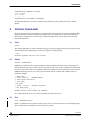
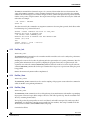
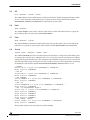
The command BPEEK is used to extract a memory value stored on 8 bits. If the address value is not given, the
selected address will be the value of the variable BASEADDRESS.
5.2
Bpoke
BPOKE <ADDRESS> <VALUE>
The command BPOKE sets the memory with the given value at the specified address. It is a 8 bits value. If the
parameters are not given, the selected data comes from the variables BASEADDRESS and DATAVALUE.
5.3
Copy
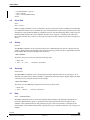
COPY <ADDRESS> <RANGE> <NEWADDRESS>
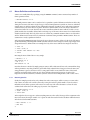
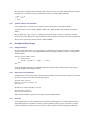
The command COPY is used to copy a range of memory data from the source address to the target address. If the
parameters are not given, the selected data comes from the variables BASEADDRESS, RANGE and
ADDRESSVALUE. Source and target addresses must not be equal,and the range must not be a negative value.
5.4
Display
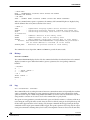
DISPLAY <ADDRESS> <RANGE> <FILENAME> <OPTION>
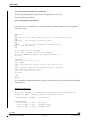
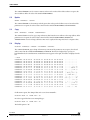
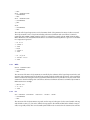
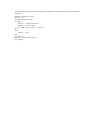
The command DISPLAY gives a dump of the memory contents. If the parameters are not given, the selected
values comes from the variables BASEADDRESS and RANGE. The data are displayed byte per byte, in
hexadecimal mode; the translation into readable characters appears on the right; the address is displayed on the
left.
> DISP
h80000000:
h80000010:
h80000020:
h80000030:
h80000040:
h80000050:
h80000060:
h80000070:
h80000080:
h80000090:
h800000a0:
h800000b0:
h800000c0:
h800000d0:
h800000e0:
h800000f0:
h80000100:
00
00
00
00
00
01
01
f6
ab
7c
af
53
00
a6
01
c7
88
00
00
00
00
00
80
40
b6
d2
c2
cb
f1
00
ae
40
ef
e2
00
00
00
00
00
ff
00
8d
f5
ce
3e
36
00
20
00
ff
9f
80
80
80
80
00
ff
00
f9
46
f2
2c
bf
00
3e
00
00
3f
00
00
00
00
00
01
00
ee
57
5a
5f
db
00
a6
00
04
93
00
00
00
00
00
00
00
fa
d9
4f
65
80
00
ce
00
00
4e
00
00
00
00
00
00
00
99
42
5a
fb
79
00
b2
00
10
ed
80
80
80
80
80
80
80
d5
5f
54
d6
a0
80
d3
80
80
e1
00
00
00
00
a4
44
7c
6a
ef
ad
ef
a4
a4
b6
7c
6c
a2
00
00
00
00
fd
23
13
5e
6f
33
f5
fa
fd
e4
13
1d
5e
00
00
00
00
3f
38
2a
d2
69
6d
9e
0d
3f
d4
2a
38
9d
80
80
80
80
40
40
40
d5
35
37
9f
a7
40
f3
40
40
a5
00
00
00
00
00
38
78
e9
9b
e7
c0
82
00
f6
78
80
95
00
00
00
00
fc
92
92
eb
60
3b
7e
7f
fc
59
92
4b
49
00
00
00
00
3f
1c
1c
ee
5d
da
ad
34
3f
dd
1c
1b
47
80
80
80
80
40
40
40
1b
66
bf
4f
35
40
6e
40
40
c8
................
................
................
................
..........?@..?@
........D#8@8..@
.@......|.*@x..@
........j^......
...FW.B_.oi5.`]f
|...ZOZT.3m7.;..
..>,_e.......~.O
S.6...y.......45
..........?@..?@
.. >.........Y.n
.@......|.*@x..@
[email protected].@
...?.N...^...IG.
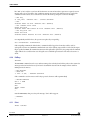
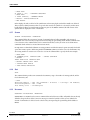
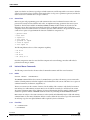
If a file name is given, The dumped data can be stored in an ASCII file :
DISPLAY BASE 16 "DUMP.TXT" "W"
In order to append the data to an existing file,type :
DISPLAY BASE 16 "DUMP.TXT" "A"
The default option is “W”.
TST 16/24
STMicroelectronics Confidential
Version 1.7
03 November 2006