1
NV-DVR1004 / NV-DVR1004NET ver. 1.1 - User’s manual
NETWORK CONNECTION FEATURE
10.2 DVR Network Settings Configuration
To configure network settings, IPInstaller software should be used. This software is provided on CD
included in the package.
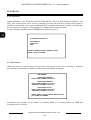
To connect with Multiplexer application IPInstaller.exe, should be run. The device must be connected
with the computer using of net cross cable which is also included in the package. The Multiplexer must
be powered on. When system boot is finished Search Device button should be pressed.
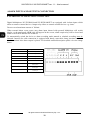
On the left side in the field Device lists the name of the device will appear along with its current IP
address.
When this position is clicked on the right side net settings will appear:
−
IP Address
−
Netmask
−
Gateway
−
HTTP Port
−
MAC
The above settings can be edited (except MAC) to adjust settings to meet specific net requirements.
When configuration settings is finished save changes clicking on Submit.
Net module reboot information will appear on the screen and after short time modified devices setting
will appear.
Clicking Exit will exit application discarding changes.
All rights reserved © NOVUS Security Sp. z o.o.
43