1
Introduction
3
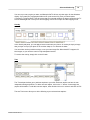
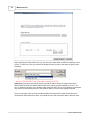
5. Click the OK button. You should receive the following message: Thank you for registering!
Note that the registration key is tied to your e-mail address. You need to enter the originally registered
e-mail at the time of purchase, even if you have already changed your e-mail address.
Un-Installation
Perform the following steps to remove MemoriesOnTV from your computer:
1.
2.
3.
4.
2
Choose Start > Settings > Control Panel > Add/Remove Programs.
Choose MemoriesOnTV from the list.
Select the Add/Remove button.
Follow the on-screen instructions.
Basic Authoring
Overview
MemoriesOnTV is an easy but powerful video authoring software. It organizes your photos and videos
into albums or sub-albums (also known as tracks) on a single CD or DVD. Each album is a continuous
slideshow selectable from the disc menu. Sub-albums allow you to group your photos and videos
within an album, and can be selectable from the disc menu as well.
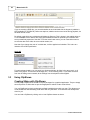
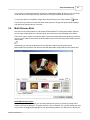
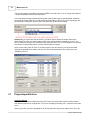
The main application window is divided into 3 main panels. The Project Panel shows the structure of
your video disc, and all its albums & sub-albums. The Main Panel shows either all your photos &
videos in the currently selected album, or shows an extension of the Control Panel. The Control Panel
gives you the authoring tools needed to customize your project, depending on the current task chosen.
© 2007 CodeJam Pte Ltd