1
Changing the video settings
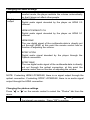
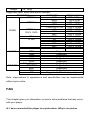
Movie
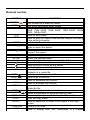
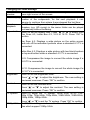
On/Off: When it is on, the movie can be previewed on the
preview
lower right corner of the screen.
Resume play When the film stops to play, the product will record the
location of the suspension, for the next playback it can
resume to continue from where it was stopped the last time.
Seamless
On/Off: If selecting seamless playback, a movie with many
playback
chapters (e.g. HD movie) in the same folder can be played
successively without buffering.
Aspect ratio Select to set the aspect ratio. Press “ ” or “ ” to select from
Pan Scan 4:3, Letter Box 4:3, 16:9 or 16:10. Press “OK” to
confirm.
Pan Scan 4:3: Displays a wide picture on the entire screen
and cuts off the redundant portions when a standard 4:3 TV is
connected.
Letter Box 4:3: Displays a wide picture with two black borders
on top and bottom when a standard 4:3 TV is connected.
16:9: Compresses the image to convert the whole image if a
16:9 TV is connected.
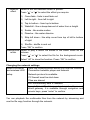
16:10: Compresses the image to convert the whole image if a
16:10 TV is connected.
Brightness
Select to set the brightness level.
Press “ ” or “ ” to adjust the brightness. The new setting is
previewed onscreen. Press “OK” to confirm.
Contrast
Select to set the contrast level.
Press “ ” or “ ” to adjust the contrast. The new setting is
previewed onscreen. Press “OK” to confirm.
TV system
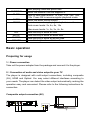
Select to adjust the TV system: HDMI Auto, NTSC, PAL,
480p, 576p, 720p 50Hz, 720p 60Hz, 1080i 50Hz, 1080i 60Hz,
1080p 50Hz, 1080p 60Hz.
Press “ ” or “ ” to set the TV system. Press “OK” to confirm.
1080p 24Hz On/Off, this setting can be used with certain TVs and video
files which support 1080p 24Hz.