1
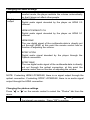
Changing the audio settings
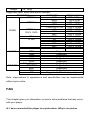
Night mode You can choose between “On”, “Off” and “Comfort” mode. In
comfort mode, the player restricts the volume automatically
so that it does not affect other people.
Digital
HDMI LPCM:
output
Digital audio signal decoded by the player as HDMI 2.0
channel.
HDMI LPCM MULTI CH
Digital audio signal decoded by the player as HDMI 5.1
channel.
HDMI RAW:
The raw digital signal of the multimedia data is directly put
out through HDMI, at this point the remote control has no
function of adjusting the volume.
SPDIF LPCM:
Digital audio signal decoded by the player through the
Optical connection.
SPDIF RAW:
The raw digital audio signal of the multimedia data is directly
put out through the optical connection, at this point the
remote control has no function of adjusting the volume.
NOTE: If selecting HDMI LPCM/RAW, there is no signal output through the
optical connection. If selecting SPDIF LPCM/RAW, there is no audio signal
output through the HDMI connection.
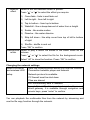
Changing the photos settings
Press “ ” or “ ” on the remote control to select the “Photos” tab from the
menu.
Slide Show
Select to set the slide show time. Press “ ” or “ ” to select
the interval you require. Press “OK” to confirm.