1
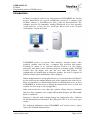
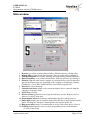
USER MANUAL LCDtool Programming tool for LCD240 devices Introduction LCDtool is a software tool for easy configuration of LCD240B/W and Vertical devices. Main blocks of a typical configuration system are a computer with LCDtool software, a LCD240 device and a cable for interconnection. The computer must be PC-compatible, running Windows 98 or later operating system and have at least one free serial port. Please refer to the “System requirements” section for details. LCD240B/W devices can present floor markings, direction arrows, other graphical symbols, time and date, a company logo and floor info pictures according to control of an electrical interface. Devices can also display emergency info picture when connected properly to backup supply. LCD240 Vertical does not display time and date and "floor info pictures". By configuration and modification of displayed graphics, the device's response to different control signal combinations can be changed. When configuration data and graphical items are created and edited, LCDtool is used to collect up the configuration file and all the graphical items referred in it. They are translated to a downloadable format and downloaded to one or more LCD240B/W or Vertical devices. During the download the device’s clock and calendar are also set up to date (if applicable). Other tools needed are a text editor and a picture editing software, commonly found on most computers (for example Microsoft Notepad and Microsoft Paint are sufficient). Software is delivered with example bitmap and configuration files, sufficient for full functionality of all features. By editing these files is an easy way to get started. For additional information about LCD240B/W and Vertical devices, please refer to the LCD240 documentation. Vuolas Electronics Oy Ltd. [email protected] Rev. 1.5 November 2006 Page 3 of 14