1
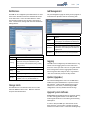
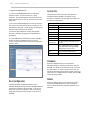
Digital Media Recorder
User Manual
DMR
An Advanced Media Design Technology
DMR |
Digital Media Recorder
©2009, Advanced Media Design, Inc
All rights reserved. This document contains information that is proprietary to Advanced Media Design, the manufacturer of all MediaPOINTE® products. No part of this publication may be reproduced, stored in a retrieval system, or
transmitted, in any form, or by any means, electronically, mechanically, by photocopying, or otherwise, without the
prior written permission of Advanced Media Design, Inc. Nationally and internationally recognized trademarks and
trade names are the property of their respective holders and are hereby acknowledged.
MediaPOINTE® is a registered trademark of Advanced Media Design, Inc.
Disclaimer
The information in this document is believed to be accurate and reliable; however Advanced Media
Design, Inc. assumes no responsibility or liability for any errors or inaccuracies that may appear in this
document, nor for any infringements of patents or other rights of third parties resulting from its use. No
license is granted under any patents or patent rights of Advanced Media Design, Inc.
This document was written by the Development Department of Advanced Media Design, Inc. We are fully
committed to, and take pride in maintaining high quality documentation. We welcome and appreciate
any comments or suggestions you may have regarding content, presentation, structure and distribution of
this document. Please use the contact information below for all correspondence:
Development Department
Advanced Media Design, Inc.
667 Rancho Conejo Blvd.
Newbury Park, CA 91320
USA
[email protected]
Version 4.0
ii
| DMR User Manual 4.0 August 2009
Safety Precautions
For your protection, please read all related safety instructions, observe all warnings and precautions, and exercise common sense
while operating this electronic equipment.
•
Always place the unit on a stable cart, stand or table.
•
Do not use the unit near water or sources of heat.
•
Do not drop or shake the unit. Do not place or install the unit in environments where it can be dropped or shaken.
Make sure the unit is powered off while being moved even for short distances.
•
Observe the power requirements of the unit; if you are not sure of the power available, consult your local dealer or power company.
•
When plugging into a power outlet, insert the plug firmly into the outlet. Route the power cord so as to avoid any activity that may result in
fraying or other damage to the cord or the plug.
•
Under no circumstances should you attempt to override the polarization or grounding protection on the plug.
•
Do not overload wall outlets, integral convenience receptacles or extension cords.
•
Unplug the unit from the wall before cleaning. Do not use liquid or aerosol cleaners.
•
For proper ventilation, do not block the slots and openings. Do not install the unit in a location where the ventilation slots and openings can be
plugged during everyday use.
•
Do not place or install the unit under, on top of or near any heat-producing equipment (i.e. radiators, stoves, or amplifiers),
or in a heated place.
•
Unplug the unit during lightning storms, when it will not be used for extended periods of time, or before you have a
scheduled power outage.
If the unit is visibly damaged either by not observing the precautions above or for any other reason, contact your local dealer
immediately. If the unit does not operate to the specifications set forth in this user guide, or exhibits a distinct change in performance, this may be an indication of a problem needing repair.
Environmental Operating Limits of DMR
Operating Temperature: 0°C to 32°C (32°F to 90°F)
Relative Humidity: 10% to 90% non-condensing
Storage & Transport Temperature: -20°C to 80°C
(-4°F to 140° F)
Electrical requirements
Input: 100-240V ~50/60Hz
Service Support and Training
MediaPOINTE®, Inc. is committed to providing the service support and training needed to install, manage, and
maintain your MediaPOINTE® equipment.
All MediaPOINTE® products are sold through a wide network of Authorized MediaPOINTE® Dealers. For help
with your products, contact your local dealer for assistance first. If for any reason, you would like to contact
MediaPOINTE® directly for information regarding service programs and extended warranty information, training,
installation or usage, we are glad to be of assistance. You can contact us at the phone number listed below, or
visit our website.
MediaPOINTE® Technical Support
Hours: 8:30 a.m. – 5:30 p.m. Pacific Standard Time
(866) 709-0444 TOLL FREE
(805) 214-7911 INTERNATIONAL
[email protected]
DMR | iii
DMR Package Contents
• 1 - MediaPOINTE DMR •
1 – Male Composite Cable
•
1 - CAT-5e LAN Cable
•
1 - RCA Stereo Audio Cable
•
1 - AC Power Cable
•
1 – Male S-Video-D Cable
•
1 – IR Remote Control plus 2 AAA batteries
•
1 – Rack Mount Kit
•
Documentation CD-ROM
•
Warranty Document
•
Registration Sheet
iv | DMR User Manual 4.0 August 2009
Warranty
MediaPOINTE warrants that the DMR (excluding spare parts if applicable, external peripheral devices and
consumables) will be free from any defect in materials or workmanship and shall perform in accordance
with its specification for a period of 30 days for MediaPOINTE software and 1 year for hardware, starting on
shipment date of the initial purchase of the equipment. MediaPOINTE disclaims any and all implied warranties
of merchantability or fitness for a particular purpose. MediaPOINTE’s sole liability for breach of this warranty
will be (at its option) to provide access to software for download or to repair or replace the defective unit
or component after customer has shipped the product to MediaPOINTE for return-to-factory repair. Customer
must obtain an RMA (return material authorization) number from MediaPOINTE prior to returning equipment.
Replacement parts may be new or equivalent to new. Part(s) replaced will be covered for the remaining
term of the warranty. MediaPOINTE shall not be liable for any loss of profits or incidental or consequential
loss for whatever reason. This warranty will be void if the equipment has been subject to any unauthorized
modifications, improper operation, user negligence, service by an unauthorized person, accident, neglect,
misuse, tampering, acts of God, or any event other than ordinary use.
Document Conventions
The following conventions are used throughout this user’s guide.
The hand symbol indicates a note, containing special instructions, and
in some cases, circumstances that require caution.
The light bulb symbol highlights suggestions or hints.
The high voltage symbol is intended to alert the user to the presence of un-insulated, dangerous
voltages.
Table of contents |
Table Of Contents
About this guide
Disclaimer. . . . . . . . . . . . . . . . . . . . . . . . . . . . . . . . i
Safety Precautions. . . . . . . . . . . . . . . . . . . . . . . . . . . . . ii
Services & Support . . . . . . . . . . . . . . . . . . . . . . . . . . . . ii
Package Contents . . . . . . . . . . . . . . . . . . . . . . . . . . . . iii
Warranty. . . . . . . . . . . . . . . . . . . . . . . . . . . . . . . . iv
Document Conventions . . . . . . . . . . . . . . . . . . . . . . . . . . iv
1
Introduction, Overview & Requirements
Introduction . . . . . . . . . . . . . . . . . . . . . . . . . . . . . . . . . 1
Key Features. . . . . . . . . . . . . . . . . . . . . . . . . . . . . . . 1
How It works. . . . . . . . . . . . . . . . . . . . . . . . . . . . . . . 1
Front Panel . . . . . . . . . . . . . . . . . . . . . . . . . . . . . . . . . 2
Optical Drive. . . . . . . . . . . . . . . . . . . . . . . . . . . . . . . 2
Front Keypad. . . . . . . . . . . . . . . . . . . . . . . . . . . . . . . 2
LED Status. . . . . . . . . . . . . . . . . . . . . . . . . . . . . . . . 2
IR Receiver. . . . . . . . . . . . . . . . . . . . . . . . . . . . . . . . 2
Reset Button . . . . . . . . . . . . . . . . . . . . . . . . . . . . . . . 2
Power Switch. . . . . . . . . . . . . . . . . . . . . . . . . . . . . . . 3
USB Port. . . . . . . . . . . . . . . . . . . . . . . . . . . . . . . . . 3
Back Panel . . . . . . . . . . . . . . . . . . . . . . . . . . . . . . . . . . 4
Inputs/Outputs. . . . . . . . . . . . . . . . . . . . . . . . . . . . . . 4
Setup & Application Diagrams . . . . . . . . . . . . . . . . . . . . . . . . . 5
2
Setting Up the DMR
8
Logging In. . . . . . . . . . . . . . . . . . . . . . . . . . . . . . . . . . 8
Web Portal Access . . . . . . . . . . . . . . . . . . . . . . . . . . . . . 8
As an Administrator. . . . . . . . . . . . . . . . . . . . . . . . . . . . 8
Changing Administrator Password. . . . . . . . . . . . . . . . . . . . . 8
vi | TABLE OF CONTENTS
As a User . . . . . . . . . . . . . . . . . . . . . . . . . . . . . . . . . 9
User Login Security. . . . . . . . . . . . . . . . . . . . . . . . . . . . 9
As an Author . . . . . . . . . . . . . . . . . . . . . . . . . . . . . . . 9
Date & Time. . . . . . . . . . . . . . . . . . . . . . . . . . . . . . . 9
Network Configuration. . . . . . . . . . . . . . . . . . . . . . . . . . 10
System Name. . . . . . . . . . . . . . . . . . . . . . . . . . . . . . 10
IP Settings . . . . . . . . . . . . . . . . . . . . . . . . . . . . . . . 10
Configuring Static IP Address . . . . . . . . . . . . . . . . . . . . . . . 10
Configuring DHCP IP Address . . . . . . . . . . . . . . . . . . . . . . . 10
USB Network Configuration. . . . . . . . . . . . . . . . . . . . . . . . . . 10
SMTP Mail. . . . . . . . . . . . . . . . . . . . . . . . . . . . . . . . 11
Command Line . . . . . . . . . . . . . . . . . . . . . . . . . . . . . 11
Telnet (TCP/IP). . . . . . . . . . . . . . . . . . . . . . . . . . . . . . 11
RS-232. . . . . . . . . . . . . . . . . . . . . . . . . . . . . . . . . 11
3
Control & Operation
Web Portal. . . . . . . . . . . . . . . . . . . . . . . . . . . . . . . . . 12
Overview. . . . . . . . . . . . . . . . . . . . . . . . . . . . . . . . . . 12
Toolbar . . . . . . . . . . . . . . . . . . . . . . . . . . . . . . . . . 12
Folder Management Table . . . . . . . . . . . . . . . . . . . . . . . . 12
On-Screen Menu/ Front Control Panel. . . . . . . . . . . . . . . . . . . 13
External Control. . . . . . . . . . . . . . . . . . . . . . . . . . . . . . . 13
RS-232. . . . . . . . . . . . . . . . . . . . . . . . . . . . . . . . . 13
Telnet. . . . . . . . . . . . . . . . . . . . . . . . . . . . . . . . . . 14
Infra-Red. . . . . . . . . . . . . . . . . . . . . . . . . . . . . . . . 14
Remote Contact Closure (relay) . . . . . . . . . . . . . . . . . . . . . . 14
4
Recording, Archiving & Streaming
Recording & Streaming. . . . . . . . . . . . . . . . . . . . . . . . . . . . 15
Changing Profiles. . . . . . . . . . . . . . . . . . . . . . . . . . . . . . 15
Recorded Content Detail. . . . . . . . . . . . . . . . . . . . . . . . . . . 16
Playback on DMR. . . . . . . . . . . . . . . . . . . . . . . . . . . . . . 16
Archiving. . . . . . . . . . . . . . . . . . . . . . . . . . . . . . . . . . 16
Mail Attachment . . . . . . . . . . . . . . . . . . . . . . . . . . . . . 16
Download Manager. . . . . . . . . . . . . . . . . . . . . . . . . . . 17
Disk Burning. . . . . . . . . . . . . . . . . . . . . . . . . . . . . . . 17
Table of contents | vii
USB Offload/Upload . . . . . . . . . . . . . . . . . . . . . . . . . . . 17
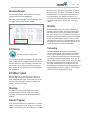
Streaming. . . . . . . . . . . . . . . . . . . . . . . . . . . . . . . . 17
Manual FTP Upload . . . . . . . . . . . . . . . . . . . . . . . . . . . 17
Metadata. . . . . . . . . . . . . . . . . . . . . . . . . . . . . . . . 17
Transcoding. . . . . . . . . . . . . . . . . . . . . . . . . . . . . . . 17
5
Management & System Tools
5
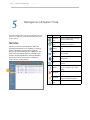
Profiles . . . . . . . . . . . . . . . . . . . . . . . . . . . . . . . . . . . 18
Profile List. . . . . . . . . . . . . . . . . . . . . . . . . . . . . . . . 18
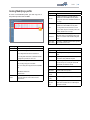
Creating/Modifying a Profile. . . . . . . . . . . . . . . . . . . . . . . 19
Capture Settings. . . . . . . . . . . . . . . . . . . . . . . . . . . . . 19
Stream Settings. . . . . . . . . . . . . . . . . . . . . . . . . . . . . 19
Archive & Custom Settings. . . . . . . . . . . . . . . . . . . . . . . . 19
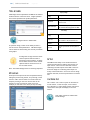
Titles & Credits. . . . . . . . . . . . . . . . . . . . . . . . . . . . . . . 20
AV Controls . . . . . . . . . . . . . . . . . . . . . . . . . . . . . . . . . 20
Display Settings. . . . . . . . . . . . . . . . . . . . . . . . . . . . . 20
AV Test . . . . . . . . . . . . . . . . . . . . . . . . . . . . . . . . . . . 20
Live Video Test. . . . . . . . . . . . . . . . . . . . . . . . . . . . . . . . 20
Notifications. . . . . . . . . . . . . . . . . . . . . . . . . . . . . . . . 21
Storage Limits. . . . . . . . . . . . . . . . . . . . . . . . . . . . . . . . 21
Logging . . . . . . . . . . . . . . . . . . . . . . . . . . . . . . . . . . 21
Update. . . . . . . . . . . . . . . . . . . . . . . . . . . . . . . . . . . 21
Upgrade System Software. . . . . . . . . . . . . . . . . . . . . . . . . . 21
Reset Configuration. . . . . . . . . . . . . . . . . . . . . . . . . . . . . 22
System Info. . . . . . . . . . . . . . . . . . . . . . . . . . . . . . . . . 22
Shutdown . . . . . . . . . . . . . . . . . . . . . . . . . . . . . . . . . 22
Reboot. . . . . . . . . . . . . . . . . . . . . . . . . . . . . . . . . . . 22
6
Options
Installing Package Upgrades . . . . . . . . . . . . . . . . . . . . . . . . . 23
Studio Package. . . . . . . . . . . . . . . . . . . . . . . . . . . . . . . 23
Video Source Inputs. . . . . . . . . . . . . . . . . . . . . . . . . . . 23
Custom Video Templates. . . . . . . . . . . . . . . . . . . . . . . . . 23
Video-On-Demand Option. . . . . . . . . . . . . . . . . . . . . . . . . . 24
Viewing a Video-On-Demand Channel . . . . . . . . . . . . . . . . . . . 24
AESOP External Storage Option . . . . . . . . . . . . . . . . . . . . . . 24
Blu-Ray Hardware Upgrade Option. . . . . . . . . . . . . . . . . . . . . 24
1
DMR |
DMR Introduction & Overview
Introduction
design, or process analysis when the participants are
not able to meet in one central location.
Welcome to the user’s guide for the MediaPOINTE®
DMR. The DMR is one of the easiest to use, costeffective and reliable archiving and streaming products
on the market today. It can archive important audio,
video, and graphical data while simultaneously
transmitting it anywhere on your network.
• Access a centralized data bank of expertise from a
field location.
This user’s guide describes how to set up and use the
DMR to record and transport graphics, video and audio
content over IP networks. As with all MediaPOINTE AVover-IP products, you can control the DMR by different
methods. These methods include: Web Portal interface,
remote control, contact closure, RS-232 serial port,
Telnet, or from the convenient front keypad.
How It Works (Method of Operation)
The DMR can archive and stream video and audio
media. The DMR accepts S-Video, composite video, and
unbalanced line level stereo audio inputs. The selected
input source along with the associated audio is captured
into a file which can be simultaneously streamed live
over your network during the archival process.
This guide is written for units running 4.0 software.
If your DMR is operating on a different version of
software, some capabilities and screenshots may be
different.
Users can select from several configurable parameters
(profiles) for capturing and subsequent playback of the
recorded material. These profiles are fully configurable,
allowing the user to specify the input source, capture
resolution, bit and frame rates.
Key Features
The archived recordings are stored on the DMR’s hard
drive. The recorded file can then be viewed on your PC
or replayed directly from the DMR on a local monitor.
The content can also be copied to a USB memory stick,
burned to DVD-R, DVD+R or CD-R disk, downloaded to a
PC, attached to an e-mail, or automatically transferred
(FTP) to a server after the file has been indexed.
The DMR may be used in a variety of situations for live
communication and collaboration, including:
• Archive media content from multiple independent
sources.
• Share visual information, designs, and concepts with
dispersed groups of people to gather input during a
video conference.
• Stream important videoconferences to other locations
such as overflow rooms or remote conference locations
over your corporate network.
• Conduct customer or employee training across vast
geographical areas.
• Discuss research, engineering, architecture, product
The DMR records content in standard MPEG-4 ASP, which
can be played on a variety of desktop client players
including QuickTime. It can record content in Windows
Media Format that can be played in Windows Media
Player.
| DMR User Manual 4.0 August 2009
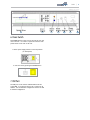
DMR Front Panel
1
2
3
4
5
6
7
Front Panel View
3. LED Status
The front panel consists of an Optical Drive, the main
operation Keypad, two status LEDs, a small RESET
button, IR receiver, a power switch and a USB port. The following is a brief description of each of these
components.
The LED indicators are used to describe system
states, actions and error conditions. The valid LED
states are described in the table below.
LED 1 (top)
LED 2 (bottom)
RED/YELLOW/ ORANGE
BLUE
1. Optical Drive
Powering On
Orange
OFF
The DMR features an optical drive capable of recording
to DVD-R, DVD+R, and CD-R media.
Ready
OFF
ON
Record/Stream
RED
ON
Indexing
RED Fast Blink
ON
Play/
OFF
Slow Blink
Error
YELLOW Fast Blink
OFF
Disk Burn
RED Slow Blink
ON
Mute
(not record)
OFF
Fast Blink
Mute (record)
RED
Fast Blink
2. Front Keypad
The DMR has a front keypad that allows the user to
start and stop recording as well as navigate the on
screen menus without using the remote control. When
the REC button is pressed a menu will appear on the
display so you can determine which recording profile to
use. A monitor is required to use this feature.
4. RESET Button
To avoid inadvertent resetting of the system, the
RESET button is hidden behind a tiny hole in the
front panel and requires activation using a small
device such as a pin or paperclip. Pressing the
RESET button will reset the Administrator Password
and return the IP settings back to the default
network settings.
5. IR Receiver
The IR Receiver is used with the included remote
control.
DMR |
DMR Front Panel
1
2
6. Power Switch
This POWER button on the front of the unit will turn the
unit on and off. It is used in conjunction with the main
power switch on the rear of the unit.
1. Ensure power supply switch is in the ON position
(on back panel)
2. Start the unit by pressing the POWER button
7. USB Port
The USB port can be used to offload media from and
to the DMR. It can also be used to set or capture an IP
address. See the Network Configuration section for USB
IP address configuration. 3
4
5
6
7
| DMR User Manual 4.0 August 2009
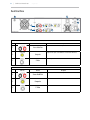
Back Panel View
8
7
10
9
1
2
3
4
5
6
11
AUDIO/ VIDEO INPUTS
Connector
Function
Description
Unbalanced Line level stereo audio inputs that use standard RCA connectors.
1
Stereo Audio Pair
Composite Video input 1 on the DMR can be selected from the Web Portal.
2
Composite
S-Video input 1 on the DMR can be selected from the Web Portal.
3
S-Video
AUDIO/ VIDEO OUTPUTS
Connector
Function
Description
Unbalanced Line level stereo audio outputs that use standard RCA connectors.
4
Stereo Audio Pair
5
Composite
6
S-Video
DMR |
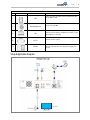
ALL OTHER CONNECTIONS
Connector
7
8
Function
LAN
Remote Relay Closure
9
USB
10
RS-232
11
AC Power
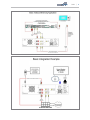
Setup & Application Diagrams
Description
The RJ45 connector allows the included standard 10/100Mb CAT-5e LAN cable to
connect the DMR to a network.
The standard 3.5 mini mono connector allows a remote switch (contact closure) to
start/stop a session of the DMR.
The USB port on the back of the unit can be used for upload or offload of video
content and for network configuration of the DMR. For more information on USB
network configuration, see Appendix B.
This standard serial DB9 connector allows connection for serial control (note: a
null-modem serial cable is required).
The IEC connector allows the included IEC cable to connect the DMR to AC power.
Make sure the power on/off switch is in the off position before plugging in the
power cable.
| DMR User Manual 4.0 August 2009
DMR |
| DMR User Manual 4.0 2
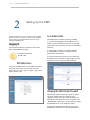
August 2009
Setting Up the DMR
Setup
Use this information when you are ready to install the DMR
hardware at your site. To turn on the unit ensure the power
supply
switch
is in thewhen
ON position
start the unit
Use this
information
you firstthen
purchase
DMR by
and
pressing
when youthe
arePOWER
ready button.
to install the hardware at your site. This
section shows the back panel and explains how to connect the
separate input connections to the unit.
Logging In
This section describes the procedure for a first time
login, and the DMR access rights.
The default IP address is:
192.168.1.253
As an Administrator
The Administrator maintains all rights to the DMR.
1. If you are already logged into the DMR as a user or
author, click on the LOG out selection at the top right
of the web UI. You will be able to enter a username and
password.
2. Use the login id “admin”. The default password
is “MediaPOINTE”. Note that the login id and the
password are case sensitive.
3. From the User Security selection of the main menu,
the Administrator can enable or disable logins for users
and authors and can change the admin password.
Web Portal Access:
To log into the DMR, browse to its IP address using your
Internet browser. There are three levels of access
rights. There is a “user” login, an “author” login, and a
system “admin” login.
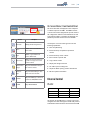
Changing the Administrator Password
Administrator rights are required to access or change
any of the settings under the “Configure” and
“Manage” sections in the main menu. By default, the
Administrator ID and password are set to “admin” and
“MediaPOINTE” respectively. It is not possible to change
the Administrator ID. It will always be “admin”.
To change the Administrator password, enter a new
Administrator password in the “New admin Password”
field (10 characters maximum) and confirm it by
clicking Change Admin Password button. The next time
the DMR is accessed, the new admin password will take
effect.
Be sure to write down the new administrator password
and keep it in a safe place. If you forget the admin
password, the DMR will have to be reset back to the
factory defaults to enable an administrator to access
the “Configure” and “Manage” sections of the unit.
As a User
Once you have navigated to the site, you will be
presented with the login page. Administrative login is
required to make changes to the system settings under
the “Configure” and “Manage” sections of the menu.
If content playback is all you require from the DMR,
you will not need administrator rights. No password is
required for the standard Guest user login as a default.
The administrator has the ability to modify this feature
to require a password for viewers to login.
To change the default IP settings of the DMR or any of
the other configuration settings, you must log in with
administrator rights.
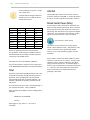
User Login Security
By default, user security is turned off. Anyone can
LOGIN to the DMR without being asked for a login ID or
password. Check the Enable user security checkbox to
enable security for the user. This will require all users
to have an ID of “user” and the password created in the
“user password” field.
Enter a user password in the “user password” field and
confirm it by clicking the Save user Security Settings
button. The next time the DMR is accessed, anyone
logging in will be presented with a login box asking for
the ID “user” and a password.
Un-checking the Enable user security checkbox will
restore the default settings.
As an Author
The Author maintains content creation rights on the
DMR. The Author can set recording options but does not
have access to the “Configure” and “Manage” sections
of the menu.
1. If you are already logged into the DMR as a user or
admin, click on the LOGOUT selection at the top of the
main menu. You will be prompted to enter a username
and password.
DMR |
2. Use the login id “author”. The password will be
user defined in the User Security section of the main
menu. Note that the login id and the password are case
sensitive.
Author Login Security
Author rights are required to access or change any
of the settings under the “Options” section in the
main menu. By default, the author login password is
disabled. Checking the Enable author checkbox will
enable the author login security. Enter an author
password in the “author password” field and confirm it
by clicking save author Security Settings button.
Un-checking the Enable author LOGIN checkbox will
deactivate the need for an author login password
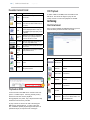
Date & Time
When content is recorded using the DMR it is given a
time and date stamp. The time and date stamp can be
set in the Date & Time section of the main menu. The
date can be selected from the pop-up calendar. Confirm
any changes by clicking on the Set Date & Time button.
If desired, the NTP (Network Time Protocol) feature can
be enabled to synchronize the clock of the DMR to an
NTP server; click on the “Enable NTP” box and enter
the server information, then click on Save NTP settings.
10 | DMR User Manual 4.0 August 2009
Network Configuration
System Name
The factory set system name is the unit build number.
You can change the name in the IP setting menu page
by entering a new name in the text field. A reboot is
required for the new name to take effect. The name
can be up to 15 characters long and consist of alphanumeric characters. No special characters or symbols
will be accepted except for a hyphen.
IP addresses may be assigned to the DMR by two ways:
DHCP and Fixed (Static) IP. If your network is configured
for DHCP, the IP address will be provided automatically
and will be visible on the S-Video or Composite output
of the DMR. To set a Fixed (Static) IP address, follow
the procedure below.
Configuring Static IP Address
1. Connect the Ethernet / LAN cable and power up the
DMR.
2. On your Internet browser, enter the current IP
address of the DMR. (Note: If the unit has factory
settings, the default static IP address is: 192.168.1.253)
3.Login to the DMR using the procedure shown in the
Logging In section.
4. Navigate to the network settings page by selecting IP
Settings.
5. To change to a Fixed or Static IP address, set the
DHCP Client checkbox to “Disable”. Fill in the IP
Address, IP Subnet Mask and Default Gateway fields.
IP Settings
The System Name and all network settings can be set
in the IP Settings section of the main menu. Network
settings may also be configured via USB memory stick
configuration.
To quickly find the system’s IP Address, connect a
Composite or S-Video monitor to the output. Use the
keypad to navigate to the System Info page of the on
screen menu.
Network Configuration
Setting
Description
DHCP Client Enable DHCP settings for automatic address retrieval f rom
DHCP Server. Disabling the DHCP client will require a static IP
address (with subnet mask and default gateway) to be entered.
IP Address
Assign a static IP address to DMR. This field will also display the
currently assigned IP address
IP Subnet
Mask
Assign subnet mask to DMR. This field will also display the
currently assigned subnet mask
Default
gateway
Assign a default gateway to the DMR. This field will also display
the currenty assigned default gateway
DNS server
If the network supports DNS, enter the DNS Server Address(es)
here.
6. Once you have completed all of the above steps,
select the Apply Changes button. You will receive a popup window warning you to use this option with caution
as you are changing the default address and should
remember the new settings.
Configuring DHCP IP Address
1. Follow the steps above (1 through 4)
2. To enable the DMR to pick up an IP address, set the
DHCP Client checkbox to “Enable”.
3. If you have made any changes to the network
settings, select the Apply Changes button. You will
receive a pop-up window warning you that you to use
this option with caution as you are changing the default
address and should remember the new settings.
USB Network Configuration
This section describes how to configure the DMR.
Changes in the Configure section of the Main Menu
require Administrator privileges and cannot be accessed
by users logged in with author or user profiles. The
network parameters of the DMR can be set via a special
configuration text file on a USB memory stick. Insert
the memory stick into one of the DMR USB ports at
any time. The unit will look for the presence of this
configuration file and will implement the settings from
the file. Use a simple ASCII text editor to create the
file.
DMR | 11
dhcp=(bool)0
dns_1=(string)192.168.0.2
dns_2=(string) 192.168.0.3
ethernet=(string)auto
gateway=(string)192.168.1.1
ipaddress=(string)192.168.1.253
netmask=(string)255.255.255.0
If the dmx_ip_conf.txt file is intentionally
left blank with no text of any type within
the body of the file, the DMR will write
its network settings to this file. This is
an easy way to obtain the unit’s network
settings.
SMTP Mail
The DMR has the ability to send email messages to a
remote SMTP server. Enter the address of the SMTP
server in the appropriate text box (use the IP address if
DNS settings are not set). The Email field will set the
default “From” field to the entered email. Leave this
field blank to allow the user to enter their own “From”
email address. Confirm any changes to the SMTP mail
configuration by clicking Save SMTP settings button.
Command Line
The DMR has a Command Line interface that can be
accessed from Telnet or RS-232. A list of commands can
be found in the External Control section of this manual.
Telnet (TCP/IP)
The Telnet port by default is not enabled. To turn on
Telnet control, set the Telnet port number (typically
Port 23) and check the TCP/IP port enable checkbox.
A password for the Telnet session can be activated
by entering a password in the Password for TCP/IP
connection text box. If a password is not desired on the
Telnet session, leave the text box blank.
RS-232
On the back of the DMR there is a serial control port
configured as a DTE that supports the RS-232 protocol. A
Null-Modem cable should be used between the DMR and
the COM port on your PC.
Terminal session settings required for RS-232 control
are: 9600, 8, None, 1 with No Flow Control.
There is no password protection on this interface
and, by default the RS-232 port is enabled. The
administrator has the ability to disable the port by unchecking the COM port enable checkbox.
12 | DMR User Manual 4.0 3
August 2009
Control & Operationud ea Toolbar
The DMR can be controlled by several different methods.
These include, a Web Portal interface, IR remote control, contact closure, RS-232 serial port, Telnet, or by the convenient
button panel (Keypad) on the front of the unit. This section
will cover each of these control interfaces in detail.
Web Portal
Overview
The DMR has a fully featured Web Portal that can be
accessed via a web browser. Enter the unit’s IP address
in the web browser’s address bar and complete a log
on. From this screen you can start and stop a recording
session, play or download previously archived material,
set recording preferences and move content off/on or
within the DMR.
Selecting the Watch Videos selection from the main
menu will show a list of all current recordings in the
Root directory.
Icon
Function
Create New
Folder
Rename
Folder
Delete Folder
Folder
Password
Open All
Folders
Close All
Folders
Toolbar
When logged in as either author or admin selecting the
Archives selection from the main menu will provide the
main system Toolbar.
Description
Will create a new folder without password
protection.
Will allow the user to change the name of
the selected folder.
This will permanently delete a folder;
including all content held within.
This icon will allow the user to password
protect the currently selected folder. If the
folder is already password protected, it will
allow the user to change the password.
Will show all folders on the DMR.
Will show only the highest tier folder of the
folder tree.
Close Folder
View
Will hide all folders on the DMR.
ROOT
Directory
Is the highest level directory/folder that
content can be stored in.
Password
Protected
Folder
A folder that has been password protected
will be displayed with the lock icon.
DMR | 13
On-Screen Menu / Front Control Panel
The On-Screen Menu is displayed on the Composite
or S-Video output of the DMR. The DMR IR remote
or Front Control Panel (keypad) will provide some of
the configuration features of the Web Portal as well
as provide the ability to navigate and playback nonpassword protected content stored on the DMR. Icon
Function
Description
Show Folders
Will display the folder management tree.
Move to
Will allow content to be moved from one
folder to another.
Copy to
Will allow a copy of a media file to be
created in a different folder.
Delete Selected
Will delete the selected content. There is no
recycle bin or recovery process for content
that has been deleted.
Currently the on screen menus give the user the
following capabilities:
♦
Start/Stop Recording
♦
Browse and Play non-password protected content
♦
Browse and Play recent content
♦
Burn content to optical disk
♦
Copy content to USB
♦
Display test images and tones
Mail Attachement
Manager
Will open the Mail Attachment Manager to
allow content to be emailed.
♦
Set audio input recording level
♦
Adjust the Menu opacity, position and timeout
Download to
my PC
Will open the Download Manager to allow
content to be moved to the local PC.
♦
Retrieve System Information
Show DVD
Will open the Disk Manager to allow content
to be burned to a DVD-R, DVD+R or CD-R.
Eject DVD
Will eject DVD from DVD drive
External Control
RS-232
DB-9 Female
Function
DB-9 Female
2
Rx to Tx
3
3
Tx to Rx
2
5
Signal Ground
5
On the back of the DMR there is a single control port
configured as a DTE that supports the RS-232 protocol. A Null-Modem cable should be used between the DMR
14 | DMR User Manual 4.0 August 2009
and the COM port on your PC – the pinout is shown here.
Terminal session settings required for
RS-232 control are: 9600, 8, None, 1
with No Flow Control.
Infra-Red
The Infra-Red (IR) receiver for the remote control is
located on the front of the DMR. It can also be used for
IR control via control systems such as AMX or Crestron.
Remote Contact Closure (Relay)
audiogain
help or ?
multicast
shutdown
author
input
multicast_ttl
smtp
bye/quit
ipassign
notify
status
cli
ipset
play
sysinfo
copyme
ipstat
playstatus
test
defaultprofile
key
reboot
usersec
displayres
limit
record
volume
displayratio
listfiles
rename
file info
list profiles
resetconf
There is no password protection on this interface
and, by default, the RS-232 port is enabled. However,
the administrator has the ability to disable the serial
control port from the Web Portal.
See below for a list of the available commands.
For more information on external control, please refer
to the MediaPOINTE Command Line Interface document.
Telnet
The telnet client within the DMR provides access to the
Command Line Interface through the TCP/IP protocol. By default, telnet is disabled but can be activated
from the Web Portal with an optional password. The
available commands are the same as listed in the RS232 section.
To access the telnet client, open a command prompt on
your computer and enter: telnet <ipaddress>
Once connected to the DMR, a connect message will be
displayed.
DMR Welcome to MediaPOINTE
Password:_
Once logged in, type ‘help’ or ‘?’ for a list of
commands.
A relay contact closure connection is mounted on the
back as a 1/8th (3.5mm) phone plug. Either a mono or
stereo plug can be used, but in the case of the stereo
phone plug, short the sleeve to the ring as the negative
connection. This connection can be wired to a simple
switch closure and will start or stop a recording.
Note: There is a +5V on the tip
This closure can be in the form of a relay, manual
switch or semi-conductor switch. This allows for relay
control via external control systems such as AMX,
Crestron, or by a plain momentary trigger, such as a
footswitch.
Semi-conductor closures are found on AMX or Crestron
controllers in the form of a D I/O port. If using a semiconductor closure, polarity is important. The phone
plug tip must be wired to the + or individual input of
the D I/O port, and the sleeve connected to the ground
or - connector. Note that, unlike relay connections,
these connections are not isolated and can form
grounding or hum loops.
DMR | 15
4
Recording, Archiving & Streaming
Recording and Streaming
A streaming/recording session can be started and
stopped from the Start/Stop section of the main toolbar
and from the profile listing. The “default” profile will
be used unless another profile is selected. To select an
alternate profile, use the Change button to bring up a
profile listing.
busy and cannot record or stream until the process is
complete. Depending on the length of the archived
material, this could take a few seconds up to several
minutes to complete.
Disabling / enabling multicast
By default the DMR will multicast anytime a profile
is intiated with streaming enabled. Multicast can be
disabled so only unicast streams will be supplied.
To disable multicast, access the CLI and enter the
“multicast off” command.
Changing Profiles
On the Start/Stop page, you can click on the Change
icon and you will get a list pop-up with all available
profiles. Select on the profile of your choice and the
Start/Stop page will automatically be updated. The RED LED will illuminate when the DMR is recording/
streaming and the Web Portal will display a “Recording”
message at the top of the page. The record/stream
parameters will be as specified in the profile that was
chosen.
To stop the recording and create an archived file, press
the Stop button to begin the “indexing” process. The
RED LED on the front of the unit will blink fast during
the indexing procedure, indicating that the unit is
Content Detail
16 | DMR User Manual 4.0 August 2009
Recorded Content Detail
Icon
Function
Rename
Description
Will allow the user to change the name of the
selected folder.
Email Media
Will allow the selected file(s) to be emailed. This
feature will not be available if SMTP settings are
not enabled.
Stream
Will play media on local PC that is browsing DMR.
The media will playback within the web portal
using an MPEG-4 capable playback plug-in (such
as Quicktime)
DVD Playback
To watch a DVD on the DMR, insert the DVD into the
DVD drive. The movie will begin to play. Use the
remote control to control the playback of the DVD.
Archiving
Mail Attachment
Once you have enabled the SMTP Mail settings you will
have the ability to attach the file to an email.
Will allow the selected file to be downloaded to
Download to
the local PC. A pop-up dialog box will ask for a
my PC
file location and name for saved file
Play on DMR
Will start the media playback on the Composite
and S-Video output simultaneously.
ROOT
Directory
Is the highest level directory/folder that content
can be stored in.
Password
Protected
Folder
A folder that has been password protected will be
displayed with the lock icon.
Upload to
Server
Transfer a file to a remote server.
Icon
Function
Transcode
Convert the MPEG-4 File to WMV, H.264, and iPod
formats.
Attach to Mail
Metadata
Tag a video file with information such as Author,
Title, Keywords and more.
Add Folder
Description
Will attach the selected content to an email.
Will add the selected folder to the email
attachment.
Will remove the selected folder from the
Remove Folder email attachment.
Add Media
Will add the selected media to the email
attachment.
Will remove the selected media from the
Remove Media email attachment.
Playback on DMR
Content stored on the DMR can be viewed on the Composite or S-Video output. Selecting the Play Locally
button will start the content playback.
During playback, the pause, stop, skip forward and skip
backward controls will be provided.
To play content on the local PC that is browsing the
DMR click on the Play button. In order to play the
file, an MPEG-4 capable playback application (such as
Quicktime Player) is required on the viewing PC. Will close the Mail Attachment Window.
Close Mail
Default Folder
A recording initiated from IR, the remote
relay closure or the REC button will be saved
to the BLUE Default Folder
DMR | 17
Download Manager
Files and Folders can be downloaded to the browsing
computer using the Download Manager.
Select the Download Manager icon from the main menu
to bring up the Download Manager Toolbar.
server. SCP, FTP, and FTPS are all available options for
transferring files. To transfer your desired file, choose
the Manual FTP icon in the actions menu. Enter the
server destination, Port number (optional for non
standard ports), Destination path, and credentials. You
can choose to delete the content after a successful
upload.
Metadata
Metadata tagging allows you to tag a video file with
information such as Author, Title, Keywords and more.
This information is stored in the header of the Video
file. A second copy of this information is stored within
an XML file that is downloaded or transferred alongside
the file. To add metadata to the file, select the video
you wish to edit and click on the metadata icon in the
Actions Menu associated with that file. Then enter your
desired information into the available fields.
Disk Burning
The disks are burned as Data Disk.
Content can be moved from the DMR to an optical disk.
Insert a blank disk into the DMR and select the Disk icon
from the main menu. This will display the Toolbar that
will provide icons for burning media files and folders
to the optical drive. Formats supported include DVD-R,
DVD+R and CD-R.
USB Offload / Upload
The front USB port can be used to move media to or
from the DMR. Connect the USB memory stick and a
folder named USB will appear in the Folder tree in the
left pane. While the USB is connected, media can be
copied to and from this folder.
Streaming
The Watch Live Stream page allows users at their
personal computers to launch client media players,
which will receive and decode the media streams for
playback.
Manual FTP Upload
Under the actions menu for any video there is a manual
FTP icon. Clicking this icon will allow you to manually
transfer a video file and associated XML file to a remote
Transcoding
The DMR and DMR Studio support file transcoding.
This is a manual post process procedure. To transcode
a video select the transcode icon under the actions
menu for the desired video. Select the desired formats
you wish to transcode from the pop-up menu. You can
choose, WMV, H.264, and iPod formats. The transcoding
will happen in the background and appear as a new
file in your media library. The new file will have the
transcoded video type appended to the beginning of the
original file name for easy recognition. To see waiting
jobs reference the Job Management page.
18 | DMR User Manual 4.0 5
August 2009
Management & System Tools
This section describes how to set up all configurable recording
options on the DMR; only author and admin users have access
to these settings.
Edit Profiles
A Profile is a collection of settings that defines the
operating characteristics for a streaming or recording
session. Parameters include graphics and audio
multicast or unicast addresses, port numbers, bit and
frame rates and modes of operation. The DMR comes
with pre-configured profiles that cannot be modified. These profiles can be copied and re-configured to
create custom recording profiles.
Icon
Function
Description
Start Record/
Stream
Will start a recording/streaming session using
the settings specified in Profile.
Stop Record/
Stream
Will stop both the recording and the live stream
and will begin the indexing process.
Streaming
Indicates that Streaming is enabled on this
profile.
Archive
When the STOP Button is pressed, the file will be
saved on the DMR.
Info
Will provide a quick view of all configured
settings in profile.
Copy
Will create a copy of a profile that can be
customized.
Edit Profile
Will allow a user defined profile to be edited.
To create a custom profile, copy one of the 8
Originals.
Delete Profile
Default Profile
Set Default
Profile
Will permanently delete a custom profile.
Used when a recording is started without a
profile specified. Identified by a Gold Star.
Click on this icon to change the Default profile.
DMR | 19
Creating/Modifying a profile
Setting
Description
Frame Rate
The frame rate in frames per second (fps) defines the
maximum bit-rate that the DMR encoder may utilize in
creating the media stream. The maximum allowable frame
rate is 30 fps.
Bitrate
The bitrate in kilobits-per-second (kbps) defines the
maximum bit-rate that the DMR encoder may utilize
in creating the media stream. For low motion or static
images the bitrate may decrease from this peak level. The
maximum allowable bitrate is 5120 kbps.
Audio Format
Select the bandwidth and encoding properties of the
audio media stream associated with the graphics stream.
All audio is encoded in the Advanced Audio Coding (AAC)
format.
Multicast Audio
& Video Address
For streaming, a valid multicast address must be specified
for both audio and video streams.
Setting
Description
Archive Folder
All recordings made with this profile will be saved to this
folder.
ON- recording will be initiated in the normal matter but will
also begin when specified Codec enters a call.
Archive prefix
A prefix of up to 10 alpha-numeric characters may be
entered. All recordings will include this prefix.
Set the DMR’s recording mode here:
Enable FTP upload When recording is ended, the file can be automatically
directed to the ftp server. Selecting this checkbox will
allow the FTP server detail to be entered.
To create a customizable profile, you must copy one of
the profiles provided with the DMR.
Setting
Profile Name
Auto Start
Description
Set the DMR’s recording mode here:
PC-for recording to be played on standard PC
iPod™- for recordings that are played back on iPod™ (MPEG-4
ASP)
WMV-Windows Media Format
Divx- Divx Format
Archive and/or
Stream
Templates- Archives Settings
Enter the name for this particular Profile.
OFF- recording will be initiated in the normal manner
Format
Profiles- Stream Settings
To enable or disable the ability to archive and stream, for
your custom profile, click on the check box next to the
appropriate icons.
FTP Server
The FTP server IP address or URL.
FTP Username
Username of FTP server to upload to.
FTP User
password
The FTP server password.
FTP upload
directory
Enter the directory path to the folder you wish to upload
to.
Delete local
media after
upload
To keep a copy of the recorded media on the DMR, ensure
that the Delete Local Media after successful FTP upload
checkbox is un-checked.
20 | DMR User Manual 4.0 August 2009
Titles & Credits
JPEG images can be uploaded to the DMR in the Titles &
Credits selection of the main menu. Images uploaded
here can be specified in the profile parameters.
Display Settings
Setting
Description
Aspect Ratio
The aspect ratio of the output can be specified to be
either 4x3 or 16x9
Media Status Player
When enabled overlays the elapsed and duration
time of the media file during playback on the DMR.
VTC Settings
Setting
Images must be in JPEG format.
Connection
IP Address
To upload an image, browse to the JPEG you wish to
use and click on the Upload button. Individual images
can be viewed or deleted using the controls provided on
each graphic.
An image that is larger than the native
content captured will be scaled to
best fit the content window. An image
that is smaller than the native content
captured will be centered in front of
the recorded content.
Note: The Studio Package allows for selecting templates
AV Controls
Audio input and output levels can be adjusted either by
sliding the pointer along the bar, or by entering a value
from 0 to 100 in the text field. You can also mute the
output by clicking on the icons. Event tones can be
turned on to alert you when an event occurs. For
example you will hear a tone when you stop recording.
Password
Description
Uses the LAN to have the DMR receive the command
and record when a call is placed with the codec.
The IP Address of the codec that you want to record
The Telnet password of the codec that you want to
record.
AV Test
The DMR has the ability to test audio and video to
connected output devices without the need for live
input sources. There are four audio test tones for
confirming the audio outputs of the DMR. There are
three test images for confirming video output to a
locally connected monitor. Once a test tone or image
has been selected, use the Stop Test button to end the
test.
Live Video Test
The “content” and “video1” inputs can be tested to
a local monitor. To test the input, click on either
the Composite or S-video image and the video source
connected to that input will display on the local
monitor.
Note: Video 2 option is enabled with
Studio Package.
DMR | 21
Notifications
Job Management
The DMR can be configured by the Administrator to send
email event notifications from the Notifications section
of the main menu. Enter the email address to which
the notifications will be sent and select the events to
track. Confirm these settings with the Save Notification
Settings button.
The job management page will show you the progress of
all manual FTP uploads as well as transcoding Jobs.
JOB MANAGEMENT TABS
Tab
Description
Job Queue
Job queue wil show you what jobs are waiting to be completed.
To cancel a job press the Cancel button on the left-hand side.
Job History
The job history tab will show you previously transcoded jobs
Upload Queue
The upload queue tab will show you the FTP uploads waiting to
be transferred. To cancel a transfer press the cancel button on
the right hand side.
Upload History
The upload history tab shows you previously uploaded files.
Logs
Setting
Description
Event Log
The time and date of all recordings and live streams are
captured in the event log. Also included in this log are all
actions related to the archived media files (moving , renaming,
deleting content etc.)
SMTP Log
All emails sent from DMR are logged and date stamped.
FTP Log
All recording uploaded to a server via FTP are logged and date
stamped.
Failed Logins All failed logins are logged and date stamped.
Error Log
The error log will provide a description of the problem that put
the DMR into an error state ( the Yellow LED will be on)
Storage Limits
The Administrator can determine the action to take
when the DMR hard drive is full. Make the selection
and press the Submit button.
Logging
The DMR can be configured by the Administrator to log
events from the Logging section of the main menu. Select the events you wish to save to a log and confirm these settings with the Save Logging Options button. Current logs will hold 14 days of data. Logs listed as
“old” will include the previous 14 days of data.
Update (Upgrades)
The Software Management section of the DMR menu
enables the system administrator to perform several
key functions. These include upgrading the system
software to a new version; and resetting the DMR
configuration to factory default network settings.
Upgrade System Software
MediaPOINTE’s Development Team is constantly striving
to refine and upgrade features on the DMR to lead
technological advances in the archiving and streaming
marketplace.
In order to keep the DMR up to date with all of the
latest features, you may want to update the system
software from time to time. Follow the following steps
22 | DMR User Manual 4.0 August 2009
to upgrade the DMR software.
1. Contact your MediaPOINTE dealer for the latest
software version. This file will have an *.mpup
extension. The downloaded file must be placed on the
same network as the PC that will be used to browse the
web portal.
2. Go to the Software Management section of the main
menu and click on the browse button to search for the
downloaded *.mpup file. Locate the file and specify the
path to the file as shown in the window.
3. Select the Upgrade button to begin the upgrade.
Be sure to wait until the upgrade is complete before
proceeding.
4. If your DMR doesn’t automatically reboot, manually
do this by selecting the Reboot button in the nfo
section. This will reboot the unit and the new software
will be in place.
System Info
The System Info section gives the user important
information about the DMR. The system can be
shutdown or rebooted from this page of the DMR. See
the table for more details.
Sys Info
Setting
Description
Product Name
Name of DMR.
Series
Product Series Number.
Version
The installed Version number of current software.
Serial Number
The DMR Serial number.
Manufacturer
Name of the Company that manufactured DMR.
Copyright
Copyright date of DMR.
Available disk space
The amount of disk space still available for content
recording.
SDI
This is a unique indentifier, specific to your DMR.
Provide MediaPOINTE technical support with this
number should you call to start a ticket.
Options
Future Optional features will be listed here.
Option Keys
This key will be required to activate an option.
Shutdown
Select the Shutdown button on the Software
Management page to remotely power-down (shut off)
the DMR. Any access to the unit will be lost as the unit
is powered down. In order to power up the unit, the
user must physically push the power switch on the front
of the unit. No communication is possible with the DMR
when it is powered down.
Reset Configuration
Selecting the Reset Configuration button on the
Software Management page will reset all DMR passwords
and network settings to factory default. This will not
delete any of your recorded files. This is the same as
using the reset button within the hole on the front on
the DMR. Reboot
Select the Reboot button on the System Info page to
power off the DMR and then turn the unit back on. This is a useful option after changing passwords or IP
Addresses.
DMR | 23
6
Options
All DMR units are shipped out to the field with the
basic software installed. However, the software was
designed with the ability to receive multiple option
upgrades. The current option upgrades available are
the Studio package and the Channels package. The unit
can be setup for one or both options simultaneously.
Please contact Advanced Media Design to purchase any
of these packages.
Video Source Inputs
The studio package adds to the DMR one more
Composite and one more S-Video input. You can test
these inputs from the AV TEST page.
Installing Upgrade Packages
After your purchase of an upgrade option(s), Advanced
Media Design’s tech support team will walk you through
the process of enabling your specific option(s) (i.e.
video 2 enabled with the Studio Package).
Studio Package:
The Studio upgrade package adds to the DMR
functionalities:
Studio
Functionalities
DMR
DMR Studio Package
Option
1 Composite
1 S-Video
2 Composite
2 S-Video
Custom Input
Selection
No
Yes
Custom Video
Templates
No
Yes
Resolution Output
Up 640 x 480
Up to 1024 x 384
Side-by-Side
Up 640 x 480
Up to 1024 x 384
Side-by-Side
Audio/Video Source
Inputs
Custom Video Templates
To select one of the 20 different CUSTOM profile
layouts, navigate to the PROFILE page and select
CUSTOM from the “Main Source” drop-down menu.
Then Click on the CHANGE icon to bring up the screen
or video templates.
Select the desired template and you will be navigated
back to the PROFILE page to set up the corresponding
input source to the selected template. On this page,
you can select your content to be either Composite or
S-Video. The rest of the template selection is either
Video 1 and or Video 2. Once you click on save profile,
your custom profile will be created. 24 | DMR User Manual 4.0 August 2009
Video-On-Demand (VOD) Option
A Video-on-Demand channel is a way to link up to a like
optioned DMR, DMR HD, DVP, VIDi HD-d, and VIDi HD
units simultaneously.
Video-On-Demand Channel Settings
By clicking on “Add New Channel” a window will open
allowing you to enter the IP address of the device you
want to connect to.
Viewing a Video-On-Demand Channel
If you go to the Live Streams page you will see current
live streams from all your VOD channels. To view
the stream click on the play icon under Actions and a
window will open and display the stream.
The following tables describe AMD devices’ play/
stream VOD capabilities:
Video-On-Demand Channel Product Matrix
Capabilities Description
DMR
DMR HD
DVP
VIDi HD
VIDi HD-d
View/Play recorded content from
Yes
Yes
No
No
No
View/Play live stream from
Yes
Yes
No
Yes
No
Make recorded content available to
Yes
Yes
Yes
No
No
Stream live content to
Yes*
Yes*
Yes
No
Yes
* with Video-On-Demand Option enabled
AESOP External Storage Option
An additional external 1Terabyte of storage is available
for the DMR. AESOP is the only external device that can
extend the storage space. For more information please
contact your sales representative.
Appendix A
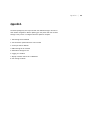
The studio package key will require several user defined settings to be reset to
their default configuration. Before updating your unit please take note of these
settings so they can be re configured when the update is complete.
1. NTP settings will be disabled
2. User and Author passwords will be reset to blank
3. Comm port will be disabled
4. SMTP settings will be removed
5. Notification settings are lost
6. Logging is re-enabled
7. Display resolution will be set to 1280x1024
8. VTC settings are blank
Appendix a | 25
DMR
An Advanced Media Design Technology
Technical Support
805.214.7911
[email protected]
Main Office
667 Rancho Conejo Blvd.
Newbury Park, CA 91320
805.480.3700
www.mediapointe.com