1
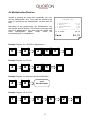
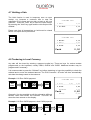
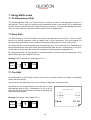
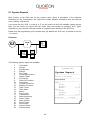
Flowchart:
P
CODE
#
PLU
TYPE
PLU
TYPE
RECORD
#
X
VALUE
CASH
ENTER
PLU
TYPE
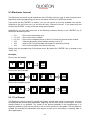
Example: Change tax rate 1 to 9.00 %:
2
1
PLU
TYPE
CURSOR
9
00
CASH
ENTER
PLU
TYPE
10.4 Scanning
When scanning codes are activated in the configuration of the application it is possible to create
and/or delete items on the cash-register either in Program Mode or during transaction when an
item is not found. Furthermore there are some special maintenance procedures which are can be
activated in Manager or programming mode.
It is possible to connect two scanners to the register. You can activate them by programming
parameter 56 & 57 also check option# 78 for check digit verification when scanning.
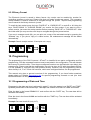
CREATING ITEMS in Transaction Mode
When Option#79 is set the register will prompt for creation of an article when not found. If
you want to create it you must confirm by pressing the SUBTOTAL key or abort by pressing
CLEAR (Note that you can press the CLEAR key at any stage to abort!!). The register will
now prompt for:
1 - The PRICE which you must enter on the SUBTOTAL key
2 - The Department which you must enter on the SUBTOTAL key
3 - The Descriptor when Option# 80 is set which you must enter on the
SUBTOTAL key
4 -Now the article is registered.
Note: From Release XX030605 on it is also possible to enter the PRICE directly on a fixed
DEPARTMENT key instead of entering the price and department on the subtotal key.
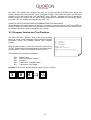
CREATING ITEMS in Program Mode
When you are in Program Mode# 20 (PLU programming) you can scan the code or enter
the code on the X key. When not found the register will ask you for creation which must be
confirmed by pressing the CR (User Report) key.
DELETING ITEMS in Program Mode
35