1
Oscillator & SLS
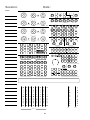
Oscillator
N3673
60
0
0
40
LEVEL 10
OSC
100
1K
10K
16K
GRPS
PFL
EXT
MAIN
MIX
DIR
SLS
PINK
0
0
CAL
SLS 10
SLS
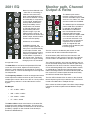
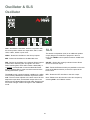
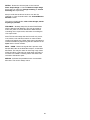
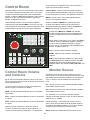
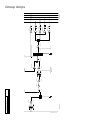
OSC - Activates the Oscillator, which in conjunction with
the seven position switch can output 40hz, 60hz, 100hz,
1Khz, 10Khz, 16Khz or pink noise.
The Studio Loudspeaker (SLS) is an additional speaker
output designed for foldback or playback in the live
room. The LEVEL control operates between -20dBu and
+10dBu.
GRPS - Routes the Oscillator to the Group Outputs.
MIX - Routes the Oscillator to the Main Mix Outs.
DIR - Routes the Oscillator to the Channel Direct Outputs
and the Retro Summing Bus. As signals sum at the
Retro Summing Bus, levels will increase substantially. It
is strongly recommended to lower the Main Mix Fader
prior to engaging DIR in order to avoid excessive levels
feeding the monitor system.
CR SEL - Routes the currently selected Control Room
Source to the SLS output.
The Level control operates between -20dBu and +10dBu.
To more finely calibrate the Oscillator output level, select
CAL. The trim screw adjacent to the level control will now
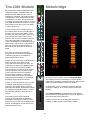
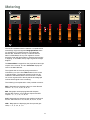
adjust the output level, and the Main Output VUs in the
Master Section Meterbridge will meter 0dB, displaying the
trim screw changes. Select CAL again to exit calibration
mode.
PFL - Routes the PFL Solo Bus to the SLS output.
EXT - Feeds the External SLS Input (available on the rear
panel of the Master Section) to the SLS output via the
level control.
Note: Talkback can also be sent to the SLS outputs by
selecting SLS in the Talkback section.
21