1
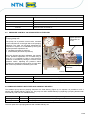
Instructions for calibrating the Laser Probe O1D100
Rotate the wording on the Display by 180°.
1.
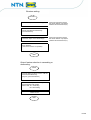
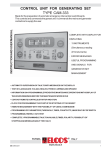
Press the MODE ENTER key 7 times: EF. appears on the Display.
2.
Press the SET key.
3.
Press the MODE ENTER key 5 times: diS. appears on the Display.
4.
Press the SET key. d3. appears on the Display.
5.
Keep the SET button pressed down for 5 sec.
6.
When the wording on the Display no longer flashes, press SET once.
7.
rd1. appears on the Display.
8.
Press MODE ENTER once.
9.
Check that the Display wording has rotated by 180°.
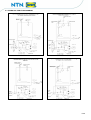
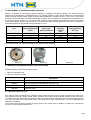
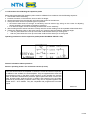
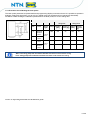
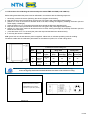
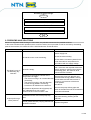
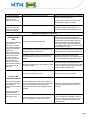
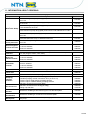
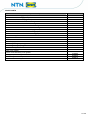
Calibrate outlet 1 (OUT 1) operating with window nsP1 (B) & fsP1 (D) (see Calibration table for Laser probe)
1.
Press the MODE ENTER key once: OU1 appears on the Display.
2.
Keep the SET button pressed down for 5 sec.
3.
When the wording on the Display no longer flashes, press SET twice until Fno appears on the Display.
4.
Press the MODE ENTER key once: nsP1 appears on the Display.
5.
Keep the SET button pressed down for 5 sec.
6.
When the wording on the Display no longer flashes, press SET once.
7.
The value of the height read appears on the Display.
8.
Press the SET button until the desired height appears.
9.
Press the MODE ENTER button once and the height set is memorised.
10.
Press the MODE ENTER key once: fsP1 appears on the Display.
11.
Repeat the previous points from N° 5 to N° 9.
Calibrate outlet 2 (OUT 2) operating with window nsP2 (A) & fsP2 (C) (see Calibration table for Laser probe)
1.
Press the MODE ENTER key once: OU2 appears on the Display.
2.
Keep the SET button pressed down for 5 sec.
3.
When the wording on the Display no longer flashes, press SET 4 times until Fno appears on the Display.
4.
Press the MODE ENTER key once: nsP2 appears on the Display.
5.
Keep the SET button pressed down for 5 sec.
6.
When the wording on the Display no longer flashes, press SET once.
7.
The value of the height read appears on the Display.
8.
Press the SET button until the desired height appears.
9.
Press the MODE ENTER button once and the height set is memorised.
10.
Press the MODE ENTER key once: fsP2 appears on the Display.
11.
Repeat the previous points from N° 5 to N° 9.
14/ 26