1
5
2. - Installation
2.1 – Plug and Play Version
2.1.1 – Power
The plug and play version will already be setup to run off mains power using either a US or
Australian style AC power plug attached to the enclosure.
2.1.2 - Control Data
DMX data is connected via a straight through cat5e cable to the internal Vortex controller via the
two external female RJ45 sockets protruding out through the centre cable gland. One is for DMX
data in and the other is for DMX data out.
2.1.3 – Lights
Lights are connected to the internal Vortex controller via the 16 waterproof female pigtail sockets.
There are eight protruding through each of the side cable glands and each individual pigtail is
labelled with a channel number between 1 and 16. Simply plug your Advatek RGB light strings into
the mating sockets, screw up the shroud covers and you are done. It is recommended to screw the
covers all the way up to ensure connection is solid and reliable. If using any cable extensions, simply
plug these in line with the enclosure socket and the light strings. If using other lights then an
appropriate 4 pin male plug will need to be attached to mate with the enclosure sockets. The pin out
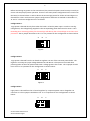
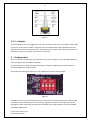
of the female sockets on the enclosure is shown below.
Pin 1 ( +VE)
Pin 4 (Blue)
Pin 3 (Green)
Front View
Pin 2 (Red)
Figure1
2.2 - Bare Board Version
2.2.1 - Power and Links
The Vortex has two split power banks with separate fuses. The board comes shipped from the
factory with 3AG 30A fast blow fuses for fuse 1 and fuse 2. The split banks allow two different
voltages to be used simultaneously. The voltage on each bank can be anywhere between 5V and 30V
DC. The total maximum current per power bank is 30A, while the total maximum current for any of
the 48 individual channels is 2A, and the total maximum current per each RGB output is 4A (each of
the 16 RGB outputs is protected by a 4A mini-blade fuse.)
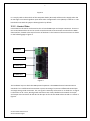
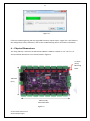
Power is connected to the Vortex board power banks via pluggable screw terminal connectors J2
and J3, located on the right-hand edge of the board. They are both clearly marked on the PCB with
the polarity and the power bank number.
Vortex 16 User Manual V1.2
© 2013 Advatek Lights