1
9
3.1 - On-board Configuration
3.1.1 - DMX Address
The DMX address can be set to anything between 1 and 494 out of a possible 512 DMX addresses.
This is because the board requires 19 DMX channels to operate in the smallest profile mode (mode
1). Other modes require more channels and hence a lower starting address.
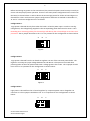
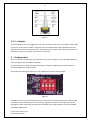
To set the start address you need to work out the 9 bit binary representation of the address you are
setting and set this on the DMX address DIP switch (least significant bit (1) is on the right hand side
of the switch as shown below in figure 7 (this conforms to the IT industry standard of representing
binary addresses.)
MSB (Binary 256)
LSB (Binary 1)
Figure 7
If you set an address that is too high for the mode you are in, the status LED will change to a slow
flash to indicate that either the mode or address is invalid.
3.1.2 - Mode Settings
There are 3 modes that the Vortex can operate in. They are:
Mode 1: 3 color channels (Red, Green and Blue) that control the color of all of the strings, followed
by 16 intensity channels to control the individual channel intensity of the set color. (Total of 19 DMX
channels).
Mode 2: Split bank 3 color channels (R,G,B for bank 1, followed by another R,G,B for bank 2), which
is then followed by the 16 intensity channels. (Total of 22 DMX channels).
Mode 3: 16 x R,G,B (or 48 individual channels). If using this for RGB control, consider it individual
colour control for each of the 16 channels; if using it for standard DC dimming, consider it 48
individual dimmer channels.
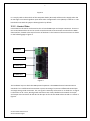
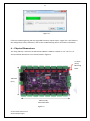
To set the mode manually on SW1, the far right switch (marked ‘4’ in figure 6 above) represents the
least significant bit. Switches 2, 3 and 4 are all used to select the modes in binary. For example,
turning on switch 4 will select mode 1, turning on switch 3 will select mode 2 and turning on both
switches 3 and 4 will select mode 3. (Same binary methodology described above for the DMX
address DIP switch).
Vortex 16 User Manual V1.2
© 2013 Advatek Lights