1
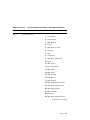
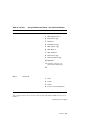
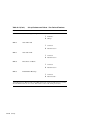
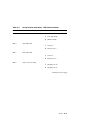
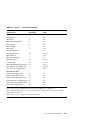
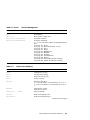
Table D–5 (Cont.)
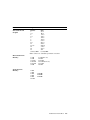
Horizontal Form Handling and Printing Modes
Escape Sequence
Description
ESC I Pn
Select Print Mode
Pn = 0/0: Draft, 10 cpi
Pn = 0/2: LQ, 10 cpi
Pn = 0/3: Proportional, 10 cpi
Pn = 0/4: Downloaded Draft, 10 cpi
Pn = 0/6: Downloaded LQ, 10 cpi
Pn = 0/7: Proportional Downloaded LQ, 10 cpi
Pn = 0/8: Draft, 12 cpi
Pn = 0/10: LQ, 12 cpi
Pn = 0/12: Downloaded Draft, 12 cpi
Pn = 0/14: Downloaded LQ, 12 cpi
Pn = 1/0: Draft, 17 cpi
Pn = 1/2: LQ, 17 cpi
Pn = 1/4: Downloaded Draft, 17 cpi
Pn = 1/6: Downloaded LQ, 17 cpi
ESC P Pn
Proportional Printing
Pn = 1 set Proportional printing,
Pn = 0 disable Proportional printing
ESC R
Set All Horizontal Tabs to Default
ESC S Pn
Script Printing
Pn = 0/1 (or any odd number) set Subscript Printing,
Pn = 0/0 (or any even number) set Superscript
Printing
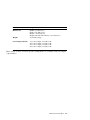
ESC T
Cancel Script Printing
ESC U Pn
Bidirectional Printing,
Pn = 0 (or any even number) set Bidirectional
printing,
Pn = 1 (or any odd number) set Unidirectional
printing
ESC W Pn
Continuous Double-Wide Printing
Pn = any odd number set double-wide printing,
Pn = any even number reset double-wide printing
ESC X P1 P2
Set Horizontal Margins
P1 is Left Margin, P2 is Right Margin
ESC b
Select Black Printing
ESC c
Select Cyan Printing
ESC d P1 P2
Horizontal Relative Motion Right
P1 P2 for 1/120-inch steps, low byte first
ESC m
Select Magenta Printing
(continued on next page)
IBM Proprinter X24E Quick Reference
D–5