1
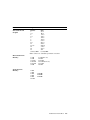
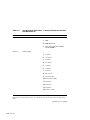
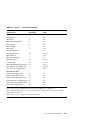
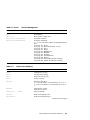
Table D–3 (Cont.)
Terminal Management
Escape Sequence
Description
ESC j
Stop Printing
ESC [ ! p
Reset Printer to DEC mode
ESC [ K n1 n2 init id P1 P2
Set Initial Condition
ESC [ T n1 n2 NUL NUL P1 P2
Code-Page Switching.
Pn1 Pn2 for Code-Page number, most-significant byte
first.
Code-page 437: U.S.A.
Code-page 190: German GS (Same as 437)
Code-page 210: Greece
Code-page 220: Spain
Code-page 850: Multilingual
Code-page 857: Turkish
Code-page 860: Portugal
Code-page 863: Canada-French
Code-page 865: Norway
Code-page 852: Latin-2 (In optional cartridge)
Code-page 866: Cyrillic (In optional cartridge)
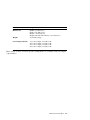
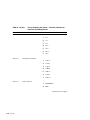
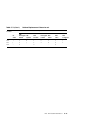
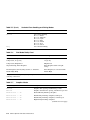
Table D–4
Vertical Form Handling
Escape Sequence
Description
ESC 0
1/8-Inch Line spacing
ESC 1
7/72-Inch Line spacing
ESC 2
Start Text Line spacing
ESC 4
Set Top of Form
ESC 5 Pn
Automatic Line Feed
Pn = any odd number set automatic line feed on CR,
Pn = any even number reset automatic line feed on
CR
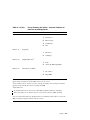
ESC A Pn
Set Text Line spacing
72/Pn lines per inch
ESC B P1 P2 ... Pn NUL
Set Vertical Tabs
ESC C Pn
Set Form Length in Lines
ESC C NUL Pn
Set Form Length in Inches
(continued on next page)
IBM Proprinter X24E Quick Reference
D–3