1
System 8500 User Manual
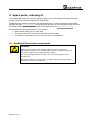
6 Troubleshooting
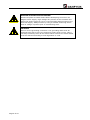
WARNING!
Troubleshooting may require investigation inside the Magnet Power
Supply.
Only trained personnel is allowed to do debugging inside the power
supply with Control and/or Main power applied to the power supply.
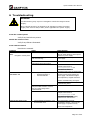
From the control panel
Verify if any interlocks are present
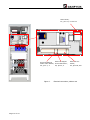
Inside the control crate
Verify if any LEDs are illuminated.
From remote control
Read the S1 command.
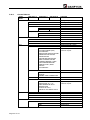
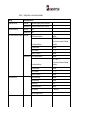
Symptom
NO RESPONSE FROM CONTROL
PANEL
No lights in control panel
Check
Check that control power is on.
Check Aux power supply in control
crate is functioning.
Check cable connection between
control board and control panel.
None of the above
POWER SUPPLY CANNOT BE
COMMANDED ON
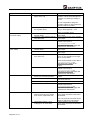
1.
Are any interlocks present?
External interlocks or
Internal interlocks
Check connections to MAIN contactor.
Verify that MAIN contactor receives
230V as control voltage when
commanded ON
None of the above
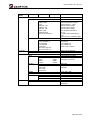
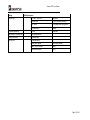
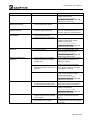
NONE OR BAD REGULATION:
1.
Check ambient temperature, must
be lower than 35°C
Cause & action
Control power has been disconnected
either at switch board or control power
contactor in power supply
AUX supply is defect. Replace Aux
power supply
Interface cable is defect. Replace cable
Control board defect. Please contact
Danfysik service desk at
[email protected] for
instructions for further
debugging/replacement of defect board.
For external interlocks the cause of the
interlock must be found outside the
power supply. This includes magnet
over temperature, magnet water flow.
Continue troubleshooting at magnet.
For internal interlocks see
troubleshooting below.
Defect MAIN contactor.
Control board defect. Please contact
Danfysik service desk at
[email protected] for
instructions for further debugging
replacement of defect board.
Room temperature too high.
Temperature must be < 35°C for the
power supply to operate correctly.
Lower room temperature
Page 51 of 54