1
Chapter 1
Introducing the Profile XP Media Platform
chroma sampling, or 4-15 Mb/s at 4:2:0 chroma sampling. With the 50 Mb/s software
option installed, each codec can be configured for DVCPRO 50 operation, MPEG D10
operation at 30, 40, or 50 Mb/s, or MPEG operation up to 50 Mb/s.
When a codec is reconfigured, the media platform must be restarted to put the change
into effect. However, any codec can play all formats of SD clip seamlessly, back to back,
without any configuration changes.
For record mode, video is routed from the Video I/O boards, over the video transport
fabric to the Video Processor board. Compressed data is moved over the PCI bus to the
Media Storage Subsystem. For play mode, compressed data is routed from the Media
Storage Subsystem, over PCI bus, to the Video Processor board where the data is
processed. Full bandwidth video is routed from the Video Processor board over the video
transport fabric to the Video I/O boards.
Video Network Adapter (Optional)
The Video Network Adapter is a 1Gb/s Fibre Channel board or 100BaseT Ethernet board
for video network connections. Both provide faster than real-time transfers of video data.
Media Storage Subsystem
The Media Storage Subsystem includes the following components:
Fibre Channel Disk Board
This is a dual port Fibre Channel Disk board for connecting the Profile XP system to the
external Fibre Channel RAID storage system in either a local or centralized storage
configuration. In local storage configurations, the Fibre Channel RAID storage system
is connected directly to the Fibre Channel Disk board. In centralized storage
configurations, this board is connected to a Fibre Channel switch fabric to provide access
to a centralized pool of Fibre Channel RAID storage systems.
When the RAID storage systems are configured with an optional second controller
board, Port B of the Fibre Channel Disk board can be connected to provide a redundant
path to the disks.
Both ports use hot-swappable copper or optical Small Form-Factor Pluggable interfaces
(SFPs) to connect to Fibre Channel cables. Copper connections allow transfers at up to
1Gb/s, while optical cables and SFPs support up to 2Gb/s rates.
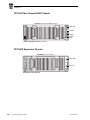
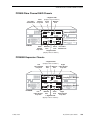
Fibre Channel RAID Chassis
The high performance RAID storage system provides the Profile XP a low profile,
compact storage system with either 36, 73, or 146 GB Fibre Channel drives. The Fibre
Channel RAID Chassis is a Fibre Channel disk array with RAID drives, hot spares,
dual power supplies (optional), redundant controllers (optional) and spare fans.
The Fibre Channel RAID Chassis comes with either 36, 73, or 146 GB drives. You
can expand the RAID storage system with the Expansion chassis, which houses 5, 10,
or 15 drives but does not need a RAID controller. The Fibre Channel RAID Chassis
offers optional redundant RAID controllers. If one fails, the system will automatically
switch over to the second controller within a few seconds.
42
Profile XP System Guide
13 May 2005