1
single analysis
[5.I]
Research modules - Recovery parameters
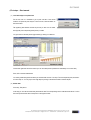
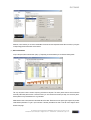
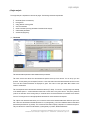
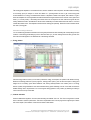
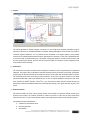
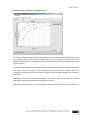
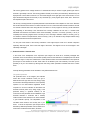
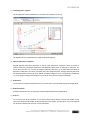
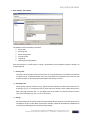
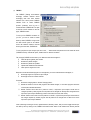
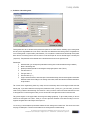
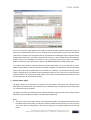
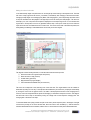
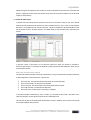
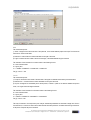
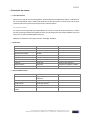
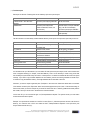
The recovery parameters can give some information about the fitness level of the test person. You find the recovery
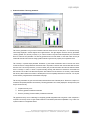
values being displayed in the left diagram with a legend below it. The right diagrams show the recovery parameters
„recovery gradient“ and „recovery convexity“. If you use this module in conjunction with multiple tests you’ll find several
blocks for each test and parameter. The recovery gradient shows how fast lactate or heart rate values recover per
minute after the main load of the test. A high gradient indicates a good recovery capacity and a high fitness level.
The convexity is a special shape parameter. Sometimes e.g. the lactate concentration does not recover back to the
normal rest value in a straight downward line but will show a slope with a maximum value some minutes after the end of
the main load. This recovery behaviour („over shoot“ effect) also provides information about the load state and fitness
level. A convexity of >100% is a result of a positive bending showing, that lactate has continued to accumulate even
after the load. This is often found when the test person was stressed out to his maximum. A convexity <100% indicates
fast recovery without further accumulation or the test person was not completely stressed to his maximum. You can print
out the results by using the buttons at the bottom of the page.
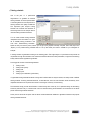
The recovery parameters can give some information about the fitness level of the test person. However to compare on a
scientific level impartial parameters are necessary. Following parameters are currently displayed in the h/p/cosmos para
analysis for the recovery:
N
N
N
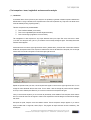
Graphical recovery curve
Recovery gradient of lactate and heart rate
Recovery convexity (Overshoot-effect) of lactate and heart rate
The graphical recovery curve is interesting for recognizing possible irregularities with one glance. In test comparison a
comparison of recovery curves can give further indications for the different performance capabilities of e.g. a team or of
a person looked at in a longitudinal section.
file: l:\manuals\h-p-cosmos para analysis\version 2.0\en\20050203_manual_h-p-cosmos_para_analysis_2 0_en.doc
© 2005 h/p/cosmos sports & medical gmbh [email protected] created 03.02.2005 printed 03.02.2005 page: 22 of 67
LN