1
7. Motion Test
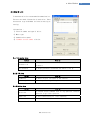
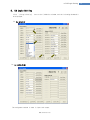
7.2 Single Move Operation
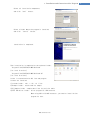
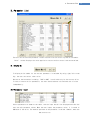
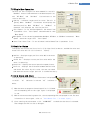
The user can test straight-line move command for one axis.
‘Abs Move’ button finds and moves to the absolute position,
and ‘DEC Move’ and ‘INC Move’ find and move to the
relative position.
* Cmd Pos : Indicates target position value. The unit is
[pulse]. When ‘Abs Move’ is executed, this displays the
absolute position. When ‘DEC Move’ or ‘INC Move’ is
executed, this displays the relative position.
* Start Speed : To set AxisStartSpeed at the second item
in parameter lists.‘Start Speed’ should be smaller than
‘Move Speed’.
* Move Speed : To set the moving speed when Abs Move, DEC Move, or INC Move is executed. ‘Move
Speed’ should be larger than ‘Start Speed’.
* Accel Time, Decel Time : To set AxisAccel and AxisDecelTime in parameter lists.
7.3 Position Status
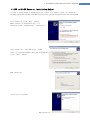
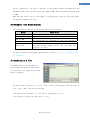
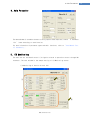
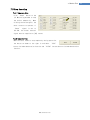
To displays the current position of axis. Click Clear Position button, and Cmd Pos value and
Actual Pos value will be initialized to ‘0(zero)’.
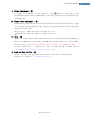
* Cmd Pos : displays target position value while the motor
is operating.
* Actual Pos : displays current position value while the
motor is operating.
* Actual Vel : displays the actual operation speed of motor.
* Pos Error : displays the difference between Cmd Pos value
and Actual Pos value. By this value, the user can check
how much the current target position is tracked correctly.
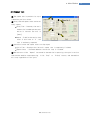
7.4 Axis Status and Alarm
②
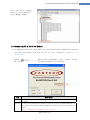
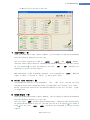
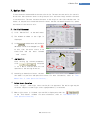
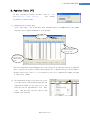
To display the current axis status. Each status is displayed
to On/Off. ‘On’ indicates in red and ‘Off’ indicates in
①
white.
1) When the motor stops operation and Inposition is finished,
③
the corresponding LED at the right figure is displayed
in red.
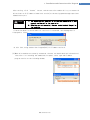
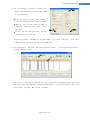
2) When an alarm occurs during operation, the corresponding LED is displayed in red. For more
information of alarm types, refer to 「User Manual-Text, 7.4 Output Signal」.
3) After removing the alarm cause, click ‘ALARM RESET’ to check that the alarm is released.
Then change the LED into Servo ON again.
www.fastech.co.kr
22