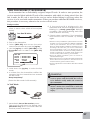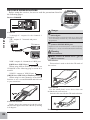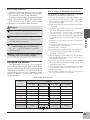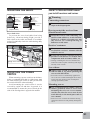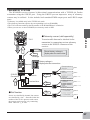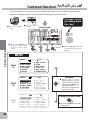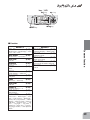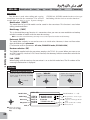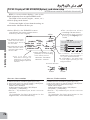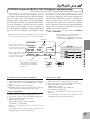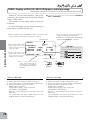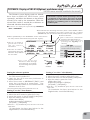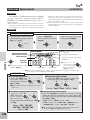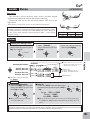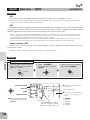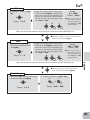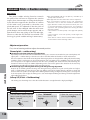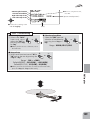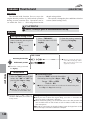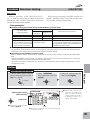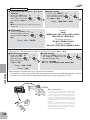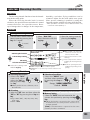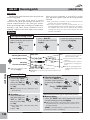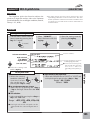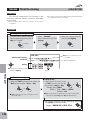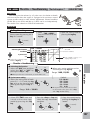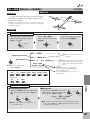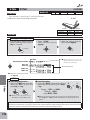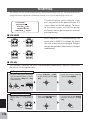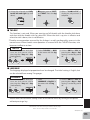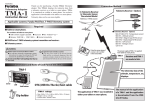
1
10-Channel Digital Proportional R/C System TM TM INSTRUCTION MANUAL 1M23N29204 Technical updates and additional programming examples available at: http://www.futaba-rc.com/faq Entire Contents © 2014 7$%/(2)&217(176 Introduction ............................................6 Ɣ6XSSRUWDQG6HUYLFH ..................................6 Ɣ$SSOLFDWLRQ([SRUWDQG0RGL¿FDWLRQ ....7 Ɣ'H¿QLWLRQVRI6\PEROV ...............................8 INTRODUCTION Ɣ6DIHW\3UHFDXWLRQV GRQRWRSHUDWHZLWKRXW UHDGLQJ .......................................................9 %HIRUHXVH ..............................................12 BEFORE USE Ɣ)HDWXUHVRI- ........................................12 Ɣ&RQWHQWVDQGWHFKQLFDOVSHFL¿FDWLRQV ....13 Ɣ6\VWHPFRPSDWLELOW\ ................................13 Ɣ$FFHVVRULHV................................................14 COMMON Ɣ7UDQVPLWWHUFRQWUROV ................................15 %DWWHU\ ............................................................. 17 6ZLWFK ............................................................. 18 7RWXUQRQWKH- ......................................... 18 5HFHLYHUDQGVHUYRFRQQHFWLRQV .................... 19 &KDUJLQJWKHEDWWHULHV ................................... 22 6WLFNDGMXVWPHQW ............................................. 23 $GMXVWLQJGLVSOD\FRQWUDVW............................. 24 &RQQHFWRU3OXJ ............................................... 24 7UDQVPLWWHUGLVSOD\V EXWWRQV .................... 25 :DUQLQJ HUURUGLVSOD\V.............................. 26 /LQNSURFHGXUH ............................................... 27 AIRPLANE HELICOPTER Ɣ5HFHLYHUQRPHQFODWXUH ............................28 Ɣ56%&+PRGH ..................................29 Ɣ5HFHLYHU VDQWHQQDLQVWDOODWLRQ ............... GLIDER Ɣ0RXQWLQJWKHVHUYR ..................................31 Ɣ5DQJHFKHFNWKHUDGLR .............................32 Ɣ6%866%86,QVWDOODWLRQ .....................33 Ɣ6%86:LULQJH[DPSOH ............................34 MULTICOPTER Ɣ6%866\VWHP .........................................35 Ɣ6%866%86'HYLFHVHWWLQJ .................36 Ɣ7HOHPHWU\6\VWHP .....................................37 TX SETTING 3 &RPPRQIXQFWLRQ.................................38 6WLFNSRVLWLRQDODUP ....................................... 65 Ɣ0RGHOVHOHFW .............................................. Ɣ7HOHPHWU\ ..................................................66 0RGHOVHOHFW .................................................... 41 0RGHOFRS\ ...................................................... 41 'DWHUHVHW......................................................... 41 5;W\SH............................................................ 42 /LQN ................................................................. 42 7HOHPHWU\5[EDWW .......................................... 66 7HOHPHWU\([WYROW ......................................... 7HOHPHWU\WHPS............................................... 75 7HOHPHWU\USP ................................................ 76 7HOHPHWU\DOWLWXGH .......................................... 77 7HOHPHWU\YDULR .............................................. 78 7HOHPHWU\GLVWDQFH ......................................... 79 7HOHPHWU\VSHHG.............................................. 81 7HOHPHWU\EDWWHU\ ........................................... 82 Ɣ0RGHOQDPH ..............................................43 0RGHOQDPH .................................................... 43 8VHUQDPH ....................................................... 44 Ɣ)DLOVDIH .....................................................45 Ɣ6HUYRUHYHUVH ............................................47 Ɣ7LPHU.........................................................48 Ɣ6HUYRPRQLWRU...........................................49 Ɣ(QGSRLQW .................................................. Ɣ7ULP...........................................................51 Ɣ6HQVRUVORW.................................................83 6HQVRUUHJLVWHU ................................................ 84 6HQVRUVHQVVORW ............................................... 85 6HQVRULQLWLDOL]H .............................................. 86 6HQVRUDOOFOHDU ............................................... 87 6HQVRUPDQXDOO\DVVLJQLQJDVHQVRU ............. 88 Ɣ6XEWULP ....................................................52 Ɣ6%86VHUYROLQN ......................................89 Ɣ3URJUDPPL[LQJ .......................................53 Ɣ0RGHOWUDQVIHU..........................................92 Ɣ$8;FKDQQHO ............................................56 Ɣ7UDLQHU ......................................................93 Ɣ3DUDPHWHU .................................................58 'DWHUHVHW......................................................... 0RGHOW\SH ...................................................... 61 6ZDVKW\SH IRUKHOL ....................................... 61 :LQJW\SH IRUJOLGHU .................................... 61 $7/7ULP ........................................................ 61 /&'FRQWUDVW .................................................. 62 %DFNOLJKW ........................................................ 62 /LJKWWLPH ........................................................ 62 /LJKWDGMXVWPHQW ............................................ 62 +RPHGLVSOD\ .................................................. 62 %DWWHU\DODUPYROWDJH ................................... 62 %DWWHU\DODUPYROWDJHYLEUDWLRQ................... 63 %X]]HUWRQH ..................................................... 63 -RJNH\QDYLJDWLRQ .......................................... 63 -RJOLJKW ........................................................... 63 -RJOLJKWWLPH .................................................. 64 7HOHPHWU\PRGH .............................................. 64 7HOHPHWU\XQLW................................................. 64 6SHHFKODQJXDJH ............................................. 64 6SHHFKYROXPH ................................................ 64 4 $LUSODQHIXQFWLRQ .................................95 Ɣ$LOHURQ'LIIHUHQWLDO..................................97 Ɣ$LOHURQĺ5XGGHU .....................................98 Ɣ97DLO .........................................................99 Ɣ*\URVHQVRU ............................................ Ɣ(OHYRQ ..................................................... Ɣ$LOYDWRU ................................................... Ɣ7KURWWOHĺ1HHGOH0L[LQJ ...................... Ɣ'XDOUDWH / (;32 ................................ Ɣ)ODSHURQ.................................................. Ɣ$LUEUDNH ................................................ Ɣ)ODSĺ(OHYDWRUPL[LQJ .......................... Ɣ(OHYDWRUĺ)ODSPL[LQJ .......................... 111 Ɣ)ODSWULP ................................................. 112 Ɣ7KURWWOHFXW............................................. 113 Ɣ,GOHGRZQ ................................................ 115 Ɣ6QDSUROO.................................................. 116 Ɣ7KURWWOHFXUYH ........................................ 117 Ɣ&DPEHUPL[LQJ ...................................... Ɣ3,7FXUYH ................................................ 118 Ɣ%XWWHUÀ\PL[LQJ .....................................161 Ɣ7KURWWOHGHOD\ ......................................... 119 Ɣ&DPEHUĺ(OHYDWRUPL[LQJ ....................162 Ɣ(OHYDWRUĺ&DPEHUPL[LQJ ....................163 +HOLFRSWHUIXQFWLRQ ............................ Ɣ$LOHURQĺ&DPEHUPL[LQJ......................165 Ɣ&RQGLWLRQ ................................................122 Ɣ$LOHURQĺ%UDNHÀDS ..............................166 Ɣ6ZDVK$)5 .............................................123 Ɣ7ULPPL[ .................................................167 Ɣ6ZDVKPL[LQJ .........................................124 Ɣ6ZDVKULQJ ..............................................126 0XOWLFRSWHUIXQFWLRQ ..........................168 Ɣ7ULPRIIVHW ..............................................127 Ɣ*\URVHQVRU ............................................ Ɣ'HOD\ .......................................................128 Ɣ'XDOUDWH / (;32 ................................171 Ɣ7KURWWOHFXW.............................................129 Ɣ&HQWHUDODUP ..........................................173 Ɣ*\URVHQVRU ............................................131 Ɣ'XDOUDWH/ (;32 ................................132 7;VHWWLQJ............................................174 Ɣ7KURWWOHFXUYH ........................................134 Ɣ6WLFNPRGH ..............................................174 Ɣ3LWFKFXUYH ..............................................136 Ɣ6WLFNDGMXVWPHQW ....................................174 Ɣ5HYROXWLRQPL[LQJ 3,7WR58' .........138 Ɣ7KURWWOHVWLFNUHYHUVH.............................175 Ɣ7KURWWOHKROG .......................................... Ɣ/DQJXDJH ................................................175 Ɣ*RYHUQRUPL[LQJ ....................................141 Ɣ+RYHULQJWKURWWOH ...................................143 Ɣ+RYHULQJSLWFK .......................................144 Ɣ+,/2SLWFKWULP ...................................145 Ɣ6ZDVKĺ7KURWWOHPL[LQJ .......................146 Ɣ7KURWWOHĺ1HHGOHPL[LQJ.......................147 *OLGHUIXQFWLRQ ...................................148 Ɣ$LOHURQ'LIIHUHQWLDO................................ Ɣ$LOHURQĺ5XGGHU ...................................151 Ɣ9WDLO........................................................152 Ɣ*\URVHQVRU ............................................153 Ɣ'XDOUDWH/ (;32 ................................154 Ɣ0RWRUVZLWFK ..........................................156 Ɣ&RQGLWLRQ ................................................157 Ɣ5XGGHUĺ$LOHURQPL[LQJ ......................158 Ɣ&DPEHUÀDSPL[LQJ ...............................159 5 INTRODUCTION Thank you for purchasing a Futaba® T-FHSS Air-2.4GHz 10J series digital proportional R/C system. This system is extremely versatile and may be used by beginners and pros alike. In order IRU\RXWRPDNHWKHEHVWXVHRI\RXUV\VWHPDQGWRÀ\VDIHO\SOHDVHUHDGWKLVPDQXDOFDUHIXOO\ ,I \RX KDYH DQ\ GLIILFXOWLHV ZKLOH XVLQJ \RXU V\VWHP SOHDVH FRQVXOW WKH PDQXDO RXU RQOLQH )UHTXHQWO\$VNHG 4XHVWLRQV RQ WKH ZHE SDJHV UHIHUHQFHG EHORZ \RXU KREE\ GHDOHU RU WKH Futaba Service Center. Introduction 'XHWRXQIRUHVHHQFKDQJHVLQSURGXFWLRQSURFHGXUHVWKHLQIRUPDWLRQFRQWDLQHGLQWKLVPDQXDOLV subject to change without notice. Support and Service: It is recommended to have your Futaba equipment serviced annually during your hobby’s “off season” to ensure safe operation. IN NORTH AMERICA 3OHDVH IHHO IUHH WR FRQWDFW WKH )XWDED 6HUYLFH &HQWHU IRU DVVLVWDQFH LQ RSHUDWLRQ XVH DQG programming. Please be sure to regularly visit the 10J Frequently Asked Questions web site DW ZZZIXWDEDUFFRPIDT 7KLV SDJH LQFOXGHV H[WHQVLYH SURJUDPPLQJ XVH VHW XS DQG VDIHW\ information on the 10J radio system and is updated regularly. Any technical updates and US PDQXDO FRUUHFWLRQV ZLOO EH DYDLODEOH RQ WKLV ZHE SDJH ,I \RX GR QRW ¿QG WKH DQVZHUV WR \RXU TXHVWLRQVWKHUHSOHDVHVHHWKHHQGRIRXU)$4DUHDIRULQIRUPDWLRQRQFRQWDFWLQJXVYLDHPDLO for the most rapid and convenient response. 'RQ¶W KDYH ,QWHUQHW DFFHVV" ,QWHUQHW DFFHVV LV DYDLODEOH DW QR FKDUJH DW PRVW SXEOLF OLEUDULHV VFKRROVDQGRWKHUSXEOLFUHVRXUFHV:H¿QGLQWHUQHWVXSSRUWWREHDIDEXORXVUHIHUHQFHIRUPDQ\ PRGHOHUVDVLWHPVFDQEHSULQWHGDQGVDYHGIRUIXWXUHUHIHUHQFHDQGFDQEHDFFHVVHGDWDQ\KRXU RIWKHGD\QLJKWZHHNHQGRUKROLGD\,I\RXGRQRWZLVKWRDFFHVVWKHLQWHUQHWIRULQIRUPDWLRQ KRZHYHUGRQ¶WZRUU\2XUVXSSRUWWHDPVDUHDYDLODEOH0RQGD\WKURXJK)ULGD\&HQWUDOWLPH to assist you. FOR SERVICE ONLY: Futaba Service Center 1$SROOR'ULYH6XLWH &KDPSDLJQ,/ 3KRQH www.futaba-rc.com/service.html Email: [email protected] FOR SUPPORT : (PROGRAMMING AND USER QUESTIONS) Please start here for answers to most questions: www.futaba-rc.com/faq/ )D[ 3KRQHRSWLRQ OUTSIDE NORTH AMERICA 3OHDVHFRQWDFW\RXU)XWDEDLPSRUWHULQ\RXUUHJLRQRIWKHZRUOGWRDVVLVW\RXZLWKDQ\TXHVWLRQV problems or service needs. 3OHDVH UHFRJQL]H WKDW DOO LQIRUPDWLRQ LQ WKLV PDQXDO DQG DOO VXSSRUW DYDLODELOLW\ LV EDVHG XSRQ the systems sold in North America only. Products purchased elsewhere may vary. Always contact your region’s support center for assistance. 6 $SSOLFDWLRQ([SRUWDQG0RGL¿FDWLRQ 7KLVSURGXFWPD\EHXVHGIRUPRGHODLUSODQHRUVXUIDFH ERDWFDUURERW XVH,WLVQRWLQWHQGHG for use in any application other than the control of models for hobby and recreational purposes. 7KH SURGXFW LV VXEMHFW WR UHJXODWLRQV RI WKH 0LQLVWU\ RI 5DGLR7HOHFRPPXQLFDWLRQV DQG LV restricted under Japanese law to such purposes. Introduction 2. Exportation precautions: D :KHQWKLVSURGXFWLVH[SRUWHGIURPWKHFRXQWU\RIPDQXIDFWXUHLWVXVHLVWREHDSSURYHGE\ the laws governing the country of destination which govern devices that emit radio frequencies. If WKLVSURGXFWLVWKHQUHH[SRUWHGWRRWKHUFRXQWULHVLWPD\EHVXEMHFWWRUHVWULFWLRQVRQVXFKH[SRUW Prior approval of the appropriate government authorities may be required. If you have purchased WKLVSURGXFWIURPDQH[SRUWHURXWVLGH\RXUFRXQWU\DQGQRWWKHDXWKRUL]HG)XWDEDGLVWULEXWRULQ \RXUFRXQWU\SOHDVHFRQWDFWWKHVHOOHULPPHGLDWHO\WRGHWHUPLQHLIVXFKH[SRUWUHJXODWLRQVKDYH been met. (b) Use of this product with other than models may be restricted by Export and Trade Control 5HJXODWLRQVDQGDQDSSOLFDWLRQIRUH[SRUWDSSURYDOPXVWEHVXEPLWWHG7KLVHTXLSPHQWPXVWQRW be utilized to operate equipment other than radio controlled models. 0RGL¿FDWLRQDGMXVWPHQWDQGUHSODFHPHQWRISDUWV)XWDEDLVQRWUHVSRQVLEOHIRUXQDXWKRUL]HG PRGL¿FDWLRQDGMXVWPHQWDQGUHSODFHPHQWRISDUWVRQWKLVSURGXFW$Q\VXFKFKDQJHVPD\YRLG the warranty. Compliance Information Statement (for U.S.A.) 7KLVGHYLFHWUDGHQDPH)XWDED&RUSRUDWLRQPRGHOQXPEHU56%FRPSOLHVZLWKSDUWRI WKH)&&5XOHV2SHUDWLRQLVVXEMHFWWRWKHIROORZLQJWZRFRQGLWLRQV 7KLVGHYLFHPD\QRWFDXVHKDUPIXOLQWHUIHUHQFHDQG 7KLV GHYLFH PXVW DFFHSW DQ\ LQWHUIHUHQFH UHFHLYHG LQFOXGLQJ LQWHUIHUHQFH WKDW PD\ FDXVH undesired operation. (3) This module meets the requirements for a mobile device that may be used at separation distances of more than 20cm from human body. To meet the RF exposure requirements of the FCC this device shall not be co-located with another transmitting device. The responsible party of this device compliance is: Futaba Service Center 1$SROOR'ULYH6XLWH&KDPSDLJQ,/86$ 7(/ RU(PDLOVXSSRUW#KREELFRFRP 6XSSRUW 7(/ RU(PDLOIXWDEDVHUYLFH#KREELFRFRP 6HUYLFH 7KH 5%5& 6($/ RQ WKH QLFNHOFDGPLXP EDWWHU\ FRQWDLQHG LQ )XWDED SURGXFWV indicates that Futaba Corporation is voluntarily participating in an industry-wide SURJUDP WR FROOHFW DQG UHF\FOH WKHVH EDWWHULHV DW WKH HQG RI WKHLU XVHIXO OLYHV ZKHQ WDNHQ RXW RI VHUYLFH ZLWKLQ WKH 8QLWHG 6WDWHV7KH 5%5& SURJUDP SURYLGHV D convenient alternative to placing used nickel-cadmium batteries into the trash or PXQLFLSDOZDVWHV\VWHPZKLFKLVLOOHJDOLQVRPHDUHDV. (for USA) You may contact your local recycling center for information on where to return the spent battery. Please FDOO %$77(5< IRU LQIRUPDWLRQ RQ 1L&G EDWWHU\ UHF\FOLQJ LQ\RXUDUHD)XWDED&RUSRUDWLRQ involvement in this program is part of its commitment to protecting our environment and conserving natural resources. 5%5&LVDWUDGHPDUNRIWKH5HFKDUJHDEOH%DWWHU\5HF\FOLQJ&RUSRUDWLRQ 7 Federal Communications Commission Interference Statement (for U.S.A.) Introduction 7KLVHTXLSPHQWKDVEHHQWHVWHGDQGIRXQGWRFRPSO\ZLWKWKHOLPLWVIRUD&ODVV%GLJLWDOGHYLFH SXUVXDQWWR3DUWRIWKH)&&5XOHV7KHVHOLPLWVDUHGHVLJQHGWRSURYLGHUHDVRQDEOHSURWHFWLRQ against harmful interference in a residential installation. 7KLV HTXLSPHQW JHQHUDWHV XVHV DQG FDQ UDGLDWH UDGLR IUHTXHQF\ HQHUJ\ DQG LI QRW LQVWDOOHG DQG XVHG LQ DFFRUGDQFH ZLWK WKH LQVWUXFWLRQV PD\ FDXVH KDUPIXO LQWHUIHUHQFH WR UDGLR FRPPXQLFDWLRQV+RZHYHUWKHUHLVQRJXDUDQWHHWKDWLQWHUIHUHQFHZLOOQRWRFFXULQDSDUWLFXODU LQVWDOODWLRQ ,I WKLV HTXLSPHQW GRHV FDXVH KDUPIXO LQWHUIHUHQFH WR UDGLR RU WHOHYLVLRQ UHFHSWLRQ ZKLFKFDQEHGHWHUPLQHGE\WXUQLQJWKHHTXLSPHQWRIIDQGRQWKHXVHULVHQFRXUDJHGWRWU\WR correct the interference by one or more of the following measures: --Reorient or relocate the receiving antenna. --Increase the separation between the equipment and receiver. --Consult the dealer or your Futaba Serivce center for help. CAUTION: To assure continued FCC compliance: $Q\FKDQJHVRUPRGL¿FDWLRQVQRWH[SUHVVO\DSSURYHGE\WKHJUDQWHHRIWKLVGHYLFHFRXOGYRLGWKH user's authority to operate the equipment. Exposure to Radio Frequency Radiation 7R FRPSO\ ZLWK )&& 5) H[SRVXUH FRPSOLDQFH UHTXLUHPHQWV D VHSDUDWLRQ GLVWDQFH RI DW OHDVW 20cm must be maintained between the antenna of this device and all persons. This device must not be co-located or operating in conjunction with any other antenna or transmitter. Meaning of Special Markings Pay special attention to safety where indicated by the following marks: DANGER - Procedures which may lead to dangerous conditions and cause death/serious injury if not carried out properly. WARNING - Procedures which may lead to a dangerous condition or cause death or VHULRXVLQMXU\WRWKHXVHULIQRWFDUULHGRXWSURSHUO\RUSURFHGXUHVZKHUHWKHSUREDELOLW\RI VXSHU¿FLDOLQMXU\RUSK\VLFDOGDPDJHLVKLJK CAUTION 3URFHGXUHV ZKHUH WKH SRVVLELOLW\ RI VHULRXV LQMXU\ WR WKH XVHU LV VPDOO EXW WKHUHLVDGDQJHURILQMXU\RUSK\VLFDOGDPDJHLIQRWFDUULHGRXWSURSHUO\ 3URKLELWHG 0DQGDWRU\ Warning: Always keep electrical components away from small children. FLYING SAFETY WARNING 7RHQVXUHWKHVDIHW\RI\RXUVHOIDQGRWKHUVSOHDVHREVHUYHWKHIROORZLQJSUHFDXWLRQV Have regular maintenance performed. Although your 10J protects the model memories ZLWK QRQYRODWLOH ((3520 PHPRU\ ZKLFK GRHV QRW UHTXLUH SHULRGLF UHSODFHPHQW DQG QRW D EDWWHU\ WKH WUDQVPLWWHU VWLOO VKRXOG KDYH UHJXODU FKHFNXSV IRU ZHDU DQG WHDU :H recommend sending your system to the Futaba Service Center annually during your nonÀ\LQJVHDVRQIRUDFRPSOHWHFKHFNXSDQGVHUYLFH 8 NiMH/NiCd Battery Charge the batteries! 6HH&KDUJLQJWKH1L&GEDWWHULHVIRUGHWDLOV $OZD\VUHFKDUJHWKH WUDQVPLWWHU DQG UHFHLYHU EDWWHULHV EHIRUH HDFK À\LQJ VHVVLRQ$ ORZ EDWWHU\ ZLOO VRRQ GLH SRWHQWLDOO\FDXVLQJORVVRIFRQWURODQGDFUDVK:KHQ\RXEHJLQ\RXUÀ\LQJVHVVLRQUHVHW \RXU7-¶VEXLOWLQWLPHUDQGGXULQJWKHVHVVLRQSD\DWWHQWLRQWRWKHGXUDWLRQRIXVDJH Where to Fly :H UHFRPPHQG WKDW \RX À\ DW D UHFRJQL]HG PRGHO DLUSODQH À\LQJ ¿HOG<RX FDQ ¿QG PRGHO FOXEVDQG¿HOGVE\DVNLQJ\RXUQHDUHVWKREE\GHDOHURULQWKH86E\FRQWDFWLQJWKH$FDGHP\ RI0RGHO$HURQDXWLFV Introduction Stop flying long before your batteries become low on charge. Do not rely on your radio’s low battery warning systems, intended only as a precaution, to tell you when to UHFKDUJH$OZD\VFKHFN\RXUWUDQVPLWWHUDQGUHFHLYHUEDWWHULHVSULRUWRHDFKÀLJKW <RX FDQ DOVR FRQWDFW WKH QDWLRQDO$FDGHP\ RI 0RGHO$HURQDXWLFV $0$ ZKLFK KDV PRUH WKDQ FKDUWHUHG FOXEV DFURVV WKH FRXQWU\ 7KURXJK DQ\ RQH RI WKHP LQVWUXFWRU WUDLQLQJ SURJUDPVDQGLQVXUHGQHZFRPHUWUDLQLQJDUHDYDLODEOH&RQWDFWWKH$0$DWWKHDGGUHVVRUWROO free phone number below. Academy of Model Aeronautics (DVW0HPRULDO'ULYH 0XQFLH,1 7HOH )D[ or via the Internet at http:\\www. modelaircraft.org $OZD\V SD\ SDUWLFXODU DWWHQWLRQ WR WKH À\LQJ ¿HOG¶V UXOHV as well as the presence and ORFDWLRQ RI VSHFWDWRUV WKH ZLQG GLUHFWLRQ DQG DQ\ REVWDFOHV RQ WKH ¿HOG %H YHU\ FDUHIXO À\LQJLQDUHDVQHDUSRZHUOLQHVWDOOEXLOGLQJVRUFRPPXQLFDWLRQIDFLOLWLHVDVWKHUHPD\EH radio interference in their vicinity. 9 NiMH/NiCd Battery Safety and Handling instructions IMPORTANT! Use only the Futaba special charger included with this set or other chargers approved by )XWDEDWRFKDUJHWKH1L0+EDWWHULHVLQWKH7-WUDQVPLWWHULQFOXGHGZLWKWKLVVHW ,WLVLPSRUWDQWWRXQGHUVWDQGWKHRSHUDWLQJFKDUDFWHULVWLFVRI1L0+1L&GEDWWHULHV$OZD\VUHDG WKH VSHFLILFDWLRQV SULQWHG RQ WKH ODEHO RI \RXU 1L0+1L&G EDWWHU\ DQG FKDUJHU SULRU WR XVH )DLOXUHWRIROORZWKHSURFHHGLQJSUHFDXWLRQVFDQTXLFNO\UHVXOWLQVHYHUHSHUPDQHQWGDPDJHWR the batteries and its surroundings and possibly result in a FIRE! Introduction 10 IMPORTANT PRECAUTIONS 'RQRWDWWHPSWWRGLVDVVHPEOH1L0+1L&GSDFNVRUFHOOV 'RQRWDOORZ1L0+1L&GFHOOVWRFRPHLQFRQWDFWZLWKPRLVWXUHRUZDWHUDWDQ\WLPH $OZD\VSURYLGHDGHTXDWHYHQWLODWLRQDURXQG1L0+1L&GEDWWHULHVGXULQJFKDUJHGLVFKDUJHZKLOHLQ XVHDQGGXULQJVWRUDJH 'RQRWOHDYHD1L0+1L&GEDWWHU\XQDWWHQGHGDWDQ\WLPHZKLOHEHLQJFKDUJHGRUGLVFKDUJHG 'RQRWDWWHPSWWRFKDUJH1L0+1L&GEDWWHULHVZLWKDFKDUJHUWKDWLV127GHVLJQHGIRU1L0+1L&G EDWWHULHVDVSHUPDQHQWGDPDJHWRWKHEDWWHU\DQGFKDUJHUFRXOGUHVXOW $OZD\VFKDUJH1L0+1L&GEDWWHULHVLQD¿UHSURRIORFDWLRQ'RQRWFKDUJHRUGLVFKDUJH1L0+1L&G EDWWHULHVRQFDUSHWDFOXWWHUHGZRUNEHQFKQHDUSDSHUSODVWLFYLQ\OOHDWKHURUZRRGRULQVLGHDQ5 &PRGHORUIXOOVL]HGDXWRPRELOH0RQLWRUWKHFKDUJHDUHDZLWKDVPRNHRU¿UHDODUP 'R QRW FKDUJH 1L0+1L&G EDWWHULHV DW FXUUHQWV JUHDWHU WKDQ WKH ³&´ UDWLQJ RI WKH EDWWHU\ ³&´ equals the rated capacity of the battery). 'RQRWDOORZ1L0+1L&GFHOOVWRRYHUKHDWDWDQ\WLPH&HOOVZKLFKUHDFKJUHDWHUWKDQGHJUHHV )DKUHQKHLW & VKRXOGEHSODFHGLQD¿UHSURRIORFDWLRQ 1L0+1L&GFHOOVZLOOQRWFKDUJHIXOO\ZKHQWRRFROGRUVKRZIXOOFKDUJH ,WLVQRUPDOIRUWKHEDWWHULHVWREHFRPHZDUPGXULQJFKDUJLQJEXWLIWKHFKDUJHURUEDWWHU\EHFRPHV excessively hot disconnect the battery from the charger immediately!! Always inspect a battery ZKLFKKDVSUHYLRXVO\RYHUKHDWHGIRUSRWHQWLDOGDPDJHDQGGRQRWUHXVHLI\RXVXVSHFWLWKDVEHHQ damaged in any way. 'RQRWXVHD1L0+1L&GEDWWHU\LI\RXVXVSHFWSK\VLFDOGDPDJHKDVRFFXUUHGWRWKHSDFN&DUHIXOO\ LQVSHFWWKHEDWWHU\IRUHYHQWKHVPDOOHVWRIGHQWVFUDFNVVSOLWVSXQFWXUHVRUGDPDJHWRWKHZLULQJ DQGFRQQHFWRUV'2127DOORZWKHEDWWHU\¶VLQWHUQDOHOHFWURO\WHWRJHWLQWRH\HVRURQVNLQ²ZDVK DIIHFWHGDUHDVLPPHGLDWHO\LIWKH\FRPHLQFRQWDFWZLWKWKHHOHFWURO\WH,ILQGRXEWSODFHWKHEDWWHU\ LQD¿UHSURRIORFDWLRQIRUDWOHDVWPLQXWHV 'RQRWVWRUHEDWWHULHVQHDUDQRSHQÀDPHRUKHDWHU 'RQRWGLVFKDUJH1L0+1L&GEDWWHULHVDWFXUUHQWVZKLFKH[FHHGWKHGLVFKDUJHFXUUHQWUDWLQJRIWKH battery. $OZD\VVWRUH1L0+1L&GFHOOVSDFNVLQDVHFXUHORFDWLRQDZD\IURPFKLOGUHQ $WWKHÀ\LQJ¿HOG 7RSUHYHQWSRVVLEOHGDPDJHWR\RXUUDGLRJHDUWXUQWKHSRZHUVZLWFKHVRQDQGRIILQWKH proper sequence: Introduction 3XOOWKURWWOHVWLFNWRLGOHSRVLWLRQRURWKHUZLVHGLVDUP\RXUPRWRUHQJLQH 2. Turn on the transmitter power and allow your transmitter to reach its home screen. &RQ¿UPWKHSURSHUPRGHOPHPRU\KDVEHHQVHOHFWHG 4. Turn on your receiver power. 7HVWDOOFRQWUROV,IDVHUYRRSHUDWHVDEQRUPDOO\GRQ¶WDWWHPSWWRÀ\XQWLO\RXGHWHUPLQHWKH cause of the problem. Test to ensure that the FailSafe settings are correct after adjusting them. Turn the transmitter RIIDQGFRQ¿UPWKHSURSHUVXUIDFHWKURWWOHPRYHPHQWV7XUQWKHWUDQVPLWWHUEDFNRQ 6WDUW\RXUHQJLQH 7. Complete a full range check. $IWHUÀ\LQJEULQJ\RXUWKURWWOHVWLFNWRLGOHSRVLWLRQHQJDJHDQ\NLOOVZLWFKHVRURWKHUZLVH disarm your motor/engine. 9. Turn off receiver power. 10. Turn off transmitter power. ,I \RX GR QRW WXUQ RQ \RXU V\VWHP LQ WKLV RUGHU \RX PD\ GDPDJH \RXU VHUYRV RU FRQWURO VXUIDFHVÀRRG\RXUHQJLQHRULQWKHFDVHRIHOHFWULFSRZHUHGRUJDVROLQHSRZHUHGPRGHOVWKH engine may unexpectedly turn on and cause a severe injury. :KLOH\RXDUHJHWWLQJUHDG\WRÀ\LI\RXSODFH\RXUWUDQVPLWWHURQWKHJURXQGEHVXUH that the wind won't tip it over. If it is knocked over, the throttle stick may be accidentally PRYHGFDXVLQJWKHHQJLQHWRVSHHGXS$OVRGDPDJHWR\RXUWUDQVPLWWHUPD\RFFXU In order to maintain complete control of your aircraft it is important that it remains visible at all times)O\LQJEHKLQGODUJHREMHFWVVXFKDVEXLOGLQJVJUDLQELQVHWFLVQRWVXJJHVWHG Doing so may result in the reduction of the quality of the radio frequency link to the model. 'RQRWJUDVSWKHWUDQVPLWWHU VDQWHQQDGXULQJÀLJKW Doing so may degrade the quality of the radio frequency transmission. $VZLWKDOOUDGLRIUHTXHQF\WUDQVPLVVLRQVWKHVWURQJHVWDUHDRIVLJQDOWUDQVPLVVLRQLVIURP WKHVLGHVRIWKHWUDQVPLWWHU VDQWHQQD$VVXFKWKHDQWHQQDVKRXOGQRWEHSRLQWHGGLUHFWO\DW WKHPRGHO,I\RXUÀ\LQJVW\OHFUHDWHVWKLVVLWXDWLRQHDVLO\PRYHWKHDQWHQQDWRFRUUHFWWKLV situation. 'RQ¶WÀ\LQWKHUDLQ:DWHURUPRLVWXUHPD\HQWHUWKHWUDQVPLWWHUWKURXJKWKHDQWHQQDRU VWLFNRSHQLQJVDQGFDXVHHUUDWLFRSHUDWLRQRUORVVRIFRQWURO,I\RXPXVWÀ\LQZHWZHDWKHU GXULQJDFRQWHVWEHVXUHWRFRYHU\RXUWUDQVPLWWHUZLWKDSODVWLFEDJRUZDWHUSURRIEDUULHU 1HYHUÀ\LIOLJKWQLQJLVH[SHFWHG 11 BEFORE USE FEATURES Ɣ7)+66$LU*PXOWLIXQFWLRQFKDQQHOWUDQVPLWWHU The Futaba 2.4GHz T-FHSS Air system is employed. Ɣ7HOHPHWU\V\VWHP A T-FHSS Air bidirectional communication system is used. The voltage of the battery mounted in the IXVHODJHFDQEHGLVSOD\HGDWWKHWUDQVPLWWHUGXULQJÀLJKW$OWLWXGHVSHHGWHPSHUDWXUHDQGRWKHUIXVHODJH data can be displayed at the transmitter by installing various optional telemetry sensors in the fuselage. Ɣ6SHHFKIXQFWLRQ Telemetry data can be listened to by plugging commercial earphones into the transmitter. Ɣ%XLOWLQGLYHUVLW\DQWHQQD Before use Diversity antenna built into the transmitter provides a simple appearance and improves handling ease. Ɣ6%866%86VHUYRVHWWLQJIXQFWLRQ S.BUS/S.BUS2 servo channel and various functions can be set by connecting the servo to the transmitter. Ɣ3RZHUVDYLQJW\SHWUDQVPLWWHU )RXU$$ V DONDOLQH EDWWHULHV FDQ EH XVHG7KH RSWLRQDO +7)% 1L0+ 9 P$ RU )7)% OLWKLXPIHUULWH9P$ EDWWHU\FDQDOVREHXVHG Ɣ9LEUDWLRQ $IXQFWLRQWKDWQRWL¿HVWKHRSHUDWRURIYDULRXVDODUPVE\YLEUDWLQJWKHWUDQVPLWWHUFDQEHVHOHFWHG Ɣ8QLTXHPRGHOPHPRU\V\VWHP The transmitter body contains a 30 model memory. Ɣ0L[LQJW\SHVHOHFWLRQ )L[HGZLQJKHOLFRSWHUDQGJOLGHUPL[LQJW\SHFDQEHVHOHFWHGWRPDWFKWKHIXVHODJH,QDGGLWLRQ swash plate types can also be selected for helicopters. Multi-copter selection is also possible. Ɣ'LJLWDOWULP 5DSLGWULPPLQJGXULQJÀLJKWLVSRVVLEOH7KHVRXQGFKDQJHVDWWKHFHQWHURIWULP7KHVWHSVL]HFDQEH arbitrarily changed. The trim position is displayed on the LCD. Ɣ/HYHUKHDGOHQJWKDGMXVWPHQWDQGQHZOHYHUKHDGVKDSH The lever head length can be adjusted. A new lever head shape that reduces slip during operation has been adopted. Ɣ6ZLWFK95SRVLWLRQFKDQJHDQG$8;FKDQQHOIXQFWLRQFKDQJH Mixing and other switches and knobs can be selected. Since the function of the AUX channels (5ch 〜 FK FDQDOVREHFKDQJHGRULJLQDOPL[LQJLQDGGLWLRQWRH[LVWLQJPL[LQJFDQEHFUHDWHGE\XVLQJWKH programmable mixing function. Ɣ0RGHOGDWDWUDQVIHUIXQFWLRQ Model data can be wirelessly transferred between 10J or 8J transmitters. 56%UHFHLYHU Ɣ7)+66$LUV\VWHP6%86FRPSDWLEOH S.BUS output and conventional channel output are provided. S.BUS and conventional system sharing is possible. 12 Ɣ(;7EDWWHU\WHUPLQDO 7KHYROWDJHFDQEHGLVSOD\HGDWWKHWUDQVPLWWHUE\EUDQFKFRQQHFWLQJWKHGULYHEDWWHU\HWFLQVWDOOHGLQ WKHIXVHODJHZLWKWKH&$59,1FDEOHVROGVHSDUDWHO\ Ɣ%DWWHU\IDLOVDIHIXQFWLRQ CONTENTS AND TECHNICAL SPECIFICATIONS 6SHFL¿FDWLRQVDQGUDWLQJVDUHVXEMHFWWRFKDQJHZLWKRXWQRWLFH <RXU-LQFOXGHVWKHIROORZLQJFRPSRQHQWV • T10J transmitter for airplanes or helicopters • R3008SB Receiver • Switch harness • Neck strap *The set contents depend on the type of set. Before use 7UDQVPLWWHU7- VWLFNFKDQQHO7)+66$LU*V\VWHP Transmitting frequency: 2.4GHz band 6\VWHP7)+66$LU6)+66VZLWFKDEOH Power supply: 6.0V Dry battery 5HFHLYHU56% 7)+66$LU*V\VWHPGXDODQWHQQDGLYHUVLW\6%86V\VWHP 3RZHUUHTXLUHPHQW9a9EDWWHU\RUUHJXODWHGRXWSXWIURP(6&HWF 6L]H[[LQ [[PP :HLJKWR] J %DWWHU\)69ROWDJH,WVHWVXSZLWKDWUDQVPLWWHU :KHQXVLQJ(6& VPDNHVXUHWKDWWKHUHJXODWHGRXWSXWFDSDFLW\PHHWV\RXUXVDJHDSSOLFDWLRQ SYSTEM COMPATIBILITY The 10J is a 2.4GHz T-FHSS Air system. The transmitter can also be switched to S-FHSS +RZHYHUWKHWHOHPHWU\ V\VWHPFDQQRWEHXVHGZLWK6)+66 7KHXVDEOHUHFHLYHUVDUHVKRZQEHORZ Communications System T-FHSS Air (Default) S-FHSS (Change is possible) Usable Receivers R3008SB *R304SB, R304SB-E, T-FHSS surface system receivers do not operate. R2008SB R2006GS R2106GF NOTE: *The Futaba T-FHSS Air system cannot be used with Futaba S-FHSS/FASST/FASSTest systems. Use it with a T-FHSS Air system transmitter and receiver. The T10J is a T-FHSS Air systemEXWFDQDOVR be used with an S-FHSS receiver by switching to S-FHSS+RZHYHULQWKLVFDVHWKHWHOHPHWU\V\VWHP cannot be used. *The T-FHSS Air system and T-FHSS surface system are different. The T10J cannot be used with the R304SB, R304SB-E or T-FHSS surface system receivers. 13 7KHIROORZLQJDGGLWLRQDODFFHVVRULHVDUHDYDLODEOHIURP\RXUGHDOHU5HIHUWRD)XWDEDFDWDORJIRU PRUHLQIRUPDWLRQ +7)%7UDQVPLWWHUEDWWHU\SDFNWKH P$K WUDQVPLWWHU1L0+EDWWHU\SDFNPD\EHHDVLO\ H[FKDQJHGZLWKDIUHVKRQHWRSURYLGHHQRXJKFDSDFLW\IRUH[WHQGHGÀ\LQJVHVVLRQV )7)%7UDQVPLWWHU/L)HEDWWHU\SDFNFDQDOVREHXVHG+RZHYHUFKDUJHZLWKWKHFKDUJHURQO\IRU LiFe. Before use 7UDLQHUFRUGWKHRSWLRQDOWUDLQLQJFRUGPD\EHXVHGWRKHOSDEHJLQQLQJSLORWOHDUQWRÀ\HDVLO\E\SODFLQJ the instructor on a separate transmitter. Note that the T10J transmitter may be connected to another T10J V\VWHPDVZHOODVWRDQ\RWKHUPRGHOVRI)XWDEDWUDQVPLWWHUV7KH7-WUDQVPLWWHUXVHVRQHRIWKHWKUHH FRUGSOXJW\SHVDFFRUGLQJWRWKHWUDQVPLWWHUFRQQHFWHG 5HIHUWRWKHGHVFULSWLRQDWWKH75$,1(5IXQFWLRQ LQVWUXFWLRQV 7KHSDUWQXPEHURIWKLVFRUGLV)870 • Servos - there are various kinds of servos. Please choose the Futaba servos best suited for the model and SXUSRVH\RXDUHXVLQJWKHPIRU,I\RXXWLOL]HD6%86V\VWHP\RXVKRXOGFKRRVHD6%86VHUYR 7HOHPHWU\VHQVRUSOHDVHSXUFKDVHDQRSWLRQDOVHQVRULQRUGHUWRXWLOL]HELGLUHFWLRQDOFRPPXQLFDWLRQ system and to acquire the information from a model high up in the sky. [Temperature sensor : SBS-01T] [Altitude sensor : SBS-01A] [RPM sensor magnet type : SBS-01RM] [RPM sensor optical type : SBS-01RO] [GPS sensor : SBS-01G] [Voltage sensor : SBS-01V] • Neckstrap - a neckstrap can be connected to your T10J system to make it easier to handle and improve \RXUÀ\LQJSUHFLVLRQVLQFH\RXUKDQGVZRQ¶WQHHGWRVXSSRUWWKHWUDQVPLWWHU¶VZHLJKW <KDUQHVVHVVHUYRH[WHQVLRQVKXEHWF*HQXLQH)XWDEDH[WHQVLRQVDQG<KDUQHVVHVLQFOXGLQJDKHDY\ GXW\YHUVLRQZLWKKHDYLHUZLUHDUHDYDLODEOHWRDLGLQ\RXUODUJHUPRGHODQGRWKHULQVWDOODWLRQV • Gyros - a variety of genuine Futaba gyros is available for your aircraft or helicopter needs. • Governor - for helicopter use. Automatically adjusts throttle servo position to maintain a constant head VSHHGUHJDUGOHVVRIEODGHSLWFKORDGZHDWKHUHWF • Receivers - various models of Futaba receivers may be purchased for use in other models. (Receivers for 7)+66$LU6)+66W\SHVDUHDYDLODEOH 14 TRANSMITTER CONTROLS - AIRPLANE Built-in Antenna Carrying Handle VR Flap Trim Control Digital Trim 5 /CH7 Control This controls CH6, and if flaperon mixing is activated controls the flap. SW(C) Elevator - Flap Mixing or Airbrake Mixing Switch SW(B) Rudder Dual Rate Switch SW(A) Elevator Dual Rate Switch SW(H) SW(E) Landing Gear Switch /CH5 SW(G) Before use SW(D) Aileron Dual Rate Switch SW(F) Snap Roll or Trainer Switch Digital Trim 6 /CH8 Control Rudder /Throttle Stick Elevator /Aileron Stick Power LED Elevator Trim Lever Throttle Trim Lever Aileron Trim Lever Rudder Trim Lever + Key − Key END Key Jog Key Power Switch (Up position: ON) LCD Panel Hook (for optional neckstrap) 7KLV¿JXUHVKRZVWKHGHIDXOWVZLWFKDVVLJQPHQWVIRUD-$0RGH IRU86$ V\VWHPDV supplied by the factory. You can change many of the switch positions or functions by selecting a new position within the setting menu for the function you wish to move. 15 TRANSMITTER CONTROLS - HELI Built-in Antenna Carrying Handle VR CH8 Knob Digital Trim 5 SW(C) Governor Switch/CH7 SW(B) Rudder Dual Rate Switch Before use SW(A) Elevator Dual Rate Switch SW(F) Idle-up 3 Switch /Gyro/CH5 SW(D) Aileron Dual Rate Switch SW(H) Trainer Switch SW(E) SW(G) Throttle - Hold Switch Idle-up 1&2 Switch Digital Trim 6 Throttle/Collective Pitch & Rudder Stick Elevator /Aileron Stick Power LED Throttle/Collective Pitch Trim Lever Elevator Trim Lever Aileron Trim Lever Rudder Trim Lever + Key − Key END Key Jog Key Power Switch (Up position: ON) LCD Panel Hook (for optional neckstrap) 7KLV¿JXUHVKRZVWKHGHIDXOWVZLWFKDVVLJQPHQWVIRUD-+0RGHV\VWHPDVVXSSOLHG by the factory. You can change many of the switch positions or functions by selecting a new position within the setting menu for the function you wish to move. 16 INSTALLATION AND REMOVAL OF THE TRANSMITTER BATTERY The T10J transmitter is designed to work with HLWKHU IRXU $$ DONDOLQH GU\ FHOO EDWWHULHV RU +7)%)7)% EDWWHU\ SDFN ERWK available separately. The transmitter batteries used are a matter of personal preference. AA Alkaline batteries are available at any local KREE\VKRSJURFHU\VWRUHHWF$EDWWHU\SDFN will need to be purchased from a hobby shop. Before use push and slide down Remove the battery BOX if you choose to use the optional HT5F1800B/FT2F2100B EDWWHU\SDFNZKLFKFDQEHUHFKDUJHGIURPWKH transmitter. And "BATT TYPE" in a PARAMETER is changed into "HT5F1800B : 5.0V FT2F2100B : 5.8V " . Battery cover :$51,1* %HFDUHIXOQRWWRGURSWKHEDWWHU\ 1HYHUGLVFRQQHFWWKHEDWWHU\FRQQHFWRU I U R P W K H 7 - W U D Q V P L W W H U D I W H U WXUQLQJRIIWKHSRZHUXQWLOWKHVFUHHQLV FRPSOHWHO\EODQNDQGWKHWUDQVPLWWHUKDV VKXWGRZQFRPSOHWHO\ ,QWHUQDOGHYLFHVVXFKDVPHPRULHVPD\EHGDPDJHG ,IWKHUHLVDQ\SUREOHPWKHPHVVDJH%DFNXS(UURU will be shown the next time when you turn on the power of the transmitter. Do not use the transmitter as it is. Send it to the Futaba Service Center. NOTE: If you need to remove or replace the transmitter battery, do not pull strongly on the battery wires to remove it. Insert the connector straight as shown. 'RQRWFRQQHFWDQ\RWKHUFKDUJHUVH[FHSW WKH VSHFLDO FKDUJHU WR WKLV FKDUJLQJ FRQQHFWRU 7KH YROWDJH GURS FKDUDFWHULVWLFV RI D UHFKDUJHDEOHEDWWHU\DQGGU\FHOOEDWWHU\ DUHGLIIHUHQW&KDQJHWKHEDWWHU\DODUP YROWDJHWR9IRUWKH+7)BDQG WR9IRUWKH)7)% NOTE: This plug is for charging HT5F1800B. The other battery cannot be charged. FT2F2100B is removed from a transmitter, and charges with an exclusive charger(LBC-4E5). 17 SWITCH ASSIGNMENT TABLE • The factory default functions activated by the switches and VR for an 10JA Mode 2 for USA transmitter are shown below. • Most 10J functions may be reassigned to non-default positions quickly and easily. • Basic control assignments of channels 5-10 are quickly adjustable in AUX-CH. • Note that most functions need to be activated in the programming to operate. -+-$ DQG -$ 0RGH IRU 86$ WUDQVPLWWHU IXQFWLRQV DUH VLPLODU EXW UHYHUVH FHUWDLQ switch commands. Always check that you have the desired switch assignment for each function during set up. ŔœŭŤŃŏŃŔœŭūŏŃƗƋƈŃŷŲųŃŵŬŪūŷŃŶźŬŷŦūŨŶŃƄƕƈŃƖƓƕƌƑƊŐƏƒƄƇƈƇŃƄƑƇŃŕŐƓƒƖƌƗƌƒƑ Before use Switch / VR Switch A ACRO Elevator D/R / CH9 HELI Elevator D/R / CH9 Switch B Switch C Rudder D/R (UP) ELE → FLP (Center/Down) Idle down (Down) Air brake Aileron D/R / CH10 Rudder D/R Governor / 7CH Switch D Switch E Switch F Switch G Switch H VR DT5 DT6 Gear / 5CH Snap roll / Trainer Flap / 6CH 7CH 8CH MULTICOPTER Glider A-1 Glider A-2 Glider AF1 Glider AF2 Glider AF4 Elevator D/R / CH9 Elevator D/R Elevator D/R Elevator D/R Elevator D/R Elevator D/R / CH9 / CH9 / CH9 / CH9 Rudder D/R Rudder D/R Rudder D/R Rudder D/R Rudder D/R Rudder D/R 6CH Aileron D/R / CH10 Aileron D/R / CH10 Idle up1,2 5CH Idle up3 / Gyro / 5CH Throttle hold Throttle cut / Trainer Trainer Hovering pitch / CH8 7CH 8CH Aileron D/R Aileron D/R Aileron D/R Aileron D/R Aileron D/R 6CH Trainer 10CH 5CH 8CH 6CH Trainer 10CH 5CH 8CH 6CH Trainer 10CH Flap(5CH) 8CH Trainer 10CH Flap(5/6CH) 8CH Trainer 10CH Flap(5/6CH) Flap(8/9CH) ŔœŭŤŃŰƒƇƈŃŕŃƗƕƄƑƖƐƌƗƗƈƕƖŃƉƒƕŃŸŶŤŏŃƗƋƈŃŷŲųŃůŨũŷŃŶźŬŷŦūŨŶŃƄƕƈŃƖƓƕƌƑƊŐƏƒƄƇƈƇŃƄƑƇŃŕŐƓƒƖƌƗƌƒƑ Switch / VR Switch A ACRO Elevator D/R / CH9 HELI Elevator D/R / CH9 Switch B Switch C Rudder D/R (UP) ELE → FLP (Center/Down) Idle down (Down) Air brake Aileron D/R / CH10 Gear / 5CH Snap roll / Trainer Rudder D/R Governor / 7CH Switch D Switch E Switch F Switch G Switch H VR DT5 DT6 Flap / 6CH 7CH 8CH MULTICOPTER Glider A-1 Glider A-2 Glider AF1 Glider AF2 Glider AF4 Elevator D/R / CH9 Elevator D/R Elevator D/R Elevator D/R Elevator D/R Elevator D/R / CH9 / CH9 / CH9 / CH9 Rudder D/R Rudder D/R Rudder D/R Rudder D/R Rudder D/R Rudder D/R 6CH Aileron D/R / CH10 Aileron D/R / CH10 Throttle hold 5CH Trainer Trainer Idle up1,2 Throttle cut / Idle up3 / Gyro / 5CH Hovering pitch / CH8 7CH 8CH Aileron D/R Aileron D/R Aileron D/R Aileron D/R Aileron D/R Trainer 6CH Trainer 6CH Trainer 6CH Trainer Trainer 10CH 5CH 8CH 10CH 5CH 8CH 10CH Flap(5CH) 8CH 10CH Flap(5/6CH) 8CH 10CH Flap(5/6CH) Flap(8/9CH) 2QWKH-$0RGHIRU86$WUDQVPLWWHUVWKH723/()7SWITCHES are spring-loaded and 2-position; on the 10JA 0RGH -+ WKRVH VZLWFKHV DUH RQ WKH ULJKW VLGH )RU FRQVLVWHQF\ WKH VZLWFK SRVLWLRQ¶V GHVLJQDWLRQ UHPDLQV WKH VDPH XSSHUOHIWLV)HWF EXWWKHIXQFWLRQVDUHPRYHGWRPDWFKWKHVZLWFKW\SH TO TURN ON THE 10J SYSTEM First make sure the throttle stick is in the low throttle position. Push up to turn on. ,IWKHWKURWWOHVWLFNLVQRWLQWKHORZSRVLWLRQ you'll have an alarm until the stick is in the low position. 18 RECEIVER AND SERVO CONNECTIONS $LUFUDIW *When using 8 or more channels, use an S.BUS function or use a second R3008SB and link both to your transmitter. Aileron Differential mode (AILE-DIFF Flaperon mode. 3 8VLQJ6HFRQG$LOHURQRSWLRQVHFRQG$LOHURQVHUYRRXWSXWLVVHQW to channels 5 and 6. ( AILE-2 4 AILEVATOR GXDOHOHYDWRU PRGH 5 ELEVON mode. 1 :LQJ7\SH 2 )/$3(521 AIL1 FLP2 (CH1) 7DLO7\SH 1250$/ ELE (CH2) 97$,/ ELE1 RUD2 (CH2) ELE2 RUD1 (CH4) $,/9$725 ELE1 AIL3 (CH2) ELE2 AIL4 (CH8) (/(921 AIL1 ELE2 (CH1) Before use 5HFHLYHU 2XWSXWDQG $LUFUDIW ACRO) &KDQQHO 1 Ailerons/Aileron-11/combined Flap-2 & Aileron-12/combined Aileron-1 & Elevator-25 2 Elevator/combined Aileron-2 & Elevator-15 3 Throttle 4 Rudder 5 Landing gear/Aileron-2/combined Flap-1 and Aileron-2 6 )ODS V FRPELQHG)ODSDQG$LOHURQ2 7 Aileron-21 8 Elevator-24/Mixture control 9 AUX 10 AUX AIL2 FLP1 (CH6) )/$3 AIL2 ELE1 (CH2) AIL1 (CH1) AIL (CH1) FLP (CH6) AIL2 (CH7) 0XOWLFRSWHU 5HFHLYHU 2XWSXWDQG 0XOWLFRSWHU MULTI COPT) &KDQQHO 1 2 3 4 5 6 $LOHURQ 0XOWLFRSWHU&RQWUROOHU (OHYDWRU 0XOWLFRSWHU&RQWUROOHU 7KURWWOH 0XOWLFRSWHU&RQWUROOHU 5XGGHU 0XOWLFRSWHU&RQWUROOHU 0RGH 0XOWLFRSWHU&RQWUROOHU AUX :KHQ XVLQJ D *<52 6(16 IXQFWLRQ &+ LV XVHG IRU 0RGH 0XOWLFRSWHU&RQWUROOHU 7 AUX 8 AUX 9 AUX 10 AUX *Use the controller of multicopter corresponding to Futaba. 19 RECEIVER AND SERVO CONNECTIONS *When using 8 or more channels, use an S.BUS function or use a second R3008SB and link both to your transmitter. 5HFHLYHU +HOLFRSWHU HELI) 2XWSXWDQG Before use &KDQQHO 1 2 3 4 5 6 7 8 9 10 $LOHURQ F\FOLFUROO (OHYDWRU F\FOLFSLWFK Throttle Rudder Gyro 3LWFK FROOHFWLYHSLWFK AUX/Governor AUX/ELE2/Mixture control AUX AUX 6ZDVK7\SH (Normal linkage type) H-1: each servo linked to the swashplate independently. $,/؟$LOHURQ6HUYR (/((؟OHYDWRU6HUYR 3,7؟3LWFK6HUYR 20 RECEIVER AND SERVO CONNECTIONS *When using 8 or more channels, use an S.BUS function or use a second R3008SB and link both to your transmitter. *OLGHU $,/ $ 2 Aileron $) $) 2 Aileron 1 Flap $) $) 2 Aileron 2 Flap $) $) 2 Aileron 4 Flap 1 Aileron Aileron Aileron Aileron Aileron 2 Elevator Elevator Elevator Elevator Elevator 3 Motor Motor Motor Motor Motor 4 Rudder Rudder Rudder Rudder Rudder 5 AUX AUX Flap Flap Flap 6 AUX AUX AUX Flap2 Flap2 7 AUX Aileron2 Aileron2 Aileron2 Aileron2 8 AUX AUX AUX AUX Flap3 9 AUX AUX AUX AUX Flap4 10 AUX − (&DPEHU − (&DPEHU − (&DPEHU − (&DPEHU Before use CH $,/ $ 1 Aileron (Wing type) $,/ $ك $,/ $ك $,/)/3 $)ك Aileron1 (CH1) Aileron1 (CH1) Aileron2 (CH7) Aileron2 (CH7) Aileron1servo (CH1) Flap (CH5) $,/)/3 $)ك Aileron1 Flap1 (CH1) (CH5) Flap2 (CH6) $,/)/3 $)ك Aileron1 (CH1) Flap1 (CH5) Aileron2 (CH7) Flap3 (CH8) Flap4 (CH9) Flap2 (CH6) Aileron2 (CH7) (Tail type) ق1RUPDOك Elevator (CH2) ۋقWDLOك Elevator1 Rudder2 (CH2) Elevator2 Rudder1 (CH4) 21 CHARGING THE BATTERIES (When the rechargeable battery option is used) &KDUJLQJ<RXU6\VWHP¶V%DWWHULHV 1. Connect the transmitter charging jack and batteries to the transmitter and receiver connectors of the charger. 2. Plug the charger into a wall socket. 3. Check that the charger LED lights. Charger TX: Transmitter charging indicator RX: Receiver charging indicator Before use To transmitter charging jack Receiver battery According to the description of the battery to be used DQG LWV H[FOXVLYH FKDUJHU SOHDVH XVH LW DIWHU FDUU\LQJ out full charge. :H UHFRPPHQG FKDUJLQJ WKH EDWWHULHV ZLWK WKH FKDUJHU VXSSOLHG ZLWK \RXU V\VWHP Note that the use of a fast charger may damage the batteries by overheating and dramatically reduce their lifetime. : K H Q + 7)% L V F K R V H Q + % & $ L V recommended. :KHQ FKDUJLQJ )7)% SOHDVH PDNH VXUH WR remove the battery from the system to charge it. Charger for this battery is recommended to use LBC4E5. %DWWHU\&DUHDQG3UHFDXWLRQV Below you will find some general rules and guidelines which should be adhered to when charging transmitter and/or receiver battery packs. These are included to serve only as general JXLGHOLQHVDQGDUHQRWLQWHQGHGWRUHSODFHRUVXSHUVHGHWKHLQIRUPDWLRQSURYLGHGE\WKHEDWWHU\ DQGRUFKDUJHUPDQXIDFWXUHU)RUFRPSOHWHLQIRUPDWLRQSOHDVHUHIHUWRWKHLQVWUXFWLRQVWKDWDUH LQFOXGHGZLWKWKHEDWWHU\SDFN V DQGRUFKDUJHUVWKDWDFFRPSDQ\WKHSURGXFWVSXUFKDVHG • Do not allow children to charge battery packs without adult supervision. • Do not charge battery packs that have been damaged in any way. We strongly suggest frequent inspection of the battery packs to ensure that no damage has occurred. • 'R QRW WR DOORZ EDWWHULHV WR RYHUKHDW ,I RYHUKHDWHG GLVFRQQHFW WKH EDWWHU\ IURP WKH FKDUJHU immediately and allow to cool. • 'RQRWPL[FHOOVDOOFHOOVVKRXOGEHRIWKHVDPHPDWHULDOFRQ¿JXUDWLRQHWF • Do not deep cycle NiMH batteries as permanent damage could result. • 1HYHUFKDUJHEDWWHULHVRQDVXUIDFHWKDWPD\EHFRPHKRWRUPD\EHLPSDFWHGE\WKHKHDW • ,PPHGLDWHO\HQGWKHFKDUJLQJSURFHGXUHLIHLWKHUWKHEDWWHULHVRUFKDUJHULWVHOIEHFRPHRYHUO\KRW • 1L0+FHOOVGRQRWH[KLELWWKH³PHPRU\HIIHFW´OLNH1L&GFHOOVVROLWWOHF\FOLQJLVQHHGHG6WRUH 1L0+SDFNVZLWKVRPHYROWDJHUHPDLQLQJRQWKHFHOOV UHIHUWREDWWHU\VXSSOLHU • NiMH cells have a self-discharge rate of approximately 20-25% (compared to 15% for NiCd EDWWHULHV ,WLVLPSRUWDQWWRUHFKDUJH1L0+EDWWHULHVLPPHGLDWHO\SULRUWRXVH • Never connect the battery in reverse. Reverse connection will cause the battery to overheat or will damage the inside of the charger. • Do not add an additional charge after charging. • 1HYHUFKDUJHZLWKDFXUUHQWH[FHHGLQJWKHQRPLQDOFDSDFLW\ O& RIWKHUHFKDUJHDEOHEDWWHU\ • ,IDEDWWHU\LVFKDUJHGZLWKDFXUUHQWH[FHHGLQJ&WKHEDWWHU\ZLOORYHUKHDWDQGGHWHULRUDWH • Do not connect two battery packs or more to one output terminal. • Avoid extremely cold and hot places and the direct sunlight when you charge batteries. • ,WLVUHFRPPHQGHGWRSHUIRUPFKDUJLQJZLWKLQWKHa& ) UDQJH2WKHUZLVHLWPD\ cause abnormal charging and overheat. 22 ADJUSTING THE LENGTH OF THE CONTROL STICKS Stick tip A Locking piece B You may change the length of the control sticks to make your transmitter more comfortable to hold and operate. To OHQJWKHQ RU VKRUWHQ \RXU WUDQVPLWWHU¶V VWLFNV ILUVW XQORFN the stick tip by holding locking piece B and turning stick WLS$ FRXQWHUFORFNZLVH 1H[W PRYH WKH ORFNLQJ SLHFH % XSRUGRZQ WROHQJWKHQRUVKRUWHQ :KHQWKHOHQJWKIHHOV FRPIRUWDEOH ORFN WKH SRVLWLRQ E\ WXUQLQJ ORFNLQJ SLHFH % counterclockwise. STICK LEVER TENSION ADJUSTMENT Four screws are removed and rear case is removed. Elevator Before use <RXPD\DGMXVWWKHWHQVLRQRI\RXUVWLFNVWRSURYLGHWKHIHHOWKDW\RXSUHIHUIRUÀ\LQJ7RDGMXVW \RXU VSULQJV \RX¶OO KDYH WR UHPRYH WKH UHDU FDVH RI WKH WUDQVPLWWHU )LUVW UHPRYH WKH EDWWHU\ FRYHURQWKHUHDURIWKHWUDQVPLWWHU1H[WXQSOXJWKHEDWWHU\ZLUHDQGUHPRYHWKHEDWWHU\IURP WKHWUDQVPLWWHU1H[WXVLQJDVFUHZGULYHUUHPRYHWKHIRXUVFUHZVWKDWKROGWKHWUDQVPLWWHU¶VUHDU FRYHULQSRVLWLRQDQGSXWWKHPLQDVDIHSODFH*HQWO\HDVHRIIWKHWUDQVPLWWHU¶VUHDUFRYHU1RZ \RX¶OOVHHWKHYLHZVKRZQLQWKH¿JXUHDERYH 8VLQJDVPDOO3KLOOLSVVFUHZGULYHUURWDWHWKHDGMXVWLQJVFUHZIRUHDFKVWLFNIRUWKHGHVLUHGVSULQJ tension. The tension increases when the adjusting screw is turned clockwise. When you are VDWLV¿HGZLWKWKHVSULQJWHQVLRQVUHDWWDFKWKHWUDQVPLWWHU VUHDUFRYHU:KHQWKHFRYHULVSURSHUO\ LQSODFHUHLQVWDOODQGWLJKWHQWKHIRXUVFUHZV5HLQVWDOOWKHEDWWHU\DQGFRYHU Rudder Aileron Stick Stick Mode 2 transmitter with rear case removed. + screw is clockwise. + screw is counter-clockwise. Do not loosen the screw past the top of the frame, as this will cause the screw to rub on the back case. Stick tension maximum Stick tension minimum ※A screw touches a case. 23 ADJUSTING DISPLAY CONTRAST 7RDGMXVWWKHGLVSOD\FRQWUDVWIURPWKHKRPHPHQXSUHVVDQGKROGWKHEND BUTTON. Push the +− KEY while still holding the END BUTTON: + KEY to brighten − KEY to darken the display + Key END Key 1.Press and hold 2.Push the +key Before use Bright END Key − Key 1.Press and hold 2.Push the −key Dark CONNECTOR / PLUG 7UDLQHUIXQFWLRQFRQQHFWRU :KHQ\RXXVHWKHWUDLQHUIXQFWLRQFRQQHFWWKH optional trainer cable between the transmitters for teacher and student. *You can set the trainer function on the Trainer Function screen. Trainer function connector Earphone plug 24 S.BUS FRQQHFWRU 6,) 6%86FRQQHFWRU 6,) When setting an S.BUS servo and telemetry VHQVRUFRQQHFWWKHPERWKKHUH 6XSSO\SRZHUE\ZD\KXERUZD\FRUG (DUSKRQHSOXJ The telemetry data can be listened to by plugging in commercial 3.5mm earphones. (See WKHWHOHPHWU\LWHPIRUWKHGHWDLOHGVHWWLQJ TRANSMITTER DISPLAYS & BUTTONS :KHQ\RX¿UVWWXUQRQ\RXUWUDQVPLWWHUDFRQ¿UPDWLRQGRXEOHEHHSVRXQGVDQGWKHVFUHHQVKRZQ EHORZ DSSHDUV %HIRUH À\LQJ RU HYHQ VWDUWLQJ WKH HQJLQH EH VXUH WKDW WKH PRGHO W\SH DQG QDPH DSSHDULQJRQWKHGLVSOD\PDWFKHVWKHPRGHOWKDW\RXDUHDERXWWRÀ\,I\RXDUHLQWKHZURQJPRGHO PHPRU\VHUYRVPD\EHUHYHUVHGDQGWUDYHOVDQGWULPVZLOOEHZURQJSRWHQWLDOO\OHDGLQJWRDFUDVK (GLWEXWWRQVDQG6WDUWXS6FUHHQ DSSHDUVZKHQV\VWHPLV¿UVWWXUQHGRQ Total timer display <TIMER> Shows the cumulated ON time. (hours:minutes) Up/down timer display <ST1.ST2> (minutes:seconds) Model timer display <MDL> Shows the cumulated ON time for each model.(hours:minutes) System timer display <SYS> Shows the cumulated ON time.(hours:minutes) Timers Model number and name Throttle trim display Model type System "T-FHSS" "S-FHSS" Output display Battery voltage Telemetry Receiving accuracy Before use Resetting timers: Select the desired timer with JOG KEY. The timer display flashes. To reset the timer, press JOG KEY. Press and hold + KEY for one second to open programming menus. Elevator trim display −key END Key +key Jog key Rudder trim display Aileron trim display JOG KEY: Control JOG KEY to scroll up/scroll down/scroll left/scroll right and select the option to edit within a IXQFWLRQ:KHQWKHPHQXKDVPXOWLSOHSDJHVPRYHWKHJOG KEY KRUL]RQWDOO\ OHIWRUULJKW Press JOG KEY to select the actual function you wish to edit from the menu. Press JOG KEY DQG KROG RQH VHFRQG WR FRQILUP PDMRU GHFLVLRQV VXFK DV WKH GHFLVLRQ WR VHOHFW D GLIIHUHQW PRGHO IURP PHPRU\ FRS\ RQH PRGHO PHPRU\ RYHU DQRWKHU WULP UHVHW VWRUH FKDQQHO SRVLWLRQLQ)DLO6DIHFKDQJHPRGHOW\SHUHVHWHQWLUHPRGHOFRQGLWLRQRIDKHOLFRSWHUVHWXSLVFKDQJHG An on screen inquiry will ask if you are sure. Press JOG KEY again to accept the change. + KEY: Press and hold + KEYIRURQHVHFRQGWRRSHQSURJUDPPLQJPHQXV,WLVXVHGIRUFKDQJLQJDVHWXS or a numerical increase. Changing the menus pages can also be performed. − KEY: ,WLVXVHGIRUFKDQJHRIDVHWXSRUUHGXFWLRQRIDQXPEHU&KDQJHRIWKHSDJHRIDPHQXFDQDOVREH performed. END BUTTON: 3UHVV(1'%87721WRUHWXUQWRSUHYLRXVVFUHHQFORVHIXQFWLRQVEDFNWRPHQXVDQGFORVHPHQXVWR start-up screen. 25 WARNING & ERROR DISPLAYS An alarm or error indication may appear on the display of your transmitter for a number of UHDVRQV LQFOXGLQJ ZKHQ WKH WUDQVPLWWHU SRZHU VZLWFK LV WXUQHG RQ ZKHQ WKH EDWWHU\ YROWDJH LV ORZDQGVHYHUDORWKHUV(DFKGLVSOD\KDVDXQLTXHVRXQGDVVRFLDWHGZLWKLWDVGHVFULEHGEHORZ LOW BATTERY ERROR: Warning sound: Continuous beep until transmitter is powered off. The LOW BATTERY warning is displayed when the transmitter battery voltage drops below 4.1V. /DQG\RXUPRGHODVVRRQDVSRVVLEOHEHIRUHORVVRIFRQWURO GXHWRDGHDGEDWWHU\ Before use MIXING ALERT WARNING: Warning sound: Several beeps repeated until problem resolved or overridden. The MIXING ALERT warning is displayed to alert you whenever you turn on the transmitter with any of the mixing switches active. This warning will disappear when the offending switch or control is deactivated. Switches for which warnings will be LVVXHGDWSRZHUXSDUHOLVWHGEHORZ7KURWWOHFXWLGOHGRZQVQDSUROODLUEUDNHWKURWWOHVWLFN DQGFRQGLWLRQPRWRU6:,IWXUQLQJDVZLWFK2))GRHVQRWVWRSWKHPL[LQJZDUQLQJ7KH functions described previously probably use the same switch and the OFF direction setting LVUHYHUVHG,QVKRUWRQHRIWKHPL[LQJVGHVFULEHGDERYHLVQRWLQWKH2))VWDWH,QWKLVFDVH reset the warning display by pressing both + / − KEYDWWKHVDPHWLPH1H[WFKDQJHRQH of the switch settings of the duplicated mixings. ,I(6&PRGHLVFKRVHQE\7+5&87D7+5&87ZLOOQRWVWDUWZDUQLQJ BACKUP ERROR::DUQLQJVRXQG6HYHUDOEHHSV UHSHDWHGFRQWLQXRXVO\ The BACKUP ERROR ZDUQLQJ RFFXUV ZKHQ WKH WUDQVPLWWHU PHPRU\ LV ORVW IRU DQ\ UHDVRQ ,I WKLV RFFXUVDOORIWKHGDWDZLOOEHUHVHWZKHQWKHSRZHULVWXUQHGRQDJDLQ 'R QRW À\ ZKHQ WKLV PHVVDJH LV GLVSOD\HG: all programming has been erased and is not available. Return your transmitter to Futaba for service. A setup of warning of each sensor can be performed in TELEMETRY. 70 26 70PDUNLVVKRZQDERXWZDUQLQJRI7(/(0(75< LINK PROCEDURE (T10J/R3008SB) (DFKWUDQVPLWWHUKDVDQLQGLYLGXDOO\DVVLJQHGXQLTXH,'FRGH,QRUGHUWRVWDUWRSHUDWLRQWKH UHFHLYHUPXVWEHOLQNHGZLWKWKH,'FRGHRIWKHWUDQVPLWWHUZLWKZKLFKLWLVEHLQJSDLUHG2QFHWKH OLQNLVPDGHWKH,'FRGHLVVWRUHGLQWKHUHFHLYHUDQGQRIXUWKHUOLQNLQJLVQHFHVVDU\XQOHVVWKH UHFHLYHULVWREHXVHGZLWKDQRWKHUWUDQVPLWWHU:KHQ\RXSXUFKDVHDGGLWLRQDO56%UHFHLYHUV this procedure is necessary; otherwise the receiver will not work. /LQNSURFHGXUH 1. Place the transmitter and the receiver close to each other within 20 inches(half meter). Less than 20 inches 0'/6(/ 6(/(㌣02'(/ &23<㌣02'(/ 5(67㌣([HFXWH 5;㌣7)+66 /,1.㌣,' ;;;;;;;;; 5. Hold down the jog key to enter the link mode. 6. A chime from the transmitter notifies the operator that the transmitter has entered the link mode. “Beep beep beep” (Enters the link mode for 20 seconds) In "Link" Mode ,IWKHUHDUHPDQ\7)+66$LUV\VWHPVWXUQHGRQLQFORVH SUR[LPLW\\RXUUHFHLYHUPLJKWKDYHGLI¿FXOW\HVWDEOLVKLQJ a link to your transmitter. This is a rare occurrence. +RZHYHUVKRXOGDQRWKHU7)+66$LUWUDQVPLWWHUUHFHLYHU EHOLQNLQJDWWKHVDPHWLPH\RXUUHFHLYHUFRXOGOLQNWR the wrong transmitter. This is very dangerous if you do QRWQRWLFHWKLVVLWXDWLRQ,QRUGHUWRDYRLGWKHSUREOHPZH strongly recommend you to double check whether your receiver is really under control by your transmitter. :KHQ WKH OLQNHG WUDQVPLWWHU SRZHU LV WXUQHG RQ communications begins. :KHQXVLQJUHFHLYHUVSHUIRUPWKHOLQNLQJRSHUDWLRQWKH VDPHDVWKHVWUHFHLYHU +RZHYHUZKHQUHFHLYHUVDUH XVHGWKHWHOHPHWU\V\VWHPFDQQRWEHXVHG *Link is required when a new model is made from a model selection. Before use 2. Turn on the transmitter. 3. Select [MDL-SEL] and access the setup screen shown below by press the jog key . 4. Use the jog key to select (NO LINK) or the ID number next to LINK in the [MDL-SEL] menu. 8. If the receiver ID is displayed in the transmitter and the LED changed from red blinking to a steady green light, linking is complete. (The receiver linking wait state ends in about 3 seconds.) 9. Check system operation. If the transmitter and receiver are not linked, try linking again. :$51,1* $IWHU WKH OLQNLQJ LV GRQH SOHDVH F\FOH UHFHLYHUSRZHUDQGFKHFNWKDWWKHUHFHLYHU WREHOLQNHGLVUHDOO\XQGHUWKHFRQWURORI WKHWUDQVPLWWHU 'RQ WSHUIRUPWKHOLQNLQJSURFHGXUHZLWK PRWRU VPDLQZLUHFRQQHFWHGRUZLWKWKH HQJLQHRSHUDWLQJDVLWPD\UHVXOWLQVHULRXV LQMXU\ Receiver ON 7. Immediately turn on the receiver power. The receiver will enter the linking state (LED blinks red) about 3 seconds after the receiver power is turned on. 27 RECEIVER NOMENCLATURE Danger %HIRUHXVLQJWKHUHFHLYHUEHVXUHWRUHDGWKHSUHFDXWLRQVOLVWHGLQ the following pages. 5HFHLYHU 5HFHLYHU56% Do not connect either a switch or battery in this manner. 'DQJHU &RQQHFWRU Before use "1 through 6": outputs for the channels 1 through 6 "7/B": outputs of 7 channels and power. % &+VHUYR 'RQ WFRQQHFWDFRQQHFWRUDVVKRZQLQD EHIRUH¿JXUH ,WZLOOVKRUWFLUFXLWLIFRQQHFWHGLQWKLVZD\$VKRUWFLUFXLW DFURVVWKHEDWWHU\WHUPLQDOVPD\FDXVHDEQRUPDOKHDWLQJ ¿UHDQGEXUQV 'RQ W FRQQHFW VHUYR IRU FRQYHQWLRQDO V\VWHPWR6%866%86SRUW 'LJLWDOVHUYRIRUFRQYHQWLRQDOV\VWHPĺ,WGRHVQRWRSHUDWH $QDORJVHUYRĺ,WPD\FDXVHDEQRUPDOKHDW¿UHDQGEXUQLQJ <KDUQHVV :DUQLQJ 6%86FRQQHFWRUV %DWWHU\ "8/SB": outputs of 8 channels or S.BUS port. >6%866HUYR6%86*\UR@ :KHQXVLQJ6%DV6%86\RXKDYHWRVHW CH MODE of the following page to mode B or mode D. "S.BUS2": outputs of S.BUS2 port. >6%866HUYR6%86*\UR7HOHPHWU\6HQVRU@ :KHQXVLQJRUPRUHFKDQQHOVXVHDQ6%86 function or use a second R3008SB and link both to your transmitter. 'RQ W FRQQHFW DQ 6%86 VHUYR J\UR WR 6%86FRQQHFWRU /('0RQLWRU This monitor is used to check the CH mode of the receiver. 0RGH6ZLWFK Use the small plastic screw driver that was included with your receiver. Switch is also used for the CH mode selection. &RQQHFWRULQVHUWLRQ Firmly insert the connector in the direction VKRZQLQWKH¿JXUH,QVHUWWKH6%86E\WXUQLQJ it 90 degrees. 28 + − ([WUD9ROWDJH&RQQHFWRU ([WUD9ROWDJH&RQQHFWRU Use this connector when using a voltage telemetry device to send the battery voltage (DC0 a9 IURPWKHUHFHLYHUWRWKHWUDQVPLWWHU You will need to purchase the optional External 9ROWDJHLQSXWFDEOH &$59,1 )870 You can then make a cable with an extra connector to the External voltage connector. +RZWRFKDQJHWKH56%&KDQQHOPRGH 'DQJHU 'RQ WWRXFKZLULQJ * There is a danger of receiving an electric shock. 'RQ WVKRUWFLUFXLWWKHEDWWHU\WHUPLQDOV * A short circuit across the battery terminals may cause DEQRUPDOKHDWLQJ¿UHDQGEXUQV *Cannot exit this CH setting mode before the operation PRGHLV¿[HG *See the below table that shows correspondence between &+PRGHDQGZD\RIÀDVKLQJ/(' 3OHDVHGRXEOHFKHFN\RXUSRODULW\ + DQG − ZKHQKRRNLQJXS\RXUFRQQHFWRUV *Default CH mode is "Mode B". ,I+ and −RIZLULQJDUHPLVWDNHQLWZLOOGDPDJH ignite and explode. Before use The R3008SB is capable of changing its channel allocations as described in the table below. 1. Turn on the receiver. (At this moment, the transmitter should be off.) Then, LED blinks RED in about 3 seconds. Next, wait until it becomes solid RED. 2. Press and hold the Mode Switch more than 5 seconds. 3. Release the button when the LED blinks RED and GREEN simultaneously. 4. The receiver is now in the "Operation CH Set" mode. At this moment, the LED LQGLFDWHVFXUUHQWVHWVWDWXVWKURXJKÁDVKLQJ a pattern that corresponds to the CH mode. 5. By pressing the Mode Switch, the operation CH is switched sequentially as "Mode C" "Mode D" "Mode A".... 6. The operation mode will be set by pressing the Mode Switch more than 2 seconds at the desired CH mode. 7. Release the button when the LED blinks RED and GREEN simultaneously. Then, the RSHUDWLRQ&+LVÀ[HG 8. After confirming the operation CH mode is changed, turn off and back on the receiver power. 'RQ¶W FRQQHFW WR ([WUD 9ROWDJH EHIRUH WXUQLQJRQDUHFHLYHUSRZHUVXSSO\ R3008SB CH MODE The R3008SB receiver is a very versatile XQLW,WKDV3:0RXWSXWV6%86DQG6%86 outputs. Additionally the PWM outputs can be FKDQJHGIURPFKDQQHOVWRFKDQQHOV,I you only desire to use it as an 7 channel receiver ZLWKRXW 6%86 LW FDQ EH XVHG ZLWKRXW DQ\ setting changes. *The “Operation CH Set” mode cannot be changed during the receiver communicates to the transmitter. R3008SB CH Mode table Output connector Channel 1 Mode A 1 〜 8CH 1 Mode B 1 〜 7CH 1 Mode C 9 〜 10CH 9 Mode D 9 〜 10CH 9 2 2 2 10 10 3 3 3 − − 4 4 4 − − 5 5 5 − − 6 6 6 − − 7/B 7 7 − − 8/SB 8 S.BUS − S.BUS Red LED blink 1 time 2 time 3 time 4 time Default CH mode 29 RECEIVER's ANTENNA INSTALLATION 7KH 56% KDV WZR DQWHQQDV ,Q RUGHU WR PD[LPL]H VLJQDO UHFHSWLRQ DQG SURPRWH VDIH modeling Futaba has adopted a diversity antenna system. This allows the receiver to obtain RF VLJQDOVRQERWKDQWHQQDVDQGÀ\SUREOHPIUHH *Must be kept as straight as possible. Antenna Coaxial cable R3008SB Receiver Before use To obtain the best results of the diversity I X Q F W L R Q S O H D V H U H I H U W R W K H I R O O R Z L Q J instructions: 1. The two antennas must be kept as straight as possible. Otherwise it will reduce the effective range. 2. The two antennas should be placed at 90 degrees to each other. Antenna This is not a critical figure, but the most important thing is to keep the antennas away from each other as much as possible. Larger models can have large metal objects that can attenuate the RF signal. In this case the antennas should be placed at both sides of the model. Then the best 5)VLJQDOFRQGLWLRQLVREWDLQHGDWDQ\Á\LQJ attitude. 3. The antennas must be kept away from conductive materials, such as metal, carbon and fuel tank by at least a half inch. The coaxial part of the antennas does not need to follow these guidelines, but do not bend it in a tight radius. 4. Keep the antennas away from the motor, ESC, and other noise sources as much as possible. Antenna *The two antennas should be placed at 90 degrees to each other. 7KH,OOXVWUDWLRQGHPRQVWUDWHVKRZWKHDQWHQQDVKRXOGEHSODFHG 5HFHLYHU9LEUDWLRQDQG:DWHUSURRILQJ7KHUHFHLYHUFRQWDLQVSUHFLVLRQHOHFWURQLFSDUWV%HVXUHWRDYRLGYLEUDWLRQ VKRFN DQG WHPSHUDWXUH H[WUHPHV )RU SURWHFWLRQ ZUDS WKH UHFHLYHU LQ IRDP UXEEHU RU RWKHU YLEUDWLRQDEVRUELQJ PDWHULDOV,WLVDOVRDJRRGLGHDWRZDWHUSURRIWKHUHFHLYHUE\SODFLQJLWLQDSODVWLFEDJDQGVHFXULQJWKHRSHQHQGRIWKH EDJZLWKDUXEEHUEDQGEHIRUHZUDSSLQJLWZLWKIRDPUXEEHU,I\RXDFFLGHQWDOO\JHWPRLVWXUHRUIXHOLQVLGHWKHUHFHLYHU \RXPD\H[SHULHQFHLQWHUPLWWHQWRSHUDWLRQRUDFUDVK,ILQGRXEWUHWXUQWKHUHFHLYHUWRRXUVHUYLFHFHQWHUIRUVHUYLFH 30 MOUNTING THE SERVO SAFETY PRECAUTIONS when you install receiver and servos Wood screw Rubber grommet Brass eyelet 2.3-2.6mm nut washer Rubber grommet Brass eyelet Servo mount Servo mount 2.3-2.6mm screw (Airplane/Glider) (Helicopter) &RQQHFWLQJFRQQHFWRUV %H VXUH WR LQVHUW WKH FRQQHFWRU XQWLO LW VWRSVDWWKHGHHSHVWSRLQW +RZWRSURWHFWWKHUHFHLYHUIURP YLEUDWLRQDQGZDWHU :UDS WKH UHFHLYHU ZLWK VRPHWKLQJ VRIW VXFKDVIRDPUXEEHUWRDYRLGYLEUDWLRQ ,I WKHUH LV D FKDQFH RI JHWWLQJ ZHW SXW WKH UHFHLYHU LQ D ZDWHUSURRI EDJ RU EDOORRQWRDYRLGZDWHU 5HFHLYHU VDQWHQQD 1HYHU FXW WKH UHFHLYHU V DQWHQQD 'R QRWELQGWKHUHFHLYHU VDQWHQQDZLWKWKH FDEOHVIRUVHUYRV Before use 6HUYROHDGZLUHV To prevent the servo lead cable from being EURNHQ E\ YLEUDWLRQ GXULQJ IOLJKW SURYLGH D little slack in the cable and fasten it at suitable points. Periodically check the cable during daily maintenance. :DUQLQJ /RFDWH WKH UHFHLYHU V DQWHQQD DV IDU DV SRVVLEOH IURP PHWDOV RU FDUERQ ILEHU FRPSRQHQWVVXFKDVIUDPHVFDEOHVHWF Margin in the lead wire. Fasten about 5-10cm from the servo outlet so that the lead wire is neat. *Cutting or binding the receiver's antenna will UHGXFHWKHUDGLRUHFHSWLRQVHQVLWLYLW\DQGUDQJH and may cause a crash. 6HUYRWKURZ MOUNTING THE POWER SWITCH :KHQPRXQWLQJDSRZHUVZLWFKWRDQDLUIUDPH make a rectangular hole that is a little larger than the total stroke of the switch so that you can turn the switch ON/OFF without binding. Avoid mounting the switch where it can be FRYHUHGE\HQJLQHRLODQGGXVW,QJHQHUDOLWLV recommended to mount the power switch on the VLGHRIWKHIXVHODJHWKDWLVRSSRVLWHWKHPXIÀHU $GMXVW \RXU V\VWHP VR WKDW SXVKURGV ZLOOQRWELQGRUVDJZKHQRSHUDWLQJWKH VHUYRVWRWKHIXOOH[WHQW ,IH[FHVVLYHIRUFHLVFRQWLQXRXVO\DSSOLHGWRD VHUYRWKHVHUYRFRXOGEHGDPDJHGGXHWRIRUFH on the gear train and/or power consumption causing rapid battery drain. 0RXQWLQJVHUYRV 8VH D YLEUDWLRQSURRI UXEEHU VXFK DV UXEEHU JURPPHW XQGHU D VHUYR ZKHQ PRXQWLQJ WKH VHUYR RQ D VHUYR PRXQW $QGEHVXUHWKDWWKHVHUYRFDVHVGRQRW WRXFKGLUHFWO\WRWKHPHWDOSDUWVVXFKDV VHUYRPRXQW ,IWKHVHUYRFDVHFRQWDFWVWKHDLUIUDPHGLUHFWO\ vibration will travel to and possibly damage the servo. 31 RANGE CHECK THE RADIO $UDQJHFKHFNPXVWEHSHUIRUPHGEHIRUHWKH¿UVWÀLJKWRIDQHZPRGHO,WLVQRWQHFHVVDU\WRGR DUDQJHFKHFNEHIRUHHYHU\ÀLJKW EXWLVQRWDEDGLGHDWRSHUIRUPDUDQJHFKHFNEHIRUHWKH¿UVW ÀLJKWRIHDFKGD\ $UDQJHFKHFNLVWKH¿QDORSSRUWXQLW\WRUHYHDODQ\UDGLRPDOIXQFWLRQVDQGWR be certain the system has adequate operational range. We have installed a special “Power Down Mode” in the T10J in order to perform an operational JURXQGUDQJHFKHFN'XULQJWKLVPRGHWKH5)SRZHULVUHGXFHGLQRUGHUWRWHVWWKHRSHUDWLRQDO range of the T10J. 7RDFWLYDWHWKH3RZHU'RZQ0RGHDQG3HUIRUP$5DQJH&KHFN Before use 7R DFWLYDWH WKH ³3RZHU 'RZQ 0RGH´ SOHDVH KROG down the JOG KEY and then turn the transmitter switch on. A power mode screen is displayed. Press the JOG KEY to select the Power Down function. When this mode is active the red LED on the lighting from of the transmitter will provide users with an audible and visual indication that the transmitter is in the “Power 'RZQ 0RGH´$XGLEO\ WKH WUDQVPLWWHU ZLOO EHHS RQH WLPHHYHU\WKUHHVHFRQGV9LVXDOO\WKH/&'VFUHHQZLOO display “POWER DOWN MODE”. The words “POWER DOWN MODE” will blink as an additional reminder that the transmitter is in the “Power Down Mode”. Select the "OFF" and press the Jog key. A screen opens without outputting power. The receiver does not operate. Select the "ON" and press the Jog key. Power is usually outputted from power mode. :LWKWKH³3RZHU'RZQ0RGH´DFWLYDWHGZDONDZD\IURPWKHPRGHOZKLOHVLPXOWDQHRXVO\RSHUDWLQJWKHFRQWUROV +DYHDQDVVLVWDQWVWDQGE\WKHPRGHODQGVLJQDOZKDWWKHFRQWUROVDUHGRLQJWRFRQ¿UPWKDWWKH\RSHUDWHFRUUHFWO\<RX should be able to walk approximately 30-50 paces from the model without losing control. ,I HYHU\WKLQJ RSHUDWHV FRUUHFWO\ UHWXUQ WR WKH PRGHO 3XVK END KEY and complete power down mode. Set the transmitter in a safe yet accessible location so it will be within reach after starting the engine. Be certain the throttle VWLFNLVDOOWKHZD\GRZQDQGWKHQVWDUWWKHHQJLQH3HUIRUPDQRWKHUUDQJHFKHFNZLWK\RXUDVVLVWDQWKROGLQJWKHPRGHO and the engine running at various speeds. ,I WKH VHUYRV MLWWHU RU PRYH LQDGYHUWHQWO\ WKHUH PD\ EH D SUREOHP 'R 127 À\ WKH DLUFUDIW /RRN IRU ORRVH VHUYR connections or binding pushrods. Also be certain that the battery has been fully charged. 1(9(5VWDUWÀ\LQJZKHQWKH³3RZHU'RZQ0RGH´LVDFWLYH 6HUYRWHVWRSHUDWLRQDWWKHWLPHRI3RZHU'RZQ0RGH 'XULQJ3RZHU'RZQPRGH\RXFDQXVHDXWRPDWLFVHUYRWHVWLQJWRFKHFNWKHUDQJHRIDVSHFL¿HGVHUYR LWPRYHVWR ULJKWDQGOHIWVORZO\ $6(592LVFKRVHQIURPDPHQX JOG KEYLVPRYHGWRDVLGHDQGSDJHVLVFDOOHG1H[WJOG KEY is moved down and CH is displayed. &+RIWKHVHUYRZKLFKZDQWVWRRSHUDWHLVFKRVHQ7KHQWKH+ KEY is pressed and it is made ACT. 7KHVHUYRVHOHFWHGGXULQJ3RZHU'RZQ0RGHRSHUDWHVDORQHDOORZLQJ\RXWRFKHFNLWVRSHUDWLRQ ,WLVGXULQJ3RZHU'RZQ0RGHVWDUWLQJDQGLI6(5927(67LVWXUQHG21LWZLOOPRYH ,QWKH3RZHU'RZQ0RGHWKHWKURWWOHVHUYRGRHVQRWRSHUDWH +HOLFRSWHUPRGHFRQGLWLRQLV¿[HGWR125 '$1*(5 1(9(5VWDUWÀ\LQJZKHQWKH³3RZHU'RZQ 0RGH´ LV DFWLYH *Control is impossible and your model crashes. 32 S.BUS/S.BUS2 INSTALLATION This set uses the S.BUS/S.BUS2 system. The wiring is as simplified and clean mounting as SRVVLEOH HYHQ ZLWK PRGHOV WKDW XVH D ODUJH QXPEHU RI VHUYRV ,Q DGGLWLRQ WKH ZLQJV FDQ EH quickly installed to the fuselage without any extraneous wiring by the use of only one simple ZLUHHYHQZKHQWKHUHDUHDODUJHQXPEHURIVHUYRVXVHG Ɣ:KHQXVLQJ6%866%86VSHFLDOVHWWLQJVDQGPL[HVLQ\RXUWUDQVPLWWHUPD\EHXQQHFHVVDU\ Ɣ7KH6%866%86VHUYRVPHPRUL]HWKHQXPEHURIFKDQQHOVWKHPVHOYHV 6HWWDEOHZLWKWKH7Ɣ7KH6%866%86V\VWHPDQGFRQYHQWLRQDOV\VWHP UHFHLYHUFRQYHQWLRQDO&+XVHG FDQEHPL[HG S.BUS Glider usage example Receiver: R3008SB Servo: S3173SVi×9 (Optional) HUB×1 (Optional) i-i Connector (Optional) i Connector (Optional) * i-i Connector makes S.BUS connection of SVi servo to SVi servo. Before use i-i Connector (Optional) * i Connector makes S.BUS connection of SVi servo to receiver. i-i Connector (Optional) Throttle servo: BLS173SV ( Optional ) S.BUS Aerobatic plane usage example Battery: FR2F1800 ( Optional ) Switch: HSW-L Receiver: R3008SB Aileron servo: BLS174SV×2 ( Optional ) HUB×3 ( Optional ) Rudder Servo: BLS175SV×1 ( Optional ) Elevator servo: BLS173SVi×2 ( Optional ) 33 S.BUS WIRING EXAMPLE Receiver ●S.BUS Servo Since the channel number is memorized by the S.BUS itself, any connector can be used. When the SBD-1 Decoder (sold separately) is used, ordinary servos can be used with the S.BUS system. %DWWHU\ 6%86 3RUW 6% 6ZLWFK *< ([WHQVLRQ FRUG 7HUPLQDOER[ Before use ●7HUPLQDOER[ Four connectors can be inserted +8% +8% +8% :DUQLQJ 3RZHUVXSSO\ 3OHDVH PDNH VXUH WKDW \RX XVHDEDWWHU\WKDWFDQGHOLYHU H Q R X J K F D S D F L W \ I R U W K H QXPEHU DQG NLQG RI VHUYRV X V H G $ O N D O L Q H E D W W H U L H V FDQQRWEHXVHG 6%866HUYR +8% ق$QRWKHUSRZHUVXSSO\ك 6ZLWFK +8% ●When separate power supply used +8% %DWWHU\ When a large number of servos are used or when high current servos are used, the servos can be driven by a separate power supply by using a separate Power Supply 3-way Hub. 6%866HUYR Green +8% Used when using a separate power supply battery. +8% Orange Three connectors can be inserted. 34 S.BUS2 SYSTEM :KHQXVLQJWKH6%86SRUWDQLPSUHVVLYHDUUD\RIWHOHPHWU\VHQVRUVPD\EHXWLOL]HG 6%867$%/( Receiver port S.BUS Servo S.BUS Gyro S.BUS2 Servo S.BUS2 Gyro Telemetry sensor S.BUS ○ ○ × S.BUS2 × (※) ○ ○ 6%86VHUYRVDQGJ\URVDQG6%86VHUYRVDQGJ\URVPXVWEHXVHGLQWKH FRUUHFWUHFHLYHUSRUWV3OHDVHUHIHUWRWKHLQVWUXFWLRQPDQXDOWRPDNHVXUH \RXFRQQHFWWRWKHFRUUHFWRQH &+0RGHLVVHWWR0RGH%>'@ 6%86 3RUW 6% 6%86 3RUW +XE +XE 6%866HUYR 6%86VHUYR &RQQHFWLRQLVSRVVLEOH 6%86J\UR &RQQHFWLRQLVSRVVLEOH 7HOHPHWU\VHQVRU &RQQHFWLRQLVLPSRVVLEOH Before use (※)'RQ WFRQQHFW6%866HUYR S.BUS Gyro to S.BUS2 connector. +XE +XE 6%866HUYR 7HOHPHWU\ 6HQVRU 6%86VHUYR &RQQHFWLRQLVLPSRVVLEOH 6%86 *<52 ٔ 5XGGHU6HUYR 35 S.BUS/S.BUS2 DEVICE SETTING S.BUS/S.BUS2 servos or a telemetry sensor can be connected directly to the T10J. Channel setting and other data can be entered for the S.BUS/S.BUS2 servos or sensors. %DFNRI7- Before use 3-way hub or Y-harnesses 6%866%86 GHYLFH 6%866%86 6HUYR 7HOHPHWU\VHQVRU 36 5HFHLYHUV %DWWHU\ 1. Turn on the transmitter power. 2. Call the setup screen. Servo: → S.BUS LINK → MODE IN Sensor: → SENSOR → REGISTER 3. Connect the S.BUS device and battery you want to set with a 3-way hub or Y-harnesses DVVKRZQLQWKHÀJXUH 4. Perform setting in accordance with each screen. 5. This sets the channel and other data for each S.BUS servo, or telemetry device to be used with the S.BUS device or receiver. TELEMETRY SYSTEM The R3008SB receiver features bi-directional communication with a T-FHSS Air Futaba transmitter using the S.BUS2 port. Using the S.BUS2 port an impressive array of telemetry VHQVRUVPD\EHXWLOL]HG,WDOVRLQFOXGHVERWKVWDQGDUG3:0RXWSXWSRUWVDQG6%86RXWSXW ports. *Telemetry is available only in the T-FHSS Air mode. 7KHWHOHPHWU\IXQFWLRQUHTXLUHVWKHFRUUHVSRQGLQJUHFHLYHU 56% 7KH7-ZLOOHQWHUDQGNHHSWKH,'QXPEHURIWKH56%WKDWLWLVOLQNHGWR :KHQ\RXXVHWZRRUPRUH56%VHWWHOHPHWU\PRGHWR,1+ ●Telemetry sensor (sold separately) Info Signal Your aircraft's data can be checked in the transmitter by connecting various telemetry sensors to the S.BUS2 connector of the receiver. Info Before use 7- Power battery voltage is displayed at the transmitter. voltage Receiver 6%86 &RQQHFWRU 6ZLWFK Info 7HUPLQDOER[ Battery voltage is displayed at the transmitter. Info +8% Servos are classified by channel, but sensors are classified by “slot” . Since the initial slot number of the T10J is preset at each sensor, the sensors can be used as is by connecting them. There are 1~31 slots. Slot 1 530 6HQVRU Slot 2 $OWLWXGH 6HQVRU Slot 3 〜 5 9ROWDJH 6HQVRU Info +8% ●Slot Number 7HPSHUDWXUH 6HQVRU *36 6HQVRU Slot 6 〜 7 Slot 8 〜 15 6HQVRU Slot 16 6HQVRU Slot 17 Info +8% Slot 31 37 Common function The setting screens are called from the following menu. All the functions common to airplane, helicopter, glider, and multi-copter model types are shown here. ● First set the throttle to slow. To menu screen by holding down the + key ● Then turn on the power. (Home screen) ● W hen t h e E N D k e y i s pressed, the display returns to the home screen. END + Common function (1 second) ● When the + key is pressed for 1 second, the menu screen is displayed. MENU 0(18岜岜岜岜 MENU 1/3 ㌣0'/6(/ ㌣0'/1$0( ㌣)$,/6$)( ㌣5(9(56( ㌣7,0(5 ㌣6(592 ㌣(1'32,17 ㌣75,0 ㌣68%75,0 ㌣30,; ㌣$8;&+$1 ㌣3$5$0(7(5 0(18岜岜岜岜 MENU 2/3 ㌣7(/(0(75< ㌣6(1625 ㌣6%86/,1. ㌣0'/75$16 ㌣75$,1(5 ㌣$,/',)) ㌣$,/ڀ58' ㌣97$,/ ㌣*<526(16 ㌣(/(921 ㌣$,/9$725 ㌣7+5ڀ1(('/ (Selection) ● Move the cursor ( h i g h l i g ht e d ) u p a n d down and to the left and right with the Jog key and select the function. The cursor can be moved over several pages. 0(18岜岜岜岜 0(18岜岜岜岜 MENU 3/3 38 ㌣'5(;32 ㌣)/$3(521 ㌣$,5%5. ㌣)/$3(ڀ/( ㌣(/()ڀ/$3 ㌣)/$375,0 ㌣7+5&87 ㌣,'/('2:1 ㌣61$352// ㌣7+5&859( ㌣3,7&859( ㌣7+5岜'(/$< (Calling the setting screen) ● Press the Jog key to open the setting screen. key / LCD ●+ key ●− key ●Jog key ●END key ■ Function MENU1/3 (P.40) TELEMETRY (P.66) Model select / Model Copy / Data reset / RX / Link Telemetry Display / Alarm setup MDL-NAME Telemetry sensor (P.43) Model name / User name FAIL SAFE (P.45) Fail safe REVERSE (P.47) Servo reverse TIMER (P.48) SENSOR SBUS LINK (P.83) (P.89) S.BUS servo set up MDL-TRANS (P.92) Data transfer of another 10J or 8J TRAINER Trainer (P.93) Common function MDL-SEL MENU2/3 Timer SERVO (P.49) Servo monitor / Servo test END POINT (P.50) End point TRIM (P.51) Trim reset / Trim step SUB TRIM (P.52) Sub trim P.MIX1-6 (P.53) Program mixing 1 〜 6 AUX-CHAN (P.56) AUX channel PARAMETER (P.58) Data reset / Model type / ATLtrim / LCD contrast / Back light : mode, time, adjustment / Home display / Battery alarm / Battery vibration / Buzzer tone / Jog navi / Jog light / Jog time / Telemetry : mode, unit / Speech : language, volume / Stick position alarm 39 MDL-SEL Model select(select / copy / reset / RX type / link) (Common) Function This function is used when calling and copying model data stored in the transmitter. The selected model data can also be reset. System changes (T-FHSS Air, S-FHSS) matched to the receiver type and linking with the receiver are also done here. Model select(SELECT) The model data of up to 30 models can be stored in the transmitter. This function is used when calling saved model data. Model copy(COPY) This is the model data copy function. It is convenient when you want to store model data as backup or build a number of models with the same data settings. ● The data of the model memory currently in use can be copied to another model memory. Data reset(RESET) The model data currently in use can be reset to its initial value. However, it does not Reset other than the following of a parameter. [ The function reset in a parameter : ATL trim, TELEMETRY mode, STK POSI ALRM ] Receiver selection(RX) Common function The R3008SB supplied with the transmitter, employs the T-FHSS Air system. When you want to use an S-FHSS receiver, switch to S-FHSS here. However, the telemetry function cannot be used with the S-FHSS system. Link(LINK) When linking with the receiver, the transmitter is set to the link mode here. The ID number of the currently linked receiver is displayed. Method Calling the setting screen ① Call the menu screen from the home screen by pressing the + key for 1 second. + Model copy Data reset RX system Link 40 ③ Open the setting screen by pressing the Jog key. (1 second) Model select ● Select the setting item with the Jog key. ② Select "MDL-SEL" from the menu with the Jog key. 0'/6(/ 6(/(㌣02'(/ &23<㌣02'(/ 5(67㌣([HFXWH 5;㌣7)+66$LU /,1.㌣,' ;;;;;;;;; (Model number:1 〜 30) ● Original data : Model type Model name ● Copy place : Model type Model name ● System(T-FHSS Air or S-FHSS) ● Link receiver ID Model select ① Select the SELECT item and then select the model number by pressing the + key or ‒ key. + ② P r e s s t h e Jog key f o r 1 second. ③ Select the model by pressing the Jog key. (1 second) − or Selection range:1 〜 30 ● Confirmation message "sure?" blinks. ● A confirmation "beep beep" sounds to show that selection is complete. For safety, a double setting system is used. When a change is cancelled after the confirmation message is displayed, the change is not made when moved to another setting item by Jog key. Model copy ① Select the COPY item and the select the model number of the copy destination by pressing the + key or ‒ key. + ② P r e s s t h e Jog key f o r 1 second. (1 second) − or ③ Copy the model by pressing the Jog key. Selection range:1 〜 30 ● A confirmation "beep" sounds and "COMPLETE" is displayed on the screen to show that copying is complete. For safety, a double setting system is used. When a change is cancelled after the confirmation message is displayed, the change is not made when moved to another setting item by Jog key. Common function ● Confirmation message "sure?" blinks. Date reset ① Select the REST item and then press the Jog key for 1 second. ② Date reset by pressing the Jog key. (1 second) ● Confirmation message "sure?" blinks. ● A confirmation "beep" sounds and "COMPLETE" is displayed on the screen is complete. For safety, a double setting system is used. When a change is cancelled after the confirmation message is displayed, the change is not made when moved to another setting item by Jog key. CAUTION Only the throttle channel (CH3) initial setting is REV (reverse). Thoroughly check the Hi and Low directions of the engine or motor used and be careful that they do not suddenly run at full speed. Even after data reset, CH3 is reversed. 41 RX type ① Select the RX item and then select T-FHSS Air or S-FHSS by pressing the + key or ‒ key. + ② RX type change by pressing the Jog key. ● Confirmation message "sure?" blinks. − or ● A confirmation "beep" sounds is complete. Selection range:T-FHSS Air, S-FHSS For safety, a double setting system is used. When a change is cancelled after the confirmation message is displayed, the change is not made when moved to another setting item by Jog key. Link ① Select the LINK item and then press the Jog key for 1 second. (1 second) Common function ● T-FHSS Air only. S-FHSS does not enter the link mode. Use the receiver link button to link the receiver. ② Enters the link mode for about 20 seconds. During this time, bring the receiver near the transmitter and turn on the receiver power. When linking, the receiver ID is displayed. ● In the link mode, a confirmation "beep beep beep" sounds and the time remaining is displayed on the screen. W h e n 20 s e c o n d s h a v e e l a p s e d , a continuous beep sounds and the link mode is exited. For safety, linking must not be performed while the drive motor or engine is running. When linking is complete, turn the power off and on and check operation. *Link is required when a new model is made from a model selection. 42 MDL-NAME Model name / User name (Common) Function A model name is inputted into each model in T10J. User name is inputted into T10J. Model name setting(MDL NAME) This function assigns a name to the model data. The model name is displayed on the top row of the home screen. This serves to prevent model memory mistakes if the current aircraft name or other name is entered. ● Up to 10 characters can be set. User name setting(USR NAME) The user name displayed on the home screen can be set. (When a user name is not set, the Futaba logo is displayed) When the home screen display is changed to USR-NAME by PARAMETER, the set user name is displayed on the home screen. ● Up to 10 characters can be set. Method ① Call the menu screen from the home screen by pressing the + key for 1 second. + ② Select "MDL-NAME" from the menu with the Jog key. ③ Open the setting screen by pressing the Jog key. (1 second) Common function Calling the setting screen (Reset) 0'/1$0( Model name (Candidate characters) ● Characters that can be entered ; Numeric/upper case alphabet/ lower case alphabet User name Model name ① Move the cursor to the model name digit you want to change by pressing the + key or ‒ key. + − ② Move the cursor to the candidate character you want to change with the Jog key. ③ Change the character by pressing the Jog key. or Set the model name by repeating steps ① to ③ above. Reset method:When the cursor is moved to any digit of the model name by + key or ‒ key and the Jog key is pressed in the state in which the cursor was moved to RESET by Jog key, the model name returns to its initial setting. 43 User name ① Move the cursor to the user name digit you want to change by pressing the + key or ‒ key. + or − ② Move the cursor to the candidate character you want to change with the Jog key. ③ Change the character by pressing the Jog key. Set the user name by repeating steps ① to ③ above. Reset method: When the cursor is moved to any digit of the user name by + key or ‒ key and the Jog key is pressed in the state in which the cursor was moved to RESET by Jog key, the user name returns to its initial setting (Futaba logo). Displaying the user name on the home screen The set user name can be displayed on the home screen. (When a user name is not set, the Futaba logo is displayed.) When the home screen display is changed to USR-NAME by PARAMETER, the set user name is displayed. Common function Calling the setting screen ① Call the menu screen from the home screen by pressing the + key for 1 second. + ② Select "PARAMETER" from the menu with the Jog key. ③ Open the setting screen by pressing the Jog key. ② Select "USR-NAME" by pressing the + key or ‒ key. ③ End setting by pressing the END key. (1 second) Parameter ① Select "HOME-DSP" from the parameter 2 page with the Jog key. + 44 − END Fail safe FAIL SAFE (Common) Function ŏ:KHQWKLVIXQFWLRQZDVSHUIRUPHGUHVHWWKHEDWWHU\ IDLO VDIH IXQFWLRQ E\ WKH IROORZLQJ PHWKRG DQG LPPHGLDWHO\ODQG When normal radiowaves cannot be received due to noise and interference, the NOR mode, which holds the servo of each channel in its position immediately before reception was lost, or F/S (Fail Safe) mode, which moves the servo of each channel to a preset position, can be selected. When T-FHSS Air is selected, the battery fail safe voltage can be set. Reset method: T h e b a t t e r y fa i l s a fe fun c t i o n c a n b e temporarily disabled by moving the throttle stick to the slowest side. However, after 30 seconds the battery fail safe function will return to the battery fail safe state. ŏ:KHQ WKH WKURWWOH FKDQQHO ZDV UHYHUVHG E\ VHUYR UHYHUVH IXQFWLRQ WKH )6 GDWD LV DOVR UHYHUVHG 7KURWWOH FKDQQHO RQO\ ,I WKH UHFHLYHU EDWWHU\ YROWDJH GURSV EHORZ WKH VHW YDOXH ZKHQ WKH IDLO VDIH PRGH ZDV VHOHFWHG WKH EDWWHU\ IDLO VDIH IXQFWLRQPRYHVWKHVHUYRWRDSUHVHWSRVLWLRQ ŏ7KH6)+66IDLOVDIHYROWDJHLV9 ŏ2QO\WKHWKURWWOHFKDQQHOEDWWHU\IDLOVDIHIXQFWLRQ FDQEHWXUQHGRQDQGRII Ɣ5HPHPEHUWRVHWWKHWKURWWOHFKDQQHOIDLOVDIHIXQFWLRQVRWKDW the servo moves to the maximum slow side for airplanes and to the slow side from the hovering position for helicopters. Crashing of the model at full high when normal radio waves cannot be received due to interference, etc., is very dangerous. Method WARNING For safety, always set the fail safe functions. Ɣ,IWKHEDWWHU\IDLOVDIHLVUHVHWE\WKHWKURWWOHVWLFNLWPD\ be mistaken for an engine malfunction and will be reset at WKURWWOHVORZDQGWKHPRGHOZLOOFRQWLQXHWRÀ\,I\RXKDYH any doubts, immediately land. ① Call the menu screen from the home screen by pressing the + key for 1 second. + ② Select "Fail safe" from the menu with the Jog key. ③ Open the setting screen by pressing the Jog key. (1 second) F/S Position Mode select ● Select the setting item with the Jog key. )$,/6$)( $,/ (/( 7+5 58' *(5 7)+66 Common function Calling the setting screen B-F/S : ON/OFF 02'(326,%)6 ㌣125 ㌣125 $&7 ㌣)6 ㌣125 ㌣125 Fail safe ■ Mode selection ① Select the mode by pressing the + key or ‒ key at the MODE item of each channel. + − or (Range) NOR, F/S (When F/S mode was selected) ■ F/S position ■ When using the B-F/S mode ② In the mode selected state, set the F/ S position by holding the stick of that channel in the position you want to set and press the Jog key for 1 second. ① Select ACT by pressing the + key or ‒ key at the B-F/S item. ● A confirmation beeping sounds to show that the servo position was set. + − or (Range / Default) INH, ACT / INH 45 Battery fail safe voltage setting ① Select BATTERY F/S VOLTAGE on page 3 of the fail safe screen with the Jog key. ② Set the voltage by pressing the + key or ‒ key. + − (Set up range) 3.8V 4.0V 4.2V 4.4V 4.6V 4.8V 5.0V 5.3V 5.6V 5.9V 6.2V 6.5V 6.8V 7.1V 7.4V Common function 46 ③ End setting by pressing the END key. END REVERSE Servo reverse Function Servo reversing (REVERSE): changes the direction an individual servo responds to a &21752/67,&.PRWLRQ CAUTION (Common) For CCPM helicopters, be sure to read the section on SWASH AFR before reversing any servos. With the exception of CCPM helicopters, always complete your servo reversing prior to any other programming. When using ACRO functions that control PXOWLSOHVHUYRVVXFKDV)/$3(521RU97$,/LW may be confusing to determine whether the servo needs to be reversed or a setting in the function needs to be reversed. Refer to the instructions for each specialized function for further details. Only the throttle channel (CH3) initial setting is REV (reverse). Thoroughly check the Hi and Low directions of the engine or motor used and be careful that they do not suddenly run at full speed. Since the direction of the ailerons of an airplane can be easily mistaken, be very careful. Method Calling the setting screen + ② Select "REVERSE" from the menu with the Jog key. ③ Open the setting screen by pressing the Jog key. (1 second) To prevent erroneous setting, after the servo reverse screen was called as described above, the channel will not be selected if the Jog key is not pressed at the left and right. Channel select ● Select the channel with the Jog key. 5(9(56( $ ( 7 5 * ) $ $ $ $ , / + 8 ( / 8 8 8 8 / ( 5 ' 5 3 ; ; ; ; 5(9 125 Common function ① Call the menu screen from the home screen by pressing the + key for 1 second. ● The currently selected channel is highlighted. ● Display Reverse/Normal REV:Reverse NOR:Normal (Channel number) Servo Reverse ① Channel is Select by Jog key. Selection range:1 〜 10ch ② NOR or REV is chosen by Jog key. ● The confirmation message "sure?" blinks on the screen. (Not displayed if the same as before.) ③ Reverse the servo by pressing the Jog key. ● A c on f i r m ati on b e e p i ng sounds and the direction of operation is reversed. For safety, a double setting system is used. When a change is cancelled after the confirmation message is displayed, the change is not made when moved to another setting item by Jog key. 47 TIMER Timer (Common) Function The timer is convenient during a competition to VHWWKHVSHFL¿HGDPRXQWRIWLPHRUWKHÀ\LQJWLPH on a full tank of fuel. ŏ7ZRWLPHUV\VWHPVFDQEHVHW7LPHU705!DQG 7LPHU705! ŏ7KH WLPHUV FDQ EH VHW IRU HDFK PRGHO 6LQFH WKH WLPHUVFDQEHVHWWRPDWFKWKHPRGHOWKH\GRQRW KDYHWREHUHVHWHDFKWLPHWKHPRGHOLVFKDQJHG ŏ7KH W\SH RI WLPHU FDQ EH VHOHFWHG IURP DPRQJ XS 83 GRZQ '2:1 DQG GRZQ VWRS '1673 7KHXSWLPHULVFRXQWHGXSIURPDQGWKHHODSVHG WLPHLVGLVSOD\HGRQWKHVFUHHQ7KHGRZQWLPHULV FRXQWHGGRZQIURPWKHVHWWLPHDQGWKHUHPDLQLQJ WLPH LV GLVSOD\HG RQ WKH VFUHHQ 7KH GRZQ VWRS WLPHUVWRSVWKHFRXQWDW(DFKWLPHUFDQEHVHW XSWRPLQXWHVVHFRQGV ŏ6ZLWFKHV $ WR + WKURWWOH VWLFN 677+5 RU SRZHU VZLWFK 3:56: FDQ EH VHOHFWHG DV WKH VWDUW VWRS VZLWFK 216: 7KH 212)) GLUHFWLRQ FDQ DOVREHVHW+RZHYHUZKHQWKHSRZHUVZLWFKZDV VHOHFWHGWKHWLPHUVWDUWVZKHQWKHSRZHUVZLWFKLV WXUQHGRQ ŏ:KHQ WKH WLPHU \RX ZDQW WR UHVHW LV VHOHFWHG ZLWK WKH -RJ NH\ DQG WKH -RJ NH\ LV SUHVVHG IRU VHFRQG DW WKH KRPH VFUHHQ WKH WLPHU LV UHVHW 6ZLWFKHV$WR+FDQEHVHOHFWHGDVWKHUHVHWVZLWFK 566: 7KH212))GLUHFWLRQFDQDOVREHVHW ŏ7KH XSGRZQ WLPHU DXGLEOH DODUP LQGLFDWHV WKH WLPHE\DEHHSHYHU\VHFRQGFRQWLQXRXVEHHSLQJ DW VHFRQG LQWHUYDOV IURP VHFRQGV EHIRUH WKH VHWWLPHDQGDFRQWLQXRXVEHHSLQJDWDVHFRQG LQWHUYDOIURPVHFRQGVEHIRUHWKHVHWWLPH Method Common function Calling the setting screen ① Call the menu screen from the home screen by pressing the + key for 1 second. + ② Select "TIMER" from the menu with the Jog key. ③ Open the setting screen by pressing the Jog key. (1 second) ● Select the item with the Jog key. ● When the throttle switch is 7,0(5 Time set up Mode selection ON Switch selection Switch direction Reset Switch selection Switch direction (Timer1) (Timer2) selected at switch selection, hold the throttle stick in the position you want to set the ON/OFF point at ON direction setting and set the ON/OFF position by pressing the Jog key for 1 second. The timer is turned ON at points higher than this position. The ON direction can be switched by pressing the + key or ‒ key. Timer <TMR1><TMR2> ■ Mode selection ① Select timer mode from the "MODE" with the + or − key. + − or (Range / Default) UP, DOWN, DN-STP/UP 48 ■ Timer time setting ■ Switch selection and ON direction setting ② Set the time by pressing the + key or ‒ key at each TIME (minutes):(second) item. ③ Select the switch by pressing the + key or ‒ key at the ON-SW or RS-SW item and set the ON direction by pressing the + key or ‒ key at the ON direction setting item. (Switch setting range/Default) ON-SW: SwA 〜 H, ST-THR, PWR-SW/SwA RS-SW: SwA 〜 H/SwA (Switch ON direction/Default) 3P SW: NULL (normally off), UP, UP&DWN, UP&CNT, CENTER, CNT&DN, DOWN/NULL 2P SW: NULL, UP, DOWN/NULL (Range / Default) 0 〜 99 m i n u t e s 59 seconds/10 minutes 00 second Servo monitor / Servo test SERVO Function The servo display/servo test function displays the CH1 to CH10 servo output bar graph and tests servo operation. ŏ7KHVHUYRGLVSOD\IXQFWLRQFDQEHXVHGIRUDVLPSOH RSHUDWLRQ FKHFN RI VXFK IXQFWLRQV DV WKH PL[LQJ IXQFWLRQ ŏ:KHQWKHVHUYRWHVWIXQFWLRQLVWXUQHGRQWKHVHUYR PRYHV WR WKH OHIW DQG ULJKW DW WKH VHW SHULRG $ Method (Common) YDULDEOH VSHHG /15 OLQHDU PRGH RU À[HG VSHHG -03 MXPS PRGH FDQ EH VHOHFWHG 7KLV FDQ EH XVHGWRFKHFNWKHVHUYRHWF2SHUDWLRQ212)) FDQDOVREHVHOHFWHGIRUHDFKFKDQQHO CAUTION Using the servo test will move the servos to their full throw. Do not use this with linkages installed. Using it may damage the servo and linkage. Calling the setting screen ② Select "SERVO" from the menu with the Jog key. ③ Open the setting screen by pressing the Jog key. 6(592岜岜 7(67㌣ Switching to the servo test screen ① Call the menu screen from the home screen by pressing the + key for 1 second. + (1 second) ● Switch the screen by selecting TEST and operating the jog key to the left and right. ● The servo operating position of each channel is displayed on a bar graph. ● Select the setting item with the Jog key. (Servo Test) Servo test ON/OFF Channel Select 6(592岜岜 *53+㌣ 7<3(㌣/15 7(67㌣2)) &<&/㌣ 63'㌣ ٹ$&7ٸ,1+ &+㌣ٕ ٸ ٸ ٸ ٸ ٸ ٸ ٸ ٹ Common function (Servo Monitor) Screen change ● Where "GRPH" is chosen, a Jog key is pressed in right or left. Type Select Cycle Select Speed setting ● Operation of a servo test Servo test ■ Type/cycle/speed setting ■ Channel selection ■ Servo test start/stop ① Select the setting item (TYPE, CYCL, SPD) with the Jog key and set the item by pressing the + key or ‒ key. ② Select the channel you want to test with the Jog key and select ACT/INH by pressing the + key or ‒ key. ③ Select the "TEST" item with the Jog key and start/stop the servo test by pressing the + key or ‒ key. + − or + − or (Range / Default) TYPE:LNR, JMP / LNR CYCL:1 〜 100 / 10(full speed at 1) SPD:1 〜 100 / 7(full speed at 100) + − or Selection range:ACT, INH Default:INH(only CH1 is ACT) Selection range:ON, OFF Default:OFF 49 END POINT End point (Common) Function The End Point function adjusts the left and right servo throws, generates differential throws, and will correct improper linkage settings. Servo throw ŏ7KH VHUYR WUDYHO FDQ EH DGMXVWHG LQGLYLGXDOO\ DW WKHOHIWDQGULJKWVLGHV At 100% setting the servo throw of each channel is about 40° for channels 1 to 4 and about 55° for channels 5 to 10. However, the maximum servo travel for channels 5 to 10 is about 110%. *When channels 5 to 8 were mixed by flaperon, differential or ailvator, the throw becomes the same (about 40° ) as channels 1 to 4. Method Calling the setting screen ① Call the menu screen from the home screen by pressing the + key for 1 second. + ② Select "END POINT" from the menu with the Jog key. ③ Open the setting screen by pressing the Jog key. (1 second) Common function (1'32,17 ● Select the channel with the Jog key. &+$,/ ځ ڀ ڀ$,/ (/( 7+5 58' *(5 ● The setting rate of each channel (Left / Down) (Right / Up) rate display rate display < ChannelDisplay > ACROBATIC HELICOPTER GLIDER (AF4) MULTICOPTER 1: AIL(Aileron) 6: FLP (Flap)1: AIL(Aileron) 6: PIT (PITCH)1: AIL(Aileron) 6: FL2(Flap2) 1: AIL(Aileron) 6: AUX 2: ELE(Elevator)7: AUX 2: ELE(Elevator)7: AUX 2: ELE (Elevator)7: AL2 (Aileron2)2: ELE(Elevator)7: AUX 3: THR (Throttle)8: AUX 3: THR(Throttle)8: AUX 3: MOT(Motor) 8: FL3(Flap3) 3: THR (Throttle)8: AUX 4: RUD(Rudder)9: AUX 4: RUD(Rudder)9: AUX 4: RUD(Rudder)9: FL4(Flap4) 4: RUD(Rudder)9: AUX 5: GER(Gear) 10: AUX 5: GYR(GYRO) 10: AUX 5: FLP(Flap) 10: AUX 5: MOD 10: AUX End point ① A channel is chosen by Jog key. Selection range:1 〜 10ch ② Operate the stick or knob of the selected channel fully to the left (down) or right (up) and adjust the rate by pressing the + key or ‒ key. + or − Range: 0 〜 140% Default:100% ● When you want to return the set value to the initial value, press the + key and ‒ key simultaneously. Adjust the rate of each direction of the stick and VR by repeating step ① . 50 TRIM Trim reset / Trim step (Common) Function Trim Step Trim Reset This function returns the trim of the model memory in use to the center (initial state). However, at this time, sub trim and trim step amount are not reset. Method The amount of trim change per step can be changed between 1 and 40 according to the aircraft capacity and trim application. Set it to match the application. With ordinary aircraft, a setting of about 2 to 10 should be fine. ,QLWLDOYDOXH Calling the setting screen ① Call the menu screen from the home screen by pressing the + key for 1 second. + ② Select "TRIM" from the menu with the Jog key. ③ Open the setting screen by pressing the Jog key. (1 second) Trim Reset ● The numbers in ( ) indicate the current trim position. (The trim operating range is 120 〜 100[DT5,DT6]) Trim step ● Select the item with the Jog key. Common function 75,0 (Trim step rate) Trim reset ① Select the RESET item and press the Jog key for 1 second. (1 second) ● For example, when the step size is the initial value (4), trim movement from center to end is 30 steps. If the step size is made 40, the trim moves 3 steps. ● A "beep" sounds to indicate that resetting is complete. At this time, the trim position number returns to 0. Trim step ① Select the trim you want to set from the STEP item and set the step size by pressing the + key or ‒ key. + − or Range:1 〜 40 Default:4 ● When you want to return the set value to the initial value, press the + key and ‒ key simultaneously. 51 SUB TRIM Sub trim (Common) Function The Sub-Trim function is used to set the servo neutral position, and may be used to make fine adjustments to the control surface after linkages and pushrods are hooked up. When you begin to set up a model, be sure that the digital trims are set to their center position. Setting precautions If sub trim is too large, the servo operating range may be exceeded at maximum control surface angle and generate a dead band in which the servo does not operate. First connect the linkage so that the amount of sub trim used is held to a minimum. Method Calling the setting screen ① Call the menu screen from the home screen by pressing the + key for 1 second. + ② Select "SUB TRIM" from the menu with the Jog key. ③ Open the setting screen by pressing the Jog key. (1 second) Common function 68%75,0 ● Select the channel with the Jog key. &+$,/ ڀ$,/ (/( 7+5 58' *(5 ● SUB trim rate of each channel. SUB trim rate of the selected channel. < ChannelDisplay > ACROBATIC HELICOPTER GLIDER (AF4) MULTICOPTER 1: AIL(Aileron) 6: FLP (Flap)1: AIL(Aileron) 6: PIT (PITCH)1: AIL(Aileron) 6: FL2(Flap2) 1: AIL(Aileron) 6: AUX 2: ELE(Elevator)7: AUX 2: ELE(Elevator)7: AUX 2: ELE (Elevator)7: AL2 (Aileron2)2: ELE(Elevator)7: AUX 3: THR (Throttle)8: AUX 3: THR(Throttle)8: AUX 3: MOT(Motor) 8: FL3(Flap3) 3: THR (Throttle)8: AUX 4: RUD(Rudder)9: AUX 4: RUD(Rudder)9: AUX 4: RUD(Rudder)9: FL4(Flap4) 4: RUD(Rudder)9: AUX 5: GER(Gear) 10: AUX 5: GYR(GYRO) 10: AUX 5: FLP(Flap) 10: AUX 5: MOD 10: AUX Sub trim ① A channel is chosen by Jog key. ② Select the SUB trim you want to set from channel item and set the rate by pressing the + key or ‒ key. + Selection range: (page 1) 1 〜 5ch (page 2) 6 〜 10ch 52 − or Range: -120 〜 +120% Default:0% ● When you want to return the set value to the initial value, press the + key and ‒ key simultaneously. P.MIX1-6 Program mixing 1 〜 6 (Common) Function Mixing that can independently customize 6 functions can be used. Programmable mixing is used to remove bad tendencies of the aircraft and PDNH RSHUDWLRQ SOHDVDQW ,Q DGGLWLRQ WR PL[LQJ between arbitrary channels, this function includes linking (linking with another mix), trim addition, offset, and switch setting functions. P.MIX 1 〜 4 (normal type) The following functions can be set for programmable mixing 1 to 4: 【Mixing Channel】 ● Use this function by changing the channel because the master channel and slave channels initial setting is a temporary combination. ● When OFS was selected as the master channel, the mixing rate setting applies to slave only. When a mixing rate is set, slave servo operation is offset by that amount. ● A knob (VR) or digital trim (DT5, DT6), as well as a channel, can be selected as the master channel. 【Trim selection】 ● Whether or not mixing includes master channel trim operation can be selected. ● The master channel mixing reference point can be shifted. 【Switch selection】 ● The programmable mixing ON/OFF switch can be selected. The switches that can be selected are switches A to H and the throttle stick. ● The switch operating direction can be set. When a 2 position switch was selected, up /down can be set, and when a 3 position switch was selected, up/up and down /up / and center/center/center and down /down can be selected. When the throttle stick was selected, the ON/OFF position and operation direction can be set. When "NULL" is selected, mixing is always ON. Common function 【Mixing reference point change】 P. MIX 5 〜 6(curve type) Programmable mix 5 to 6 allows setting of the mixing rate by 5 point curve. OFS and knob/digital trim use and trim selection by normal type master channel setting described above are impossible, but switch selection is possible. Method Calling the setting screen ① Call the menu screen from the home screen by pressing the + key for 1 second. + ② Select "P.MIX1-6" from the menu with the Jog key. ③ Open the setting screen by pressing the Jog key. (1 second) 53 P.MIX Selection (P.MIX 1-6) ■ Calling the setting screen ① Use the Jog key to select the P.MIX number you want to use. ② Call the setting screen by pressing the Jog key. to P.MIX1 〜 4 set up screen ● P.MIX1 〜 4(normal type) ● P.MIX5 〜 6(curve type) to P.MIX5 〜 6 set up screen (P.MIX1 〜 4 set up screen) Function activation Mixing rate adjustment ● When INH is selected, the function cannot be used. When ON or OFF is selected, the function is activated. ON and OFF changes are linked to the switch. Offset Master CH selection Slave CH selection ● Select the item with the Jog key. (Master CH Current position) Trim ON/OFF Switch selection Switch direction Common function P.MIX1 〜 4 ■ Function activation ■ Master/slave channel selection ① Select the MIX item and select ON or OFF by pressing the + key or ‒ key. ② Select the MASTR channel you want to use by pressing the + key or ‒ key. + − or ● When you do not want to use the function select INH. − or ③ Select the Slave channel you want to us by pressing the + key or ‒ key. ● A knob VR or digital trim DT5/DT6, as well as channels 1 to 10, can be specified as the master channel. In addition, when OFS was selected as the master channel, slave servo operation is offset. ■ Mixing rate adjustment ④ Select the RATE item and adjust the mixing rate by pressing the + key or ‒ key for each direction of the stick, etc. selected at the master channel. + + − or Range:-100 〜 +100% Default:0% ● When you want to return the set value to the initial value, press the + key and ‒ key simultaneously. (Changing the ON/OFF Switch) ■ ON/OFF Switch selection ■ Switch ON direction setting ① Select the "SW" item and then select the switch by pressing the + key or ‒ key. ② Select the "POSI" item and select the switch ON direction by pressing the + key or ‒ key. + − or Selection range:SwA 〜 SwH、THR 54 + − or ● 2P SW:NULL(always ON),UP, DOWN ● 3P SW:NULL(always ON) , UP, UP&D, UP&C, CNTR, C&DN, DOWN ● THR stick: Hold the stick at the ON/OFF point and set the ON/OFF position by pressing the Jog (1 second) key for 1 second. (If the Jog key is pressed for 1 second when the position was set, it returns to the NULL state.) The switch ON direction can also be selected by pressing the + key or ‒ key. (Changing the mixing reference point) (Including trim operation) ■ Mixing reference point setting ■ Trim ON/OFF setting ① Select the "OFFST" item and hold the master side stick or knob in the position you want to set and set the new reference point by pressing the Jog key. ① Select the "TRM" item and select ON or OFF by pressing the + key or ‒ key. (1 second) − or Range:OFF、ON Range:-100 〜 +100% (THR only 0 〜 100%) Default:0% + Default:OFF ● When you do not want to include trim in mixing select OFF. CAUTION At the end of setting, check that the mixing function is performed normally. (P.MIX5 〜 6 set up screen) ● Select the item with the Jog key. Function activation Master CH select Slave CH select ● When INH is selected, the function cannot be used. When ON or OFF is selected, the function is activated. ON and OFF changes are linked to the switch. Switch selection Switch ON direction Common function ● The set curve is displayed on a graph. 5Point curve setting P.MIX5 〜 6 Refer to the P.MIX1 〜 4 setting method described previously for settings other than the 5 point curve setting described below. ■ 5point curve setting ① Select the setting item (P-1 〜 P-5) of each point with the Jog key and set the amount of movement of each point by pressing the + key or ‒ key. + − or Range:-100 〜 +100% Default:0% CAUTION At the end of setting, check that the mixing function is performed normally. 55 AUX-CHAN AUX Channel (Common) Function Auxiliary channel function (AUX-CH): defines the relationship between the transmitter controls and the receiver output for channels 5-10. Remember that if you assign primary control of a channel to a switch which you later use for other functions (like dual/triple rates or airbrakes), every time you use that other function you will also be moving the auxiliary channel. Method Calling the setting screen ① Call the menu screen from the home screen by pressing the + key for 1 second. + ② Select "AUX-CHAN" from the menu with the Jog key. ③ Open the setting screen by pressing the Jog key. (1 second) Common function $8;&+$1 &+㌣6Z* &+㌣95 &+㌣'7 &+㌣'7 &+㌣6Z$ &+㌣6Z' < AUX Channel Default > CH5 CH6 CH7 CH8 CH9 CH10 ACROBATIC SwG(SwitchG) VR (Volume) DT5(Trim5) DT6(Trim6) SwA(SwitchA) SwD(SwitchD) CH5 CH6 CH7 CH8 CH9 CH10 HELICOPTER SwF(SwitchF) ----(PITCH) SwC(SwitchC) VR(Volume) SwA(SwitchA) SwD(SwitchD) CH5 CH6 CH7 CH8 CH9 CH10 GLIDER DT5(Trim5) SwG(SwitchG) SwD(SwitchD) DT6(Trim6) SwA(SwitchA) VR(Volume) CH5 CH6 CH7 CH8 CH9 CH10 AUX Channel ① A channel is chosen by Jog key. ② Select the "SW" item and then select the switch by pressing the + key or ‒ key. + Selection range:5 〜 10ch − or Selection range:NULL, SwA 〜 SwH, VR, DT5, DT6 56 MULTICOPTER SwE(SwitchE) SwC(SwitchC) VR(Volume) DT6(Trim6) SwA(SwitchA) SwD(SwitchD) WARNING The priority of AUX Don't assign two or more functions to one channel. Priority may be given to a higher rank function and a low rank function may be canceled. higher rank GYRO CH5 PITCH CH6 FLAP TRIM CH7 AIL DIFF ACRO Priority SW-G FLAPERON GYRO CH8 AILVATOR PITCH low rank VR DT5 THR → NEEDLE GYRO DT6 CH9 SW-A CH10 SW-D CH5 GYRO SW-F CH6 PITCH CH8 ELE2 THR → NEEDLE GYRO SW-C GOVERNOR SW-A CH9 GOVERNOR CH10 SW-D GLIDER CH5 FLAP1 CH6 FLAP2 CH7 AILERON2 GYRO SW-D CH8 FLAP3 GYRO DT6 CH9 FLAP4 CH10 CAMBR MIX CH5 GYRO GYRO DT5 SW-G VR Common function GOVERNOR CH7 GYRO HELI SW-A VR SW-E CH6 SW-C MULTICOPTER CH7 GYRO VR CH8 GYRO DT6 CH9 SW-A CH10 SW-D 57 Parameter function (Common) PARAMETER submenu: sets those parameters you would likely set once, and then not disturb again. Once you have selected the correct model you wish to work with, the next step is setting up the SURSHUSDUDPHWHUVIRUWKLVVSHFL¿FPRGHO PARAMETER Function Data reset(RESET) The present model data is reset. Data Reset does NOT reset, ATL Trim, TELEMETRY mode, or STK POSI Alarm. Model type(TYPE) SWASH : Only helicopter WING : Only glider MODEL TYPE: sets the type of programming used for this model. The T10J has 30 model memories, which can each support: ● One powered aircraft (ACRO) memory type (with multiple wing and tail configurations. See twin aileron servos, twin elevator servos, ELEVON, and V-TAIL for further information.) ● Eight helicopter swashplate types, including CCPM. See Helicopter MODEL TYPE for details. ● If you use CGY750, the swash type should choose H-1. ( Swash type is chosen by setup in CGY750. ) ● Five glider wing types. See glider WING TYPE for details. ● Multicopter type. Common function Before doing anything else to set up your aircraft, first you must decide which MODEL TYPE best fits this particular aircraft. (Each model memory may be set to a different model type.) If your transmitter is a T10JA, the default is ACRO. If it is a T10JH, the default is HELI(H1). ATL Trim(ATL) Adjustable travel limit (ATL): makes the channel 3 TRIM LEVER (THROTTLE TRIM) effective only at low throttle, disabling the trim at high throttle. This prevents pushrod jamming due to idling trim changes. This function defaults to ON. If you are not using channel 3 for throttle, you may want trim operation the same as on all other channels. To do so, set ATL to OFF. If you need the ATL to be effective at the top of the stick instead of the bottom, reverse the THR-REV setting. Note that this affects all models in the radio, not just the model you are currently editing. LCD contrast(CONTRAST) Contrast adjustment LCD screen. ● You adjust to legible contrast. set up range -10 〜 +10 Back light(BACK-LIT) Back light mode of a LCD screen can be chosen. ● ALWAYS / KEY-ON (Shines for a definite period of time after key operation.) / OFF Light time(LIT-TIME) Sets the length of time the backlight will stay on. ● Set up range 1 〜 30 Light adjustment(LIT-ADJS) Light volume adjustment of a back light. ● Set up range 1 〜 30 Home display(HOME-DSP) Item selection displayed on a home screen ● Futaba logo (Default), USR-NAME , RX BATT, DT5/DT6, THR/PIT (Case of helicopter, the position of a throttle and pitch.) 58 Battery alarm(BATT-ALM) Select the battery alarm voltage according to the battery to be used. ● 4 dry cell batteries ⇒ 4.2V DRY4 ● HT5F1800B (NiMH battery) ⇒ 5.0V NiMH5 ● FT2F2100B (Lithium ferrite battery) ⇒ 5.8V LiFe2 Battery alarm vibration(BATT VIB) Battery alarm is told with vibration. Buzzer tone(BUZ-TONE) The tone of buzzer sound when a key is pressed. ● Set up range : OFF,1(low) 〜 100(high) Jog key navigation(Jog-NAVI) Blink at the time of Jog key operation, Display of the operation direction. Jog light(Jog-LIT) ON/OFF of a Jog key light. Jog light time(Jog-TIME) Time setting in which a Jog key light shines. ● Set up range : 1 〜 30(s) Telemetry mode setting(TELEMETRY MODE) ● Range:ACT / INH Telemetry display units setting(TELEMETRY UNIT) Sets whether the telemetry display is in meters or yards/pounds. ● Range:METER / YARD (℃ / ℉) Speech language setting(SPEECH LANGUAGE) Sets the speech language when listening to telemetry information through earphones. ● Range:Japanese (JPN), English (English) Common function Sets whether or not telemetry is activated. When using 2 receivers with 1 transmitter, select INH. Speech volume setting(SPEECH VOLUME) Sets the volume when listening to telemetry information through earphones. ● Range:LOW / HIGH Stick position alarm setting(STK POSI ALRM) Can be set so that an audible alarm sounds once when the throttle stick reaches the set position. 59 Method Calling the setting screen ② Select "PARAMETER" from the menu with the Jog key. ① Call the menu screen from the home screen by pressing the + key for 1 second. + ③ Open the setting screen by pressing the Jog key. (1 second) 3$5$0(7(5 Data reset Model type 5(6(7㌣([HFXWH 7<3(㌣$&52%$7,& Swash type (In the case of a helicopter ) Wing type (In the case of a glider ) ATLTrim page 1 $7/㌣21 0'/ ● Next page 2 〜 5 Common function LCD contrast(CONTRAST) Back light(BACK-LIT) Light time(LIT-TIME) Light adjustment(LIT-ADJS) Home display(HOME-DSP) Battery alarm(BATT ALM) Battery alarm vibration(BATT VIB) Buzzer tone(BUZ-TONE) Jog key navigation(JOG-NAVI) Jog light(JOG-LIT) Jog light time(JOG-TIME) (TELEMETRY MODE) (TELEMETRY UNIT) (SPEECH LANGUAGE) (SPEECH VOLUME) Stick position alarm(STK POSI ALRM) page 2 page 3 page 4 page 5 Date reset ① Call the "RESET" from the PARAMETER by Press the Jog key for 1 second. ② Date reset by pressing the Jog key. (1 second) ● Confirmation message "sure?" blinks. ● A confirmation "beep" sounds and "COMPLETE" is displayed on the screen is complete. For safety, a double setting system is used. You need to confirm your setting changes by pressing the jog key. When "COMPLETE" can be seen, it is the completion of reset. CAUTION 60 Only the throttle channel (CH3) initial setting is REV (reverse). Thoroughly check the Hi and Low directions of the engine or motor used and be careful that they do not suddenly run at full speed. Even after data reset, CH3 is reversed. Model type ① Select the "TYPE" item and then select the model type by pressing the + key or ‒ key. + ② Press the Jog key for 1 second. ③ Model type change by pressing the Jog key. (1 second) − or ● Confirmation message "sure?" blinks. ● The new model type is displayed on the screen. For safety, a double setting system is used. You need to confirm your setting changes by pressing the jog key. If you fail to press the jog key and see "COMPLETE" on your screen, your changed are not saved. ● A confirmation "beep" sounds is complete. Selection range: ACROBATIC, HELICOPTER,GLIDER,MULTI COPT Swash type(for Heli) ① Select the "SWASH" item and then select the swash type by pressing the + key or ‒ key. − (1 second) ● C o n f i r m a t i on messag e "sure?" blinks. or ③ Swash type change by pressing the Jog key. For safety, a double setting system is used. You need to confirm your setting changes by pressing the jog key. If you fail to press the jog key and see "COMPLETE" on your screen, your changed are not saved. ● A confirmation "beep" sounds is complete. Selection range:H-1, HR3, H-3, HE3, HN3, H-2, H-4, H4X Wing type(for Glider) ① Select the "WING" item and then select the swash type by pressing the + key or ‒ key. + − ② Press the Jog key for 1 second. ③ Swash type change by pressing the Jog key. (1 second) ● C o n f i r m a t i on messag e "sure?" blinks. or Common function + ② Press the Jog key for 1 second. For safety, a double setting system is used. When a change is cancelled after the confirmation message is displayed, the change is not made when moved to another setting item by Jog key. ● A confirmation "beep" sounds is complete. Selection range:1AIL, 2AIL, 2A+1F, 2A+2F, 2A+4F ATL Trim ON/OFF ① Select the "ATL" item and change the mode by pressing the + key or ‒ key. + − or Selection range:ON, OFF Default:OFF 61 LCD contrast ① Select the "CONTRAST" item and change numerical value (contrast) by pressing the + key or ‒ key. + Selection range:-10 〜 +10 − or Default:0 Back-light / Light-time / Light-adjustment ■ Back-light mode ■ Light-time Select the "BACK-LIT" item and change the mode by pressing the + key or ‒ key. + − ■ Light-adjustment Select the "LIT-TIME" item and change numerical value (time) by pressing the + key or ‒ key. + or − Select the "LIT-ADJ" item and change numerical value (brightness) by pressing the + key or ‒ key. + or − or Common function ● "ALWAYS":always ON "OFF":always OFF "KEY-ON":It light on after Key operation. ● It is only a case in "KEY-ON" mode here. Selection range: ALWAYS, OFF, KEY-ON Selection range:1 〜 30(s) Default:10(s) Selection range:1 〜 30 Default:15 Default:ALWAYS ● When you want to return the set value to the initial value, press the + key and ‒ key simultaneously. ● When you want to return the set value to the initial value, press the + key and ‒ key simultaneously. ● It is the brightest at 30. Home display ① Select the "HOME-DSP" item and change the mode by pressing the + key or ‒ key. + − ● "Futaba":Display about a Futaba logo. "USR-NAME":Display about a user name. "DT5/DT6":Display about the position of DT5 and DT6 "RX BATT":Display about the receiver battery voltage "THR/PIT":Display about the position of pitch and throttle. Selection range: Futaba, USR-NAME,DT5/ DT6, RX BATT, THR/PIT(*) Default:Futaba *Only Heli mode can be chosen about THR/PIT. Battery alarm voltage ① Select the "BATT ALM" item and change the numerical value (voltage) by pressing the + key or ‒ key. + − or ● AA alkaline batterys ⇒ 4.2V DRY4 ● Futaba HT5F1800B ⇒ 5.0V NiMH5 ● Futaba FT2F2100B ⇒ 5.8V LiFe2 62 Selection range: 4.2V 4.6V 5.0V 5.4V 5.8V 6.2V 6.6V 7.0V 7.4V *The voltage drop of a rechargeable battery and a dry cell battery is different. When using a rechargeable battery, always change the voltage. Battery alarm voltage vibration ① Select the "BATT VIB" item and change the ON or OFF by pressing the + key or ‒ key. + − or Selection range: ON, OFF ● ON ⇒ The battery alarm of a transmitter is told with vibration. Buzzer tone ① Select the "BUZ-TONE" item and change the numerical value (tone) by pressing the + key or ‒ key. The higher the numerical value the higher the tone. + or − Selection range: OFF, 1 〜 100 ● When you want to return the set value to the initial value, press the + key and ‒ key simultaneously. ① Select the "Jog-NAVI" item and change the mode by pressing the + key or ‒ key. + − or Selection range: ON,OFF Common function Jog key navigation When NAVI selected flashes when the Jog key was pressed. When a function that only operates in the vertical direction is selected, the LED blinks vertically. When a function that operates in the vertical and horizontal directions is selected, the LED blinks vertically and horizontally. Jog light ① Select the "Jog-LIT" item and change the mode by pressing the + key or ‒ key. + − or ● "ALWAYS":The light is always switched on. "KEY-ON":KEY operation → Light on. "OFF":Always off. Selection range: ALWAYS, KEY-ON, OFF Default:KEY-ON 63 Jog light time ① Select the "Jog-TIME" item and change numerical value (time) by pressing the + key or ‒ key. + − or Selection range: 1 〜 30 Default:10 ● Jog-Lit sets the lighting time when KEY-ON was set. ● When you want to return the set value to the initial value, press the + key and ‒ key simultaneously. Telemetry mode ① Select the "TELEMETRY-MODE" item and change the mode by pressing the + key or ‒ key. + − or Selection range: ACT, INH Common function Telemetry unit ① Select the "TELEMETRY-UNIT" item and change the mode by pressing the + key or ‒ key. + or − Selection range: METER, YARD Speech language ① Select the "SPEECH-LANGUAGE" item and change the language by pressing the + key or ‒ key. + − or Selection range: Japanese, English Speech volume ① Select the "SPEECH-VOLUME" item and change the volume by pressing the + key or ‒ key. + − or 64 Selection range: HIGH, LOW Stick position alarm An alarm (single beep) can be sounded at the specified throttle stick position. ● Alarm function ON/OFF can be set by switch. Beep sounds When the THR stick is set to the specified position. Select "Parameter" Press the Jog key to the side and select page 5. ● Select the item with the Jog key. ① Stick position is chosen by Jog key. 3$5$0(7(5岜岜岜岜岜岜岜岜 67.326,$/50 0'/ 02'(㌣21 6:㌣6Z$ 326,㌣'2:1 67,&.㌣ ② Set the throttle stick to the position at which you want to generate the alarm. ParameterVHWWLQJLVQRW UHVHW +RZHYHU STK POSI ALRM, Telemetry mode DQG WKH ATL trim RQ ZKLFK (MDL) Z D V G L V S O D \ H G D U H UHVHWWDEOH ● When INH is selected, the function cannot be used. When ON or OFF is selected, the function is activated. ON and OFF changes are linked to the switch. ●The number in parenthesis is the current throttle stick position. ③ When the Jog key is held down the alarm sounds at that position. Common function INH ⇔ ON/OFF Switch selsction Switch direction Stick position (STK POSI ALRM ) ● 3$5$0(7(5岜岜岜岜岜岜岜岜 67.326,$/50 0'/ 02'(㌣21 6:㌣6Z$ 326,㌣'2:1 67,&.㌣ Memorize the position at which the beep is to sound. THR Stick 65 TELEMETRY Telemetry (Common) Function This screen displays and sets the various information from the receiver. An alarm and vibration can be generated depending on the information. For example, a drop in the voltage of the receiver battery housed in the aircraft can be reported by an alarm. ● This function can only be used in the T-FHSS Air mode. The S-FHSS system cannot use telemetry. ● Telemetry sensors sold separately can be mounted in the aircraft to display a variety of information. (Receiver voltage does not require a sensor.) ● The telemetry function cannot be used if the telemetry mode of the parameters is not ACT. ● When 2 receivers are used with 1 transmitter, the telemetry function cannot be used. Common function Viewing the receiver voltage. Setting is unnecessary. When menu telemetry is listened to, the voltage appears. P.66 Viewing the drive battery voltage. CA-RVIN-700 and wiring work are necessary. P.70 Using various optional telemetry sensors. Optional telemetry sensors are necessary. T10J setting is unnecessary. Using several telemetry sensors of the same type. Setting by "sensor" in the menu is necessary. (Slot setting is necessary.) Setting alarms from the telemetry information. Setting by "Telemetry" in the menu is necessary. P.74 〜 82 P.84 P.75 〜 82 RX-BATT ● Viewing the receiver voltage. In the initial state, the receiver voltage is displayed at the transmitter. Display Calling the setting screen ① Call the menu screen from the home screen by pressing the + key for 1 second. + ③ Open the setting screen by pressing the Jog key. (1 second) Receiver voltage display 66 ② Select "TELEMETRY" from the menu with the Jog key. 7(/(0(75< 5;%$77 5(&(,9(5 ● How to display receiver voltage on a home screen. (;792/7 5(&(,9(5 HOME-DSP PARAMETER "RX BATT" is chosen by + key or − key. ● Viewing the receiver voltage maximum and minimum values. In the initial state, the receiver voltage maximum and minimum values are displayed in the transmitter. (Value until reset) Display Calling the setting screen ① Select "RX-BATT" from the telemetry screen with the Jog key. ② Open the setting screen by pressing the Jog key. Receiver voltage display Receiver voltage MIN Receiver voltage MAX 5;%$77 0,10$; 9 99 MIN/MAX reset ① Select "MIN/MAX" from the RX-BATT screen with the Jog key. ② Date reset by pressing the Jog key for 1 second. Common function $/$50 9,% /,0,7 '1㌣,1+㌣2))㌣9 63((&+㌣,1+6:㌣18// ● A confirmation "beep" sounds when complete. ŏ 5HFHLYHU → 7UDQVPLWWHU 7 K H U H F H S W L R Q R I W K H VLJQDOIURPWKHUHFHLYHUWR WKH WUDQVPLWWHU LV VKRZQ 7KLVGRHVQRWDIIHFWÁLJKW WARNING 'RQRWVWDUHDWRUVHWWKHWUDQVPLWWHUVHWWLQJVFUHHQZKLOHÀ\LQJ Ŷ/RVLQJVLJKWRIWKHDLUFUDIWGXULQJÀLJKWLVYHU\GDQJHURXV Ŷ:KHQ\RXZDQWWRFKHFNWKHLQIRUPDWLRQGXULQJÀLJKWFDOOWKHWHOHPHWU\VFUHHQEHIRUHÀLJKWDQGKDYHWKHVFUHHQ FKHFNHGE\VRPHRQHRWKHUWKDQWKHRSHUDWRU 67 ● Setting receiver voltage alarm. Use this setting to sound an alarm when the receiver battery voltage drops dangerously low. VIB (vibration) that vibrates the transmitter at the same time can also be set. Method Calling the setting screen ① Select "RX-BATT" from the telemetry screen with the Jog key. ② Open the setting screen by pressing the Jog key. 5;%$77 9 99 0,10$; Common function DN (down) shows than an alarm is generated when the voltage drops below the set voltage. $/$50 9,% /,0,7 '1㌣,1+㌣2))㌣9 63((&+㌣,1+6:㌣18// Alarm set ① In the RX-BATT screen state, select (ALARM) from the menu with the Jog key. ② Select the "ACT" by pressing the + key or ‒ key. + or − Vibration set ① In the RX-BATT screen state, select (VIB) from the menu with the Jog key. ② Select the "TYP1 〜 TYP3" by pressing the + key or ‒ key. "VIB" types TYP 1 + or − TYP 2 TYP 3 Alarm voltage set ① In the RX-BATT screen state, select (LIMIT) 0.0V from the menu with the Jog key. ② Select the voltage by pressing the + key or ‒ key. Selection range: 3.5V 〜 8.4V + or − ● When you want to set 5.0V, press the + key and ‒ key simultaneously. 68 ● Listening to the receiver voltage by speech. The receiver voltage can be heard verbally from the transmitter with a commercial earphone (3.5φ plug). The speech function can be turned on and off with the specified switch. Method Calling the setting screen ① Select "RX-BATT" from the telemetry screen with the Jog key. ② Open the setting screen by pressing the Jog key. 5;%$77 9 99 0,10$; Selects the switch that turns the speech function on and off. Speech ① In the RX-BATT screen state, select (SPEECH) from the menu with the Jog key. ② Select the "ACT" by pressing the + key or ‒ key. + or − Common function Speech ACT / INH $/$50 9,% /,0,7 '1㌣,1+㌣2))㌣9 63((&+㌣,1+6:㌣18// Switch ① In the RX-BATT screen state, select (SW) from the menu with the Jog key. ② Select the switch by pressing the + key or ‒ key. + or Selection range: NULL, SWA 〜 SWH − OFF In "NULL", a speech always turns on. OFF OFF ON 2 Position ON 3 Position 69 EXT-VOLT When connected as shown in the figure, the voltage of the drive battery in the aircraft and another power supply battery can be displayed at the T10J. ● CA-RVIN-700 (external voltage input connector sold separately) is necessary. ● Soldered wiring work is necessary. ([WUD9ROWDJH 3RUW 56% )XVH %ODFNOLQH &$59,1 5HGOLQH ZLWKH[WHUQDOSRZHU LQSXWPXVWEHOHVVWKDQ9 Common function 3RZHU%DWWHU\RU DQRWKHUSRZHUVXSSO\ IRUVHUYRV %UDQFK 7R0RWRU&RQWUROOHU RU6HUYR ● EXT-Voltage display When connected as shown in the figure, the drive battery voltage is displayed at the transmitter. Display Calling the setting screen ① Call the menu screen from the home screen by pressing the + key for 1 second. + ② Select "TELEMETRY" from the menu with the Jog key. (1 second) 7(/(0(75< 5;%$77 5(&(,9(5 EXT-Voltage display 70 (;792/7 5(&(,9(5 ③ Open the setting screen by pressing the Jog key. ● EXT-Voltage MIN/MAX In the initial state, the EXT-voltage maximum and minimum values are displayed at the transmitter. (Value until reset) Calling the setting screen ① S e l e c t "EX T- V OLT " f r o m t h e telemetry screen with the Jog key. ② Open the setting screen by pressing the Jog key. EXT-Voltage display EXT-Voltage MAX EXT-Voltage MIN (;792/7 0,10$; 9 99 MIN/MAX reset ① In the EXT-VOLT screen state, select (MIN/MAX) from the menu with the Jog key. ② Date reset by pressing the Jog key for 1 second. Common function $/$50 9,% /,0,7 '1㌣,1+㌣2))㌣9 63((&+㌣,1+6:㌣18// ● A confirmation "beep" sounds is complete. 71 ● EXT-Voltage alarm set up This setting will sound an alarm when the EXT-voltage drops dangerously low. VIB (vibration) that vibrates the transmitter at the same time can also be set. Method Calling the setting screen ① Select "EXT-VOLT" from the telemetry screen with the Jog key. ② Open the setting screen by pressing the Jog key. (;792/7 9 99 0,10$; Common function DN (down) shows than an alarm is generated when the voltage drops below the set voltage. $/$50 9,% /,0,7 '1㌣,1+㌣2))㌣9 63((&+㌣,1+6:㌣18// Alarm set ① In the EXT-VOLT screen state, select (ALARM) from the menu with the Jog key. ② Select the "ACT" by pressing the + key or ‒ key. + or − Vibration set ① In the EXT-VOLT screen state, select (VIB) from the menu with the Jog key. ② Select the "TYP1 〜 TYP3" by pressing the + key or ‒ key. + or − "VIB" types If the following types are selected, the transmitter will vibrate during the warning. TYPE 1 TYPE 2 TYPE 3 Alarm voltage set ① In the EXT-VOLT screen state, select (LIMIT) from the menu with the Jog key. ② Select the voltage by pressing the + key or ‒ key. Selection range: 0.0V 〜 70.0V + or − ● When you want to set 5.0V, press the + key and ‒ key simultaneously. 72 ● Listening to the EXT-voltage by speech. The EXT- voltage can be heard verbally from the transmitter with a commercial earphone (3.5mm plug). The speech function can be turned on and off with the specified switch. Method Calling the setting screen ① Select "EXT-VOLT" from the telemetry screen with the Jog key. ② Open the setting screen by pressing the Jog key. (;792/7 9 99 0,10$; Speech ON/OFF Switch selection Speech ① In the EXT-VOLT screen state, select (SPEECH) from the menu with the Jog key. ② Select the "ACT" by pressing the + key or ‒ key. + or − Common function Speech ACT / INH $/$50 9,% /,0,7 '1㌣,1+㌣2))㌣9 63((&+㌣,1+6:㌣18// Switch set ① In the EXT-VOLT screen state, select (SW) from the menu with the Jog key. ② Select the switch by pressing the + key or ‒ key. + or Selection range: NULL, SWA 〜 SWH − OFF In "NULL", a speech always turns on. OFF OFF ON 2 Position ON 3 Position 73 Various telemetry sensors (optional) information display and alarm setting Various telemetry sensors (sold separately) are connectable to the S.BUS2 port of the R3008SB through a 3-way hub and relay terminals. The information of sensors connected at initialization can be viewed as long as 2 or more of the same kind of sensor are not used (for example, 2 temperature sensors). ● Sensors that can be used with the T10J: Futaba SBS-01T, SBS-01RM, SBS-01RO, SBS-01A, SBS-01V, SBS-01G ● Robbe sensors that can be used with the T10J: Robbe TEMP125, GPS-1675, VARIO-1712, VARIO-1672, CURR-1678 *Futaba does not sell Robbe sensor. Sensor Connection 7(036HQVRU 6%67 +8% 530قPDJQHWك6HQVRU 6%650 6%86 &RQQHFWRU 530قRSWLFVك6HQVRU 6%652 +8% $OWLWXGH6HQVRU 6%6$ Common function 9ROWDJH6HQVRU 6%69 Method +8% *366HQVRU 6%6* 5HIHUWRWKHPDQXDORIHDFKVHQVRUIRUWKH PRXQWLQJLQVWUXFWLRQWRWKHPRGHORIVHQVRU Sensor information can be viewed by calling telemetry from the menu and calling the connected sensor display page. The detailed setting screen of that sensor can be called by selecting and pressing the sensor you want to select with the Jog key. ● Refer to the receiver battery (RX-BATT) item for a description of key operation. 7(/(0(75< 5;%$77 7(03 6%67 5(&(,9(5 ① Select "TELEMETRY" from the menu with the Jog key. (;792/7 5(&(,9(5 530 USP 6%6502 7(/(0(75< 5;%$77 7(03 5(&(,9(5 6%67 ② The sensor item of your choice is chosen by Jog key, and Jog key is pressed. (;792/7 5(&(,9(5 530 USP 6%6502 Sensor set up 74 TEMP : Display of SBS-01T(Option), and alarm setup *A temperature sensor must be installed in the aircraft. ● Conversion of a display unit is performed by "TELEMETRY UNIT" of "PARAMETER". TEMP is a screen which displays/sets up the temperature information from an optional temperature sensor. The temperature of the model (engine, motor, EDWWHU\HWF ZKLFKLVÀ\LQJFDQEHGLVSOD\HG ,ILWEHFRPHVKLJKHURUORZHUWKDQWKHVHWWLQJDQ alarm and/or vibration will alert you. GURSV EHORZ WKH VHW YDOXH TYPE 3 ŏ6ZLWFKVHOHFWLRQ ŏ < R X F D Q K H D U W K H WHPSHUDWXUH WKURXJK DQ HDUSKRQHRUKHDGVHWE\ DFWLYDWLQJ WKH 6SHHFK IXQFWLRQ OFF OFF OFF ON ON 2 Position Common function ŏ6HOHFW>7(03@LQWKH7(/(0(75<VFUHHQDQGDFFHVV WKH VHWXS VFUHHQ VKRZQ EHORZ E\ SUHVV WKH -RJ ŏ7KHPD[LPXPDQGWKHPLQLPXP NH\ ŏ7HPSHUDWXUH ZKHQSRZHULQJ21DUHVKRZQ ŏ0D[LPXPDQGPLQLPXPdate reset 7(03 ŏ 83ZLOO VKRZ WKDW DQ by pressing the Jog key for 1 second. ٦ DODUP ZLOO VWDUW ZKHQ 0,10$; ٦٦ WKHWHPSHUDWXUHULVHV "VIB" type $/$50 9,% /,0,7 DERYHWKHVHWYDOXH If the following types are selected, the 83㌣,1+㌣2))㌣岜٦ transmitter will vibrate during the warning. '1㌣,1+㌣2))㌣٦ TYPE 1 ŏ'1ZLOOVKRZWKDWDQ DODUP ZLOO VWDUW ZKHQ 63((&+㌣,1+6:㌣18// TYPE 2 W K H W H P S H U D W X U H 3 Position Alert set : Hot warning $OHUWVHW/RZWHPSHUDWXUHZDUQLQJ 0RYHWKHFXUVRUWRWKH83 $/(57 LWHP 6HOHFWWKH$&7PRGHE\SUHVVWKHNH\ 0RYHWKHFXUVRUWRWKH83 /,0,7 >YDOXH@LWHP $MXVWWKHUDWHE\SUHVVWKHNH\ ,QLWLDOYDOXH℃ $GMXVWPHQWUDQJH℃ a℃ 83 /,0,7 ≧'1 /,0,7 0RYHWKHFXUVRUWRWKH'1 $/(57 LWHP 6HOHFWWKH$&7PRGHE\SUHVVWKHNH\ 0RYHWKHFXUVRUWRWKH'1 /,0,7 >YDOXH@LWHP $MXVWWKHUDWHE\SUHVVWKHNH\ ,QLWLDOYDOXH℃ $GMXVWPHQWUDQJH℃ a℃ 83 /,0,7 ≧'1 /,0,7 *When the + - key simultaneous press, the rate is reset to the initial value. *When the + - key simultaneous press, the rate is reset to the initial value. 7R WHUPLQDWH WKH LQSXW DQG UHWXUQ WR WKH RULJLQDOVWDWHWRXFKWKH(1'NH\ 7R WHUPLQDWH WKH LQSXW DQG UHWXUQ WR WKH RULJLQDOVWDWHWRXFKWKH(1'NH\ 75 R.P.M : Display of SBS-01RM/RO(Option), and alarm setup *A RPM sensor must be installed in the aircraft. RPM is a screen which displays / sets up the RPM information from an optional RPM sensor. The RPM of the model (engine, motor, etc.) ZKLFKLVÀ\LQJFDQEHVKRZQ ,ILWEHFRPHVKLJKHURUORZHUWKDQWKHVHWWLQJDQ alarm and/or vibration will alert you. ŏ6HOHFW>530@LQWKH7(/(0(75<VFUHHQ DQGDFFHVVWKHVHWXSVFUHHQVKRZQ EHORZE\SUHVVWKH-RJNH\ ŏ 7 K H P D [ L P X P Z K H Q SRZHULQJ21DUHVKRZQ ŏ 0 D [ L P X P dat e r e s e t b y ŏ530 pressing the Jog key for 1 second. 530 ŏ83 ,QGLFDWHV WKDW WKH DODUP ZLOO VWDUW ZKHQ WKH 530 ULVHV DERYH WKHVHWYDOXH Common function ŏ'1,QGLFDWHVWKDWWKH DODUP ZLOO VWDUW ZKHQ WKH 530 IDOOV EHORZ WKHVHWYDOXH USP 0$; USP $/$50 9,% /,0,7 83㌣,1+㌣2))㌣ '1㌣,1+㌣2))㌣ 7<3(㌣237),1㌣ 63((&+㌣,1+6:㌣18// ŏ < R X F D Q K H D U W K H 530 GDWD WKURXJK DQ HDUSKRQH RU KHDGVHW E\$FWLYDWLQJWKH6SHHFK IXQFWLRQ "VIB" type If the following types are selected, the transmitter will vibrate during the warning. TYPE 1 TYPE 2 TYPE 3 ŏ0$* 0$*1(7,& RU237 237,&$/ LVVHWDFFRUGLQJ WRWKHVHQVRU\RXXVH 6%6500$*1(7,& 6%652237,&$/ ŏ,Q 237,&$/ WKH QXPEHU RI EODGHV ),1 RIWKHSURSHOOHU UR WRU \RXUPRGHOLVHQWHUHG ŏ,Q 0$*1(7,& WKH JHDU UDWLR RI \RXU HQJLQH PRWRU \RX DUH XVLQJLVHQWHUHG ŏ6ZLWFKVHOHFWLRQ OFF OFF OFF ON 2 Position 3 Position $OHUWVHW2YHUURWDWLRQV Alert set : Under rotations 0RYHWKHFXUVRUWRWKH83$/(57LWHP 6HOHFWWKH$&7PRGHE\SUHVVWKHNH\ 0RYHWKHFXUVRUWRWKH83 /,0,7 >YDOXH@LWHP $MXVWWKHUDWHE\SUHVVWKHNH\ ,QLWLDOYDOXHUSP $GMXVWPHQWUDQJHUSPaUSP 83 /,0,7 ≧'1 /,0,7 0RYHWKHFXUVRUWRWKH'1$/(57LWHP 6HOHFWWKH$&7PRGHE\SUHVVWKHNH\ 0RYHWKHFXUVRUWRWKH83 /,0,7 >YDOXH@LWHP $MXVWWKHUDWHE\SUHVVWKHNH\ ,QLWLDOYDOXHUSP $GMXVWPHQWUDQJHUSPaUSP 83 /,0,7 ≧'1 /,0,7 *When the + - key simultaneous press, the rate is reset to the initial value. *When the + - key simultaneous press, the rate is reset to the initial value. 7R WHUPLQDWH WKH LQSXW DQG UHWXUQ WR WKH RULJLQDOVWDWHWRXFKWKH(1'NH\ 76 ON 7R WHUPLQDWH WKH LQSXW DQG UHWXUQ WR WKH RULJLQDOVWDWHWRXFKWKH(1'NH\ ALTITUDE : Display of SBS-01A / SBS-01G(Option), and alarm setup *An altitude sensor or GPS sensor must be installed in the aircraft. $/7,78'(LVDVFUHHQZKLFKGLVSOD\VVHWVXS the altitude information from an optional altitude sensor or GPS sensor. The altitude of the model ZKLFKLVÀ\LQJFDQEHNQRZQ,ILWEHFRPHVKLJKHU (low) than preset altitude, you can be told by alarm. To show warning by vibration can also be chosen. Data when a power supply is turned on shall be 0 m, and it displays the altitude which changed from there. Even if the altitude of an airfield is high, that shall be 0 m and the altitude difference from DQDLU¿HOGLVGLVSOD\HG7KLVVHQVRUFDOFXODWHVWKH altitude from atmospheric pressure. Atmospheric pressure will get lower as you go up in altitude, using this the sensor will estimate the altitude. Please understand that an exact advanced display cannot be performed if atmospheric pressure changes in a weather situation. ● Conversion of a display unit is performed by "TELEMETRY UNIT" of "PARAMETER". ŏ7KH PD[LPXP DQG WKH PLQLPXP ZKHQSRZHULQJ21DUHVKRZQ ŏ 0D[LPXP DQG PLQLPXP GDWH UHVHW E\SUHVVLQJWKHJog keyIRUVHFRQG ŏ6HOHFW >$/7,78'(@ LQ WKH 7(/(0(75< VFUHHQ DQG DFFHVV WKHVHWXSVFUHHQVKRZQEHORZE\SUHVVWKH-RJNH\ ŏ$OWLWXGH $/7,78'( P ŏ 8 3 L Q G L F D W H V W K H DODUP ZLOO VWDUW ZKHQ 0,10$; WKH DOWLWXGH UHDFKHV $/$50 9,% /,0,7 DERYH\RXUVHWYDOXH 83㌣,1+㌣2))㌣岜 "VIB" type If the following types are selected, the transmitter will vibrate during the warning. ŏ < R X F D Q K H D U W K H $OWLWXGHGDWDWKURXJKDQ HDUSKRQH RU KHDGVHW E\$FWLYDWLQJWKH6SHHFK IXQFWLRQ OFF TYPE 1 TYPE 2 TYPE 3 OFF OFF ON ON 2 Position 3 Position )LUVWWKHVHWRIDUHIHUHQFHLVUHTXLUHG Alert set : Low side 7KH PRGHO DQG WUDQVPLWWHU WR ZKLFK WKH DOWLWXGHVHQVRUZDVFRQQHFWHGDUHWXUQHGRQ 0RYHWKHFXUVRUWRWKH>5()(5(1&(@RI(;(& LWHP 3UHVVWKH-RJNH\ VRUPRUHSUHVV 0RYHWKHFXUVRUWRWKH'1 $/(57 LWHP 6HOHFWWKH$&7PRGHE\SUHVVWKHNH\ 0RYHWKHFXUVRUWRWKH83 /,0,7 >YDOXH@LWHP $MXVWWKHUDWHE\SUHVVWKHNH\ ,QLWLDOYDOXH P $GMXVWPHQWUDQJHa P 83 /,0,7 ≧'1 /,0,7 *Atmospheric pressure is changed according to the weather also DWWKHVDPHDLU¿HOG<RXVKRXOGSUHVHWEHIRUHDÀLJKW Alert set : High side 0RYHWKHFXUVRUWRWKH83 $/(57 LWHP 6HOHFWWKH$&7PRGHE\SUHVVWKHNH\ 0RYHWKHFXUVRUWRWKH83 /,0,7 >YDOXH@LWHP $MXVWWKHUDWHE\SUHVVWKHNH\ ,QLWLDOYDOXH P $GMXVWPHQWUDQJHa P 83 /,0,7 ≧'1 /,0,7 Common function '1㌣,1+㌣2))㌣ ŏ ' 1 L Q G L F D W H V W K H 5()(5(1&(㌣(;(& DODUP ZLOO VWDUW ZKHQ 63((&+㌣,1+6:㌣18// WKH DOWLWXGH UHDFKHV EHORZ\RXUVHWYDOXH ŏ6ZLWFKVHOHFWLRQ *When the + - key simultaneous press, the rate is reset to the initial value. 7R WHUPLQDWH WKH LQSXW DQG UHWXUQ WR WKH RULJLQDOVWDWHWRXFKWKH(1'NH\ *When the + - key simultaneous press, the rate is reset to the initial value. 7R WHUPLQDWH WKH LQSXW DQG UHWXUQ WR WKH RULJLQDOVWDWHWRXFKWKH(1'NH\ 77 VARIO : Display of SBS-01A / SBS-01G(Option), and alarm setup *An altitude sensor or GPS sensor must be installed in the aircraft. 9$5,2LVDVFUHHQZKLFKGLVSOD\VVHWVXSWKH variometer information from an optional altitude sensor or GPS sensor. 7KHYDULRPHWHURIWKHPRGHOZKLFKLVÀ\LQJFDQ be known. ,ILWEHFRPHVKLJKHURUORZHUWKDQWKHVHWWLQJDQ alarm and/or vibration will alert you. ● Conversion of a display unit is performed by "TELEMETRY UNIT" of "PARAMETER". ŏ7KH PD[LPXP DQG WKH PLQLPXP ZKHQSRZHULQJ21DUHVKRZQ ŏ0D[LPXPDQGPLQLPXPdate reset by pressing the Jog key for 1 second. ŏ6HOHFW>9$5,2@LQWKH7(/(0(75<VFUHHQDQGDFFHVVWKH VHWXSVFUHHQVKRZQEHORZE\SUHVVWKH-RJNH\ ŏ9DULRPHWHU 9$5,2 PV ŏ83LQGLFDWHVWKHDODUP Z L O O V W D U W Z K H Q W K H 0,10$; YDULR UHDFKHV DERYH $/$50 9,% /,0,7 \RXUVHWYDOXH 83㌣,1+㌣2))㌣岜 Common function 78 "VIB" type If the following types are selected, the transmitter will vibrate during the warning. '1㌣,1+㌣2))㌣ ŏ ' 1 L Q G L F D W H V W K H DODUP ZLOO VWDUW ZKHQ 63((&+㌣,1+6:㌣18// W K H Y D U L R U H D F K H V EHORZ\RXUVHWYDOXH ŏ6ZLWFKVHOHFWLRQ ŏ < R X F D Q K H D U W K H 9DULR GDWD WKURXJK DQ HDUSKRQH RU KHDGVHW E\$FWLYDWLQJWKH6SHHFK IXQFWLRQ OFF TYPE 1 TYPE 2 TYPE 3 OFF OFF ON ON 2 Position 3 Position Alert set : Rise side Alert set : Low side 0RYHWKHFXUVRUWRWKH83 $/(57 LWHP 6HOHFWWKH$&7PRGHE\SUHVVWKHNH\ 0RYHWKHFXUVRUWRWKH83 /,0,7 >YDOXH@LWHP $MXVWWKHUDWHE\SUHVVWKHNH\ ,QLWLDOYDOXH PV $GMXVWPHQWUDQJHa PV 83 /,0,7 ≧'1 /,0,7 0RYHWKHFXUVRUWRWKH'1 $/(57 LWHP 6HOHFWWKH$&7PRGHE\SUHVVWKHNH\ 0RYHWKHFXUVRUWRWKH83 /,0,7 >YDOXH@LWHP $MXVWWKHUDWHE\SUHVVWKHNH\ ,QLWLDOYDOXH PV $GMXVWPHQWUDQJHa PV 83 /,0,7 ≧'1 /,0,7 *When the + - key simultaneous press, the rate is reset to the initial value. *When the + - key simultaneous press, the rate is reset to the initial value. 7R WHUPLQDWH WKH LQSXW DQG UHWXUQ WR WKH RULJLQDOVWDWHWRXFKWKH(1'NH\ 7R WHUPLQDWH WKH LQSXW DQG UHWXUQ WR WKH RULJLQDOVWDWHWRXFKWKH(1'NH\ DISTANCE : Display of SBS-01G(Option), and alarm setup *An GPS sensor must be installed in the aircraft. The Distance screen displays and sets altitude data from an SBS-01G GPS Sensor (sold separately), and allows the distance to the airborne aircraft to be read by the transmitter. When the aircraft flies inside or outside the set distance an alarm and vibration alerts the pilot. *Positioning time of GPS A short time is required until the positioning of the GPS is established. In the meantime, don't move the model during this process. Wait until the GPS sensor's LED turns solid green. If it is blinking green it is still acquiring the satellites signals. ● Conversion of a display unit is performed by "TELEMETRY UNIT" of "PARAMETER". ŏ7KLVLQGLFDWHVWKHUHFHLYLQJDFFXUDF\IURPD*36VDWHOOLWH:KHQ WKUHH EDUV DUH GLVSOD\HG WKH *36 LV UHDG\ IRU XVH 3XVKLQJ >5()(5(1&(@VHWVWKHFXUUHQWDLUFUDIWSRVLWLRQDVWKHVWDUWLQJSRLQW ŏ&XUUHQWGLVWDQFH ŏ 7 K L V L Q G L F D W H V 0 D [ L P X P 'LVWDQFHWKHDLUFUDIWÁHZWR ŏ 0 D [ L P X P G D W H U H V H W E \ SUHVVLQJ WKH Jog key IRU VHFRQG ŏ6HOHFW >',67$1&(@ LQ WKH 7(/(0(75< VFUHHQ DQG DFFHVV WKHVHWXSVFUHHQVKRZQEHORZE\SUHVVWKH-RJNH\ ŏ7KH 83 DQ DODUP LV J H Q H U D W H G Z K H Q W K H V H W Y D O X H L V H[FHHGHG * P 0$; P $/$50 9,% /,0,7 83㌣,1+㌣2))㌣P '1㌣,1+㌣2))㌣P 5()(5(1&(㌣(;(& 63((&+㌣,1+6:㌣18// "VIB" type If the following types are selected, the transmitter will vibrate during the warning. TYPE 1 TYPE 2 TYPE 3 ŏ6ZLWFKVHOHFWLRQ ŏ < R X F D Q K H D U W K H 'LVWDQFH GDWD WKURXJK DQ HDUSKRQH RUKHDGVHW E\$FWLYDWLQJWKH6SHHFK IXQFWLRQ OFF OFF OFF ON ON 2 Position 3 Position 6HWWLQJWKHUHIHUHQFHSRVLWLRQ Setting a "too close" alert distance. 7XUQ RQ WKH WUDQVPLWWHU DQG WKH PRGHO ZLWK WKH*36VHQVRULQVWDOOHGLQLW :DLW IRU WKH *36 DFFXUDF\ LQGLFDWRU WR GLVSOD\WKUHHEDUV 0RYH WKH FXUVRU WR 5()(5(1&( >(;(&@ DQG SUHVV WKH -RJ NH\ V RU PRUH SUHVV 7KH PRGHOVFXUUHQWSRVLWLRQLVQRZVWRUHGDQGWKH GLVWDQFHLVVHWWRP 0RYHWKHFXUVRUWRWKH'1 $/(57 LWHP 6HOHFWWKH$&7PRGHE\SUHVVWKHNH\ 0RYHWKHFXUVRUWRWKH83 /,0,7 >YDOXH@LWHP $MXVWWKHUDWHE\SUHVVWKHNH\ ,QLWLDOYDOXH P $GMXVWPHQWUDQJHa P 83 /,0,7 ≧'1 /,0,7 *Now, the position of the present model was set to 0 m. Setting a "too far" alert distance 0RYHWKHFXUVRUWRWKH83 $/(57 LWHP 6HOHFWWKH$&7PRGHE\SUHVVWKHNH\ 0RYHWKHFXUVRUWRWKH83 /,0,7 >YDOXH@LWHP $MXVWWKHUDWHE\SUHVVWKHNH\ ,QLWLDOYDOXH P $GMXVWPHQWUDQJHa P 83 /,0,7 ≧'1 /,0,7 Common function ŏ7KH '1 DQ DODUP LV JHQHUDWHG ZKHQ WKH GLVWDQFHGURSVEHORZ WKHVHWYDOXH ',67$1&( *When the + - key simultaneous press, the rate is reset to the initial value. 7R WHUPLQDWH WKH LQSXW DQG UHWXUQ WR WKH RULJLQDOVWDWHWRXFKWKH(1'NH\ *When the + - key simultaneous press, the rate is reset to the initial value. 7R WHUPLQDWH WKH LQSXW DQG UHWXUQ WR WKH RULJLQDOVWDWHWRXFKWKH(1'NH\ 79 ● 2nd page of [DISTANCE] ŏ6HOHFW>',67$1&(@LQWKH7(/(0(75<VFUHHQDQGDFFHVV WKHVHWXSVFUHHQVKRZQEHORZE\SUHVVWKH-RJNH\ ŏ-RJNH\SUHVVDVLGHPDGHSDJH ',67$1&( * 02'(㌣685)$&( 326,7,21 1 b岜岜 ( b岜岜 ŏ&XUUHQWSRVLWLRQGLVSOD\ 11RUWKODWLWXGH((DVWORQJLWXGH 66RXWKODWLWXGH::HVWORQJLWXGH Common function ŏ $ O W L W X G H F D O F X O D W H G D V H L W K H U V W U D L J K W O L Q H GLVWDQFH VODQW RU VXUIDFH GLVWDQFH RQ D PDS FDQ DOVREHVHOHFWHG T N SLA Altitude SURFACE 7ZRGLVWDQFHFDOFXODWLRQPHWKRGVDUHDYDLODEOH 6XUIDFH VWUDLJKWOLQHGLVWDQFH DQG6ODQWPD\ EHVHOHFWHG 6HOHFWSDJHE\-RJNH\SUHVVVLGHIURPWKH ',67$1&(VFUHHQ 6HOHFW 6/$17! 685)$&(! QH[W WR 02'( SUHVVWKHNH\ 80 SPEED : Display of SBS-01G(Option), and alarm setup *An GPS sensor must be installed in the aircraft. The speed screen displays and sets the speed data and with a tail wind, the displayed speed increases. from an SBS-01G (GPS sensor) sold separately. ● Conversion of a display unit is performed by "TELEMETRY UNIT" of "PARAMETER". The speed of the aircraft during flight can be displayed. *Positioning time of GPS After flight, the maximum speed during flight A short time is required until the positioning of the GPS can be viewed. Because this speed is based on is established. In the meantime, don't move the model position data from a GPS satellite, the ground speed during this process. Wait until the GPS sensor's LED turns is displayed instead of air speed. Consequently, solid green. If it is blinking green it is still acquiring the satellites signals. with a head wind, the displayed speed decreases ŏ7KH'1WKDWDQDODUP LV JHQHUDWHG ZKHQ W K H V S H H G G U R S V EHORZWKHVHWYDOXH 83㌣,1+㌣2))㌣岜 '1㌣,1+㌣2))㌣ 63((&+㌣,1+6:㌣18// transmitter will vibrate during the warning. TYPE 1 TYPE 2 TYPE 3 ŏ6ZLWFKVHOHFWLRQ ŏ < R X F D Q K H D U W K H 6SHHG GDWD WKURXJK DQ HDUSKRQHRUKHDGVHWE\ $FWLYDWLQJ WKH 6SHHFK IXQFWLRQ OFF OFF OFF ON ON 2 Position 3 Position $OHUWVHWWLQJZKHQVSHHGLQFUHDVHV $OHUWVHWWLQJZKHQVSHHGGHFUHDVHV 0RYHWKHFXUVRUWRWKH83 $/(57 LWHP 6HOHFWWKH$&7PRGHE\SUHVVWKHNH\ 0RYHWKHFXUVRUWRWKH83 /,0,7 >YDOXH@LWHP $MXVWWKHUDWHE\SUHVVWKHNH\ ,QLWLDOYDOXH NPK $GMXVWPHQWUDQJHa NPK 83 /,0,7 ≧'1 /,0,7 0RYHWKHFXUVRUWRWKH'1 $/(57 LWHP 6HOHFWWKH$&7PRGHE\SUHVVWKHNH\ 0RYHWKHFXUVRUWRWKH83 /,0,7 >YDOXH@LWHP $MXVWWKHUDWHE\SUHVVWKHNH\ ,QLWLDOYDOXH NPK $GMXVWPHQWUDQJHa NPK 83 /,0,7 ≧'1 /,0,7 *When the + - key simultaneous press, the rate is reset to the initial value. *When the + - key simultaneous press, the rate is reset to the initial value. *This alarm is started once a model becomes more than setting speed. 7R WHUPLQDWH WKH LQSXW DQG UHWXUQ WR WKH RULJLQDOVWDWHWRXFKWKH(1'NH\ Common function ŏ7KLVLQGLFDWHVWKHUHFHLYLQJDFFXUDF\IURPD*36VDWHOOLWH:KHQ WKUHH EDUV DUH GLVSOD\HG WKH *36 LV UHDG\ IRU XVH 6SHHG LV QRW GLVSOD\HGZKHQUHFHLYLQJDFFXUDF\LVEDG ŏ&XUUHQWVSHHG ŏ6HOHFW >63(('@ LQ WKH 7(/(0(75< VFUHHQ DQG DFFHVV WKH ŏ7KLVLQGLFDWHV0D[LPXPVSHHGWKH VHWXSVFUHHQVKRZQEHORZE\SUHVVWKH-RJNH\ DLUFUDIWÁHZWR 63((' ڼ ŏ0D[LPXP GDWH UHVHW E\ SUHVVLQJ ŏ7KH 83WKDW DQ DODUP NPK WKHJog keyIRUVHFRQG LV JHQHUDWHG ZKHQ 0$; NPK W K H V H W Y D O X H L V "VIB" type $/$50 9,% /,0,7 H[FHHGHG If the following types are selected, the 7R WHUPLQDWH WKH LQSXW DQG UHWXUQ WR WKH RULJLQDOVWDWHWRXFKWKH(1'NH\ *Speed alarm precaution Since the GPS speed sensor displays the ground speed, it cannot be used as a stall alarm. For example, an aircraft that stalls at 50km/h will stall if the tailwind is 5km/h or greater even through 55km/h is displayed by ground speed. In addition, with an aircraft that will disintegrate in midflight at 400km/h at an over-speed alarm, when the headwind reaches 30km/h the airplane will disintegrate in midair due to over speeding even at a ground speed of 370km/h. 81 BATTERY / EXT-VOLT: Display of SBS-01V(Option), and alarm setup *SBS-01V must be installed in the aircraft. ,QWKLVVFUHHQWKHEDWWHU\YROWDJHLVGLVSOD\HG ,Q RUGHU WR XVH WKLV IXQFWLRQ LW LV QHFHVVDU\ WR connect of R3008SB ⇔ SBS-01V ⇔ Battery SBS-01V measures two batteries. The drive battery connected to two lines is displayed on EXTVOLT. The battery for receivers connected to 3P lines is displayed here. ŏ6HOHFW >%$77(5<@ LQ WKH 7(/(0(75< VFUHHQ DQG DFFHVVWKHVHWXSVFUHHQVKRZQEHORZE\SUHVVWKH -RJNH\ %$77(5< 0,10$; ŏ'1 ZLOO VKRZ WKDW DQ DODUP ZLOO VWDUW ZKHQ WKH (;792/7 GURSV EHORZWKHVHWYDOXH ŏ%DWWHU\YROWDJH ŏ7KH PD[LPXP DQG WKH PLQLPXP ZKHQSRZHULQJ21DUHVKRZQ ŏ0D[LPXPDQGPLQLPXPdate reset by pressing the Jog key for 1 second. 9 99 "VIB" type $/$50 9,% /,0,7 '1㌣,1+㌣2))㌣9 63((&+㌣,1+6:㌣18// If the following types are selected, the transmitter will vibrate during the warning. TYPE 1 TYPE 2 TYPE 3 ŏ6ZLWFKVHOHFWLRQ OFF Common function ŏ < R X F D Q K H D U W K H % D W W H U \ GDWD WKURXJK DQ HDUSKRQH RU KHDGVHW E\ $FWLYDWLQJ WKH 6SHHFKIXQFWLRQ OFF ON ŏ'1 ZLOO VKRZ WKDW DQ DODUP ZLOO VWDUW ZKHQ WKH (;792/7 GURSV EHORZWKHVHWYDOXH ON 2 Position ŏ6HOHFW >(;792/7@ LQ WKH 7(/(0(75< VFUHHQ DQG DFFHVVWKHVHWXSVFUHHQVKRZQEHORZE\SUHVVWKH -RJNH\ (;792/7 0,10$; OFF 3 Position ŏ(;7YROWDJH ŏ7KH PD[LPXP DQG WKH PLQLPXP ZKHQSRZHULQJ21DUHVKRZQ ŏ0D[LPXPDQGPLQLPXPdate reset by pressing the Jog key for 1 second. 9 99 "VIB" type $/$50 9,% /,0,7 '1㌣,1+㌣2))㌣9 63((&+㌣,1+6:㌣18// If the following types are selected, the transmitter will vibrate during the warning. TYPE 1 TYPE 2 TYPE 3 ŏ<RX FDQ KHDU WKH ([WUD 9ROWDJH GDWD WKURXJK DQ HDUSKRQHRUKHDGVHWE\ $FWLYDWLQJ WKH 6SHHFK IXQFWLRQ ŏ6ZLWFKVHOHFWLRQ OFF ON 2 Position $OHUWVHW/RZWHPSHUDWXUHZDUQLQJ 0RYHWKHFXUVRUWRWKH'1 $/(57 LWHP 6HOHFWWKH$&7PRGHE\SUHVVWKHNH\ 0RYHWKHFXUVRUWRWKH'1 /,0,7 >YDOXH@LWHP $MXVWWKHUDWHE\SUHVVWKHNH\ ,QLWLDOYDOXH9 $GMXVWPHQWUDQJHa9 %$77(5< $GMXVWPHQWUDQJHa9 (;792/7 *When the + - key simultaneous press, the rate is reset to the initial value. 7R WHUPLQDWH WKH LQSXW DQG UHWXUQ WR WKH RULJLQDOVWDWHWRXFKWKH(1'NH\ 82 OFF OFF ON 3 Position Sensor Slot SENSOR (Common) Function This screen registers the telemetry sensors used with the transmitter. When only one of a certain type of sensor is used, this setting is unnecessary and the sensor can be used by simply connecting it to the S.BUS2 port of the transmitter. When using 2 or more of the same kind of sensor, they must be registered here. [What is a slot?] 6HUYRVDUHFODVVL¿HGE\&+EXWsensorsDUHFODVVL¿HGLQXQLWVFDOOHG"slot". There are slots from No. 1 to No. 31. $OWLWXGHVHQVRUV*36VHQVRUV and other data sensor units may use PXOWLSOHVORWV. Using a sensor which uses two or more slots, the required number of slots is automatically assigned by setting up a start slot. When 2 or more of the same kind of sensor are used, the sensors themselves must allocate unused slots and memorize that slot. 6(16256/27 ㌣6%67 ㌣6%6502 ㌣6%6$ 6%6$ 6%6$ ㌣6%69 ● 3 slots SBS-01A is used. < Assignable slot > TEMP(SBS-01T) RPM(SBS01RM,SBS01RO) 6(16256/27 6%69 ㌣6%6* 6%6* 6%6* 6%6* 6%6* ● 8 slots SBS-01G is used. ● Slot number Sensor ● Jog key presses side and makes it 2 pages. Common function ● The "SENSOR" of a menu is chosen, and Jog key press. ● SensorID:When multiple sensors of the same type are not used, ID is unnecessary. *Altimeter, GPS, and other sensors that display a large amount of data require multiple slots. *Depending on the type of sensor, the slot numbers that can be allocated may be limited. The required number of slots 1 slot The number which can be used as a start slot 1 slot 1 〜 31 Voltage(SBS-01V) 2 slot Altitude(SBS-01A) 3 slot GPS(SBS-01G) TEMP125-F1713 8 slot 1 slot VARIO-F1712 2 slot VARIO-F1672 2 slot CURR-F1678 3 slot GPS-F1675 8 slot Selling area 1 〜 31 1,2,3,4,5,6,8,9,10,11,12,13,14,16,17,18,19,20 ,21,22,24,25,26,27,28,29,30 1,2,3,4,5,8,9,10,11,12,13,16,17,18,19,20,21,24 ,25,26,27,28,29 8,16,24 1 〜 31 1,2,3,4,5,6,8,9,10,11,12,13,14,16,17,18,19,20 ,21,22,24,25,26,27,28,29,30 1,2,3,4,5,6,8,9,10,11,12,13,14,16,17,18,19,20 ,21,22,24,25,26,27,28,29,30 1,2,3,4,5,8,9,10,11,12,13,16,17,18,19,20,21,24 ,25,26,27,28,29 8,16,24 Global Europe 83 ● REGISTER(When using multiple telemetry sensors of the same type.) 7KLVIXQFWLRQUHJLVWHUVDQDGGLWLRQDOVHQVRU&RQQHFWWKHVHQVRUDVVKRZQLQWKH¿JXUHDQGUHJLVWHULWE\ WKHIROORZLQJSURFHGXUH7KHVHQVRU,'LVUHJLVWHUHGLQWKHWUDQVPLWWHU Sensor connect Receiver battery Hub Sensor Connect a sensor to add T10J Method Calling the setting screen Common function ② Select "SENSOR" from the menu with the Jog key. ① Call the menu screen from the home screen by pressing the + key for 1 second. + ③ Open the setting screen by pressing the Jog key. (1 second) ④ Jog key presses side and makes it 6pages. 6(16256/27 ㌣6%67 ㌣6%6502 ㌣6%6$ 6%6$ 6%6$ ㌣6%69 6(16256/27 ,1+%,7 Left 1-time press or Right 10time press ㌣5(*,67(5 ㌣6(166/27 ㌣,1,7,$/,=( ㌣$//&/($5 Sensor register ① "REGISTER" in SENSOR SLOT page 6 is chosen by Jog key. ② Press the Jog key for 1 second. ● Confirmation message "sure?" blinks. ③ Press the Jog key. ● A confirmation "beep" sounds when complete. ● "COMU-ERROR" : When the number of slots needed in registration is insufficient, an error is displayed and registration cannot be performed. 84 ● SENS SLOT This procedure changes the slot number of one registered sensor. Sensor connection Receiver battery Hub Sensor Connect a sensor to add T10J Calling the setting screen ① "SENS SLOT" in SENSOR SLOT page 6 is chosen by Jog key. ② Jog key press. Common function 6(16256/276(77,1* ● READ is chosen and Jog key is pressed → "sure?" → Jog key is pressed. ● "COMU-ERROR" when reading goes wrong. 5($' 67$576/27 ڀٮٮ岜岜岜 6/27/(1*7+ ٮٮ 7<3( 岜岜岜岜ٕٕٕٕ ,' ٮٮٮٮٮ ● Number is chosen, Input a number by the + key or − key. *Referred to < Assignable slot > ● Once the sensor is read correctly, the Sensor ID will be displayed 85 ● INITIALIZE This function returns the slot setting and alarm setting of each sensor to their initial value (shipped state). Various sensors can be used one by one. *The slot number memorized at each sensor cannot be initialized. Calling the setting screen ① Call the menu screen from the home screen by pressing the + key for 1 second. + ② Select "SENSOR" from the menu with the Jog key. ③ Open the setting screen by pressing the Jog key. (1 second) ④ Jog key presses side and makes it 6 pages 6(16256/27 Common function ㌣6%67 ㌣6%6502 ㌣6%6$ 6%6$ 6%6$ ㌣6%69 6(16256/27 ,1+%,7 Left 1-time press or Right 10time press ㌣5(*,67(5 ㌣6(166/27 ㌣,1,7,$/,=( ㌣$//&/($5 Initialize ① "INITIALIZE" in SENSOR SLOT page 6 is chosen by Jog key. ② Press the Jog key for 1 second. ● Confirmation message "sure?" blinks. 86 ③ Press the Jog key. ● The initialization is done when "COMPLETE" is shown. ● ALL CLEAR 7KLVIXQFWLRQVHWVDOOWKHVORWVWR,1+6HQVRUVFDQQRWEHXVHGHYHQLIFRQQHFWHGWRWKHUHFHLYHU$OOWKH alarm settings of each sensor are also cleared. *The slot number memorized at each sensor is not initialized. Calling the setting screen ② Select "SENSOR" from the menu with the Jog key. ① Call the menu screen from the home screen by pressing the + key for 1 second. + ③ Open the setting screen by pressing the Jog key. (1 second) ④ Jog key presses side and makes it 6 pages 6(16256/27 ,1+%,7 Left 1-time press or Right 10time press ㌣5(*,67(5 ㌣6(166/27 ㌣,1,7,$/,=( ㌣$//&/($5 All clear ① "ALL CLEAR" in SENSOR SLOT page 6 is chosen by Jog key. ② Press the Jog key for 1 second. ● Confirmation message "sure?" blinks. Common function ㌣6%67 ㌣6%6502 ㌣6%6$ 6%6$ 6%6$ ㌣6%69 6(16256/27 ③ Press the Jog key. ● The clearing is done when "COMPLETE" is shown. 87 ● Manually assigning a sensor slot number $VORWQXPEHUFDQEHDVVLJQHGZLWKRXWFRQQHFWLQJWKHVHQVRUWRWKHWUDQVPLWWHU,QDPDQXDOVHWLWLV required to store a start slot number in a sensor. Calling the setting screen ② Select "SENSOR" from the menu with the Jog key. ① Call the menu screen from the home screen by pressing the + key for 1 second. + ③ Open the setting screen by pressing the Jog key. (1 second) ④ Jog key is pressed in a side and it searches for an empty slot. (INHIBIT). 6(16256/27 Common function ㌣6%67 ㌣6%6502 ㌣6%6$ 6%6$ 6%6$ ㌣6%69 6(16256/27 6%6* 6%6* 6%6* ,1+,%,7 ,1+,%,7 ,1+,%,7 Assignment of slot ① When an INHIBIT slot is selected and the Jog key is pressed, a list of sensors that can be assigned to that slot is displayed. *Refer to the <Assignable slots> table. 88 ② Select the sensor you want to assign and press the Jog key. ③ Press the END key. END SBUS LINK S.BUS servo link (Common) Function An S.BUS servo can memorize the channel and various settings you input. Servo setting can be performed on the T10J screen by wiring the servo DVVKRZQLQWKH¿JXUH * With some S.BUS(2) servos, there are some functions with FDQQRW EH XVHG ,I D IXQFWLRQ FDQQRW EH XVHG WKH GLVSOD\ screen will change. (Only the function which can be used by a servo is displayed.) $IWHUUHDGLQJFRPSOHWLRQZLWKFRQQHFWLRQRIWKHDERYH¿JXUH if a stick is moved, the test of operation of the servo can be operated and carried out. Method Calling the setting screen ① Call the menu screen from the home screen by pressing the + key for 1 second. + ② Select "SBUS LINK" from the menu with the Jog key. ③ Open the setting screen by pressing the Jog key. (1 second) 02'(,1 6%866; 12/,1. 5($' ④ Press the Jog key for 1 second. 3/($6('2127<(7 &211(&7$6(592 (1 second) ⑤ Connect a S.BUS servo to set up. Common function 6%866; Receiver battery CAUTION HUB ● 'RQ WFRQQHFWDVHUYRXQWLO "MODE IN". T10J S.BUS/ S.BUS2 Servo Ŷ2WKHUZLVHDVHUYRZLOOYLEUDWHDQG EUHDNGRZQ S.BUS Servo setting ⑤ "READ" is chosen by Jog key, Press the Jog key for 1 second. ⑥ READ is completed and the item in which data of S.BUS servo and a setup are possible is displayed. * "COMU-ERROR" : It is failure of READ. Check a servo and connection. ⑦ S.BUS servo is set up. ⑧ "WRITE" is chosen and Jog key is pressed for 1 second. The writing is done when "COMPLETE" is shown. Next page S.BUS servo function 89 S.BUS Servo Description of function of each parameter *There are a function which can be used according to the kind of servo, and an impossible function. • ID Displays the ID of the servo whose parameters are to be read. It cannot be changed. • Channel Channel of the S.BUS system assigned to the servo. Always assign a channel before use. • Reverse The direction in which the servo rotates can be changed. • Servo type When "Retractable" is selected and the servo has been continuously stopped for 30 seconds, the dead band expands and unnecessary hold current due to external force is eliminated. When a new control signal enters, normal operation is resumed. When using the servo as a landing gear servo, select "Retractable". Also adjust the servo travel to match the landing gear movement range. • Soft Start Restricts operation in the specified direction the instant the power is turned on. By using this setting, the first initial movement when the power is turned on slowly moves the servo to the specified position. • Stop Mode The state of the servo when the servo input signal is lost can be specified. The "Hold" mode setting holds the servo in its last commanded position even if using AM or FM system. Common function • Smoother This function changes smoothness of the servo operation relative to stick movement changes. Smooth setting is used for normal flight. Select the "OFF" mode when quick operation is necessary such as 3D. • Neutral Offset The neutral position can be changed. When the neutral offset is large value, the servo's range of travel is restricted on one side. • Speed Control Speeds can be matched by specifying the operating speed. The speed of multiple servos can be matched without being affected by motor fluctuations. This is effective for load torques below the maximum torque. However, note that the maximum speed will not be exceed what the servo is capable of even if the servos operating voltage is increased. • Dead band The dead band angle at stopping can be specified. [Relationship between dead band set value and servo operation] Small ĺ Dead band angle is small and the servo is immediately operated by a small signal change. Large ĺ Dead band angle is large and the servo does not operate at small signal changes. (Note) If the dead band angle is too small, the servo will operate continuously and the current consumption will increase and the life of the servo will be shortened. • Travel Adjust The left and right travels centered about the neutral position can be set independently. • Boost The minimum current applied to the internal motor when starting the servo can be set. Since a small travel does not start the motor, it essentially feels like the dead band was expanded. The motor can be immediately started by adjusting the minimum current which can start the motor. [Relationship between boost set value and servo operation] Small ĺ Motor reacts to a minute current and operation becomes smooth. Large ĺ Initial response improves and output torque increases. However, if the torque is too large, operation will become rough. 90 • Boost ON/OFF OFF : It is the boost ON at the time of low-speed operation.(In the case of usual) ON : It is always the boost ON.(When quick operation is hope) • Damper The characteristic when the servo is stopped can be set. When smaller than the standard value, the characteristic becomes an overshoot characteristic. If the value is larger than the standard value, the brake is applied before the stop position. Especially, when a large load is applied, overshoot, etc. are suppressed by inertia and hunting may occur, depending on the conditions. If hunting (phenomena which cause the servo to oscillate) occurs even though the Dead Band, Stretcher, Boost and other parameters are suitable, adjust this parameter to a value larger than the initial value. [Relationship between damper set value and servo operation] Small ĺ When you want to overshoot. Set so that hunting does not occur. Large ĺ When you want to operate so that braking is not applied. However, it will feel like the servo response has worsened. (Note) If used in the hunting state, not only will the current consumption increase, but the life of the servo will also be shortened. • Stretcher This is used when stopping hunting, etc., but the holding characteristic changes as shown below. [Relationship between stretcher and servo operation] Small ĺ Servo holding force becomes weaker. Large ĺ Servo holding force becomes stronger. (Note) When this parameter is large, the current consumption increases. • Buzzer When the power supply of a servo is previously turned on at the time of a power supply injection without taking transmit of a transmitter, the buzzer sound of about 2.5 Hz continues sounding from a servo. Common function The servo hold characteristic can be set. The torque which attempts to return the servo to the target position when the current servo position has deviated from the target position can be adjusted. (Even when the transmit of a transmitter is taken out previously, a buzzer becomes until the signal of a servo is outputted normally, but it is not unusual.) The transmitter has been turned OFF ahead of a servo power supply → The buzzer sound of about 1.25 Hz continues sounding as servo power supply end failure alarm. (Do not insert or remove the servo connector while the receiver power is ON. A buzzer may sound by incorrect recognition.) *Buzzer sound is generated by vibrating the motor of a servo. Since current is consumed and a servo generates heat, please do not operate the number more than needed or do not continue sounding a buzzer for a long time. 91 MDL-TRANS Model transfer Function (Common) *T10J does not carry out normal operation during data transfer. Transmission of model data is possible with T10J transmitters. Data transfer is performed by the radio. The MDL-TRANS function works with the current model you are using in the transmitter. As for the receiving transmitter, any data on the current model that is receiving the information will be over-written. Method CAUTION $OZD\V FKHFN VHUYR GLUHFWLRQ SULRU WR HYHU\ IOLJKW DV DQ DGGLWLRQDO SUHFDXWLRQ WR FRQILUP SURSHUPRGHOGDWHKRRNXSVDQGUDGLRIXQFWLRQ NOTE: MDL-TRANS between two T10J radios should be performed within a 2-meter range. Calling the setting screen ① Call the menu screen from the home screen by pressing the + key for 1 second. + ② Select "MDL-TRANS" from the menu with the Jog key. ③ Open the setting screen by pressing the Jog key. (1 second) Common function 0'/75$16 MODE: T R A N S F E R(T10J o f d a t a origin )/ R E C E I V E( T 1 0 J w h i c h receives data) Execution of transmission/ reception Model transfer ● MDL-TRANS between two T10J radios should be performed within ① In each T10J, the + or − key is pressed and it is made "TRANSFER" and "RECEIVE". + ② Select "Execute" with the Jog key. − or ● "TRANSFER":T10J of data origin "RECEIVE":T10J which receives data Selection range:TRANSFER, RECEIVE ● From T8J to T10J, data transfer is possible. In that case, TYPE of T10J on the "RECEIVER" side is changed into "T8J" by +− key. However, data cannot be sent to T8J from T10J. 92 2-meter range. ③ Hold down the Jog key [ each T10J ]. (1 second ) ) ● "COMPLETE" is displayed and the mode transfer is finished. ● If data is not being transmitted, the receiving transmitter returns to normal operation 10 seconds after execution. At this time, "Failure" (not transmitting) is displayed. TRAINER Trainer (Common) Function 6LQFHWKHFKDQQHODQGRSHUDWLRQPRGHXVHGLQWUDLQLQJFDQEHVHOHFWHGWKHWUDLQLQJGLI¿FXOW\FDQEHVHW to match the student’s level. The trainer function can be used by connecting the instructor’s transmitter to the student’s transmitter XVLQJDVSHFLDOWUDLQHUFRUG VROGVHSDUDWHO\ 6WXGHQWRSHUDWLRQLVSRVVLEOHE\LQVWUXFWRUVZLWFKRSHUDWLRQ,I the student enters a dangerous situation, control can be immediately switched to the instructor. ● Four operation modes can be selected at each channel. ● The trainer switch is set to switch H. Trainer code When the trainer function is used, the snap roll function is automatically deactivated. Teacher Student CAUTION Use the trainer function under the following conditions: Trainer function operation modes ● FNC mode: The channel set to this mode can be controlled by the student using the mixing set at the instructorʼ s transmitter. (Student settings are returned to their initial value in advance.) ● MIX mode: The channel set to this mode is controlled by mixing the instructor and student signals. Correction rudder is applied by the instructor. When this mode is selected, the studentʼ s rate is reduced to prevent servo overthrow. The studentʼ s rate can also be set. (The studentʼ s settings are returned to their initial value in advance.) ● NOR mode: The channel set to this mode is controlled by signals from the studentʼ s transmitter. (The instructor and student settings must be the same.) ● OFF mode: The channel set to this mode cannot be controlled by the student. It can only be controlled by the instructor. Common function ● When the instructor uses a T10J transmitter, set the studentʼ s transmitter modulation to PPM (for conventional frequency transmitter). (When the student uses a T10J transmitter, the modulation mode does not have to be changed. A PPM signal is always output from the trainer jack.) ● Before flight always confirm that all the instructor and student channels operate normally as set. ● Always insert the trainer cord as far as it will go and take measures so that the cord will not work loose during use. ● Always remove the high frequency module of the studentʼ s transmitter. (For module type) ● Never turn on the studentʼ s transmitter power switch. However, channels not provided at the studentʼ s transmitter are controlled by the instructor regardless of the above settings. When other models are selected, the trainer function is deactivated, but the channel settings remain. Example of use ● When the FUNC mode is set at the stick channel, helicopter stick operation training is possible even with a 4EX transmitter (4 channels for aircraft). ● Control by the instructor is possible by setting only the training channel matched to the studentʼ s level to the NORM mode and setting the other channels to the OFF mode. ◆ Trainer Cords Instructor Student Trainer Cords T12FG (FUTM4405) 10J 10C, 9C, 7C, 6EX, 4EX 18MZ,14MZ, 14SG, FX-22, 12Z, 12FG, 8FG, 10J, 8J, 6J 18MZ,14MZ, 14SG, FX-22, 12Z, 12FG, 8FG, 10C, 9C, 7C, 8J, 6J, 4EX T12FG (FUTM4405) and 9C (FUTM4415) Trainer Cords 10J 93 Method Calling the setting screen ① Call the menu screen from the home screen by pressing the + key for 1 second. + ② Select "TRAINER" from the menu with the Jog key. ③ Open the setting screen by pressing the Jog key. (1 second) (Trainer function) 75$,1(5 ● Select the item with the Jog key. Function activation ● Channel setting mode display Channel Select $8; $8; Common function Select CH mode Display Rate by student(at MIX mode) < ChannelDisplay > ACROBATIC HELICOPTER 1: AIL (Aileron) 6: FLP(Flap) 2: ELE(Elevator) 7: AUX 3: THR(Throttle)8: AUX 4: RUD(Rudder) 5: GER(Gear) 1: AIL(Aileron) 6: PIT(PITCH) 2: ELE(Elevator) 7: AUX 3: THR(Throttle) 8: AUX 4: RUD(Rudder) 5: GYR(GYRO) GLIDER (AF2) *CH9 and CH10 cannot use a trainer function. Trainer function ■ Function activation ① Select the "OFF" by pressing the + key or ‒ key. + ■ Mode setting − ② The mode of the channel of hope is chosen by pressing the + key or ‒ key. or (When MIX mode Select) ■ Student rate setting ③ Jog key is pressed in a side and a channel is chosen, rate setting by pressing the + key or ‒ key. + Range:0 〜 100% Default:30% + Selection range:OFF, NOR, FNC, MIX、 Default:OFF ● When you do not want to use the function select INH. 94 MULTICOPTER 1: AIL(Aileron) 6: FL2(Flap2) 1: AIL(Aileron) 6: AUX 2: ELE(Elevator) 7: AI2(Aileron2) 2: ELE(Elevator) 7: AUX 3: MOT(Motor) 8: AUX 3: THR(Throttle)8: AUX 4: RUD(Rudder) 4: RUD(Rudder) 5: FLP(Flap) 5: MOD(Mode) − or − or Airplane Function The setting screen of each function is called from the following menu. The function when the model type was set to airplane (ACROBATIC) is displayed here. Power ON ● First set the throttle to slow. To menu screen by holding down the + key ● Then turn on the power. (Home screen) ● When t h e E N D k e y i s pressed, the display returns to the home screen. ● When the + key is pressed for 1 second, the menu screen is (1 second) displayed. + END MENU 0(18岜岜岜岜 0(18岜岜岜岜 ㌣(1'32,17 ㌣75,0 ㌣68%75,0 ㌣30,; ㌣$8;&+$1 ㌣3$5$0(7(5 0(18岜岜岜岜 MENU 2/3 ㌣7(/(0(75< ㌣6(1625 ㌣6%86/,1. ㌣0'/75$16 ㌣75$,1(5 ㌣$,/',)) ㌣$,/ڀ58' ㌣97$,/ ㌣*<526(16 ㌣(/(921 ㌣$,/9$725 ㌣7+5ڀ1(('/ Airplane MENU 1/3 ㌣0'/6(/ ㌣0'/1$0( ㌣)$,/6$)( ㌣5(9(56( ㌣7,0(5 ㌣6(592 (Selection) ● Move the cursor (highlighted) up and down and to the left and right with the Jog key and select the function. The cursor can be moved over several pages. 0(18岜岜岜岜 MENU 3/3 ㌣'5(;32 ㌣)/$3(521 ㌣$,5%5. ㌣)/$3(ڀ/( ㌣(/()ڀ/$3 ㌣)/$375,0 ㌣7+5&87 ㌣,'/('2:1 ㌣61$352// ㌣7+5&859( ㌣3,7&859( ㌣7+5岜'(/$< (Calling the setting screen) ● Press the Jog key to open the setting screen. 95 key / LCD ●+ key ●− key ●Jog key ●END key Refer to "Common Functions" previously described for a description of this function. ■ Function MENU1/3 MDL-SEL (P.40) TELEMETRY (P.66) D/R, EXPO Model select / Model Copy / Data reset / RX / Link Telemetry Display / Alarm setup Dual rate / EXPO MDL-NAME SENSOR FLAPERON Telemetry sensor (P.43) Model name / User name FAIL SAFE (P.45) Fail safe Airplane REVERSE (P.47) Servo reverse TIMER (P.48) END POINT Trim reset / Trim step Sub trim P.MIX1-6 (P.98) (P.99) (P.100) (P.112) THR.CUT (P.113) IDLE DOWN (P.115) SNAP ROLL (P.116) Snap roll (P.101) THR-CURVE (P.117) Throttle curve (P.102) PIT-CURVE (P.118) PIT-curve Ailvator THR → NEEDL PARAMETER Throttle → Needle Mixing (P.58) FLAP TRIM Idle down AUX channel Data reset / Model type / ATLtrim / LCD contrast / Back light : mode, time, adjustment / Home display / Battery alarm / Battery vibration / Buzzer tone / Jog navi / Jog light / Jog time / Telemetry : mode, unit / Speech : language, volume / Stick position alarm (P.111) Throttle cut Elevon AILVATOR (P.56) (P.110) Flap trim Gyro mixing ELEVON (P.53) Program mixing 1 〜 6 AUX-CHAN (P.97) V-Tail GYRO SENS (P.52) (P.108) Elevator → Flap mixing V-TAIL (P.51) FLAP → ELE ELE → FLAP (P.93) Trainer Aileron → Rudder SUB TRIM (P.92) TRAINER AIL → RUD (P.106) Air brake Flap → Elevator mixing Servo monitor / Servo test TRIM AIR-BRK Data transfer of another 10J or 8J SERVO (P.50) (P.89) MDL-TRANS Aileron Differential (P.104) Flaperon S.BUS servo set up AIL-DIFF (P.49) (P.83) SBUS LINK Timer End point 96 MENU3/3 MENU2/3 (P.103) THR DELAY Throttle delay (P.119) AIL-DIFF Aileron differential (ACROBATIC) Function The left and right aileron differential can be adjusted independently. This function is restricted to 2 servo aileron. CH1 CH7 NOTE:Aileron Differential cannot be used simultaneously with Flaperon or Elevon. If another function is already active, “Others WING mix “ON” is displayed on the screen. After setting the active function to “INH” , set the Aileron Differential function to “ACT” . Method Calling the setting screen ① Call the menu screen from the home screen by pressing the + key for 1 second. ② Select "AIL-DIFF" from the menu with the Jog key. ③ Open the setting screen by pressing the Jog key. + (1 second) $,/',)) (Aileron) Aileron1(CH1)rate Aileron2(CH7)rate L:Aileron stick Left side rate R:Aileron stick Right side rate Airplane ACT/INH ● When INH is selected, the function cannot be used. To use the function, select ACT. ● Select the setting item with the Jog key. Aileron Differential ■ Activating the function ① Select the "MIX" item and then select the "ACT" by pressing the + key or ‒ key. + − ■ Aileron rate ② Select the "RATE-AIL1" item and move the aileron stick to the left and right and adjust the travel of each servo by pressing the + key or ‒ key. + − or or Range:-120 〜 +120% Default:+100% ● When you do not use a function, set to the "INH" side. ● When you want to return to the initial value, press the + key and ‒ key simultaneously. However, when the polarity is changed only the number returns to the initial value. (Adjust the "RATE-AIL2" item in the same way as ② .) 97 AIL → RUD Aileron → Rudder mixing (ACROBATIC) Function Use this mix when you want to mix the rudders with aileron operation. This allows the aircraft to bank at a steep angle. ŏ:KHQ WKH OLQNDJH GLUHFWLRQ LV UHYHUVHG E\ WKH OLQNDJH DGMXVWPHQWV FDQ EH PDGH E\ FKDQJLQJ WKHUDWHSRODULW\ Method Calling the setting screen ① Call the menu screen from the home screen by pressing the + key for 1 second. ② Select "AIL → RUD" from the menu with the Jog key. ③ Open the setting screen by pressing the Jog key. + (1 second) $,/ ڀ58' Activating the function ● When not using this function, select INH. Mixing rate Airplane ● Select the setting item with the Jog key. Aileron → Rudder Mixing ■ Activating the function ① Select the "MIX" item and then select the "ON" by pressing the + key or ‒ key. + 98 − ■ Mixing rate ② S e l e c t t h e " R AT E " i t em a n d then adjust the mixing rate by pressing the + key or ‒ key. + − or or Range:-100 〜 +100% Default:+50% ● When you do not use a function, set to the "INH" side. ● When you want to return the set value to the initial value, press the + key and ‒ key simultaneously. However, polarity does not return. V-TAIL V-Tail (ACROBATIC) Function V-tail This mixing is used with V tail aircraft that combine the elevator and rudder functions. NOTE:V Tail cannot be used simultaneously with Elevon or Ailevator. When another function is already activated, “Other WING mix “ON” ” is displayed on the screen. Set the V tail function to ACT after setting the active function to INH. CH2 (CH4) Elevator Rudder Method CH4 (CH2) CH2 Servo ELE1 RUD2 CH4 Servo ELE2 RUD1 Calling the setting screen ① Call the menu screen from the home screen by pressing the + key for 1 second. ② Select "V-TAIL" from the menu with the Jog key. ③ Open the setting screen by pressing the Jog key. + (1 second) Activating the function 97$,/ ELE1 rate ELE2 rate (Rate adjustment) RUD2 rate RUD1 rate Airplane ● When INH is selected, the function cannot be used. To use the function, select ACT. ● Select the setting item with the Jog key. V-TAIL ■ Activating the function ① Select the "MIX" item and then select the "ACT" by pressing the + key or ‒ key. + − or ● When you do not use a function, set to the "INH" side. ■ Rate adjustment ② Select the "RATE" item and then adjust the mixing rate by pressing the + key or ‒ key. + − or Range:-100 〜 +100% Default:+50% (only ELE2 : -50%) ● When you want to return the set value to the initial value, press the + key and ‒ key simultaneously.However, polarity does not return. NOTE:We recommend that setting be performed while moving the stick and checking the amount of movement. If the amount of movement is too large, elevator and rudder operation will be compounded and the servo travel range will be exceeded and a dead band in which the servo will not operate may be created. 99 GYRO SENS Gyro sensor (ACROBATIC) Function IOLJKW WKH J\UR ZLOO ORVH FRQWURO RI WKH SODQH·V DWWLWXGH )URP WKH VWDQGSRLQW RI VDIHW\ ZH UHFRPPHQGWKDWWKH2)) SRVLWLRQDOVREHVHW XVLQJDSRVLWLRQVZLWFK ŏ & + & + & + & + & + R U & + & + & + FRPELQDWLRQV FDQ EH VHOHFWHG DV WKH VHQVLWLYLW\ VHWWLQJFKDQQHO This function is dedicated mixing for switching the gyro sensitivity and gyro mode (AVCS/ NORMAL) of Futaba airplane use gyros. Up to 3 axes can be set. ŏ7KH VHQVLWLYLW\ VZLWFK FDQ EH VHOHFWHG DQG WKH VHQVLWLYLW\RIHDFKGLUHFWLRQRIWKHVZLWFKFDQEH VHW 6ZLWFKHV $ WR + ,I WKH DLUSODQH VWDOOV GXULQJ Method Calling the setting screen ① Call the menu screen from the home screen by pressing the + key for 1 second. ② Select "GYRO SENS" from the menu with the Jog key. ③ Open the setting screen by pressing the Jog key. + (1 second) *<526(16 Activating the function Gain Channel selection Switch direction ● When not using this function, select INH. Sensitivity switch selection (C u r r e n t s w i t c h o p e r a t i n g direction) Airplane Gyrotype, Gain rate ● Select the setting item with the Jog key. (Gyro type) (Gyro Gain) ● Switches to the sensitivity setting screen of each switch direction when the Jog key is pressed. ● When using a Futaba GYA gyro, select gyro type GY. This switches the gyro sensitivity setting item to mode and sensitivity direct reading display. GYRO SENS ■ Activating the function ① Select the "MIX" item and then select the "ON" by pressing the + key or ‒ key. + ■ Sensitivity switch selection ② Select the "SW" item and then select the switch by pressing the + key or ‒ key. − or + ● When you do not use a function, set to the "INH" side. ■ Sensitivity setting channel selection ③ Select the + − "CH" i tem an d or then select the sensitivity setting channel by pressing the + key or ‒ key. Range:CH5、CH5/CH7、 CH5/CH8、CH5/CH7/CH8 Default:CH5 100 − or Range:SwA 〜 SwH、Default:SwA ■ Gyro type and sensitivity setting ④ Press the Jog key and select the sensitivity setting screen you want to set and then set “type” (gyro type) and “rate” (gyro sensitivity) of each channel by pressing the +key or ‒ key. ("type")Range:STD,GY Default:STD ("rate")Range:0 〜 100%(STD), NOR100 〜 0 〜 AVC100% (GY) Default:50%(STD), 0%(GY) ● When you want to return the set value to the initial value, press the + key and ‒ key simultaneously. ELEVON Elevon (ACROBATIC) Function CH2 This mixing is used with delta wing, tailess, and disk shaped airplanes that combine the aileron and elevator functions. Connect the CH1 servo to the left aileron and the CH2 servo to the right aileron. CH1 Pitch ŏ7KHDLOHURQDQGHOHYDWRUWUDYHOFDQEHDGMXVWHGLQGLYLGXDOO\ CH2 NOTE:Elevon cannot be used simultaneously with V-tail or Ailevator functions. You may use Flaperon or Differential when this function is active. If another function is already active, “Other WING mix “ON” is displayed on the screen. After setting the active function to “INH” , set the elevon function to “ACT” . CH1 Roll Roll Pitch CH1 servo AIL1 ELE2 CH2 servo AIL2 ELE1 Method Calling the setting screen ① Call the menu screen from the home screen by pressing the + key for 1 second. ② Select "ELEVON" from the menu with the Jog key. ③ Open the setting screen by pressing the Jog key. + (1 second) (/(921 ● When INH is selected, the function cannot be used. To use the function, select ACT. Aileron1(CH1)rate Aileron2(CH2)rate (Aileron rate) L:Aileron stick Left side rate R:Aileron stick Right side rate Elevator2(CH1)rate Elevator1(CH2)rate Airplane Activating the function (Elevator rate) ● Select the setting item with the Jog key. ELEVON ■ Activating the function ① Select the "MIX" item and then select the "ACT" by pressing the + key or ‒ key. + − or ● When you do not use a function, set to the "INH" side. ■ Rate set ② Select the "RATE" item and then adjust the mixing rate by pressing the + key or ‒ key. + − or Range:-120 〜 +120% Default:+100% (only ELE1 : -100%) ● When you want to return the set value to the initial value, press the + key and ‒ key simultaneously.However, polarity does not return. NOTE:We recommend that setting be performed while moving the stick and checking the amount of movement. If the amount of movement is too large, elevator and aileron operation will be compounded and the servo travel range will be exceeded and a dead band in which the servo will not operate may be created. 101 AILVATOR Ailvator (ACROBATIC) Function Ailevator mixes both Ailerons and Elevators together. Or the function can be used separate from your ailerons when you have two (OHYDWRUVHUYRV6LQFHWKHUHDUHDLUFUDIWOLNHMHW¿JKWHUVWKDWXVHWKH elevators as ailerons, using this function can give you a sense of reality. $LOHURQRSHUDWLRQFDQDOVREHXVHGZLWKHOHYDWRUVHUYRVSHFL¿FDWLRQV The servos connect to the receiver CH2 and CH8 output. ŏ(OHYDWRUDQGDLOHURQWUDYHOFDQEHDGMXVWHGLQGLYLGXDOO\ ŏ&RQÀUPWKHGLUHFWLRQRIRSHUDWLRQEHFDXVHLWLVGLIIHUHQWGHSHQGLQJ RQWKHOLQNDJH CH 6 (CH7) CH 1 CH 2 (CH 8) Roll Pitch CH 8 (CH 2) CH2 servo AIL3 ELE1 CH8 servo AIL4 ELE2 NOTE:Ailevator cannot be used simultaneously with V-tail or Elevon functions. When “Other WING mix “ON” “is displayed on the screen, set the ailvator function to ACT after setting the active function to INH. Method Calling the setting screen ① Call the menu screen from the home screen by pressing the + key for 1 second. ② Select "AILVATOR" from the menu with the Jog key. ③ Open the setting screen by pressing the Jog key. + (1 second) Airplane ● Select the setting item with the Jog key. $,/9$725 Activating the function AIL3 Rate set AIL4 Rate set ● When INH is selected, the function cannot be used. To use the function, select ACT. (Rate) ELE2 Rate set ELE1 Rate set AILVATOR ■ Activating the function ① Select the "MIX" item and then select the "ACT" by pressing the + key or ‒ key. + − or ● When you do not use a function, set to the "INH" side. ■ Rate set ② Select the "RATE" item and then adjust the mixing rate by pressing the + key or ‒ key. + − or Range:-100 〜 +100% Default:-50% (AIL3, AIL4), -100% (ELE2),+100% (ELE1) ● When you want to return the set value to the initial value, press the + key and ‒ key simultaneously.However, polarity does not return. NOTE:We recommend that setting be performed while moving the stick and checking the amount of movement. If the amount of movement is too large, elevator and aileron operation will be compounded and the servo travel range will be exceeded and a dead band in which the servo will not operate may be created. ● When used as 2 elevator servos specifications without aileron operation, set the AIL3 and AIL4 travel to 0%. 102 THR → NEEDL Throttle → Needle mixing (ACROBATIC) Function This function is used when the engine is equipped with a mixture control system (needle control and other mixture adjustments to the engine). The throttle control servo connects to receiver CH8. ŏ7KHPL[WXUHFDQEHVHWE\SRLQWFXUYHLQUHODWLRQ WRWKHWKURWWOHVWLFN ŏ$Q DFFHOHUDWLRQ IXQFWLRQ ZKLFK DFFHOHUDWHV WKH HQJLQH WR WKH RSWLPDO PL[WXUH ZKHQ WKH WKURWWOH LV RSHQHGFDQEHVHW NOTE:This cannot be used if Ailevator function is active as they cannot be used simultaneously. “AILVATOR mix “ON” “is displayed on the screen. Set the THR → NEEDL function to ACT after setting the active function to INH. Method Calling the setting screen ① Call the menu screen from the home screen by pressing the + key for 1 second. ② Select "THR → NEEDL" from the menu with the Jog key. ③ Open the setting screen by pressing the Jog key. + (1 second) ● Select the setting item with the Jog key. 7+5 ڀ1(('/ ● When not using this function, select INH. 5 Point curve set (Cursor moves with a THR stick) Acceleration rate ● The set-up curve is shown Airplane Activating the function Throttle curve ■ Activating the function ① Select the "MIX" + it em a n d t h e n select the "ON" by pressing the + key or ‒ key. − or ■ 5 point curve setting ② Select the setting item (P-1 〜 P-5) and then set the travel of each point by pressing the + key or ‒ key. ● When you do not use a function, set to the "INH" side. Range:0 〜 100% Default:P-1:0%, P-2:25%, P-3:50%, P-4:75%, P-5:100% ● An acceleration function helps the engine compensate ■ Acceleration rate ③ Select the "ACC" item and adjust the acceleration for sudden, large amounts of throttle input by making the mixture suddenly richer, then easing it back to amount by pressing the + key or ‒ key. Range:0 〜 100%, Default:0% ● When you want to return the set value to the initial value, press the + key and ‒ key simultaneously. NOTE: When using the acceleration function, since the needle stroke is large, adjust your settings so there is no binding of your linkage. the proper adjustment for that throttle setting. This function requires some adjustment to best fit your engine and your flying style. Adjust engineʼ s response until no hesitation occurs on rapid throttle input. ● Superfluous operation of a needle servo becomes large as it approaches to 100%. Moreover, time to usually return to a position becomes late. 103 D/R,EXPO Dual rate / EXPO (ACROBATIC) Function D/R The aileron, elevator and rudder channel control surface angle can be switched in 2 steps ŏ7KHFRQWUROVXUIDFHDQJOHLVDGMXVWHGE\HDFKGLUHFWLRQRIWKHVZLWFK7KHOHIWDQGULJKW XSDQGGRZQ GLUHFWLRQRIHDFKVZLWFKFDQEHVHWLQGLYLGXDOO\ EXP This function makes operation more pleasant by changing the operating curve so that servo movement is sluggish or sensitive relative to stick operation near the aileron, elevator, throttle, and rudder neutral position. Adjustments can be made in 2 steps according to the control surface angle. ŏ7KH´µVLGHPDNHVVHUYRPRYHPHQWVOXJJLVKDQGWKH´µVLGHPDNHVVHUYRPRYHPHQWVHQVLWLYHQHDUWKH QHXWUDOSRVLWLRQ([SRQHQWLDOLVDSSOLHGWRHQWLUHWKURWWOHVHUYRWUDYHO:KHQWKH´µVLGHLVLQFUHDVHGWKH VORZVLGHEHFRPHVVOXJJLVKDQGWKHKLJKVLGHEHFRPHVVHQVLWLYH ŏ6HWWLQJFRUUHVSRQGLQJWRHDFKUDWHRIGXDOUDWH '5 LVSRVVLEOH ([FHSWWKURWWOH 7KHGLUHFWLRQRIHDFK VZLWFKDQGWKHOHIWDQGULJKW XSDQGGRZQ GLUHFWLRQRIHDFKFKDQQHOFDQEHVHWLQGLYLGXDOO\ Switch selection(SW) Switches A to H can be selected as the aileron channel, elevator channel, and rudder channel dual rate (exponential) switch. ŏ'HIDXOW:$LOHURQ:6ZLWFK' / (OHYDWRU:6ZLWFK$ / 5XGGHU:6ZLWFK% Method Airplane Calling the setting screen ① Call the menu screen from the home screen by pressing the + key for 1 second. ② Select "D/R,EXPO" from the menu with the Jog key. + (1 second) ● The channel under selection is underlined. Channel selection Dual rate (Switch Direction) EXPO ● The dual rate and exponential settings are displayed by a curve. Switch selection ● Channel selection/Select the setting item with the Jog key. 104 ③ Open the setting screen by pressing the Jog key. (Switch No.) (D/R and EXPO rate display) Top row;Left side / down Bottom row;Right side / up < Channel > 1:Aileron 2:Elevator 3:Throttle 4:Rudder D/R ① A channel is chosen by Jog key. Range:1, 2, 4 ② Adjust the rate by moving the cursor to D/R with the Jog key, switching the dual rate switch to the direction you want to set, moving the stick to the left (down) or right (up) side and pressing the + key or ‒ key. − + Range: 0 〜 140% Default:100% ● When you want to return the set value to the initial value, press the + key and ‒ key simultaneously. Adjust the rate of each direction of the dual rate switch and stick by repeating step ● Moving to another setting item of the same channel is possible by Jog key. EXPO ① Select the "EXP" item and then select the channel with the Jog key. ② Adjust the rate by moving the cursor to EXP with the Jog key, switching the dual rate switch to the direction you want to set, moving the stick to the left (down) or right (up) side and pressing the + key or ‒ key. − + Range:1 〜 4 Range: -100 〜 +100% Default:0% ● When you want to return the set value to the initial value, press the + key and ‒ key simultaneously. ● Moving to another setting item of the same channel is possible by Jog key. Airplane Adjust the rate of each direction of the dual rate switch and stick by repeating step Switch Change ① Select the "SW" item and then select the channel with the Jog key. ② A switch is chosen by + key or -key. + − or Range:1, 2, 4 Range:SwA 〜 SwH 105 FLAPERON Flaperon (ACROBATIC) Function This mixing function mixes two ailerons and also gives the DLOHURQVDÀDSIXQFWLRQ$LOHURQDQGOHIWDQGULJKWDLOHURQFRQWURO surfaces can be raised at the same time. If this function is used together with air brake function, the aircraft speed can be dropped when landing and is effective in narrow places. Connect the left aileron servo to CH1 (AIL) and the right aileron servo to CH6 (FLP). ŏ7KH XS DQG GRZQ DQJOH RI WKH OHIW DQG ULJKW DLOHURQ FRQWURO VXUIDFHVFDQEHDGMXVWHGLQGLYLGXDOO\ ŏ7KHOHIWDQGULJKWÁDSWUDYHOFDQDOVREHDGMXVWHGLQGLYLGXDOO\ CH1 CH6 CH6 servo A i l e r o n Right Aileron Operation Flap Operation Flap1 CH1 servo Left Aileron Flap2 NOTE:Only the Flaperon, AileronDifferential, or Elevon functions can be used. They cannot be turned on simultaneously. When another function is already activated, “Other WING mix “ON” “is displayed on the screen. Set the Flaperon function to ACT after setting the active function to INH. Method Calling the setting screen ① Call the menu screen from the home screen by pressing the + key for 1 second. ③ Open the setting screen by pressing the Jog key. Airplane + (1 second) Activating the function Aileron1(CH1)rate Aileron2(CH6)rate Flap2(CH1)rate Flap1(CH6)rate ● Select the setting item with the Jog key. 106 ② Select "FLAPERON" from the menu with the Jog key. )/$3(521 ● When INH is selected, the function cannot be used. To use the function, select ACT. (Aileron rate) L:Aileron stick Left side rate R:Aileron stick Right side rate (Flap rate) Flaperon ■ Activating the function ① Select the "MIX" item and then select the "ACT" by pressing the + key or ‒ key. + − ■ Aileron rate ② Select "RATE-AIL1" and operate the aileron stick to the left and right and adjust the travel of each servo by pressing the + key or ‒ key. + − or or Range:-120 〜 +120% Default:100% ● When you do not use a function, set to the "INH" side. ● When you want to return the set value to the initial value, press the + key and ‒ key simultaneously. However, when the polarity is changed, only the number is returned to the initial value. (The “RATE-AIL 2” item is adjusted in the same way as ② .) (When flap trim is used, make the settings shown below.) ● However, set the basic travel with the Flap function in advance.(Default:0%) ■ Flap rate ③ Select the "RATE-FLP2" item and adjust the Flap2 travel by pressing the + key or ‒ key. + − or Range:-120 〜 +120% Default:+100% ● When you want to return the set value to the initial value, press the + key and ‒ key simultaneously.However, polarity does not return. Airplane (The “RATE-FLP1” item is adjusted in the same way as ③ . However, the “RATE-FLP1” side initial value is -100%.) Flaperon ACT CH1 CH6 When flaperon is active, the ailerons can be controlled by the servos connected to CH1 and CH6. The servo travel can be adjusted by the left and right end points. Air brake ACT CH1 CH6 The left and right ailerons can be raised (brake operation) and lowered (flap operation) at the same time by setting SW-C to its lowest position. 107 AIR-BRK Air brake (ACROBATIC) Function This function is used when the air brake is necessary during landing and is turned on and off by switch C (initial setting). ŏ1RUPDOO\ ZKHQ WKH DLOHURQV DUH XVHG DV D EUDNH WKH\DUHUDLVHG 83VLGH ŏ:KHQ WKH RSHUDWLRQ PRGH LV ´2)67µ RIIVHW WKH DLU EUDNH LV FRQWUROOHG E\ VZLWFK RSHUDWLRQ :KHQ WKHRSHUDWLRQPRGHLV´/,15µ OLQHDU WKHDLUEUDNH LV RSHUDWHG OLQHDUO\ DW VZLWFK 21 DQG IURP WKH FRQWUROVWLFNVHWSRVLWLRQ ŏ,IWKH´/,15µPRGHZDVVHOHFWHGWKHWKURWWOHVWLFN FRQWUROV &+ DQG WKH DLU EUDNH RSHUDWLRQ EXW LW FDQ EH VHSDUDWHG IURP &+ RSHUDWLRQ &+ FRQWURO FDQ EH VZLWFKHG IURP VWLFN WR VWLFN RU WR 95 NQRE +RZHYHU ZKHQ RWKHU WKDQ VWLFN ZDV VHOHFWHG WKH WKURWWOH WULP DQG IXQFWLRQ UHYHUVH IXQFWLRQVFDQQRWEHXVHG ŏ:KHQ XVHG LQ WKH ´/,15µ PRGH DGMXVW WKH WUDYHO ZLWK WKH WKURWWOH VWLFN DW WKH PD[LPXP VORZ VLGH EUDNLQJDPRXQWPD[LPXP ● Adjustment item for every wing type Display (Normal) Flaperon Aileron Differential AIL1(1CH) ELEV(2CH) FLAP(6CH) AIL2(7CH) ----Elevator Flap ----- Aileron1 Elevator Aileron2 ----- Aileron1 Elevator Flap Aileron2 CH2 CH 2 CH 6 CH 1 Method Airplane Calling the setting screen ① Call the menu screen from the home screen by pressing the + key for 1 second. ③ Open the setting screen by pressing the Jog key. + (1 second) Activating the function Rate set Delay Rate set ● Select the setting item with the Jog key. 108 ② Select "AIR-BRK" from the menu with the Jog key. $,5%5. 3CH Control set ● When not using this Function select INH. The display of On/ Off is shown when active and assigned to a switch. Switch selection Switch direction Mode ● When the “LINR” operation mode was selected, the current throttle stick position is displayed at the operation reference point and in the bottom row parentheses. Air brake ■ Activating the function ① Select the "MIX" item and then select the "ON" or "OFF" by pressing the + key or ‒ key. + ■ Rate set ② Select the "rate" item and adjust the servo travel by pressing the + key or ‒ key. − + − or Range:-100 〜 +100% Default:+50%(ELEV only -10%) or ● When you do not use a function, set to the "INH" side. ● When you want to return the set value to the initial value, press the + key and ‒ key simultaneously. However, polarity does not return. ■ Delay Rate set ③ Select the "delay" item and adjust the elevator operation delay by pressing the + key or ‒ key. + − or ● The amount of delay is large at 100%. Range:0 〜 100%、Default:0% ● When you want to return the set value to the initial value, press the + key and ‒ key simultaneously. (In the case of change of a switch) ■ Switch selection ① Select the "SW" i tem an d t h e n select the switch by pressing the + key or ‒ key. + − or + − or Range: ● 2P SW:NULL, UP, DOWN ● 3P SW:NULL, UP, UP&D, UP&C, CNTR, C&DN, DOWN (In the case of change of a mode) ■ Mode ①S e l e c t t h e + − "MOD" item or and select the operation mode by pressing the + key or the ‒ key. Range:OFST, LINR Default:OFST Airplane Range:SwA 〜 SwH Default:SwC ■ Switch direction ② Select the ON direction by pressing the + key or ‒ key at the ON direction selection item. ■ Operation reference point setting ("LINR" mode only) ② Select the operation reference point setting item newly displayed at the bottom row of "MOD" and hold the throttle stick at the air brake start point and set the reference point by pressing the Jog key for 1 second. Range:0 〜 100% (When 3CH control is changed at the time of "LINR") ■ "LINR" mode 3CH control ① Select the "CH3" item and select control by pressing the +key or ‒ key. Range:THR, SwA 〜 SwH, VR, DT5, DT6 Default:THR 109 FLAP → ELE Flap → Elevator mixing (ACROBATIC) Function This mixing is used to compensate for pitch FKDQJHV HOHYDWRUGLUHFWLRQ DWÀDSRSHUDWLRQ ŏ:KHQ WKH PL[LQJ GLUHFWLRQ LV UHYHUVHG E\ WKH OLQNDJH DGMXVWPHQW LV SRVVLEOH E\ FKDQJLQJ WKH UDWHSRODULW\ ŏ7KHPL[LQJUHIHUHQFHSRLQWFDQEHVKLIWHG 2))6(7 Method Calling the setting screen ① Call the menu screen from the home screen by pressing the + key for 1 second. ② Select "FLAP → ELE" from the menu with the Jog key. ③ Open the setting screen by pressing the Jog key. + (1 second) )/$3 ( ڀ/( ● When not using this function, select INH. Activating the function Mixing rate Airplane Mixing offset rate (P r e s e n t f l a p o p e r a t i n g position) ● Select the setting item with the Jog key. Flap → ElevatorMixing ■ Activating the function ① Select the "MIX" item and then select the "ON" by pressing the + key or ‒ key. + ■ Mixing rate ② S e l e c t t h e " R AT E " i t em a n d then adjust the mixing rate by pressing the + key or ‒ key. − ● When you want to return the set value to the initial value, press the + key and ‒ key simultaneously. (When changing the mixing reference point) ■ Mixing reference point offset setting ① Select the "OFFSET" item and turn the Flap knob to the point you want to make the mixing reference point and set the reference point by pressing the Jog key for 1 second. Range:-100 〜 +100% Default:0% 110 − or Range:-100 〜 +100% Default:0% or ● When you do not use a function, set to the "INH" side. + (1 second) ELE → FLAP Elevator → Flap mixing (ACROBATIC) Function This mixing is used when you want to apply mixing from elevators WRÀDSV8VXDOO\PL[LQJLVVXFKWKDWWKHÀDSVDUHORZHUHGE\UDLVLQJ the elevators. When used with Fun Fly and other aircraft, small loops are possible. Flap CH6 ŏ7KHXSVLGHDQGGRZQVLGHUDWHVFDQEHDGMXVWHG Method Elevator CH2 Calling the setting screen ① Call the menu screen from the home screen by pressing the + key for 1 second. ② Select "ELE → FLAP" from the menu with the Jog key. ③ Open the setting screen by pressing the Jog key. + (1 second) (/( ) ڀ/$3 Activating the function ● When not using this Function select INH. The display of On/ Off is shown when active and assigned to a switch. Mixing rate Switch selection Switch direction ● Select the setting item with the Jog key. ● Sets the ON/OFF direction of the selected switch. ○ 2P SW:NULL, UP, DOWN ○ 3P SW:NULL, UP, UP&D, UP&C, CNTR, C&DN, DOWN Airplane (Elevator down side rate) (Elevator up side rate) ● This cursor position operates and chooses an elevator stick. Elevator → FlapMixing ■ Activating the function ① Select the "MIX" item and then select the ON or OFF by pressing the + key or ‒ key. + ■ Switch selection ② Select the "SW" item and then select the switch by pressing the + key or ‒ key. − or ● When you do not use a function, set to the "INH" side. ■ Switch direction ③ Select the "POSI " by pressing the + key or ‒ key at the ON direction selection item. + − or Range: ● 2P SW:NULL, UP, DOWN ● 3P SW:NULL, UP, UP&D, UP&C, CNTR, C&DN, DOWN + − or Range:SwA 〜 SwH、Default:SwC ■ Mixing rate ④ S e l e c t t h e " R AT E " i t e m a n d then adjust the mixing rate by pressing the + key or ‒ key. Range:-100 〜 +100% + − or Default:+50% ● When you want to return the set value to the initial value, press the + key and ‒ key simultaneously. However, polarity does not return. ● RATE ↑ / ↓ cursor position operates and chooses an elevator stick. 111 FLAP TRIM Flap trim (ACROBATIC) Function VR neutral Single beep sound This function trims the CH6 VR knob. ŏ7KHWULPWUDYHOFDQEHDGMXVWHG *When the flaperon function is activated ( “ACT” ), this function is turned on automatically. It can be turned on and off independently. Method Flap neutral VR turns Flap adjustment VR turns Flap adjustment Calling the setting screen ① Call the menu screen from the home screen by pressing the + key for 1 second. ② Select "FLAP TRIM" from the menu with the Jog key. ③ Open the setting screen by pressing the Jog key. + (1 second) )/$375,0 Activating the function Airplane Flap trim rate ● When INH is selected, the function cannot be used. To use the function, select ACT. ● Select the setting item with the Jog key. Flap Trim ■ Activating the function ① Select the "MIX" item and then select the "ACT" by pressing the + key or ‒ key. + − or ● When you do not use a function, set to the "INH" side. 112 ■ Flap rate ② Select the "RATE" item and then adjust the flap rate by pressing the + key or ‒ key. + − or Range:-100 〜 +100% Default:0% ● When you want to return the set value to the initial value, press the + key and ‒ key simultaneously. THR.CUT Throttle cut (ACROBATIC) Function This function cuts (stops) the engine or motor by stick operation. At throttle operation, the rate is adjusted to the position which completely cuts the throttle servo or ESC when the throttle is operated. When Thr.Cut is active, the throttle position is held regardless of the throttle stick position. ŏ125(6& RSHUDWLRQ PRGH VZLWFKLQJ )RU PRWRU DLUFUDIWVHOHFW(6&)RUPRWRUDLUFUDIWWKHWKURWWOH SRVLWLRQ ZKHQ WKH IXQFWLRQ LV UHVHW FDQ EH VHW VR WKHPRWRUZLOOQRWXQH[SHFWHGO\UXQDWKLJKVSHHG ZKHQ WKH WKURWWOH FXW IXQFWLRQ LV UHVHW :KHQ WKH WKURWWOHVWLFNLVKLJKHUWKDQWKHVHWWKURWWOHSRVLWLRQ WKH WKURWWOH FXW IXQFWLRQ LV QRW UHVHW HYHQ LI WKH VZLWFKLVVHWWR2))6HWWRDVDIHWKURWWOHSRVLWLRQ VORZVLGH ŏ)XQFWLRQRSHUDWLRQFDQEHVHOHFWHGIURPDPRQJ VZLWFKHV$ 〜 + ŏ6HWWKHWKURWWOHFXWIXQFWLRQIRUVDIHW\DOVR Method Calling the setting screen ① Call the menu screen from the home screen by pressing the + key for 1 second. ② Select "THR.CUT" from the menu with the Jog key. ③ Open the setting screen by pressing the Jog key. + (1 second) Mode Activating the function Cut Position rate Throttle Position Switch selection Switch direction ● Select the setting item with the Jog key. ● When not using this Function select INH. The display of On/ Off is shown when active and assigned to a switch. Airplane 7+5&87 ● Adjusts the rate to the position that completely cuts the throttle servo or ESC. ● Sets the ON/OFF direction of the selected switch. ○ 2P SW:NULL, UP, DOWN ○ 3P SW:NULL, UP, UP&D, UP&C, CNTR, C&DN, DOWN ● The “THR” item can be set when the operation mode i s “E S C” . T h e n u m b e r i n parentheses is the current throttle stick position. 113 Throttle Cut ■ Mode ① Select the "MODE" item and then select the mode by pressing the + key or ‒ key. + ■ Activating the function ② Select the "MIX" item and then select the off by pressing the + key or ‒ key. − + − or or Range:NOR, ESC Default:NOR ● When you do not use a function, set to the "INH" side. ● "NOR":Engine plane "ESC":Electric motor plane ■ Switch selection ③ Select the "SW" item and then select the switch by pressing the + key or ‒ key. + − ■ Switch direction ④ Select the "POSI" by pressing the + key or ‒ key at the ON direction selection item. + − or or Range: Range:SwA 〜 SwH Default:SwA Airplane ■ Cut Position rate ⑤ Select the "RATE" item and then select the cht position by pressing the + key or ‒ key (motor stop). + − ● 2P SW:NULL, UP, DOWN ● 3P SW:NULL, UP, UP&D, UP&C, CNTR, C&DN, DOWN (In the case of ESC ) ■ Function release Throttle Position ⑥ Select the "THR" item and then select the release position by THR stick is lowered and Jog key is pressed for 1 second. or ● It adjusts to the position where an engine is cut. Range:-30 〜 0 〜 +30% Default:0% ● When you want to return the set value to the initial value, press the + key and ‒ key simultaneously. 114 ● Set to a safe low throttle position. Range:0 〜 100% Default:15% IDLE DOWN Idle down (ACROBATIC) Function This function is linked to the air brake switch and gear switch and lowers the engine idle. It is used when engine idle is set high to prevent the HQJLQHIURPVWDOOLQJGXULQJÀLJKWDQG\RXZDQWWR lower engine idle when landing. ŏ7KHDPRXQWHQJLQHLGOHLVORZHUHGFDQEHVHW ŏ$WLGOLQJGRZQRSHUDWLRQWKHVWRSOHYHUDGMXVWVWKH LGOHGRZQDPRXQW ŏ)XQFWLRQRSHUDWLRQFDQEHVHOHFWHGIURPDPRQJ VZLWFKHV$ 〜 +7KHVZLWFKGLUHFWLRQFDQDOVREH VHOHFWHG Method Calling the setting screen ② Select "IDLE DOWN" from the menu with the Jog key. ① Call the menu screen from the home screen by pressing the + key for 1 second. ③ Open the setting screen by pressing the Jog key. + (1 second) ,'/('2:1 Activating the function Idle down rate ● When not using this Function select INH. The display of On/ Off is shown when active and assigned to a switch. ● Select the setting item with the Jog key. ● Sets the ON/OFF direction of the selected switch. ○ 2P SW:NULL, UP, DOWN ○ 3P SW:NULL, UP, UP&D, UP&C, CNTR, C&DN, DOWN Idle down ■ Activating the function ① Select the "MIX" item and then select the on or off by pressing the + key or ‒ key. Airplane Switch selection Switch direction + ■ Switch selection ② Select the "SW" item and then select the switch by pressing the + key or ‒ key. − or ● When you do not use a function, set to the "INH" side. ■ Switch direction ③ Select the "POSI" by pressing the + key or ‒ key at the ON direction selection item. Range: ● 2P SW:NULL, UP, DOWN ● 3P SW:NULL, UP, UP&D, UP&C, CNTR, C&DN, DOWN + − or Range:SwA 〜 SwH、Default:SwC ■ Idle down rate ④ Select the "RATE" item and then ad just the idle down rate by pressing the + key or ‒ key. + − or Range:0 〜 40% Default:0% ● When you want to return the set value to the initial value, press the + key and ‒ key simultaneously. ● The idle down amount is usually 10% 〜 20%. Hold down the aircraft and set the throttle switch to the maximum slow position while the engine is running and adjust the idle drop amount while turning the switch on and off. 115 SNAP ROLL Snap roll (ACROBATIC) Function This function performs snap roll by switch (SwH). ŏ7KH UROO GLUHFWLRQ LV VHOHFWHG IURP DPRQJ GLUHFWLRQV 58 /8 5' /' E\ VZLWFKHV ŏ$VDVDIHW\PHDVXUHDVDIHW\PRGHFDQEHVHWVRWKDWRSHUDWLRQLVQRWSHUIRUPHG HYHQLIDVZLWFKLVPLVWDNHQO\WXUQHGRQZKHQUHWUDFWLQJWKHODQGLQJJHDU Method NOTE: The trainer function cannot be turned on simultaneously with this function. If the trainer function is active, “trainer “ACT”” is displayed on the screen. After setting the trainer function to “INH” , turn on this function. (Direction Switch) SW1 SW2 1: R/U 2: L/U 3: R/D 4: L/D Calling the setting screen ① Call the menu screen from the home screen by pressing the + key for 1 second. ② Select "SNAP ROLL" from the menu with the Jog key. ③ Open the setting screen by pressing the Jog key. + (1 second) Activating the function 61$352// (Snap roll direction) ● When INH is selected, the function cannot be used. To use the function, select OFF(ON). Safe mode set Direction Switch selection Rate set Airplane ● Select the setting item with the Jog key. Snap roll ■ Activating the function ① Select the "MIX" item and then select the "OFF" by pressing the + key or ‒ key. or ■ Direction switch selection ② Select the "DIRC-SW1" and "DIRC-SW2" item and select each switch by pressing the + key or ‒ key. ● When you do not use a function, set to the "INH" side. Range: NULL, SwA 〜 SwH Default:NULL + − ■ Safe mode set ④ Select the "SAFE-MODE" item and then select the mode by pressing the + key or ‒ key. Range: FREE, CH5+, CH5Default:FREE ■ Servo Rate set ③ Switch the DIRC-SW1 or DIRCSW2 in the direction you are wanting to adjust by pressing the + key or ‒ key at the “AIL” , “ELE” , and “RUD” items. Range:-120 〜 +120% ● Set the R/U, L/U, R/D, and L/D directions. ● When a 3 position switch was selected at “DIRC-SW1” setting, 1:R/U, 2:L/ U, 3:R/D switching is possible with 1 switch. At this time, “DIRC-SW2” cannot be selected. Safe mode setting can set the direction of the landing gear switch. ● When “CH5-” was selected, the safety device sets the landing gear switch to the rear position and the snap switch is not effective even if operated. When the landing gear switch is in the forward position, operation is possible. When “CH5+ “ was selected, the safety device operates and the snap switch is ineffective even if operated. When the landing gear switch is in the rear position, operation is possible. ● When “FREE” was selected: The safety device does not operate regardless of the switch direction. 116 THR-CURVE Throttle curve(Airplane) (ACROBATIC) Function This function sets a 5 point throttle curve so that the engine/motor speed relative to movement of the WKURWWOHVWLFNLVWKHRSWLPXPYDOXHIRUÀLJKW ŏ$FXUYHFDQEHVHWIRUHDFKVZLWFKSRVLWLRQ However, this function cannot be used when the throttle EXP function was set. When this function is set, the throttle EXP function cannot be used. Method Calling the setting screen ② Select "THR-CURVE" from the menu with the Jog key. ① Call the menu screen from the home screen by pressing the + key for 1 second. ③ Open the setting screen by pressing the Jog key. + (1 second) 7+5&859( Activating the function Switch selection ● When not using this function, select INH. ● The set-up curve is shown 5 point curve set (Present switch position) Airplane ● Select the setting item with the Jog key. Throttle curve ■ Activating the function ① Select the "MIX" item and then select the "ON" by pressing the + key or ‒ key. + − or ● When you do not use a function, set to the "INH" side. ■ Switch selection ② Select the "SW" item and then select the switch by pressing the + key or ‒ key. + − or Range:SwA 〜 SwH、Default:SwE ■ 5 point curve set ③ By Jog key, either of P-1 to P-5 is chosen. The + key or - key is pressed and a rate is set up. + − or Range:0 〜 100% Default:P-1:0%, P-2:25%, P-3:50%, P-4:75%, P-5:100% 117 Pitch curve(Airplane) PIT-CURVE (ACROBATIC) Function This function is a function for the variable pitch propellers of an airplane. 7KHFXUYHRI¿YHSRLQWVFDQEHVHWXS ŏ3,7FXUYH IXQFWLRQ FDQQRW EH XVHG ZKHQ DQ $,/9$725IXQFWLRQLV$&7 ŏ&+RIDSLWFKFDQEHVHWWR&+RU&+ Method Calling the setting screen ② Select "PIT-CURVE" from the menu with the Jog key. ① Call the menu screen from the home screen by pressing the + key for 1 second. ③ Open the setting screen by pressing the Jog key. + (1 second) 3,7&859( Activating the function Switch selection ● When not using this function, select INH. Channel selection ● The set-up curve is shown Airplane 5 point curve set (Present switch position) ● Select the setting item with the Jog key. PIT-curve ■ Activating the function ① Select the "MIX" item and then select the "ON" by pressing the + key or ‒ key. + − or ● When you do not use a function, set to the "INH" side. ■ 5 point curve set ③ By Jog key, either of P-1 to P-5 is chosen. The + key or - key is pressed and a rate is set up. + − or Range:SwA 〜 SwH、Default:SwE (When a channel is changed) + − or Range:-100 〜 +100% Default:P-1:-100%, P-2:-50%, P-3:0%, P-4:+50%, P-5:+100% 118 ■ Switch selection ② Select the "SW" item and then select the switch by pressing the + key or ‒ key. ■ Channel selection ① Select the "CH" item and then select the channel by pressing the + key or ‒ key. + Range:8CH、5CH Default:8CH − or THR DELAY Throttle delay (ACROBATIC) Function When this function is used, the throttle servo operating speed can be slowed down. (Perfect for turbojet engine throttle control, etc.) ŏ7KHDPRXQWRIGHOD\FDQEHVHW Method Calling the setting screen ① Call the menu screen from the home screen by pressing the + key for 1 second. ② Select "THR DELAY" from the menu with the Jog key. ③ Open the setting screen by pressing the Jog key. + (1 second) 7+5'(/$< ● When INH is selected, the function cannot be used. To use the function, select ACT. Activating the function (Throttle delay rate) ● It can be set to slow the servo movement up to +100% ● Select the setting item with the Jog key. Airplane Delay Rate set THR DELAY ■ Activating the function ① Select the "MIX" item and then select the "ACT" by pressing the + key or ‒ key. + − or ■ Delay Rate set ② Select the "RATE" item and then adjust the rate by pressing the + key or ‒ key. + − or Range:0 〜 100% Default:0% ● When you want to return the set value to the initial value, press the + key and ‒ key simultaneously. ● When you do not use a function, set to the "INH" side. 119 HELICOPTER Function The setting screen of each function is called from the following menu. The function when the model type was set to helicopter is displayed here. To menu screen by holding down the + key PowerON ● First set the throttle to slow. ● Then turn on the power. (Home screen) ● When t h e E N D k e y i s pressed, the display returns to the home screen. END ● When the + key is pressed for (1 second) 1 second, the menu screen is displayed. + MENU 0(18岜岜岜岜 0(18岜岜岜岜 MENU 1/3 ㌣0'/6(/ ㌣0'/1$0( ㌣)$,/6$)( ㌣5(9(56( ㌣7,0(5 ㌣6(592 ㌣(1'32,17 ㌣75,0 ㌣68%75,0 ㌣30,; ㌣$8;&+$1 ㌣3$5$0(7(5 Helicopter 0(18岜岜岜岜 MENU 2/3 ㌣7(/(0(75< ㌣6(1625 ㌣6%86/,1. ㌣0'/75$16 ㌣75$,1(5 ㌣&21',7,21 ㌣6:$6+$)5 ㌣6:+0,; ㌣6:+5,1* ㌣2))6(7 ㌣'(/$< ㌣7+5&87 (Selection) ● Move the cursor ( h i g h l i g ht e d ) u p a n d down and to the left and right with the Jog key and select the function. The cursor can be moved over several pages. 0(18岜岜岜岜 MENU 3/3 120 ㌣*<526(16 ㌣'5(;32 ㌣7+5&859( ㌣3,7&859( ㌣5(920,; ㌣7+5+2/' ㌣*29(5125 ㌣+297+5 ㌣+293,7 ㌣+, ط/23,7 ㌣7+50,; ㌣7+5ڀ1(('/ (Calling the setting screen) ● Press the Jog key to open the setting screen. key / LCD ●+ key (Condition switching at each setting screen) ● Press the jog button for 1 second. When setting conditions with the following function, each setting can be made by switching the condition by pressing the Jog key for 1 second. Throttle curve, Pitch curve, Pitch → Rudder, Gyro sens, HI/ LO-Pitch, OFFSET, Throttle MIX, THR → Needle, Swash MIX ●− key ●Jog key ●END key Refer to "Common Functions" previously described for a description of this function. ■ Function MENU1/3 MDL-SEL MENU2/3 (P.40) TELEMETRY MENU3/3 (P.66) GYRO SENS Model select / Model Copy / Data reset / RX / Link Telemetry Display / Alarm setup Gyro mixing MDL-NAME SENSOR D/R, EXPO Telemetry sensor (P.43) Model name / User name FAIL SAFE (P.45) Fail safe REVERSE (P.47) Servo reverse TIMER (P.48) Timer SERVO (P.89) S.BUS servo set up MDL-TRANS (P.92) Pitch curve TRAINER REVO.MIX (P.93) Trainer (Idle-up・ Throttlehold) S W A S H A F R (H-1 (P.123) (P.51) Swash AFR SWH.MIX (P.52) Sub trim P.MIX1-6 OFFSET AUX-CHAN Trim offset AUX channel DELAY PARAMETER Delay (P.58) Data reset / Model type / ATLtrim / LCD contrast / Back light : mode, time, adjustment / Home display / Battery alarm / Battery vibration / Buzzer tone / Jog navi / Jog light / Jog time / Telemetry : mode, unit / Speech : language, volume / Stick position alarm THR.CHT THR HOLD (P.138) (P.140) Throttlehold GOVERNOR removes) (P.141) Governor mixing HOV-THR (P.143) Hovering Throttle (P.124) HOV-PIT (P.144) Hovering Pitch (P.126) HI/LO-PIT (P.145) HI/LO-pitch trim Swash RING Program mixing 1 〜 6 (P.56) (P.122) Swash MIXing SWH.RING (P.53) (P.136) Helicopter (P.50) SUB TRIM (P.134) Revolution mixing (PIT to RUD) END POINT Trim reset / Trim step PIT-CURVE Data transfer of another 10J or 8J Condition TRIM THR-CURVE Throttle curve Servo monitor / Servo test End point (P.132) Dual rate / EXPO SBUS LINK CONDITION (P.49) (P.83) (P.131) (P.127) THR-MIX (P.146) Swash → Throttle mixing (P.128) THR-NEEDL (P.147) Throttle → Needle mixing (P.129) Throttle cut 121 CONDITION Condition select (Idle-up・Throttlehold) (HELICOPTER) Function The condition switches (idle up 1/2/3 and throttle hold switch) are not operative at initial setting. Switch setting is performed in advance with the condition select function. ŏ,QLWLDOO\VHWWRLGOHXS6Z( FHQWHU LGOHXS6Z( IRUZDUG LGOH XS 6Z) IRUZDUG WKURWWOH KROG 6Z* IRUZDUG Method Calling the setting screen ① Call the menu screen from the home screen by pressing the + key for 1 second. ② Select "CONDITION" from the menu with the Jog key. ③ Open the setting screen by pressing the Jog key. + (1 second) ● When not using this Function select INH. The display of On/ Off is shown when active and assigned to a switch. &21',7,21 Idle-up setting Throttlehold setting ● Select the setting item with the Jog key. (Activating thefunction) (Switch direction ) (Switch selection ) Helicopter Condition select ■ Activating the function ① Select the "INH" item of the condition you want to use and set it to "ON" or "OFF" by pressing the + key or ‒ key. + − or ● Set conditions you do not want to use to "INH". (In the case of change of a switch) ■ Switch selection ② A cursor is moved to + "Switch selection" and or a switch is changed by + key or − key. − Range:SwA 〜 SwH Default:SwE (IDLE-UP1/2) 、 SwF (IDLE-UP3) 、SwG (THR-HOLD) 122 ■ Switch direction ③ A cursor is moved to "Switch direction" and a switch direction is changed by + key or − key. + − or Range: ● 2P SW:NULL, UP, DOWN ● 3P SW:NULL, UP, UP&D, UP&C, CNTR, C&DN, DOWN SWASH AFR Swash AFR (HELICOPTER) (When swash type is H-1, this setting screen is not displayed.) Function This is the adjustable function rate (AFR) function when HR3, H-3, HE3, HN3, H-2, H-4, or H4X is selected as the swash type. The ailerons, elevators, and pitch steering angle and direction can be adjusted. Method Calling the setting screen ① Call the menu screen from the home screen by pressing the + key for 1 second. ② Select "SWASH AFR" from the menu with the Jog key. ③ Open the setting screen by pressing the Jog key. + (1 second) ● Select the setting item with the Jog key. ● Depending on the swash type the screen display is different. 6:$6+$)5 ● When the polarity is changed, the direction of operation is reversed. Rete NOTE:If the steering angle is too large, linkage binding may occur . ■ Travel adjustment of each function ① Select each function item of "RATE" and set the rate by pressing the + key or ‒ key. + − or Helicopter Swash AFR Range:-100 〜 +100% Default:+50% ● When you want to return the set value to the initial value, press the + key and ‒ key simultaneously. However, polarity does not return. 123 SWH. MIX Swash mixing (HELICOPTER) Function This mixing is used to correct the bad tendencies of the swash plate in the aileron direction and elevator direction relative to aileron, elevator, and pitch operations. It adjusts the rate of the direction that requires correction so that the servo operates smoothly in the proper direction relative to each operation. ŏ7KHFRUUHFWLRQDPRXQWRIHDFKFRQGLWLRQFDQEH VHW ŏ7KH OHIW DQG ULJKW XS DQG GRZQ FRUUHFWLRQ DPRXQWFDQEHVHWIRUHDFKFRQGLWLRQ Example of use: Using to correct bad roll tendencies ① AIL → ELE is set to ON. ② ACTION/ON is common to all conditions. The rate of unused conditions is set to 0%. ③ When the nose drops at right roll and the right side rate is adjusted in the "+" direction, the elevators move to the up side when the right aileron is deflected. Left roll can be adjusted by left side rate. However, since the left and right ailerons polarity and elevators operating direction relationship is reversed; check the correction direction by swash plate operation. Method Calling the setting screen ① Call the menu screen from the home screen by pressing the + key for 1 second. ② Select "SWH.MIX" from the menu with the Jog key. ③ Open the setting screen by pressing the Jog key. + (1 second) ● Select the setting item with the Jog key. (Present condition) Helicopter Condition Mixing master direction (Rate) Mixing rate 6:+0,; Activating the function 124 6:+0,; ● When not using this function, select INH. Swash mixing ■ Activating the function ① Select the "MIX" item and then select the "ON" by pressing the + key or ‒ key. + ■ Setup of rate ② Select the "RATE" item and then adjust the mixing rate by pressing the + key or ‒ key. − Range:-100 〜 +100% Default:0% or ● When you want to return the set value to the initial value, press the + key and ‒ key simultaneously. ● When you are not using a function, set this to INH. ● ON/OFF of a function, Setup of rate, and a trim, Jog key is pushed and setting condition can be chosen. Range: NORM, IDL1, IDL2, IDL3, HOLD Helicopter 125 SWH.RING Swash ring (HELICOPTER) ← ELE operation → Function This swash mixing function limits swash travel to prevent damage to the switch linkage due to simultaneous aileron and elevator operation. If is effective in 3D aerobatics with a large steering angle. 50% 100% ← AIL operation → ● Aileron and elevator stick operation is limited to within the circle (swash mixing) in the figure shown at the right. (When rate is 100%) Method SwashRing Calling the setting screen ① Call the menu screen from the home screen by pressing the + key for 1 second. ② Select "SWH.RING" from the menu with the Jog key. ③ Open the setting screen by pressing the Jog key. + (1 second) 6:+5,1* ● When not using this function, select INH. Activating the function Swash Ring rate ● Select the setting item with the Jog key. ● Displays the actual aileron and elevator combined travel when the stick is manipulated. ● Adjusts the operable range (swash mixing) of the aileron and elevator sticks. Helicopter Swash Ring ■ Activating the function ① Select the "MIX" item and then select the "ON" by pressing the + key or ‒ key. + − or ● When you do not use a function, set to the "INH" side. ■ Setup of rate ② Select the "RATE" item and then adjust the mixing rate by pressing the + key or ‒ key. + − or Range:50 〜 200% Default:100% ● When you want to return the set value to the initial value, press the + key and ‒ key simultaneously. NOTE:Adjust the swash mixing rate to the largest swash inclination at which the linkage rod does not interfere. 126 OFFSET Trim offset (HELICOPTER) Function If this trim offset function is used, independent trim adjustments can be made during hovering and in the air. This function can offset the ailerons, elevators, and rudder neutral position by linking to the set switch or condition. A habit that tends to appear from the standpoint of helicopter characteristics when flying at high speed is possible. This function can correct this habit. ŏ)RUDFORFNZLVHURWDWLRQURWRUVLQFHWKHKHOLFRSWHU WLOWVWRWKHULJKWGXULQJÁLJKWXVHWKHRIIVHWIXQFWLRQ WR VHW WKH VZDVK SODWH VR WKDW WKH KHOLFRSWHU WLOWV WR WKH OHIW 6LQFH WKH GLUHFWLRQ RI WKH HOHYDWRUV LV GLIIHUHQWGHSHQGLQJRQDGMXVWPHQWRIWKHDLUFUDIW GHFLGHWKHVHWWLQJGLUHFWLRQDIWHUÁLJKW:KHQWKH J\URLVXVHGLQWKH$9&6PRGHDWWKHUXGGHUHWF WKHRIIVHWUDWHLVPDGH LQLWLDOVHWWLQJ WRPDNH FRUUHFWLRQVDWWKHJ\URVLGH ŏ:KHQWKHVZLWFKZDVVHOHFWHGRIIVHWV\VWHPFDQ EHVHWIRUDSRVLWLRQVZLWFKDQGRIIVHWV\VWHPV FDQ EH VHW IRU D SRVLWLRQ VZLWFK /LQNLQJ WR FRQGLWLRQV ,'/ 〜 +2/' LVDOVRSRVVLEOH ŏ:KHQWKHRIIVHWIXQFWLRQLVRQGDWDDGMXVWPHQWLV SRVVLEOHHYHQE\GLJLWDOWULP7KHWULPDGMXVWHGUDWH LVLQSXWLQWKHDLU :KHQWKHRIIVHWIXQFWLRQLV21 WKHLQLWLDOVFUHHQWULPGLVSOD\LVOLQNHG Method Calling the setting screen ① Call the menu screen from the home screen by pressing the + key for 1 second. ② Select "OFFSET" from the menu with the Jog key. ③ Open the setting screen by pressing the Jog key. + (1 second) ● Select the setting item with the Jog key. 2))6(7 ● When not using this Function select INH. The display of On/Off is shown when active and assigned to a switch. Activating the function Switch direction, Selection of condition Offset rate (Present condition ) Switch selection Trim offset ■ Activating the function ① Select the "MIX" item an d t h e n s e l e ct t h e "ON" or "OFF" by pressing the + key or ‒ key. + ■ Switch selection ② Select the "SW" item and then select the switch by pressing the + key or ‒ key. − or ● When you do not use a function, set to the "INH" side. ■ Switch direction and condition selection ③ Select the switch direction and condition you want to set at the switch direction and + − condition items. or + − Helicopter ● When "Cond" is chosen, if Jog key is pushed for 1 second, it will change to each condition setting screen. or Range:Cond, SwA 〜 SwH ■ Offset rate ④ Select the "RATE" item and then adjust the offset rate by pressing the + key or ‒ key. Range:-120 〜 +120% Default:0% ● When you want to return the set value to the initial value, press the + key and ‒ key simultaneously. 127 DELAY Delay (HELICOPTER) Function This function prevents sudden offset changes ZKHQWKHRIIVHWSLWFKĺUXGGHUPL[LQJDQGWKURWWOH hold functions are turned on and off. ŏ'HOD\FDQEHVHWDWWKHDLOHURQVHOHYDWRUVUXGGHU WKURWWOHDQGSLWFK ŏ 7 K H V H W G H O D \ L V F R P P R Q W R W K H R I I V H W SLWFKńUXGGHUPL[LQJDQGWKURWWOHKROGIXQFWLRQV Method Calling the setting screen ① Call the menu screen from the home screen by pressing the + key for 1 second. ② Select "DELAY" from the menu with the Jog key. ③ Open the setting screen by pressing the Jog key. + (1 second) ● Select the setting item with the Jog key. '(/$< ● Linked to the offset, revolution mixing, and throttle hold functions and turned "ON". Delay rate ● The delay is maximum at 100%. Delay rate Helicopter ■ Delay rate setup ① Select the "RATE" item and then adjust the delay rate by pressing the + key or ‒ key. + − or Range:0 〜 100% Default:0% ● When you want to return the set value to the initial value, press the + key and ‒ key simultaneously. 128 THR.CUT Throttle cut (HELICOPTER) Function This function cuts (stops) the engine or motor by stick operation. At throttle operation, the rate is adjusted to the position which completely cuts the throttle servo or ESC when the throttle is operated. At function operation, this position is held regardless of the throttle stick position. ŏ125(6& RSHUDWLRQ PRGH VZLWFKLQJ )RU PRWRU DLUFUDIWVHOHFW(6&)RUPRWRUDLUFUDIWWKHWKURWWOH SRVLWLRQ ZKHQ WKH IXQFWLRQ LV UHVHW FDQ EH VHW VR WKHPRWRUZLOOQRWXQH[SHFWHGO\UXQDWKLJKVSHHG ZKHQ WKH WKURWWOH FXW IXQFWLRQ LV UHVHW :KHQ WKH WKURWWOHVWLFNLVKLJKHUWKDQWKHVHWWKURWWOHSRVLWLRQ WKH WKURWWOH FXW IXQFWLRQ LV QRW UHVHW HYHQ LI WKH VZLWFKLVVHWWR2))6HWWRDVDIHWKURWWOHSRVLWLRQ VORZVLGH ŏ)XQFWLRQRSHUDWLRQFDQEHVHOHFWHGIURPDPRQJ VZLWFKHV$ 〜 + ŏ6HWWKHWKURWWOHFXWIXQFWLRQIRUVDIHW\DOVR Method Calling the setting screen ① Call the menu screen from the home screen by pressing the + key for 1 second. ② Select "THR.CUT" from the menu with the Jog key. ③ Open the setting screen by pressing the Jog key. + (1 second) 7+5&87 ● Select the setting item with the Jog key. ● Adjusts the rate to the position that completely cuts the throttle servo or ESC. ● Sets the ON/OFF direction of the selected switch. ○ 2P SW:NULL, UP, DOWN ○ 3P SW:NULL, UP, UP&D, UP&C, CNTR, C&DN, DOWN ● The "THR" item can be set when the operation mode is "ESC". The number in parentheses is the current throttle stick position. Helicopter Mode Activating the function Cut Position rate Throttle Position Switch selection Switch direction ● When not using this Function select INH. The display of On/ Off is shown when active and assigned to a switch. 129 Throttle Cut ■ Mode ① Select the "MODE" item and then select the mode by pressing the + key or ‒ key. + ■ Activating the function ② Select the "MIX" item and then select the off by pressing the + key or ‒ key. − + − or or Range:NOR, ESC Default:NOR ● When you do not use a function, set to the "INH" side. ● "NOR":Engine plane "ESC":Electric motor plane ■ Switch selection ③ Select the "SW" item and then select the switch by pressing the + key or ‒ key. + − ■ Switch direction ④ Select the "POSI" by pressing the + key or ‒ key at the ON direction selection item. + − or or Range: Range:SwA 〜 SwH Default:SwA ■ Cut Position rate ⑤ Select the "RATE" item and then select the cht position by pressing the + key or ‒ key (motor stop). + − (In the case of ESC ) ■ Function release Throttle Position ⑥ Select the "THR" item and then select the release position by THR stick is lowered and Jog key is pressed for 1 second. Helicopter or ● It adjusts to the position where an engine is cut. Range:-30 〜 0 〜 +30% Default:0% ● When you want to return the set value to the initial value, press the + key and ‒ key simultaneously. 130 ● 2P SW:NULL, UP, DOWN ● 3P SW:NULL, UP, UP&D, UP&C, CNTR, C&DN, DOWN ● Set to a safe low throttle position. Range:0 〜 100% Default:15% GYRO SENS Gyro mixing (HELICOPTER) (For helicopters Gyro mixing) Function ŏ:KHQWKH*<PRGHZDVVHOHFWHG$9&RU125 LVGLVSOD\HGDWWKHVHQVLWLYLW\VHWWLQJYDOXH ŏ7KH VHQVLWLYLW\ VHWWLQJ FKDQQHO FDQ EH VHOHFWHG IURP WKH 58' &+ 58'$,/ &+&+ 58' (/( &+&+ RU 58'$,/(/( &+&+&+ FRPELQDWLRQV This mixing adjusts the gyro sensitivity from the transmitter. The AVCS gyro (GY mode) or normal gyro (STD mode) can be selected. Up to 3 axes can be set. ŏ7KHVHQVLWLYLW\FDQEHOLQNHGWRWKHFRQGLWLRQ &RQG RUDQDUELWUDU\VZLWFKDQGVHW Method Calling the setting screen ① Call the menu screen from the home screen by pressing the + key for 1 second. ② Select "GYRO SENS" from the menu with the Jog key. ③ Open the setting screen by pressing the Jog key. + (1 second) Activating the function Gain channel selection Switch direction ● When not using this function, select INH. *<526(16 Gain switch direction (Present switch position) Gyro type, Gain rate ● Select the setting item with the Jog key. (Gyro type) (Gyro Gain set) ● Swit c h e s t o t h e sensitivity setting screen of each switch direction when the Jog key is pressed. ● When a Futaba GY gyro is used, gyro type "GY" is selected. This switches the gyro sensitivity setting item to the mode and sensitivity direct reading display. ■ Activating the function ① Select the "MIX" item and then select the "ON" by pressing the + key or ‒ key. + ■ Gain switch selection ② Select the "SW" item and then select the switch by pressing the + key or ‒ key. − or ● When you do not use a function, set to the "INH" side. ■ Gain channel selection ③ Select the + − "CH" item and or then select the sensitivity setting channel by pressing the + key or ‒ key. Range:RUD, RUD/AIL, RUD/ELE, RUD/AIL/ELE Default:RUD + − or Helicopter Gyro setup Range:Cond, SwA 〜 SwH ■ Gyro type and sensitivity setting ④ Press the Jog key and select the sensitivity setting screen you want to set and then set "type" (gyro type) and "rate" (gyro sensitivity) of each channel by pressing the +key or ‒ key. ("type")Range:STD,GY Default:STD ("rate")Range:0 〜 100%(STD), NOR100 〜 0 〜 AVC100%(GY) Default:50%(STD), 0%(GY) ● When you want to return the set value to the initial value, press the + key and ‒ key simultaneously. 131 D/R,EXPO Dual rate / EXPO (HELICOPTER) Function D/R The aileron, elevator and rudder channel control surface angle can be switched in 2 steps ŏ7KHFRQWUROVXUIDFHDQJOHLVDGMXVWHGE\HDFKGLUHFWLRQRIWKHVZLWFKRUFRQGLWLRQ7KHOHIWDQG ULJKW XSDQGGRZQ GLUHFWLRQRIHDFKVZLWFKFDQEHVHWLQGLYLGXDOO\ EXP This function makes operation more pleasant by changing the operating curve so that servo movement is sluggish or sensitive relative to stick operation near the aileron, elevator, throttle, and rudder neutral position. Adjustments can be made in 2 steps according to the control surface angle. ŏ7KHVLGHPDNHVVHUYRPRYHPHQWVOXJJLVKDQGWKHVLGHPDNHVVHUYRPRYHPHQWVHQVLWLYHQHDUWKH QHXWUDOSRVLWLRQ([SRQHQWLDOLVDSSOLHGWRHQWLUHWKURWWOHVHUYRWUDYHO:KHQWKHVLGHLVLQFUHDVHGWKH VORZVLGHEHFRPHVVOXJJLVKDQGWKHKLJKVLGHEHFRPHVVHQVLWLYH ŏ6HWWLQJFRUUHVSRQGLQJWRHDFKUDWHRIGXDOUDWH '5 LVSRVVLEOH ([FHSWWKURWWOH 7KHGLUHFWLRQRIHDFK VZLWFKDQGWKHOHIWDQGULJKW XSDQGGRZQ GLUHFWLRQRIHDFKFKDQQHOFDQEHVHWLQGLYLGXDOO\ Switch selection(SW) Switches A to H can be selected as the aileron channel, elevator channel, and rudder channel dual rate (exponential) switch. ŏ6HOHFW:6ZLWFK 〜 6ZLWFK+ / FRQGLWLRQ:&RQG ŏ'HIDXOW:$LOHURQ:6ZLWFK' / (OHYDWRU:6ZLWFK$ / 5XGGHU:6ZLWFK% Method Calling the setting screen ① Call the menu screen from the home screen by pressing the + key for 1 second. ② Select "D/R,EXPO" from the menu with the Jog key. ③ Open the setting screen by pressing the Jog key. + (1 second) Helicopter ● The channel under selection is underlined. Channel selection Switch direction (present switch position ) Dual rate EXPO ● The dual rate and exponential settings are displayed by a curve. Switch selection ● Channel selection/Select the setting item with the Jog key. ● Jog key is pushed for 1 second, a condition screen will change. 132 (Switch number) (Rate) < Channel > 1:Aileron 2:Elevator 4:Rudder Dual rate ■ Channel selection ① A channel is chosen by Jog key. ■ Switch direction ② Select the "No" item and then select the switch direction or condition by pressing the + key or ‒ key. + Range:1, 2, 4 ■ D/R Setup of rate ③ Select each function item of "D/R" and set the rate by pressing the + key or ‒ key. + − or − or Range:0 〜 140% Default:100% ● When you want to return the set value to the initial value, press the + key and ‒ key simultaneously. Adjust the rate of each direction of the dual rate switch and stick by repeating step ● Moving to another setting item of the same channel is possible by Jog key. EXPO ■ Channel selection ① A channel is chosen by Jog key. ■ Switch direction ② Select the "No" item and then select the switch direction or condition by pressing the + key or ‒ key. Range:1, 2, 4 + ■ EXP Setup of rate ③ Select the "EXP" item and then adjust the rate by pressing the + key or ‒ key. + − or − Range:-100 〜 +100%、Default:0% or ● When you want to return the set value to the initial value, press the + key and ‒ key simultaneously. Adjust the rate of each direction of the dual rate switch and stick by repeating step Switch Change ■ Channel selection ① Select the "SW" item and then select the channel with the Jog key. ■ Switch selection ② A switch or Cond is chosen by + key or ‒ key. + Helicopter ● Moving to another setting item of the same channel is possible by Jog key. − or Range:1, 2, 4 Range:SwA 〜 SwH, Cond ● When "Cond" is chosen, a setup is possible for every condition. 133 THR-CURVE Throttle curve(For helicopters ) (HELICOPTER) Function ŏ1RUPDO 125 LGOHXS ,'/ LGOHXS ,'/ DQG LGOHXS ,'/ WKURWWOHFXUYHVFDQEHVHW ŏ7KHQRUPDO 125 LGOHXS ,'/ LGOHXS ,'/ DQGLGOHXS ,'/ VZLWFKFDQEHSUHVHWDWWKH FRQGLWLRQVHOHFWLRQVFUHHQ The throttle curve function sets a 5 point curve in relation to the throttle stick movement and adjusts each point over the 0 〜 100% range so that the HQJLQHVSHHGLVRSWLPXPIRUÀLJKW (Normal throttle curve adjustment method) The normal throttle curve creates a basic throttle curve centered near hovering. This curve is adjusted together with the normal pitch curve so that engine speed is constant and up/down control is easiest. The normal throttle function is always on. (Idle up 1/2/3 throttle curve adjustment method) The idle up curves are set so that the engine maintains a constant speed even when the pitch is reduced during flight. Curves matched to the purpose such as loop, roll and 3D are created and idle up curves 1/2/3 are by aerobatics. CAUTIONS [Operation precautions]When starting the engine, always set idle up sticks 1/2/3 to OFF and start the engine at idling. Method Calling the setting screen ① Call the menu screen from the home screen by pressing the + key for 1 second. ② Select "THR-CURVE" from the menu with the Jog key. ③ Open the setting screen by pressing the Jog key. + (1 second) Helicopter Activating the function Setting condition 7+5&859( ● When not using this Function select INH. The display of On/ Off is shown when active and assigned to a switch. A display when normal is "---" (alwaysON). 5point curve rate ● The THR-CURVE settings are displayed by a curve. ● Select the setting item with the Jog key. (Rate) 134 (Present condition) Throttle curve ■ Activating the throttle curves (ID1/2/3) ① Select the "MIX" item and set to + "ON" or "OFF" by pressing the + key or ‒ key. − or ● For the normal condition, "---" is displayed. (Always ON) Range:NOR, ID1, ID2, ID3 ● When you do not want to use an idle up curve, set to "INH". ■ 5 point curve setting ② Select the setting item of each point (P-1 〜 P-5) with the Jog key and set the travel of each point by pressing the + key or ‒ key. + − Default: P-5: 100% P-4: 75% P-3: 50% P-2: 25% P-1: 0% Range:0 〜 100% or ● When you want to return the set value to the initial value, press the + key and ‒ key simultaneously. ■ Curve copying method ① Select the "CND" item and switch to the curve copy mode by pressing the Jog key. ② Press the + key or ‒ key and select the copy destination condition. + ③ Copy the condition by pressing the Jog key for 1 second. − (1 second) or ● Throttle curve setting examples 50 25 0 P1 50 P3 P4 STICK (Normal) P5 0 P1 P5=100.0% P4= 75.0% P3= 65.0% P2= 65.0% P1= 67.0% 75 50 25 25 P2 (The example of a setting ) % 100 P5=100.0% P4= 75.0% P3= 50.0% P2= 54.0% P1= 56.0% 75 RATE RATE 75 (The example of a setting ) % 100 P2 P3 P4 P5 0 P1 P2 STICK (Idle-up1) P3 P4 P5 Helicopter P5=100.0% P4= 65.0% P3= 50.0% P2= 30.0% P1= 0.0% RATE (The example of a setting ) % 100 STICK (Idle-up2) NOTE:Set the actual value of the throttle curve according to the fuselage specifications. 135 PIT-CURVE Pitch curve(For helicopters ) (HELICOPTER) Function The pitch curve function allows setting by a 5 point curve in relation to throttle stick movement and adjustment of each point over the -100% 〜 +100% range so that the pitch enters the optimum ÀLJKWVWDWH ŏ1RUPDO 125 LGOHXS ,'/ LGOHXS ,'/ LGOH XS ,'/ DQG KROG +/' SLWFK FXUYHV FDQ EH VHW ŏ7KHQRUPDO 125 LGOHXS ,'/ LGOHXS ,'/ LGOHXS '/ DQGKROG +2/' VZLWFKHVFDQEH SUHVHWDWWKHFRQGLWLRQVVHOHFWLRQVFUHHQ NOTE:When the hold switch is on, the hold function has priority even though an idle up switch is in any position. (Normal curve adjustment method) The normal pitch curve creates a basic pitch curve centered near hovering. This curve is adjusted together with the throttle pitch curve so that engine speed is constant and up/down control is easiest. (Idle up 1/2/3 curve adjustment method) The high side pitch curve sets the maximum pitch that does not apply a load to the engine. The low side pitch curve is created to match the purpose such as loop, roll, and 3D. The idle up 1/2/3 curves are used by aerobatics. (Throttle hold curve adjustment method) The throttle hold curve is used when performing auto rotation dives. Set the intermediate pitch to match the stick work at pitch up. Method Calling the setting screen Helicopter ① Call the menu screen from the home screen by pressing the + key for 1 second. ② Select "PIT-CURVE" from the menu with the Jog key. + (1 second) Activating the function Condition ● When not using this Function select INH. The display of On/ Off is shown when active and assigned to a switch. When normal,"---" (always ON) is displayed. 3,7&859( 5point curve rate ● Select the setting item with the Jog key. ● The PIT-CURVE settings are displayed by a curve. (Rate) 136 ③ Open the setting screen by pressing the Jog key. (Present condition) Pitch curve ■ Activating the pitch curves (ID1/2/3, HLD) ① Select the "MIX" item and then + select the "ON" or "OFF" by or pressing the + key or ‒ key. − ● For the normal condition, "---" is displayed. (Always ON) Range:NOR, ID1, ID2, ID3, HLD ● When you do not want to use an idle up, hold curve, set to "INH". Default: P-5: +100% P-4: +50% P-3: 0% P-2: -50% P-1: -100% ■ 5 point curve setting ② Select the setting item of each point (P-1 〜 P-5) with the Jog key and set the travel of each point by pressing the + key or ‒ key. + − Range:-100 〜 +100% or ● When you want to return the set value to the initial value, press the + key and ‒ key simultaneously. ■ Curve copying method ① Select the "CND" item and switch to the curve copy mode by pressing the Jog key. ② Press the + key or ‒ key and select the copy destination condition. + ③ Copy the condition by pressing the Jog key for 1 second. − (1 second) or ● Pitch curve setting examples 0 -50 -100 P1 P5= +40% P4= +10% P3= -10% P2= -40% P1= -70% 0 P2 P3 P4 -100 P1 P5 (Normal) P2 P3 STICK P4 (Idle-up1) (The example of a setting ) % +100 +50 +50 P5= +40% P4= +10% P3= -10% P2= -50% P1= -80% 0 -50 -50 STICK RATE +50 RATE P5= +70% P4= +50% P3= +6% P2= -40% P1= -70% (The example of a setting ) % +100 P5 -100 P1 P2 P3 P4 P5 STICK Helicopter RATE +50 (The example of a setting ) % +100 RATE (The example of a setting ) % +100 (Idle-up2) NOTE:Set the actual value of the pitch curve according to the fuselage specifications. P5= +100% P4= +50% P3= 0% P2= -50% P1= -100% 0 -50 -100 P1 P2 P3 STICK P4 P5 (Hold) 137 REVO.MIX Pitch → Rudder mixing (HELICOPTER) Function 7KH SLWFKĺUXGGHU PL[LQJ IXQFWLRQ FRQWUROV the pitch of the tail rotor to suppress the reaction torque (force that attempts to swing the helicopter in the direction opposite the direction of rotation of the main rotor) generated by the main rotor pitch and speed. It is adjusted so that the pitch of the tail rotor is also changed when the main rotor pitch changes and reaction torque appears and so that the nose does not swing to the left and right. However, when the AVCS mode is used with a GY 6HULHVJ\URSLWFKĺUXGGHUPL[LQJLVXQQHFHVVDU\ ŏ7KHQRUPDO 125 LGOHXS ,'/ DQGLGOHXS ,'/ UDWHVFDQEHVHW ŏ7KHKLJKVLGHDQGORZVLGHUDWHVFDQEHDGMXVWHG ŏ)RU D FORFNZLVH URWDWLRQ URWRU WKH RSHUDWLQJ GLUHFWLRQ LV VHW VR WKDW WKH UXGGHU LV PL[HG LQ WKH ULJKW GLUHFWLRQ ZKHQ WKH SLWFK EHFRPHV SOXV )RU D FRXQWHUFORFNZLVH URWDWLRQ URWRU WKH VHWWLQJ LV RSSRVLWH 7KH RSHUDWLQJ GLUHFWLRQ VHWWLQJ UHYHUVHV WKHUDWHSRODULW\ &:URWDWLRQ/RZVLGH /2: KLJKVLGH +,*+ &&: URWDWLRQ /RZ VLGH /2: KLJK VLGH +,*+ *7KH DERYH YDOXHV DUH WKH LQLWLDO YDOXHV 5HSODFH WKHPZLWKWKHDFWXDOVHWWLQJYDOXHV Adjustment procedure First, trim at hovering and then adjust the neutral position. (Normal pitch → rudder mixing) Helicopter ● Throttle low side (slow while hovering) adjustment Repeatedly hover from take off and land from hovering at a constant rate matched to your own rhythm, and adjust pitch → rudder mixing so that the nose does not deflect when the throttle is raised and lowered. If the nose points to the left when landing from hovering or points to the right when taking off, when hovering stabilizes and the stick moves to the neutral position, low side mixing rate is probably too large and when the nose points in the opposite direction, low side rate is probably too small. However, when landing, the direction of the nose may not stabilize depending on the state on the ground. The direction of the nose may also become unstable when rotation of the rotor does not rise. ● Throttle high (up to climbing from hovering and diving hovering) adjustment Repeat up to climbing from hovering and diving hovering matched to your own rhythm and adjust pitch → rudder mixing so that the nose does not deflect to the left and right when the throttle is raised and lowered. If the nose points to the right when climbing from hovering, the high side mixing rate is too large and if the nose points to the right, the mixing rate is too small. Repeat climbing and diving and make adjustment while taking the balance. (idle-up1/2,3Pitch → Ruddermixing) This mixing sets the mixing rate so that the rudder direction is straight forward at high speed flight. Method Calling the setting screen ① Call the menu screen from the home screen by pressing the + key for 1 second. + (1 second) 138 ② Select "REVO.MIX" from the menu with the Jog key. ③ Open the setting screen by pressing the Jog key. Activating the function Selection of condition High side Setup of rate Low side Setup of rate 5(920,; ● When not using this function, select INH. (present switch position ) ● Select the setting item with the Jog key. (Rate) Pitch → Ruddermixing ■ Activating the function ① Select the "MIX" + item and then select the "ON" by pressing the + key or ‒ key. ■ Selection of condition ② Select the "CND" item and selection of condition by pressing the + key or ‒ key. − or − or Range:NORM, IDL1/2, IDL3 ● When you do not use a function, set to the "INH" side. ■ Setup of rate ③ Select each function item of "HI"or "LO" and set the rate by pressing the + key or ‒ key. + + − or Range:-100 〜 +100% Default(NORM):-20%(LOW)、+20%(HIGH) Default(IDL1/2/3):0%(LOW)、0%(HIGH) ● When you want to return the set value to the initial value, press the + key and ‒ key simultaneously. Helicopter 139 THR HOLD Throttle hold (HELICOPTER) Function The throttle hold function fixes or stops the engine throttle position by hold switch operation during an auto rotation dive. Operation can be set within the -50% 〜 +50% range based on the throttle trim position. The switch is changed at the conditions selection screen. (Initial setting: SwG) CAUTIONS [NOTE]Priority is given to throttlehold over idle-up. Method Calling the setting screen ① Call the menu screen from the home screen by pressing the + key for 1 second. ② Select "THR HOLD" from the menu with the Jog key. ③ Open the setting screen by pressing the Jog key. + (1 second) 7+5+2/' Activating the function ● When not using this Function select INH. The display of On/ Off is shown when active and assigned to a switch. hold throttle position ● Select the setting item with the Jog key. Throttle hold Helicopter ■ Activating the function ① Select the "MIX" item and then select the "ON" or "OFF" by pressing the + key or ‒ key. + − or ■ Hold throttle position ② Select the "RATE" item and then adjust the rate by pressing the + key or ‒ key. + − or Range:-50 〜 +50% Default:0% ● When you want to return the set value to the initial value, press the + key and ‒ key simultaneously. ● When you do not use a function, set to the "INH" side. ● Function ACT ↔ INH is linked to 【Hold position adjustment method】 condition THR-HOLD, and can be set ● When you want to lower the engine idling, set to the "+" direction and at any screen. adjust so that the carburetor is full open. ● When maintaining idling, set the throttle stick to the slow position and turn the hold switch on and off and set to the number at which the servo does not operate. NOTE:When connecting the throttle linkage, lower the digital trim to the slowest and adjust so that the carburetor is full open. 140 GOVERNOR Governor mixing (HELICOPTER) Function When a governor (CGY750/GY701/GV-1, etc.) is used, the speed can be adjusted from the transmitter. CH7 or CH8 or CH9 can be selected as the speed setting control channel. When using a separate ON/OFF switch (cut switch), ON/OFF control uses CH8. In this case, CH7 or CH9 controls speed setting. Setting examples: ● Example of setting that switches the speed and ON/OFF by 3 position switch 3position Adjustment from transmitter Switch Setup of rate direction R.P.M 1:OFF UP 0% 0%(Governor R.P.M "off") R.P.M 2:1400 CNTR 50% "50%" R.P.M 3:1700 DOWN 100% "100%" *For example, speed 3 sets *For the time being use the *Since speed adjustment from the transmitter the maximum speed to be initial rate setting. is rate setting, checking the actual speed at used and is lowered and the governor display and remembering its adjusted at the transmitter. relationship is convenient. Governor speed (setting example) ● Switching the speed for each condition The speed for each condition can be set by selecting "Cond" by switch. Since speed adjustment from the transmitter is rate setting, for the actual speed check the governor display. ● Controlling governor ON/OFF by separate switch When a separate switch is used to turn the governor on and off, switch setting is performed by "OFF-CNTRL" item. *Speed and ON/OFF switch settings are different depending on the governor. Perform these settings in accordance with the instruction manual of the governor used. *At throttle hold, always confirm that the governor is OFF. Conversely, when raising the speed value, reverse the polarity of "CH8". Method Calling the setting screen ② Select "GOVERNOR" from the menu with the Jog key. ③ Open the setting screen by pressing the Jog key. + (1 second) Activating the function Switch selection *29(5125 ● When "INH", the function cannot be used. When you want to use CH7 as the speed setting channel, select "CH7" and when you want to use CH8(9), select "CH8(9)". Setup of rate ● Select the setting item with the Jog key. Helicopter ① Call the menu screen from the home screen by pressing the + key for 1 second. (Rate) ● The above screen shows the case when the speed is set for each condition. 141 Governor mixing ■ A c t i v a t i n g t h e f u n c t i o n(R . P. M C H selection) ① Select the "MIX" item + − and then select the or "CH7""CH8" or "CH9" by pressing the + key or ‒ key. ■ Switch selection ② Select the "MODE" item and then select the switch by pressing the + key or ‒ key. + − or Range:Cond, SwA 〜 SwH ● When you do not use a function, set to the "INH" side. ■ R.P.M setting ③ Select the "RATE" item and then adjust the rate by pressing the + key or ‒ key. + Range:0.0 〜 100.0% − or Default: (Cond) NORM=0.0%, IDL1=50.0%, IDL2=100.0%, IDL3=100.0%, HOLD=0.0% (2P Switch selection ) UP=0.0%, DOWN=100.0% (3P Switch selection) UP=0.0%, CNTR=50.0%, DOWN=100.0% (When using an ON/OFF switch) *Select the OFF-CTRL item and then adjust the rate by pressing the + key or ‒ key. ■ ON/OFF Switch selection ■ Switch direction ① Select the "SW" + ② Select the "POSI" by pressing + − or it e m a n d t he n the + key or ‒ key at the ON or select the switch direction selection item. by pressing the ● 2P SW:UP, DOWN + key or ‒ key. ● 3P SW:UP, UP&D, UP&C, CNTR, C&DN, DOWN − Range:SwA 〜 SwH Default:SwA Helicopter (When number of rotations goes up at the time of Throttlehold ) *If the speed is increased at throttle hold, the governor and transmitter operating directions will not coincide. In this case, match the operating directions by reversing the polarity of "CH8". What is a governor ? A governor is made up of a set of sensors which read the RPM of the helicopterʼ s head, and a control unit that automatically adjusts the throttle setting to maintain a constant head speed regardless of changes in pitch of blades, weather conditions, etc. Governors are extremely popular in competition helicopters due to the consistency provided. How does it help in helicopter setup? The governor eliminates the need to spend large amounts of time setting up throttle curves, as it automatically adjusts the engineʼ s RPM to maintain the desired head speed. 142 HOV-THR Hovering throttle (HELICOPTER) Function The hovering throttle function trims the throttle near the hovering point. When the hovering throttle knob is turned clockwise, the speed increases and when it is turned counterclockwise, the speed decreases. Rotor speed changes due to changes in the temperature, humidity, and other flying conditions can be trimmed. Adjust for the most stable rotor speed. More precise trimming is possible by using this function together with the hovering pitch function. ŏ7KHRSHUDWLRQFRQGLWLRQFDQEHVHOHFWHGIURPRQO\ QRUPDORUQRUPDOLGOHXS Method Calling the setting screen ① Call the menu screen from the home screen by pressing the + key for 1 second. ② Select "HOV-THR" from the menu with the Jog key. ③ Open the setting screen by pressing the Jog key. + (1 second) Activating the function ● When "INH", the function cannot be used. To use the function, switch to "ON". +297+5 Trim memory settting (Compensation amount at trim memory) VR setting Selection of condition (Actual compensation amount including the hovering throttle knob) ● Select the setting item with the Jog key. ● The knob operating direction is different depending on the polarity. ● NORM:Only the normal condition operates ● NORM/IDL1:It operates by normal condition and idle-up1. Hovering Throttle − or ● When you do not use a function, set to the "INH" side. ■ VR setting ③ Select the "VR" item and then select the "VR" or "DT" by pressing the + key or ‒ key. Range:NULL (OFF) , +VR, -VR, +DT5, -DT5, +DT6, -DT6 Default:+DT6 ■ Selection of condition ② Select the "MODE" item and then select condition by pressing the + key or ‒ key. + − or Range:NORM, NORM/IDL1 Default:NORM Helicopter ■ Activating the function ① Select the "MIX" + item and then select the "ON" by pressing the + key or ‒ key. (Memorizing the hovering throttle adjustment position) ■ Memory setting ④ Select the "RATE" item and memorize the current trim position by pressing the Jog key. ● When the knob is returned to the center after memorization, the trim position returns to its previous position. [NOTE]If memorization is repeated at the same position, the value is cumulated. 143 HOV-PIT Hovering pitch (HELICOPTER) Function The hovering pitch function trims the pitch near the hovering point. When the hovering pitch knob is turned clockwise, the pitch gets stronger and when it is turned counterclockwise, the pitch gets weaker. Rotor speed changes due to changes in temperature, humidity, and other flying conditions can be trimmed. Adjust for the most stable rotor rotation. Method More precise trimming is possible by using this function together with the hovering throttle function. ŏ7KH RSHUDWLQJ FRQGLWLRQ FDQ EH VHOHFWHG IURP QRUPDORQO\DQGQRUPDOLGOHXS ŏ7KH WULP SRVLWLRQ FDQ EH PHPRUL]HG ,I LW LV PHPRUL]HGEHIRUHWKHPRGHOPHPRU\LVFKDQJHG WKHRULJLQDOWULPVWDWHFDQEHUHWULHYHGE\PHUHO\ VHWWLQJ WKH NQRE WR WKH FHQWHU ZKHQ WKH WULP SRVLWLRQLVUHFDOOHG Calling the setting screen ① Call the menu screen from the home screen by pressing the + key for 1 second. ② Select "HOV-PIT" from the menu with the Jog key. ③ Open the setting screen by pressing the Jog key. + (1 second) Activating the function Trim memory settting (Compensation amount at trim memory) VR setting Selection of condition (Actual compensation amount including the hovering pitch knob) ● Select the setting item with the Jog key. ● NORM:Only the normal condition operates ● NORM/IDL1:It operates by normal condition and idle-up1. ● The knob operating direction is different depending on the polarity Helicopter Hovering Pitch ■ Activating the function ① Select the "MIX" + item and then select the "ON" by pressing the + key or ‒ key. − or ● When you do not use a function, set to the "INH" side. ■ VR setting ③ Select the "VR" item and then select the "VR" or "DT" by pressing the + key or ‒ key. + − or Range:NULL (OFF) , +VR, -VR, +DT5, -DT5, +DT6, -DT6 Default:-VR 144 ● When "INH", the function cannot be used. To use the function, switch to "ON". +293,7 ■ Selection of condition ② Select the "MODE" item and then select condition by pressing the + key or ‒ key. + − or Range:NORM, NORM/IDL1 Default:NORM (Memorizing the hovering pitch adjustment position) ■ Memory setting ④ Select the "RATE" item and memorize the current trim position by pressing the Jog key. ● When the knob is returned to the center after memorization, the trim position returns to its previous position. [NOTE]If memorization is repeated at the same position, the value is cumulated. HI/LO-PIT HI/LO-pitch trim (HELICOPTER) Function The high/low pitch trim function adjusts the pitch servo high side and low side to the optimum SLWFKLQGLYLGXDOO\IRUHDFKÀLJKWFRQGLWLRQ QRUPDO idle up 1/2/3, hold). ŏ7KH KLJK SLWFK DQG ORZ SLWFK WULP OHYHUV DQG RSHUDWLQJ GLUHFWLRQ FDQ EH VHOHFWHG 7KH WULP OHYHUVRSHUDWHLQFRPPRQIRUHDFKFRQGLWLRQDQG D XVHGR QRW XVH WULP OHYHU FDQ EH VHOHFWHG IRU HDFKIXQFWLRQ Method Calling the setting screen ① Call the menu screen from the home screen by pressing the + key for 1 second. ② Select "HI/LO-PIT" from the menu with the Jog key. ③ Open the setting screen by pressing the Jog key. + (1 second) Selection of condition +,/23,7 High side Pitch Trim ON,OFF High side trim (Present condition ) (Actual adjustment position including high pitch trim) (Low side same) ● Selected from among DT5, DT6, and VR. The operation direction is different depending on the polarity (+, -). ● Select the setting item with the Jog key. HI/LO-pitch trim − or ■ Adjustment by Key operation ④ Select each function item of "HI-PIT" or "LO-PIT" and set the pitch rate by pressing the + key or ‒ key. Range:60 〜 100% Default:100% Helicopter ■ Selection of condition ① Select the setting + condition selection item and select the condition by pressing the + key or ‒ key. ■ DT, VR adjustment ON, OFF selection ② Select ON, OFF by pressing the + key or ‒ key at the high side or low side "ADJ" item. ■ TYP selection ③ Select trim or VR by pressing the + key or ‒ key at the "TYP" item. Range:+DT5, -DT5, +DT6, -DT6,+VR, -VR ● The high side or low side pitch can be adjusted with the selected digital trim or VR. 145 THR-MIX Throttle mixing (HELICOPTER) Function This mixing compensates for slowing of the helicopter when the ailerons, elevators, and rudder are operated. ŏ7KHFRUUHFWLRQDPRXQWOLPLWVWKHWKURWWOHKROGSRLQW RUKLJKHVWSRLQW RSHUDWLRQ ŏ7KH FRPSHQVDWLRQ DPRXQW FDQ EH VHW IRU HDFK FRQGLWLRQ Method Calling the setting screen ① Call the menu screen from the home screen by pressing the + key for 1 second. ② Select "THR-MIX" from the menu with the Jog key. ③ Open the setting screen by pressing the Jog key. + (1 second) 7+50,; ● When not using this function, select INH. Activating the function Condition (Present condition) Mixing ● Select the setting item with the Jog key. (Rate) Helicopter Throttle mixing ■ Activating the function ① Select the "MIX" item and then select the "ON" by pressing the + key or ‒ key. + − or ● When you do not use a function, set to the "INH" side. ■ Setup of rate ② Select each function item of "MIX" and set the rate by pressing the + key or ‒ key. + − or Range:0 〜 100% (RUD → THR : -100 〜 +100%) Default:0% ● When you want to return the set value to the initial value, press the + key and ‒ key simultaneously. ● The setting condition can be selected by pressing the Jog key at rate adjustment. Range:NORM, IDL1, IDL2, IDL3 146 THR → NEEDL Throttle → Needlemixing(For helicopters ) (HELICOPTER) Function This mixing sets the mixture by a 5 point curve in relation to throttle stick movement when the engine is equipped with a mixture control system (needle control or other mixture adjustment). Normal condition (NOR) idle up use (ID2) and idle up 3 (ID3) can be set independently. The needle servo connects to CH8 of the transmitter. 8CH Method Calling the setting screen ① Call the menu screen from the home screen by pressing the + key for 1 second. ② Select "THR → NEEDL" from the menu with the Jog key. ③ Open the setting screen by pressing the Jog key. + (1 second) Activating the function Condition 7+5 ڀ1(('/ ● When not using this function, select INH. (Present condition) 5 point curve set ● The CURVE settings are displayed by a curve. ● Select the setting item with the Jog key. Throttle → Needlemixing ■ Activating the function ① Select the "MIX" item and then select the "ON" or "OFF" by pressing the + key or ‒ key. + − ● When such, setting condition can be chosen by pressing Jog key. or Range:NOR, I12, ID3 ■ 5 point curve setting ② Select the setting item of each point (P-1 〜 P-5) with the Jog key and set the travel of each point by pressing the + key or ‒ key. + Helicopter ● When you do not use a function, set to the "INH" side. Default: P-5: 100.0% P-4: 75.0% P-3: 50.0% P-2: 25.0% P-1: 0.0% − or ● When you want to return the set value to the initial value, press the + key and ‒ key simultaneously. Range:0.0 〜 100.0% ■ Curve copying method ① Select the "CND" item and switch to the curve copy mode by pressing the Jog key. ② Press the + key or ‒ key and select the copy destination condition. + − ③ Copy the condition by pressing the Jog key for 1 second. (1 second) or 147 Glider function The setting screen of each function is called from the following menu. The function when the model type was set to glider (2AIL+4FLP) is displayed here. Power ON ● First set the throttle to slow. ● Then turn on the power. ● W hen t h e E N D k e y i s pressed, the display returns to the home screen. To menu screen by holding down the + key (Home screen) $) + END (1 second) ● When the + key is pressed for 1 second, the menu screen is displayed. MENU 0(18岜岜岜岜$) 0(18岜岜岜岜$) MENU 1/3 ㌣0'/6(/ ㌣0'/1$0( ㌣)$,/6$)( ㌣5(9(56( ㌣7,0(5 ㌣6(592 ㌣(1'32,17 ㌣75,0 ㌣68%75,0 ㌣30,; ㌣$8;&+$1 ㌣3$5$0(7(5 0(18岜岜岜岜$) Glider MENU 2/3 ㌣7(/(0(75< ㌣6(1625 ㌣6%86/,1. ㌣0'/75$16 ㌣75$,1(5 ㌣$,/',)) ㌣$,/ڀ58' ㌣97$,/ ㌣*<526(16 0(18岜岜岜岜$) MENU 3/3 148 ㌣'5(;32 ㌣02725 ㌣&21',7,21 ㌣58'ڀ$,/ ㌣&$0%5岜)/3 ㌣&$0%5岜0,; ㌣%877(5)/< ㌣&$0%5(ڀ/( ㌣(/(&ڀ$0%5 ㌣$,/&ڀ$0%5 ㌣$,/ڀ%5.)/ ㌣75,00,; (Selection) ● Move the cursor ( h i g h l i g ht e d ) u p a n d down and to the left and right with the Jog key and select the function. The cursor can be moved over several pages. (Calling the setting screen) ƔPress the Jog key to open the setting screen. Key / LCD ●+ key ●− key $) ●Jog key ●END key ■ The menu item is an example of WING type 2 ailerons + 4 flaps. The menu items can be changed according to the WING type. For example, if WING type is 1AIL, since the item blinks, reference only the item of the WING type used. Relevant WING type display → WING TYPE 1AIL 2AIL 2AIL+1F 2AIL+2F 2AIL+4F Refer to "Common Functions" previously described for a description of this function. ■ Function MENU1/3 MDL-SEL MENU 3/3 MENU2/3 (P.40) TELEMETRY (P.66) D/R, EXPO Model select / Model Copy / Data reset / RX / Link Telemetry Display / Alarm setup Dual rate / EXPO MDL-NAME SENSOR MOTOR SW Telemetry sensor (P.43) Model name / User name FAIL SAFE (P.45) Fail safe REVERSE (P.47) Servo reverse TIMER (P.48) SBUS LINK MDL-TRANS AIL → RUD Aileron → Rudder V-TAIL (P.51) Trim reset / Trim step Sub trim P.MIX1-6 Gyro mixing (P.150) CAMBR MIX (P.151) BUTTERFLY (P.152) CAMBR → ELE (P.162) Camber → Elevator mixing (P.153) ELE → CAMBR (P.163) Elevator → Camber mixing (P.165) Aileron → Camber mixing AIL → BRKFL AUX-CHAN Aileron → Brake flap AUX channel TRIM MIX PARAMETER Trim MIX (P.58) (P.161) Butterfly mixing Program mixing 1 〜 6 (P.56) (P.160) Camber mixing AIL → CAMBR (P.53) (P.159) Camber flap mixing V-Tail GYRO SENS (P.52) (P.93) (P.158) (P.166) Glider SUB TRIM RUD → AIL CAMBR FLP END POINT TRIM (P.92) Trainer Servo monitor / Servo test (P.157) Condition TRAINER SERVO End point CONDITION Rudder → Aileron mixing Aileron Differential (P.50) (P.89) Data transfer of another 10J or 8J AIL-DIFF (P.156) Motor switch S.BUS servo set up Timer (P.49) (P.83) (P.154) (P.167) Data reset / Model type / ATLtrim / LCD contrast / Back light : mode, time, adjustment / Home display / Battery alarm / Battery vibration / Buzzer tone / Jog navi / Jog light / Jog time / Telemetry : mode, unit / Speech : language, volume / Stick position alarm 149 AIL-DIFF Aileron differential WING TYPE Function (GLIDER) 1AIL 2AIL 2AIL+1F 2AIL+2F 2AIL+4F Two servos can be used for ailerons and a differential can be applied to left and right aileron operation. Connect the left aileron to CH1 (AIL) and the right aileron to CH7. CH1 ŏ7KHXSDQGGRZQDQJOHRIWKHOHIWDQGULJKWDLOHURQ FRQWUROVXUIDFHFDQEHDGMXVWHGLQGLYLGXDOO\ CH7 Method Calling the setting screen ① Call the menu screen from the home screen by pressing the + key for 1 second. ② Select "AIL-DIFF" from the menu with the Jog key. ③ Open the setting screen by pressing the Jog key. + (1 second) $,/',)) (Aileron rate) Aileron1(CH1)rate Aileron2(CH7)rate ● Select the setting item with the Jog key. Aileron Differential Glider ■ Aileron control surface angle adjustment ① Select the "RATE-AIL1" item and then move the aileron stick to the left and right and adjust the travel of each by pressing the + key or ‒ key. Range:-120 〜 +120% Default:+100% ● When you want to return the set value to the initial value, press the + key and ‒ key simultaneously.However, polarity does not return. (Adjust the RATE-AIL2 item the same as ② .) 150 L:Aileron Stick Left side rate R:Aileron Stick Right side rate AIL → RUD Aileron → Rudder (GLIDER) WING TYPE Function 1AIL 2AIL 2AIL+1F 2AIL+2F 2AIL+4F Use this mix when you want to mix the rudder with aileron operation. This allows the aircraft to bank at a steep angle. ŏ:KHQ WKH PL[LQJ GLUHFWLRQ LV UHYHUVHG E\ WKH OLQNDJH DGMXVWPHQWV FDQ EH PDGH E\ FKDQJLQJ WKHUDWHSRODULW\ Method Calling the setting screen ① Call the menu screen from the home screen by pressing the + key for 1 second. ② Select "AIL → RUD" from the menu with the Jog key. ③ Open the setting screen by pressing the Jog key. + (1 second) 崐嵓嵕嵛ڀ嵑崨嵤 $,/ ڀ58' Activating the function Rate adjustment ● When not using this function, select INH. 0,;㌣,1+ 5$7(㌣ 1250 6:㌣6:$ 326,㌣'2:1 ● Select the setting item with the Jog key. 3 Position Switch NULL ON UP ON UP&DWN ON ON OFF OFF ON 2 Position Switch NULL UP UP&CNT ON ON OFF OFF ON CENTER OFF ON OFF CNT&DN OFF ON ON DOWN OFF ● When condition was used, the display can be switched and each connection can be set by switching the condition switch. ● The ON/OFF switch can be changed. (Selected with the Jog key and changed with the +key) ● Sets the ON/OFF direction of the selected switch. OFF ON DOWN ON ON OFF ON OFF ON ■ Activating the function ① Select the "MIX" item and then select the "ON" by pressing the + key or ‒ key. + − ■ Mixing rate ② S e l e c t t h e " R AT E " i t em a n d then adjust the mixing rate by pressing the + key or ‒ key. + − or or Range:-100 〜 +100% Default:0% ● When you do not use a function, set to the "INH" side. ● When you want to return the set value to the initial value, press the + key and ‒ key simultaneously.However, polarity does not return. Glider Aileron → Rudder 151 V-TAIL V-Tail (GLIDER) WING TYPE Function 1AIL 2AIL 2AIL+1F 2AIL+2F 2AIL+4F This mixing is used with V tail aircraft that combine the elevator and rudder functions. V-tail CH2 (CH4) Elevator Rudder Method CH4 (CH2) CH2 Servo ELE1 RUD2 CH4 Servo ELE2 RUD1 Calling the setting screen ① Call the menu screen from the home screen by pressing the + key for 1 second. ② Select "V-TAIL" from the menu with the Jog key. ③ Open the setting screen by pressing the Jog key. + (1 second) Activating the function 97$,/ ● When INH is selected, the function cannot be used. To use the function, select ACT. ELE1 rate ELE2 rate (Rate adjustment) RUD2 rate RUD1 rate ● Select the setting item with the Jog key. V-TAIL Glider ■ Activating the function ① Select the "MIX" item and then select the "ACT" by pressing the + key or ‒ key. + − or ● When you do not use a function, set to the "INH" side. ■ Rate adjustment ② Select the "RATE" item and then adjust the mixing rate by pressing the + key or ‒ key. + − or Range:-100 〜 +100% Default:+50% (only ELE2 : -50%) ● When you want to return the set value to the initial value, press the + key and ‒ key simultaneously.However, polarity does not return. NOTE:We recommend that setting be performed while moving the stick and checking the amount of movement. If the amount of movement is too large, elevator and rudder operation will be compounded and the servo travel range will be exceeded and a dead band in which the servo will not operate may be created. 152 GYRO SENS Gyro sensor (GLIDER) WING TYPE Function 1AIL 2AIL 2AIL+1F 2AIL+2F 2AIL+4F IOLJKW WKH J\UR ZLOO ORVH FRQWURO RI WKH SODQH·V DWWLWXGH )URP WKH VWDQGSRLQW RI VDIHW\ ZH UHFRPPHQGWKDWWKH2)) SRVLWLRQDOVREHVHW XVLQJDSRVLWLRQVZLWFK ŏ&+ &+&+ &+&+ RU &+&+&+ FRPELQDWLRQV FDQ EH VHOHFWHG DV WKH VHQVLWLYLW\ VHWWLQJFKDQQHO This function is dedicated mixing for switching the gyro sensitivity and gyro mode (AVCS/ NORMAL) of Futaba airplane use gyros. Up to 3 axes can be set. ŏ7KH VHQVLWLYLW\ VZLWFK FDQ EH VHOHFWHG DQG WKH VHQVLWLYLW\RIHDFKGLUHFWLRQRIWKHVZLWFKFDQEH VHW 6ZLWFKHV $ WR + ,I WKH DLUSODQH VWDOOV GXULQJ Method Calling the setting screen ② Select "GYRO SENS" from the menu with the Jog key. ① Call the menu screen from the home screen by pressing the + key for 1 second. ③ Open the setting screen by pressing the Jog key. + (1 second) Activating the function Gain Channel selection Switch direction *<526(16 ● When not using this function, select INH. Sensitivity switch selection (C u r r e n t s w i t c h o p e r a t i n g direction) Gyrotype, Gain rate ● Switches to the sensitivity setting screen of each switch direction when the Jog key is pressed. ● Select the setting item with the Jog key. GYRO SENS ■ Activating the function ① Select the "MIX" item and then select the "ON" by pressing the + key or ‒ key. (Gyro type) (Gyro Gain) ● When using a Futaba GYA gyro, select gyro type GY. This switches the gyro sensitivity setting item to mode and sensitivity direct reading display. + ■ Sensitivity switch selection ② Select the "SW" item and then select the switch by pressing the + key or ‒ key. − or + Range:CH5、CH5/CH7、 CH5/CH8、CH5/CH7/CH8 Default:CH5 Range:SwA 〜 SwH、Default:SwA ■ Gyro type and sensitivity setting ④ Press the Jog key and select the sensitivity setting screen you want to set and then set "type" (gyro type) and "rate" (gyro sensitivity) of each channel by pressing the + key or ‒ key. ("type")Range:STD,GY Glider ● When you do not use a function, set to the "INH" side. ■ Sensitivity setting channel selection ③ Select the + − "CH" item and or then select the sensitivity setting channel by pressing the + key or ‒ key. − or Default:STD ("rate")Range:0 〜 100%(STD), NOR100 〜 0 〜 AVC100%(GY) Default:50%(STD), 0%(GY) ● When you want to return the set value to the initial value, press the + key and ‒ key simultaneously. 153 D/R,EXPO Dual rate / EXPO WING TYPE Function (GLIDER) 1AIL 2AIL 2AIL+1F 2AIL+2F 2AIL+4F D/R The aileron, elevator and rudder channel control surface angle can be switched in 2 steps ŏ7KHFRQWUROVXUIDFHDQJOHLVDGMXVWHGE\HDFKGLUHFWLRQRIWKHVZLWFK7KHOHIWDQGULJKW XSDQGGRZQ GLUHFWLRQRIHDFKVZLWFKFDQEHVHWLQGLYLGXDOO\ EXP This function makes operation more pleasant by changing the operating curve so that servo movement is sluggish or sensitive relative to stick operation near the aileron, elevator, throttle, and rudder neutral position. Adjustments can be made in 2 steps according to the control surface angle. ŏ7KHVLGHPDNHVVHUYRPRYHPHQWVOXJJLVKDQGWKHVLGHPDNHVVHUYRPRYHPHQWVHQVLWLYHQHDUWKH QHXWUDOSRVLWLRQ([SRQHQWLDOLVDSSOLHGWRHQWLUHWKURWWOHVHUYRWUDYHO:KHQWKHVLGHLVLQFUHDVHGWKH VORZVLGHEHFRPHVVOXJJLVKDQGWKHKLJKVLGHEHFRPHVVHQVLWLYH ŏ6HWWLQJFRUUHVSRQGLQJWRHDFKUDWHRIGXDOUDWH '5 LVSRVVLEOH ([FHSWWKURWWOH 7KHGLUHFWLRQRIHDFK VZLWFKDQGWKHOHIWDQGULJKW XSDQGGRZQ GLUHFWLRQRIHDFKFKDQQHOFDQEHVHWLQGLYLGXDOO\ Switch selection(SW) Switches A to H can be selected as the aileron channel, elevator channel, and rudder channel dual rate (exponential) switch. ŏ'HIDXOW:$LOHURQ:6ZLWFK' / (OHYDWRU:6ZLWFK$ / 5XGGHU:6ZLWFK% Method Calling the setting screen ① Call the menu screen from the home screen by pressing the + key for 1 second. ② Select "D/R, EXPO" from the menu with the Jog key. ③ Open the setting screen by pressing the Jog key. + (1 second) Glider ● The channel under selection is underlined. Channel selection Dual rate (Switch Direction) EXPO ● The dual rate and exponential settings are displayed by a curve. Switch selection ● Channel selection/Select the setting item with the Jog key. 154 (Switch number) (D/R and EXPO rate display) Top row;Left side / down Bottom row;Right side / up < Channel > 1:Aileron 2:Elevator 3:Throttle 4:Rudder D/R ① A channel is chosen by Jog key. Range:1, 2, 4 ② Adjust the rate by moving the cursor to D/R with the Jog key, switching the dual rate switch to the direction you want to set, moving the stick to the left (down) or right (up) side and pressing the + key or ‒ key. − + Range: 0 〜 140% Default:100% ● When you want to return the set value to the initial value, press the + key and ‒ key simultaneously. Adjust the rate of each direction of the dual rate switch and stick by repeating step ● Moving to another setting item of the same channel is possible by Jog key. EXPO ① Select the "EXP" item and then select the channel with the Jog key. ② Adjust the rate by moving the cursor to EXP with the Jog key, switching the dual rate switch to the direction you want to set, moving the stick to the left (down) or right (up) side and pressing the + key or ‒ key. − + Range:1 〜 4 Range: -100 〜 +100% Default:0% ● When you want to return the set value to the initial value, press the + key and ‒ key simultaneously. Adjust the rate of each direction of the dual rate switch and stick by repeating step ● Moving to another setting item of the same channel is possible by Jog key. Switch Change ① Select the "SW" item and then select the channel with the Jog key. ② A switch is chosen by + key or ‒ key. + − or Range:SwA 〜 SwH Glider Range:1, 2, 4 155 Motor switch MOTOR SW (GLIDER) WING TYPE Function This function sets the operating motor when the EP glider with motor is started by switch. The operating speed can individually set in 2 ranges of high from slow and slow from high. If you do motor control with a throttle stick, you should set this function to INH. 1AIL 2AIL 2AIL+1F 2AIL+2F 2AIL+4F ŏ)RUVDIHW\WKH212))VZLWFKRIWKHDLUFUDIWLWVHOI FDQEHVHW ŏ,IDWUDQVPLWWHUSRZHUVXSSO\LVVZLWFKHGRQZKLOH WKH PRWRU 6: KDV EHHQ 21 WKH ZDUQLQJ ZLOO RSHUDWH%HVXUHWRVZLWFKRQDSRZHUVXSSO\ZLWK WKHPRWRUVWDUWVZLWFK2)) Method Calling the setting screen ① Call the menu screen from the home screen by pressing the + key for 1 second. ② Select "MOTOR SW" from the menu with the Jog key. ③ Open the setting screen by pressing the Jog key. + (1 second) ● Present motor control position 027256: 02'(㌣2)) 6$)(6:㌣6:$㌣'2:1 67576:㌣6:'㌣'2:1 2)) 21 326,㌣㌣ 63(('㌣2))㌣2)) ● Select the setting item with the Jog key. Motor ● Decelerating speed setting ■ Activating the function ① Select the "MODE" item and then select the "OFF" by pressing the + key or ‒ key. + − or Glider − ● Start SW ● A setup of the motor control position (3CH end point)of Highside and Low-side ● Accelerating speed setting ■ Switch selection ② Change the switch by pressing the + key or ‒ key a t t h e s w i t c h selection item. ● When you do not use a function, set to the "INH" side. ■ Switch direction ③ Select the + " D O W N " it em or and then select the position by pressing the + key or ‒ key. ● If this safety switch is not ON, the motor will not start even if the starter switch is turned on. In "NULL", a safe function does not work. + Range:SwA 〜 SwH ■ Speed setting ④ Select "SPEED " next to (OFF) and (ON) by Jog key. Range:OFF,1 〜 10(more slowly) ● (ON) is the acceleration speed setting. ● (OFF) is the deceleration speed setting. ● 2P SW:UP, DOWN ● 3P SW: UP, UP&D, UP&C, CNTR, C&DN, DOWN DANGER Always remove the propeller from the motor during setting and at operation checks. Ŷ7KHUHLVWKHGDQJHURIWKHSURSHOOHUVSLQQLQJXQH[SHFWHGO\DQGFDXVLQJDVHULRXVLQMXU\ 156 − or CONDITION Condition (GLIDER) WING TYPE Function The condition function lets you change multiple settings by one switch operation. Different settings can be made immediately by switching 2 conditions. 1AIL 2AIL 2AIL+1F 2AIL+2F 2AIL+4F ŏ7KH IXQFWLRQV WKDW FDQ EH FKDQJHG E\ FRQGLWLRQ DUH ・$LOHURQń5XGGHU ・5XGGHUń$LOHURQ ・&DPEHU)/3 ・&DPEHU0,; ・%XWWHUÁ\ ・&DPEHUń(/( ・(/(ń&DPEHU ・$,/ń&DPEHU ・$,/ń%5.)/ ・7ULPPL[ Method Calling the setting screen ② Select "CONDITION" from the menu with the Jog key. ① Call the menu screen from the home screen by pressing the + key for 1 second. ③ Open the setting screen by pressing the Jog key. + (1 second) &21',7,21 Condition1 ● When not using this Function select INH. The display of On/Off is shown when active and assigned to a switch. ㌣,1+㌣6:$㌣'2:1 ㌣,1+㌣6:$㌣'2:1 ● Priority is given to the condition 2 when the condition 1 and 2 is turned on simultaneously. Condition2 ● Select the setting item with the Jog key. (Activating the function) (Switch direction) (Switch selection) CONDITION + − or Glider ■ Activating the function ① Select the "INH" item of the condition you want to use and then set that condition to "ON" or "OFF" by pressing the + key or ‒ key. ● Set conditions you do not want to use to "INH". (Changing the switch) ■ Switch selection ② Change the switch by pressing the + key or ‒ key at the switch selection item. + − or ■ Switch direction ③ Select the ON direction by pressing the + key or ‒ key at the ON direction selection item. + − or Range: Range:SwA 〜 SwH Default:SwA ● 2P SW:NULL, UP, DOWN ● 3P SW:NULL, UP, UP&D, UP&C, CNTR, C&DN, DOWN 157 RUD → AIL Rudder → Aileron (GLIDER) WING TYPE Function This function is used when you want to mix the ailerons with rudder input. It is used when rudder is applied during roll maneuvers such as, knife edge flight. It can be used to turn or bank scale models, large models, etc. like a fullsize aircraft. 1AIL 2AIL 2AIL+1F 2AIL+2F 2AIL+4F ŏ:KHQ WKH PL[LQJ GLUHFWLRQ LV UHYHUVHG E\ WKH OLQNDJH DGMXVWPHQWV FDQ EH PDGH E\ FKDQJLQJ WKHUDWHSRODULW\ Method Calling the setting screen ① Call the menu screen from the home screen by pressing the + key for 1 second. ② Select "RUD → AIL" from the menu with the Jog key. ③ Open the setting screen by pressing the Jog key. + (1 second) 58'ڀ$,/ Activating the function Mixing rate ● When not using this function, select INH. 0,;㌣,1+ 5$7(㌣ 1250 6:㌣6:$ 326,㌣'2:1 ● Select the setting item with the Jog key. 3 Position Switch NULL ON UP ON OFF ON OFF ON 2 Position Switch NULL UP CENTER OFF ON OFF CNT&DN OFF ON ON DOWN OFF OFF ON ● The ON/OFF switch can be changed. (Selected by Jog key and changed by + key.) ● Sets the ON/OFF direction of the selected switch. DOWN ON ON OFF ON OFF ON Glider RUD → AIL ■ Activating the function ① Select the "MIX" item and then select the "ON" by pressing the + key or ‒ key. + 158 UP&CNT ON OFF OFF ON UP&DWN ON ON ● When condition was used, the display can be switched and each connection can be set by switching the condition switch. − ■ Mixing rate ② S e l e c t t h e " R AT E " i t em a n d then adjust the mixing rate by pressing the + key or ‒ key. + − or or Range:-100 〜 +100% Default:0% ● When you do not use a function, set to the "INH" side. ● When you want to return the set value to the initial value, press the + key and ‒ key simultaneously.However, polarity does not return. CAMBR FLP Camber flap (GLIDER) WING TYPE Function 7KHXSGRZQWUDYHORIHDFKÀDS FDPEHUÀDSV )/3 EUDNH IODSV )/3 FDQ EH DGMXVWHG independently for each servo according to the ZLQJW\SH7KHFDPEHUÀDSVRSHUDWHVE\'7DQG WKHEUDNHÀDSVRSHUDWHVE\'7 1AIL 2AIL 2AIL+1F 2AIL+2F 2AIL+4F Aileron1 (CH1) Flap1 Flap3 (Camber Flap) (Brake Flap) (CH5) (CH8) Flap4 (Brake Flap) Aileron2 (CH9) Flap2 (CH7) (Camber Flap) (CH6) ŏ7KHD[LVRIHDFKÁDSFDQEHVKLIWHG ŏ7KH FRQWURO VZLWFK FDQ EH FKDQJHG E\ $8; FKDQQHO Method Calling the setting screen ① Call the menu screen from the home screen by pressing the + key for 1 second. ② Select "CAMBR FLP" from the menu with the Jog key. ③ Open the setting screen by pressing the Jog key. + (1 second) D T5 a n d D T6 s e t the amount of movement when the flap is operated. ● Flap1 ● Flap2 ● Flap3 ● Flap4 &$0%5岜)/3 &$0%(5)/$3 ● Select the setting item with the Jog key. 57 57 2)6 )㌣㌣㌣ )㌣㌣㌣ )㌣㌣㌣ )㌣㌣㌣ ● Up side rate ● Down side rate ● Offset rate − ● The number is changed by + key or ‒ key. (Currently selected condition) &$0%5岜)/3 ق1250 %5$.()/$3ڀ岜岜&$0%(5 57 57 2)6 )/㌣㌣㌣ ● Selection of whether or not mixing from brake FLP to camber FLP is performed 0,;㌣,1+ 6:㌣6Z$㌣'2:1 ● Brake FLP to camber FLP mixing switch selection Glider Camber FLP 2page [Brakeflap → Camberflap] + ● Brake FLP to camber FLP mixing rate and offset (axis shift) ● Brake FLP to camber FLP mixing switch operation direction 159 CAMBR MIX Camber mixing (GLIDER) WING TYPE Function This function adjusts the rate of camber operation for the wing camber (ailerons, camber flaps, brake flaps) in the negative and positive directions. The aileron, flap, and elevator rates can also be adjusted independently and attitude changes caused by camber operation can be All the wing control surfaces are lowered and the camber is increased (lift increases) Attitude changes are compensated for by setting the amount of elevator movement. 1AIL 2AIL 2AIL+1F 2AIL+2F 2AIL+4F corrected. ,QLWLDOVHWWLQJDVVLJQVFDPEHURSHUDWLRQWRVLGHOHYHU'7 ŏ2SHUDWLRQFDQEHWXUQHGRQDQGRIIE\VZLWFK ŏ95FDQEHFKDQJHGE\$8;FKDQQHO All the wing control surfaces are raised and the camber is decreased (lift decreases) Turn the VR Attitude changes are compensated for by setting the amount of elevator movement. Method Calling the setting screen ① Call the menu screen from the home screen by pressing the + key for 1 second. ② Select "CAMBR MIX" from the menu with the Jog key. ③ Open the setting screen by pressing the Jog key. + (1 second) Sets the amount of movement when the VR was turned. (Currently selected condition) &$0%5岜0,; 1250 5$7( 5$7( $,/㌣㌣ $,/㌣㌣ 0,;㌣,1+ 6:㌣6Z$㌣'2:1 Glider ● Aileron1 ● Aileron2 ● Camber MIX ACT/INH ● Can be set to operate from a switch. When NULL, it is operated by a VR. ( R AT E1):T h e a m o u n t o f operations when VR is turned to the right. + − ● The number is changed by + key or ‒ key. ( R AT E2):T h e a m o u n t o f operations when VR is turned to the left. Sets the amount of [Camber FLP 2page] (Currently selected condition) movement when &$0%5岜0,; 1250 the VR is turned. ● Flap1 ● Flap2 ● Flap3 ● Flap4 ● Elevator 160 ● Select the setting item with the Jog key. 5$7( 5$7( )/3㌣㌣ )/3㌣㌣ )/3㌣㌣ )/3㌣㌣ (/(㌣㌣ ● Amount of compensation of the elevator when the camber changed. BUTTERFLY Butterfly mixing (GLIDER) WING TYPE Function 1AIL 2AIL 2AIL+1F 2AIL+2F 2AIL+4F 6ORZWKHDLUFUDIW·VYHORFLW\ 3 URYLGH ZDVKRXW DW WKH ZLQJ WLSV WR UHGXFH WKH WHQGHQF\WRWLSVWDOO & UHDWH PRUH OLIW WRZDUG WKH FHQWHU RI WKH ZLQJ DOORZLQJLWWRÁ\DWDVORZHUVSHHG ŏ 0L[LQJ GXULQJ IOLJKW FDQ EH WXUQHG 212)) E\ VHWWLQJDVZLWFK ŏ 7KH SRLQW DW ZKLFK WKH EXWWHUIO\ RSHUDWLRQ UHIHUHQFHSRLQWFDQEHRIIVHW ŏ7KHGLIIHUHQWLDOUDWHFDQEHDGMXVWHG This function is utilized to quickly slow the aircraft and reduce altitude by simultaneously raising the left and right ailerons and lowering the ÀDSV FDPEHUÀDSEUDNHÀDS Butterfly (Crow) produces an extremely HI¿FLHQWODQGLQJFRQ¿JXUDWLRQE\DFFRPSOLVKLQJ WKHIROORZLQJ OFF ON Switch set to ON Resistance increased by raising the elevators and lowering the flaps THR stick lowered (High) Fine tuning of an elevator Method Calling the setting screen ① Call the menu screen from the home screen by pressing the + key for 1 second. ② Select "BUTTERFLY" from the menu with the Jog key. ③ Open the setting screen by pressing the Jog key. + (1 second) (Currently selected condition) Amount of movement setting ● Aileron1 ● Aileron2 ● Amount of elevator compensation ● Butterfly : ACT/INH ● Can be either set to a switch or when NULL is controlled by the THR stick. %877(5)/<岜岜岜 $,/㌣ $,/㌣ (/(㌣ 1250 )/3㌣ )/3㌣ )/3㌣ )/3㌣ 0,;㌣,1+ 6:㌣6Z$㌣'2:1 2)67㌣ ● Offset setting ‒Select "OFST" XX%. + − ● The number is changed by + key or ‒ key. ● When MIX is set to ACT, the amount of MIX(s) according to stick operation is displayed. Brake amount MAX Glider ● Current THR stick position 0% : Low 100% : High ● Select the setting item with the Jog key. OFST ▶ 100% At THR stick high press the Jog key for 1 second High Slow THR stick operation Brake amount MAX OFST ▶60% At THR stick 60% press the Jog key for 1 second ● When offset is set below a center, the mixing of THR stick operates by the high side. Start from 60% High Slow THR stick operation 161 CAMBR → ELE Camber → Elevator mixing WING TYPE Function (GLIDER) 1AIL 2AIL 2AIL+1F 2AIL+2F 2AIL+4F When the camber/speed flaps are utilized, the aircraft might experience, a change in pitch. This mix compensates for such changes by incorporating elevator input. Flap operation pitch change ŏ 7KH HOHYDWRU VHUYRV XSGRZQ UDWHV FDQ EH DGMXVWHG VHSDUDWHO\ ,I WKH PL[LQJ GLUHFWLRQ LV UHYHUVHGFKDQJHWKHPL[LQJUDWHSRODULW\ RU² ŏ 0L[LQJ GXULQJ IOLJKW FDQ EH WXUQHG 212)) E\ VHWWLQJDVZLWFK $OZD\V21DW6:>18//@VHWWLQJ Flap1 (CH5) Flap2 (CH6) compensated for by elevators Elevator (CH2) Method Calling the setting screen ① Call the menu screen from the home screen by pressing the + key for 1 second. ② Select "CAMBR → ELE" from the menu with the Jog key. ③ Open the setting screen by pressing the Jog key. + (1 second) &$0%5(ڀ/( 1250 5$7( 5$7( (/(㌣㌣ Mixing rate Activating the function ● Select the setting item with the Jog key. 0,;㌣,1+ 6:㌣6Z$㌣'2:1 3 Position Switch NULL ON UP ON ON ON OFF ON OFF ON 2 Position Switch NULL UP UP&CNT ON OFF OFF ON UP&DWN CENTER OFF ON OFF CNT&DN OFF ON ON DOWN Glider ON ON OFF ON OFF ON OFF OFF ON ● When condition is used, the display can be switched and each connection can be set by switching the condition switch. ● The ON/OFF switch can be changed. ( S e l e c t e d w i t h t h e Jog key a n d changed with the +key) ● Sets the ON/OFF direction of the selected switch. ● ( R AT E1) a n d ( R AT E2) s h o w t h e direction of camber of operation. Camber → ELE mixing ■ Activating the function ① Select the "MIX" item and then select the "ON" by pressing the + key or ‒ key. + − or ● When you do not use a function, set to the "INH" side. 162 DOWN ● When not using this function, select INH. ■ Mixing rate ② S e l e c t t h e " R AT E " i t em a n d then adjust the mixing rate by pressing the + key or ‒ key. + − or Range:-120 〜 +120% Default:0% ● When you want to return the set value to the initial value, press the + key and ‒ key simultaneously. ELE → CAMBR Elevator → Camber mixing WING TYPE Function This function is used when you want to mix the FDPEHUÀDSVZLWKHOHYDWRURSHUDWLRQ:KHQXVHG the flaps are lowered by up elevator, and lift is increased. (GLIDER) 1AIL 2AIL 2AIL+1F 2AIL+2F 2AIL+4F ŏ,QÁLJKWPL[LQJFDQEHWXUQHG212))E\DVVLJQLQJ WKLVWRDVZLWFK $OZD\V21DW6:>18//@VHWWLQJ ŏ7KHPL[LQJUDWHFDQEHDGMXVWHG ŏ6HWWLQJVRWKDWWKHÁDSVDUHQRWRSHUDWHGQHDUWKH FHQWHURIWKHHOHYDWRUVLVSRVVLEOH 5$1*( Aileron1 (CH1) Flap1 Flap3 (Camber Flap) (Brake Flap) (CH5) (CH8) Up the elevator flap is down Flap4 (Brake Flap) Aileron2 (CH9) Flap2 (CH7) (Camber Flap) (CH6) Elevator (CH2) Method Calling the setting screen ① Call the menu screen from the home screen by pressing the + key for 1 second. ② Select "ELE → CAMBR" from the menu with the Jog key. ③ Open the setting screen by pressing the Jog key. + (1 second) (Currently selected condition) Mixing rate ● Aileron1 ● Aileron2 ● Camber MIX ACT/INH ● Can be either set to a switch or when NULL is always active. (/(&ڀ$0%5 1250 5$7( 5$7( $,/㌣㌣ $,/㌣㌣ 0,;㌣,1+ 6:㌣6Z$㌣'2:1 5$1*(㌣ ● Described on the next page. ● Current position of the elevator stick ● Select the setting item with the Jog key. + − ● The number is changed by + key or ‒ key. (Currently selected condition) Mixing rate (/(&ڀ$0%5 1250 ● Flap1 ● Flap2 ● Flap3 ● Flap4 5$7( 5$7( )/3㌣㌣ )/3㌣㌣ )/3㌣㌣ )/3㌣㌣ Glider [ELE → Camber 2page] ● (RATE1) and (RATE2) show the direction of elevator of operation. 163 (ELE → Camber ) (/(&ڀ$0%5 1250 5$7( 5$7( $,/㌣㌣ $,/㌣㌣ 0,;㌣,1+ 6:㌣6Z$㌣'2:1 5$1*(㌣ ● When MIX is set to ACT, the amount of MIX(s) according to stick operation is displayed. ● Setting that inhibits camber mixing near the elevator center position. Setting so that camber mixing is performed only when the elevators were operated greatly is possible. RANGE setting ■ Setting state ① Select the "0%" item next to RANGE with the Jog key. ■ To setting value ② Move the elevator stick to the position you want operation to begin. Can be either up or down. When set to down, the up side is also set by the same amount. ■ Set value memorization ③ Press the Jog key for 1 second. Hold the stick in position. (/(&ڀ$0%5 1250 5$7( 5$7( $,/㌣㌣ $,/㌣㌣ 0,;㌣,1+ 6:㌣6Z$㌣'2:1 5$1*(㌣ When elevator operation exceeds the range, the stick position is displayed and mixing is performed. Glider 164 ● When a RANGE number is selected and the Jog key is pressed for 1 second, RANGE is reset to 0% and normal mixing is performed. AIL → CAMBR Aileron → Camber mixing WING TYPE Function 7KLVPL[LQJOLQNVWKHFDPEHUÀDSVZLWKDLOHURQ operation (stick). It is used when you want to increase roll axis maneuverability. (GLIDER) 1AIL 2AIL 2AIL+1F 2AIL+2F 2AIL+4F ŏ:KHQ WKH PL[LQJ GLUHFWLRQ LV UHYHUVHG E\ WKH OLQNDJH DGMXVWPHQWV FDQ EH PDGH E\ FKDQJLQJ WKHUDWHSRODULW\ Flaps and ailerons operate OFF ON Set switch to ON Roll is corrected by using the ailerons to control the camber FLP. Ailerons operation Method Calling the setting screen ② Select "AIL → CAMBR" from the menu with the Jog key. ① Call the menu screen from the home screen by pressing the + key for 1 second. ③ Open the setting screen by pressing the Jog key. + (1 second) $,/&ڀ$0%5 1250 /()7 5,*+7 )/3㌣㌣ )/3㌣㌣ 0,;㌣,1+ 6:㌣6Z$㌣'2:1 Mixing rate Activating the function ● Select the setting item with the Jog key. 3 Position Switch NULL ON ON ON UP UP&DWN ON ON ON ON OFF OFF OFF OFF ON 2 Position Switch NULL UP UP&CNT CENTER OFF ON CNT&DN OFF ON OFF ON DOWN OFF OFF ON ● When not using this function, select INH. ● When condition was used, the display can be switched and each connection can be set by switching the condition switch. ● The ON/OFF switch can be changed. ( S e l e c t e d w i t h t h e Jog key a n d changed with the +key) ● Sets the ON/OFF direction of the selected switch. DOWN ON OFF ON OFF ON Glider ON AIL → Camber mixing ■ Activating the function ① Select the "MIX" item and then select the "ON" by pressing the + key or ‒ key. + − or ● When you do not use a function, set to the "INH" side. ■ Mixing rate ② S e l e c t t h e " R AT E " i t em a n d then adjust the mixing rate by pressing the + key or ‒ key. + − or Range:-120 〜 +120% Default:0% ● When you want to return the set value to the initial value, press the + key and ‒ key simultaneously. 165 AIL → BRKFL Aileron → Brake flap mixing WING TYPE Function This mixing links the brake flaps with aileron operation (stick). It is used when you want to increase roll axis maneuverability. (GLIDER) 1AIL 2AIL 2AIL+1F 2AIL+2F 2AIL+4F ŏ:KHQ WKH PL[LQJ GLUHFWLRQ LV UHYHUVHG E\ WKH OLQNDJH DGMXVWPHQWV FDQ EH PDGH E\ FKDQJLQJ WKHUDWHSRODULW\ Flaps and ailerons operate OFF ON Set the switch to ON Roll is corrected by using the ailerons to control the brake FLP. Ailerons operation Method Calling the setting screen ① Call the menu screen from the home screen by pressing the + key for 1 second. ② Select "AIL → BRKFL" from the menu with the Jog key. ③ Open the setting screen by pressing the Jog key. + (1 second) $,/ڀ%5.)/ 1250 Mixing rate Activating the function ● Select the setting item with the Jog key. /()7 5,*+7 )/3㌣㌣ )/3㌣㌣ 0,;㌣,1+ 6:㌣6Z$㌣'2:1 3 Position Switch NULL ON UP ON OFF ON OFF ON 2 Position Switch NULL UP UP&CNT ON OFF OFF ON UP&DWN ON ON CENTER OFF ON OFF CNT&DN OFF ON ON OFF ON ● When condition was used, the display can be switched and each connection can be set by switching the condition switch. ● The ON/OFF switch can be changed. ( S e l e c t e d w i t h t h e Jog key a n d changed with the +key) ● Sets the ON/OFF direction of the selected switch. DOWN Glider ON ON OFF ON OFF ON AIL → BRKFL mixing ■ Activating the function ① Select the "MIX" item and then select the "ON" by pressing the + key or ‒ key. + − or ● When you do not use a function, set to the "INH" side. 166 DOWN OFF ● When not using this function, select INH. ■ Mixing rate ② S e l e c t t h e " R AT E " i t em a n d then adjust the mixing rate by pressing the + key or ‒ key. + − or Range:-120 〜 +120% Default:0% ● When you want to return the set value to the initial value, press the + key and ‒ key simultaneously. Trim mix TRIM MIX (GLIDER) WING TYPE Function 1AIL 2AIL 2AIL+1F 2AIL+2F 2AIL+4F ŏ7KHVHUYRVSHHGDWZKLFKWULPLVWRWKHVHWSRVLWLRQ FDQEHVHW This function shifts the ailerons, elevators, and HDFKÀDSWULPWRWKHSUHVHWSRVLWLRQE\PHDQVRID switch. OFF Aileron1 (CH1) Flap1 Flap3 (Camber Flap) (Brake Flap) (CH5) (CH8) ON Set the switch to ON Trim of each control surface is moved to the set value. Flap4 (Brake Flap) Aileron2 (CH9) Flap2 (CH7) (Camber Flap) (CH6) Elevator (CH2) Method Calling the setting screen ① Call the menu screen from the home screen by pressing the + key for 1 second. ② Select "TRIM MIX" from the menu with the Jog key. ③ Open the setting screen by pressing the Jog key. + (1 second) [TRIM MIX page1] 75,00,; 1250 $,/㌣ )/3㌣ $,/㌣ )/3㌣ (/(㌣)/3㌣ )/3㌣ ● Select the setting item with the Jog key. + − [TRIM MIX page2] ● The number is changed by + key or ‒ key. 75,00,; Activating the function '(/$< $,/㌣2)) )/3㌣2)) (/(㌣2)) 3 Position Switch NULL ON ON ON UP ON OFF OFF 2 Position Switch NULL UP UP&DWN ON OFF ON DOWN ON ON OFF ON OFF ON UP&CNT ON ON OFF CENTER OFF ON OFF CNT&DN OFF ON ON DOWN OFF OFF ON ● Sets the trim neutral position of each control surface. Range:-100 〜 +100 Returned to 0 by pressing the + key and ‒ key simultaneously. ● The ON/OFF switch can be changed. (Selected with the Jog key and changed with the +key) ● Sets the ON/OFF direction of the selected switch. Glider ● When not using this function, select INH. 0,;㌣,1+ 6:㌣6Z$㌣'2:1 ● When condition is used, the display can be switched and each connection can be set by switching the condition switch. ● Servo speed at which the trim position is to the set position. Sudden attitude changes are prevented by turning the switch on. (Selected by Jog key and changed by + key and ‒ key.) Range:OFF(fast shift)、1 〜 10(slow shift) Returned to OFF by pressing the Jog key for a long time. *This is not the servo speed when the stick was operated. 167 Multicopter Function The setting screen of each function is called from the following menu. The function when the model type was set to multicopter (MULTI COPT) is displayed here. Power ON ● First set the throttle to slow. To menu screen by holding down the + key ● Then turn on the power. (Home screen) ● When t h e E N D k e y i s pressed, the display returns to the home screen. ● When the + key is pressed for 1 second, the menu screen is (1 second) displayed. + END MENU 0(18岜岜岜岜 0(18岜岜岜岜 MENU 1/2 ㌣0'/6(/ ㌣0'/1$0( ㌣)$,/6$)( ㌣5(9(56( ㌣7,0(5 ㌣6(592 ㌣(1'32,17 ㌣75,0 ㌣68%75,0 ㌣30,; ㌣$8;&+$1 ㌣3$5$0(7(5 Multicopter 0(18岜岜岜岜 MENU 2/2 ㌣7(/(0(75< ㌣6(1625 ㌣6%86/,1. ㌣0'/75$16 ㌣75$,1(5 ㌣*<526(16 ㌣'5(;32 ㌣&175$/50 (Selection) ● Move the cursor (highlighted) up and down and to the left and right with the Jog key and select the function. The cursor can be moved over several pages. (Calling the setting screen) ● Press the Jog key to open the setting screen. 168 key / LCD ●+ key ●− key ●Jog key ●END key Refer to "Common Functions" previously described for a description of this function. ■ Function MENU1/3 MDL-SEL MENU2/3 (P.40) TELEMETRY (P.66) Model select / Model Copy / Data reset / RX / Link Telemetry Display / Alarm setup MDL-NAME Telemetry sensor (P.43) Model name / User name FAIL SAFE (P.45) Fail safe REVERSE (P.47) Servo reverse TIMER (P.48) SENSOR SBUS LINK MDL-TRANS TRAINER SERVO D/R, EXPO END POINT Dual rate / EXPO End point CNTR ALRM TRIM Center alarm SUB TRIM (P.52) Sub trim P.MIX1-6 (P.170) (P.171) (P.173) Multicopter Servo monitor / Servo test (P.51) (P.93) Trainer Gyro mixing Trim reset / Trim step (P.92) Data transfer of another T10J GYRO SENS (P.50) (P.89) S.BUS servo set up Timer (P.49) (P.83) (P.53) Program mixing 1 〜 6 AUX-CHAN (P.56) AUX channel PARAMETER (P.58) Data reset / Model type / ATLtrim / LCD contrast / Back light : mode, time, adjustment / Home display / Battery alarm / Battery vibration / Buzzer tone / Jog navi / Jog light / Jog time / Telemetry : mode, unit / Speech : language, volume / Stick position alarm 169 GYRO SENS Gyro sensor (MULTICOPT) ŏ7KH VHQVLWLYLW\ VZLWFK FDQ EH VHOHFWHG DQG WKH VHQVLWLYLW\RIHDFKGLUHFWLRQRIWKHVZLWFKFDQEH VHW 6ZLWFKHV$WR+ ŏ&+ &+&+ &+&+ RU &+&+&+ FRPELQDWLRQV FDQ EH VHOHFWHG DV WKH VHQVLWLYLW\ VHWWLQJFKDQQHO Function This function is dedicated mixing for switching the gyro sensitivity and gyro mode (AVCS/ NORMAL) of Futaba gyros. Up to 3 axes can be set. The attitude control of multicopter uses the system of multicopter attachment. This "GYROSENS" will be used for accessories, such as camera control. *When this function is used, it becomes impossible for CH5 to use it for multi copter controller. Use CH6 for multi copter controller and use SwC. Method Calling the setting screen ① Call the menu screen from the home screen by pressing the + key for 1 second. ② Select "GYRO SENS" from the menu with the Jog key. ③ Open the setting screen by pressing the Jog key. + (1 second) *<526(16 Activating the function Gain Channel selection Switch direction ● When not using this function, select INH. Gain switch selection (C u r r e n t s w i t c h o p e r a t i n g direction) Gyrotype, Gain rate ● Select the setting item with the Jog key. (Gyro type) (Gyro Gain) ● Switches to the sensitivity setting screen of each switch direction when the Jog key is pressed. ● When using a Futaba GYA gyro, select gyro type GY. This switches the gyro sensitivity setting item to mode and sensitivity direct reading display. Multicopter GYRO SENS ■ Activating the function ① Select the "MIX" item and then select the "ON" by pressing the + key or ‒ key. + ■ Sensitivity switch selection ② Select the "SW" item and then select the switch by pressing the + key or ‒ key. − or + ● When you do not use a function, set to the "INH" side. ■ Sensitivity setting channel selection ③ Select the + − " C H " i tem an d or then select the sensitivity setting channel by pressing the + key or ‒ key. Range:CH5、CH5/CH7、 CH5/CH8、CH5/CH7/CH8 Default:CH5 170 − or Range:SwA 〜 SwH、Default:SwA ■ Gyro type and sensitivity setting ④ Press the Jog key and select the sensitivity setting screen you want to set and then set “type” (gyro type) and “rate” (gyro sensitivity) of each channel by pressing the +key or ‒ key. ("type")Range:STD,GY Default:STD ("rate")Range:0 〜 100%(STD), NOR100 〜 0 〜 AVC100%(GY) Default:50%(STD), 0%(GY) ● When you want to return the set value to the initial value, press the + key and ‒ key simultaneously. D/R,EXPO Dual rate / EXPO (MULTICOPT) Function D/R The aileron, elevator and rudder channel control surface angle can be switched in 2 steps ŏ7KHFRQWUROVXUIDFHDQJOHLVDGMXVWHGE\HDFKGLUHFWLRQRIWKHVZLWFK7KHOHIWDQGULJKW XSDQGGRZQ GLUHFWLRQRIHDFKVZLWFKFDQEHVHWLQGLYLGXDOO\ EXP This function makes operation more pleasant by changing the operating curve so that servo movement is sluggish or sensitive relative to stick operation near the aileron, elevator, throttle, and rudder neutral position. Adjustments can be made in 2 steps according to the control surface angle. ŏ7KH´µVLGHPDNHVVHUYRPRYHPHQWVOXJJLVKDQGWKH´µVLGHPDNHVVHUYRPRYHPHQWVHQVLWLYHQHDU WKHQHXWUDOSRVLWLRQ([SRQHQWLDOLVDSSOLHGWRHQWLUHWKURWWOHVHUYRWUDYHO:KHQWKH´µVLGHLVLQFUHDVHG WKHVORZVLGHEHFRPHVVOXJJLVKDQGWKHKLJKVLGHEHFRPHVVHQVLWLYH ŏ6HWWLQJFRUUHVSRQGLQJWRHDFKUDWHRIGXDOUDWH '5 LVSRVVLEOH ([FHSWWKURWWOH 7KHGLUHFWLRQRIHDFK VZLWFKDQGWKHOHIWDQGULJKW XSDQGGRZQ GLUHFWLRQRIHDFKFKDQQHOFDQEHVHWLQGLYLGXDOO\ Switch selection(SW) Switches A to H can be selected as the aileron channel, elevator channel, and rudder channel dual rate (exponential) switch. ŏ'HIDXOW:$LOHURQ:6ZLWFK' / (OHYDWRU:6ZLWFK$ / 5XGGHU:6ZLWFK% Method Calling the setting screen ① Call the menu screen from the home screen by pressing the + key for 1 second. ② Select "D/R,EXPO" from the menu with the Jog key. ③ Open the setting screen by pressing the Jog key. + (1 second) Multicopter ● The channel under selection is underlined. Channel selection Dual rate (Switch Direction) EXPO ● The dual rate and exponential settings are displayed by a curve. Switch selection ● Channel selection/Select the setting item with the Jog key. (Switch number) (D/R and EXPO rate display) Top row;Left side / down Bottom row;Right side / up < Channel > 1:Aileron 2:Elevator 3:Throttle 4:Rudder 171 D/R ① A channel is chosen by Jog key. Range:1, 2, 4 ② Adjust the rate by moving the cursor to D/R with the Jog key, switching the dual rate switch to the direction you want to set, moving the stick to the left (down) or right (up) side and pressing the + key or ‒ key. − + Range: 0 〜 140% Default:100% ● When you want to return the set value to the initial value, press the + key and ‒ key simultaneously. Adjust the rate of each direction of the dual rate switch and stick by repeating step ● Moving to another setting item of the same channel is possible by Jog key. EXPO ① Select the "EXP" item and then select the channel with the Jog key. ② Adjust the rate by moving the cursor to EXP with the Jog key, switching the dual rate switch to the direction you want to set, moving the stick to the left (down) or right (up) side and pressing the + key or ‒ key. − + Range:1 〜 4 Range: -100 〜 +100% Default:0% ● When you want to return the set value to the initial value, press the + key and ‒ key simultaneously. Adjust the rate of each direction of the dual rate switch and stick by repeating step ● Moving to another setting item of the same channel is possible by Jog key. Multicopter Switch Change ① Select the "SW" item and then select the channel with the Jog key. + − or Range:1, 2, 4 172 ② A switch is chosen by + key or -key. Range:SwA 〜 SwH CNTR ALRM Center alarm (MULTICOPT) Function $QDODUP VLQJOHEHHS FDQEHVRXQGHGDWWKHVSHFL¿HGWKURWWOHVWLFNSRVLWLRQ ŏ$ODUPIXQFWLRQ212))FDQEHVHWE\VZLWFK Beep sounds When the THR stick is set to the specified position. Method Calling the setting screen ① Call the menu screen from the home screen by pressing the + key for 1 second. ② Select "CNTR ALRM" from the menu with the Jog key. ③ Open the setting screen by pressing the Jog key. + (1 second) ● Select the item with the Jog key. 67.326,$/50 02'(㌣21 6:㌣6Z$ 326,㌣'2:1 67,&.㌣ ● When INH is selected, the function cannot be used. When ON or OFF is selected, the function is activated. ON and OFF changes are linked to the switch. ● The number in parenthesis is the current throttle stick position. Position setting ① Stick position is chosen by Jog key. ② Set the throttle stick to the position at which you want to generate the alarm. Multicopter INH ⇔ ON/OFF Switch selsction Switch direction Stick position &175$/50 ③ When the Jog key is held down the alarm sounds at that position. &175$/50 67.326,$/50 02'(㌣21 6:㌣6Z$ 326,㌣'2:1 67,&.㌣ THR Stick Memorize the position at which the beep is to sound. 173 TX SETTING The settings here are special settings that are unnecessary during normal use. The stick mode can be changed and stick adjustment (calibration), throttle lever reverse, and language can be set. Turn on the power switch with the + key 7;6(77,1* 67.02'( and ‒ key pressed in the power off state. The screen shown at the left appears. To return 67.$'7+55(9 1(;7 125 /$1*8$*( to the home screen, turn off the power and then turn the power back on without pressing the keys. (QJOLVKᴾ ■ STK-MODE AIL RUD ELE THR THR ELE MODE 1 RUD AIL AIL RUD MODE 2 that this be done by Futaba Service. (Charged modification) RUD AIL ELE THR This is the MODE1 〜 MODE4 setting. The initial state is MODE2. To change the mode the stick ratchet must be changed. Request THR ELE MODE 4 MODE 3 ■ STK-ADJ This function is normally not used. If stick deviation should occur, make this adjustment. Do not use it in the normal state. Calling the setting screen ① Turn off the power and then turn the power back on while pressing the + key and ‒ key simultaneously. + ② Select STK-ADJ → NEXT in the menu with the Jog key. ③ Enter the setting screen by pressing the Jog key. ② Press the Jog key down and select NEUT ■ . ③ Set the stick to the neutral position and press the Jog key. − Stick adjustment ① Select the stick you want to adjust with 1 〜 4 with the + key. + 1 4 3 174 2 ④ Swing the selected stick fully to the left and right (up and down). ⑤ ■ appears next to "LEFT" and "RGHT". Press the Jog key. ⑥ When "COMPLETE" is displayed, adjustment is complete. END ■ THR-REV This function is not used. When you want to use full throttle with the throttle stick down and slow with the throttle stick up, select REV. When the stick is up, trim is effective and when the stick is down, trim is not effective. *Throttle servo operation reversed by the linkage is usually performed by reverse in the normal menu. When throttle servo operation is reversed with the THR-REV function, trim becomes ineffective at slow. THR-REV ① Turn off the power and then turn on the power while pressing the + key and ‒ key simultaneously. + ② Select THR-REV → NOR in the menu with the Jog key. ③ Select NOR or REV by pressing the + key or ‒ key. Setting is ended by power off. + − − ■ LANGUAGE The language displayed at proportional can be changed. The initial setting is English, but can be selected from among 7 languages. LANGUAGE ① Turn off the power and then turn on the power while pressing the + key and ‒ key simultaneously. + ② Select LANGUAGE → English in the menu with the Jog key. ③ Select NOR or REV by pressing the + key or ‒ key. Setting is ended by power off. + − − Return from the transmitter setting screen to the normal menu by turning on the power without pressing a key. FUTABA CORPORATION 1080 Yabutsuka, Chosei-mura, Chosei-gun, Chiba-ken, 299-4395, Japan Phone: +81 475 32 6982, Facsimile: +81 475 32 6983 2014, 02 (2) 175