1
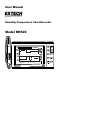
User Manual
Humidity-Temperature Chart Recorder
Model RH520
Introduction
Congratulations on your purchase of the Extech RH520 Temperature + Humidity Chart
Recorder. The RH520 measures and displays Temperature, Humidity, and Dew Point.
The remote (detachable) probe senses the ambient conditions while the LCD display
graphs and provides numerical representation of the readings. Programmable audiovisual alarms alert the user when ambient conditions reach alarm presets. The optional
alarm module permits automatic relay switching when alarm presets are reached.
The RH520 Internal Memory can store up to 49,152 measurements for later transfer to a
PC. Careful use of this instrument will provide years of reliable service.
Warranty
EXTECH INSTRUMENTS CORPORATION warrants this instrument to be free of defects
in parts and workmanship for one year from date of shipment (a six month limited warranty
applies to sensors and cables). If it should become necessary to return the instrument for
service during or beyond the warranty period, contact the Customer Service Department at
(781) 890-7440 ext. 210 for authorization or visit our website www.extech.com for contact
information. A Return Authorization (RA) number must be issued before any product is
returned to Extech. The sender is responsible for shipping charges, freight, insurance and
proper packaging to prevent damage in transit. This warranty does not apply to defects
resulting from action of the user such as misuse, improper wiring, operation outside of
specification, improper maintenance or repair, or unauthorized modification. Extech
specifically disclaims any implied warranties or merchantability or fitness for a specific
purpose and will not be liable for any direct, indirect, incidental or consequential damages.
Extech's total liability is limited to repair or replacement of the product. The warranty set
forth above is inclusive and no other warranty, whether written or oral, is expressed or
implied.
2
Model RH520 Version 2.7 7/05
Specifications
Display
Large, backlit graphical LCD
Temperature measurement range
-20.0 to 140.0 F (-28 to 60 C)
Humidity measurement range
10 to 95%
Dew point temperature
-20.0 to 140.0 F (-28 to 60 C)
Accuracy
o
o
o
o
o
o
±3.0% RH and 1.8 F (1 C) for temperature
Internal memory storage
49,152 complete reading sets
Sampling interval
Selectable recording rate: 0.1 to 199.9 minutes
Graph scaling
User selectable in 10 F, 5 C and 10% increments
Low battery indication
5-segment battery indicator
Power supply
Three (3) ‘AA’ batteries and AC adaptor (included)
Battery life
4 weeks typical, using alkaline batteries
Operating Temperature
CONTROL MODULE and DISPLAY:
o
o
o
o
0 to 120 F (0 to 50 C)
o
o
SENSOR: -20 to 140 F (-28 to 60 C)
Operating Humidity
CONTROL MODULE and DISPLAY:
90% RH max.
SENSOR: 95% RH max.
Dimensions
5.0 x 7.7 x 0.9" (127 x 196 x 23mm)
Weight
12.6oz (357g)
3
Model RH520 Version 2.7 7/05
RH520 Description
1.
2.
3.
4.
5.
6.
7.
Remote sensor
Sensor cable
LCD Display
Swivel keypad / table-top stand
PC interface jack
Universal alarm
module jack
AC adaptor jack
15
9
8
8.
9.
10.
11.
12.
13.
14.
15.
10 11
12
13 14
DATA RESET button (clears recorded measurement data and alarm history)
Temperature units select switch (C or F)
PROGRAMMING RESET button (clears programming changes but retains
measurement data and alarm history)
Display CONTRAST adjust
Sensor cable storage area
‘AA’ 1.5V batteries
Sensor cable run
Wall mount holes
4
Model RH520 Version 2.7 7/05
DISPLAY DESCRIPTION
1
2
9
10
9
3
4
3
11
9
5
12
6
7
8
1.
Temperature measurement graph
2.
Internal memory usage meter
3.
Vertical axis scale limits
4.
Cursor / Alarm indicators
5.
Push-button lock-out status indicator
6.
Time display
7.
Relative Humidity (RH) measurement graph
8.
Date display
9.
Function indicators
10. Numerical temperature reading display
11. Numerical RH reading display
12. Battery status indicator
5
Model RH520 Version 2.7 7/05
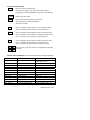
PUSH-BUTTON DESCRIPTION
VIEW
Return the LCD to the Standard View
Escape from any setting function without storing value changes
Scrolls highest and lowest (MAX/MIN) readings when in Standard View
ALARM
TIME
Display or Set alarm values
Display a reading stored at specific Time and Date
Set and Display the recording Sampling Rate
Set the Time and Date
SET
Used in combination with other buttons to set new parameter values
Stores new parameter values and returns to the Standard View
TEMP
Used in combination with other buttons to set the vertical graph range
Used in combination with other buttons to set temperature alarm values
Used in combination with the RH button to display Dew Point
RH
Used in combination with other buttons to set the vertical graph range
Used in combination with other buttons to set RH alarm values
Used in combination with the TEMP button to display Dew Point
Right, left, down, and up arrow buttons for scrolling data and navigating
the display
KEYPAD QUICK REFERENCE (ALSO SHOWN ON REAR OF THE RH520 HOUSING)
Key-press
VIEW
Function
Selects view mode
SET
ARROW KEYS
TIME
TEMP + RH
ALARM
SET + TEMP + ALARM
SET + RH + ALARM
TIME + VIEW
SET + TIME + VIEW
SET + TIME
SET + TEMP + UP
SET + RH + UP
Saves new settings
Scroll through selections
View reading at specific time/date
View Dew Point temp.
Step back through ALARM points
Enters Set TEMP Alarm mode
Enters Set RH Alarm mode
View Sample Rate
Enter Set Sample Rate mode
Enter Set Time/Date mode
Enter Set TEMP Vertical Scale mode
Enter Set RH Vertical Scale mode
6
Second / Alternate Keystrokes
VIEW modes: Normal, TEMPmax,
RHmax, TEMPmin, RHmin
VIEW to cancel, exit mode
Movers cursor through stored points
Arrow keys to select, VIEW to exit
VIEW to exit
ALARM selects next Alarm, VIEW to exit
ALARM selects HIGH/LOW, SET to save
ALARM selects HIGH/LOW, SET to save
VIEW to exit
SET to save, VIEW to exit
SET to save, VIEW to exit
TEMP selects upper/lower, SET to save
RH selects upper/lower, SET to save
Model RH520 Version 2.7 7/05
Getting Started
POWER
1. The RH520 runs on battery power or AC adaptor (4.5VDC 300mA). Battery power
consists of three (3) ‘AA’ batteries. See the Battery Replacement section of this manual
when changing/installing the batteries. Note: Batteries and adaptor are supplied.
2. Plug the AC adaptor in the AC adaptor jack shown in the Description section. The
batteries will act as battery back-up in the event of an AC power failure.
3. Once the batteries are installed or the adaptor properly connected, the RH520 will
begin displaying.
4. In the unlikely event that the AC power AND the battery back-up fails, the RH520 will
require a “Programming Reset” to reset the display. Press the RESET button located
inside the battery compartment. “Reset” clears all settings. Time, Date and the logging
interval need to be entered. The measurement data and alarm history, however, will
still be retained in the non-volatile memory.
5. The 5-segment battery life indicator allows the user to track the status of the battery.
When all 5-segments are dark, the battery is fully charged. Segments switch off as the
battery ages. When the battery indicator has only one segment left the batteries must
be replaced immediately.
NOTE: Always set the date and time immediately after batteries have been installed or
after the RESET button has been pressed.
MOUNTING THE RH520
The RH520 can be used in the following ways:
1. Placed on a table top where the swivel keypad is employed as the table stand
2. Wall mounted using the rear mounting holes
MEASUREMENT PROBE
The probe is attached to the meter with a 1 meter cable and can be used in two ways:
Stored in the RH520 probe cradle or simply held in hand
PUSH-BUTTON LOCK-OUT SECURITY FEATURE
The RH520 can be secured from tampering by having its push-buttons locked.
1. Press for approx. 1 second and release the UP, DOWN, LEFT, and SET arrow buttons
simultaneously to lock-out the push-buttons.
Note: The security lock out can only be performed from the main view screen. If a
scroll key or the time button was pressed prior to setting up the lock-out, the user must
scroll back to the main screen.
2. Press for approx. 1 second and release the UP, DOWN, LEFT, and SET arrow buttons
simultaneously to restore the operation of the push-buttons
7
Model RH520 Version 2.7 7/05
Programming the RH520
SETTING THE TIME AND DATE
1. From the Standard View, press the SET and TIME buttons simultaneously
2. The SET indicator will appear
3. Use the UP and DOWN arrow buttons to set the time
4. Use the LEFT and RIGHT arrow buttons to step through the minutes, hours,
AM/PM/24-Hour, day, month, and year parameters
If AM or PM is selected, the date format will be MONTH-DAY-YEAR
If 24-hour is selected, the date format will be DAY-MONTH-YEAR
5. Press SET at any time to store the new value and revert to the Standard View
6. Press VIEW at any time to return to the Standard View without storing any changes
CLEARING THE INTERNAL MEMORY
Press the RESET button (located inside the battery compartment) to clear the display and
measurement parameters (sample rate, vertical resolution), and to reset the display.
Press the DATA RESET button (located on the back of the unit) to clear all of the stored
readings, the MAX/MIN values, and the Alarm history.
o
o
SELECTING THE UNIT OF MEASURE FOR TEMPERATURE ( C/ F)
o
o
The C/ F switch, located inside the battery compartment, is used to select the unit of
measure for temperature displays
SETTING THE VERTICAL RESOLUTION FOR THE TEMPERATURE GRAPHIC DISPLAY
1. Press the SET, TEMP, and UP arrow buttons simultaneously
2. The upper temperature range indicator will flash and the SET icon will appear
o
3. Use the UP-DOWN buttons to change the upper temperature value (10 increments for
°F, 5° increments for °C).
4. Press the TEMP button and the lower temperature range indicator will flash
o
5. Use the UP-DOWN buttons to change the lower temperature value (10 increments for
°F, 5° increments for °C). Note that the upper and lower temperature values cannot
overlap and the upper value cannot be less than zero
6. Press the TEMP button to toggle upper and lower range values
7. Press the SET button at any time to store a value and return the instrument to the
Standard View
8. Press VIEW at any time to return to the Standard View
SETTING THE VERTICAL RESOLUTION FOR THE RH GRAPHIC DISPLAY
1. Press the SET, RH, and UP arrow buttons simultaneously
2. The upper RH range indicator will flash and the SET icon will appear
3. Use the UP-DOWN buttons to change the upper RH value in 10% increments
4. Press the RH button and the lower RH range indicator will flash
5. Use the UP-DOWN buttons to change the lower RH value in 10% increments
6. Note that the upper and lower RH values cannot overlap
7. Press the RH button to toggle upper and lower range values
8. Press the SET button at any time to store a value and return the instrument to the
Standard View
9. Press VIEW at any time to return to the Standard View
8
Model RH520 Version 2.7 7/05
SETTING THE RECORDING SAMPLE RATE
The Sampling Rate is the rate at which the RH520 automatically records measurements
1. Press the SET, VIEW, and TIME arrow buttons simultaneously from the Standard View
2. The current Sample Rate (in minutes) will appear in the numerical temperature display
area
3. The whole minutes area of the numeric display will flash
4. The MIN and the SET icons will switch on. All other TEMP and RH indicators and
numeric displays will switch off
5. The projected TIME and DAYS representing the moment the internal memory will be
full (based on the sample rate) is displayed in the TIME and DATE display areas.
6. Use the UP-DOWN arrow buttons to increment/decrement the rate. Use the LEFTRIGHT arrow buttons to step through the units of time
7. Sample rates can be set from 0.1 minutes up to 199.9 minutes
8. Press the SET button at any time to save changes and return to the Standard View
9. Press VIEW at any time to return to the Standard View without saving the changes
SETTING THE TEMPERATURE ALARM LIMITS
1. Press the SET, TEMP, and ALARM buttons simultaneously from the Standard View
2. The ALARM, SET, and MAX indicators will switch on. All of the RH indicators will
switch off
3. Use the UP-DOWN arrow buttons to increment/decrement the HIGH temperature
alarm limit. Use the LEFT-RIGHT arrow buttons to step through the decades
4. Press the ALARM button. The MIN (low alarm) indicator will switch on
5. Use the UP-DOWN arrow buttons to increment/decrement the LOW temperature alarm
limit. Use the LEFT-RIGHT arrow buttons to step through the decades
6. The HIGH and LOW alarm limits cannot overlap
7. Use the ALARM button to toggle between the HIGH and the LOW alarm limits
8. Press the SET button at any time to save changes and return to the Standard View
9. Press VIEW at any time to return to the Standard View without saving the changes
SETTING THE RH ALARM LIMITS
1. Press the SET, RH, and ALARM buttons simultaneously from the Standard View
2. The ALARM, SET, and MAX indicators will switch on. All of the TEMP indicators will
switch off
3. Use the UP-DOWN arrow buttons to increment/decrement the HIGH RH alarm limit.
Use the LEFT-RIGHT arrow buttons to step through the decades
4. Press the ALARM button. The MIN (low alarm) indicator will switch on
5. Use the UP-DOWN arrow buttons to increment/decrement the LOW RH alarm limit.
Use the LEFT-RIGHT arrow buttons to step through the decades
6. The HIGH and LOW alarm limits cannot overlap
7. Use the ALARM button to toggle between the HIGH and the LOW alarm limits
8. Press the SET button at any time to save changes and return to the Standard View
9. Press VIEW at any time to return to the Standard View without saving the changes
9
Model RH520 Version 2.7 7/05
Display Modes
STANDARD VIEW
The Standard View is the display state of the RH520 when it is turned on. Refer to the
diagram in the display description section of this manual for a representation of the
Standard View. To reach the Standard View at any time, press the VIEW button. Note that
the display automatically reverts to the Standard View five (5) minutes after the last button
press.
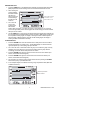
CURSOR
The CURSOR location is indicated by a small diamond located between the two graphs.
See diagram. There is one diamond for each horizontal pixel in the graph (64 positions).
The date, time, and measurements for the data point selected by the cursor are shown in
the Time/Date and numerical measurement display fields.
Each press of the RIGHT ARROW button will move the cursor to the right. When the
cursor reaches the right side limit, the graph will move to the left. Holding the button
down will speed the scrolling rate. When the cursor reaches the oldest (last) reading, it
will stop.
Each press of the LEFT ARROW button will move the cursor to the left. When the
cursor reaches the left side limit, the graph will move to the right. Holding the button
down will speed the scrolling rate. When the cursor reaches the newest (latest)
reading, it will stop.
Each press of the UP ARROW button will shift the graph to the next set of 64 values; to
the left of the ones currently displayed (the cursor will not move).
Each press of the DOWN ARROW button will shift the graph to the next set of 64
values; to the right of the one displayed (the cursor will not move).
Cursor
Position
Measurements
at current
cursor position
Time and Date of readings
at current cursor position
10
Model RH520 Version 2.7 7/05
MAX-MIN DISPLAYS
1. Press the VIEW button in the Standard View to display the highest (MAX) and lowest
(MIN) temperature and RH readings from all of the stored measurement records.
2. When viewing the
highest readings,
the MAX indicator
will switch on.
When viewing the
lowest readings,
the MIN icon will
switch on.
MAX or MIN indicator
is ON when in the
MAX or MIN mode
3. The cursor will
move to the
location of the
MIN or MAX
reading within the graph. If not within the graph currently displayed, the cursor will
move to the right-most position and the graph will shift accordingly so that the relevant
data point can be viewed.
4. Use the VIEW button to step through the highest and lowest temperature readings and
then the highest and lowest RH readings. When the MAX or MIN indicator is ON under
the temperature reading digits, the display is showing the MAX or MIN temperature.
When the MAX or MIN indicator is ON under the RH reading digits, the display is
showing the MAX or MIN relative humidity.
ALARM DISPLAYS
1. Press the ALARM button from the Standard View to analyze the most recent alarm
activity (temperature or humidity), if any. The ALARM display icon and the relevant
upper (temperature) or lower (RH) graph pixel will flash.
2. The cursor will move to the location within the graph. If not within the graph currently
displayed, the cursor will move to the right-most position and the graph will shift
accordingly so that the relevant data point can be viewed.
3. Press the ALARM button again to view the second most recent set of Alarms (if no
alarms, the Standard View will appear)
4. Press the ALARM button again to view the third most recent set of Alarms (if no
alarms, the Standard View will appear)
5. This procedure can continue until no further alarms exist and pressing the ALARM
button will only bring up the Standard View
6. In the example diagram, the RH520 is showing a high temperature alarm (MAX and
ALARM indicators on).
MAX Temperature
Alarm Mode
11
Model RH520 Version 2.7 7/05
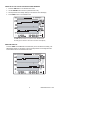
USING THE CLOCK TO SORT THROUGH STORED READINGS
1. Press the TIME button in the Standard View mode
2. Use the ARROW buttons to select a particular time of day.
3. The temperature and humidity readings for the selected Time will display.
4. Press VIEW to return to the Standard View.
Use the arrow buttons to scroll to the desired time.
Readings recorded at the selected time will display
DEW POINT DISPLAY
Press the TEMP and the RH buttons simultaneously to view the Dew Point reading. The
DEW POINT display icon will switch on above the temperature. See the diagram below.
Press VIEW to return to the standard view mode.
12
Model RH520 Version 2.7 7/05
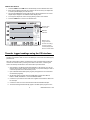
SAMPLE RATE DISPLAY
1. Press the VIEW and the TIME buttons simultaneously from the Standard View mode
2. Both numerical displays will switch off so that the LCD can show only the sample rate
in minutes (the MIN display icon will switch on)
3. The projected TIME-DAYS that the internal memory will be full (based on the current
sample rate) is displayed in the TIME and DATE display areas
4. To change the sample rate, refer to the programming section of this manual.
5. Press the VIEW button to return to the Standard View
Sample rate
in minutes
MINUTES
indicator
12 Hrs 38 minutes 10 months 28 days 3 years
Displays how
long it will take
to finish recording
in hours:minutes
months/days/years.
Not the actual date.
Transfer logged readings using the PC Interface
The DATA jack on the right side of the meter is used to connect the RH520 to a PC. The
supplied communication cable connects to the DATA jack on the meter and a serial (9-pin)
jack on the PC.
When the communication cable is connected to the meter, the meter begins sending the
contents of its internal memory out through the cable. For this reason, connecting the
meter is the last step as described in the communication procedure below:
1. Store readings in the RH520 as described elsewhere in this manual. Up to 49,152
readings can be stored. However, for the first test, try only a few readings in order to
confirm the operation of the data transfer process.
2. Open a Windows-based data capture program (see Appendix in rear of manual for
recommended programs).
3. Set the data capture program options to BAUD RATE: 57,600; DATA BITS: 8;
PARITY: NONE; STOP BITS: 1; and use XON/XOFF MODE
4. Connect the 9-pin serial connector side of the supplied communications cable to the
PC serial port
5. Connect the other end of the communications cable to the RH520 data jack.
6. The stored readings will automatically appear in the data capture program screen.
13
Model RH520 Version 2.7 7/05
Alarm Conditions and the Alarm History
When in Standard View mode:
If the ALARM display icon is flashing – an Alarm condition currently exists.
If the ALARM display icon is ON steady – there are past Alarms to view in the Alarm
history. Use the ALARM button to view the Alarm history as described elsewhere in this
manual.
If an Alarm is tripped, press the ALARM button to silence it.
Press and hold the SET button for 2 seconds to clear an alarm through the external
relay module.
When in Alarm View or Time View mode:
If the ALARM display icon is flashing – the cursor is currently on an Alarm condition.
If the ALARM display icon is ON steady – there are past Alarms to view in the Alarm
history. Use the cursors or the ALARM button to view the Alarm history as described
elsewhere in this manual.
Note that the Alarm display icon and the external alarm relay module can be controlled
separately as indicated in the statements above.
Factory Default Settings
Default LCD mode: Standard View
o
Temperature Graph Vertical Resolution: 0 to 100 F
RH Graph Vertical Resolution: 0 to 100%
TEMP and RH Alarm Limits: 0 (low) and 100 (high)
Sample Rate: One (1) reading stored per minute
Battery Replacement
The 5-segment battery life indicator allows the user to track the status of the battery. When
all 5-segments are dark, the battery is fully charged. Segments switch off as the battery
ages. When the battery indicator has only one segment left the batteries must be replaced
immediately.
1. Open the battery compartment on the rear of the instrument
2. Remove the old batteries and replace with three (3) heavy duty alkaline ‘AA’
batteries observing polarity
3. Replace the battery compartment cover securely
4. The RH520 will require a “Programming Reset” to reset the display. Press the
RESET button located inside the battery compartment. “Reset” clears all settings.
Time, Date and the logging interval need to be entered. The measurement data and
alarm history, however, will still be retained in the non-volatile memory.
Optional Alarm Relay Module
The alarm output jack, located on the swivel push-button stand, drives the optional Remote
Alarm Relay Module (cable and relay). The relay module can be used to power external
warning or switching devices when programmed alarm limits are reached. Refer to the
manual supplied with the optional module for connection information.
14
Model RH520 Version 2.7 7/05
Calibration and Repair Services
Extech offers repair and calibration services for the products we sell. Extech also
provides NIST certification for most products. Call the Customer Service Department for
information on calibration services available for this product. Extech recommends that
annual calibrations be performed to verify meter performance and accuracy.
Support line (781) 890-7440
Technical support: Extension 200; E-mail: [email protected]
Repair & Returns: Extension 210; E-mail: [email protected]
Product specifications subject to change without notice
For the latest version of this User’s Guide, Software updates, and other
up-to-the-minute product information, visit our website: www.extech.com
Copyright © 2005 Extech Instruments Corporation
All rights reserved including the right of reproduction in whole or in part in any form
Software
Software operational instructions are located on the software disc.
15
Model RH520 Version 2.7 7/05