1
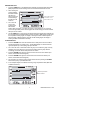
SETTING THE RECORDING SAMPLE RATE
The Sampling Rate is the rate at which the RH520 automatically records measurements
1. Press the SET, VIEW, and TIME arrow buttons simultaneously from the Standard View
2. The current Sample Rate (in minutes) will appear in the numerical temperature display
area
3. The whole minutes area of the numeric display will flash
4. The MIN and the SET icons will switch on. All other TEMP and RH indicators and
numeric displays will switch off
5. The projected TIME and DAYS representing the moment the internal memory will be
full (based on the sample rate) is displayed in the TIME and DATE display areas.
6. Use the UP-DOWN arrow buttons to increment/decrement the rate. Use the LEFTRIGHT arrow buttons to step through the units of time
7. Sample rates can be set from 0.1 minutes up to 199.9 minutes
8. Press the SET button at any time to save changes and return to the Standard View
9. Press VIEW at any time to return to the Standard View without saving the changes
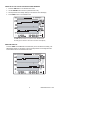
SETTING THE TEMPERATURE ALARM LIMITS
1. Press the SET, TEMP, and ALARM buttons simultaneously from the Standard View
2. The ALARM, SET, and MAX indicators will switch on. All of the RH indicators will
switch off
3. Use the UP-DOWN arrow buttons to increment/decrement the HIGH temperature
alarm limit. Use the LEFT-RIGHT arrow buttons to step through the decades
4. Press the ALARM button. The MIN (low alarm) indicator will switch on
5. Use the UP-DOWN arrow buttons to increment/decrement the LOW temperature alarm
limit. Use the LEFT-RIGHT arrow buttons to step through the decades
6. The HIGH and LOW alarm limits cannot overlap
7. Use the ALARM button to toggle between the HIGH and the LOW alarm limits
8. Press the SET button at any time to save changes and return to the Standard View
9. Press VIEW at any time to return to the Standard View without saving the changes
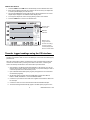
SETTING THE RH ALARM LIMITS
1. Press the SET, RH, and ALARM buttons simultaneously from the Standard View
2. The ALARM, SET, and MAX indicators will switch on. All of the TEMP indicators will
switch off
3. Use the UP-DOWN arrow buttons to increment/decrement the HIGH RH alarm limit.
Use the LEFT-RIGHT arrow buttons to step through the decades
4. Press the ALARM button. The MIN (low alarm) indicator will switch on
5. Use the UP-DOWN arrow buttons to increment/decrement the LOW RH alarm limit.
Use the LEFT-RIGHT arrow buttons to step through the decades
6. The HIGH and LOW alarm limits cannot overlap
7. Use the ALARM button to toggle between the HIGH and the LOW alarm limits
8. Press the SET button at any time to save changes and return to the Standard View
9. Press VIEW at any time to return to the Standard View without saving the changes
9
Model RH520 Version 2.7 7/05