1
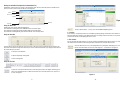
When the above dialog box appears, you can input flash playing speed (Flash Frame), then click the "OK"
icon to confirm its value and the current playing flash with extension.swf will be converted into file with
extension.scn. The converting progress rate will show on the screen for you.
1
Converting Progress Rate
4. DMX Record
In this function, allows to record external DMX signal from DMX generator or controller as a new scene for
application.
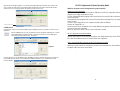
Click the "DMX Record" icon, the new dialog box(screen) will appear, indicating you to record
external DMX signal from DMX controller to your AR-32 system as a scene (DMX signal
converting to file with extension.scn). See figure-3.
1
AR-32 Configuration Software Operating Guide
USB Drive Program & AR-32 Configuration Program Installation
USB Drive Program Installation
If you first use the system, you must install the USB Driver and AR-32 Configuration Software
program as the simply following these steps;
1.Before installing USB Drive program, please ensure all tension and USB cable connections are
connected properly.
2.Download the main program folder, copy and save them in the pointed path of your computer
which you wish.
3.Connect your X-Trigger-8R to your computer with USB cable via USB port.
4.Power the X-Trigger-8R on.
5.And a promote screen will indicate you to install USB Driver program by following the installation
process till it has been completed.
NOTE: You must select "Driver" directory in the main folder to install.
AR-32 Configuration Program Installation
Open the main folder file, and select AR-32 program, then simple double-click on the "SETUP.EXE"
file, follow the installation process to install till it has been completed.
How to uninstall USB Drive program and AR-32 Configuration software
Figure-3
USB Drive program and AR-32 Configuration software can be uninstalled via "Add or Remove
Programs" utility found in the Control Panel.
Click the "Record" icon to start DMX recoding, and DMX recording is valid until pressing the "Stop Record"
to stop DMX recording. And the screen will show the DMX record time for you. And at this time, other
functions disable.
1
-9-
-3-