1
9 USING THE TEMPERATURE PROBES
9.1 Caution
Each time you connect a temperature probe to the unit, the probe optical connector should be cleaned
beforehand. Otherwise, particles of grease or dirt may obstruct the device internal connector and affect the
measurements by completely blocking the signal or by generating too much attenuation when using a long
fiber length.
Never use a cloth other than the type recommended for fiber optic cleaning. Dampening the cloth with pure
isopropyl alcohol ensures good cleaning.
Occasionally, clean the inside of the bulkhead connector (attached to the thermometer) with a wipe or cotton
swab dipped in alcohol (2.5 mm mini foam swabs work best).
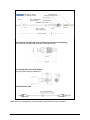
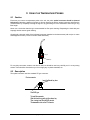
Locking nut
Ferrule key
Ferrule
For very dirty connectors, acetone can also be used, but should be used very carefully, as it is a very strong
solvent. Care should be exercised so you do not apply any on plastic materials, etc.
9.2 Description
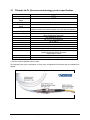
The optical connector used is a standard ST type connector.
Device connector
Insert the Ferrule key here
Pins BNC type
To install the connector,
Slide the ferrule key gently into the above key.
Then, turning, insert the two BNC pins into
The appropriate slots on the ST connector
Document no. G1041r03
Copyright Neoptix Canada LP
38