1
RC4 USER MANUAL – TABLE OF CONTENTS
Disclaimers ...................................................................................................................................................................... 2
Not For Use Where Human Safety May Be At Risk .................................................................................................... 2
Not For Control of Pyrotechnical Devices.................................................................................................................... 2
Product Safety .............................................................................................................................................................. 2
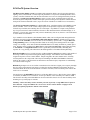
RC4 FlexTX System Overview ...................................................................................................................................... 4
Getting Started – Setting Up RC4 Components ........................................................................................................... 5
Items You Do NOT Need to Get Started ...................................................................................................................... 5
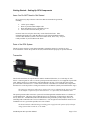
Parts of the RC4 System ............................................................................................................................................... 5
Transmitter ................................................................................................................................................................... 5
Receiver/Dimmers ........................................................................................................................................................ 6
FlexTX Transmitter Operation ..................................................................................................................................... 7
The FlexTX Transmitter User Interface – Overview .................................................................................................... 7
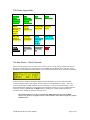
TXD-Series Keypad Map ............................................................................................................................................. 8
The Main Screen – Watch Channels............................................................................................................................. 8
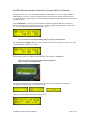
Set DMX Start – Block of Contiguous Channels ......................................................................................................... 9
Edit Individual DMX and CV Channel Assignments ................................................................................................. 10
Save DMX Setup ........................................................................................................................................................ 11
Recall DMX Setup ..................................................................................................................................................... 11
Transmitter Channel Test Functions ........................................................................................................................... 12
RX4 Dimmer Settings (Done at Transmitter) ............................................................................................................. 14
Select Receiver RX Number / Display Receiver Status (Battery Voltage) ................................................................. 14
Set RX Channel Assignments..................................................................................................................................... 15
Set Other RX Parameters (Low Level, Dimmer Curve, RVD, Digital Persistence) ................................................... 16
RX Setup Copy / RX Setup Paste ............................................................................................................................... 20
Send RX Config ......................................................................................................................................................... 20
RX4 Receiver Operation .............................................................................................................................................. 21
RX4 Receiver Buttons and Indicators ........................................................................................................................ 21
Changing the RX Number .......................................................................................................................................... 22
Default Settings .......................................................................................................................................................... 23
Dimmer Power Wiring and Fusing ............................................................................................................................. 24
RX4 Receiver Power Connection Diagram ................................................................................................................ 24
RX4-HO High Output Receivers ................................................................................................................................ 27
RX4-MINI Receivers ................................................................................................................................................. 29
RX4-STANDARD and RC4-MINI Typical Wiring Diagram .................................................................................... 31
RX4-STANDARD / RX4-HO Typical High-Power Wiring Diagram........................................................................ 32
Receiver Load Testing – Receiver Test Buttons ......................................................................................................... 33
Receiver Battery Voltage Indication........................................................................................................................... 33
Radio Settings................................................................................................................................................................ 34
Set System ID ............................................................................................................................................................. 34
Set System Baud Rate ................................................................................................................................................ 35
Additional System Parameters.................................................................................................................................... 35
Setting the System ID ................................................................................................................................................. 35
Using Other Channels................................................................................................................................................. 36
Complete LAWNII Configurations for the RC4 System ............................................................................................ 36
RX4-MINI Lawn-II RF Module Setup ....................................................................................................................... 37
A General Discussion of Radio Reliability .................................................................................................................. 38
Troubleshooting ............................................................................................................................................................ 39
Simple Solutions to Common Problems ..................................................................................................................... 39
Reset and Initialize to Factory Defaults ...................................................................................................................... 41
RC4 Specifications ........................................................................................................................................................ 42
Soundsculpture RC4 Operation Manual
Page 3 of 43