1
USERS MANUAL
WaveSculptor PC Interface
TRI50.026 ver 1
28 February, 2007
1
PC INTERFACE FUNCTIONALITY
The WaveSculptor interface software is provided to allow WaveSculptor owners to
configure and test their motor controller(s).
2
OBSERVATION
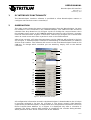
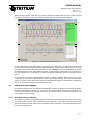
This main screen shows the status and measurements from the WaveSculptor. On start
the software is not connected to the CANUSB adapter. The CAN baud rate should be
selected from drop down box (a) of Figure 1 prior to clicking the connect button. Once
the software opens a port to the CANUSB adapter the text box (ah) of Figure 1 changes
from red “Disconnected” to green “Connected”. Text box (ai) of Figure 1 is a counter that
starts at 0 and counts each time a packet is seen on the CAN network.
After a few seconds, all Tritium WaveSculptors on the CAN bus will be listed in list box
(b) of Figure 1. A WaveSculptor controller is identified by its CAN identifier (or address)
and its serial number. The software will connect to the first WaveSculptor found on the
CAN bus. To change which controller you are watching, simply click on the desired
controller.
(ag)
(ah)
(ai)
(a)
(b)
(c)
(d)
(e)
(f)
(g)
(h)
(i)
(q)
(j)
(l)
(n)
(p)
(r)
(s)
(t)
(u)
(v)
(w)
(x)
(y)
(k)
(m)
(o)
(aa)
(z)
(ab)
(ac)
(ae)
(ad)
(af)
Figure 1 - Main observation screen.
All configuration information stored in the WaveSculptor is downloaded to the PC when
it becomes selected in list box (b) of Figure 1. The driver controls CAN identifier
(expected by the WaveSculptor) is contained in this configuration information, hence the
Driver Controls Base Address (c) of Figure 1 is displayed only after a controller is
selected. The driver controls base address is needed by the controls dialog window,
which pretends to be a driver controls unit at this address.
1 of 15