1
21
Sample Validation Recommendations
SAN Fabric Validation Checklist
1. Fabric Stability Validation
2. High Availability ISL Failure Simulation
3. High Availability Switch Failure Simulation
Fabric Stability Validation
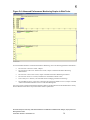
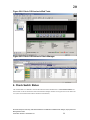
For validating the stability of the fabric, run the host application software for a period of time. If available, use
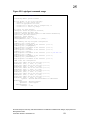
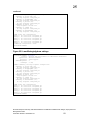
simulation tools provided by the software application vendor. Run the sample script above for approximately72 hours
to check for I/O stability and observe for any problems. Switch event logs should be setup to capture any problems in
the fabric. In addition, a host syslogd can be setup to capture event data. No problems should be observed. If there are,
troubleshoot them at this time.
Check the switch event logs for any issues with the fabric while validating its
Guideline stability. Setup the syslogd system log on a host and configure to capture
fabric event messages.
High Availability ISL Failure Simulation
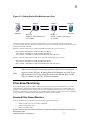
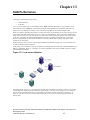
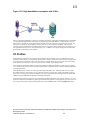
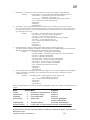
Take a case where all hosts are attached to one edge switch. From this switch, one trunk with two ISLs is attached to a
core switch to form a trunk group with 4 Gbit/sec of available bandwidth. This trunk group contains an ISL trunk
master and a second ISL as a trunk member. A maximum of 400 MB/sec should be generated across them to provide
maximum ISL stressing. These tests simulate failures on an edge and a core switch. Hot code load should also be tested
before going into production.
Case 1 Member ISL Cable Pull
With I/O, remove the non-trunk master ISL for ten seconds and then replace it. Repeat this test three times. I/O should
continue without any effect. Some frames may be “lost” when the cable is pulled. If this is the case, the host will log
messages indicating that the I/O is being retried.
Case 2 Trunk Master ISL Cable Pull
With I/O, remove the Trunk master ISL for ten seconds and then replace it. Repeat this test three times. I/O traffic may
be paused briefly on the second fabric, however the I/O should not timeout on the host.
High Availability Switch Failure Simulation
Case 1 Edge Switch Failure
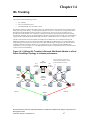
Initiate a fastboot on a switch module with no I/O to simulate edge switch failure. Repeat this test three times in
succession. The switch should fully recover after the fastboot and the fabric should rebuild. Other devices not
associated with the rebooted switch should continue to perform I/O. Verify this with the fabricshow command.
Case 2 Core Switch Failure
Initiate a fastboot on a core switch. Repeat this test three times in succession. The switch should full recovery after
the fastboot and the fabric should rebuild. Verify this with the fabricshow command.
Case 3 CP Failover (SilkWorm 12000/24000)
Initiate an hafailover on an active CP with I/O running in the fabric. Full recovery without an I/O pause should
occur in all cases.
Brocade Enterprise and Entry SAN Switch Modules for IBM eServer BladeCenter Design, Deployment and
Management Guide
Publication Number: 53-0000561-01
110