1
20
Note
Follow the guidance of your SAN support vendor for the configuration of this
setting.
Viewing and changing this parameter.
1.
Enter the iodShow command to view the current IOD setting.
One of the following messages appears:
•
IOD is set. (Enables the in-order delivery (IOD) option. Enforces in-order delivery of frames during a fabric
topology change.)
•
IOD is not set. (Turns off the in-order delivery (IOD) option. This command may cause out-of-order delivery
of frames during fabric topology changes.)
2.
Enter the iodSet command to enable In-Order Delivery.
3.
Enter the iodReset command to disable In-Order Delivery.
Example
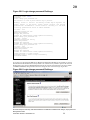
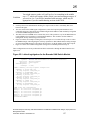
switch:admin> iodshow
IOD is set
switch:admin> configshow "route.d"
route.delayReroute:1
switch:admin> iodreset
Committing configuration...done.
switch:admin> iodshow
IOD is not set
switch:admin> configshow "route.d"
route.delayReroute:0
Brocade Enterprise and Entry SAN Switch Modules for IBM eServer BladeCenter Design, Deployment and
Management Guide
Publication Number: 53-0000561-01
107