1
Chapter 2: Windows Installation and Licensing
Installation and Licensing Manual
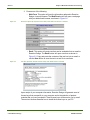
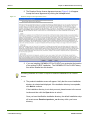
Finally, in the Path to License field (Figure 2-8), enter the port@host location of the
license server. By default, the Reaction Design license server uses 28850 as the port.
So, enter 28850@<servername>, where <servername> is the name of the license
server machine, and click OK.
Figure 2-8
License Tool: Path to License.
Now the client will be able to check out a license through the Server daemon.
Occasionally the port@host or license file location set in the Manage Reaction
Design License tool does not get updated into the computer's environment until after
one of these situations:
3 The My Computer > Properties > Advanced > Environment Variables tab
is opened and closed. (This triggers a refresh of the environment variable
settings.)
3 The computer is rebooted (and all environment settings are refreshed).
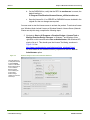
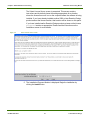
In these cases, the FLEXlm License Finder dialog message will appear (but is
minimized) and you will need to specify the same port@host or license file path that
you just specified in the Manage Reaction Design License tool. We have made every
attempt to prevent this problem, but you may still encounter it. You will only need to
provide this information to the FLEXlm License Finder once.
RD-INST-1008-UG-1
23
© 2010 Reaction Design