1
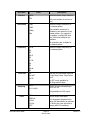
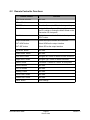
5.2 Remote Controller Functions
Remote Control
Function
Input format selection
Not used
“IR Lock” button
Not used
“RESET” button
Reset the Generation 3D to the factory settings
“Menu” button
Invoke the Menu System. Pressing this button on
the IR is similar to turning the Menu Wheel on the
Generation 3D front panel
“Exit” button
Go back one menu level. Similar to front panel
"ESC" button
Output format area
Select the output interface and resolution
“OUT-HDM” button
Select HDMI as the output interface
“OUT-SDI” button
Select SDI as the output interface
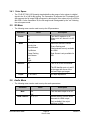
“Up Arrow” button
Not used
“Down Arrow” button
Not used
“Left Arrow” button
Navigate left. Similar to Wheel counter clockwise
“Right Arrow” button
Navigate right. Similar to Wheel clockwise
“Select” button
"Ok/Select" is similar to "Select" on front panel
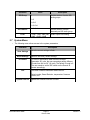
“InRes” buttons
Not used
“InFPS” buttons
Not used
“Scaling” button
Not used
“De-Int Filter” button
Not used
“Status OSD” button
Not used
“Save” button
Save settings
G3D.OM.002067.DRM
Page 21
Doremi Labs
Version 1.3