1
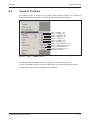
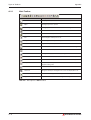
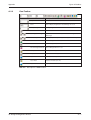
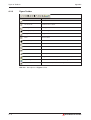
MITSUBISHI ELECTRIC
GT Designer2
Grafic Software
for GOT1000 Series
Beginner's Manual
Art. No.: 194213
16 01 2007
Version A
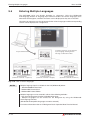
MITSUBISHI ELECTRIC
INDUSTRIAL AUTOMATION
About this Manual
The texts, illustrations, diagrams and examples in this manual are only
intended as aids to help explain the functioning, operation, use and
programming of the configuration system for the GOT1000 serie
MELSOFT GT Designer2 Version2.
Separate manuals are available for the programmable logic controllers
(PLCs) and HMI devices of the different MELSEC series of
MITSUBISHI ELECTRIC.
This manual focuses on users with experience in dealing with automation
and communication networks.
For using and usage of this software only the user his own is
responsible.
If you have any questions regarding the installation and operation of the
software described in this manual, please do not hesitate to contact your
sales office or one of your Mitsubishi distribution partners.
You can also obtain information and answers to frequently asked questions
from our Mitsubishi website under
www.mitsubishi-automation.com.
The GT Designer2 software is supplied under a legal license
agreement and may only be used and copied subject to the terms of this
License Agreement.
No part of this manual may be reproduced, copied, stored in any kind of
information retrieval system or distributed without the prior express written
consent of MITSUBISHI ELECTRIC.
MITSUBISHI ELECTRIC reserves the right to change the specifications of
its products and/or the contents of this manual at any time and without
prior notice.
© January 2007
Beginner's Manual
GT Designer2 Version2
Art. No.: 194213
Version
Changes / Additions / Corrections
A
First issue as extractions of the following manual:
GT Designer2 Version2 Basic Operation/Data Transfer Manual, Art.-No. 166738
01/2007 pdp-ow
Typographic Conventions
Use of notes
Notes containing important information are clearly identified as follows:
NOTE
Note text
Use of examples
Examples containing important information are clearly identified as follows:
Example
Example text
쑶
Numbering in figures and illustrations
Reference numbers in figures and illustrations are shown with white numbers in a black
circle and the corresponding explanations shown beneath the illustrations are identified with
the same numbers, like this:
1 2 3 4
Procedures
In some cases the setup, operation, maintenance and other instructions are explained with
numbered procedures. The individual steps of these procedures are numbered in ascending
order with black numbers in a white circle, and they must be performed in the exact order
shown:
햲 Text
햳 Text
햴 Text
Footnotes in tables
Footnote characters in tables are printed in superscript and the corresponding footnotes
shown beneath the table are identified by the same characters, also in superscript.
If a table contains more than one footnote, they are all listed below the table and numbered in
ascending order with black numbers in a white circle, like this:
Text
Text
Text
Character formatting and orientation aids
Menu names, menu commands, submenu commands, and dialogue box options are printed in
boldface type. Examples: The menu item New in the menu Project or the options PLC interface and Computer Link in the dialogue box Transfer-Setup.
Please keep this manual in a place where it is always available for the users.
Contents
1
Introduction
1.1
Overview Software Package . . . . . . . . . . . . . . . . . . . . . . . . . . . . . . . . . . . . . . . .1 - 2
1.1.1
Copyright . . . . . . . . . . . . . . . . . . . . . . . . . . . . . . . . . . . . . . . . . . . . . . . .1 - 2
1.2
Related Manuals . . . . . . . . . . . . . . . . . . . . . . . . . . . . . . . . . . . . . . . . . . . . . . . . .1 - 3
2
Installation
2.1
System Requirements . . . . . . . . . . . . . . . . . . . . . . . . . . . . . . . . . . . . . . . . . . . . .2 - 1
2.2
2.3
2.4
2.1.1
Minimum Hardware Requirements . . . . . . . . . . . . . . . . . . . . . . . . . . . . 2 - 1
2.1.2
Software Requirements. . . . . . . . . . . . . . . . . . . . . . . . . . . . . . . . . . . . .2 - 1
System Configuration . . . . . . . . . . . . . . . . . . . . . . . . . . . . . . . . . . . . . . . . . . . . .2 - 2
2.2.1
Overview . . . . . . . . . . . . . . . . . . . . . . . . . . . . . . . . . . . . . . . . . . . . . . . .2 - 2
2.2.2
Permissible Cables . . . . . . . . . . . . . . . . . . . . . . . . . . . . . . . . . . . . . . . .2 - 2
Software Installation . . . . . . . . . . . . . . . . . . . . . . . . . . . . . . . . . . . . . . . . . . . . . .2 - 3
2.3.1
Starting the Menu Screen . . . . . . . . . . . . . . . . . . . . . . . . . . . . . . . . . . .2 - 3
2.3.2
Installing the Software Programs . . . . . . . . . . . . . . . . . . . . . . . . . . . . . 2 - 3
Installing the USB Driver . . . . . . . . . . . . . . . . . . . . . . . . . . . . . . . . . . . . . . . . . . .2 - 6
2.4.1
On Windows약 2000 Professional . . . . . . . . . . . . . . . . . . . . . . . . . . . . . 2 - 6
2.4.2
On Windows약 XP Professional or Windows약 XP Home Edition . . . . . 2 - 9
3
Creating the Project Data
3.1
Setting before Screen Creation . . . . . . . . . . . . . . . . . . . . . . . . . . . . . . . . . . . . . .3 - 1
3.2
Creating Screens . . . . . . . . . . . . . . . . . . . . . . . . . . . . . . . . . . . . . . . . . . . . . . . . .3 - 4
3.3
3.4
3.2.1
Creating the Second Screen . . . . . . . . . . . . . . . . . . . . . . . . . . . . . . . . . 3 - 4
3.2.2
Setting the Screen Switching Device . . . . . . . . . . . . . . . . . . . . . . . . . . 3 - 5
3.2.3
How to Switch Between the Created Screens . . . . . . . . . . . . . . . . . . . 3 - 7
Figure Drawing and Text Input. . . . . . . . . . . . . . . . . . . . . . . . . . . . . . . . . . . . . . .3 - 8
3.3.1
Frame Line Drawing Method . . . . . . . . . . . . . . . . . . . . . . . . . . . . . . . . . 3 - 9
3.3.2
Text Input Method . . . . . . . . . . . . . . . . . . . . . . . . . . . . . . . . . . . . . . . .3 - 10
Setting the Object Function . . . . . . . . . . . . . . . . . . . . . . . . . . . . . . . . . . . . . . . .3 - 11
3.4.1
Numerical Display/Numerical Input Setting Method . . . . . . . . . . . . . . 3 - 12
3.4.2
Lamp Setting Method (Bit Lamp) . . . . . . . . . . . . . . . . . . . . . . . . . . . . 3 - 15
3.4.3
Switch (Bit Switch) Setting Method . . . . . . . . . . . . . . . . . . . . . . . . . . . 3 - 18
3.4.4
Switch (Go To Screen Switch) Setting Method . . . . . . . . . . . . . . . . . . 3 - 21
3.4.5
Alarm List (System Alarm) Setting Method. . . . . . . . . . . . . . . . . . . . . 3 - 25
3.4.6
Alarm List (User Alarm) Setting Method . . . . . . . . . . . . . . . . . . . . . . . 3 - 26
GT Designer2 Beginner's Manual
IX
Contents
3.5
Saving the Created Project Data . . . . . . . . . . . . . . . . . . . . . . . . . . . . . . . . . . . .3 - 30
3.6
Previewing the Created Project Data . . . . . . . . . . . . . . . . . . . . . . . . . . . . . . . . 3 - 30
3.7
Transferring Project Data from PC to GOT . . . . . . . . . . . . . . . . . . . . . . . . . . . . 3 - 31
3.8
Connecting the PC and GOT . . . . . . . . . . . . . . . . . . . . . . . . . . . . . . . 3 - 31
3.7.2
Installing the Standard monitor OS and Communication driver . . . . . 3 - 31
3.7.3
Downloading the Project Data. . . . . . . . . . . . . . . . . . . . . . . . . . . . . . . 3 - 33
Connecting with the PLC CPU . . . . . . . . . . . . . . . . . . . . . . . . . . . . . . . . . . . . .3 - 34
3.8.1
Connecting to the PLC CPU . . . . . . . . . . . . . . . . . . . . . . . . . . . . . . . . 3 - 34
3.8.2
Operation Image on GOT . . . . . . . . . . . . . . . . . . . . . . . . . . . . . . . . . . 3 - 35
3.8.3
Uploading the Project Data . . . . . . . . . . . . . . . . . . . . . . . . . . . . . . . . . 3 - 36
4
Configuration of Working Areas
4.1
Screen Configuration and Various Tools . . . . . . . . . . . . . . . . . . . . . . . . . . . . . . . 4 - 1
4.2
Workspace Type . . . . . . . . . . . . . . . . . . . . . . . . . . . . . . . . . . . . . . . . . . . . . . . . .4 - 2
4.3
X
3.7.1
4.2.1
Project Tab . . . . . . . . . . . . . . . . . . . . . . . . . . . . . . . . . . . . . . . . . . . . . .4 - 2
4.2.2
Category Tab . . . . . . . . . . . . . . . . . . . . . . . . . . . . . . . . . . . . . . . . . . . . .4 - 3
4.2.3
Library Tab. . . . . . . . . . . . . . . . . . . . . . . . . . . . . . . . . . . . . . . . . . . . . . .4 - 3
Settings for Working with GT Designer2 . . . . . . . . . . . . . . . . . . . . . . . . . . . . . . . 4 - 4
4.3.1
Menu Configuration . . . . . . . . . . . . . . . . . . . . . . . . . . . . . . . . . . . . . . . .4 - 4
4.3.2
Types of Toolbars . . . . . . . . . . . . . . . . . . . . . . . . . . . . . . . . . . . . . . . . .4 - 4
4.3.3
Adding or Deleting Toolbars/Icons . . . . . . . . . . . . . . . . . . . . . . . . . . . . 4 - 4
4.3.4
Settings for Drawing Screens . . . . . . . . . . . . . . . . . . . . . . . . . . . . . . . . 4 - 5
5
Screen Configuration
5.1
Base Screen and Window Screen Types . . . . . . . . . . . . . . . . . . . . . . . . . . . . . . 5 - 1
5.2
Screen Laying . . . . . . . . . . . . . . . . . . . . . . . . . . . . . . . . . . . . . . . . . . . . . . . . . . .5 - 2
5.3
Object Placement Area and Display Area . . . . . . . . . . . . . . . . . . . . . . . . . . . . . . 5 - 3
5.4
Basic Operations for Object Placement. . . . . . . . . . . . . . . . . . . . . . . . . . . . . . . . 5 - 5
5.4.1
Placing Figures and Objects . . . . . . . . . . . . . . . . . . . . . . . . . . . . . . . . . 5 - 5
5.4.2
Figure Drawing/Text Input . . . . . . . . . . . . . . . . . . . . . . . . . . . . . . . . . . .5 - 6
5.4.3
Object Function Setting . . . . . . . . . . . . . . . . . . . . . . . . . . . . . . . . . . . . .5 - 8
5.4.4
Workspace Operations . . . . . . . . . . . . . . . . . . . . . . . . . . . . . . . . . . . .5 - 14
5.5
Viewing Created Screen Image. . . . . . . . . . . . . . . . . . . . . . . . . . . . . . . . . . . . .5 - 17
5.6
Data Check . . . . . . . . . . . . . . . . . . . . . . . . . . . . . . . . . . . . . . . . . . . . . . . . . . . .5 - 19
MITSUBISHI ELECTRIC
Contents
6
Transferring Data
6.1
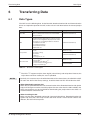
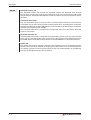
Data Types . . . . . . . . . . . . . . . . . . . . . . . . . . . . . . . . . . . . . . . . . . . . . . . . . . . . . .6 - 1
6.2
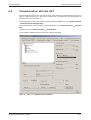
Communication with the GOT . . . . . . . . . . . . . . . . . . . . . . . . . . . . . . . . . . . . . . .6 - 3
6.3
Transfering the Project Data to the GOT . . . . . . . . . . . . . . . . . . . . . . . . . . . . . . . 6 - 5
7
Printing Project/File Output
7.1
Printer Setting . . . . . . . . . . . . . . . . . . . . . . . . . . . . . . . . . . . . . . . . . . . . . . . . . . .7 - 2
7.1.1
Setting items . . . . . . . . . . . . . . . . . . . . . . . . . . . . . . . . . . . . . . . . . . . . .7 - 2
8
Library
8.1
Using Library . . . . . . . . . . . . . . . . . . . . . . . . . . . . . . . . . . . . . . . . . . . . . . . . . . . .8 - 1
8.1.1
User Library. . . . . . . . . . . . . . . . . . . . . . . . . . . . . . . . . . . . . . . . . . . . . .8 - 2
8.1.2
Basic Operation of Library. . . . . . . . . . . . . . . . . . . . . . . . . . . . . . . . . . .8 - 3
8.1.3
System Library . . . . . . . . . . . . . . . . . . . . . . . . . . . . . . . . . . . . . . . . . . .8 - 4
8.1.4
Registering Templates on Library . . . . . . . . . . . . . . . . . . . . . . . . . . . . . 8 - 4
8.1.5
Pasting Templates from Library. . . . . . . . . . . . . . . . . . . . . . . . . . . . . . . 8 - 6
9
Draw and Edit
9.1
Drawing Figures. . . . . . . . . . . . . . . . . . . . . . . . . . . . . . . . . . . . . . . . . . . . . . . . . .9 - 1
9.1.1
Drawing Tools . . . . . . . . . . . . . . . . . . . . . . . . . . . . . . . . . . . . . . . . . . . .9 - 1
9.1.2
Use of Tools. . . . . . . . . . . . . . . . . . . . . . . . . . . . . . . . . . . . . . . . . . . . . .9 - 2
9.2
Editing Text . . . . . . . . . . . . . . . . . . . . . . . . . . . . . . . . . . . . . . . . . . . . . . . . . . . . .9 - 4
9.3
Pasting Figure Data . . . . . . . . . . . . . . . . . . . . . . . . . . . . . . . . . . . . . . . . . . . . . . .9 - 6
9.4
Editing Figures and Objects . . . . . . . . . . . . . . . . . . . . . . . . . . . . . . . . . . . . . . . .9 - 8
9.5
9.4.1
Arranging Figures and Objects . . . . . . . . . . . . . . . . . . . . . . . . . . . . . . . 9 - 8
9.4.2
Aligning Figures and Objects . . . . . . . . . . . . . . . . . . . . . . . . . . . . . . . . 9 - 9
9.4.3
Changing Attributes of Figures and Objects . . . . . . . . . . . . . . . . . . . . 9 - 10
9.4.4
Changing Size of Figures/Objects. . . . . . . . . . . . . . . . . . . . . . . . . . . . 9 - 11
9.4.5
Copying Figures and Objects Consecutively . . . . . . . . . . . . . . . . . . . 9 - 12
Entering Multiple Languages . . . . . . . . . . . . . . . . . . . . . . . . . . . . . . . . . . . . . . .9 - 14
9.5.1
Setting Language Switching Device . . . . . . . . . . . . . . . . . . . . . . . . . . 9 - 15
GT Designer2 Beginner's Manual
XI
Contents
XII
A
Appendix
A.1
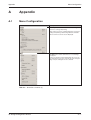
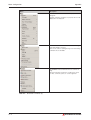
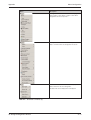
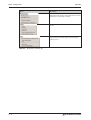
Menu Configuration . . . . . . . . . . . . . . . . . . . . . . . . . . . . . . . . . . . . . . . . . . . . . . .A - 1
A.2
Types of Toolbars . . . . . . . . . . . . . . . . . . . . . . . . . . . . . . . . . . . . . . . . . . . . . . . .A - 5
A.2.1
Main Toolbar . . . . . . . . . . . . . . . . . . . . . . . . . . . . . . . . . . . . . . . . . . . . .A - 6
A.2.2
View Toolbar . . . . . . . . . . . . . . . . . . . . . . . . . . . . . . . . . . . . . . . . . . . . .A - 7
A.2.3
Figure Toolbar . . . . . . . . . . . . . . . . . . . . . . . . . . . . . . . . . . . . . . . . . . . .A - 8
A.2.4
Object Toolbar. . . . . . . . . . . . . . . . . . . . . . . . . . . . . . . . . . . . . . . . . . . .A - 9
A.2.5
Edit Toolbar . . . . . . . . . . . . . . . . . . . . . . . . . . . . . . . . . . . . . . . . . . . . .A - 10
A.2.6
Align Toolbar . . . . . . . . . . . . . . . . . . . . . . . . . . . . . . . . . . . . . . . . . . . .A - 11
A.2.7
Draw Toolbar . . . . . . . . . . . . . . . . . . . . . . . . . . . . . . . . . . . . . . . . . . . .A - 11
A.2.8
Communication Toolbar . . . . . . . . . . . . . . . . . . . . . . . . . . . . . . . . . . .A - 12
A.2.9
Favorites Toolbar. . . . . . . . . . . . . . . . . . . . . . . . . . . . . . . . . . . . . . . . .A - 12
A.2.10
Comment Toolbar . . . . . . . . . . . . . . . . . . . . . . . . . . . . . . . . . . . . . . . .A - 12
A.3
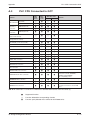
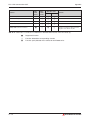
PLC CPU Connected to GOT . . . . . . . . . . . . . . . . . . . . . . . . . . . . . . . . . . . . . .A - 13
A.4
FAQs . . . . . . . . . . . . . . . . . . . . . . . . . . . . . . . . . . . . . . . . . . . . . . . . . . . . . . . . .A - 15
A.4.1
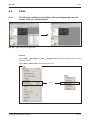
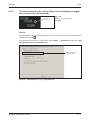
The Workspace/Property sheet/Data view has disappeared
from the screen. How can it be displayed? . . . . . . . . . . . . . . . . . . . . . A - 15
A.4.2
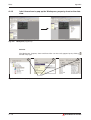
I don't know how to pop up the Workspace, property sheet or
the data view. . . . . . . . . . . . . . . . . . . . . . . . . . . . . . . . . . . . . . . . . . . .A - 16
A.4.3
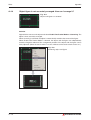
The cursor remains to be + mark. Objects are continuously
arranged. How can the cursor be recovered?. . . . . . . . . . . . . . . . . . . A - 17
A.4.4
Object figure is not accurately arranged. How can I arrange it?. . . . . A - 18
MITSUBISHI ELECTRIC
Introduction
1
Introduction
About the GOT
The GOT (Graphic Operation Terminal) can be used as an electronic operation panel on which
functions such as switch operation, lamp display, data display, message display can be
operated on the monitor screen, which had been conventionally implemented with a control
box.
About Project Data to be Displayed on GOT
The screen (project data) displayed on the GOT is created on the PC using the dedicated
software (GT Designer2).
On GT Designer2, paste display frame figures called objects, such as switch figures, lamp
figures and numerical display, to create a screen, and set operation functions to the pasted
objects with the device memory (bit, word) of the PLC CPU to execute the functions of the GOT.
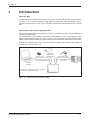
Transfer the created project data to the GOT using the USB cable, RS-232 cable, Ethernet
(only GT15쏔쏔)or memory card.
Memory card
USB-cable,
RS232-cable or
Ethernet cable
Screen data transfer
Connection cable
Connection
PLC CPU
Personal
Computer
The Ethernet communication unit is necessary
to connect via an Ethernet cable.
GOT1000 series
Fig. 1-1:
Scheme of data transfer to GOT
GT Designer2 Beginner's Manual
1–1
Overview Software Package
1.1
Introduction
Overview Software Package
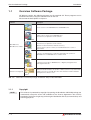
GT Works2 contains the following programs on the attached CD. These programs can be
installed and used by using the selection menu on the CD.
Please note the descriptions in chapter 2.
Software
Description
Creates screens for the GOT1000 series and GOT900 series.
GT Designer2
Enables a PC to operate as the GOT1000 series.
The license key is required to use this software.
GT SoftGOT1000
Enables a PC to operate as the GOT-A900 series.
The license key is required to use this software.
GOT-1000 series,
(Operates for about 10 minutes without license key.)
GOT-900 series software
GT SoftGOT2
For the license key, please contact your local Mitsubishi service center or
representative.
Connects to the GX Simulator or PLC CPU and enables the operation of
GOT-A900 series or GOT1000 series to simulate in PC.
GT Simulator2
Converts the project data for GOT800 series or Digital’s package data into a
GT Designer2 format file.
GT Converter2
Software for viewing PDF
Tab. 1-1:
1.1.1
NOTE
1–2
Adobe약 Acrobat약
Reader약
Adobe약 Acrobat약 Reader약 is the product of Adobe Systems Incorporated and the
software necessary to view PDF data. The online manual is in PDF format data
and requires this software to view.
Overview of software package included in the provided CD-ROM
Copyright
This software is protected by copyright. By opening the distribution CD-ROM package you
automatically accept the terms and conditions of the License Agreement. You are only
permitted to make one single copy of the original distribution disk for your own backup and
archiving purposes.
MITSUBISHI ELECTRIC
Introduction
1.2
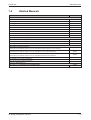
Related Manuals
Related Manuals
Manual Name
Art. No.
Manuals for GOT1000 Series
GT15 User's Manual
169273
GT Designer2 Version2 Basic Operation/Data Transfer Manual
166738
GT Designer2 Version2 Screen Design Manual (For GOT1000 Series)
169246
GOT1000 Series Connection Manual
169247
GOT1000 Series Extended/Option Functions Manual
169248
GOT1000 Series Gateway Functions Manual
169249
GT Simulator2 Version2 Operating Manual
169250
GT SoftGOT1000 Version2 Operating Manual
GT Converter2 Version2 Operating Manual
—
169251
Manuals for GOT-A900 / GOT-F900 Series
GT Works2 Version2/GT Designer2 Version2 Operating Manual (Startup - Introductory Manual)
169377
GT Designer2 Version2 Operating Manual
169378
GT Designer2 Version2 Reference Manual
169379
Manuals for GOT-A900 Series
GOT-A900 Series Operating Manual
(GT Works2 Version2/GT Designer2 Version2 compatible Extended - Option Functions Manual)
169380
GOT-A900 Series User's Manual
(GT Works2 Version2/GT Designer2 Version2 compatible Connection System Manual)
169381
GOT-A900 Series User's Manual
(GT Works2 Version2/GT Designer2 Version2 compatible Gateway Functions Manual)
169382
GT Simulator2 Version2 Operating Manual
169250
GT SoftGOT2 Version1 Operating Manual
160460
GT Converter2 Version2 Operating Manual
169251
Manuals for GOT-F900 Series
GOT-F900 Series HARDWARE Manual [CONNECTION]
Tab. 1-2:
144038
Overview of manuals available
GT Designer2 Beginner's Manual
1–3
Related Manuals
1–4
Introduction
MITSUBISHI ELECTRIC
Installation
System Requirements
2
Installation
2.1
System Requirements
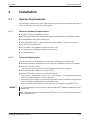
The following hardware and system requirements for your computer should be fulfilled to be
able to install and use the software GT Designer2:
2.1.1
2.1.2
Minimum Hardware Requirements
ꔴ
Pentium약-Processor 300 MHz or higher
ꔴ
64 MB RAM for Microsoft약 Windows 98/Windows Me/Windows NT 4.0/Windows 2000
ꔴ
128 MB RAM for Microsoft약 Windows XP
ꔴ
VGA compatible graphics card (resolution min. 800 x 600 dots, High Color (16 bits))
ꔴ
17"/43 cm diag. VGA monitor
ꔴ
For installation: min. 300 MB available hard disc space
ꔴ
For execution: min. 100 MB available hard disc space
ꔴ
CD-ROM disc drive
Software Requirements
The GT Designer2 is a 32-Bit-Software, requiring the following Operating Systems:
ꔴ
ꔴ
Microsoft약 Windows NT 4.0
(min. Service Pack 6 and min. the Internet Explorer 5.0 must be installed) �
ꔴ
Microsoft약 Windows 2000 (min. Service Pack 2) �
ꔴ
Microsoft약 Windows XP Home or Professional Edition � �
햲
햳
NOTES
Microsoft약 Windows 98/Windows Me (min. the Internet Explorer 5.0 must be installed)
The functions „Compatibility mode“, „Fast user switching“, „Changing desktop themes
(font)“ and „Remote desktop“ are not supported.
The administrator authority is required to install GT Designer2 into Windows NT약 Workstation 4.0, Windows약 2000 Professional, Windows약 XP.
Also, the administrator authority is required to use GT Designer2 on Windows약 XP.
It is recommended to use the Operating Systems Microsoft약 Windows 2000 or Microsoft약
Windows XP.
With all Operating Systems except Microsoft약 Windows XP you have to install Microsoft약
Internet Explorer 5.0.
GT Designer2 Beginner's Manual
2–1
System Configuration
Installation
2.2
System Configuration
2.2.1
Overview
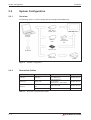
The following shows a system configuration that includes GOT-1000 series.
USB cable or
RS232 cable
GOT1000-series
Personal
Computer
Ethernet
cable
Memory card
GT Works2
Printer cable
Printer
Required accessories
Type
Manufacturer
USB port
USB cable
GT09-C20USB-5P
(A ↔ Mini-B type)
Mitsubishi Electric
RS232 port
RS232 cable
GT01-C30R2-9S or
FX-232-CAB-1
(9-Pin female ↔ 9-Pin female)
Mitsubishi Electric
Ethernet
Ethernet communication
unit
GT15-J7E71-100
Mitsubishi Electric
Ethernet cable
100BASE-TX
—
Fig. 2-1:
2.2.2
System configuration
Permissible Cables
Communication via
Tab. 2-1:
2–2
Ethernet
communication
unit
Overview of permissible cables
MITSUBISHI ELECTRIC
Installation
Software Installation
2.3
Software Installation
2.3.1
Starting the Menu Screen
Proceed as follows:
약
햲 Start Windows .
햳 Insert the CD-ROM into the CD-ROM drive.
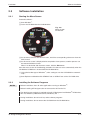
Fig. 2-2:
Menu Screen
GT Works2
햴 As the menu screen of GT Works2 starts, install the corresponding software or view the
PDF manual.
햵 As this menu screen is displayed after completion of one process, another process can
be executed without a break.
When it is desired to end the menu screen, click the Exit button.
Start the menu screen in the following procedure if it does not start automatically when the
CD-ROM of GT Works2 is inserted into the CD-ROM drive.
햲 Using Device Manager of Windows약, make setting to start the CD-ROM drive automatically.
햳 Start Explorer and double-click GTWK2-E.exe. or GTD2-E.exe. of the CD- ROM drive.
2.3.2
NOTES
Installing the Software Programs
Before installation, close all other applications running on Windows약.
Before installing GT Designer2, do not connect the GOT to the PC.
The administrator authority is required to install GT Designer2 into Windows약 NT Workstation 4.0, Windows약 2000 Professional, Windows약 XP.
During installation, do not install any other software programs.
During installation, do not remove the CD-ROM from the CD-ROM drive.
GT Designer2 Beginner's Manual
2–3
Software Installation
Installation
Installing GT Designer2, GT Simulator2, GT SoftGOT2, and GT Converter2
NOTE
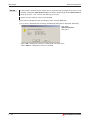
To prepare for installation, any of the following messages may be displayed midway during
installation. (The display changes depending on the Windows®.)
If any of the following messages is displayed, reinstall the product after execution of the
specified exe file according to the instruction of the screen. When the product has not been
installed correctly, restart the computer once.
Message
Measure
This package is not in the proper operating environment. Please install this package after executing
\Update\Axdist.Exe from CD-ROM.
If this message is displayed, execute
\Update\Axdist.exe of the CD-ROM.
This package is not in the proper operating environment. Please install this package after executing
\Update\50COMUPD.Exe from CD-ROM.
If this message is displayed, execute
\Update\50COMUPD.exe of the CDROM.
This package is not in the proper operating environment. Please install this package after executing
\EnvMEL\Setup.Exe from CD-ROM.
If this message is displayed, execute
\EnvMEL\Setup.exe of the CD-ROM.
Tab. 2-2:
Warnings due to wrong operating environment
햲 Click the software to be installed (Fig. 2-2).
햳 Follow the instructions on the screen. These instructions will lead you through the installation. To continue the installation procedure click on NEXT.
The product ID is indicated in the software registration form packed with the product.
햴 Depending on the version of Windows you will be asked to restart Windows after the installation has finished, to complete the installation.
Installing the Manual Data
The online manual data is viewed from Help of GT Designer2.
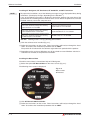
햲 Select the option GT Manual Menu on the menu screen (Fig. 2-2).
The following menu screen is displayed:
Fig. 2-3:
Menu screen
GT Manual
햳 Click GT Manual 1000 Installation.
햴 Follow the instructions on the screen. These instructions will lead you through the installation. To continue the installation procedure click on NEXT.
2–4
MITSUBISHI ELECTRIC
Installation
NOTE
Software Installation
Adobe약 Acrobat약 Reader약 must be installed separately to view the online manuals.
This software can be installed by the option Acrobat Reader Installation in the selection
menu GT Manual (Fig. 2-3).
Uninstalling the Software Programs
To uninstall the programs use the Windows Control Panel. Follow the instructions given by
Windows.
NOTES
Before uninstallation, make sure to close all software packages.
When using Windows NT약 Workstation 4.0, Windows약 2000 Professional, or Windows약
XP Professional/Home Edition, log on as a user with administrative privileges (for computer
management).
GT Designer2 Beginner's Manual
2–5
Installing the USB Driver
2.4
Installation
Installing the USB Driver
To make the USB communication with the GOT in the following OS environment, Windows® X
P HomeEdition, Windows® XP Professional, Windows® 2000 Professional, Windows®
Millennium Edition (Me) or Windows® 98 Second Edition, the USB driver must be installed.
The following describes a USB driver installation procedure.
NOTE
When the USB driver cannot be installed, check the following settings:
When Windows® 2000 Professional is used:
If "Block - Prevent installation of unsigned files" has been selected in [Control Panel] [System] - [Hardware] - [Driver Signing...], the USB driver may not be installed. Choose
"Ignore - Install all files, regardless of file signature" or "Warn - Display a message before
installing an unsigned file " in [Driver Signing...], and install the USB driver by the administrator authority.
When Windows® XP Professional or Windows® XP Home Edition is used:
If "Block - Never install unsigned driver software" has been selected in [Control Panel] [System] - [Hardware] - [Driver Signing...], the USB driver may not be installed.
Choose "Ignore - Install the software anyway and don't ask for my approval" or "Warn Prompt me each time to choose an action" in [Driver Signing...], and install the USB driver.
2.4.1
On Windows
2000 Professional
The following describes a USB driver installation procedure when Windows® 2000 Professional is used.
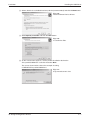
햲 When the PC and GOT are connected with the USB cable, the following screen
appears. Click the Next button.
Fig. 2-4:
Welcome to the Found New Hardware
Wizard
2–6
MITSUBISHI ELECTRIC
Installation
Installing the USB Driver
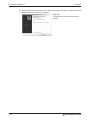
햳 Select „Search for a suitable driver for my device (recommended)“ and click the Next button.
Fig. 2-5:
Install Hardware Device Drivers
햴 Select Specify a location and click the Next button.
Fig. 2-6:
Locate Driver Files
햵 As the screen below appears, set the product installation destination
"Easysocket\USBdrivers" and click the button Next.
The screen shown below shows the example of setting
C:\MELSEC\Easysocket\USBdrivers.
Fig. 2-7:
Copy manufacturer's data
GT Designer2 Beginner's Manual
2–7
Installing the USB Driver
Installation
햶 When the following screen appears, this indicates that the installation is completed. Click the
Finish button to terminate the installation.
Fig. 2-8:
Completing the Found New Hardware
Wizard
2–8
MITSUBISHI ELECTRIC
Installation
2.4.2
Installing the USB Driver
On Windows
XP Professional or Windows
XP Home Edition
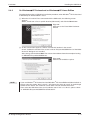
The following describes a USB driver installation procedure, when Windows약 XP Professional
or Windows약 XP Home Edition is used.
햲 When the PC and GOT are connected with the USB cable, the following screen
appears.
Select „Install from a list or specific location [Advanced]“ and click the Next button.
Fig. 2-9:
Welcome to the Found New Hardware
Wizard
햳 As the screen below appears, choose "Include this location in the search".
Check "Include this location in the search" and set "Easysocket\USBDrivers" of the folder
where GT Designer was installed.
After setting, click the button Next. The screen shown below shows the example of setting
C: \MELSEC\Easysocket\USBDrivers.
Fig. 2-10:
Search and installation options
NOTE
If you use Windows약 XP Professional and Windows약 XP Home Edition with ServicePack 2,
please select the option “Don’t search. I will choose the driver to install.” in the dialogue
window shown above. The automatic search does not work with ServicePack 2.
Then select the USB driver from your installation root. If this is i.e. drive C, please select:
“C: \MELSEC\Easysocket\USBDrivers\ECUsbd.inf”
GT Designer2 Beginner's Manual
2–9
Installing the USB Driver
Installation
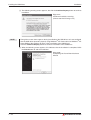
햴 The following warning screen appears, but click the Continue Anyway button to continue
installation.
Fig. 2-11:
Hardware Installation warning
(Please see the following note.)
NOTE
Though the screen above appears during installation of the USB driver, we have confirmed
that the USB driver operates properly using Windows약 XP Professional or Windows약 XP
Home Edition. (No problem will occur after installation of the USB driver.)
Click the Continue Anyway button to continue installation of the USB driver.
햵 When the following screen appears, this indicates that the installation is completed. Click
the Finish button to end the installation.
Fig. 2-12:
Completing the Found New Hardware
Wizard
2 – 10
MITSUBISHI ELECTRIC
Creating the Project Data
Setting before Screen Creation
3
Creating the Project Data
3.1
Setting before Screen Creation
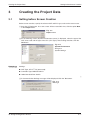
Before screen creation, specify the relevant GOT and PLC type, and set the screen name.
햲 Start the GT Designer2. As a new screen will be created this time, click the option New
in the Project menu.
Fig. 3-1:
Project menu
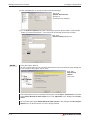
햳 As the following screen (System Environment screen) is displayed, select the type of the
GOT to be used and the type of the PLC (PLC Type). After making selection, click the
OK button.
Fig. 3-2:
System Environment
dialog box
System Settings
Example
Settings:
ꔴ
GOT Type: GT11첸첸-Q (320 x 240)
ꔴ
Controller Type: MAULSTICK-FX
ꔴ
16dot Standard Font: Gothic
햴 A Communication Settings message will be displayed. Click the Yes button.
쑶
Fig. 3-3:
Message
GT Designer2 Beginner's Manual
3–1
Setting before Screen Creation
Creating the Project Data
햵 Click the OK button to accept the Communication Settings.
Fig. 3-4:
System Environment
dialog box
Communication Settings
햶 As the Screen Property dialog box is displayed, input the Screen Name. Click the OK
button to create Base Screen 1. The screen will be created specifically hereafter.
Fig. 3-5:
Screen Property dialog box
NOTES
Using the Project Wizard:
To start a new project you can use the Project Wizard. The wizard will lead you through the
basic settings of the project step by step.
Fig. 3-6:
New Project
Wizard
dialog box
The Project Wizard can be started by selecting the menu Project - Preferences. Check the
option Show Wizard on New Project on the tab Operation of the dialogue box Preferences.
By unchecking the option Show Wizard on New Project in the dialogue box New Project
Wizard you can deactivate the use of the Project Wizard.
3–2
MITSUBISHI ELECTRIC
Creating the Project Data
Setting before Screen Creation
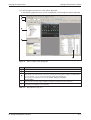
햷 In GT Designer2 now the first sreen will be displayed.
In the following figure the basic screen configuration of GT Designer2 will be explained.
�
�
�
�
�
Fig. 3-7:
No.
Basic screen of GT Designer2
Description
�
Menu bar
�
Toolbars
�
Workspace
The settings of the whole project, such as the created screens and common settings, are displayed in a
tree form. Setting, copy, etc. can be performed by double-click and right-click.
The workspace is devided into the three tabs Project, Category and Library.
�
Property Sheet
The selected screen/object/figure attributes are displayed. Setting can be also made here.
�
Data View
Lists all objects and figures set on a drawing.
Tab. 3-1:
Description to Fig. 3-7
GT Designer2 Beginner's Manual
3–3
Creating Screens
3.2
Creating the Project Data
Creating Screens
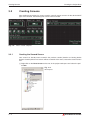
After making preparations for screen creation, actually create screens for the desired GOT
type. In this manual, the following two screens will be created.
Fig. 3-8:
3.2.1
Basic screen samples
Creating the Second Screen
One screen has already been created in the previous section (Section 3.1 Setting before
Screen Creation).Since two screens will be created in this manual, create the second screen
first.
햲 Right-click on the Base Screen on the tree in the project workspace and select the option New.
Fig. 3-9:
Workspace
3–4
MITSUBISHI ELECTRIC
Creating the Project Data
Creating Screens
햳 As the Screen Property dialog box is displayed, input the Screen Name. Click the OK
button.
Fig. 3-10:
Screen Property dialog box
Example
Set data:
ꔴ
Screen Name: Error Screen
쑶
3.2.2
Setting the Screen Switching Device
A screen switching device is a word device used to switch the screen on the GOT .The GOT
switches to the screen of the numeric value stored in the screen switching device.
Use the screen switching device for screen switching only.
When the value of the screen switching device is 1,
the GOT displays Base Screen 1.
Base screen 1 Base screen 2
When the value of the screen switching device turns
from 1 to 2, the GOT displays Base Screen 2.
Base screen 1 Base screen 2
Fig. 3-11: Screen switching
GT Designer2 Beginner's Manual
3–5
Creating Screens
Creating the Project Data
Screen Switching Device Setting Method
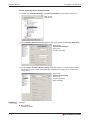
햲 Double-click Common Settings - System Environment in the project workspace.
Fig. 3-12:
Workspace
햳 As the System Environment dialog box is displayed, double-click Screen Switching.
Fig. 3-13:
System Environment
dialog box
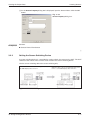
Screen Switching
햴 As the screen switching device setting dialog box appears, set the switching device
for the base screen. Clicking the OK button completes the setting of the screen switching device.
Fig. 3-14:
System Environment
dialog box
Screen Switching
Device Setting
Example
Settings:
ꔴ
3–6
Base Screen
Switching: D100
MITSUBISHI ELECTRIC
Creating the Project Data
3.2.3
Creating Screens
How to Switch Between the Created Screens
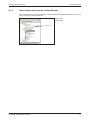
One created screen can be switched to the other by double-clicking either of the base screens
on the tree in the project workspace.
Fig. 3-15:
Workspace
Double-click
GT Designer2 Beginner's Manual
3–7
Figure Drawing and Text Input
3.3
Creating the Project Data
Figure Drawing and Text Input
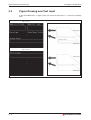
In the GOT-1000 series, a single screen can consist of two layers, i.e., front layer and back
layer.
Base screen 1
Front layer
Back layer
Base screen 2
Front layer
Back layer
Fig. 3-16: Base Screen Setup
3–8
MITSUBISHI ELECTRIC
Creating the Project Data
3.3.1
Figure Drawing and Text Input
Frame Line Drawing Method
햲 Click tool Rectangle on the Figure toolbar.
Fig. 3-19:
Figure toolbar
햳 As the mouse cursor turns into +, press the left mouse button at the starting point for
drawing a rectangular.
햴 Drag and move the cursor to the end point.
햵 Release the left mouse button to draw a rectangular. (After arrangement, right-click the
mouse to cancel the arrangement mode.)
Fig. 3-17:
Drawing a rectangular
햶 As double-clicking the created rectangle displays the Rectangle dialog box, where attributes such as color and thickness of the line can be changed. Click the OK button to
close the dialog box.
Fig. 3-18:
Rectangle dialog box
햷 Repeat steps 햲 to 햶 to draw frame lines.
After selecting the drawn figure, holding down the key Ctrl and dragging the figure
allows it to be copied easily.
GT Designer2 Beginner's Manual
3–9
Figure Drawing and Text Input
3.3.2
Creating the Project Data
Text Input Method
햲 Click tool Text on the Figure toolbar.
Fig. 3-20:
Figure toolbar
햳 Clicking the mouse displays the Text dialog box. Input text.
The font can also be set. The default settings are as follows: 16-dot Standard.
The input is immediately reflected on the screen.
Click the OK button to close the dialog box.
Fig. 3-21:
Text dialog box
NOTE
After selecting the figure or text to be resized, drag the handle 첸 to change the size.
Fig. 3-22:
Resizing a rectangular with mouse
Drag
3 – 10
MITSUBISHI ELECTRIC
Creating the Project Data
3.4
Setting the Object Function
Setting the Object Function
After drawing figures and texts, set each object function.
Numeric Display
The value stored in
the PLC CPU device
is displayed.
Numeric Input
The value is written to
the PLC CPU device.
Lamp (Bit Lamp)
The lamp is lit when
the bit device of the
PLC CPU turns ON.
Switch (Bit Switch)
Touching this switch
turns OFF the bit
device of the PLC CPU.
Alarm List
(System Alarm)
The error that occurred
in the GOT is displayed.
Switch
(Go To Screen Switch)
Touching this switch
switches the screen.
Alarm List
(User Alarm)
When the bit device
turns ON, the corresponding comment
preregistered by the
user is displayed.
Switch
(Go To Screen Switch)
Touching this switch
switches the screen.
Fig. 3-23: Setting the object function
GT Designer2 Beginner's Manual
3 – 11
Setting the Object Function
3.4.1
Creating the Project Data
Numerical Display/Numerical Input Setting Method
햲 Click Numerical Display or Numerical Input on the Object toolbar.
Fig. 3-24:
Object toolbar
햳 As the mouse cursor turns into +, click the mouse in the desired position to arrange the
display or input.
(After arrangement, right-click the mouse to cancel the arrangement mode.)
Fig. 3-25:
Numerical Display/Numerical Input
after insertion
햴 As double-clicking the arranged Numerical Display or Numerical Input, or the respective
entry in the dialog box Data View, displays the respective dialog box, make settings.
Confirm settings by clicking OK.
Fig. 3-26:
Numerical Display dialog box
3 – 12
MITSUBISHI ELECTRIC
Creating the Project Data
Setting the Object Function
Fig. 3-27:
Numerical Input dialog box
Example
Settings (for Numerical Display):
ꔴ
Type: Numerical Display
ꔴ
Device: D10
ꔴ
Shape: Frame; Frame_1
ꔴ
Font: 16dot Standard
ꔴ
Layer: Front
Settings (for Numerical Input):
ꔴ
Type: Numerical Input
ꔴ
Device: D11
ꔴ
Shape: Frame; Frame_1
ꔴ
Font: 16dot Standard
ꔴ
Layer: Front
쑶
GT Designer2 Beginner's Manual
3 – 13
Setting the Object Function
Creating the Project Data
햵 Change the size.
Fig. 3-28:
Resizing with mouse
Drag
햶 When the object is resized, the figure frame and object may be displaced. If the figure
frame and object are displaced, select the object, then right-click the mouse, and select
Centering. The displacement is automatically corrected. When Enable Two Tracker
Mode is selected, the figure frame and object can be moved or resized individually by
the user.
Fig. 3-29:
Centering figure frame and
object
햷 This completes the Numerical Display/Numerical Input setting.
3 – 14
MITSUBISHI ELECTRIC
Creating the Project Data
3.4.2
Setting the Object Function
Lamp Setting Method (Bit Lamp)
햲 Click Bit Lamp on the Object toolbar.
Fig. 3-30:
Object toolbar
햳 When the mouse cursor turns to +, click the mouse in the desired position to place the
Lamp.
(After placing it, right-click the mouse to release the placement mode.)
Fig. 3-31:
Bit Lamp after insertion
햴 Double-clicking the placed Lamp or the respective entry in the dialog box Data View displays the respective dialog box. Make settings.
Confirm settings by clicking OK.
Fig. 3-32:
Bit Lamp dialog box,
Basic tab
GT Designer2 Beginner's Manual
3 – 15
Setting the Object Function
Creating the Project Data
Fig. 3-33:
Bit Lamp dialog box,
Text tab
Example
Settings (Basic tab):
ꔴ
Device: M0
ꔴ
Layer: Front
Settings (Text tab):
ꔴ
Device: M0
ꔴ
Font: 16dot Standard
햵 After setting the Text tab, click the All Settings button.
(The Text tab settings made for OFF time are reflected when the Lamp is turned ON.)
쑶
Click the ON button to check the attributes of ON time.
A text can be registered in each display position (Center, Top, Bottom, Left, Right). The
text-registered display position button is displayed in purple characters.
햶 When the settings are completed, click the OK button.
Fig. 3-34:
Bit Lamp after making settings
햷 This completes the setting of the first Lamp.
3 – 16
MITSUBISHI ELECTRIC
Creating the Project Data
Setting the Object Function
햸 When creating the second Lamp or later, select the set Lamp and then select the Edit
Consecutive Copy menu to display the Consecutive Copy dialog box.
Fig. 3-35:
Consecutive Copy dialog box
Example
Set data:
ꔴ
Number: X: 4
ꔴ
Interval (Dot): X: 10
쑶
햹 Click the OK button to copy the Lamp.
Fig. 3-36:
Bit Lamp after copying
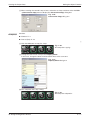
햺 Change the text of each Lamp in the Property Sheet.
In this case, change the texts of ON and OFF times to the same one.
Fig. 3-37:
Property Sheet dialog box
햻 This completes the Lamp setting.
Fig. 3-38:
Bit Lamp after adaptation
GT Designer2 Beginner's Manual
3 – 17
Setting the Object Function
3.4.3
Creating the Project Data
Switch (Bit Switch) Setting Method
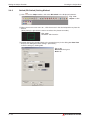
햲 Click
on the Object toolbar, and select Bit Switch in the displayed submenu.
Fig. 3-39:
Object toolbar
햳 When the mouse cursor turns to +, click the mouse in the desired position to place the
Switch.
(After placing it, right-click the mouse to release the placement mode.)
Fig. 3-40:
Bit Switch after insertion
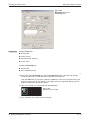
햴 Double-clicking the placed Switch or the respective entry in the dialog box Data View
displays the dialog box. Make settings. (See below.)
Confirm settings by clicking OK.
Fig. 3-41:
Bit Switch dialog box,
Basic tab
3 – 18
MITSUBISHI ELECTRIC
Creating the Project Data
Setting the Object Function
Fig. 3-42:
Bit Switch dialog box,
Text/Lamp tab
Example
Settings (Basic tab):
ꔴ
Device: M0
ꔴ
Action: Reset
ꔴ
Shape: Square: Square_1
ꔴ
Layer: Front
Settings (Text/Lamp tab):
ꔴ
Device: M0
ꔴ
Font: 16dot Standard
햵 After setting the Text/Lamp tab, click the All Settings button. (The Text tab settings
made for OFF time are reflected when the Switch is turned ON.)
쑶
Click the ON button to check the attributes of ON time. A text can be registered in each
display position (Center, Top, Bottom, Left, Right). The text-registered display position
button is displayed in purple characters.
햶 When the settings are completed, click the OK button.
Fig. 3-43:
Bit Switch after setting
햷 This completes the setting of the first Switch.
GT Designer2 Beginner's Manual
3 – 19
Setting the Object Function
Creating the Project Data
햸 When creating the second Switch or later, select the Switch and then select the Edit
Consecutive Copy menu to display the Consecutive Copy dialog box.
Fig. 3-46:
Consecutive Copy dialog box
Example
Set data:
ꔴ
Number: X: 4
ꔴ
Interval (Dot): X: 10
쑶
햹 Click the OK button to copy the Lamp.
Fig. 3-44:
Bit Switch after copying
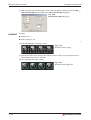
햺 Change the text of each Lamp in the Property sheet. In this case, change the texts of
ON and OFF times to the same one.
햻 This completes the Lamp setting.
Fig. 3-45:
Bit Switch after adaptation
3 – 20
MITSUBISHI ELECTRIC
Creating the Project Data
3.4.4
Setting the Object Function
Switch (Go To Screen Switch) Setting Method
햲 Click
menu.
on the Object toolbar, and select Go To Screen Switch in the displayed sub-
Fig. 3-47:
Object toolbar
햳 When the mouse cursor turns to +, click the mouse in the desired position to place the
Switch. (After placing it, right-click the mouse to release the placement mode.)
Fig. 3-48:
Switch after insertion
햴 Double-clicking the placed Switch or the respective entry in the dialog box Data View
displays the dialog box. Make settings. (See below.)
Confirm settings by clicking OK
Fig. 3-49:
Go To Screen Switch dialog box,
Basic tab
GT Designer2 Beginner's Manual
3 – 21
Setting the Object Function
Creating the Project Data
Fig. 3-50:
Go To Screen Switch dialog box,
Text/Lamp tab
Example
Settings (Basic tab):
ꔴ
Go To Screen: Fixed – 2 – Error Screen
ꔴ
Shape: Square: Square_1
ꔴ
Layer: Front
Settings (Text/Lamp tab):
ꔴ
Text: Error Screen
ꔴ
Font: 16dot Standard
햵 After setting the Text/Lamp tab, click the All Settings button.
(The Text tab settings made for OFF time are reflected when the Switch is turned ON.)
쑶
Click the ON button to check the attributes of ON time. A text can be registered in each
display position (Center, Top, Bottom, Left, Right). The text registered display position
button is displayed in purple characters.
햶 When the settings are completed, click the OK button.
Fig. 3-51:
Switch after Setting
3 – 22
MITSUBISHI ELECTRIC
Creating the Project Data
Setting the Object Function
햷 Adjust the size.
Fig. 3-53:
Switch after adjustment the size
NOTE
Make a right click on the object and select the option Enable Two Tracker Mode in the
displayed menu. By this the object and the object's frame seperately can be adjusted in their
positions or shapes.
In case of a touch sensitive switch by this you can adjust the touch sensitive area.
햸 This completes the setting of the Switch on Base Screen 1.
After setting, press the [Ctrl] key + [C] key with the Switch selected. (Shortcut: Copy)
햹 Double-click Base Screen 2 (Error screen) on the tree in the Project workspace (Dialog
box Workspace) to display Base Screen 2.
Fig. 3-52:
Workspace dialog box
햺 Press the [Ctrl] key + [V] key on Base Screen 2 to paste the copied Switch. (Shortcut:
Paste) Click the mouse to paste the Switch.
GT Designer2 Beginner's Manual
3 – 23
Setting the Object Function
Creating the Project Data
햻 Select the pasted switch, and change the set data in the Property sheet.
Fig. 3-54:
Property Sheet dialog box
Example
Set data:
ꔴ
Go To Screen: Fixed – 1 – Data Display Screen
ꔴ
Text: Data Display Screen
쑶
NOTE
If a character string of multiple lines is input in the property sheet text, only the text on the first
line is displayed.
햻 This completes the Go To Screen Switch setting.
Fig. 3-55:
Switch after adjusting the size
3 – 24
MITSUBISHI ELECTRIC
Creating the Project Data
3.4.5
Setting the Object Function
Alarm List (System Alarm) Setting Method
햲 Click
System Alarm on the Object toolbar.
Fig. 3-56: Object toolbar
햳 As the mouse cursor turns into +, click the mouse in the desired position to arrange the
Alarm List.
(After arrangement, right-click the mouse to cancel the arrangement mode.)
Fig. 3-57: Alarm List (System alarm) after insertion
햴 Adjust the size.
Fig. 3-58: Alarm List (System Alarm) after adjusting the size
햵 This completes the setting of the Alarm List (System Alarm).
GT Designer2 Beginner's Manual
3 – 25
Setting the Object Function
3.4.6
Creating the Project Data
Alarm List (User Alarm) Setting Method
When using the Alarm List (User Alarm), it is necessary to register the comments to be
displayed as alarms in advance.
Basic Comment Registration Method
The following explains how to register the Basic Comments with an example.
Comment-No.
Comment
1
A-Line supply conveyor stopped. Check the power source.
2
Emergency stop limit switch operated. Check the product.
3
Product limit switch dose not operate. Check for presence/absence of the product.
4
Hydraulic pressure of finishing machine 1 is low. Supply hydraulic oil.
Tab. 3-2:
Sample comments
햲 Double-click Basic Comment on the tree in the Project workspace.
Fig. 3-59:
Workspace dialog box
햳 When the Basic Comment box appears, register a comment.
Fig. 3-60: Type the first comment
햴 After registering the comment, click
New Comment on the Comment toolbar.
Fig. 3-61:
Comment toolbar
3 – 26
MITSUBISHI ELECTRIC
Creating the Project Data
NOTE
Setting the Object Function
Comment toolbar displaying method:
Choose View
Toolbars
Comment to display the toolbar.
햵 Register the second comment. After that, register the third and fourth comments in the
same procedure.
Fig. 3-62: Type a further comment
햶 When comment creation is completed, close the Basic Comment List dialog box.
Fig. 3-63: Comment creation completed
Alarm List (User Alarm) Setting Method
햷 Click
User Alarm on the Object toolbar.
Fig. 3-64: Object toolbar
햸 As the mouse cursor turns into +, click the mouse in the desired position to arrange the
Alarm List.
(After arrangement, right-click the mouse to cancel the arrangement mode.)
Fig. 3-65: Alarm List (User Alarm) after inserting
GT Designer2 Beginner's Manual
3 – 27
Setting the Object Function
Creating the Project Data
햹 Double-clicking the arranged Alarm List or the respective entry in the dialog box Data
View displays the respective dialog box. Make settings. (See below.)
Confirm settings by clicking OK.
Fig. 3-66:
User Alarm dialog box
Basic tab
Fig. 3-67:
User Alarm dialog box
Device tab
Example
Set data (Basic tab):
ꔴ
Alarm (Device) Points: 4
ꔴ
Layer: Front
Set data (Device tab):
ꔴ
Device No.: Continuous
ꔴ
Alarm Device: M0
쑶
3 – 28
MITSUBISHI ELECTRIC
Creating the Project Data
Setting the Object Function
햺 Adjust the size.
Fig. 3-68: Alarm List (User Alarm) after adjusting the size
햻 This completes the setting of the Alarm List (User Alarm).
GT Designer2 Beginner's Manual
3 – 29
Saving the Created Project Data
3.5
Creating the Project Data
Saving the Created Project Data
햲 Choose the Project
Save As menu.
햳 When the Save As dialog box appears, select the storage place and set the file name.
Fig. 3-69:
Save As dialog box
햴 Click the Save button to save the project data.
3.6
Previewing the Created Project Data
햲 Choose the View
Preview menu.
햳 The screen to be displayed on the GOT appears in the Screen Preview window.
Fig. 3-70: Screen Preview window
3 – 30
MITSUBISHI ELECTRIC
Creating the Project Data
Transferring Project Data from PC to GOT
3.7
Transferring Project Data from PC to GOT
3.7.1
Connecting the PC and GOT
Connect your PC to the USB interface on the front of the GOTs by using a USB cable
GT09-C20USB-5P.
Alternatively you can use the RS232 interface of your PC and the GOT to establish the connection. In this case use a RS232 cable GT01-C30R2-9S or FX-232-CAB-1.
When connecting to an ETHERNET you can also transfer project data from your PC to several
GOTs via ETHERNET.
The following table lists the different data transfer speeds.
Data transfer time of the particular connection method
Project data size
ETHERNET
(100 Mbps)
USB
(12 Mbps)
RS232
(115 kbps)
1 MB
20 sec
20 sec
2 min 30 sec
Tab. 3-3:
3.7.2
Data transfer speed
Installing the Standard monitor OS and Communication driver
The GOT does not include the Standard monitor OS for monitoring and the Communication
driver for communication with the PLC CPU. Therefore, it is necessary to perform this operation only once before monitoring.
This operation is required again when the Standard monitor OS is updated or the communication method with the PLC is changed.
NOTE
Precautions for OS installation:
Installing the OS into the GOT clears the project data within the GOT.
Upload the data within the GOT as necessary.
GT Designer2 Beginner's Manual
3 – 31
Transferring Project Data from PC to GOT
햲 Choose the Communication
Creating the Project Data
To/From GOT menu.
햳 When the Communicate with GOT dialog box appears, select the Communication
configuration tab.
Fig. 3-71: Communicate with GOT dialog box
햴 On the Communication configuration tab, confirm and set the communication settings to
be used.
When any setting has been changed, click the Update button.
햵 After then, choose the OS Install
GOT tab.
햶 On the OS Install
GOT tab, select the Standard monitor OS, Communication driver, Extended function OS and Option OS to be installed into the GOT.
햷 After making the selection, click the Install button. This starts the installation of the OS
and communication driver.
햸 After OS installation is completed, the GOT restarts.
3 – 32
MITSUBISHI ELECTRIC
Creating the Project Data
3.7.3
Transferring Project Data from PC to GOT
Downloading the Project Data
After OS installation, download the created project data to the GOT.
햲 Select Project Download
GOT tab in the Communicate with GOT dialog box.
GOT tab, select the data (Base Screen, Window Screen,
햳 On the Project Download
Common settings) to be downloaded to the GOT.
Project configuration tree: Check all. (Click the Select All button.)
Fig. 3-72: Communicate with GOT dialog box
햴 After making the selection, click the Download button. This starts project data downloading.
GT Designer2 Beginner's Manual
3 – 33
Connecting with the PLC CPU
3.8
Creating the Project Data
Connecting with the PLC CPU
After transferring the Standard monitor OS, Communication driver and project data to the
GOT, connect the GOT and PLC CPU.
The RS422 connection between the GT11첸첸 and PLC is taken as a connection example in
this section.
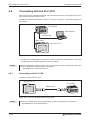
PLC (FX3U)
GX Developer
햲
RS232 cable
RS422 cable
GOT (GT11첸첸)
Fig. 3-73: System configuration example
햲
NOTE
3.8.1
For details of GX Developer including the system configuration and operation, refer to the
GX Developer 8.0 Operating Manual (Part-No. 144011).
Before mounting the communication unit or connecting the cable, completely power OFF
the GOT. Refer to the following manual for details.
씮 GOT1000 Series Connection Manual
Connecting to the PLC CPU
Connect the GOT and PLC CPU.
GOT (GT11첸첸)
PLC (FX3U)
RS422 cable
Fig. 3-74: connection between GOT and FX-CPU
NOTE
3 – 34
Refer to the following manual for details of the system configuration for connection.
씮GOT1000 Series Connection Manual
MITSUBISHI ELECTRIC
Creating the Project Data
3.8.2
Connecting with the PLC CPU
Operation Image on GOT
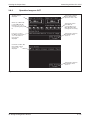
The D10 value is
displayed.
When any of M0 to M3
is turned ON with GX
Developer, etc., the
corresponding lamp is
lit.
If an error occurs in
the GOT or CPU, the
error code and error
message are
displayed.
Touching here displays
the key window and
inputs the value to D11.
Touching the switch
turns OFF the
corresponding one of
M0 to M3 that is ON
(extinguishes the lamp).
Touching here switches
the display to Base
Screen 2.
Comments of M0 to M3
that are ON on Base
Screen 1 are
displayed.
Touching here switches
the display to Base
Screen 1.
Fig. 3-75: Functions of Base Screen 1 and 2
GT Designer2 Beginner's Manual
3 – 35
Connecting with the PLC CPU
3.8.3
Creating the Project Data
Uploading the Project Data
To back up or correct the project data downloaded to the GOT, upload the project data to the PC.
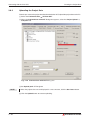
햲 Select the Communication
To/From GOT.
햳 When the Communicate with GOT dialog box appears, select the Project Upload
Computer tab.
Fig. 3-76: Communicate with GOT dialog box
햴 Set Upload path: GT Designer2
NOTE
When the project data are not displayed in a tree structure, click the Get Latest button.
햵 Click the Upload button to execute uploading.
3 – 36
MITSUBISHI ELECTRIC
Configuration of Working Areas
Screen Configuration and Various Tools
4
Configuration of Working Areas
4.1
Screen Configuration and Various Tools
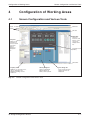
Title bar
Menu bar
Toolbars
Title bar
Data View
All object
functions and
figures on the
screen are
displayed in a
list.
Workspace
Settings on the
overall project
such as created
screen and
common
settings are
displayed in
tree.
Created screen
(Editor)
Status Bar
Property sheet
Attributes of selected screen,
objects and figures are
displayed. Settings can be
made here.
Fig. 4-1:
Library Image list
Library is displayed.
Objects/figures in
library can be pasted.
Parts Image list
Parts used in the part
display function are
displayed.
Screen configuration and various tools
GT Designer2 Beginner's Manual
4–1
Workspace Type
Configuration of Working Areas
4.2
Workspace Type
4.2.1
Project Tab
Overall project settings such as created screens and common settings are displayed in a tree.
It is convenient to see the project details, to check the work progress and to copy a screen.
Display Overlay Screen
When this is checked, the set overlay
screen status is displayed in a tree.
Screen
Displays the created screens in a tree structure
by type (base screen, window screen).
Common Settings
The object function settings used in common
for the project are displayed in a tree.
When an item is double clicked, the setting
dialog box for each function is displayed.
Common file
Displays the files (parts, comments) common
to multiple object functions in a tree structure.
Fig. 4-2:
NOTE
4–2
Project tab
Available functions:
쮿 Right click the mouse to select basic commands such as New Screen, Open or Copy.
쮿 Dragging a figure to the Project workspace allows registration of Parts.
MITSUBISHI ELECTRIC
Configuration of Working Areas
4.2.2
Workspace Type
Category Tab
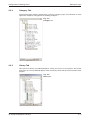
The overall project setting is displayed in a tree by Category (type). Classification for each
application simplifies management and editing of objects.
Fig. 4-3:
Category tab
4.2.3
Library Tab
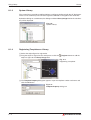
Here you find a library of predefined objects, which you can use in your project. The further
more you can save user defined objects in the user library, which then also can be used in other
projects.
Fig. 4-4:
Library tab
GT Designer2 Beginner's Manual
4–3
Settings for Working with GT Designer2
Configuration of Working Areas
4.3
Settings for Working with GT Designer2
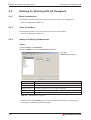
4.3.1
Menu Configuration
In the appendix of this manual you will find an overview of the menu configuration:
씮 Please see Appendix, section A.1
4.3.2
Types of Toolbars
In the appendix of this manual you will find an overview of the toolbars:
씮 Please see Appendix, section A.2
4.3.3
Adding or Deleting Toolbars/Icons
Toolbars
햲 Select Project
Preferences.
햳 Select Toolbars tab in the Preferences dialog box.
Fig. 4-5:
Preferences dialog box
Tab
Description
Toolbars
Check the desired toolbars for addition. To delete it, remove the check.
Show ToolTips
When the cursor is placed on the icon, check this to display the icon name.
With Shortcut Keys
When the cursor is placed on the icon, check this to display the shortcut key.
(It is effective only when the “Show Tool Tips” is displayed.)
Reset
Only the selected toolbars are set to default status.
Reset All
All toolbars are set to default status.
Tab. 4-1:
Description to Fig. 4-5
햴 In the selection field Toolbars you can select and deselect toolbars for displaying by
checking or unchecking the desired toolbar.
4–4
MITSUBISHI ELECTRIC
Configuration of Working Areas
Settings for Working with GT Designer2
Icons
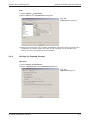
햲 Select Project
Preferences.
햳 Select Icon tab in the Preferences dialog box.
Fig. 4-6:
Preferences dialog box
햴 Select the desired icon in the selection field Icon for movement and drag it to the desired position in a toolbar. When you select an icon and drag it to the outside of the
toolbar, the icon will be deleted from that toolbox.
4.3.4
Settings for Drawing Screens
Operation
햲 Select Project
Preferences.
햳 Select Operation tab in the Preferences dialog box.
Fig. 4-7:
Operation dialog box
GT Designer2 Beginner's Manual
4–5
Settings for Working with GT Designer2
Element
Figure/Object
deselect - after create
Configuration of Working Areas
Status
Description
Checked
After arranging objects, the selected status (status with handle) is
reset.
Not checked
With the selected status (status with handle), figures/objects are
arranged on the drawing screen.
Checked
After setting figures/objects, the tool selected status is reset.
It is convenient to arrange different figures/objects.
Not checked
After setting figures/objects, the selected status remains active.
It is convenient to arrange the same figures/objects continuously.
Checked
The system settings dialog box (GOT type, PLC type, etc.) appears in creation of a new project.
Not checked
The system settings dialog box (GOT type, PLC type, etc.) does
not appear in creation of a new project.
Checked
After arranging objects on the drawing screen, the settings dialog
box automatically appears.
Not checked
After arranging objects on the drawing screen, the settings dialog
box does not automatically appear.
Checked
File is automatically saved.
Saving interval (5 to 720) is set.
Tool de-select after use
System setting on new
Change object after create
Auto File Save
Not checked
File is not automatically saved.
Checked
When the GT Designer2 is started, the project selection dialog
box (New, Open, etc.) appears.
Not checked
When the GT Designer2 is started, the project selection dialog
box (New, Open, etc.) does not appear.
Show "Select Project"
dialog when …
Show Wizard on New
Project
Checked
When creating a new project, the wizard screen appears.
Not checked
When creating a new project, the wizard screen does not appear.
Figure/Object move on
screen display area
(with ALT key, move to
temporary area)
Checked
A figure or object can be moved on the screen display area by
dragging. When dragged pressing the ALT key, it can be moved
to the temporary area.
Not checked
A figure or object can be moved to the temporary area by dragging. When dragged pressing the ALT key, it can be moved on
the screen display area.
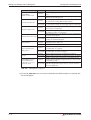
Tab. 4-2:
Description to Fig. 4-7
햴 On the tab Operation you can activate and deactivate different options for working with
the GT Designer2.
4–6
MITSUBISHI ELECTRIC
Configuration of Working Areas
Settings for Working with GT Designer2
View
햲 Select Project
Preferences.
햳 Select View tab in the Preferences dialog box.
Fig. 4-8:
Preferences dialog box
Element
Description
Snap
Dot value (1, 2, 4, 8 or 16) is selected for automatic arrangement of figures or objects on the screen.
Position
Grid
Display
items
Spacing
Grid spacing (2 to 64 dots) is set.
Color
Grid display color is selected.
Paint
When a closed figure is filled with “Paint,” this item is selected to display the filled
status.
Device
This item is selected to display the device name set in the object.
Object ID
This item is selected to display the object ID of each object. The object ID is automatically put on each object. It is convenient to display the object ID in setting
the system information.
Object
This item is selected to display the set object.
Object
Frame
Select this item to display the boundary of the object.
Device/
Object ID
text color
Specify the text color of the object or object ID.
Text color: Black
Device/
Object ID
background
color
Object
Frame
color
Tab. 4-3:
Position of grid display is selected:
앫 Front: Grid is displayed at the front of the screen.
앫 Back: Grid is displayed at the back of the screen.
앫 None: Grid is not displayed.
Specify the text background color of the object or object ID.
Background color: White
Specify the color of the object boundary.
Frame color: Green
Description to Fig. 4-8
햴 On the tab View you can activate and deactivate different options for displaying in the
GT Designer2.
GT Designer2 Beginner's Manual
4–7
Settings for Working with GT Designer2
NOTES
Configuration of Working Areas
The function Snap is used to aline figures and objects with the grid. The alinement is done
with a multiple of the snap value. For example, if the value is set to 16 points the cursor can
only moved to the coordinates of multiples of 16. A position in between is not possible. The
cursor or the object are so to say snaped every 16 points.
The items set on the display tab View can also be changed from the toolbar View and the
menu View.
Snap
Value
Zoom
Grid
Spacing
Grid
Color
Change of
ON/OFF status
Display of Screen
Device No. Background Color
Display of
Object ID
Layer display
Display of
Display of
Workspace Property
Screen
Display magnification
Display/non-display of device, object ID,
paint, object and object frame
Grid display position
Fig. 4-9:
4–8
View toolbar and View menu
MITSUBISHI ELECTRIC
Screen Configuration
Base Screen and Window Screen Types
5
Screen Configuration
5.1
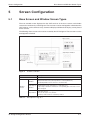
Base Screen and Window Screen Types
The user-created screen displayed on the GOT consists of the base screens and window
screens that are drawn by GT Designer2. These screens can be overlapped or switched on the
GOT. Objects, such as Switch, Lamp, Comment Display and Numerical Display, can be placed
on the screens.
The following shows screens that can be created by the GT Designer2. These screens can be
overlapped or switched.
Base screen
Superimpose Window
Overlap Window
Move bar
Key Window
Close key
Fig. 5-1:
Screens overview
Screen
Description
Base Screen
The basic screen for user-created screen display on GOT.
Overlap
Window
Window
Screen
A composite window placed on the base Screen. Up to two windows can be disSuperimpose played simultaneously. (Superimpose 1, Superimpose 2)
If super impose window is switched, the corresponding parts of the base screen
Window
will be changed.
Key Window
Tab. 5-1:
A pop-up window that appears over the base screen. Up to two windows can be
displayed simultaneously. (Overlap Window 1, Overlap Window 2)
The Overlap Window can be moved or closed manually.
A pop-up window for inputting numerical values and ASCII codes to be displayed
on the base Screen.
There are two types of key window:
default key window and user created key window.
Description to Fig. 5-1
GT Designer2 Beginner's Manual
5–1
Screen Laying
5.2
Screen Configuration
Screen Laying
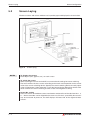
The base screens and various windows are layered by type and displayed as shown below.
Base screen
Superimpose
Windows 1, 2
Overlap
Windows 1, 2
Back
Key
Window
Front
Fig. 5-2:
NOTES
Screen laying
To display the screens
Draw objects (text, graphics, etc.) on each screen.
To switch the screen
When switching the screen on the GOT, be sure to make the settings for screen switching.
The GOT switches the base screen according to the touch switch operation or the current
value of the screen switching device. (Specify the screen switching device for each project
using GT Desginer2.) Refer to Section 7.14 of the Screen Design Manual for details of the
touch switches for screen switching and the screen switching device setting
Screen No. setting
The base screens and window screens need not be numbered in serial order from No. 1, 2,
3..... Some screen No. can be skipped for the future use, if there is a possibility that screens
may be increased. At power-on, the GOT displays the lowest No. of the registered base
screens.
5–2
MITSUBISHI ELECTRIC
Screen Configuration
5.3
Object Placement Area and Display Area
Object Placement Area and Display Area
The drawing screen editor for Base Screen and Window Screen provides two areas: screen
display area and temporary area.
The temporary area is the area for temporary placement of objects and figures during screen
layout change. This feature enables the screen layout to be smoothly changed.
Objects plased on the temporary area will not be displayed on the GOT, they are positioned
outside the area of screen display.
Screen display area
Temporary area
Fig. 5-3:
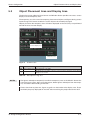
Nr.
Bereich
Beschreibung
�
Screen display area
Area displayed on the GOT.
�
Temporary area
Not displayed on the GOT. In this area, however, figures and objects can be placed
during screen creation.
Tab. 5-2:
NOTES
Screen areas
Description to Fig. 5-3
The figures and objects temporarily saved in the temporary area are included in thetransfer
size of the base screen. After saving the project, delete figures and objects from the temporary area before downloading to the GOT.
Please check not to place text, figures or grafics on the border to the display area. These
would only be partly displayed on the GOT after transfering the project data to the GOT.
GT Designer2 Beginner's Manual
5–3
Object Placement Area and Display Area
NOTES
Screen Configuration
When using Superimpose Window
If a character (nameplate) or frame figure object arranged in the window screen protrudes to
the temporary area, the protruding part is left on the base screen after the superimpose
window is displayed then hidden. Switching the base screen erases the remaining character
(nameplate) or frame figure (see following figure),
Displaying the superimpose window
(GOT display area)
Hiding the superimpose window
(GOT display area)
Statisches Fenster
Character
(nameplate)
Frame figure
Fig. 5-4:
Indication error due to protruding parts
To check the later display on the GOT of the created screens you can use the function
Preview in the menu View of the GT Designer2. This function enables you to check all of the
display configurations.
5–4
MITSUBISHI ELECTRIC
Screen Configuration
Basic Operations for Object Placement
5.4
Basic Operations for Object Placement
5.4.1
Placing Figures and Objects
햲 Perform either of the following operations.
– From the Object menu, select the object to be placed.
Example) Bit switch object
Choose Object
Switch
Bit Switch.
The cursor changes to + (placement mode).
– On the Object toolbar, click the object to be placed.
Example) Bit switch object
Click on the Object toolbar, and click Bit Switch from among the submenu items.
The mouse cursor changes to + (placement mode).
Fig. 5-5:
Object toolbar
햳 Move the cursor to the desired position, and click the mouse to place the object. Objects
of the same type can be placed consecutively by clicking the mouse repeatedly. When
stopping this operation, right-click the mouse after placing the object to release the
cursor from the placement mode.
Fig. 5-6:
Bit switch after placement
NOTE
Placing and moving a figure or object:
Performing the operation with the "Alt" key held down places the figure or object inside the
screen display area. Even if an attempt is made to place in the temporary area, the target will
be placed at the right or bottom end of the screen display area.
Fig. 5-7:
Placing or moving with the
ALT key held down
Actually placed position
Cursor position
Actually placed
position
Cursor position
GT Designer2 Beginner's Manual
5–5
Basic Operations for Object Placement
5.4.2
Screen Configuration
Figure Drawing/Text Input
How to Draw a Frame Line
햲 Click Rectangle on the Figure toolbar. The mouse cursor changes to +.
햳 Draw a rectangle:
Left-click at the starting point. Drag the mouse to move the cursor to the end point. Releasing the left button of the mouse draws a rectangle. Then, right-click the mouse to
exit from the placement mode.
Fig. 5-8:
Drawing a rectangle
햴 Set the frame line and paint of the rectangle:
Double-click the created rectangle. The Rectangle dialog box appears. Change the color and thickness of the line.
Fig. 5-9:
Rectangle dialog box
Clicking the OK button determines the settings and closes the dialog box.
Click the Cancel button to cancel the settings and close the dialog box.
NOTE
Changing the figure size:
Select the figure to be resized and then drag the handle 첸 to change its size.
Fig. 5-10:
Resizing with mouse
Drag
5–6
MITSUBISHI ELECTRIC
Screen Configuration
Basic Operations for Object Placement
How to Draw a Text
햲 Click Text on the Figure toolbar. The mouse cursor changes to +.
햳 Enter a text:
When the mouse cursor changes to +, click the mouse on the text drawing position.
When the Text dialog box appears, input a text and set attributes.
Fig. 5-11:
Text dialog box
The input will be immediately reflected on the screen.
햴 Click the OK button to close the dialog box. Click the Cancel button to cancel the settings and close the dialog box.
NOTE
Changing the text size:
Select the text to be resized and then drag the handle 첸 to change its size.
Fig. 5-12:
Resizing with mouse
Drag
GT Designer2 Beginner's Manual
5–7
Basic Operations for Object Placement
5.4.3
Screen Configuration
Object Function Setting
Setting the "Numerical Display" Object
햲 Click Numerical Display on the Object toolbar. The mouse cursor changes to +.
햳 Click the mouse on the desired position to place the object.
Fig. 5-13:
Numerical Display after inserting
햴 The Numerical Display dialog box appears.
Set the Type, View Format, Frame Format, etc.
Fig. 5-14:
Numerical Display dialog box
햵 Click the OK button to close the dialog box. Click the Cancel button to cancel the settings and close the dialog box.
햶 Right-click the mouse to exit from the placement mode.
5–8
MITSUBISHI ELECTRIC
Screen Configuration
NOTES
Basic Operations for Object Placement
When the object size is changed, this may result in misalignment between the figure frame
and the object as shown below. In this case, perform the following operation:
Select the object. Right-click the mouse and select Centering. This will automatically
correct the misalignment.
Fig. 5-15:
Centering
By selecting Enable Two Tracker Mode, the figure frame and object can be moved or
resized separately.
Screen Re-displaying Procedure
When the object placed on the figure marked with Paint is moved, some area may remain
unpainted in the figure.
The object placed on the
figure marked with Paint is
moved.
Some area remains
unpainted in the figure.
Choose View
Redisplay
menu to refresh display.
Fig. 5-16: Screen re-displaying
햲 Choose the View
Redisplay menu.
햳 The display of the drawing screen will be corrected.
GT Designer2 Beginner's Manual
5–9
Basic Operations for Object Placement
Screen Configuration
Setting the "Lamp [Bit Lamp]" Object
햲 Click Bit Lamp on the Object toolbar. The mouse cursor changes to +.
햳 Click the mouse on the desired position to place the object.
The Bit Lamp dialog box appears.
Set the Device, Display Style, etc. in the Basic tab.
Fig. 5-17:
Bit Lamp dialog box,
Basic tab
햴 Set the text color, text size, etc. in the Text tab.
The settings of "ON Display" and "OFF Display" can be made in the Text tab, and both
settings are required. Click the ON button to set the ON status display, and the OFF button to set the OFF status display.
A text can be registered in each display position (Center, Top, Bottom, Left, Right). The
text-registered display position button is displayed in purple characters.
Fig. 5-18:
Bit Lamp dialog box,
Text tab
햵 Click the OK button to close the dialog box. Click the Cancel button to cancel the settings and close the dialog box.
5 – 10
MITSUBISHI ELECTRIC
Screen Configuration
Basic Operations for Object Placement
햶 Right-click the mouse to exit from the placement mode.
NOTE
Making the ON Display and OFF Display the same
To make the ON Display and OFF Display settings the same, set either ON or OFF status in
the Text tab, and then click the Copy ON
OFF or Copy OFF
ON button.
For example, when reflecting the settings of the OFF Display on the ON Display, click the
ON button with the OFF Display selected.
Copy OFF
Placing the "Lamp" or "Switch" Objects with Figures from the Library
햲 Click the Library tab in the workspace.
Fig. 5-19:
Workspace dialog box,
Library tab
햳 For example select the subfolder AV Lamp(1) in the path Library and open it by doulbe
clicking. A list of the available objects in this subfolder will be displayed. With a right click
on the subfolder AV the option Open Image View is displayed. Using this option you can
open a dialog box showing the predefined object figures in this subfolder.
Fig. 5-20:
Library Image List dialog box
GT Designer2 Beginner's Manual
5 – 11
Basic Operations for Object Placement
Screen Configuration
햴 Click the target Lamp or Switch object in the "Library Image List" window, and drag and
drop it on the desired position.
Fig. 5-21:
Placing objects from the library
Setting the Touch Switch [Bit Switch] Object
햲 Click on the Object toolbar, and click Bit Switch from among the submenu items. The
mouse cursor changes to +.
햳 Click the mouse on the desired position to place the object.
The Bit Switch dialog box appears.
Set the Switch Action, Display Style, etc. in the Basic tab.
Fig. 5-22:
Bit Switch dialog box,
Basic tab
5 – 12
MITSUBISHI ELECTRIC
Screen Configuration
Basic Operations for Object Placement
햴 Set the Text/Lamp function, etc. in the Text/Lamp tab. The settings of "ON Display" and
"OFF Display" can be made in the Text tab, and both settings are required. Click the ON
button to set the ON status display, and click the OFF button to set the OFF status display. A text can be registered in each display position (Center, Top, Bottom, Left, Right).
The text-registered display position button is displayed in purple characters.
Fig. 5-23:
Bit Switch dialog box,
Text/Lamp tab
햵 Click the OK button to close the dialog box. Click the Cancel button to cancel the settings and close the dialog box.
햶 Right-click the mouse to exit from the placement mode.
NOTE
Making the ON Display and OFF Display the same
To make the ON Display and OFF Display settings the same, set either ON or OFF status in
the Text tab, and then click the Copy ON
OFF or Copy OFF
ON button.
For example, when reflecting the settings of the OFF Display on the ON Display, click the
Copy OFF
ON button with the OFF Display selected.
GT Designer2 Beginner's Manual
5 – 13
Basic Operations for Object Placement
5.4.4
Screen Configuration
Workspace Operations
The workspace displays the whole project settings by data type in the tree structure. The data
of the whole project can be managed/edited easily.
Example
Screen copy:
The existing screen can be copied in the workspace.
햲 In the Project workspace, select and right-click the screen, and select the Copy menu.
Fig. 5-24:
Copy menu
햳 Right-click the mouse again and select the Paste menu.
Fig. 5-25:
Paste menu
햴 When the Screen Property dialog box appears, set the screen number, etc. of the
screen to be copied.
5 – 14
MITSUBISHI ELECTRIC
Screen Configuration
Basic Operations for Object Placement
햵 Then, click the OK button to display the copied screen.
Fig. 5-26:
Screen after
inserting
쑶
Example
Parts registration:
A figure can be registered as a part in the workspace.
햲 Select the figure to be registered, and drag it to the Parts folder in the workspace.
Fig. 5-27:
Drag selected figure
to Parts
Drag
햳 The Parts Property dialog box appears. Set the number and name of the part.
Fig. 5-28:
Parts Property
dialog box
GT Designer2 Beginner's Manual
5 – 15
Basic Operations for Object Placement
Screen Configuration
햴 Click the OK button to register the figure as the part.
Fig. 5-29:
Parts after
registering
쑶
5 – 16
MITSUBISHI ELECTRIC
Screen Configuration
5.5
Viewing Created Screen Image
Viewing Created Screen Image
By using the preview function you can precheck the display of the created screen pages. In the
preview screen the screen images are displayed in the same configuration as later in a project
on the GOT and so can be checked.
햲 Click Screen Preview on the Main toolbar, or select View
Preview.
햳 The image displayed on the GOT is displayed on the preview screen.
Fig. 5-30: Screen Preview dialog box
The preview display can be changed/output from each (File and View) menu.
Fig. 5-31:
Screen Preview
dialog box menus
GT Designer2 Beginner's Manual
5 – 17
Viewing Created Screen Image
Item
Screen Configuration
Description
File menu
Save
Preview display is saved in a file (BMP format file).
Print
Preview display is printed.
Printer Settings
Printer settings, paper and paper orientation are set.
Output in reverse
Black and white is reversed when printing based on the printer/file setting.
Fill Black at Text BG
Letters are filled in white and letter background is filled in black to make clearly
visible reversed when printing based on the printer/file setting.
Dithering
Intermediate color tone is provided on the two tone monochrome screen when
printing based on the printer/file setting.
Close
Preview screen is closed.
View menu
Menu and Title
Toolbar
Display/non-display of the toolbars is selected.
Statu Bar
Display/non-display of the status bar is selected.
Use Preview No.
Checked:
앫 Display Word Comment and Word parts Display of the set Preview No.
Not checked:
앫 Display Word Comment and word parts Display according to the settings
of each state.
ON Image
Every time the menu item is selected, the preview screen display status switches between ON and OFF. The display contents are the same as those of the
ON/OFF display on the drawing screen.
When ON is selected:
앫 Object of bit device: Figure/text set to ON is displayed.
앫 Object of word device: Status set to State 1 is displayed.
When OFF is selected:
앫 Object of bit device: Figure/text set to OFF is displayed.
앫 Object of word device: Status set to State 0 (normal) is displayed.
Next State
Switches the screen display, which has been set in Object "State", in ascending
order.
Previous State
Switches the screen display, which has been set in Object "State", in descending order.
Overlap 1
Select whether Overlap Window 1 will be displayed or hidden.
Overlap 2
Select whether Overlap Window 2 will be displayed or hidden.
Superimpose 1
Select whether Superimpose 1 will be displayed or hidden.
Superimpose 2
Select whether Superimpose 2 will be displayed or hidden.
Key Window
Select whether Key Window will be displayed or hidden.
Dialog Window
Select whether Dialog Window will be displayed or hidden.
16 (Gray Scale)
Set the colors of the displayed screen (GT11첸첸 only).
256 colors
Set the colors of the displayed screen.
65536 colors
Set the colors of the displayed screen(GT15첸첸 only).
Tab. 5-3:
햲
5 – 18
Display/non-display of the title bar is selected.
햲
햲
햲
햲
햲
햲
Description Fig. 5-31
To display a window in the preview window, the window must have been displayed in the
Editor window of the Base Screen.
MITSUBISHI ELECTRIC
Screen Configuration
5.6
Data Check
Data Check
Whether the project data created with the GT Designer2 has an error or not is checked.
햲 Open all screens for data check. Unopened screens are not data checked.
햳 Select Tools
Data Check menu.
햴 The Data Check dialog box is displayed.
Set the check items for data check and click the Check button.
Fig. 5-32:
Data Check
dialog box
Item
Description
Touch Area
Checks whether the settings of the touch switch functions are overlapped as described below. In addition, checks whether the switch operates as the touch key or not.
앫 The touch switches are overlaid each other..
앫 Numerical input/ASCII input is overlapped with touch switches.
Key Count
Checks whether more than 1000 touch switch functions (all touch switch objects) are
placed in the GOT display area for each screen (Front and Back).
Memory Store Object
Checks whether the objects exceeding the following numbers are set to be stored
into memory:
앫 Line graph (path display): 2 or more/project
앫 Trend graph (memory store): 17 or more/project
앫 Scatter graph (memory store): 17 or more/project
앫 User alarm (memory store): 17 or more/project
Window Screen Data
Checks whether the data list display and alarm history display are set on the window
screen. (The data list display and alarm history display are inapplicable to the window screen.)
Scroll Object
Checks whether multiple objects (Data List Display, Alarm History Display, User
Alarm) that need to be scrolled are set on a single screen.
Data Area
Checks whether any of the objects is set outside the screen range.
Carry out Checking during Check this item to automatically carry out the data check when saving the project or
save or transfer
downloading the project data to the GOT.
All Screen
A data check is made on all screens.
Open Screen Only
A data check is made on open screens only.
Dialog Window
Checks whether there is a window screen set as a replacement for the system
dialog.
Tab. 5-4:
Description to Fig. 5-32
GT Designer2 Beginner's Manual
5 – 19
Data Check
NOTES
Screen Configuration
A data check is made on open screens only in standard setting. Unopened screens are not
checked, if the option Open Screen Only is checked in the dialouge window Data Check. To
check all screens, start a check after opening all screens.
Objects in the temporary area are not checked.
햵 To close the dialog box after checking the data, click the OK button.
햶 If an error is detected after checking, the following dialog box is displayed. (Example).
Fig. 5-33:
Data Check Error
dialog box
When OK is clicked, data check is continued for any other error.
When Abort is clicked, data check is cancelled.
5 – 20
MITSUBISHI ELECTRIC
Transferring Data
Data Types
6
Transferring Data
6.1
Data Types
The GOT uses the following data. As the Boot OS, Standard monitor OS and Communication
driver are required to operate the GOT, make sure to install them before the created project
data.
Data type
Description
Storage destination
Boot-OS
The OS required to control the GOT hardware and
make a communication between the PC and GOT.
Factory-installed.
C: Built-in Flash Memory
The monitoring function, OS and screen data installation, OS and screen data deletion, touch key control,
system screen and guidance display function and other features for controlling the GOT are installed.
OS
Project data
Resource data
Tab. 6-1:
햲
NOTES
앫 Standard monitor OS
앫 Communication driver
앫 Extended function OS
앫 Option OS, etc.
C: Built-in Flash Memory
앫 User screen data
앫 Parts
앫 Common settings
앫 Comment
앫 HQ-Font
앫 True-Type-Font, etc.
A: Standard CF Card
(GT15첸첸 only)
앫 Alarm log file (Alarm History, Advanced alarms) 햲
앫 Recipe data 햲
앫 Advanced recipe data file 햲
앫 Screen transition information file 햲
앫 Image file (Hard-Copy) 햲
A: Standard CF Card
(GT15첸첸 only)
C: Built-in Flash Memory
D: Built-in SRAM
Overview of data types
The GT11첸첸 supports only the alarm log file (alarm history) and recipe data. However, the
recipe data cannot be used by the user if uploaded.
Basically, it is not necessary to install the Boot OS as it has been factory-installed in the GOT.
To return the GOT to the factory-settings, install the Boot OS. This will initialize the GOT.
When downloading project data
When the OS (Standard monitor OS, Communication driver, Extended function OS, Option
OS) of GT Designer2 used to create the project data are newer than the OS installed in the
GOT, new functions may be invalid. When downloading the project data to the GOT, it is
recommended to reinstall the OS.
When installing the OS
Make sure that OSs (Standard monitor OS, Communication driver, Extended function OS,
Option OS) are of the same major version and minor version. If their version numbers are
different, the GOT will not operate.
GT Designer2 Beginner's Manual
6–1
Data Types
NOTES
Transferring Data
Standard monitor OS
The Standard monitor OS includes the Standard monitor OS, Standard Font, System
Screen Data, etc. They are programs that operate the GOT, e.g. interface control, OS/screen
data installation, OS/project data deletion, touch key control, and screen/guidance display
functions.
Communication driver
The Communication driver is used to make a communication between the GOT and PLC
CPU. Make sure to select and install the Communication driver according to the connection
method used. Refer to the GOT1000 Series Connection Manual for details of the connection
methods and communication settings.
The communication driver is automatically configurated when using the Project Wizard to
create a new project.
Extended function OS
The Extended function OS is needed for using extended functions, such as system monitor
or the use of a bar code reader. Please also see the descriptions in the following manuals:
GOT1000 Series Extended Function Manual and GOT1000 Series Connection Manual.
Option OS
The Option OS contains functions and fonts also needed for the use of optional function
devices. These are not installed in the shipping state of the GOT. It has to be installed by the
user before a project can be transfered. Please also see the descriptions in the following
manual: GT Designer2 Screen Design Manual.
6–2
MITSUBISHI ELECTRIC
Transferring Data
6.2
Communication with the GOT
Communication with the GOT
For the communication of your PC with the GOT some settings have to be done first. The first
step for communication was done when creating the new project by the configuration of
communication (see section 3.1).
The configuration of communication can be checked and edited by the menu Communication
Communication Configuration.
The communication with the GOT is controlled by the menu Communication
GOT.
햲 Select the menu Communication
To/From
To/From GOT.
햳 The following dialog box with several tabs will be displayed.
Fig. 6-1:
Dialog box Communicate with GOT
GT Designer2 Beginner's Manual
6–3
Communication with the GOT
Tab
Description
Project Download -> GOT
Transfering the project data to the GOT
Further information on this tab you will find in section 6.3.
Project Upload -> Computer
Transfering the project data from the GOT into the GT Designer2
This function is used to transfer an already existing project and its project
data from the GOT into the GT Designer2 on your PC.
Resource Upload -> Computer
Transfering the recource data onto your PC
Use this function to transfer e.g. alarm history data of the GOT or other
operation related data from the GOT onto your PC.
Drive information
Use this function to read information about different memory areas (drives)
of the GOT.
Communication configuration
Setting of the communication configuration
This tab is equal to the menu Communication
guration.
OS Install -> GOT
Use this tab to install the OS on the GOT. Further information on this tab
you will find in section 6.1.
Boot OS Install -> GOT
Using this tab you can install the boot OS on the GOT. Further information
on this tab you will find in section 6.1.
Verify
This option lets you compare the on the GOT saved project data with the
actually opened project in the Designer2. The verification result is displayed.
Special Data Download -> GOT
Transfering of special data for monitoring of intelligent moduls,
the System Q Motion, and servo amplifier
For using the special data you have to install the extended function OS.
Tab. 6-2:
6–4
Transferring Data
Communication Confi-
Description of the tabs in Fig. 6-1
MITSUBISHI ELECTRIC
Transferring Data
6.3
NOTE
Transfering the Project Data to the GOT
Transfering the Project Data to the GOT
For the communication with the GOT you have to transfer the communication driver and the
communication settings to the GOT.
Further information on this tab you will find in section 3.7 and in the following manuals:
GOT1000 Series Connection Manual (Installation of Communication Driver) and
GT Designer2 Screen Design Manual (Download of Communication Driver).
햲 Select the menu Communication
To/From GOT.
햳 The in Fig. 6-1 shown dialog box is as a standard displayed with the tab Project
Download -> GOT opened.
햴 Set the for transfering data required settings.
Option
Description
Tree diagram of the
project configuration
Select and mark the to be transfered project data from the displayed project configuration.
Delete all old data in
Project folder
Check this option, if you want all old project data to be deleted before the new
project data are uploaded.
Not self reset after
downloaded
Select this option to deactivate the restart of the GOT after completion of the
data transfer. After changing the communication settings the GOT has to be
restarted.
(This option is only displayed when using an ETHERNET connection.)
Drive
Select the GOT's drive to be the destination for data download.
Folder
System Environment set file name of
Display of the in the menu Common
the destination for project data download
Boot Drive
Select the drive for starting the project data
Project ID
Display of the project ID
Transfer size
Display of the data size of the data selected for download
Buffering area size
Display of the buffer memory used for functions like extended alarms
Drive information
Display area of drive information
User area size
Display of the usable memory size
Empty area size
Display of the remaining free memory size
Memory meter
Display of a bar diagram showing the used memory after reading the drive information from the GOT
Boot Memory Information
Display area for user memory information (only GT15첸첸)
Select All
Use this button to automatically select and mark all items of the project configuration for the project download.
Difference
If the project data where already transfered to the GOT during creating the project you can compare the data on the GOT with the changed data of the project
in the GT Designer2 by pressing this button. In the project configuration all different data are displayed with a mark. Select this button and then select the button
Download to only download the changed data with differences to the GOT.
Deselect
Select this button to reset all marks in the project configuration. (The standardly
marked items will not be changed.)
Download
Select this button to start the data download.
Get latest
Reading the drive information from the selected drive
Tab. 6-3:
Description of the tab Project Download -> GOT in Fig. 6-1
GT Designer2 Beginner's Manual
6–5
Transfering the Project Data to the GOT
6–6
Transferring Data
MITSUBISHI ELECTRIC
Printing Project/File Output
7
Printing Project/File Output
Project settings or screen image created on the GT Designer2 can be output to a file or printer.
The data output to a file can be used for various documents after editing with a commercially
available word processor software.
Output to file
n
Text/CSV format data
(Screen setting information,
comment, etc.)
n
BMP format data
(Screen image)
Saved in hard disk of PC
Output to printer
Screen setting information,
comment list, screen image, etc.
Fig. 7-1:
NOTE
Data output via PC
Print setting:
앫 Papers are printed in the portrait mode.
앫 Font and font size for printing cannot be changed.
앫 The header information (date, file name) are automatically printed when output to a
printer.
GT Designer2 Beginner's Manual
7–1
Printer Setting
7.1
Printing Project/File Output
Printer Setting
햲 Select Project
Print.
햳 The Print dialog box appears.
Set items for printing and click the OK button
7.1.1
Setting items
Fig. 7-2:
Print dialog box
Item
Description
Name
Select the printer for printing.
Properties
The dialog box Printer setup is opened, displaying the actually selected
printer with the actuall parameters listed. The further settings or changes depend on the printer connected with the PC.
Print to File
Save the data in a file without printing from the printer. Check Print to File
and click the Print button. The Save as dialog box is displayed.
Set the file target.
Printer
Items for Print
Select the items to be printed.
In the tree diagram mark the to be printed items.
File Format
When data are written to files, select the file format (CSV/TXT).
Tab. 7-1:
7–2
Description to Fig. 7-2 (1)
MITSUBISHI ELECTRIC
Printing Project/File Output
Item
Description
Preview
Using this button you can open a preview screen. The display in this screen
shows you what the printed projects will look like. If there are several pages
to be printed, use the cursor keys to change to the next or previous page.
Zoom the display by entering the desired procentage. The button One Page
changes the zoom factor to display a complete page. For printing click on the
printer icon. By selecting Close you can cancel this function.
Page Setup
Using this button you can open a dialogue box to set the attributes for printing the data (tab Page Setup) or the screen image (tab Screen Image).
Detail
Using this button you can open a dialogue box for extended settings for printing of the screen base, window pages and operands on paper or into a file.
Print
Outputs the data to the printer or file based on the settings.
Close
Closes the dialog box without printing.
Tab. 7-1:
NOTE
Printer Setting
Description to Fig. 7-2 (2)
Further information on printing and the above mentioned dialogue box you will find in the
following manual: GT Designer2 Basic Operation/Data Transfer Manual.
GT Designer2 Beginner's Manual
7–3
Printer Setting
7–4
Printing Project/File Output
MITSUBISHI ELECTRIC
Library
8
Using Library
Library
Figures and objects created by the user can be registered as a library. Registered figures and
objects can be easily pasted on the screen.
8.1
Using Library
Workplace,
Library tab,
User Library:
Registered objects or figures
are displayed in a tree.
To display the library
workspace, click the library tab
Library Image List:
The library can be operated
while displaying image of
registered objects or figures.
Library Editor:
Double click the registered
objects or figures to edit them
with the dedicated editor.
System Library:
In GT Designer2 enclosed
predefined library.
Fig. 8-1:
User created favorits and predefined objects and figures in the library
GT Designer2 Beginner's Manual
8–1
Using Library
8.1.1
Library
User Library
Objects and figures (templates) created by the user can be registered in the user library.
My Favorites
Objects or figures registered as My favourites a re-registered on the My Favourites toolbars.
When frequently used objects/figures are registered on My Favourites toolbars, it is convenient to use them.
Fig. 8-2:
My Favorites toolbar
Further subfolders
In the user library you can create further subfolders whose contents will not be displayed in a
toolbar. By entering a folder's name you can save your user defined and registered objects and
figures.
Right click on the user library to open a drop down menu. Select New User Library. You are
now asked to enter a name for the new subfolder.
Example
In the user library the subfolder 1 Switches was created.
Fig. 8-3:
New subdirectory 1 Switches
쑶
NOTE
8–2
The maximum number of user created libraries is 50. For one library, the maximum 200
templates can be registered.
MITSUBISHI ELECTRIC
Library
8.1.2
Using Library
Basic Operation of Library
Select the item for operation and right click the mouse to select the setting item. As shown
below, the display varies depending on the selected items.
Fig. 8-4:
Display depending on the selected items
Item
Description
New Template
New template is added to My Favourites or the user created library.
New User Library
A new library is added to the user created library.
Edit
Registered template is edited/modified with the library editor.
Cut
Registered library/template is cut.
Copy
Registered library/template is copied.
Paste
Cut and registered library/template is pasted to the new library/template.
Delete
Registered library/template is deleted.
Rename
The name of the registered library/template is changed.
Open Image View
Template image is displayed on the Library Image List screen(see Fig. 8-).
Property
The No. and Name of the registered library/template is changed.
New User Library Folder
A new user library folder is created in the specified path.
Load User Library Folder
A desired user library file is searched for in the specified path folder and, if one is
found, the user library is opened.
Store to User Library Folder
The user library folder displayed in the current library workspace and subordinate
files are saved in the specified user library folder. Each subdirectory is stored in a
seperate file with the extension "*.lbe".
Import User Library
Another library file from the currently edited library data (My Favourites, user created library) is imported.
Tab. 8-1:
Description to Fig. 8-4
GT Designer2 Beginner's Manual
8–3
Using Library
8.1.3
Library
System Library
The system library provides predefined objects and figures delivered with the GT Designer2.
These can be used freely, but cannot be registered, deleted or changed for their attributes.
By double clicking on a subdirectory the dialogue window Library Image List for the subdirectory will be displayed.
Fig. 8-5:
System-Library
8.1.4
Registering Templates on Library
햲 Select the object/figure for registration.
햳 Drag the object or figure into the workspace or click the
object or figure to the Library Image List.
Register button to add the
Fig. 8-7:
Registering a template
Drag
햳 The Template Property dialog box appears. Input the template number and name and
click the OK button.
Fig. 8-6:
Template Property dialog box
8–4
MITSUBISHI ELECTRIC
Library
Using Library
햴 Registration is completed.
Fig. 8-8:
Template Figure 1 after registering
GT Designer2 Beginner's Manual
8–5
Using Library
8.1.5
Library
Pasting Templates from Library
햲 Select the template for pasting and paste it on the drawing screen.
Pasting from Workspace, Library tab
Drag
Click
Pasting from Library Image List
Click
click
Pasting from My Favourites toolbar
Click
Click
Fig. 8-9:
8–6
Pasting a template on a screen
MITSUBISHI ELECTRIC
Draw and Edit
Drawing Figures
9
Draw and Edit
9.1
Drawing Figures
9.1.1
Drawing Tools
Figure
Drawing example
Line
Line FreeForm
Rectangle
Tool icon and menu command
Line
•
• Figure 씮 Line
Line FreeForm
•
• Figure 씮 Line FreeForm
Rectangle
•
• Form 씮 Rectangle
•
Rectangle (filled)
• Figure 씮 Rectangle (filled)
Polygon
Circle
(including ellipse)
•
Polygon
• Figure 씮 Polygon
•
Circle
• Figure 씮 Circle
•
Circle (filled)
• Figure 씮 Circle (filled)
Arc
(including elliptic arc)
•
Sector
•
Scale
•
Tab. 9-1:
Arc
• Figure 씮 Arc
Sector
• Figure 씮 Sector
Scale
• Figure 씮 Scale
Drawing tools overview
GT Designer2 Beginner's Manual
9–1
Drawing Figures
9.1.2
Draw and Edit
Use of Tools
Drawing figures using the tools
Line: Drag from start point 1) to end point 2), and release the left button of the mouse.
Draw while pressing the Shift key:
Lines can be drawn at the angle of
45 degrees.
Draw while pressing the Ctrl key:
A line can be drawn from the start
point 1) as a center.
Rectangle: Drag from start point 1) to end point 2), and release the left button of the mouse.
Draw while pressing the Shift key:
A square can be drawn.
Draw while pressing the Ctrl key:
A rectangle can be drawn from the
start point 1) as a center.
Circle/Ellipse: Drag from start point 1) to end point 2), and release the left button of the mouse.
Draw while pressing the Shift key:
A complete round circle can be
drawn.
Draw while pressing the Ctrl key:
A circle can be drawn from the start
point 1) as a center.
Line Free Form: Drag from start point 1) to end point 2), and release the left button of the mouse.
Drag from start point 1) to end point
2), and release the left button of the
mouse.
Click at the end point of next line 3).
Repeat the operation in 3) until a
figure is drawn. Double click end
point 4) to complete drawing.
Tab. 9-2: Drawing figures using tools (1)
9–2
MITSUBISHI ELECTRIC
Draw and Edit
Drawing Figures
Drawing figures using the tools
Polygon:
Drag from start point 1) to end point
2) of the first side, and release the
left button of the mouse.
A dashed line is displayed. Click at
the end point of next side 3).
Repeat the operation in 3) until the
desired figure is drawn. Double click
4) to complete drawing.
Click the left mouse button at the
start point of arc 3), and move the
cursor to end point 4).
Click end point 4) to complete
drawing.
Click the left mouse button at the
start point of arc 3), and move the
cursor to end point 4).
Click end point 4) to complete
drawing.
Arc:
Drag from start point 1) to end point
2) to determine the radius of arc.
A dashed line is displayed inside the
circle.
Sector:
Drag from start point 1) to end point
2) to determine the radius of arc.
A dashed line is displayed inside the
circle.
Scale: Drag from start point 1) to end point 2), and release the left button of the mouse.
Draw while pressing the Shift key:
A scale with the same vertical and
horizontal sizes can be drawn.
Draw while pressing the Ctrl key:
A scale can be drawn from the start
point as a center.
Tab. 9-2: Drawing figures using tools (2)
GT Designer2 Beginner's Manual
9–3
Editing Text
9.2
Draw and Edit
Editing Text
햲 Click
(Text) on the Figure toolbar or choose the Figure
Text menu.
햳 Clicking on the screen displays the Text dialog box.
Fig. 9-1:
Text dialog box
햴 Enter the texts to be displayed, set their attributes and click the OK button.
Then, the entered texts will be displayed.
Option
Beschreibung
Text
Enter the text to be displayed. Up to 512 characters can be entered as texts. A text can be
entered on multiple lines. To start a new line (line feed), press the Enter key at the end of the
current line. (A line feed occupies one character.)
Select the text display format.
Text Style
Regular
Solid 햲
Raised 햳
Text Color
Select the text display color.
Effects
Select the effect of the character. (The option becomes valid if a Windows약 font is selected.)
Skript
The scripts that can be selected with the selected Windows약 font are displayed. (The option
becomes valid if a Windows약 font is selected.)
Direction
Select the text orientation (horizontal, vertical).
Alignment
Select the position by which character strings on multiple lines will be aligned.
TextSolid Color
Select the solid color when the “Text Style” item is set to “Solid” or “Raised”.
Font
Select the font for the text. 햴
Size
Select the text size (width height magnification). 햴
Interval
Set the interval, i.e., space between lines of character strings.
Category
Select the category assigned to a figure. 햵
Set as Default
Click this item to set the current attributes as the user defaults. At the next attribute setting,
the attributes set as the defaults will be displayed.
Tab. 9-3:
9–4
Bold
Erläuterungen zu Fig. 9-1
MITSUBISHI ELECTRIC
Draw and Edit
Editing Text
햲
햳
햴
Text style Solid = Regular with shadow behind
Text style Raised = Bold with shadow behind
Setting of font type and size:
Font
6 x 8dot
Size
Width x Length
—
12dot Standard
1 x 1 to 8 x 8
16dot Standard
0,5 x 0,5 to 8 x 8
12dot HQ Mincho
2 x 2 to 8 x 8
12dot HQ Gothic
2 x 2 to 8 x 8
16dot HQ Mincho
2 x 2 to 8 x 8
16dot HQ Gothic
2 x 2 to 8 x 8
Windows-Fonts
햵
—
24 to 128 dots
(4-dot Unit)
TrueType Mincho
TrueType Gothic
Dots
Tab. 9-4:
Fonts and Sizes overview
—
24 to 128 dots
(4-dot Unit)
8 to 128 dots
(1-dot-increment)
Refer to GT Designer2 Basic Operation/Data Transfer Manual for further information.
GT Designer2 Beginner's Manual
9–5
Pasting Figure Data
9.3
Draw and Edit
Pasting Figure Data
This function imports figure data (BMP/JPEG/DXF (AutoCAD drawing file) format) to GT
Desinger2 and pastes the figure on the screen.
햲 Perform either of the following operations:
file format
Description
Icon and Menu Command
BMP
BMP format file is imported as an image.
Import Image
•
• Figure 씮 Import Image
JPEG
JPEG format file is imported as an image.
(GT15첸첸 only)
•
Import Image
• Figure 씮 Import Image
DXF format file is imported as an image.
You can import in AutoCAD created files of the
versions 12, 13, and 14.
Notes:
• Data with the status "Layer OFF" cannot be
imported.
DXF
• Only text with the code Shift-JIS is compatible.
• The coordinate unit "1" becomes 1 dot in
GT Designer2.
Import DXF
•
• Figure 씮 Import DXF
• The import can take up to 10 min.
• An image with more than 2048 x 1536 dots
cannot be imported.
Tab. 9-5:
Importing figure data
햳 The Open a File dialog box appears. Select the file of the figure data to be imported and
click the Open button.
Fig. 9-2:
Open a File dialog box
햴 When the specified figure data is displayed on the upper left of screen, move the cursor
to the area to place and click.
9–6
MITSUBISHI ELECTRIC
Draw and Edit
NOTE
Pasting Figure Data
The BMP/JPEG/DXF format file can be pasted onto the GT Desinger2 screen by
drag-and-drop operation.
Fig. 9-3:
Pasting file by Drag-and-drop operation
GT Designer2 Beginner's Manual
9–7
Editing Figures and Objects
Draw and Edit
9.4
Editing Figures and Objects
9.4.1
Arranging Figures and Objects
햲 Select the desired figure/object for editing.
햳 Perform the following operations according to the editing details.
Function
Description
The front-to-back sequence of objects is
changed within the screen.
Bring to Front or
Front Layer/
Send to Back or
Back Layer
Bring to Front of
Layer/
Sent to Back of
Layer
Flip Vertical/
Flip Horizontal
Example:
The selected objects are changed in front-toback sequence.
Icon and Menu Command
Bring to Front
•
• Edit 씮 Stacking order 씮
Bring to Front on Front Layer
Send to Back
•
• Edit 씮 Stacking order 씮
Send to Back on Back Layer
Bring to Front of Layer
The front-to-back sequence of figures/objects •
is changed within the same layer.
• Edit 씮 Stacking order 씮
Bring to Front of Layer
Example:
The selected figure is moved to the front.
Send to Back of Layer
•
• Edit 씮 Stacking order 씮
Send to Back of Layer
The selected figure is flipped.
(Not available for objects)
Example:
Flipping selected figure vertically
•
Flip Vertical
• Edit 씮 Rotate/Flip 씮
Flip Vertical
•
Flip Horizontal
• Edit 씮 Rotate/Flip 씮
Flip Horizontal
Rotate Left/
Rotate Right
Figure is rotated 90 degrees to right/left.
(Not available for objects)
Example:
Rotating selected figure 90 degrees to left
•
Rotate Left
• Edit 씮 Rotate/Flip 씮
Rotate Left
•
Rotate Right
• Edit 씮 Rotate/Flip 씮
Rotate Right
Group/
Ungroup
Multiple figures and objects are grouped or
ungrouped.
Example:
Multiple selected figures and objects are
grouped
•
Group
• Edit 씮 Group
•
Ungroup
• Edit 씮 Ungroup
Tab. 9-6:
9–8
Arranging figures and objects
MITSUBISHI ELECTRIC
Draw and Edit
9.4.2
Editing Figures and Objects
Aligning Figures and Objects
햲 Select the desired figure/object for editing.
햳 Perform the following operations according to the editing details.
Function
Description
Icon und Menu Command
Align Left
Figures and objects are aligned with the
leftmost figure.
Align Left
•
• Edit 씮 Align 씮 Left
Align Center
(Horizontal)
Figures and objects are aligned at the
center in the horizontal direction.
Align Center (Horizontal)
•
• Edit 씮 Align 씮 Center (Horizontal)
Align Right
Figures and objects are aligned with the
rightmost figure.
Align Right
•
• Edit 씮 Align 씮 Right
Align Top
Figures and objects are aligned with the
uppermost figure.
•
Align Center
(Vertical)
Figures and objects are aligned at the
center in the vertical direction.
Align Center (Vertical)
•
• Edit 씮 Align 씮 Center (Vertical)
Align Bottom
Figures and objects are aligned with the
lowermost figure.
•
Align Across
Selected figures are equally aligned in
the horizontal direction.
Aligns the figures/objects equally based
on the top-left coordinates of the leftmost
and rightmost figures/objects.
Align Across
•
• Edit 씮 Align 씮 Across
Align Down
Selected figures are equally aligned in
the vertical direction.
Aligns the figures/objects equally based
on the top-left coordinates of the uppermost and lowermost figures/objects.
•
Align Down
• Edit 씮 Align 씮 Down
Tab. 9-7:
Align Top
• Edit 씮 Align 씮 Top
Align Bottom
• Edit 씮 Align 씮 Bottom
Aligning figures and objects
Example
Top
Right
Center (Horizontal)
Before alignment
Across
Fig. 9-4:
Down
Examples of alignment
쑶
NOTE
If figures are overlapped by alignment or similar operation, click Edit
reverse the last action.
GT Designer2 Beginner's Manual
Undo menu to
9–9
Editing Figures and Objects
9.4.3
Draw and Edit
Changing Attributes of Figures and Objects
햲 Select the desired figure/object.
햳 Change the attribute of the selected figure/object on the property sheet.
Pattern Fg color is changed. Change will be reflected on figure.
Fig. 9-5:
NOTE
9 – 10
Changing Pattern Foreground Color
Attributes of different types of objects/figures cannot be changed at a time.
Attributes of grouped objects/figures of different types cannot be changed at a time, either.
MITSUBISHI ELECTRIC
Draw and Edit
9.4.4
Editing Figures and Objects
Changing Size of Figures/Objects
햲 Select the desired figure or object.
햳 Move the cursor to a handle of figure or object. Drag it to change the size of figure or object.
Changing vertical and
horizontal sizes from corner
Changing vertical and
horizontal sizes
Fig. 9-6:
NOTES
Changing sizes
Operation in combination with the Shift and Ctrl keys allows the following changes of size:
Changing sizes without changing the horizontal to vertical ratio
Drag while pressing
the Shift key.
Changing vertical and horizontal sizes from the center
Drag while pressing
the Ctrl key.
Changing sizes from the center without changing the horizontal to vertical ratio
Drag while pressing
the Shift and Ctrl keys
Fig. 9-7:
Changing sizes while pressing additional key
Text can be resized by performing the operation in above. When high-quality or True Type
font is used, the text may not be resized as intended, since they are restricted in the applicable size.
GT Designer2 Beginner's Manual
9 – 11
Editing Figures and Objects
9.4.5
Draw and Edit
Copying Figures and Objects Consecutively
햲 Select the desired figure or object for consecutive copies. (For consecutive copy of multiple figures or objects, select multiple figures/objects at a time.)
Consecutive Copy from the menu.
햳 Select the Edit
The Consecutive Copy dialog box appears.
After setting the copy details, click the OK button to make copies.
Fig. 9-8:
Consecutive Copy dialog box
Option
Description
Set the number of figures (copy source + its copies) that will appear on the screen.
For example, when Number is set to "2", two figures, i.e., the copy source and its one
copy will appear on the screen.
Example) Number is set to X: 3 and Y: 2.
Copy source
X=3
Number
Y=2
Before setting
After setting
X
Set the number of figures (copy source + its copies) in the X direction
(rightward from the copy source). (1 to 100)
Y
Set the number of figures (copy source + its copies) in the Y direction
(downward from the copy source). (1 to 100)
Set the interval (dots) between copy source and its copies.
Example) Interval is set to X: 5 dots.
When one figure is selected
When multiple figures are selected
Interval (Dot) 햲
Tab. 9-8:
9 – 12
X
Set the interval (dots) between figures in the X direction
(rightward from the copy source). (0 to 100)
Y
Set the interval (dots) between figures in the Y direction
(downward from the copy source). (0 to 100)
Description to Fig. 9-8 (1)
MITSUBISHI ELECTRIC
Draw and Edit
Editing Figures and Objects
Option
Description
It is set to offset the device of the object to the device number for the increments when
copying an object.
For a touch switch, the write device only for the bit/word operation is applicable.
Not : Increment is not performed.
X Priority : Incremented in the X direction (right)
Y Priority : Incremented in the Y direction (down)
After selecting the priority direction, set the device No. increment.
Increment (Dec) : -10000 to 10000
Address Increment
Tab. 9-8:
햲
NOTE
Example 1:
Priority in the X direction
Number of increments: 2
Example 2:
Priority in the Y direction
Number of increments: 2
Copy source
Copy source
The increment is added in
X direction (right).
The increment is added in
Y direction (down).
Description to Fig. 9-8 (2)
See the following hint!
Copying with 0 interval:
If a figure/object is copied with 0 interval, the pasted figure/object is overlapped with the
source by 1 dot. Set the interval to 1 or more to avoid overlapping of figures or objects.
Copying with 0 interval.
Fig. 9-9:
Copying with the interval of 16
Copying with interval
GT Designer2 Beginner's Manual
9 – 13
Entering Multiple Languages
9.5
Draw and Edit
Entering Multiple Languages
The GOT1000 series can display Unicode 2.1 characters. Using the Windows®
multi-language function or language input software enables the various languages to be
entered on GT Designer2, and their characters can be displayed as they are on the GOT.
Characters or comments can also be entered in the various languages and the corresponding
screens can be displayed on a single GOT.
Comment column No. can be switched
by the language switching function.
Project data download.
Message is switched from PLC.
Comment group 1
(Comment column No. 1: Japanese)
Comment group 1
(Comment column No. 2: English)
Comment group 1
(Comment column No. 3: Chinese)
Fig. 9-10: Use of various languages
NOTES
Multiple language input is available for the OS (Windows®) below:
:- Windows®2000 Professional
- Windows®XP Professional
- Windows®XP Home Edition
Multiple languages can be entered in either of the following methods:
- Use the multi-language function of Windows® to enter.
- Multiple languages can be entered on GT Designer2 by using the Windows®
multi-language function.
(Windows®-incompatible languages cannot be entered.)
For further information refer to GT Designer2 Basic Operation/Data Transfer Manual.
9 – 14
MITSUBISHI ELECTRIC
Draw and Edit
9.5.1
Entering Multiple Languages
Setting Language Switching Device
The comment displayed on the objects can be switched by writing a column No. of comment
group in the language switching device set up by GT Designer2.
If registering messages of Japanese, English, Chinese and other language in each column of
comment group, the language of the comment displayed can be switched.
Example
When switching language by Comment display (Word)
Comment display (word)
(specifies a comment No.)
Language switching device
(specifies a column No.)
Fig. 9-11: Switching the comment display
쑶
NOTE
By registering comments of the same language in several columns of a comment group, the
comment group can be used as not language switching but comment switching.
GT Designer2 Beginner's Manual
9 – 15
Entering Multiple Languages
Draw and Edit
Creating a new comment group
햲 Select Common
Comment.
햳 Select the submenu Comment
New Comment Group.
햴 The comment group property dialog box is displayed.
Fig. 9-12:
Comment Group Property dialogue
box
햵 Input a group No. and a name.
In the column Column No. check the desired number of columns used in the comment
group.
햶 Confirm your input with OK.
The following dialogue box is displayed.
Fig. 9-13: Comment List dialogue box
햶 With a right click on one line and selecting the option New you can insert further lines.
Fig. 9-14: Comment List dialog box
햷 Insert the desired text in the columns, here columns No. 1, 2 and 3.
9 – 16
MITSUBISHI ELECTRIC
Draw and Edit
Entering Multiple Languages
Registering the language switching
햲 Select the menu Common
System Environment.
햳 Double click on the option Language Switching.
햴 The following dialogue box will be displayed.
Fig. 9-15:
System
Environment
dialog box
햵 Check the option Use Language Switching, set the Language Switching Device and
input a preview column No. The text of this column will be displayed during the creation
of the screen in GT Designer2.
NOTES
The language switching device is relevant for the complete project. It cannot only be set for
one screen.
If no language switching device is set, the text of the column No. 1 of the comment group will
be displayed.
The language switching function is only available for objects being supported by the
commentar group.
If the value of the language switching device is 0 or not defined when the power is switched
on, the comment "No comment" will be displayed.
For further information refer to the following manual:
GT Designer2 Screen Design Manual.
GT Designer2 Beginner's Manual
9 – 17
Entering Multiple Languages
9 – 18
Draw and Edit
MITSUBISHI ELECTRIC
Appendix
Menu Configuration
A
Appendix
A.1
Menu Configuration
Menu
Description
The Project menu contains functions of file management,
preference settings and printing.
New creation of project, reading existing files, preference
settings and printing of data being edited are available.
The recent file record can also be displayed.
The Edit menu contains edit functions for created figures/objects.
If incorrect operation is done during edit, the screen can
be returned to the previous status. Copy, paste and grouping of objects and figures are also allowed.
Tab. A-1: Overview of menus (1)
GT Designer2 Beginner's Manual
A–1
Menu Configuration
Menu
Appendix
Description
The View menu contains functions of display on the GT
Designer2.
Toolbars, status bar, workspace or property sheet can be
displayed or not displayed.
The Screen menu contains functions of screen management and settings in a project.
New screen creation, opening/closing screen and change
of window size are available.
The Common menu contains functions of common settings.
The object functions used for the overall project can be
set. Also, comments, parts, etc. can be registered.
Tab. A-1: Overview of menus (2)
A–2
MITSUBISHI ELECTRIC
Appendix
Menu Configuration
Menu
Description
The Figure menu contains functions of drawing figures.
Various figures can be drawn or figures can be filled.
Image data can also be imported.
The Object menu contains functions of objects such as
lamps or switches witch are arranged on the screen.
The Tools menu contains functions of list display of set
devices and error check of setting items.
The data view can be displayed or not displayed.
Tab. A-1: Overview of menus (3)
GT Designer2 Beginner's Manual
A–3
Menu Configuration
Menu
Appendix
Description
The Communication menu includes the functions that
download and upload data, display GOT drive information
and make the communication settings.
The Window menu contains functions of tiling multiple
screens.
The Help menu contains functions of viewing the PDF
manual related to the GT Designer2 and checking the
software version.
Tab. A-1: Overview of menus (4)
A–4
MITSUBISHI ELECTRIC
Appendix
A.2
Types of Toolbars
Types of Toolbars
The following types of toolbars are available. When desired toolbars are checked for
display/non-display, the toolbars can be displayed/non-displayed accordingly.
Displays the Main toolbar
Displays the View toolbar
Displays the Figure toolbar
Displays the Object toolbar
Displays the Edit toolbar
Displays the Align toolbar
Displays the Draw toolbar
Displays the Communication toolbar
Displays the My Favourites toolbar
Displays the Comment toolbar
Displays the Toolbars tab of the
Preferences dialog box
Fig. A-1: View
Toolbars menu
If you drag a displayed toolbar, it may be arranged as a window on the screen.
If you drag the toolbar back to the tool bar displaying area it will be integrated here again.
The following pages also describe details of each toolbar.
GT Designer2 Beginner's Manual
A–5
Types of Toolbars
A.2.1
Appendix
Main Toolbar
Icon and Name
Description
New
New project file is created.
Open
Existing project file is opened.
Save Project
Editing project is overwritten and saved on the existing file.
New Base Screen
New screen is created.
Open Screen
Specified screen is opened.
Cut
Selected figures and objects are cut.
Copy
Selected figures and objects are copied.
Paste
Figures and objects are pasted.
Undo
The last operation is cancelled to recover the status before change.
Redo
The last operation is repeated.
Screen Preview
Settings are displayed with the display image on the GOT.
Previous Screen
Screen with the number before the current screen number is opened.
Next Screen
Screen with the number next to the current screen number is opened.
Unopened Screens
Unopened screen is opened with Previous/Next Screen in the ascending/descending order.
Screen Device List
List of devices used is displayed.
Data View
All figures and objects arranged on the screen are displayed in a list.
Comment
Comment to be displayed with the object function is registered.
Figure And Object
Objection of selection is switched to Figure and Object.
Tab. A-2: Description of Main toolbar
A–6
MITSUBISHI ELECTRIC
Appendix
A.2.2
Types of Toolbars
View Toolbar
Icon and Name
Description
Snap
Snap movement of the cursor is set
Zoom
Screen display magnification rate/shrinkage rate is set.
Grid Spacing
Grid Spacing is set.
Grid Color
Grid color is set.
ON Image/OFF Image
Screen is switched to the display of device ON Image/device
OFF Image.
Device, Object ID
Device (Dev.) and object ID (ID) are displayed for each object.
Screen Color
Screen background color is set.
Screen Pattern
Screen background pattern is set.
Screen Background Color
Screen background color is set.
Workspace
Workspace is displayed.
Property Sheet
Property Sheet is displayed.
Layer: Front
Displays the front layer only.
Layer: Back
Displays the back layer only.
Layer: Front and Back
Displays the overlaid front and back layers.
Tab. A-3: Description of View toolbar
GT Designer2 Beginner's Manual
A–7
Types of Toolbars
A.2.3
Appendix
Figure Toolbar
Icon and Name
Description
Line
Line is drawn.
Line FreeForm
Continuous line is drawn.
Rectangle
Rectangle is drawn.
Rectangle (Filled)
Filled rectangle is drawn.
Polygon
Polygon is drawn.
Circle
Circle is drawn.
Circle (Filled)
Filled circle is drawn.
Arc
Arc is drawn.
Sector
Sector is drawn.
Scale
Scale is drawn.
Text
Text is input.
Paint
Polygon and closed area are painted with the selected pattern.
Import Image
BMP, JPEG format file is imported on the editing screen.
Import DXF
DXF format file is imported on the editing screen
Tab. A-4: Description of Figure toolbar
A–8
MITSUBISHI ELECTRIC
Appendix
A.2.4
Types of Toolbars
Object Toolbar
Icon and Name
Description
Switch toolbar
Switch function is set.
Bit Lamp
Bit Lamp function is set.
Word Lamp
Word Lamp function is set.
Numerical Display
Numerical Display function is set.
ASCII Display
ASCII Display function is set.
Numerical Input
Numerical Input function is set.
ASCII Input
ASCII Input function is set.
Time Display
Time Display function is set.
Bit Comment
Bit Comment function is set.
Word Comment
Word Comment function is set.
Alarm History
Alarm History function is set.
User Alarm
Alarm List function (User Alarm) is set.
System Alarm
Alarm List function (System Alarm) is set.
Bit Parts Display
Bit Parts Display function is set.
Word Parts Display
Word Parts Display function is set.
Fixed Parts Display
Fixed Parts Display function is set.
Panel meter
Panel meter function is set.
Level
Level function is set.
Trend Graph
Trend Graph function is set.
Line Graph
Line Graph function is set.
Bar Graph
Bar Graph function is set.
Tab. A-5: Description of Object toolbar
GT Designer2 Beginner's Manual
A–9
Types of Toolbars
A.2.5
Appendix
Edit Toolbar
Icon and Name
Description
Bring to Front
Places the selected object on the front of the front layer.
Send to Back
Places the selected figure or object on the back of the back layer.
Group
Selected figures and objects are grouped.
Ungroup
Grouping is canceled.
Flip Horizontal
Selected figure is flipped horizontally.
Flip Vertical
Selected figure is flipped vertically.
Rotate Left
Selected figure is rotated 90 degrees to the left.
Rotate Right
Selected figure is rotated 90 degrees to the right.
Edit Vertex
Length of freeform line or polygon line is changed.
Align
Selected figures and objects are aligned.
Selection: Figure
Only figures are selected.
Selection: Object
Only objects are selected.
Selection: Figure and Object
Figures and objects are selected.
Tab. A-6: Description of Edit toolbar
A – 10
MITSUBISHI ELECTRIC
Appendix
A.2.6
Types of Toolbars
Align Toolbar
Icon and Name
Description
Align Left
Aligned with the selected leftmost figure or object.
Align Center (Horizontally)
Aligned at the center horizontally.
Align Right
Aligned with the selected rightmost figure or object.
Align Top
Aligned with the selected uppermost figure or object.
Align Center (Vertically)
Aligned at the center vertically.
Align Bottom
Aligned with the selected lowermost figure or object.
Align Across
Selected figures and objects are evenly aligned in the horizontal direction.
Align Down
Selected figures and objects are evenly aligned in the vertical direction.
Tab. A-7: Description of Align toolbar
A.2.7
Draw Toolbar
Icon and Name
Description
Line Style
Line style is set or changed.
Line Width
Line width is set or changed.
Line Color
Line color is set or changed.
Fill Pattern
Fill pattern is set or changed.
Pattern Fg Color
Fill color is set or changed.
Pattern Bg Color
Fill background color is set or changed.
Text Color
Text color is set or changed.
Text Style
Text style is set or changed.
Text Solid Color
Text solid color is set or changed.
Tab. A-8: Description of Draw toolbar
GT Designer2 Beginner's Manual
A – 11
Types of Toolbars
A.2.8
Appendix
Communication Toolbar
Icon and Name
Description
To/From GOT
Data is transferred to GOT.
To Memory Card
Transfers data to the memory card.
Communication
Configuration
Communication setting is made.
Tab. A-9: Description of Communication toolbar
A.2.9
Favorites Toolbar
User defined objects and figures registered in the subdirectory Favorites of the user library
are displayed in the toolbar Favorites.
Also see section 8.1.1.
A.2.10
Comment Toolbar
Icon and Name
Description
New Comment
Adds a new comment line.
New Comment Group
Creates a new comment group.
Comment Group Property
Selects the selected comment group property.
Insert Row
Inserts a row in the specified position.
Insert Column
Inserts a column in the specified position.
Import
Imports the existing CSV, text or Unicode text file.
Export
Exports a comment list to a CSV, text or Unicode text file.
Attribute
Opens the comment attribute setting dialog.
Search
Opens the character string search dialog.
Jump
Opens the jump dialog.
Attribute Display/Non-Display
Displays/Hides the attribute information.
Tab. A-10: Description of Comment toolbar
A – 12
MITSUBISHI ELECTRIC
Appendix
A.3
PLC CPU Connected to GOT
PLC CPU Connected to GOT
GOTF900
series
GOTA900
series
GT11
GT15
System Q
쎻
쏹
쎻
쏹
—
A/QnA
쎻
쏹
쎻
쏹
—
A/QnA/System Q
쏹
쏹
쏹
쏹
—
FX
쏹
쏹
쏹
쏹
—
A/QnA/System Q
쏹
쏹
쏹
쏹
—
MELSECNET/10 connection
(PLC to PLC network)
쎻
쏹
쎻
쏹
—
CC-LINK(ID) connection
(Intelligent device station)
쎻
쏹
쎻
쏹
—
CC-LINK(G4) connection (Via G4)
쎻
쏹
쏹
쏹
—
Ethernet connection
쎻
쏹
쎻
쏹
—
FX(2N)-10GM/20GM
쏹
쎻
쎻
쎻
—
FREQROL series
쏹
쎻
쏹
쏹
—
Computer connection
쏹
쏹
쏹
쏹
—
OMRON PLC connection
쏹
쏹
쏹
쏹
—
KEYENCE PLC connection
쎻
쎻
쏹
쏹
—
SHARP PLC connection
쎻
쏹
쏹
쏹
—
TOSHIBA PLC connection
쎻
쏹
쏹
쏹
—
HITACHI PLC connection
쎻
쏹
쏹
쏹
—
Fuji Electric FA Components & Systems
PLC connection
쏹
쎻
쎻
쎻
—
MATSUSHITA PLC connection
쏹
쏹
쏹
쏹
—
YASKAWA Electric PLC connection
쏹
쏹
쏹
쏹
The GOT-F900 series does not support
connection to the GL, PROGIC8,
CP9200H and CP9300MS
(MS compatibility) series.
YOKOGAWA PLC connection
쎻
쎻
쏹
쏹
—
Allen-Bradley PLC connection
쏹
쏹
쏹
쏹
—
SIEMENS PLC connection
쏹
쏹
쏹
쏹
The GOT-A900 and GOT1000 series do
not support connection to the S7-200
series.
Function
Bus connection
CPU direct
connection
Computer link
connection
GOT1000 series
Remarks
Tab. A-11: Overview of connection combinations between GOT series and PLC series (1)
쏹:
Supported function
쎻:
Function deleted/no corresponding function
쏆:
Function partly deleted when utilized for GOT1000 series
GT Designer2 Beginner's Manual
A – 13
PLC CPU Connected to GOT
Appendix
GOTF900
series
GOTA900
series
GT11
GT15
OMRON temperature controller
쎻
쎻
쏹
쏹
—
YAMATAKE temperature controller
쎻
쎻
쏹
쏹
—
RKC temperature controller
쎻
쎻
쏹
쏹
—
MELSERVO-J2S/M connection
쎻
쎻
쏹
쏹
—
Multiple-GOT connection function
쏹
쎻
쏆
쎻
Using the series GOT-F900 you can connect up to four devices with each other,
using the series GT11 only two.
Function
GOT1000 series
Remarks
Tab. A-11: Overview of connection combinations between GOT series and PLC series (2)
A – 14
쏹:
Supported function
쎻:
Function deleted/no corresponding function
쏆:
Function partly deleted when utilized for GOT1000 series
MITSUBISHI ELECTRIC
Appendix
FAQs
A.4
FAQs
A.4.1
The Workspace/Property sheet/Data view has disappeared from the
screen. How can it be displayed?
Fig. A-2: Data view has disappeared
Solution
Workspace or View
Select View
Property sheet.
Select Tools
Property sheet to display the Workspace and the
Data View to display the Data view.
Select
Fig. A-3: Select the respective menu command
GT Designer2 Beginner's Manual
A – 15
FAQs
A.4.2
Appendix
I don't know how to pop up the Workspace, property sheet or the data
view.
Fig. A-4: Workspace popped up
Solution
The Workspace, Property sheet and Data View can be easily popped up by clicking
located at top right.
click here
Fig. A-5: Click here to pop up
A – 16
MITSUBISHI ELECTRIC
Appendix
A.4.3
FAQs
The cursor remains to be + mark. Objects are continuously arranged.
How can the cursor be recovered?
The cursor is
not recovered.
Fig. A-6:
Objects are continuously
arranged
Solution
After arrangement of an object, right click the mouse or press the Esc key on the keyboard to
recover the cursor to
.
To maintain the cursor to an arrow mark, select Project
de-select after use on the Operation tab.
Preferences and check Tool
Mark the check box to
enable this item.
Fig. A-7: Preferences dialog box, Operation tab
GT Designer2 Beginner's Manual
A – 17
FAQs
A.4.4
Appendix
Object figure is not accurately arranged. How can I arrange it?
Fig. A-8:
Object and figure not centered
Solution
Right click the mouse on the object and select Enable Two Tracker Mode and Centering. The
object is then accurately arranged.
When Centering is selected, the object is automatically moved to the center of the figure.
When Enable Two Tracker Mode is selected, the object and the figure are independently
moved, enlarged or reduced. The arrangement position of the object and the figure can be
finely adjusted. (When the touch switch is set, the valid area of the touch switch can be set.)
Fig. A-9:
Centering object and figure
A – 18
MITSUBISHI ELECTRIC
Index
Index
A
I
Aligning · · · · · · · · · · · · · · · · · · · · · · 9 - 9
Icons · · · · · · · · · · · · · · · · · · · · · · · · 4 - 5
Attributes · · · · · · · · · · · · · · · · · · · · · 9 - 10
Installation
Online manual data · · · · · · · · · · · · · · 2 - 4
Software · · · · · · · · · · · · · · · · · · · · 2 - 3
C
Category · · · · · · · · · · · · · · · · · · · · · · 4 - 3
Communication · · · · · · · · · · · · · · · · · · 6 - 3
Communication driver · · · · · · · · · · · · · · 6 - 1
Copying
Consecutively · · · · · · · · · · · · · · · · 9 - 12
Copying Consecutively · · · · · · · · · · · · · 9 - 12
Copyright · · · · · · · · · · · · · · · · · · · · · 1 - 2
System Requirements · · · · · · · · · · · · 2 - 1
Uninstallation · · · · · · · · · · · · · · · · · 2 - 5
USB driver · · · · · · · · · · · · · · · · · · · 2 - 6
L
Lamp · · · · · · · · · · · · · · · · · · · · · · · 5 - 10
Languages · · · · · · · · · · · · · · · · · · · · 9 - 14
Switching · · · · · · · · · · · · · · · · · · · 9 - 15
Library · · · · · · · · · · · · · · · · · · · · · · 5 - 11
Operation · · · · · · · · · · · · · · · · · · · 8 - 3
D
Data types · · · · · · · · · · · · · · · · · · · · · 6 - 1
Datentypen · · · · · · · · · · · · · · · · · · · · 6 - 1
System library · · · · · · · · · · · · · · · · · 8 - 4
Template· · · · · · · · · · · · · · · · · 8 - 4, 8 - 6
Drawing
Text · · · · · · · · · · · · · · · · · · · · · · · 9 - 4
Tools · · · · · · · · · · · · · · · · · · · · · · 9 - 1
Use · · · · · · · · · · · · · · · · · · · · · · · 8 - 1
User Library · · · · · · · · · · · · · · · · · · 8 - 2
M
F
FAQs · · · · · ·
Figure · · · · ·
Aligning· · ·
Data format
Drawing · ·
Editing · · ·
Tools · · · ·
Frame · · · · ·
·
·
·
·
·
·
·
·
·
·
·
·
·
·
·
·
·
·
·
·
·
·
·
·
·
·
·
·
·
·
·
·
·
·
·
·
·
·
·
·
·
·
·
·
·
·
·
·
·
·
·
·
·
·
·
·
Menu layout · · · · · · · · · · · · · · · · · · · · A - 1
·
·
·
·
·
·
·
·
·
·
·
·
·
·
·
·
·
·
·
·
·
·
·
·
·
·
·
·
·
·
·
·
·
·
·
·
·
·
·
·
·
·
·
·
·
·
·
·
·
·
·
·
·
·
·
·
·
·
·
·
·
·
·
·
·
·
·
·
·
·
·
·
·
·
·
·
·
·
·
·
A - 15
· 5-5
· 9-9
· 9-6
· 9-1
· 9-8
· 9-1
· 5-6
O
Object · · · · · · · · · · · · · · · · · · · 5 - 5, 5 - 11
Object function · · · · · · · · · · · · · · · · · · 5 - 8
Operation System (OS) · · · · · · · · · · · · · 6 - 1
OS · · · · · · · · · · · · · · · · · · · · · · · · · 6 - 1
P
G
GOT · · · · · · · · · · · · · · · · · · · · · · · · 1 - 1
Connection to CPU · · · · · · · · · · · · · 3 - 34
GT Works2 · · · · · · · · · · · · · · · · · · · · 1 - 2
GT Designer2 Beginner's Manual
Preferences
Icons · · · · · · · · · · · · · · · · · · · · · · 4 - 5
Operation · · · · · · · · · · · · · · · · · · · 4 - 5
Toolbars · · · · · · · · · · · · · · · · · · · · 4 - 4
View · · · · · · · · · · · · · · · · · · · · · · 4 - 7
Preview · · · · · · · · · · · · · · · · · · · · · · 5 - 17
I
Index
Object function· · · · · · · · · · · · · · · · 3 - 11
Printing
Settings · · · · · · · · · · · · · · · · · · · · 7 - 2
to file · · · · · · · · · · · · · · · · · · · · · · 7 - 1
Preview · · · · · · · · · · · · · · · · · · · · 3 - 30
via printer · · · · · · · · · · · · · · · · · · · 7 - 1
Save As · · · · · · · · · · · · · · · · · · · · 3 - 30
Screen configuration · · · · · · · · · · · · · 4 - 1
Project · · · · · · · · · · · · · · · · · · · · · · · 4 - 2
Creation · · · · · · · · · · · · · · · · · · · · 3 - 1
Wizard · · · · · · · · · · · · · · · · · · · · · 3 - 2
Project Wizard · · · · · · · · · · · · · · · · · · 3 - 2
R
Re-displaying · · · · · · · · · · · · · · · · · · · 5 - 9
S
Screen
Alarm list · · · · · · · · · · · · · · · · · · · 3 - 26
Basic comment · · · · · · · · · · · · · · · 3 - 26
Configuration · · · · · · · · · · · · · · · · · 5 - 1
Creation · · · · · · · · · · · · · · · · · 3 - 4, 5 - 3
Display, numerical · · · · · · · · · · · · · · 3 - 12
Download· · · · · · · · · · · · · · · · · · · 3 - 33
Figure· · · · · · · · · · · · · · · · · · · · · · 3 - 8
Lamp · · · · · · · · · · · · · · · · · · · · · 3 - 15
Layer · · · · · · · · · · · · · · · · · · · · · · 3 - 8
Laying · · · · · · · · · · · · · · · · · · · · · 5 - 2
II
Save· · · · · · · · · · · · · · · · · · · · · · 3 - 30
Switch · · · · · · · · · · · · · · · · · · · · · 3 - 18
System alarm · · · · · · · · · · · · · · · · 3 - 25
Text input · · · · · · · · · · · · · · · · · · · 3 - 10
Transfer to GOT · · · · · · · · · · · · · · · 3 - 31
Upload · · · · · · · · · · · · · · · · · · · · 3 - 36
User alarm · · · · · · · · · · · · · · · · · · 3 - 26
Screen configuration · · · · · · · · · · · · · · · 4 - 1
Size · · · · · · · · · · · · · · · · · · · · · · · · 9 - 11
System Configuration · · · · · · · · · · · · · · 2 - 2
T
Template · · · · · · · · · · · · · · · · · · 8 - 4, 8 - 6
Text · · · · · · · · · · · · · · · · · · · · · 5 - 7, 9 - 4
Toolbars · · · · · · · · · · · · · · · · · · · · · · A - 5
Tools · · · · · · · · · · · · · · · · · · · · · · · · 4 - 1
Transferring project data · · · · · · · · · · · · 6 - 5
W
Workspace · · · · · · · · · · · · · · · · 4 - 2, 5 - 14
MITSUBISHI ELECTRIC
MITSUBISHI ELECTRIC
HEADQUARTERS
REPRESENTANTES EUROPEOS
REPRESENTANTES EUROPEOS
MITSUBISHI ELECTRIC EUROPE B.V.
EUROPE
Gothaer Straße 8
D-40880 Ratingen
Phone:+49 (0)2102 / 486-0
Fax:+49 (0)2102 / 486-1120
MITSUBISHI ELECTRIC EUROPE B.V.
FRANCE
25,Boulevard des Bouvets
F-92741 Nanterre Cedex
Phone:+33 (0)1 / 55 68 55 68
Fax:+33 (0)1 / 55 68 57 57
MITSUBISHI ELECTRIC EUROPE B.V.
IRELAND
Westgate Business Park,Ballymount
IRL-Dublin 24
Phone:+353 (0)1 4198800
Fax:+353 (0)1 4198890
MITSUBISHI ELECTRIC EUROPE B.V.
ITALY
Viale Colleoni 7
I-20041 Agrate Brianza (MI)
Phone:+39 039 / 60 53 1
Fax:+39 039 / 60 53 312
MITSUBISHI ELECTRIC EUROPE B.V.
SPAIN
Carretera de Rubí 76-80
E-08190 Sant Cugat del Vallés (Barcelona)
Phone:+34 93 / 565 3131
Fax:+34 93 / 589 1579
MITSUBISHI ELECTRIC EUROPE B.V.
UK
Travellers Lane
UK-Hatfield, Herts. AL10 8XB
Phone:+44 (0)1707 / 27 61 00
Fax:+44 (0)1707 / 27 86 95
MITSUBISHI ELECTRIC CORPORATION
JAPAN
Office Tower “Z”14 F
8-12,1 chome,Harumi Chuo-Ku
Tokyo 104-6212
Phone:+81 3 622 160 60
Fax: +81 3 622 160 75
MITSUBISHI ELECTRIC AUTOMATION
USA
500 Corporate Woods Parkway
Vernon Hills, IL 60061
Phone: +1 847 478 21 00
Fax: +1 847 478 22 83
GEVA
AUSTRIA
Wiener Straße 89
AT-2500 Baden
Phone:+43 (0)2252 / 85 55 20
Fax:+43 (0)2252 / 488 60
TEHNIKON
BELARUS
Oktyabrskaya 16/5, Off.704
BY-220030 Minsk
Phone:+375 (0)17 / 210 46 26
Fax:+375 (0)17 / 210 46 26
KONING & HARTMAN B.V.
BELGIUM
Woluwelaan 31
BE-1800 Vilvoorde
Phone:+32 (0)2 / 257 02 40
Fax:+32 (0)2 / 257 02 49
AKHNATON
BULGARIA
4 Andrej Ljapchev Blvd.Pb 21
BG-1756 Sofia
Phone:+359 (0)2 / 97 44 05 8
Fax:+359 (0)2 / 97 44 06 1
INEA CR D.O.O.
CROATIA
Losinjska 4 a
HR-10000 Zagreb
Phone:+385 (0)1 / 36 940 - 01/ -02/ -03
Fax:+385 (0)1 / 36 940 - 03
AUTOCONT CONTROL SYS.S.R.O. CZECH REPUBLIC
Jelinkova 59/3
CZ-721 00 Ostrava Svinov
Phone:+420 (0)59 / 5691 150
Fax:+420 (0)59 / 5691 199
B:TECH A.S.
CZECH REPUBLIC
Na Ostrove 84
CZ - 58001 Havlickuv Brod
Phone:+420 (0)569 / 408 841
Fax:+420 (0)569 / 408 889
BEIJER ELECTRONICS EESTI OÜ
ESTONIA
Pärnu mnt.160i
EE-11317 Tallinn
Phone:+372 (0)6 / 51 81 40
Fax:+372 (0)6 / 51 81 49
BEIJER ELECTRONICS OY
FINLAND
Ansatie 6 a
FIN-01740 Vantaa
Phone:+358 (0)9 / 886 77 500
Fax:+358 (0)9 / 886 77 555
UTECO A.B.E.E.
GREECE
5,Mavrogenous Str.
GR-18542 Piraeus
Phone:+30 211 / 1206 900
Fax:+30 211 / 1206 999
MELTRADE LTD
HUNGARY
Fertõ utca 14.
HU-1107 Budapest
Phone:+36 (0)1 / 431-9726
Fax:+36 (0)1 / 431-9727
BEIJER ELECTRONICS SIA
LATVIA
Lienes iela 28
LV-1009 Riga
Phone:+371 (0)784 / 2280
Fax:+371 (0)784 / 2281
BEIJER ELECTRONICS UAB
LITHUANIA
Savanoriu Pr.187
LT-02300 Vilnius
Phone:+370 (0)5 / 232 3101
Fax:+370 (0)5 / 232 2980
INTEHSIS SRL
MOLDOVA
bld.Traian 23/1
MD-2060 Kishinev
Phone:+373 (0)22 / 66 4242
Fax:+373 (0)22 / 66 4280
KONING & HARTMAN B.V.
NETHERLANDS
Haarlerbergweg 21-23
NL-1101 CH Amsterdam
Phone:+31 (0)20 / 587 76 00
Fax:+31 (0)20 / 587 76 05
BEIJER ELECTRONICS A/S
NORWAY
Teglverksveien 1
NO-3002 Drammen
Phone:+47 (0)32 / 24 30 00
Fax:+47 (0)32 / 84 85 77
MPL TECHNOLOGY SP.Z O.O.
POLAND
Ul.Krakowska 50
PL-32-083 Balice
Phone:+48 (0)12 / 630 47 00
Fax:+48 (0)12 / 630 47 01
SIRIUS TRADING & SERVICES SRL
ROMANIA
Str.Biharia nr.67-77
RO-013981 Bucuresti 1
Phone:+40 (0)21 / 201 1147
Fax:+40 (0)21 / 201 1148
CRAFT CONSULTING & ENGINEERING D.O.O. SERBIA
Toplicina str.4 lok 6
SER-1800 Nis
Phone:+381 (0)18 / 292-24-4/5 , 523 962
Fax:+381 (0)18 / 292-24-4/5 , 523 962
INEA SR D.O.O.
SERBIA
Karadjordjeva 12/260
SER-113000 Smederevo
Phone:+381 (0)26 / 617 163
Fax:+381 (0)26 / 617 163
AUTOCONT CONTROL S.R.O.
SLOVAKIA
Radlinského 47
SK - 02601 Dolný Kubín
Phone:+421 (0)43 / 5868 210
Fax:+421 (0)43 / 5868 210
CS MTRADE SLOVENSKO,S.R.O.
SLOVAKIA
Vajanskeho 58
SK - 92101 Piestany
Phone:+421 (0)33 / 7742 760
Fax:+421 (0)33 / 7735 144
INEA D.O.O.
SLOVENIA
Stegne 11
SI-1000 Ljubljana
Phone:+386 (0)1 / 513 8100
Fax:+386 (0)1 / 513 8170
BEIJER ELECTRONICS AUTOMATION AB
SWEDEN
Krangatan 4A
S-20124 Malmö
Phone:+46 (0)40 / 35 86 00
Fax:+46 (0)40 / 35 86 02
ECONOTEC AG
SWITZERLAND
Hinterdorfstr.12
CH-8309 Nürensdorf
Phone:+41 (0)44 / 838 48 11
Fax:+41 (0)44 / 838 48 12
GTS
TURKEY
Darulaceze Cad.No.43 KAT.2
TR-34384 Okmeydani-Istanbul
Phone:+90 (0)212 / 320 1640
Fax:+90 (0)212 / 320 1649
CSC AUTOMATION LTD
UKRAINE
15,M.Raskova St.,Fl.10,Office 1010
UA-02002 Kiev
Phone:+380 (0)44 / 494 33 55
Fax:+380 (0)44 / 494-33-66
MITSUBISHI
ELECTRIC
FACTORY AUTOMATION
REPRESENTACIONES DE
EURASIA
KAZPROMAUTOMATICS LTD.
KAZAKHSTAN
2,Scladskaya str.
KAZ-470046 Karaganda
Phone:+7 3212 / 50 11 50
Fax:+7 3212 / 50 11 50
ELEKTROSTYLE
RUSSIA
Poslannikov Per.,9,Str.1
RU-105005 Moscow
Phone:+7 495 / 542 4323
Fax:+7 495 / 956 7526
ICOS
RUSSIA
Industrial Computer Systems ZAO
Ryazanskij Prospekt,8A,Office 100
RU-109428 Moscow
Phone:+7 495 / 232 0207
Fax:+7 495 / 232 0327
NPP “URALELEKTRA”
RUSSIA
Sverdlova 11A
RU-620027 Ekaterinburg
Phone:+7 343 / 353 2745
Fax:+7 343 / 353 2461
REPRESENTACIONES EN
ORIENTE MEDIO
ILAN & GAVISH LTD
24 Shenkar St.,Kiryat Arie
IL-49001 Petah-Tiqva
Phone:+972 (0)3 / 922 18 24
Fax:+972 (0)3 / 924 0761
ISRAEL
REPRESENTACIÓN EN ÁFRICA
CBI LTD.
Private Bag 2016
ZA-1600 Isando
Phone:+ 27 (0)11 / 928 2000
Fax:+ 27 (0)11 / 392 2354
SOUTH AFRICA
Mitsubishi Electric Europe B.V. /// FA - European Business Group /// Gothaer Straße 8 /// D-40880 Ratingen /// Germany
Tel.: +49(0)2102-4860 /// Fax: +49(0)2102-486112 /// [email protected] /// www.mitsubishi-automation.de
Specifications subject to change /// Art. no. 194213-A /// 01.2007