1
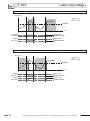
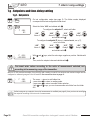
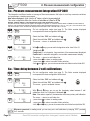
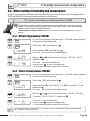
User Manual
Presure • Temperature • Humidity • Air Velocity • Air Flow
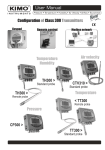
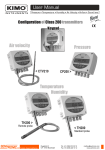
Configuration of Class 300 Transmitters
Keypad
Remote control
New
Modbus network
Temperature
Humidity
TH300 >
Standard probe
TH300 >
Remote probe
Temperature
< TT300
Remote probe
Pressure
CP300 >
TT300 >
Standard probe
Summary
1. Prerequesite . . . . . . . . . . . . . . . . . . . . . . . . . . . . . . . . . . . . . . . . . . . . . . . . . . . . . . . . . . . . . . . . . . . . . . . . . . . . . . . . . . . . . . . P 1
1.a - Working principle . . . . . . . . . . . . . . . . . . . . . . . . . . . . . . . . . . . . . . . . . . . . . . . . . . . . . . . . . . . . . . . . . . . . . . . . P 1
1.b - Output signal selection . . . . . . . . . . . . . . . . . . . . . . . . . . . . . . . . . . . . . . . . . . . . . . . . . . . . . . . . . . . . . . . . . . P 1
2. Modbus parameters . . . . . . . . . . . . . . . . . . . . . . . . . . . . . . . . . . . . . . . . . . . . . . . . . . . . . . . . . . . . . . . . . . . . . . . . . . . . P 3
2.a - Configuration parameters . . . . . . . . . . . . . . . . . . . . . . . . . . . . . . . . . . . . . . . . . . . . . . . . . . . . . . . . . . . . . . . P 3
2.b - Modbus functions . . . . . . . . . . . . . . . . . . . . . . . . . . . . . . . . . . . . . . . . . . . . . . . . . . . . . . . . . . . . . . . . . . . . . . . . P 3
2.c - Register access security key . . . . . . . . . . . . . . . . . . . . . . . . . . . . . . . . . . . . . . . . . . . . . . . . . . . . . . . . . . . P 3
3. Activation code and access to functions . . . . . . . . . . . . . . . . . . . . . . . . . . . . . . . . . . . . . . . . . . . . . . . P 5
4. Display and keypad configuration •
F100 . . . . . . . . . . . . . . . . . . . . . . . . . . . . . . . . . . . . . . . . . . . P 6
4.a - Transmitter channel for infrared remote control . . . . . . . . . . . . . . . . . . . . . . . . . . . . . . . . . . . . . . . P 6
4.b - Backlight . . . . . . . . . . . . . . . . . . . . . . . . . . . . . . . . . . . . . . . . . . . . . . . . . . . . . . . . . . . . . . . . . . . . . . . . . . . . . . . . . P 6
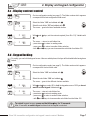
4.c - Display contrast control . . . . . . . . . . . . . . . . . . . . . . . . . . . . . . . . . . . . . . . . . . . . . . . . . . . . . . . . . . . . . . . . . P 7
4.d - Keypad locking . . . . . . . . . . . . . . . . . . . . . . . . . . . . . . . . . . . . . . . . . . . . . . . . . . . . . . . . . . . . . . . . . . . . . . . . . . P 7
4.e - Slave addressing (Modbus) . . . . . . . . . . . . . . . . . . . . . . . . . . . . . . . . . . . . . . . . . . . . . . . . . . . . . . . . . . . . . P 8
5. Configuring channels and units of measurement •
F200. . . . . . . . . . . . . . . . . . . . . . P
9
6. Analogue output management •
F300 . . . . . . . . . . . . . . . . . . . . . . . . . . . . . . . . . . . . . . . . . . . . . . . P 10
6.a - Output diagnostics . . . . . . . . . . . . . . . . . . . . . . . . . . . . . . . . . . . . . . . . . . . . . . . . . . . . . . . . . . . . . . . . . . . . . P 11
6.b - Analogue outputs setting . . . . . . . . . . . . . . . . . . . . . . . . . . . . . . . . . . . . . . . . . . . . . . . . . . . . . . . . . . . . . . P 12
7. Alarm / Relay settings •
F400 . . . . . . . . . . . . . . . . . . . . . . . . . . . . . . . . . . . . . . . . . . . . . . . . . . . . . . . . . . . P 14
7.a - Activation / Deactivation of BEEP alarm. . . . . . . . . . . . . . . . . . . . . . . . . . . . . . . . . . . . . . . . . . . . . . P 14
7.b - Relay security . . . . . . . . . . . . . . . . . . . . . . . . . . . . . . . . . . . . . . . . . . . . . . . . . . . . . . . . . . . . . . . . . . . . . . . . . . P 14
7.c - Alarm / relay functions and LED colour codes . . . . . . . . . . . . . . . . . . . . . . . . . . . . . . . . . . . . . . . P 15
7.d - Channel selection for alarms / relays . . . . . . . . . . . . . . . . . . . . . . . . . . . . . . . . . . . . . . . . . . . . . . . . . P 16
7.e - Alarm mode details. . . . . . . . . . . . . . . . . . . . . . . . . . . . . . . . . . . . . . . . . . . . . . . . . . . . . . . . . . . . . . . . . . . . . P 17
7.f - Alarm mode selection . . . . . . . . . . . . . . . . . . . . . . . . . . . . . . . . . . . . . . . . . . . . . . . . . . . . . . . . . . . . . . . . . . P 19
7.g - Set points and time-delay setting . . . . . . . . . . . . . . . . . . . . . . . . . . . . . . . . . . . . . . . . . . . . . . . . . . . . . P 20
8. Pressure measurement configuration •
F500 . . . . . . . . . . . . . . . . . . . . . . . . . . . . . . . . . . . . P 22
8.a - Pressure measurement integration (CP 300) . . . . . . . . . . . . . . . . . . . . . . . . . . . . . . . . . . . . . . . . P 22
8.b - Time-delay between 2 self-calibrations (CP 300) . . . . . . . . . . . . . . . . . . . . . . . . . . . . . . . . . . . . P 22
9. Humidity measurement configuration •
F500 . . . . . . . . . . . . . . . . . . . . . . . . . . . . . . . . . . . . P 23
9.a - Humidity and temperature offset adjustment (TH 300) . . . . . . . . . . . . . . . . . . . . . . . . . . . . . . P 23
Class 300 transmitter configuration via keypad / remote control / Modbus
Summary
10. Air velocity measurement configuration (CP300 + SQR) •
F600 . . . . . . . . P 24
10.a - Temperature compensation . . . . . . . . . . . . . . . . . . . . . . . . . . . . . . . . . . . . . . . . . . . . . . . . . . . . . . . . . P 24
10.b - Air velocity coefficient selection. . . . . . . . . . . . . . . . . . . . . . . . . . . . . . . . . . . . . . . . . . . . . . . . . . . . . . P 26
10.c - Air velocity correction coefficient input . . . . . . . . . . . . . . . . . . . . . . . . . . . . . . . . . . . . . . . . . . . . . . P 27
11. Airflow measurement configuration •
F600 . . . . . . . . . . . . . . . . . . . . . . . . . . . . . . . . . . . . . P
28
12. Other functions. . . . . . . . . . . . . . . . . . . . . . . . . . . . . . . . . . . . . . . . . . . . . . . . . . . . . . . . . . . . . . . . . . . . . . . . . . . . . . . . P 31
12.a - Activation / Deactivation of the RS 232 and home bus . . . . . . . . . . . . . . . . . . . . . . . . . . . . P 31
12.b - Serial number display . . . . . . . . . . . . . . . . . . . . . . . . . . . . . . . . . . . . . . . . . . . . . . . . . . . . . . . . . . . . . . . . P 31
12.c - Modification of Modbus communication speed . . . . . . . . . . . . . . . . . . . . . . . . . . . . . . . . . . . . . P 32
12.d - Purge Mode . . . . . . . . . . . . . . . . . . . . . . . . . . . . . . . . . . . . . . . . . . . . . . . . . . . . . . . . . . . . . . . . . . . . . . . . . . . P 33
13. Error codes . . . . . . . . . . . . . . . . . . . . . . . . . . . . . . . . . . . . . . . . . . . . . . . . . . . . . . . . . . . . . . . . . . . . . . . . . . . . . . . . . . . . . P 35
14. Functions recap . . . . . . . . . . . . . . . . . . . . . . . . . . . . . . . . . . . . . . . . . . . . . . . . . . . . . . . . . . . . . . . . . . . . . . . . . . . . . . . P 37
Class 300 transmitter configuration via keypad / remote control / Modbus
1. Prerequisite
1.a - Working principle
Using keypad / remote control / Modbus configuration, you can activate (or deactivate) a channel, change the
measuring range, set the set points and time-delay...
®
Principle: the configuration options are accessed via folders and sub-folders (similar to Windows ). Access is
made via a numerical code (full details in this manual).
Visual alarm LED
AL1
AL2
Infrared receiver
CODE:
0000
Graphic display
Keypad
1.a.1 - Keypad
AL1
AL2
CODE:
0000
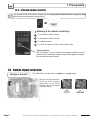
Meaning of the keys
To increment a value or a level
To decrement a value or a level
To validate an input
To cancel an input or to return to the previous step
Class 300 transmitter configuration via keypad / remote control / Modbus
Page 1
1. Prerequesite
1.a.2 - Infrared remote control
The remote control works like the keypad and the configuration method remains exactly the same
whichever you use (keypad or remote control).
=
Meaning of the remote control keys
To increment a value or a level
To decrement a value or a level
To validate an input
To cancel an input or to return to the previous step
Channel selector
With this selector, you can swap the transmission channel so that it
matchs with the transmitter reception channel. See page 6 to configure
the transmitter reception channel.
1.b - Output signal selection
Voltage or Current ?
The Class 300 can output either a voltage or a current signal.
With the on-off switch located on
the left top of the transmitter
(when open), you can choose
analogue output 0-10V (voltage)
or 4-20 mA (current)
Down
0-10 V
Page 2
Up
4-20 mA
Class 300 transmitter configuration via keypad / remote control / Modbus
2. Modbus parameters
2.a - Configuration parameters
• Communication speed. . . . . . . . . . . . . . . . . . . . . 19200 Bauds (see page 33 to configure the speed)
• Data bits. . . . . . . . . . . . . . . . . . . . . . . . . . . . . . . . . 8 bits
• Stop bit . . . . . . . . . . . . . . . . . . . . . . . . . . . . . . . . . . 1 bit
• Parity . . . . . . . . . . . . . . . . . . . . . . . . . . . . . . . . . . . . None
• Flow control. . . . . . . . . . . . . . . . . . . . . . . . . . . . . None
• Transmitter addressing . . . . . . . . . . . . . . . . . between 1 and 255
default address “0” for single ended bus configuration
to change the addressing, see page 8.
2.b - Functions
• Register reading . . . . . . . . . . . . . . . . . . . . . . . . . . . . . . . . . . . Function 03
• Register writing . . . . . . . . . . . . . . . . . . . . . . . . . . . . . . . Function 16
• Communication loop test . . . . . . . . . . . . . . . . . . . . . Function 08
2.c - Access codes to Registers
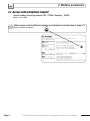
• Registers type . . . . . . . . . . . . . . . . . . . . . . . . . . . . . . . . . . . Signed long integer (32 bits), permuted (LSB, MSB)
• Alarms status - Modbus code : 1436
b31
...
Ex. The value sent by the transmitter is 5
Alarm condition 1
and relay 1 excited
Relay 2
b4 b3 b2 b1 b0
0 1 0 1
Alarm 1
Alarm 2
Relay 1
• Values - Modbus code : 1438 (channel 1)
1442 (channel 2)
1446 (channel 3 or value 1 of the external transmitter)
1450 (channel 4 or value 2 of the external transmitter)
Ex. the value sent by the transmitter is 6321
• Values formatting - Modbus code : 1440 (channel 1)
1444 (channel 2)
1448 (channel 3 or value 1 of the external transmitter)
1452 (channel 4 or value 2 of the external transmitter)
Units of measurement
1
m/s
12 mmH2O
2
3
4
5
6
7
8
9
10
11
fpm
m3/h
L/s
cfm
m3/s
°C
°F
%RH
PSI
Pa
13
14
15
16
17
18
19
20
21
22
inWg
Kpa
mmHg
mbar
g/kg (absolute humidity. ñ)
°C (dew temp. Td)
°F (dew temp. Td)
°C (wet temp. Tw)
°F (wet temp. Tw)
KJ/Kg (Enthalpy i)
b31
...
b12 b11 b10 b9 b8 b7 b6 b5 b4 b3 b2 b1 b0
0 0 0 1 0 0 0 0 1 1 0 0
Unit of measurement (see chart)
Nr of digits after the comma
Value sign (0=>+, 1=> -)
Ex. The formatting displayed is 268.
Unit of measurement => 12 (see chart)
Figure(s) after the comma => 1
Sign => positive
If the value measured is equal to 6231 :
Result => 623,1 mmH2O
Class 300 transmitter configuration via keypad / remote control / Modbus
Page 3
2. Modbus parameters
2.c - Access code to Registers (sequel)
• Serial number of sensing element (SPI - CP300 / Humidity - TH300)
Modbus code: 1402
Other access codes to different registers are indicated on each function at stage n°2.
db
Mo us
Shown as this pictogram:
202
Page 4
Class 300 transmitter configuration via keypad / remote control / Modbus
3. Activation code and access to functions
This step is COMPULSORY for each configuration.
!
To access the transmitter functions, and for safety, you have to first enter a safety code.
• Please check that the transmitter is powered on.
• If the transmitter displays an error code, please see “Errors Code” section on page 35
Step 1
Press on
to get this screen
The first “0” blinks, which means that this column is activated and you can
enter data from the keypad.
CODE:
0000
Step 2
The code must be entered from left to right.
To increment a value or a level, press
Enter the CODE “0101”
To
decrement a value or a level, press
with the keypad and
To validate a value (level) or to validate the code, press
validate with
CODE:
To return to the previous status or to cancel, press
0101
Step 3
This screen appears:
This screen confirms that the code was correctly entered, and that you can
configure the transmitter.
If the code was wrongly entered, the transmitter initializes and returns to the
starting display.
100
100
Configuration folder number
The transmitter includes 6 folders maximum::
• 100
• 200
• 300
• 400
• 500
• 600
Ex. In the folder 400, you can configure the alarms
and relays. See page 14.
Step 4
Configuration folder
selection
100
>
F
102
05
To select your configuration folder, press to increment 100 or press
decrement 100.
Once the folder is selected, press
to validate.
L
to
On the top left of each page of this manual, you can find a reminder of the
configuration folder where the function is available.
F400
Class 300 transmitter configuration via keypad / remote control / Modbus
Page 5
F100
4. Display and keypad configuration
4.a - Transmitter channel for infrared remote control
You can change the channel number for receiving the signal from the infrared remote control.
The advantage is that only one remote control is required to drive several transmitters, and that there
is no interference if 2 transmitters are located side by side.
By default, the channel number is 0.
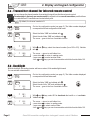
Step
1
Step
2
Go into the configuration mode (see page 5). The folder number displayed
corresponds to the last configuration folder used.
100
Step
3
>
Step
>
.
Select the sub-folder “100” and validate with .
The cursor > goes to the line of available choices.
db
Mo us
200
F
100
00
F
100
With and
with .
F
100
03
The cursor > returns to sub-folders line.
• press twice
to return to reading mode
• press once
to select another folder.
• with and keys, you can choose another sub-folder from the folder 100.
>
4
Select the folder “100” and validate with
100
03
keys, select the channel number (from 00 to 09). Validate
4.b - Backlight
With the backlight, the reading is easier with more contrast, if the ambient light is weak.
You can activate or deactivate it.
Step
1
Step
2
Step
3
>
Step
>
Page 6
Select the folder “100” and validate with
100
>
4
Go into the configuration mode (see page 5). The folder number displayed
corresponds to the last folder used.
100
F
101
01
F
101
F
01
101
01
.
Select the sub-folfer “101” and validate with .
The cursor > goes to the line of available choices.
With and
Validate with
db
Mo us
202
keys, select 00 to deactivate the backlit or 01 to activate.
.
The cursor > returns to sub-folders line.
• press twice to return to reading mode.
• press once to select another folder.
• with and keys, you can choose another sub-folder from the folder 100.
Class 300 transmitter configuration via keypad / remote control / Modbus
F100
4. Display and keypad configuration
4.c - Display contrast control
Step
Go into configuration mode (see page 5). The folder number which appears
corresponds to the last configuration folder used.
100
1
Step
Select the folder “100” and validate with
100
2
3
>
Step
>
4
db
Mo us
Select the sub-folder “102” and validate with .
The cursor > goes to the line of available choices.
204
F
102
05
F
102
With
.
F
102
08
The cursor > returns to sub-folders line.
• press twice to return to reading mode.
• press once to return to another folder selection.
• with and keys, you can choose another sub-folder from folder 100.
>
Step
.
08
and
keys, set the contrast required (from 0 to 10). Validate with
4.d - Keypad locking
For safety, you can lock the keypad access. Like on a mobile phone, the keys will be disabled after having been
locked.
Step
1
Step
2
100
Go into configuration mode (see page 5). The folder number which appears
corresponds to the last folder used.
100
Select the folder “100” and validate with
db
Mo us
>
Step
3
>
Step
>
4
!
F 104
01
.
208
Select the sub-folder “104” and validate .
The cursor > goes to the different choices available.
F 104
With and keys, select 01 to lock the keypad access or 00 if you do not
want to lock the keypad. Validate with .
F 104
01
The cursor > returns to sub-folders line.
• press twice to return to reading mode.
• press once to return to another folder selection.
• with and keys to choose another sub-folder from the folder 100
01
To unlock keypad access, press and hold the
key for 10 seconds.
After 10 seconds, an audible signal confirms that the keypad is unlocked.
Class 300 transmitter configuration via keypad / remote control / Modbus
Page 7
F100
4. Display and keypad configuration
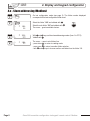
4.e - Slave addressing (Modbus)
Step
1
Step
2
Step
3
>
Step
>
Page 8
Select the folder “100” and validate with
100
>
4
Go into configuration mode (see page 5). The folder number displayed
corresponds to the last configuration folder used.
100
Select the sub-folder “106” and validate with
The cursor > goes to available choices.
.
db
Mo us
.
212
F
106
01
F
106
With and keys, set the slave addressing number (from 1 to 255).
Validate with .
F
106
23
The cursor > goes to sub-folders line.
• press twice
to return to reading mode.
• press once to return to another folder selection.
• with and keys to choose another sub-folder from the folder 100.
23
Class 300 transmitter configuration via keypad / remote control / Modbus
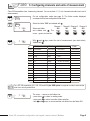
F200 5. Configuring channels and units of measurement
Class 300 transmitters have 4 measuring channels. You can activate 1, 2, 3 or 4 channels and select each unit of
measurement.
Step
1
Step
2
Select the folder “200” and validate with .
200
>
Step
3
Go into configuration mode (see page 5). The folder number displayed
corresponds to the last configuration folder used.
200
>
F
F
200
04
Select sub-folder
and validate with
. The
cursor > goes to choices line.
Channel 1 Channel 2 Channel 3 Channel 4
200
201
202
203
db
Mo us
db
Mo us
db
Mo us
db
Mo us
400
402
404
406
With
and
keys, select the unit of measurement (see chart below).
Validate with .
201
06
CP 301, 302 et 303 CP 304
00
TH 300
TT 300
Voie inactive
Voie inactive
Voie inactive
Voie inactive
01
Pa
Pa
°C
°C
02
mmH2O
mmH2O
°F
°F
03
inWg
inWg
%HR
04
mbar
mbar
g/Kg (Hygro. absolue ñ)
05
°C
mmHg
°C (Temp. de rosée Td)
06
°F
°C
°F (Temp. de rosée Td)
07
m/s
°F
°C (Temp. humide Tw)
08
fpm
m/s
°F (Temp. humide Tw)
09
m3/h
fpm
KJ/Kg (Enthalpie i)
10
L/s
m3/h
11
cfm
L/s
12
m3/s
13
cfm
m3/s
For a CP 300 transmitter (301, 302, 303 and 304),the SQR option is required in order to activate the
units of air velocity and airflow.
Step
4
>
F
201
06
The cursor > returns to sub-folders line.
• press twice to return to reading mode.
• press once to return to another folder selection.
• with and keys to choose another sub-folder from the folder 200.
Class 300 transmitter configuration via keypad / remote control / Modbus
Page 9
F300
6. Analogue output management
6.a - Output diagnostics
With this function, you can check with a multimeter (or a regulator/display, or a PLC/BMS) if the transmitter outputs
are working properly. The transmitter generates a voltage of 0 V, 5 V and 10 V or a current of 4 mA, 12 mA and 20
mA.
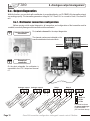
6.a.1 - Multimeter connection configuration
Before carrying out the output diagnostics, all connections and configurations of the transmitter must be
enabled, to avoid any damage on the transmitter and the multimeter !
Step
1
Selection of the channel
to be checked
First, select a channel for the output diagnostics.
The channel numbers are indicated on the
board located below the terminal block.
Channel n°1
Step
2
Channel n°2
Example of
connection
On the photo alongside, the multimeter is
connected to the 0-10 V output and channel
n°1.
Analogue output 1
Analogue output 2
ge
ge
lta nd
lta nd
o
o
v
v
ou t
ou t
...
...
... gr en
... gr en
... ...... curr
... ...... curr
.
.
.
.
..
. . ..
. . .. .....
V. ... ...
V. ...
0 ..... .. ...
0 ..... .. ...
1
1
0 - D. A.
0 - D. A.
N
N
G 20 m
G 20 m
44-
Page 10
Relay 1
B
-
A
+
e
op
n
e
op
n
ly
ly
d
al
al
ed
se
m on
rm on clos
lo
o
c
m
m
.. om ally
..n om ally
...
...
... ..c rm
... ..c rm
... .... no
... .... no
r
no
..
Relay 2
.
.. .
NO M .....
C O ...
NC
..
...
..
.
.. .
NO M .....
C O ...
NC
..
...
[
24 Vdc / ac
230 Vac
115 Vac
The ticked box shows
the power supply type
of the transmitter
(230 Vac shown above).
Class 300 transmitter configuration via keypad / remote control / Modbus
F300
6. Analogue output management
6.a.2 - Output diagnostics
Once the connection of the transmitter to the multimeter (or regulator or PLC/BMS is complete, (see page
6), you can carry out the analogue output diagnostics on several check points.
Step
1
Step
2
100
Go into configuration mode (see page 5). The folder number displayed
corresponds to the last configuration folder used.
300
Select the folder “300” and validate with
>
F
300
00
Channel n° 1 output
Select sub-folder “300”
.
Channel n° 2 output
db
Mo us
600
Select sub-folder “303”
db
Mo us
606
and validate with .
The cursor > goes to available choices.
Step
3
>
F
300
01
With and keys, select the signal that the transmitter must output (see
chart below). Note : no need to validate with .
Diagnostic Output
4
0V
01
5V
02
10 V
03
4 mA
04
12 mA
05
20 mA
If the deviations are too big (>0,05V or >0,05mA) between the signal issued and the
value displayed on the multimeter, we recommend that you return the transmitter to
our factory.
!
Step
00
>
F
300
01
The cursor > returns to sub-folders line.
• press twice
to return to reading mode.
• press once to return to another folder selection.
• with and keys to choose another sub-folder from the folder 300.
Class 300 transmitter configuration via keypad / remote control / Modbus
Page 11
F300
6. Analogue output management
6.b - Analogue output settings
With this function, you can modify the measuring range of the transmitter, and you can equate the new limits to the
analogue output (0-10V or 4-20mA).
You can enter the measuring range required on your own !
!
You must enter the values according to the units of measurement selected, not
according to the measuring range of the transmitter.
Eg. on a CP 303 pressure transmitter (0 to ±1000 Pa) with a reading in mmH2O, the minimum and maximum ranges must be
configured on measuring range of 0 to ±102 mmH2O. See conversion chart on following page.
Step
1
Step
2
Go into configuration mode (see page 5). The folder number displayed
corresponds to the last configuration folder used.
100
Select the folder “300” and validate with
300
>
F 301
-100
Minimum of Channel n°1
output
Select sub-folder “301”
and validate with
Step
3
F 301
> -000100
Step
4
>
F
302
+500
5
!
Etape
Step
6
F 302
>+000500
602
.
Minimum of Channel n°2
output
Select sub-folder “304”
db
Mo us
608
. The cursor > returns to the input line.
With and keys, select the value sign: negative or positive, validate with
. Then, enter the minimum limit value and validate with .
Maximum of Channel n°1
output
Select sub-folder “302”
and validate with
Step
db
Mo us
db
Mo us
604
Maximum of Channel n°2
output
Select sub-folder “305”
db
Mo us
610
. The cursor > goes to the input line.
With and keys, select the value sign: negative or positive, validate with
.
Then, enter the maximum limit value and validate with .
We recommend that the interval between the minimum and maximum is > 5% of the measuring range.
>
F
302
+500
The cursor > goes to sub-folders line.
• press twice to return to reading mode.
• press once to return to another folder selection.
• with and keys you can choose another sub-folder from the folder
300.
After an analogue output setting, if the unit of measurement is modified (see page 5), you have to reconfigure the
outputs according to the new unit of measurement.
Page 12
Class 300 transmitter configuration via keypad / remote control / Modbus
F300
6. Analogue output management
6.b.1 - Units of measurement conversion chart
Pressure
Pa
CP 301
CP 302
CP 303
CP 304
mmH2O
inWg
mbar
mmHg
0 to ±100
0 to ±10,2
0 to ±0,401
0 to ±1,00
-
0 to ±500
0 to ±51,0
0 to ±2,005
0 to ±5,00
-
0 to ±1000
0 to ±102,0
0 to ±4,015
0 to ±10,00
-
0 to ±10000
0 to ±1020,0 0 to ±40,01
0 to ±100,00
0 to ±75,00
Temperature
°C
TH 300 - Sonde Inox
TH 300 - Sonde PC
TT 300 - Sonde Inox
TT 300 - Sonde PC
°F
-40,0 à +180,0
-40,0 à +356,0
-20,0 à +120,0
-4,0 à +248,0
-40,0 à +180,0
-40,0 à +356,0
-20,0 à +120,0
-4,0 à +248,0
Class 300 transmitter configuration via keypad / remote control / Modbus
Page 13
F400
7. Alarm / relay settings
7.a - Activation / Deactivation of BEEP alarm
The beep alarm (audible alarm) is activated when a set point is reached.
For more details on the setpoint settings, see page 20.
Step
1
Step
2
100
Go into configuration mode (page 5). The folder number displayed
corresponds to the last configuration folder used.
400
Select the folder “400” and validate with
.
Select sub-folder “400” and validate with
The cursor > goes to available choices.
.
3
>
Step
>
4
800
F
400
01
F
400
With
and
keys, select
disactivate. Validate with .
F
400
01
The cursor > goes to sub-folders line.
• press twice to return to reading mode.
• press once to return to another folder selection.
• with and keys you can choose another sub-folder from the folder 400.
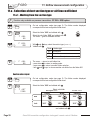
>
Step
db
Mo us
01
01
to activate the BEEP alarm or
00
to
7.b - Relay security
The relay outputs are by default, in negative security: the relay is energized when a set point is reached.
With the keypad, you can swap the relays in positive security : then, the relay is de-energized when a set point is
reached or during a power outage.
Step
1
Step
2
Step
3
>
Step
>
Page 14
Select folder “400” and validate with
400
>
4
Enter in configuration mode (see page 5). The folder number displayed
corresponds to the last configuration folder used.
100
.
Select sub-folder “401” and validate with
The cursor > goes to available choices.
db
Mo us
.
802
F
401
01
F
401
With the keys
and , select 01 for a positive security or
negative security. Validate with .
F
401
01
The cursor > returns to sub-folders line.
• press twice on to return to reading mode.
• press once on to return to another folder selection.
• with and keys, you can choose another sub-folder from the folder 400.
01
Class 300 transmitter configuration via keypad / remote control / Modbus
00
for a
F400
7. Alarm / relay settings
7.c - Alarm / relay functions and LED colour codes
7.c.1 - Visual / audible alarms
Class 300 transmitters have 2 visual / audible alarms located in front of the transmitter, allowing to know the
condition of the setpoints.
Alarm n°1
Alarm n°2
Alarm LED colour codes
Green
The alarm function is activated and
the set point is not reached
The alarm function is activated and
the setpoint is reached
The alarm function is not activated
Red
None
The red LED appears when the setpoint is reached,
taking into account the time-delay and the action type
(falling or rising).
See page 17 for more details.
Audible alarm
Once the alarm is activated, an alarm sounds
whilst the setpoint is reached.
The BEEP alarm function must be activated to use the
audible alarm. See page 14.
7.c.2 - The relays
Class 300 transmitters have 2 relays visible on the transmitter board. These 2 relays each have one LED to
allow real-time checking.
Relay n°1
LED
Relay n°1
Relay n°2
LED
Relay n°2
Relay LED colour codes
Red
The relay is energized
None
The relay is not energized
or has not been configured
The relay is energized when the setpoint is reached, taking
into account the time-delay, the action type and also the
alarms security mode.
Set points, time-delay and action type setting: see page 20
Alarm security settings : see page 14
Class 300 transmitter configuration via keypad / remote control / Modbus
Page 15
F400
7. Alarm / relay settings
7.d - Selection of the channel for visual and relays alarms
Class 300 transmitters have 4 alarms: 2 visual (LED) and audible alarms and 2 relay alarms. The transmitter can be
configured with 4 different alarms setups.
!
Step
1
Before any alarm setup, check that the corresponding channel(s) is activated.
Go into configuration mode (see page 5). The folder number displayed
corresponds to the last configuration folder used.
100
Step
Select the folder “400” and validate with
400
2
>
F
402
01
Select sub-folder
“402”
Alarm 1
(LED 1)
Step
3
Step
4
Page 16
>
>
.
db
Mo us
804
db
Mo us
db
Mo us
“407” 814
“412” 824
Alarm 2
Relay 1
(LED 2)
and validate with .
db
Mo us
“417” 834
Relay 2
F
402
With and keys, select the channel number for which you want to
configure an alarm. Validate with .
F
402
01
The cursor > returns to sub-folders line.
• press twice to return to reading mode.
• press once to return to another folder selection.
• with and keys, you can choose another sub-folder from the folder 400
(i.e. for example to configure another alarm / relay)
01
Class 300 transmitter configuration via keypad / remote control / Modbus
F400
7. Alarm / relay settings
7.e - Alarm mode details
7.e.1 - Definitions
Setpoint
The setpoint is a limit which, on being reached and/or exceeded , activates an alarm or energizes a relay (in negative
security, see page 14 for more details).
Time-delay
Once the setpoint is reached and/or exceeded, the time-delay postpones the alarm activation (or relay excitation) for a
short period (in seconds). Once this period is elapsed, and if the setpoint is still exceeded, then the alarm is activated or
the relay is energized (in negative security).
Action type
For alarm activation or relay excitation, you can choose the action type: rising or falling action.
• Rising action: the alarm is activated once the measurement goes over the setpoint
• Falling action: the alarm is activated once the measurement goes below the setpoint
7.e.2 - Available configurations
Configuration N°1 : 2 setpoints and time-delay activated (Control Mode)
Setpoint 1 > Setpoint 2
Measurement
Alarm set
<T> Time-delay
Setpoint 1
Setpoint 2
<T>
<T>
<T>
Time
Energized
Not energized
Relay status
Negative security
Energized
Not energized
Relay status
Positive security
Control mode (or
regulation mode)
=>you can regulate the
measurement within a
range determined by 2
setpoints.
Setpoint 2 > Setpoint 1
Measurement
Alarm set
<T> Time-delay
Setpoint 2
Setpoint 1
<T>
<T>
<T>
Time
Energized
Not energized
Relay status
Negative security
Energized
Not energized
Status relay
Positive security
Class 300 transmitter configuration via keypad / remote control / Modbus
Page 17
F400
7. Alarm / relay settings
Configuration N°2 : 1 setpoint, time-delay and rising action activated
Measurement
Alarm set
<T> Time-delay
Setpoint 1
<T>
<T>
<T>
Time
Energized
Not energized
Relay status
Negative security
Energized
Not energized
Relay status
Positive security
Configuration N°3 : 1 setpoint, time-delay and falling action activated
Measurement
Alarm set
<T> Time-delay
Setpoint 1
<T>
Page 18
<T>
<T>
Time
Energized
Not energized
Relay status
Negative security
Energized
Not energized
Relay status
Positive security
Class 300 transmitter configuration via keypad / remote control / Modbus
F400
7. Alarm / relay settings
7.f - Alarm mode selection
Step
1
Step
>
Step
Step
4
Select the folder “400” and validate with .
400
2
3
Go into configuration mode (see page 5). The folder number displayed
corresponds to the last configuration folder used.
100
>
>
Select sub-folder
F
403
01
F
403
F
01
403
01
“403”
Alarm 1
db
Mo us
806
db
Mo us
db
Mo us
“408”
“413”
816
826
Alarm 2
Relay 1
and validate with .
db
Mo us
“418”
836
Relay 2
With and keys, select the code relative to the alarm mode (see chart
below). Validate with .
Code
Alarm mode
Drawing
00
No alarm
01
2 setpoints with time-delay (control mode)
N° 1 page 17
02
1 setpoint with time-delay and rising action
N° 2 page 18
03
1 setpoint with time-delay and falling action
N° 3 page 18
The cursor > returns to sub-folders line.
• press twice to return to reading mode.
• press once to return to another folder selection.
• with and keys, you can choose another sub-folder from the folder
400.
Class 300 transmitter configuration via keypad / remote control / Modbus
Page 19
F400
7. Alarm / relay settings
7.g - Setpoints and time-delay setting
7.g.1 - Setpoints
Step
1
Step
2
Go into configuration mode (see page 5). The folder number displayed
corresponds to the last configuration folder used.
100
Select the folder “400” and validate with
400
>
F
404
02
.
To configure the setpoint 1, select sub-folder
“404”
Alarm 1
db
Mo us
808
db
Mo us
db
Mo us
“409”
“414”
818
828
Alarm 2
Relay 1
and validate with .
db
Mo us
“419”
838
Relay 2
To configure the setpoint 2 (alarm in control mode, see p17),
select sub-folder
db
db
db
db
Mo us
Mo us
Mo us
Mo us
“405”
“410”
“415”
“420”
820
810
830
840
Alarm 1
Alarm 2
Relay 1
Relay 2
and validate with .
Step
3
>
!
F
404
-00100
With and keys, select the value sign: negative or positive. Validate with
.
Then, enter the setpoint value and validate with .
You must enter values according to the units of measurement selected, not
according to the measuring range of the transmitter.
Ex. on a CP 303 pressure transmitter (0 to ±1000 Pa) with a reading in mmH2O, the minimum and maximum ranges must be
configured on measuring range of 0 to ±102 mmH2O. See conversion chart on page 13.
Step
4
>
F
404
-100
The cursor > returns to sub-folders line.
• press twice to return to reading mode.
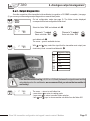
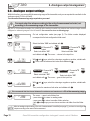
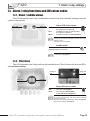
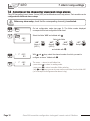
• press once to return to another folder selection.
• with and keys, you can choose another sub-folder from the folder
400.
If after having set up a setpoint, the unit of measurement is modified (see page 9), then you have to reconfigure
the setpoints according to this new unit of measurement.
Page 20
Class 300 transmitter configuration via keypad / remote control / Modbus
F400
7. Alarm / relay settings
7.g.2 - Time-delay
Step
1
Step
2
100
Go into configuration mode (see page 5). The folder number displayed
corresponds to the last configuration folder used.
400
Select the folder “400” and validate with
>
Step
3
>
Step
>
4
F
406
02
.
Select sub-folder
“406”
Alarm 1
db
Mo us
812
db
Mo us
db
Mo us
“411”
“416”
822
832
Alarm 2
Relay 1
and validate with .
db
Mo us
“421”
842
Relay 2
F
406
With and keys, set the required time-delay: from 00 to 60 seconds.
If you do not need the time-delay, enter 00.
Validate with .
F
406
15
The cursor > returns to sub-folders line.
• press twice to return to reading mode.
• press once to return to another folder selection.
• with and keys , you can choose another sub-folder from the folder 400.
15
Class 300 transmitter configuration via keypad / remote control / Modbus
Page 21
F500
8. Pressure measurement configuration
8.a - Pressure measurement integration (CP 300)
The integration coefficient makes an average of the measurements: this helps to avoid any excessive variations
and guarantees a stable measurement.
New value displayed = [((10 - Coef.) x New Value) + (Coef. x former value)] /10
This value is applicable when the variation is less than +/- (Coef. x 10 Pa)
Example : CP303 (0-1000 Pa) - First measurement: 120 Pa - New measurement : 125 Pa
The pressure source is stable, the user applied a low integration. Integration : 1, maximum variation allowed +/-10 Pa. Since the variation is
less than 10 Pa, we apply the integration calculation formula. Next measurement displayed ((9 * 125) + (1 *120 ))/10 = 124.5 soit 124 Pa. If the
new value had been 131 Pa, the next value displayed would have been 100% of the new value, i.e 131 Pa.
Step
1
Step
2
100
Go into configuration mode (see page 5). The folder number displayed
corresponds to the last configuration folder used.
500
Select the folder “500” and validate with
F
500
03
F
500
>
Step
3
>
Step
>
4
F
08
500
08
.
Select the sub-folder “500” and validate with
The cursor > returns to available choices.
With
and
db
Mo us
.
1000
keys, you can set the integration value: from 00 to 09.
Validate with .
Coefficient 0 : no integration, large variation of the measurement displayed.
Coefficient 9 : maximum integration, more stable measurement display.
The cursor > returns to sub-folders line.
• press twice to return to reading mode.
• press once to return to another folder selection.
• with and keys , you can choose another sub-folder from the folder 500.
8.a - Time-delay between 2 self-calibrations
Step
1
Step
2
Select the folder “500” and validate with
500
>
Step
3
>
Step
>
4
Go into configuration mode (see page 5). The folder number displayed
corresponds to the last configuration folder used.
100
F
501
15
F
501
F
501
30
30
.
Select the sub-folder “501” and validate with
The cursor > goes to available choices.
db
Mo us
.
1002
With
and
keys, you can set the time-delay values between 2 selfcalibrations: from 0 to 60 minutes. Validate with .
Nota : if the value is equal to 0, the transmitter will not carry out any self-calibration.
The cursor > returns to sub-folder line.
• press twice to return to reading mode.
• press once to return to another folder selection.
• with and keys , you can choose another sub-folder from the folder 500
Whenever you want, in reading mode, you can carry out a self-calibration by keeping “ESC” pressed
for 5 seconds.
Page 22
Class 300 transmitter configuration via keypad / remote control / Modbus
F500
9. Humidity measurement configuration
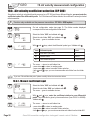
9.a - Offset setting in humidity and temperature
In order to compensate for any longterm drift of the transmitter, you can add an offset to the value displayed by the
TH 200 with the EHK 500 reference portable instrument or via the keypad.
! Function only available on humidity transmitters: TH 300
The EHK 500 is a reference portable instrument (optional) which enables you to adjust at one point the
humidity and temperature reading, via the RS 232 connection cable. Thanks to this new time-saving
system, no need to return the transmitter to our factory.
Your transmitter is always available on site. For more details, see technical datasheet and user manual of
EHK 500.
9.a.1 - Offset in hygrometry (TH300)
Etape
1
Etape
2
Etape
3
Etape
4
Go into the configuration mode (see page 2). The folder number displayed
corresponds to the last folder used.
100
Select folder “500” and validate with
500
.
F 500
> +0010,0
Select sub-folder “500” and validate with .
The cursor > goes to the line of available choices.
F 500
> +0010,0
With keys and
Validate with .
>
F
500
10
, enter the offset value: from
-50,0 to +50,0.
The cursor > returns to sub-folders line.
• press once on
to return to reading mode.
• or choose another folder to access other functions.
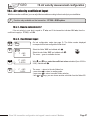
9.a.2 - Offset in temperature (TH300)
Etape
1
Etape
2
Etape
3
Etape
4
Go into the configuration mode (see page 2). The folder number displayed
corresponds to the last folder used.
100
Select folder “500” and validate with
.
500
F 501
> +0003,2
Select sub-folder “501” for an offset in °C or “502” for an offset in °F and
validate with .
The cursor > goes to the line of available choices.
F 501
> +0003,2
With keys and , enter the offset value: from -50,0 to +50,0 (in
°C) or from -90 to +90 (in °F). Validate with .
>
F
501
3,2
The cursor > returns to folders line.
• press once on
to return to reading mode.
• or choose another folder to access other functions.
If you activate the offset in temperature in °C (function 501), the value entered is automatically converted
into °F (function 502) and vice versa.
Class 300 transmitter configuration via keypad / remote control / Modbus
Page 23
F600
10. Air velocity measurement configuration
10.a - Temperature compensation
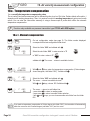
You can modify the temperature compensation value.
The air velocity and airflow measured with a differential probe (such as Pitot tube, Debimo blade,orifice plate...)
depends on the working temperature. Then, it is required to enter the working temperature to get more accurate
results. You can enter the value either manually or using a thermocouple K probe which offers the automatic
temperature compensation.
! Function only available on pressure transmitter type CP 300 with SQR option
10.a.1 - Manual compensation
Step
1
Step
2
Go into configuration mode (see page 5). The folder number displayed
corresponds to the last configuration folder used.
100
Select the folder “600” and validate with
600
>
db
Mo us
F 600
23
Select the sub-folder “600” to enter a value in °C
or "601" to enter a value in °F
validate with
Step
3
F 600
> +00020
Step
4
Step
5
>
>
.
F 602
00
F 602
00
1200
db
Mo us
1202
. The cursor > returns to available choices.
With and keys, enter the temperature compensation (Celsius degree
shown alongside, sub-folder "600"). Validate with .
Select the folder “602” and validate with .
The cursor > returns to available choices.
With and keys, choose 00. Validate with
.
The cursor > returns to sub-folders line.
• press twice to return to reading mode.
• press once to return to another folder selection.
• with and keys, you can choose another sub-folder from the folder
600
If you make a temperature compensation in Celsius degree (sub-folder "600"), the transmitter will automatically
make the conversion into Farenheit degree (sub-folder "601") and vice versa.
Page 24
Class 300 transmitter configuration via keypad / remote control / Modbus
F600
10. Air velocity measurement configuration
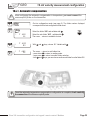
10.a.1 - Automatic compensation
!
Step
1
Step
2
Before configuring the automatic compensation in temperature, you must connect the
thermocouple K probe on the transmitter.
600
>
Step
3
Step
4
!
Go into configuration mode (see page 5). The folder number displayed
corresponds to the last configuration folder used.
100
>
>
Select the folder “600” and validate with
F
602
01
F
602
F
602
01
01
db
Mo us
.
1204
Select the sub-folder “602” , validate with .
The cursor > returns to available choices.
With
and
keys, choose 01. Validate with
.
The cursor > returns to sub-folders line.
• press twice to return to reading mode.
• press once to return to another folder selection.
• with and keys, you can choose another sub-folder from the folder 500
Once the automatic temperature compensation configuration is complete, check carefully
the connection of the thermocouple K probe.
Class 300 transmitter configuration via keypad / remote control / Modbus
Page 25
F600
10. Air velocity measurement configuration
10.b - Air velocity coefficient selection (CP 300)
Since the air velocity is calculated from the pressure (on a CP 300) and from a differential probe, you must enter the
coefficient value of the differential probe. For Pitot tubes and Debimo blades, the coefficient is already included
in the transmitter.
! Function only available on the pressure transmitters: CP 300 + SQR option
Step
1
Step
2
Step
Step
4
Select the folder “600” and validate with
600
>
3
Go into configuration mode (see page 5). The folder number displayed
corresponds to the last configuration folder used.
100
>
>
F
603
00
F
603
F
.
Select the sub-folder “603” and validate with
The cursor > goes to available choices.
With
and
db
Mo us
.
1206
keys, select the differential probe type. Validate with
.
01
603
01
Code
Differential probe
Coef.
00
Pitot tube L (ISO 3966)
1
01
DEBIMO blade
0.8165
02
Other differential probe
To be entered
The cursor > returns to sub-folders line.
• press twice to return to reading mode.
• press once to return to another folder selection.
• with and keys, you can choose another sub-folder from the folder
600.
If you use “Other differential probe” please carefully follow the instructions below.
10.b.1 - Manual coefficient input
Step
1
Select the folder “600” and validate with
600
>
Step
F
604
00
F
604
2
>
0.8165
Step
>
F 604
0.8165
3
Page 26
.
Select the sub-folder “604” and validate with
The cursor > goes to available choices.
db
Mo us
.
1208
With
and
keys, enter the coefficient relative to your differential
probe. This coefficient is given by the manufacturer (from 0.0001 to 9.9999).
Validate with .
The cursor > returns to sub-folders line.
• press twice to return to reading mode.
• press once to return to another folder selection.
• with and keys , you can choose another sub-folder from the folder 600.
Class 300 transmitter configuration via keypad / remote control / Modbus
F600
10. Air velocity measurement configuration
10.c- Air velocity coefficient input
With this correction coefficient, you can adjust the transmitter according to the air velocity in your installation.
! Function only available on the transmitter : CP 300 + SQR option
10.c.1 - How to calculate it ?
If the air velocity in your duct is equal to 17 m/s, and if the transmitter indicates 16.6 m/s, then the
coefficient to apply is 17 / 16,6, ie 1.024
10.c.2 - Coefficient input
Step
1
Step
2
Select the folder “600” and validate with
600
>
Step
3
>
Step
>
4
Go into configuration mode (see page 5). The folder number displayed
corresponds to the last configuration folder used.
100
.
Select the sub-folder “605” and validate with
The cursor > goes to available choices.
db
Mo us
.
1210
F
605
00
F
605
With and keys, enter the coefficient value calculated (from 0.200 to
2.000). Validate with .
F 605
1.024
The cursor > returns to the sub-folders line.
• press twice to return to reading mode.
• press once to return to another folder selection.
• with et keys, you can choose another sub-folder from the folder 600.
1.024
Class 300 transmitter configuration via keypad / remote control / Modbus
Page 27
F600
11. Airflow measurement configuration
11.a - Selection of duct section type or airflow coefficient
11.a.1 - Working from the section type
! Function only available on pressure transmitters: CP 300 + SQR option
Step
1
Step
2
600
F
606
00
F
606
>
Step
3
Step
4
Go into configuration mode (see page 5). The folder number displayed
corresponds to the last configuration folder used.
100
>
>
F
00
606
00
Select the folder “600” and validate with .
Select the sub-folder “606” and validate with
The cursor > goes to available choices.
With and
Validate with
db
Mo us
1212
.
keys, select the section type (00 or 01).
.
Code
Section type
00
Rectangular
01
Circular
02
Airflow coefficient (to be entered, see p 29)
The cursor > returns to sub-folders line.
• press twice to return to reading mode.
• press once to return to another folder selection.
• with and keys to choose another sub-folder from the folder 600.
Section sizes input
Step
1
Step
2
100
Go into configuration mode (see page 5). The folder number displayed
corresponds to the last configuration folder used.
600
Select the folder “600” and validate with
>
F
.
Select sub-folder
607
1500
Rectangular section
Length
mm
“607”
inch
“610”
db
Mo us
1214
db
Mo us
1220
Width
“608”
“611”
Diameter
db
Mo us
“609”
1216
db
Mo us
“612”
1222
and validate with
Page 28
Circular section
.
Class 300 transmitter configuration via keypad / remote control / Modbus
db
Mo us
1218
db
Mo us
1224
F600
Step
3
>
Step
>
4
F
F
10. Airflow measurement configuration
607
With and keys, enter the value (from 0 to 3000mm or 0 to 118.11 inch).
Validate with .
607
The cursor > returns to sub-folders line.
• press twice to return to reading mode.
• press once to return to another folder selection.
• with and keys, you can choose another sub-folder from the folder 600.
1500
1500
If you enter a length, width or diameter in mm, the transmitter will automatically calculate the conversion in Inch
(vice versa)
10.a.2 - Working from a airflow coefficient
With this coefficient, you can calculate the airflow from the pressure. This coefficient is given by the manufacturer of the
devices supplied with pressure connections (+ and -). From the square root of the pressure measured (Delta P),and from this
coefficient, you get the airflow.
Airflow = CD x
Pressure
!
Function only available for the pressure transmitter: CP 300 + SQR option. In this calculation mode, you
have no access to reading of air velocity. If you activate this calculation mode and also a channel in
air velocity, the transmitter will display an error code “4”.
!
Go back to procedure page 28 / step 3:
With and keys, select 02 and validate with
Step
1
600
2
>
Step
3
>
Step
>
4
Go into configuration mode (see page 5). The folder number displayed
corresponds to the last configuration folder used.
100
Step
.
Select the folder “600” and validate with .
Select the sub-folder “613” and validate with
The cursor > goes to available choices.
db
Mo us
.
1226
F
613
00
F
613
With and
Validate with
F
614
01
The cursor > returns to sub-folders line.
Select the sub-folder “614” to select the unit of measurement in
db
Mo us
pressure for the airflow calculation and validate with .
1228
The cursor > returns to available choices.
40.25
keys, enter the airflow coefficient value (from 0,01 to 999,99).
.
Class 300 transmitter configuration via keypad / remote control / Modbus
Page 29
F600
Step
5
Step
6
Page 30
>
>
F
F
614
01
614
01
11. Airflow measurement configuration
With
and
keys, select the unit of measurement (see chart below).
Validate with .
CP301/302/303
CP304
01
Pa
Pa
02
mmH2O
mmH2O
03
inWg
inWg
04
mbar
mbar
05
-
mmHg
The cursor > returns to sub-folders line.
• press twice to return to reading mode.
• press once to return to another folder selection.
• with and keys to choose another sub-folder from the folder 600.
Class 300 transmitter configuration via keypad / remote control / Modbus
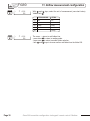
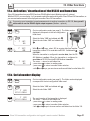
12. Other functions
12.a- Activation / deactivation of the RS232 and home bus
Class 300 transmitters have one RS232 and one RS 485 digital output (Modbus protocol) - optional.
With the RS 232, you can display 1 or 2 parameters which are measured by other Class 200 and 300 transmitters, or
you can send measurements to be displayed on another Class 300 transmitters.
!
If you set up your transmitter to send measurements to another transmitter via RS 232, then you will
not be able to use the RS 485 digital output anymore (Modbus - optional).
Step
1
Step
2
Go into configuration mode (see page 5). The folder number
displayed corresponds to the last configuration
folder used.
100
100
F
103
00
F
103
>
Step
3
>
00
Select the folder “100” and validate with .
Select the sub-folder “103” and validate with
.
With
and
keys, select
00
to receive data from another
transmitter or select 01 to send data via RS 232. Validate with
CAUTION !!
Step
4
>
F
103
00
db
Mo us
206
When the transmitter is configured to receive data, then the RS
485 Modbus is active). When the transmitter is configured to
send data via RS 232, then the RS 485 Modbus is inactive.
The cursor > returns to sub-folders line.
• press twice to return to reading mode.
• press once to return to another folder selection.
• with and keys, you can choose another sub-folder from the folder 100.
12.b- Serial number display
Step
1
Step
2
100
Go into configuration mode (see page 5). The folder number displayed
corresponds to the last configuration folder used.
100
Select the folder “100” and validate with
Select the sub-folder “105”
F 105
>
03.12.2004
Step
3
F 105
>
03.12.2004
.
db
Mo us
210
The serial number of the transmitter is displayed.
The cursor > returns to sub-folders line.
• press twice to return to reading mode.
• press once to return to another folder selection.
• with and keys to choose another sub-folder from the folder 100.
Class 300 transmitter configuration via keypad / remote control / Modbus
Page 31
12. Other functions
12.c- Modification of Modbus communication speed
Step
1
Step
2
100
>
Step
3
Step
4
Page 32
Go into configuration mode (see page 5). The folder number displayed
corresponds to the last configuration folder used.
100
>
>
Select the folder “100” and validate with
.
F
107
03
Select the sub-folder “107” and validate with
F
107
With
F
05
107
05
and
.
keys, select a communication speed
(see chart below). Validate with
.
00
2400 bauds
03
19200 bauds (speed by default)
01
4800 bauds
04
38400 bauds
02
9600 bauds
05
115200 bauds
db
Mo us
214
The cursor > returns to sub-folders line.
• press twice to return to reading mode.
• press once to return to another folder selection.
• with and keys, you can choose another sub-folder from the folder 100.
Class 300 transmitter configuration via keypad / remote control / Modbus
12. Other functions
12.d- Purge mode
The purge mode enables to freeze the measurement when being displayed, enables to lock the analogue outputs,
and to activate the relay 1, in order to actuate a de-dust system of a air movement conditions.
! This function is only available on CP300 pressure transmitters.
12.d.1 -Activation / deactivation of Purge Mode
Step
1
Step
2
100
Go into configuration mode (see page 5). The folder number displayed
corresponds to the last configuration folder used.
300
Select the folder “300” and validate with
F
306
00
F
306
>
Step
3
>
Step
>
4
F
01
306
01
.
Select the sub-folder “306” and validate with
.
With and keys, activate (01) or deactivate (00) the purge
mode. Validate with .
db
Mo us
612
The cursor > returns to sub-folders line.
• press twice to return to reading mode.
• press once to return to another folder selection.
• with and keys, choose another sub-folder from the folder 300
12.d.2 -Working duration of purge mode
Step
1
Step
2
300
>
Select the folder “300” and validate with
.
F
307
00
Select the sub-folder “307” and validate with
.
F
307
With and keys, enter the value in seconds of the required
working duration of each purge (from 01 to 60). Validate with
F
307
25
The cursor > returns to sub-folders line.
• press twice to return to reading mode.
• press once to return to another folder selection.
• press and to choose another sub-folder from the folder 300
db
Mo us
Step
3
>
Step
>
4
Go into configuration mode (see page 5). The folder number displayed
corresponds to the last configuration folder displayed.
100
25
Class 300 transmitters configuration via keypad / remote control / modbus
614
Page 33
12. Other functions
12.d- Mode Purge
12.d.3 -Frequency
Step
1
Step
2
100
Go into configuration mode (see page 5). The folder number displayed
corresponds to the last configuration folder used.
300
Select the folder “300” and validate with
F
308
00
Select the sub-folder “308” and validate with
F
308
With keys and , enter the value in minutes of the frequency
of each purge (from 01 to 9999). Validate with .
F
308
60
The cursor > returns to sub-folders line.
• press twice to return to reading mode.
• press once to return to another folder selection.
• with and , choose another sub-folder from the folder 300.
>
.
db
Mo us
Step
3
>
Step
>
4
.
60
616
12.d.4 - Time-delay
Once the purge is finished, time-delay is a time period before the transmitter returns to measurement
mode and before the analogue outputs are reactivated.
Step
1
Step
2
100
Go into configuration mode (see page 5). The folder number displayed
corresponds to the last configuration folder used.
300
Select the folder “300” and validate with
>
3
>
Step
>
Page 34
F
309
00
Select the sub-folder “309” and validate with
.
F
309
With and keys, enter the value in seconds of the time-delay
required (from 00 to 60). Validate with .
F
309
10
The cursor > returns to the sub-folders line.
• press twice to return to reading mode.
• press once to return to another folder selection.
• with and keys, choose another sub-folder from the folder 300.
db
Mo us
Step
4
.
10
Class 300 transmitters configuration via keypad / remote control / modbus
618
13. Error codes
Code Problem
Solution
01
Configuration error (alarm(s) set on a non
displayed/activated channel)
• Check status of the 4 alarms and 4 channels.
Ex. : the error appears if an alarm is configured on a channel
(1,2,3 or 4) which is not active. Then, you must activate the
channel on which you want to configure an alarm.
Activation of a channel :see page 5
Alarm and relay configurations: see page 14
02
No channel activated
• Activate one channel (at least).
Activation of a channel: see page 5
03
Humidity probe (TH300) or SPI (CP 300) not
connected
• Connect the probe / SPI (see user manual SPI)
04
Only on CP 300.
A channel is configured in air velocity (see page
5) and the airflow calculation function (page 23)
is set to 02 (airflow coefficient). This
combination is impossible.
• Select a unit in airflow for the channel 1, 2, 3 or 4 (see channels
configuration, page 5)
• Instead of airflow coefficient, select a circular or rectangular
section in function 606 (see page 28)
Class 300 transmitters configuration via keypad / remote control / modbus
Page 35
200
201
202
203
200
202
204
206
208
210
212
214
odbu
s
Code
xxx
M
100
101
102
103
104
105
106
107
odbu
s
Code
M
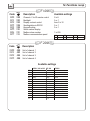
14. Functions recap
xxx
400
402
404
406
F100
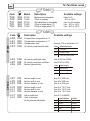
Description
Available settings
Channel n° for IR remote control
Backlight
Display contrast control
Sending data via RS232
Keypad locking
Serial number display
Modbus slave number
Modbus communication speed
0 to 9
0 or 1
from 0 to 10
0 or 1
0 or 1
1 to 255
00 2400 bds 02 9600 bds
04 38400 bds
01 4800 bds 03 19200 bds
05 115200 bds
F200
Description
Unit of channel 1
Unit of channel 2
Unit of channel 3
Unit of channel 4
Available settings
CP301, 302 et 303 CP 304
TH300
Inactive channel
Pa
mmH2O
Inactive channel Inactive channel
Pa
mmH2O
°C
°F
08
inWg
mbar
°C
°F
m/s
fpm
inWg
mbar
mmHg
°C
°F
m/s
%HR
g/Kg (absolute humd. ñ)
°C (dew temperature Td)
°F (dew temperature Td)
°C (wet temperature Tw)
°F (wet temperature Tw)
09
m3/h
fpm
KJ/Kg (Enthalpy i)
10
11
L/s
cfm
m3/h
L/s
12
m3/s
00
01
02
03
04
05
06
07
13
cfm
m3/s
channel 2
CP 300
odbu
F300
Available settings
600
Analogue output setting on channel 1
0=>0V, 1=>5V, 2=>10V
3=>4mA, 4=>12mA, 5=>20mA
301
302
602
604
Analogue output minimum on channel 1
Analogue output maximum on channel 1
303
606
Analogue output setting on channel 1
304
305
608
610
Analogue output minimum on channel 2
Analogue output maximum on channel 2
306
307
308
309
612
614
616
618
Activation / Deactivation of purge mode
Working time of each purge
Frequency of each purge
Time-delay after purge
M
Description
Code
300
s
channel 1
14. Functions recap
xxx
0=>0V, 1=>5V, 2=>10V
3=>4mA, 4=>12mA, 5=>20mA
00 or 01
from 01 to 60 seconds
from 01 to 9999 minutes
from 00 to 60 seconds
odbu
s
Code
M
14. Functions recap
xxx
F400
Description
R E L AY 2
R E L AY 1
ALARM 2
ALARM 1
400 800 Audible alarm
401 802 Relays security
402 804 Channel selection for alarm 1
403 806 Channel selection for alarm 1
404 808 Setpoint 1 of alarm 1
405 810 Setpoint 2 of alarm 1
406 812 Time-delay on alarm 1
407 814 Channel selection for alarm 2
408 816 Alarm 2 type selection
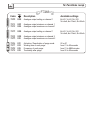
409 818 Setpoint 1 of alarm 2
410 820 Setpoint 2 of alarm 2
411 822 Time-delay on alarm 2
412
413
824 Channel selection for Relay 1
826 Alarm type selection for Relay 1
414
415
416
828 Setpoint 1 of Relay 1
830 Setpoint 2 of Relay 1
832 Time-delay of Relay 1
417
418
834 Channel selection for Relay 2
836 Alarm type selection for Relay 1
419 838 Setpoint 1 of Relay 2
420 840 Setpoint 2 of Relay 2
421 842 Time-delay of Relay 2
Available settings
0 or 1
0 (negative) or 1 (positive)
1=> channel 1, 2=> channel 2, 3=>channel 3, 4=> channel 4
0=> inactive
1=> setpoint 1, setpoint 2 and time-delay
2=> setpoint 1, time-delay and rising action
3=> setpoint 1, time-delay and falling action
from 0 to 60 seconds
1=> channel 1, 2=> channel 2, 3=>channel 3, 4=> channel 4
0=> inactive
1=> setpoint 1, setpoint 2 and time-delay
2=> setpoint 1, time-delay and rising action
3=> setpoint 1, time-delay, and falling action
from 0 to 60 seconds
1=> channel 1, 2=> channel 2, 3=>channel 3, 4=> channel 4
0=> inactive
1=> setpoint 1, setpoint 2 and time-delay
2=> setpoint 1, time-delay and rising action
3=> setpoint 1, time-delay and falling action
from 0 to 60 seconds
1=> channel 1, 2=> channel 2, 3=>channel 3, 4=> channel 4
0=> inactive
1=> setpoint 1, setpoint 2 and time-delay
2=> setpoint 1, time-delay and rising action
3=> setpoint 1, time-delay and falling action
from 0 to 60 seconds
14. Functions recap
M
500
500
501
501
502
1000
1000
1002
1002
1004
CP 300
604
605
606
M
xxx
odbu
s
600
601
602
603
s
Code
Code
CP 300
odbu
xxx
1200
1202
1204
1206
1208
1210
1212
Model
F500
Description
Available settings
CP300
TH300
CP300
TH200
TH200
Measurement integration
Offset in humidity
Self-calibration for time-delay
Offset in temperature (°C)
Offset in temperature (°F)
from 0 to 9
-50,0 to +50,0
from 0 to 60 minutes
from -50,0 to +50,0
from -90,0 to +90,0
F600
Description
Available settings
Compensation temperature in °C
Compensation temperature in °F
Compensation type
Air velocity measurement mean
manual =>00 or automatic=>01
Air velocity coefficient value
Air velocity correction coefficient
Section type selection
Code
Differential probe
00
Pitot tube
01
DEBIMO blade
02
Other differential probe
from 0.0001 to 9.9999
from 0.200 to 2.000
Code
Section type
00
Rectangular
01
Circular
02
Airflow coefficient
607
608
609
1214
1216
1218
Section length in mm
Section width in mm
Section diameter in mm
from 0 to 3000 mm
from 0 to 3000 mm
from 0 to 3000 mm
610
611
612
1220
1222
1224
Section length in inch
Section width in inch
Section diameter in inch
from 0 to 118.11 inch
from 0 to 118.11 inch
from 0 to 118.11 inch
613
614
1226
1228
Airflow coefficient
Units of pressure
for the pressure calculation
from 0.01 to 999.99
CP301/302/303
CP304
01
Pa
Pa
02
mmH2O
mmH2O
03
inWg
inWg
04
mbar
mbar
05
-
mmHg
Ref. NT Ang - Classe 300 - 03/07B - We reserve the right to modify the characteristics of our products without notice.