1
F500
9. Humidity measurement configuration
9.a - Offset setting in humidity and temperature
In order to compensate for any longterm drift of the transmitter, you can add an offset to the value displayed by the
TH 200 with the EHK 500 reference portable instrument or via the keypad.
! Function only available on humidity transmitters: TH 300
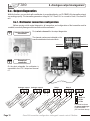
The EHK 500 is a reference portable instrument (optional) which enables you to adjust at one point the
humidity and temperature reading, via the RS 232 connection cable. Thanks to this new time-saving
system, no need to return the transmitter to our factory.
Your transmitter is always available on site. For more details, see technical datasheet and user manual of
EHK 500.
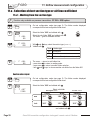
9.a.1 - Offset in hygrometry (TH300)
Etape
1
Etape
2
Etape
3
Etape
4
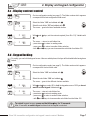
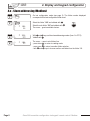
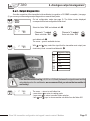
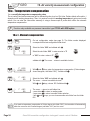
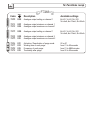
Go into the configuration mode (see page 2). The folder number displayed
corresponds to the last folder used.
100
Select folder “500” and validate with
500
.
F 500
> +0010,0
Select sub-folder “500” and validate with .
The cursor > goes to the line of available choices.
F 500
> +0010,0
With keys and
Validate with .
>
F
500
10
, enter the offset value: from
-50,0 to +50,0.
The cursor > returns to sub-folders line.
• press once on
to return to reading mode.
• or choose another folder to access other functions.
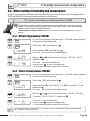
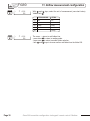
9.a.2 - Offset in temperature (TH300)
Etape
1
Etape
2
Etape
3
Etape
4
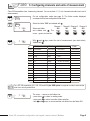
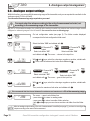
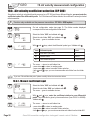
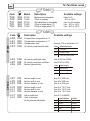
Go into the configuration mode (see page 2). The folder number displayed
corresponds to the last folder used.
100
Select folder “500” and validate with
.
500
F 501
> +0003,2
Select sub-folder “501” for an offset in °C or “502” for an offset in °F and
validate with .
The cursor > goes to the line of available choices.
F 501
> +0003,2
With keys and , enter the offset value: from -50,0 to +50,0 (in
°C) or from -90 to +90 (in °F). Validate with .
>
F
501
3,2
The cursor > returns to folders line.
• press once on
to return to reading mode.
• or choose another folder to access other functions.
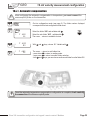
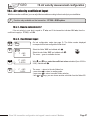
If you activate the offset in temperature in °C (function 501), the value entered is automatically converted
into °F (function 502) and vice versa.
Class 300 transmitter configuration via keypad / remote control / Modbus
Page 23