1
Presel
4-2
SESAM
01-OCT-2004
Program version 7.3
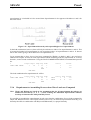
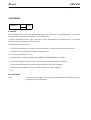
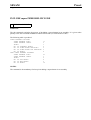
• The parameters (commands, sub-commands and data) are separated by one or more blank characters (or
a comma) and may be entered one by one or with two or more entries on a single line of input. For example:
COMMAND
SUB-COMMAND
SUB-SUB-COMMAND
data ...
is equivalent to:
COMMAND SUB-COMMAND SUB-SUB-COMMAND data ...
Note, however, that data belonging to different data sets cannot be entered on a single line.
• UPPER CASE = lower case (all commands will be logged on a ‘command log file’ in UPPER case).
• Commands and sub-commands may be abbreviated as long as they are unique. In a command consisting
of words separated by hyphens, each word may be abbreviated or completely left out. Examples:
NODE-NUMBERS = N-N
COMMAND-INPUT-FILE = C-I
• Default values are provided between slashes, ‘/default/’. The defaults are accepted by hitting Return.
• Real or integer input may be entered irrespective of type of numerical data, use ‘E’ for exponent.
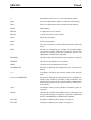
• ‘?’ will list all legal commands and data options. (This command is irrelevant for the graphical user interface where all legal commands and data options are at any time given in the command column of the
graphic-mode window.)
• ‘P?’ will list all legal commands starting with P.
• ‘..’ (two dots) will execute the input data before ‘..’ and subsequently abort the current command. The
program is thereafter ready for more commands. If the data before the ‘..’ is incomplete it will be discarded.
• ‘,,’ (two commas) will cause one default parameter to be accepted. (May be useful when editing a ‘command input file’.)
• ‘;’ (semicolon) will cause default parameters to be accepted until the end of the parameter group or until
there is no default provided.
• Text containing blank characters has to be enclosed within single quotes: 'this is a text'.
• ‘%’ (percentage sign) at the beginning of a line is used for entering a comment. Comments will be
logged together with commands on the ‘command log file’ (see Section 4.1.3). Note that the program
will occasionally log information on the ‘command log file’, this will appear as comments in between
data and comments entered by the user. The program information is preceded by ‘%%’ (two percentage
signs) to distinguish it from the user’s own comments. This makes it easy to strip a ‘command log file’
for program information in connection with creating a ‘command input file’ (any fairly good editor will
have a macro-functionality or similar enabling you to locate and remove all lines with ‘%%’). Moreover,
comments preceded by ‘%%’ will not be logged on the ‘command log file’ to avoid irrelevant logging of
program information when using an unedited ‘command log file’ as a ‘command input file’.