1
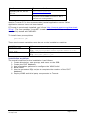
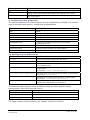
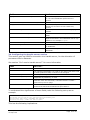
Field
Set it to…
apply.shibboleth.security
“y” for security modes 1 or 2, “n” for mode 3. If
“n”, the other Shibboleth parameters are
ignored.
allow.username.password.srb.login
“y” for mode 1, “n” for mode 2.
http.port.to.block
In mode 2, the port which the XDMS server is
running on, to bounce it from. Otherwise,
ignored.
shibboleth.login.url
In mode 2, the URL to redirect the login page
towards.
shibboleth.model.unique.id
An identifier for the university allocated by
MAMS.
shibboleth.model.unique.id.block.chars
Characters to remove from the unique ID.
Replaced characters are substituted with an “@”
character. For example: =+;<>-
shib.id.trim.length
Maximum length for ID.
grid.security.certificate
In modes 1 and 2, the security certificate used
for Shibboleth.
cert.provider
Web service that provides certificates for
Shibboleth.
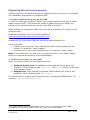
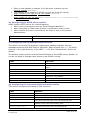
3d. Configuring the handle server section
This section sets up XDMS’s connection to a handle server, for the allocation of
permanent IDs to datasets.
See section “Do I need a handle server?” for more information
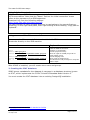
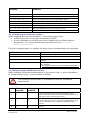
Field
Set it to…
create.dataset.handle
“y” to enable use of handle server, otherwise “n”.
hdl.server.namespace
The registered namespace you wish to use. Once it has been used
for some production data, it should not be changed.
hdl.server.key.location
Path to private key used to access handle server.
hdl.server.key.passphrase
Passphrase of private key, if used.
hdl.resolver.url
The URL of the handle server’s front page. In other words, if you
paste this value into a browser, it should reach the “Handle
System Proxy Server” page.
hdl.base.url
The base URL that XDMS will be running as. This is used to
construct the URL that the handle will point back to.
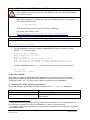
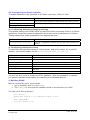
To understand the significance of these fields, take the following set-up as an
example.
hdl.server.namespace=102.100.archer
hdl.server.key.location=/etc/grid-security/handlekey.bin
hdl.resolver.url= http://handles.uni.edu.au
hdl.base.url=http://xdms.uni.edu.au:8080/
This has the following implications.
XDMS System Administrator’s Guide v1.0
30 Sept 2008
Page 14 of 24