1
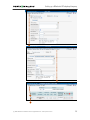
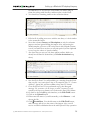
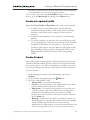
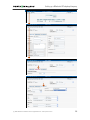
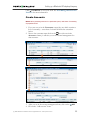
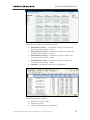
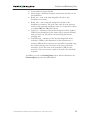
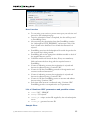
Setting up a Wholesale IP Telephony Company o H323-ID – h323-id (recommended hostname.domainname) o H323 Password – If you plan to use default Cisco remote IP authentication script, put cisco here. o NAS-IP-Address – IP address of the h323 interface. o Auth. Translation rule – use to converts dialed number in the desired format. o Type – VoIP node type, select VOIP-GW. o Manufacturer - Select Cisco or Quintum. o Radius Client – Check this if this node will be communicating with the billing. o Radius Key – If this node is a radius client, put the shared secret here; it must be same as configured on the NAS as a key in the configuration of the radius server. o Radius Source IP – Unless your gateway has multiple network interfaces, the value here should be the same as NAS-IP-Address 4. Click Save&Close. 5. Repeat steps 2-4 until all of your nodes are entered. NOTE: There is some propagation delay between the database and the Radius server configuration file; no more than 15 minutes. Create Tariff A tariff is a single price list for calling services. A tariff combines: Conditions, which are applicable for every call regardless of the called destination. Per destination rates. Normally you need a separate tariff for each of your customers. 1. In the Management section of the Admin-Index choose Tariffs 2. On the Tariff Management page choose Add 3. Fill in the New Tariff form: o Name – the short name for tariff object. This is the name you will see later in the select menus. o Currency – indicates in which currency the pricing information is defined. All pricing information for a single tariff must be defined in the same currency. NOTE: Currency for the tariff is chosen only once, and you cannot change it later. o Type – if you plan for this tariff to be used for your wholesale customer’s accounts, so that the customer himself can edit rates in this tariff, choose “Managed by NNN”, where NNN is the customer’s name. Otherwise, if this tariff is for the retail customer’s accounts or for your termination costs to the vendor, choose Managed by None here. o Off-peak Period – defines the off-peak period. Click on the Offpeak period wizard icon ( ) to summon the wizard, which will (c) 2000-2004 Porta Software Ltd. All rights Reserved. www.portaone.com 11