1
Setting up a Wholesale IP Telephony Company
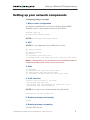
Setting up your network components
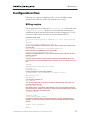
Configuring NAS gw-example1
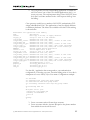
1. Basic router configuration
It is highly recommended to use the latest telephony IOS and DSP
firmware, and to set the hostname the same as the h323-id.
hostname <h323_id>
ip domain name <default domain>
NOTE: VSA
h323-gw-id=”hostname.domain”
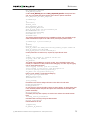
2. NTP
NOTE: it is very important to have reliable time services.
ntp server <name/IP>
…….
ntp server <name/IP>
ntp master 5
clock timezone <your time zone> 1
clock summer-time <your summer time zone> recurring <your rules>
NOTE: It is important that you only use well-known time zone abbreviations which are
supported by the billing engine. If unsure, use the UTC time zone.
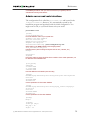
3. AAA
aaa
aaa
aaa
aaa
new-model
authentication login h323 group radius
authorization exec h323 group radius
accounting connection h323 stop-only group radius
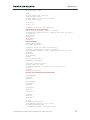
4. VoIP interface
interface <your interface to the world>
h323-gateway voip interface
h323-gateway voip id <gatekeeper id> ipaddr <IP> <port>
h323-gateway voip h323-id <h323_id>
NOTE: if you want to use a virtual interface then add the line:
h323-gateway voip bind srcaddr <IP>
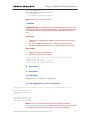
5. Enable gateway functionality
gateway
6. Enable gateway accounting
For older IOS versions:
(c) 2000-2004 Porta Software Ltd. All rights Reserved. www.portaone.com
6