1
19
6. CONTROL
6.1. Remote Control Pad
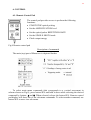
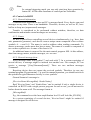
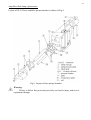
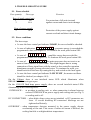
The control pad provides access to perform the following
functions:
• START/STOP optical pulsing
• Set the AMPLIFICATION level
• Set the optical pulses REPETITION RATE
• Set the SINGLE SHOTS mode
• Check output energy
Fig.8 Remote control pad
Description of commands
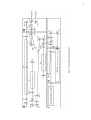
The main (top) part of Menu tree is depicted further.
To select main menu commands (this corresponds to a vertical movement in
scheme shown on Fig.8), press button SEL and hold it down while selecting the desired
command by buttons ∆ and ∇. When selected, release the button SEL. Remote control
pad display will show one of the sub-menu commands. To select another command, use
button SEL to move in a sub-menu.