1
US006442243B1
(12)
(54)
United States Patent
(10) Patent N0.:
Valco et al.
(45) Date of Patent:
VOICE MAIL INTERFACE
5,737,394 A
5,751,793 A
Inventors: Larry
SherrillIJee
J. Packebush,
valco, pleasanton,
Austin, TX
Aug. 27, 2002
4/1998 Anderson et a1. ...... .. 379/8811
*
5/1998
Davies et a1. .......... .. 379/88.11
5,797,124 A
2 * 8/1998 Walsh
in?ict61a1~8.1.
_
,
(CUAS)(’UJS‘;hn Payton Beans’ Oakland’
,
es
av
......
---- ..
............... ..
.
5,943,402 A * 8/1999 Hamel et a1. .......... .. 379/8826
5,953,394 A
,
(73)
US 6,442,243 B1
6,014,427 A
Asslgnee: imiTegggmzgsgg' Resources’ Inc"
9/1999 Asakawa et a1. ...... .. 379/8825
*
1/2000
Hanson et al. ........... .. 379/67.1
6,021,181 A * 2/2000 Miner 61 a1. ........... .. 379/8823
us in,
OTHER PUBLICATIONS
*
( )
Nt'
0 Ice
:
Sb'
tt
d'
1'
th t
fth'
pigs: isoeirtlgndlgg ?rm553115;; Tiger
Lucent Technologies, Inc., entitled “Sierra Voice Network
U.S.C. 154(b) by 0 days.
Server > 1998~
* cited by examiner
(21)
Appl. No.: 09/558,292
(22) Filed:
_
_
Apr. 25, 2000
(74) Attorney, Agent, or Firm—Greenblum & Bernstein,
(51)
Int. Cl.7 .......................... .. H04M 1/64; H04M 3/42
PLC
(52)
US. Cl. ................ .. 379/671; 379/884; 379/8813;
(57)
379/8822; 379/201.02; 379/207.13
(58)
_
Primary Exammer—Allan Hoosam
ABSTRACT
_
f
_
_1
_
1 d
Field Of Search ......................... .. 379/671, 70, 72,
379/74 76 88 04 88 22 88 23 88 24
Anmer ace to a V0166 mal System men 65 a messt‘ge
review area from Where messages are played to a subscriber
88 27 88 13 ’18 1'8 ’88 2'5 ’88 2'6 ’201'01’
and a settings area. The message revieW area is immediately
' ’
' 261 0'2 £42 61 ’207' 13’ 21 01’
'
(56)
’
'
’
'
’
'
References Cited
accessed When the subscriber enters the voice mail system.
The settings area is accessed from the message revieW area
When the subscriber enters a predetermined command. Set
tings features are sequentially accessed from the settings
U.S. PATENT DOCUMENTS
4,757,525 A
5,394,445 A
5,400,393 A
CALL
*
*
*
area. Functions directly available from the message revieW
7/1988 Matthews et a1. ..... .. 379/8826
2/1995 Ball et a1. .............. .. 379/8821
3/1995 Knuth et a1. ........... .. 379/8827
%
66
DONE,*,TIME
area are also provided.
18 Claims, 2 Drawing Sheets
U.S. Patent
Au ca 2 7, 2 0 W.
US 6,442,243 B1
Shw 1
m52,35 59%:
E0
2957:
.UEM
M5o2na
US 6,442,243 B1
1
2
VOICE MAIL INTERFACE
voice mail program. As With all conventional voice mail
interfaces, the user must develop a basic mental map before
BACKGROUND OF THE INVENTION
being able to easily navigate from state to state. The typical
user Will invent and share 5 “shortcuts” that alloW a function
in one state to be immediately accessed from another state.
An example is using 3-3-7 to erase a message. This shortcut
1. Field of the Invention
The present invention relates to the ?eld of telecommu
nications. More particularly, the present invention relates to
a voice mail interface having a non-hierarchical interface
spans tWo major program states: message listening, in Which
3-3 means “go to the end” and 7 means “reduce volume”;
structure that permits a user to access voice mail features
and message disposition after the message has played, in
Without having to memorize commands.
Which 7 means “erase.” Notice in the midst of 3-3-7 that the
2. Background Information
7 key changes meaning. A user must understand that just
When a user subscribing to a voice mail service accesses
pressing 7 during a message Will not erase it and that the user
must ?rst go to the menu that folloWs the message and then
a voice mail system, (for example, to listen to a recorded
message), the user interacts With a voice mail interface.
erase the message.
Typically, the user enters a passWord to access a voice 15
It is more user friendly to alloW any command to be issued
mailbox and then enters a command (for example, presses a
key on the telephone touchpad) to play a message or to enter
at any time (Where practical). The Message Center and
a settings area.
Bell Telephone Co., took a step in this direction by collaps
ing message listening and message disposition into a single
CallNotes, a voice mail system available from SouthWestern
Traditional settings areas rely heavily on menus. To
change a setting, the user “navigates” to the appropriate area
and modi?es the setting. The user then “navigates” back to
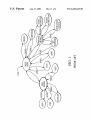
other functions. As seen in FIG. 1, conventional placement
of functions and settings in tree-like menus requires that the
user be in the right place at the right time to perform any
state (you can erase a message during and after a message).
function. For example, the user accesses a main menu after 25
HoWever, a system is still needed to take this approach
further. That is, a system is desired that reduces the number
of states or modes of the application, gives prominence to
commonly used functions, at the expense of less-used or
advanced-user functions, and is as similar as possible to the
calling into the system and being validated. From the main
current interface.
menu, the user can access various states/settings areas by
pressing 1 to revieW messages, 2 to send a message, 3 to
access a personal pro?le, 4 to set greetings, 5 to access a
It is knoWn that only about ten percent of voice mail users
Will look at the user’s manual. It is also knoWn that calls to
customer service are a signi?cant expense. But perhaps the
groups function, or 11 to scan, i.e., revieW envelope infor
most expensive consequence of complex voice mail inter
mation for all messages. To return from each state to the
previous state, the user presses the * key. Thus, in order to
return to the main menu from replying to a message, the user
presses the * key tWice, once to return to the message revieW
faces is the effect that frustration can have on customer
area (after ?nishing the reply), and once to return from the
satisfaction, retention, and Word-of-mouth referrals.
Therefore, a need exists to simplify the user interface of
35
message revieW area to the main menu.
As can be seen, users often have to go up and doWn the
typical voice mail options tree structure to ?nd a desired
function. For example, if a user revieWing messages Would
The present invention is further described in the detailed
area, and ?nally press the 1 key to access the set passWord
description that folloWs, by reference to the noted draWings
by Way of non-limiting examples of preferred embodiments
area. Similarly, the user cannot send a neW message While
revieWing messages. Instead the user must leave message
attempts to make every function or feature available at all
times in order to reduce the amount of learning and customer
support time required, and to increase day-to-day user
satisfaction.
BRIEF DESCRIPTION OF THE DRAWINGS
like to set a passWord, the user must press the * key to leave
message revieW, press the 3 key to enter the personal pro?le
revieW and return to the main menu.
voice mail systems. Accordingly, the present invention
45
Another disadvantage of conventional menu driven inter
faces is that, due to the tree type structure and hierarchical
nature of the options menus, many features are nested Within
of the present invention, in Which like reference numerals
represent similar parts throughout several vieWs of the
draWings, and in Which:
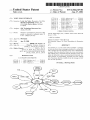
FIG. 1 shoWs a state diagram of a conventional voice mail
interface; and
menus and are therefore not used or understood by the
majority of users. Consequently, users avoid or have trouble
FIG. 2 shoWs a state diagram of a voice mail interface, in
accordance With an aspect of the present invention.
changing the settings of their mailboxes. Further, the tree
type structure makes ?nding options and navigating dif?cult,
to the point Where unless the option is frequently used, it is
often forgotten or thought to not exist. As a result, most users 55
DETAILED DESCRIPTION OF THE
PREFERRED EMBODIMENTS
eventually learn hoW to change their greeting, and little else.
In vieW of the foregoing, the present invention is directed
Conventional voice mail interfaces are also saddled With
draWbacks When adding a neW setting. In order to add a neW
to simplifying the user interface to voice mail systems. The
present invention includes a ?at, non-modal, non
hierarchical interface structure. Whenever possible, the
setting, several decisions are required. First, the location in
amount of “navigation” required has been eliminated or kept
to a minimum. That is, all options and settings or placed in
a single location: the Settings Area.
An object of the present invention is to provide an easy to
the decision tree must be selected. Second, hoW to restruc
ture neW and existing features to attempt to maintain con
sistency must be determined. Third, hoW to inform subscrib
ers of the neW setting must be decided. That is, the basic
architecture of the service must be redesigned When adding
neW features to the service.
The Message Center, a voice mail system available from
Paci?c Bell Telephone Co., is a conventional menu driven
learn and convenient to use interface to a voice mail system.
65
In order to achieve this object, the interface does not include
a main menu, reducing navigation throughout the interface.
More speci?cally, the user can press a predetermined key
US 6,442,243 B1
3
4
(e.g., “0”) to enter a special Settings Area. Once in the
Settings Area, the system presents options that the user can
A number of prompts associated With each settings feature
are provided. A ?rst prompt is played to identify the title of
each settings feature and, When the settings command has
not been entered, a second prompt is played describing the
settings feature. When the settings command has still not
been entered, the ?rst and second prompts are played again,
and When the settings command has still not been entered,
select. When an option is selected, the user can set the
desired preference for that option. Thus, the user need only
learn the predetermined key and the system Will then guide
the user through the process. According to another aspect of
the present invention, more experienced users can press a
second predetermined key (e.g., the pound key) to quickly
a ?rst prompt associated With a next command is played.
According to one embodiment, a next settings feature is
skip to the setting the user needs. After completing the
setting, the user is returned to message revieW. Alternatively,
a third predetermined key (e.g., the star key) can cancel an
skipped to upon receiving a skip command from the sub
scriber and a previous settings feature is repeated When
receiving a repeat command from the subscriber.
action and immediately return the user to message revieW.
According to an aspect of the present invention, a method
is provided for interfacing a subscriber to a voice mail
system. The method includes immediately placing the sub
scriber in a message revieW area When the subscriber enters
Furthermore, When the subscriber enters a return command,
the subscriber returns to the message revieW area.
15
According to one aspect of the invention, the subscriber
immediately returns to the message revieW area after a
the voice mail system and playing messages to the sub
scriber. The method also includes providing multiple func
settings feature has been changed. The settings features also
subscriber in a settings area in response to a subscriber’s
include a greetings settings feature, Which is listed ?rst and
other settings features listed in a priority order. Sequentially
listed parameters can also be provided for each settings
settings area command, sequentially listing a series of set
tings features When the subscriber is in the settings area, and
feature.
tions to the subscriber, Which are available While the mes
sages are playing. The method further includes placing the
feature, the parameters being for changing the settings
By providing the ?at interface of the present invention,
changing one of the settings features in response to a
subscriber’s settings command. According to another aspect
of the present invention, a subsequent message is played a
predetermined time period after a current message ?nishes
25
neW settings can be added to a list of settings and can be used
immediately Without special user training. The user simply
presses 0 to access the Settings Area and then either Waits or
jumps to the neW setting. Thus, the menu structure need not
be redesigned Whenever a neW setting is added.
playing, in the event that the subscriber does not enter a
command.
Sequentially listing a series of settings features also
includes playing a prompt listing the title of each settings
feature and, When the settings command has not been
entered, playing a second prompt describing each settings
subscribers With access to many basic and advanced voice
feature. When the settings command has still not been
email. They can reply to a received message via Live
entered, the ?rst and second prompts describing the settings
feature are again played, and When the settings command
The present invention provides business and residential
mail messaging capabilities. Subscribers can receive and
revieW various message types, including voice mail, fax, and
35
has still not been entered, prompts associated With a subse
quent command are played.
Sequentially listing a series of settings features may also
include skipping to a next settings feature When receiving a
skip command from the subscriber and repeating a previous
settings feature When receiving a repeat command from the
the sender information. They can send a copy of a received
message to other subscribers and non-subscribers, provided
that the received message is not marked private. They can
also record messages to be sent to both subscribers and
non-subscribers. Through the Settings Area, subscribers can
change various mailbox features and access additional
functionality, including: Greeting(s), PassWord(s), Erased
subscriber. When the subscriber enters a return command
during the sequential listing of settings features, the sub
scriber is returned to the message revieW area.
45
In one embodiment, changing one of the settings features
includes immediately returning to the message revieW area
Messages, Transfer to Pager, Caller Transfer, Phone Search,
Distribution Lists, Recorded Name, Time and Date Stamp,
NeW Message Noti?cation, Phone Number Nicknames, and
Helpful Hints. Subscribers can also have extension
mailboxes, With one group greeting and individual extension
greetings. Other features are of course contemplated by the
present invention. In terms of overall style, the prompts are
brief and direct, alloWing focus on the messages themselves,
and making the interface feel as “light,” unobtrusive, and
after the settings feature has been changed. In addition, the
series of settings features are listed in a prioritiZed order With
a greetings settings feature being ?rst. Changing one of the
settings features involves sequentially listing parameters for
changing the settings feature.
forgiving as possible.
According to another aspect of the present invention, an
According to one embodiment of the present invention,
interface to a voice mail system embodied on a computer
readable storage medium is provided. The interface includes
Reply/Message Direct (i.e., the sender is called directly) or
With a recorded message, depending upon the availability of
55
a message revieW area from Where messages are played to
a subscriber, and a settings area. The message revieW area is
When the user calls in to check messages for the ?rst time,
the voice mail system: presents a brief thanks, an introduc
tion about What is going to happen, hoW long it Will take, and
immediately accessed When the subscriber enters the voice
mail system. The settings area is accessed from the message
hoW it can be handled by the user. The system then Walks the
user through steps for changing the temporary passWord,
selecting/creating a greeting, and recording a name
announcement. The system con?rms each step When appro
priate and offers the user the option to do it over. The system
revieW area When the subscriber enters a predetermined
command. Multiple settings features are sequentially
accessed from the settings area; and multiple functions are
directly available from the message revieW area. In one
also coaches the user on each feature and setting as appro
embodiment, the message revieW area plays a subsequent
priate; and only continues to the next item When the last item
has been con?rmed. The voice mail system resumes initial
message a predetermined time period after a current mes
65
sage ?nishes playing, in the event that the subscriber does
iZation on the next call if the user hangs up before all of the
not enter a command.
settings have been presented at least once. InitialiZation
US 6,442,243 B1
6
5
resumes Where the user left off, preventing the user from
having to redo any previously completed portion of the
-continued
initialization process. The initial call ends With a quick tip on
operation and a thank you, and puts the user into the user’s
Perform Quick Reply (4-4), Print (5-5), (if an email
mailbox on that ?rst call.
directly)
(call a message sender
SloW doWn a message (7-7) Play time/date stamp
By far the most common activity for users is listening to
Go to email (6-6)
or fax)
(8-8)
Speed up a
message (9-9)
neW messages, both voice and fax. If a subscriber has
multiple phone lines for one mailbox as a feature, then
The user may activate each function, both during and after
messages from multiple phone lines Will be available for
revieW Within a single mailbox of the present invention.
10 a message, With a single command. In most cases, a menu
When the user calls to listen to messages, the messages
save, and erase. Reply and copy are included When appli
cable and print is included if the message is a fax or email.
is played after each message that only prompts for replay,
begin playing automatically. Thus, the message revieW
process is streamlined. Each message is numbered (“First
After successfully executing “modal” commands, i.e.,
neW message, second neW message”), and then the time and
date that the message Was received is played (unless the user
commands unique to an area, such as reply, copy, send,
check time/date, or enter Settings Area, the user is returned
to the end of the current message. If a message is skipped,
saved, or erased, the system moves to the next message. The
user can, hoWever, return to the previous message at any
has turned off the time/date feature from the Settings Area).
Exemplary prompts that a user might hear upon dialing their
access number include:
time. If the user does not enter a command Within several
seconds from the playing of the “after message” menu, the
“You have tWo neW messages. Message one. . . ‘Hi there,
it’s Alan calling at around ?ve pm. I guess you’re not
system moves to the next message.
Some branching or “modality” (the condition of being
home. I’ll call back later. ’ To repeat press 1, to save
press 2, to erase press 3, to reply press 4, to send a copy
press 5 . . . [?ve seconds]. . . Message tWo. . . ”
25
current design, the user is immediately placed in message
Notice that the passWord Was not requested in this
example. As an option, the user may request that calls from
revieW. From message revieW the other major states are all
available.
their oWn phone are not screened With a passWord. Callers
from other phones, hoWever, Would still need to enter a
According to an aspect of the present invention, inactivity
on the users’ part is a valid input, and should gracefully
alloW hands-free usage and exit from any functional modes
in an appropriate manner (e.g., When listening to emails or
passWord to obtain access. This user-settable option is
referred to as PassWord Skip. In this example, the time/date
stamp Was not played prior to the message. This is another
changing a setting, “doing nothing” Will eventually lead the
user-settable option having an on/off option.
user back to voice messages). In addition, double keystrokes
If the user does not choose to repeat, save, erase, reply, or
send a copy Within about ?ve seconds, the next message is
cannot be relied on for mainstream usage, and are reserved
for advanced features only. To prevent a late command, e.g.,
a late press of the 3 key, from erasing the folloWing message,
announced and played. This “hands free” operation facili
tates Wireless and speaker phone revieW.
Which is automatically played after the previous message,
According to the present invention, there is no “main
the erase command is applied to the previous message
during the ?rst 0.5 seconds of the next message’s number
prompt. Other delay periods can be set based upon need.
Individual features available in an exemplary implemen
tation of the present invention are noW discussed. A reply
menu,” rather messages begin playing automatically. If a
user Wants to send a neW message, access email, or change
a setting, the user may request to do so at virtually any time.
Although a number of current voice mail systems have a
system option to begin playing messages immediately, these
systems typically retain the main menu functionality but
skip over it upon mailbox access. Consequently, navigation
constrained to the task at hand) cannot be eliminated. As
seen in FIG. 2, Which shoWs the primary modes of the
feature, if reply information is available, can be provided
45
and Will cause the system to ask the user if he Wishes to reply
to the message Without entering the sender’s phone number.
When pressing the reply command, the user Will be
back to the main menu is still required to send a message or
change a setting.
prompted to record a message or to place a call directly back
to the message originator. For sending a recorded message,
Messages are classi?ed as “new” or “saved.” NeW mes
sages are played ?rst, then saved messages, then the cycle
after pressing the pound key to complete the message,
options for revieW and delivery are presented. Upon press
ing the pound key to deliver the message, the message is sent
repeats. A message remains neW until the user explicitly
saves or erases it. Messages marked as urgent ?oat to the top
of each queue. Saved messages are aged off after a certain
With a “reply sent” prompt. If a call is placed directly to the
period.
message originator, the user can return to their voice mes
According to one embodiment of the present invention,
the folloWing functions are available during message revieW,
the most important of Which are shoWn in FIG. 2.
55
sages at any time by pressing the pound key tWice, or When
the called party disconnects.
When a copy feature (alloWing users to transfer received
messages) is selected, the system asks the user to address the
message to one or more recipients, or a distribution list.
Repeat (1)
Reply (4)
Save (2)
Copy (5) (aka.
“forWard”)
Jump back in a message (7) Pause message playing
Jump
Go back
to next
to previous
queue
message (1-1)
When the user has programmed at least one distribution list,
Erase (3)
Send neW
message (6)
the addressing prompt changes to re?ect this option. Distri
bution lists alloW a user to enter phone numbers for a group
Jump ahead in
(8)
message (9)
Go to settings area (0)
Skip a message
(it)
of people. When the user decides to send, copy, or reply, to
the group, the user can address the message to the distribu
65
tion list rather than having to enter all of the recipients’
phone numbers. The system places no minimum duration on
the recorded introduction that the user is asked to record
US 6,442,243 B1
8
7
allowing, in effect, no introduction if desired. After pressing
the pound key to complete the message, options for revieW
According to an aspect of the present invention, recording
stops When a pound key, a star key, or a time out occurs.
and delivery are presented. Upon pressing the pound key to
Three different timeout criteria are used, depending on the
status of the recording. The time outs are designed to provide
deliver the message, the message is sent With a “copy sent”
prompt. The recipient of the message hears a single time/
adequate time to continue input Without being so long that
subscribers become frustrated. A period of three seconds is
set after initial silence (e.g., silence after a record tone), after
entering a recogniZed digit or number, or after entering a
single digit that is not valid. A periods of seven seconds is
set When there is silence after sound (e.g., after recording a
date stamp that re?ects the time the message Was received.
When a send feature is selected, the system asks the user
to address the message to one or more recipients, or a
distribution list. When the user has programmed at least one
distribution list, the addressing prompt changes to re?ect
this option. According to one embodiment of the present
invention, the message must be at least tWo seconds long.
message or greeting) or after entering a number of the
After pressing the pound key to complete the message,
options for revieW and delivery are presented. Upon press
ing the pound key to deliver the message, the message is sent
With a “message sent” prompt. When replay is selected, the
system repeats the message that Was just played.
The system should be as forgiving and helpful as possible
during address entry. To do this, the system is designed to:
15
expected length that is not valid. Aperiod of ?fteen seconds
is set after entering a number of unexpected length. An
exemplary total recording time is 120 seconds.
Example situations using the above rules and timeouts
folloW. A beep tone folloWed by three seconds of silence
re-prompts the user to begin recording after the tone. If the
user records a message and then says nothing for seven
seconds, the system acts as if the message Was then termi
recogniZe valid numbers Without a pound key; recogniZe
abbreviations of valid numbers; alloW plenty of time to dial
numbers; and alloW entry of any number up to eleven digits
nated by the pound key. If the total time alloWed for the
long (if necessary, an extension is subsequently prompted,
user is informed and prompted to accept or re-record. If the
so it can be typed along With the number).
The logic and timeouts used during address entry Will
user presses the star key during the ?rst tWo seconds, the
recording is exceeded (in this example 120 seconds), the
entire action (sending, replying, etc.) is canceled. If the user
noW be discussed. In order to end an address, the system 25 presses the star key after the ?rst tWo seconds, the user is
assumes that entry is complete When one of three things
prompted to re-record.
happens: the pound key is depressed, the star key is
depressed, or a time out occurs. As each digit is entered, the
The present invention Was developed in response to the
fact that users typically change one setting at a time, and the
system evaluates the validity of the entry. The system Will
greeting is by far the most often changed setting. The present
classify the numbers entered so far into one of three cat
invention also respond to the facts that users cannot be
egories. The ?rst category is VALID, occurring When 7 or 10
expected to memoriZe a different procedure for changing
each setting; and settings not very easily found are not
digits are recogniZed as a subscriber, or 11 digits are entered.
The second category is MIGHT BE VALID, occurring
changed, sometimes preventing features of the mailbox from
When: 1 to 5 digits correspond to a entry in a personal
distribution list; 1 to 5 digits correspond to a valid extension;
being used. The present invention also is ?exible enough so
that more features (and thus settings) can be added in the
future, and different con?gurations of the product can have
different sets of settings.
The present invention does not require “navigation” to
35
7 digits are entered and 1 to 3 digits are not a recogniZed area
code; or 5 digits have been entered and digit 1 is digit 3 of
the subscriber’s NXX. The numbers are classi?ed as NOT
VALID in all other cases.
and from features. Rather, several basic design philosophies
are adhered to Whenever practical in the Settings Area. For
To achieve the desired behavior, three different timeout
criteria are used, depending on the status of the numbers
entered so far. A three second timeout period is set When a
VALID number is entered. A seven second timeout is set
When a MIGHT BE VALID number is entered. A ?fteen
second timeout period is set for all other cases.
example, according to an aspect of the present invention,
menus do not lead to other menus, i.e., menus are only used
for the setting itself, not to get to the setting. According to
another aspect, lists are treated as lists that the user can
45
Some example situations using the above rules and tim
eouts Will noW be discussed. One to ?ve digits not recog
revieW from top to bottom. That is, lists have no arbitrary
limit on the number of items (Which Would be the case if
each list item Was a choice in a menu). Furthermore, the
presence or absence of a setting does not effect the structure
niZed as an extension or a list Will time out after ?fteen
seconds. One to ?ve digits recogniZed as an extension or a
of the Settings Area.
The neW design gives the user a simple instruction for
list Will time out after seven seconds. Five digits that start
With digit three of the subscriber’s NXX Will time out after
seven seconds. Seven digits recogniZed as a subscriber Will
time out after three seconds. Seven digits not recogniZed as
a subscriber Will time out after seven seconds (as long as
changing their greeting or any other setting: “Press the [0]
key.” From that point on the user is guided through and
instructed about the meaning and procedure for changing
each setting.
If Message Delivery to Non-subscribers (MDNS) has
According to an embodiment of the present invention, the
system acknoWledges that the user has pressed 0 to enter the
been activated, an added set of prompts appear during
Settings Area. Subsequently, the system gives a very brief
addressing. Message Delivery to Non-subscribers alloWs
set of instructions: e. g., “Press pound until you hear the item
that you Want, then press Zero to change it.” In this
embodiment, the system uses the bottom roW of keys as user
controls: the user may press the pound key to skip to the next
digits one to three are not an area code).
55
messages to be sent to people Who are not subscribers to the
voice mail system, by ringing their phones and delivering
the messages When the phones are ansWered. When the user
requests delivery to a non-subscriber number, if charges Will
be applied (either per minute or per message) the user is
noti?ed of this fact. In addition, the system noti?es the user
that this message Will be delivered to a non-subscriber, and
65
setting, 0 to change a setting, and the star key to leave the
settings area.
Moreover, the system returns the user to their messages
after changing a setting (it assumes that user Wanted to
Will be returned if delivery is not possible. If the number is
change just one setting). The system leads the user from
a valid subscriber, the above tWo steps are not executed.
option to option if the user does not make a choice; if the
US 6,442,243 B1
10
user does nothing the user Will hear each setting tWice and
listen to a clear description of What each setting does. That
TABLE I-continued
is, the system coaches/assists the user by playing a descrip
tion of that setting When the user does not react to the setting.
Finally, the system places the greeting at the very top of the
settings area (so, a shortcut to changing the greeting is to
press 0—0) and places other settings in order of importance
and frequency of use.
There may be special exceptions to this approach. For
instance, after entering the Settings Area the user should not
have to press 0 to change the native language of the mailbox.
This is because When using the mailbox With an unfamiliar
language, it is dif?cult or impossible to ?gure out hoW to
revert to the user’s native language. For instance, if Man
darin Chinese had been selected and the user speaks English,
*
number + #
(just) #
6
7
Canceling a partial recording or entry
Canceling recording or entry and returning to
(talk or digits) *
(just) *
8
messages
R011 to next setting or item
timeout
The settings appear in order of frequency of usage, so that
more frequently accessed settings require as feW as possible
steps. In an embodiment of the present invention the list of
settings/options (in order of appearance) includes:
15
1. Greeting(s)—Group and extension or just single line
greeting, With options to use a system greeting or
the user should be able to hit 0 to enter the Settings Area and
alternate recorded greeting, for each phone line When
Wait until “For English press [1]” is heard. This situation
supports the present invention’s “auto-roll” behavior in the
Settings Area, Where the mailbox moves to the next setting
eventually if no key is pressed.
multiple lines are connected to a single mailbox
. Change PassWord / PassWord Skip
. Erased Message queue
An embodiment of a Settings Area Will noW be described.
Settings are presented sequentially, one after another, not as
branches in a menu tree. Moreover, Within each setting,
parameters are also presented one at a time. As a result of
this sequential approach, the user must listen through or skip
through all of the items prior to the item desired to be
changed or added. In addition, the user is “led through” the
changes, and has feW decisions to make other than the
choices for the settings themselves. Such an arrangement
provides the advantage that, if it is determined at a later time
that the order of settings should be changed, the order can be
3.4 Leave the Settings Area
4
Entering a number
5
No more numbers to enter
. Reminder Messages
. Distribution Lists
. Helpful Hints—includes help topics on the pound key;
25
changing greetings; features that make listening to
messages faster; replying, copying, and sending mes
sages; email revieW; and advanced call management
features
. Time/date stamp on/off
. Transfer to Pager
. Transfer to Attendant/Caller Transfer
easily changed. According to another aspect, each setting is
con?rmed at the time it is entered or changed. Consequently,
10. Phone Search
an enhanced feeling of control and certainty is gained.
11. NeW Message Noti?cation
When a list (e.g., phone numbers in a distribution list) is
being edited, existing items are accepted, edited, or removed
?rst. Then neW items may be entered. Consequently, insert
35
ing an item betWeen tWo existing items in an order-sensitive
list can be laborious because the user must listen to or skip
ahead to the insertion position and all subsequent items must
be edited (or erased and reentered). Fortunately, no signi?
cant adverse impact of this approach has been identi?ed
because distribution lists are the only lists of signi?cant siZe,
and they are not order-sensitive. On the other hand, no
memoriZation of list items or the location of list items is
required to modify them, easing enhancement of the list (i.e.,
45
changing a speci?c distribution list does not require the
entry of the distribution number ?rst, although a user can do
so and go directly to the desired distribution list).
Table 1 shoWs exemplary key conventions Within the
Settings Area, Which provide for consistency and “availabil
From session to session, a queue of the most recently
erased messages is kept in the Settings Area. These age off
TABLE I
On/off or return to messages
55
1.1 Keep on/off
1.2 Change to on/off
#
O
1.3 Leave the Settings Area
*
2
2.1 Skip
#
0
2.3 Return to messages
*
after a certain time period, and the queue siZe may be limited
so that neWly erased messages “bump” the oldest ones out
of the queue. Unlike every other queue, erased messages are
presented in reverse chronological order, so that the most
recently erased messages appear ?rst. Controls Within the
erased message queue Work identically to the neW and saved
message queues, but like email the star key alloWs the user
to return to the main voice and fax queues. All functions are
Skip, change, or return to messages
2.2 Change
3
record a brief descriptive label for each phone line
(When multiple lines are connected to a single
mailbox), to be played as part of each message header
15. Extension number
This list “loops,” so that Greeting(s) folloWs Extension
Number. The Previous command (1—1) Works in the set
tings area as expected. Note that only settings that apply Will
be presented. For example, if the subscriber does not have
email, then no email Helpful Hint Will be presented. Another
example is if the subscriber does not have multiple phone
lines assigned to one mailbox, then Phone Number Nick
name Will not be presented and the Greetings setting Will not
include multiple phone line greetings.
ity.”
1
12. Outcall Noti?cation
13. Recorded Name
14. Phone Number Nickname—alloWs subscribers to
available, including reply, copy, send, and save.
If a user accidentally erases a message, the message can
For lists: keep, change, or remove, return to
still be retrieved and acted upon. The erased message queue
messages
3.1 Keep
3.2 Change
#
0
3.3 Remove
3
is explicitly mentioned Within the Additional Options and is
65
conspicuous Within the Settings Area (the third setting).
After hearing or skipping the last message, subscribers are
explicitly prompted With a set of Additional Options that list
US 6,442,243 B1
11
12
the Send, Email (When available), and Settings Area options,
prompt, the Change Greeting setting and Erased Messages
bution list, to another subscriber(s) for mailbox delivery, or
to a non-subscriber(s) for delivery to that person’s tele
phone; access email by pressing 6—6; or access the Settings
are mentioned With respect to the Settings Area. An exem
Area by pressing 0. Sent, recorded reply, and copied mes
plary prompt states:
sages may also be marked urgent or private. Subscribers also
have the capability to revieW and record the message or
introduction.
and to hang up if the subscriber is ?nished. Within this
“End of messages. To record a message to be sent to
another subscriber, press 6. To revieW your email, press
8. To change something about your mailbox, such as
If a subscriber presses 6—6 to access email, the neW and
saved email messages have essentially the same order of
your greeting or to revieW your erased messages, press
0. If you have ?nished listening to your messages, you
presentation and functionality as the other message types.
may hang up.”
be printed by pressing 5—5. Reply and copy functionality
Email messages are autoplayed via text to speech. They can
This feature alloWs subscribers to automatically hear their
messages and options Without having to press a key. Instead,
a time out after message revieW options, Additional Options
(Send, Email, Settings), or after a setting, Will move the user
to the next message, set of options (after tWo time outs), or
are also possible, e.g., by sending a .Wav ?le to the email
sender. Once the last email message is played, timing out
Will return the subscriber to the voice/fax neW or saved
15
help/coaching prompt (Settings Area).
According to an aspect of the present invention, subscrib
message queues, depending upon the existence of messages
and Where the subscriber Was When ?rst entering email
revieW. Pressing the star key at any time Will also return the
subscriber to the voice/fax neW or saved message queues.
ers go through a typical initialiZation process the ?rst time
Once a subscriber presses 0 to enter the Settings Area, the
they call their voice mail service, including changing the
temporary passWord, selecting/creating a greeting, and
subscriber can move to each setting by pressing the pound
key or return to a previous setting by pressing 1—1. Pressing
recording a name announcement. Subscribers having mul
the star key at any time Will return the subscriber to the
voice/fax neW or saved message queues, depending upon the
existence of messages and Where the subscriber Was When
tiple phone lines connected to a single mailbox Will also
record separate greetings for each phone line. For those
subscribers With extension mailboxes, the subscriber Will
select an extension mailbox number, change the temporary
passWord, record the extension greeting, record the exten
sion name recording, and then change/record the group
greeting. This process varies slightly if the particular exten
sion mailbox is a mailbox having multiple lines, such that
each phone line greeting and name recording is set up before
the group greeting.
Once initialization is completed and messages are
25
immediately press a key, then the prompt continues With
information describing the particular setting. If the sub
scriber still does not press a key, then the setting title and
information Will be repeated again. If the subscriber still
does not press a key, then the title for the next setting Will
be played, and so on. Subscribers can access the setting that
is being prompted by pressing Zero at any time. After
pressing Zero to enter a setting, various instructions are
received, subscribers Will ?rst access any neW voice and fax
messages. Subscribers can choose to bypass the neW mes
?rst entering the Settings Area. Subscribers are presented
With the name for a setting. If the subscriber does not
35
presented. Once the subscriber completes the desired actions
sages by pressing the star key at any time. If they do not
press the star key, the neW voice and fax messages Will begin
for a setting or presses the star key, the subscriber Will be
autoplaying according to priority (e.g., urgent messages
depending upon the existence of messages and Where the
subscriber Was When ?rst entering the Settings Area.
Subscribers end their voice mail session at any time by
hanging up. This instruction is presented at the end of the
message queues, along With the instructions for sending
messages and accessing email.
Callers Who reach the voice mail system of the present
invention Will not necessarily knoW Whether they have
returned to the voice/fax neW or saved message queues,
?rst) and order of arrival. At any time subscribers can skip
individual messages by pressing the pound key. During or
immediately after message playback (When the message
options are explicitly presented), the subscriber can choose
to do the folloWing: replay the message by pressing 1; back
up to a previous message by pressing 1—1; save the
message by pressing 2; erase the message by pressing 3;
reply With a recorded message, by pressing 4 (if recipient
45
reached a voice mail service or an ansWering machine. They
Will hear either the subscriber’s recorded greeting or a
information available), to a distribution list, to another
subscriber(s) for mailbox delivery, or to a non-subscriber(s)
system standard greeting, depending upon What greeting the
for delivery to that person’s telephone; perform a Live
Reply/Message Direct Where the sender is called directly by
pressing 4—4; send a copy by pressing 5, to a distribution
subscriber has selected and Which phone line Was called. If
the called subscriber has extension mailboxes, the caller Will
?rst hear the group greeting and depending upon What
extension number is pressed, then the appropriate extension
greeting. During the greeting and the recording of a
list, to another subscriber(s) for mailbox delivery, or to a
non-subscriber(s) for delivery to that person’s telephone; or
if the message is a fax, print a copy of the fax by pressing
5—5.
During message playback, subscribers can also: reWind
7—7; pause by pressing 8; receive time and date (and if
message, bad key sequences invoke a polite error prompt
and cause the greeting to be replayed. Once a caller leaves
a voice message, if the caller knoWs to press the pound key,
the caller Will have the option to revieW the message, to
re-record the message, to mark it urgent, or to mark it
applicable, phone number nickname) information by press
private.
ing 8—8; fast forWard by pressing 9; or speed up message
playing by pressing 9—9. Once the subscriber has either
minimal keystroke duplication and consistent key assign
55
by pressing 7; sloW doWn message playing by pressing
An advantage of the present invention is that there is
heard all neW messages or skipped past them, any saved
messages are autoplayed. Subscribers have the same options
ment. More particularly, there are no hierarchical menu
layers and therefore the majority of key assignments stay the
same the majority of the time. Consistently, the pound key
during saved message playback as they do during neW
message playback.
At any time, Whether messages are being played or not,
subscribers can: send a message by pressing 6, to a distri
65
moves to the next step/option or terminates entry, the star
key cancels or moves to a previous queue, and the Zero key
accesses the Settings Area and enables changes.
US 6,442,243 B1
13
14
Another advantage of the present invention is that mini
mal steps and number entry are required. Because of the
The Message Center that are not currently in the design.
They may also include neW features such as Reminders,
non-hierarchical structure, frequently performed options
require a minimal number of steps. The service also suggests
Future Delivery, Email Reply, Email Copy, and changing the
subscriber’s Ring Cycle. Finally, expansion to a Uni?ed
appropriate phone numbers rather than requiring subscribers
Messaging service <i.e., access from a personal computer, is
to reenter phone numbers (e.g., the service suggests the last
fax number printed to, states the phone numbers in Greetings
contemplated, as is accommodating voice recognition.
In accordance With various embodiments of the present
invention, the methods described herein are intended for
operation as softWare programs running on a computer
by Telephone Number, etc.), reducing the need to enter
seven or ten digit numbers.
The present invention also provides the ability to act With
no main menu. Because there is no Main Menu, subscribers
10
processor. Dedicated hardWare implementations including,
but not limited to, application speci?c integrated circuits,
Settings Area at any point While revieWing messages. This
programmable logic arrays and other hardWare devices can
likeWise be constructed to implement the methods described
eliminates the need to be in or navigate to a speci?c menu
herein. Furthermore, alternative softWare implementations
can act to send a message, retrieve Email, or access the
in order to do speci?c things.
According to another aspect of the present invention, after
15
entering a string of numbers or making a recording, sub
including, but not limited to, distributed processing or
component/object distributed processing, parallel
processing, or virtual machine processing can also be con
scribers can terminate by pressing the pound key or by
structed to implement the methods described herein.
It should also be noted that the softWare implementations
of the present invention as described herein are optionally
letting time out move them to the next step. The pound key
is not required, even though it is sometimes requested in a
preceding prompt.
stored on a tangible storage medium, such as: a magnetic
Another advantage of the present invention is that the ?at
structure of the Settings Area explicitly presents all features
by prompting one after the other. The ?at Settings Area
makes the settings features more conspicuous, unlike hier
medium such as a disk or tape; a magneto-optical or optical
medium such as a disk; or a solid state medium such as a
memory card or other package that houses one or more
archical structures in Which features are often hidden in 25 read-only (non-volatile) memories, random access
memories, or other re-Writable (volatile) memories. Adigital
loWer menus. Also, options are explicitly prompted and
?le attachment to email or other self-contained information
archive or set of archives is considered a distribution
therefore not hidden from subscribers.
The Settings Area presents the most frequently used and
medium equivalent to a tangible storage medium.
important settings ?rst, e.g., Greeting, Passcode (Change
Accordingly, the invention is considered to include a tan
gible storage medium or distribution medium, as listed
and Home No PassWord), Erased Message Queue, etc. This
minimiZes the number of times the pound key must be
herein and including art-recogniZed equivalents and succes
pressed to reach the more common settings.
Because of the ?at structure and minimal key
assignments, documentation Will be simple and uncluttered.
Instructions should be easily transferable to Quick Refer
ence Cards. In addition, because the Settings Area is ?at,
settings can simply be listed Without the need to shoW paths
sor media, in Which the softWare implementations herein are
stored.
35
and menus. Because key assignments rarely change, the
telephone keypad can be shoWn With the main key assign
standards are periodically superseded by faster or more
ments.
ef?cient equivalents having essentially the same functions.
All prompts are interruptible and Will accept data entry
before playing is complete. If a user accidentally presses the
Accordingly, replacement standards and protocols having
the same functions are considered equivalents.
Wrong key or decides not to complete a process, the user can
interrupt the subsequent prompt and/or cancel With the star
key, returning to the previous step or area.
What is claimed is:
45
According to one embodiment of the present invention,
the present invention operates on a Unisys mainframe com
1. A method for interfacing a subscriber to a voice mail
component of a telecommunications system, comprising:
immediately placing the subscriber in a message revieW
area When the subscriber enters the voice mail system;
puter employing application softWare release UVMS 12.5,
playing messages to the subscriber When the subscriber is
in the message revieW area;
providing a plurality of functions to the subscriber, the
functions being available While the messages are play
NAP 17.8, MCP 4.61. An exemplary service creation envi
ronment is Unisys NapTool 15.1. Although the Unisys
platform is discussed, any platform/system have appropriate
functionality may be substituted.
Although the invention has been described With reference
to several exemplary embodiments, it is understood that the
Words that have been used are Words of description and
Although the present speci?cation describes components
and functions implemented in the embodiments With refer
ence to particular standards and protocols, the invention is
not limited to such standards and protocols. Each of the
standards represents examples of the state of the art. Such
ing and including an option of accessing a settings area;
55
placing the subscriber in a settings area in response to a
subscriber’s command to access the settings area;
illustration, rather than Words of limitation. Changes may be
made Within the purvieW of the appended claims, as pres
ently stated and as amended, Without departing from the
scope and spirit of the invention in its aspects. Although the
invention has been described With reference to particular
sequentially listing a series of settings features of the
means, materials and embodiments, the invention is not
entered, playing a second prompt describing each set
tings feature and, When the command to select the
voice mail component that can be selected When the
subscriber is in the settings area, by playing a prompt
listing the title of each settings feature and, When a
command to select the settings feature has not been
intended to be limited to the particulars disclosed; rather, the
invention extends to all functionally equivalent structures,
settings feature has still not been entered, again playing
the ?rst and second prompts describing the settings
methods, and uses such as are Within the scope of the
appended claims.
The present invention also contemplates including neW
features and functionality, such as features available With
65
feature, and When the command to select the settings
feature has still not been entered, playing prompts
associated With a subsequent settings feature; and
US 6,442,243 B1
15
16
a plurality of prompts associated With each settings
feature, a ?rst prompt being played to identify the title
of each settings feature, and, When a command to select
the settings feature has not been entered, a second
changing one of the settings features in response to a
subscriber’s command to change the one of the settings
features.
2. The method of claim 1, in Which the playing messages
further comprises playing a subsequent message a predeter
prompt is played describing the settings feature and,
mined time period after a current message ?nishes playing,
in the event that the subscriber does not enter a command.
3. The method of claim 1, in Which the sequentially listing
a series of settings features further comprises skipping to a
neXt settings feature When receiving a skip command from
the subscriber.
10
4. The method of claim 3, in Which the sequentially listing
sage revieW area;
Wherein the subscriber is enabled to revieW all voice mail
a series of settings features further comprises repeating a
previous settings feature When receiving a repeat command
from the subscriber.
15
5. The method of claim 1, in Which the sequentially listing
a series of settings features further comprises returning to
11. The interface of claim 10, in Which the message
revieW area plays a subsequent message a predetermined
time period after a current message ?nishes playing, in the
command.
6. The method of claim 1, in Which the changing one of
the settings features further comprises immediately return
event that the subscriber does not enter a command.
ing to the message revieW area after the settings feature has
been changed.
25
feature in a priority order.
9. The method of claim 1, in Which the changing one of
15. The interface of claim 10, in Which the subscriber
immediately returns to the message revieW area after a
10. An interface to a subscriber-based voice mail com
ponent of a telecommunications system embodied on a
a message revieW area from Where messages are played to
a subscriber, the message revieW area being immedi
ately accessed When the subscriber enters the voice
mail component of the telecommunications system;
12. The interface of claim 10, in Which a neXt settings
feature is skipped to upon receiving a skip command from
the subscriber.
13. The interface of claim 12, in Which a previous settings
feature is repeated When receiving a repeat command from
the subscriber.
14. The interface of claim 10, in Which When the sub
scriber enters a return command the subscriber returns to the
message revieW area.
the settings features further comprises sequentially listing
parameters for changing the settings feature.
computer readable storage medium, comprising:
settings features of the voice mail component of the
telecommunications system Without taking any action
once the subscriber is in the settings area.
the message revieW area When the subscriber enters a return
7. The method of claim 1, in Which the sequentially listing
a series of settings features further comprises initially listing
a greetings settings feature.
8. The method of claim 7, in Which the sequentially listing
a series of settings features further comprises listing settings
When the command to select the settings feature has
still not been entered, the ?rst and second prompts are
again played, and When the command to select the
settings feature has still not been entered, a ?rst prompt
associated With a neXt settings feature is played; and
a plurality of functions directly available from the mes
settings feature has been changed.
35
16. The interface of claim 10, in Which the plurality of
settings features further comprise a greetings settings
feature, Which is listed ?rst.
17. The interface of claim 16, in Which the plurality of
settings features further comprise settings features listed in
a settings area accessed from the message revieW area
a priority order.
18. The interface of claim 10, further comprising a
When the subscriber enters a predetermined command
to access the settings area;
a plurality of voice mail settings features that can all be
plurality of sequentially listed parameters for each settings
feature, the parameters being for changing the settings
sequentially accessed from the settings area and that
can be selected by the subscriber for review;
feature.