1
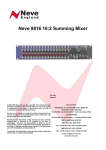
Neve 8816
16:2 Summing Mixer
User Manual
527 - 361
Issue 6.5
The 8816 is a 16:2 summing mixer with comprehensive input, mixing and monitoring functions,
with VU meters, remix and Recall as standard.
In addition to the standard 8816 there is also a digital outputs option and an optional fader pack.
88 Series Outboard / 8816 Summing Mixer
Issue 6.5
Health & Safety Notice
For your own safety and for the protection of others,
please observe the following safety instructions:
•
Read these instructions.
•
Heed all safety warnings.
•
Do not use near water.
•
Clean only with a dry cloth.
•
Do not install near heat sources.
•
Do not block ventilation openings.
•
Protect the power cord.
•
Only use accessories specified by the manufacturer.
•
Unplug when unused for long periods of time.
•
Refer all servicing to qualified personnel only.
AMS NEVE
Billington Road
Burnley
Lancs
BB11 5UB
England
Phone +44 (0)1282 457011
Fax: +44 (0)1282 417282
Email: [email protected]
Web: www.ams-neve.com
Support: http://www.ams-neve.info/crm/fault_report.html
© 2007-2010 AMS Neve Ltd own the copyright of all information and drawings contained in this manual which are not to be
copied or reproduced by any means or disclosed in part or whole to any third party without written permission.
As part of our policy of continual product improvement, we reserve the right to alter specifications without notice but with due
regard to all current legislation.
Disclaimer: The information in this manual has been carefully checked and is believed to be accurate at the time of
publication. However, no responsibility is taken by us for inaccuracies, errors or omissions nor any liability assumed for any
loss or damage resulting either directly or indirectly from use of the information contained within it.
Trademarks: All trademarks are the property of their respective owners and are hereby acknowledged.
-2-
88 Series Outboard / 8816 Summing Mixer
Issue 6.5
Table of Contents
Health & Safety Notice.........................................2
Options................................................................20
System Requirements.................................4
Customer Service.......................................4
Note on Headroom and Levels.....................5
Fader Pack Option....................................20
ADC Option.............................................21
Sampling Frequency.................................21
Single / Double Rate AES Output................21
DSD.......................................................22
Application Scenarios..........................................6
Rear Panel Connectors and Controls...............23
Introduction...........................................................5
Recording.................................................6
Recording with the optional Fader Pack.........7
Overdubbing.............................................8
Mixing......................................................9
Mixing with Fader Pack.............................10
Mastering................................................11
Live Recording.........................................12
Sub Mixer................................................13
Line Output.............................................23
Line Input...............................................23
Talkback Foot Switch................................23
USB........................................................23
Rear Panel Controls..................................23
Earth Lift Switch......................................23
Slave Bus Switch......................................23
ADC Option.............................................24
ADC L & R Insert......................................24
AES Sync................................................24
WCLK In.................................................24
WCLK Out...............................................24
AES Out..................................................24
DSD L and R............................................24
75 Ohm WCLK.........................................24
SDIF 2/3.................................................24
Controls...............................................................14
Channel Strip...........................................14
Level Control...........................................14
Pan Control.............................................14
Cue Control Button...................................14
Channel Cut /Solo button..........................15
Cue Section.............................................15
2T to Cue................................................15
Headphone Mon.......................................15
Headphone Control...................................15
Headphone Jack.......................................15
Firmware Upgrades............................................25
Selecting a File for Transfer.......................25
File Downloading......................................26
Corrupted or Old Firmware........................26
Master Section....................................................16
Alt Spk...................................................16
iMon.......................................................16
Talkback Level.........................................16
Talkback Microphone................................16
INS MIX .................................................16
IMR Level Control.....................................16
INS........................................................16
2TR MIX..................................................17
2TR Level Control.....................................17
Monitor Selections....................................17
Mon Level...............................................18
Sum.......................................................18
Width Control..........................................18
<W> button............................................18
Mix Level................................................18
Analogue / Digital overload indication.........18
Metering.................................................19
Power Switch...........................................19
Physical & Technical Information.....................27
Dimensions.............................................27
Rack Mounting and Cooling........................27
Power Requirements.................................27
Mains Supply...........................................27
System Settings..................................................28
Setting the Headroom on the optional A to D
card.......................................................28
Monitor Source pre/post ADC Insert...........28
Fader Pack Jumper Settings.......................29
Multiple 8816 / 8804................................30
Unit Specifications.............................................31
Connectors..........................................................32
Recall Software Installation..............................35
Installation for PC....................................35
Installation for Mac...................................37
New Versions of Recall Software for Mac.....37
-----+-----
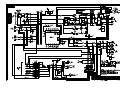
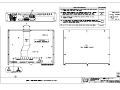
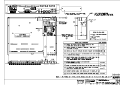
Appendix: A3 Signal Flow Block Diagrams
8816
Optional Fader Pack control
Optional ADC board installation
-3-
88 Series Outboard / 8816 Summing Mixer
Issue 6.5
System Requirements
The 8816 may be used as a standalone unit.
If you wish to use the units Recall facility, it should be connected directly to
the computer or via a powered USB hub but not via a passive USB hub.
If you wish to use the Neve Recall software to store and reload user
configurations you must have one of the following supported operating
systems:
PC
•
•
•
Mac
•
Windows 2000, Service Pack 4 or later
Windows XP, Service Pack 3 or later
Vista, Service Pack 1 or later
Mac OS 10.3.9 or later
Customer Service
In the unlikely event that this unit should malfunction or develop a fault,
then please register the fault details on our website by clicking the link
below.
You will also need to enter the unit's serial number when you do this, so
please have this to hand.
http://www.ams-neve.info/crm/fault_report.html
Once the fault details have been registered, one of our technical support
team will be in touch via email.
This link should also be used for further operational or technical help, or
any general enquiry about the unit.
-4-
88 Series Outboard / 8816 Summing Mixer
Issue 6.5
Introduction
The 8816 is an extremely versatile 16:2 summing mixer, which can produce
the highest possible recording and mixing performances in any format using
revered Neve analogue designs including transformer mixing.
With comprehensive input, mixing and monitoring functions, 8816 can
upgrade a DAW to a professional mixing facility.
Not only does the unit provide quite unbelievable analogue facilities but also
has remix and Recall as standard.
In addition to the superb facilities offered as standard on the 8816 there are
two options, digital outputs and a fader pack.
ADC Output
World class A to Ds with sampling rates of up to 192kHz and DSD outputs.
Analogue insert points are provided ahead of the ADCs that couple the
ultimate analogue circuitry with superior digital conversion making the unit
an obvious choice for complete integration with a DAW.
NOTE: The ADC option requires internal fitting. Please consult your local Neve
dealer.
Fader Pack
16 Input Faders with Cut / Solo controls and post fade direct outputs plus 2
Master Faders give the engineer fine level control with a traditional feel.
With the fader unit attached, the rotary channel level controls become aux
pre-fade send levels, increasing the functionality of the unit.
Note on Headroom and Levels
•
Each channel has 15dB of gain also known as 15dB 'in hand'.
•
Excessive use of gain may overload your DAW or other recording
device.
0dB on the channel level control is approx at the 12’o’clock position.
•
Internal headroom is 26dBu.
•
If your DAW is overloading but the overload indicators on the 8816
meters are not illuminated, then reduce your output levels.
•
If your DAW is overloading and the red overload indicators are
illuminated then you may need to reduce your input levels.
-5-
88 Series Outboard / 8816 Summing Mixer
Issue 6.5
Application Scenarios
Recording
PC / Mac
Mic
1073 DPA
Pro Tools
1 – 16 Line In
Studio
Headphones
Engineer
Headphones
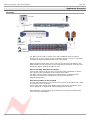
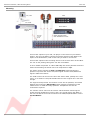
The 8816 can be used to monitor from the workstation while recording
directly from a mic pre such as the 1073DPD or as a pre-mixer for recording
a number of signals simultaneously to the workstation.
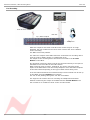
With the optional fader pack, direct outs can be used from the 8816 to the
DAW enabling it to be used like a conventional desk with both recording and
monitoring signals passing through the unit.
Direct recording with 8816 as monitor
Connect the output of the mic pre to the input of the workstation. Connect
the outputs of the workstation to the inputs of the 8816.
The 8816 outputs can be monitored on loudspeakers or headphones as
required. The performers headphones source can be switched
(engineer/performer).
Sub-mixing signals to be recorded
Connect the instruments to be recorded to the inputs of the 8816 (via a 1073
or similar mic pre if required).
Connect the main output of the 8816 to the inputs of the workstation (this
can be analogue or digital if the optional digital card is fitted).
Set the balance required using the channel level controls on the 8816 and
record onto the workstation.
-6-
88 Series Outboard / 8816 Summing Mixer
Issue 6.5
Recording with the optional Fader Pack
PC / Mac
Mic
1073 DPA
Direct Out
Pro Tools
Studio
Headphones
Fader Pack
1 – 16 Line In
Engineer
Headphones
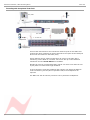
Connect the instruments to be recorded to channel inputs on the 8816 and
connect the direct outputs from these channels to the inputs of the DAW (the
direct outs are located on the fader pack).
These channels can be muted so that they do not go to the main bus if
monitoring via the 8816 or a monitor mix can be set up on the DAW and
monitored via the 2 Track Return on the 8816.
Signals can now be recorded with fader control over their level while the mix
or play back is monitored through the 8816.
In all of the above recording situations the engineer can utilise the 8816 to
control monitoring via two pairs of speakers and/or the headphones as
required.
The 8816 can also be used to provide a Cue to performer headphones.
-7-
88 Series Outboard / 8816 Summing Mixer
Issue 6.5
Overdubbing
PC / Mac
Backing
Tracks
Ch 15-16
Channels 1 -14
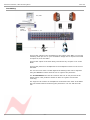
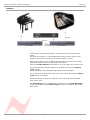
Connect the outputs of the workstation to the inputs of the 8816. If you have
a backing track pre-mix on your workstation assign this to outputs connected
to inputs 15/16 on the 8816.
Connect the output of the track being recorded to any of inputs 1-14 on the
8816.
Connect the performer’s headphones to the headphone socket on the rear of
the 8816.
The cue mix level of the overdub against the backing track can be adjusted
using the Cue level control until the mix is right for the performer.
The 2-Track Return can also be routed to the Cue so may be used as an
effects return if the performer wishes to listen to a guide reverb while
recording.
The engineer can monitor on headphones connected to the front of the 8816
and can switch between monitoring the performer’s cue mix and the main
mix.
-8-
88 Series Outboard / 8816 Summing Mixer
Issue 6.5
Mixing
`
PC / Mac
Neve 33609
Pro Tools
Stereo
Main Out
Line In
1-8 & 9-16
Insert Send & Return
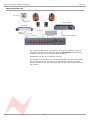
Connect the outputs of the workstation to the inputs of the 8816. Key
elements such as lead vocals and lead instruments should be kept separate
within the workstation and connected to individual inputs on the 8816.
Other elements such as backing vocals, effects, etc can be routed to stereo
groups within the workstation and these groups connected to the 8816
inputs.
Optimum sound quality within the workstation is generally achieved by
setting the virtual faders to 0dB.
Final mix levels can be set on the 8816.
The mix is now being created on the mix bus of the 8816.
This uses the same transformer mix topology as the classic 80 series Neve
consoles and recreates their legendary sound.
Recording back to the DAW or onto another device such as a CDR may be
analogue or, if the digital option is fitted, can be from the Neve Analogue to
Digital Converters ensuring the best possible sound quality.
A Neve 33609 compressor or a Neve 8803 EQ unit can be patched across the
Insert allowing the whole mix to be compressed or EQ’d.
Sometimes it is necessary to mix between a clean mix and a processed mix,
for example when using a Filter Bank to create a special effect across the
whole mix for one section of a song.
This can be done by patching the filter bank across the Inserts of the 8816
and switching to Insert Mix mode.
The balance between the clean mix and the processed mix is now controlled
by the Insert Mix level control and the engineer can switch between clean
and processed mix or balance the two as required.
-9-
88 Series Outboard / 8816 Summing Mixer
Issue 6.5
Mixing with Fader Pack
PC / Mac
Neve 33609
Pro Tools
Stereo
Main Out
Line In
1 – 8 & 9-16
Fader Pack
Insert Send & Return
`
The engineer and producer can monitor on two sets of speakers, main and
near field, and switch between them using the Alt Speaker switch allowing
comparisons of the mix on small and large speakers.
Headphones can also be connected if required.
The outputs of the recording unit (or the appropriate two tracks of the DAW)
can be connected to the two track return so that the engineer can switch
between monitoring the mix leaving the 8816 and the mix coming back from
the recorder.
- 10 -
88 Series Outboard / 8816 Summing Mixer
Issue 6.5
Mastering
PC / Mac
1081
Pro Tools
Neve 33609
Stereo Main
Output
Line In
1-8 &
9-16
Insert Send & Return
Sum & Difference mode
Connect the outputs of your DAT, CD player or two tracks of your DAW to
inputs 1 and 2 on the 8816. Connect the master outputs of the 8816 to the
inputs of the Workstation, CDR or DAT that you wish to record onto.
Connect the outputs of the recording device to the 2 track return of the 8816.
The mix is now passing through the mix bus of the 8816.
A Neve 33609 compressor or a Neve 8803 EQ unit can be patched across the
Insert Point allowing the whole mix to be compressed or EQ’d.
The Insert can be switched to Sum and Difference mode allowing the
producer to process the centre sum/mono signal and the stereo/difference
signal in different manners.
The width control can be used to reduce the stereo width, perhaps for a club
remix, or to enhance it beyond standard stereo if the original mix is not wide
enough.
The engineer and producer can monitor on two sets of speakers, and switch
between them using the Alt Speaker switch allowing comparisons of the
mastered mix on small and large speakers. Headphones can also be
connected if required.
The monitor source select can be used to switch between monitoring the
sound entering the 8816 on inputs 1 and 2, the sound leaving the 8816 on
the mix bus and the sound as recorded on the CDR/DAT/Workstation via the
2 Track Return.
- 11 -
88 Series Outboard / 8816 Summing Mixer
Issue 6.5
Live Recording
DAT
2 Track
Front Of House console
Main Out
Grp / Matrix Outputs
Headphones
While the output for the main Front Of House console may be of a high
standard, the mix created for the venue does not have the correct balance
for the recording.
The 8816 solves this problem.
The main mix outputs of the 8816 should be connected to a recording device
such as a DAT or DAW running on a laptop Mac or PC.
The output of the recording device should be connected to the 2 Track
Return on the 8816.
Key elements such as the lead vocal can be connected directly to an input on
the 8816 from a Direct Out on the FOH console.
Other elements such as drums, keyboards, etc can be connected to the
inputs of the 8816 either from the Group Outputs or from the Matrix Outputs
of the FOH console depending on the type of FOH console being used.
A correct balance between the individual and pre-mixed sounds can be set up
on the 8816 using the Channel level controls.
The mix is now passing through the mix bus of the 8816.
The engineer can monitor the live recording on headphones and switch
between monitoring the output of the 8816 and the 2 Track Return from
the recorder for a confidence check on the recorded sound.
- 12 -
88 Series Outboard / 8816 Summing Mixer
Issue 6.5
Sub Mixer
Mix Out
Mix Out
Slave 8816
2 Track
Bus Input
Master 8816
Sometime the console being used for a mix simply does not have enough
inputs.
This may be because it is a small digital mixer being used to meet a fixed
budget or because the console has a limited number of inputs.
Connect the outputs of the additional instruments or sound sources such as
keyboards, effects units etc to the inputs of the 8816.
Connect the Main Outputs of the 8816 to a pair of inputs on the main mixer.
The sounds passing through the 8816 can be balanced using the Channel
Level controls.
These sounds are now passing through the mix bus of the 8816.
The overall level being passed to the main mixer can be set using the Master
Level control of the 8816.
Should more than 16 inputs be required on the sub-mixer then two 8816
units can be used.
The Mix Output from the first 8816 is connected to the 2 Track Bus Input
of the second 8816 and the Main Output from the second 8816 goes to the
main mixer.
- 13 -
88 Series Outboard / 8816 Summing Mixer
Issue 6.5
Controls
Channel Strip
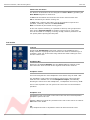
The channel strip comprises a Cut/Solo button, a rotary Level control, a
rotary Pan control and a Cue select button.
Level Control
The Level Control has a range of ∞dB to +15dB with 0dB set at about 12
o'clock.
This range is deliberately chosen to be able to accommodate most line inputs
levels whether they be professional +4dBu inputs or semi-professional
-10dBV inputs.
The Level control sets the levels going to the main L+R Mix Outputs and to
the Utility Aux Bus with the extra benefit of changing its function into an
individual aux pre-fade send level when an optional fader panel is fitted.
Please note:
If you need to calibrate your DAW inputs from the 8816 (for example using
tone as a reference signal), the 8816 channel gain controls should all be set
at approximately the 12 o'clock position before trimming the input levels on
your DAW.
This ensures that in a worst-case scenario, the differences in levels due to
the variations in tolerance of the potentiometers is only +/-1dB from centre.
Setting the channel gain controls to maximum is not recommended before
calibrating your DAW inputs.
Pan Control
This is a classic -3dB centre pan, with S-Law shaping to help accurate
panning to extremes of left and right.
Cue Control Button
When operated this takes the input of the channel (pre fader level and pre
pan) and sends it to the Cue mixer via the Cue level control to feed the cue
output via the Headphones jack-sockets on the front and rear of the unit.
Channels 1-14 are individually switchable to the Cue mix via the Cue button
control.
(On older models of 8816, Cue buttons 1-14 are interlocked, while on newer
models it is possible to send any combination of 1-14 to the Cue mix).
Channels 15 and 16 are linked as a stereo cue direct to the cue mix.
For overdubbing, channels 15-16 can be set up as your backing track mix on
the DAW, and then selecting the appropriate channel from 1 to 14 will allow
you to blend or ride a track using the cue level control, allowing the artist to
hear exactly what he or she needs to hear before dropping in to record.
- 14 -
88 Series Outboard / 8816 Summing Mixer
Issue 6.5
Channel Cut /Solo button
The function of the button can be changed from Cut to Solo by operating the
Solo Master adjacent to channel 16.
In Cut mode this button will mute the feed to the main two track bus.
Cut is indicated by the button turning red.
In Solo mode, selecting the button will cut all channels except the one
operated, commonly referred to as Solo In Place.
Solo is indicated by the button turning yellow.
As the solo system is latching, it is possible to build up solo groups and to
then use the Cut/Solo Master to audition a solo group or a cut group.
This can be useful for comping or sorting out EQ / balance problems in the
mix quickly before printing the final pass.
Cue Section
2T to Cue
Sends the 2 Track Return (post level control) to the headphone mix –
ideally suited for replaying the last overdub to the artist for auditioning or a
complete 2 track mix of the whole song without the artist needing to come
into the control room.
Headphone Mon
Selects the prefade LS Outputs onto the Cue headphone outputs so the
artist hears the same sources as the engineer feeds to the monitors.
Headphone Control
This control adjusts the main Headphone levels with a range of ∞dB - 0dB.
The headphone control also incorporates a switch which, when operated,
feeds the unit's talkback mic to the Headphone Output, automatically
dimming the music fed to the headphones , loudspeakers and Cues by 20dB.
There is also a parallel 1/4 inch jack on the rear of the unit for footswitch
operation.
Headphone Jack
A headphone jack is provided on the front of the unit and a second parallel
headphone jack on the rear.
Parallel +4dBu line outputs are provided on the rear of the unit to be used for
Cue feeds to the studio.
NB:
Only headphones with an Impedance above 60 Ohms should be used.
- 15 -
88 Series Outboard / 8816 Summing Mixer
Issue 6.5
Master Section
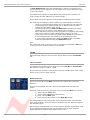
Alt Spk
Selects a second set of loudspeakers for switching between main and near
field loud speakers.
iMon
This input has a 3.5mm jack socket for connecting your MP3 player to the
unit’s LS selector and feeding to the LS Output or Cue headphone outputs.
Talkback Level
This adjustment screw sets the level from the talkback mic to the cue
headphones.
This is not set to a factory-preset, and the level should always be set by
the user before use. Failure to set this pot may result in a low level
talkback feed.
Talkback Microphone
A microphone is built into the unit to allow the engineer or producer to
communicate with the artist during recording sessions.
INS MIX
Insert Mix routes the IMR signal to the main 2 Track Mix Output prelevel control but post-insert.
IMR Level Control
Insert Mix Return allows for the IMR signals to be mixed directly into the
main mix output, post insert but pre mix output level control.
It has a range of ∞dB to +10dB and can be used for DJ style mixing or where
the engineer wants to mix some compressed or EQ’d main mix source back
into the main mix outputs without the compression or EQ dominating the mix
as it would using the insert.
INS
This switches the main mix pre fade insert in and out of circuit via the input
and output connectors on the rear of the unit.
It has two modes selectable by pressing the Mix Level control. When a
normal pre fade insert is selected the button will illuminate yellow.
If the mix level control is pressed then the illumination will change to red
indicating that the insert point has changed to a Sum & Difference insert.
- 16 -
88 Series Outboard / 8816 Summing Mixer
Issue 6.5
In Sum & Difference mode the standard stereo signal is converted into a
mono common or sum signal on the left output and a mono difference signal
on the right output.
This enables the engineer to apply different processes to the common (or
centre) image and the difference (or stereo) image.
At the insert return the signal is re-converted to a standard stereo signal.
The technique is frequently used in mastering recordings and is useful for:
•
Using an overall stereo EQ where the L & R Image will not shift with
any tracking errors within the EQ unit, or EQ the mono to subtly
change the mix balance post mixing.
•
Compress and limit the Sum and Difference separately to negate
tracking errors or create a quite different stereo image.
•
Add a sub bass synth to the mono program for really deep mono bass
that will not make the cutter head jump if mastering to vinyl.
•
Listen to the mono and trim the DAW sample delays to get perfect L
& R tracking and save the results to an interleaved wav file.
•
A vocal could be brightened by EQing the Sum signal or Cymbals
could be brightened by EQing the Difference signal.
N.B:
The underlying mode of the insert can be changed by pressing the Mix level
control even if the insertion button is not selected.
2TR MIX
When selected, sends the 2 track return signal directly to the 2 Track Mix
bus.
2TR Level Control
This adjusts the two track return level sent to the Cue Mix or 2 Track Mix
bus and has a range of ∞dB to +10dB.
This is useful for sending 2 track mixes to the cue headphones or as a reverb
return to the cues or 2 track mix bus.
Monitor Selections
There are 3 leds above the Mon level control to indicate the LS monitor
selection.
If no led is illuminated, then the main monitor defaults to the Main Mix
output.
Selection of the sources to the monitor is by pressing the Mon level control.
•
1st press: selects 2TR to Mon
•
2nd press: selects CH1/2 pre fade sources
•
3rd press: selects iMon input
•
4th press: returns the monitor to the Main Mix output.
It is also possible to set the Main Mix source to the monitors, post the ADC
insert jack (if fitted), which will allow for monitoring of the main mix signal or
the inserted signal.
This could be of benefit when you need to monitor the ADC Input which could
be a completely different source from the 8816 such as when using the
digital option as a separate high quality stereo A to D.
- 17 -
88 Series Outboard / 8816 Summing Mixer
Issue 6.5
NB:
The monitor source can be set to Pre- or Post- the ADC insert using jumpers
within the unit.
Information is provided in the Jumper Settings section on page 28.
Mon Level
This alters the loud speaker’s output level and has a range of ∞dB to 0dB.
Sum
This is selected by pressing the width control.
When illuminated yellow then the main mix outputs are summed with
whatever is selected to the LS Monitor.
This function is useful when auditioning mixes together in the Main or Alt
loudspeakers.
Width Control
The Width control is post mix level control, and alters the stereo image from
mono through stereo to enhanced stereo.
<W> button
This switches the Width control into circuit across the Main mix output (post
insert) and is indicated by the button being illuminated yellow.
Mix Level
This alters the main mix level and has a range of ∞dB to 0dB. It can be used
to control the output level from the unit to the DAW.
The control can also be augmented with fader control if an optional fader
pack is fitted. In this case, the mix level control no longer has any function.
Analogue / Digital overload indication
Analogue overload of the unit is indicated by a red led in the associated left
or right output meter.
The actual level at which the overload led illuminates is about 1dB below the
max output of the unit (+26 dBu).
If the ADC option is fitted to the unit then the led will light yellow if a digital
overload occurs for more than 1 sample.
This has priority over the analogue overload indication.
Sensitivity of the digital overload indication will be set by the unit’s digital
operating level.
- 18 -
88 Series Outboard / 8816 Summing Mixer
Issue 6.5
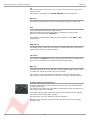
Metering
The main left and right meters are sourced directly from the main outputs so
signal problems within the unit or that which is connected can be metered
correctly.
The meter is a pseudo PPM type with a special scale that ranges from -16 to
+26 dBu.
This type of meter and range is ideal for accurate metering of analogue levels
when they are fed to a digital recorder to maximise levels and to avoid digital
clipping.
Three important points are identified on the meter to help the user to match
levels between the unit and a DAW.
• 0 (PPM Scale Point 5) for line-up +4dBu (0vu)
• 14 (PPM Scale Point 8.5) +18 dBu for typical DAWs set to 14 = 0dBFS,
REL +4 dBu.
• 18 (PPM Scale Point 9.5) +22 dBu for typical DAWs set to 18 = 0dBFS,
REL +4 dBu.
Power Switch
Switches the unit on/off and indicates a healthy +36 volts supply by
illuminating red.
When powering up the unit, it is normal that:
• the buttons on the unit will flash briefly
• the internal relays will reset themselves
• the meter needles will briefly jump to full-scale.
- 19 -
88 Series Outboard / 8816 Summing Mixer
Issue 6.5
Options
Fader Pack Option
The optional fader pack provides 16 Input faders with post fade direct
outputs plus mutes and 2 Master faders.
• The Input faders have a range of -∞dB to +15dB.
• The Master faders have a range of -∞dB to 0dB.
With the fader pack fitted, the rotary channel level control of the 8816
becomes an aux pre-fader send level control with a range of -∞dB to +15dB.
These auxes can be set Pre- or Post-fade, and this is set in the Recall
software once the 8804 is attached via USB.
This aux can be used to send channels to a reverb or other effects unit.
It is not possible to monitor this aux send on the 8816, it is only available on
the D-sub output labelled Balanced Insert Outputs on the rear of the unit.
Recall of the faders and mutes can be stored using USB and the Recall
software so that they can be included into the multi- unit Recall system
provided on the 88 outboard range.
NB:
Internal jumper settings must be changed to enable the optional fader pack
to take control of the main mix level.
Please see section on Jumper settings on page 29.
• When the fader option is not fitted, the Aux Gain jumper sets the Aux
output level to –3dBu.
• When the fader option is fitted, the Aux Gain jumper sets the Aux output
level to 0dBu
Also, please note that the Solo and Mute buttons will not synchronise
between the two units until both units are connected to the PC (or Mac) via
USB and the Recall software is running, as shown below.
USB
USB
- 20 -
88 Series Outboard / 8816 Summing Mixer
Issue 6.5
ADC Option
Sampling Frequency
Sample frequency can be selected by pressing the button to the right of the
sample frequency leds.
This will toggle through the sampling frequencies one at a time.
The 8816 has 2 sync inputs:
• AES 3 (on a female XLR), and
• Word Clock (on a chassis BNC).
If neither sync input is present, the unit will synchronise to its internal crystal
clock.
If one or the other sync inputs is present, the AES or WCK led will illuminate
red showing that that sync input type is detected.
When the correct sampling frequency is selected, either the WCK or AES led
will light solid green to show that sync is being received and the unit has
successfully locked to it.
If both sync inputs are present and valid, the Wordclock input will take
preference over AES as the reference.
Normally the sync input is set to the required sample rate.
In this case both AES out 1/L and AES out 2/R carry the same stereo AES
signal converted from the unit’s left and right analogue outputs.
Single / Double Rate AES Output
Single Rate
If the selected sample rate on the front of the unit (for example 48kHz) is the
same as the sync being input into the rear of the unit (48 kHz, either via
Wordclock or AES sync), then the 2 XLR connectors on the rear of the ADC
card will output Left and Right on both XLRs, so in effect a stereo mix on 1/L
and the same stereo mix on 2/R (this does not just apply to the 48kHz
sample rate, but to when any sample rate on the front matches exactly that
being input on the rear).
Either the WCK or AES led will illuminate green indicating the sync reference
is being used for the digital output.
Double Rate
If the selected sample rate on the front of the unit (for example 96kHz) is
double that being input into the sync into the rear of the unit (48 kHz, either
Wordclock or AES sync), then the 2 XLR connectors on the rear will output
Left and Left on 1/L and Right and Right on 2/R (this applies to all those
situations when the sample rate selected on the front is exactly double the
actual sample rate input into the rear [either Wordclock or AES], not just at
48kHz).
Either the WCK or AES led will illuminate green indicating the sync reference
is still being used for the digital output even though the ADC is sampling at
twice the sync input sampling rate.
It was designed to work in this this way to make allowances for early digital
equipment that had limited sample rate capability.
- 21 -
88 Series Outboard / 8816 Summing Mixer
Issue 6.5
DSD
Selecting DSD will default to 44.1kHz reference.
If no sync is available it will use its own internal crystal reference.
The interface requires a minimum of 2 BNC cables (DSD left and DSD right)
to the DSD recording device.
The DSD output can be switched between SDIF 2 and SDIF 3 formats with a
rear panel switch.
SDIF 2 requires a 44.1kHz sync signal to be passed to the DAC and this
should preferably come from the 8816 sync output via a 3rd BNC cable.
SDIF 3 transmits the DSD signals with clock information included and should
not need the sync signal.
Please refer to your DSD recording device for information on compatibility.
- 22 -
88 Series Outboard / 8816 Summing Mixer
Issue 6.5
Rear Panel Connectors and Controls
Line Output
DB 25 Socket (standard Pro Tools and DA88TM connection) balanced at +4
dBu for INS, Main and LS Outputs and 1/4 inch stereo jacks at -10dBv for
Main and Alt (Loudspeaker) Outputs.
Line Input
• DB 25 Socket (standard Pro Tools and DA88TM connection) balanced at
+4dBu.
• DC Power Input 8 Pin DIN Socket
Talkback Foot Switch
1/4 inch mono jack.
USB
Type B male.
When connecting the unit to a PC (or Mac), it must be connected directly to
an available USB port or via a powered hub, and not via a passive hub.
Rear Panel Controls
Earth Lift Switch
This will lift the mains earth connection from the chassis of the unit, allowing
for the unit to be connected to a suitable technical earth system thus
avoiding hum loops.
Slave Bus Switch
This switches the 2T bus input onto the unit’s main mix bus.
This allows two 8816 units to be joined together to create a slave and master
system expanding the number of inputs.
It also automatically sets the unit to be part of the Recall system as the
slave or master.
• At the Out position, this sets the unit to Slave
• At the In position, this sets the unit to Master
If you only have a single 8816, this should always be set to Slave.
- 23 -
88 Series Outboard / 8816 Summing Mixer
Issue 6.5
ADC Option
ADC L & R Insert
1/4 inch jack acting as a switched insert into the ADC input.
Maximum input level +26dBu for conversion to 0dBFS.
N.B. See Headroom Level Setting for different input level conversions.
Hot
Tip
Cold
Ring
Ground
Sleeve
AES Sync
Female XLR to take a standard AES 110 Ohm input signal for use as a word
clock sync source.
WCLK In
BNC input for TTL level world clock signal.
Input impedance can be set to 75 Ohm using the selection switch on the rear
of the unit.
WCLK Out
BNC 75 Ohm output TTL level world clock signal at sampling frequencies
buffered from ADC sync source.
AES Out
Male XLR outputs standard AES 110 Ohm digital audio.
In normal operation (working at 48kHz while syncing to a 48kHz clock), both
XLRs will output a parallel signal of the analogue Main Mix.
When working in Dual Mode (syncing to a 48kHz clock yet selecting 96kHx on
the front panel), the Left of the Main Mix will be sent on the Left XLR and the
Right of the Main Mix will be sent on the right XLR.
DSD L and R
BNC 75 Ohm output TTL level DSD signal.
75 Ohm WCLK
Selects a 75 Ohm input impedance for WCLK in.
SDIF 2/3
Selects the DSD Output format; SDIF2 DSD data only, SDIF3 DSD data with
embedded clock.
- 24 -
88 Series Outboard / 8816 Summing Mixer
Issue 6.5
Firmware Upgrades
In order to get the most from your Neve unit, the latest firmware should be
installed.
Upgrading your software is a simple process with on screens prompts to
guide you.
>
>
>
>
Start the Recall software.
On the main screen, right-click the window title bar (Mac users select
Recalls)
Click Upgrade Firmware.
Select the file to transfer.
You will be prompted about removing other units.
When updating units, only the unit that is being updated should be
connected via USB. All other units should have their USB disconnected.
Even if you are updating two units of the same model, they should be
connected individually and updated in two separate operations.
If more than one unit is connected via USB when the Update is about to be
performed, a screen will prompt you to disconnect the other units.
A prompt screen will confirm the software number & version you should
select, and display the current version of firmware for the unit.
Click OK.
Selecting a File for Transfer
The Open File dialog will appear.
To locate the firmware file, browse to the location:
•
•
PC users: C:\Program Files\Neve Recall\Firmware
Mac users: Applications\Neve Recall\Firmware
The file names follow the format down_88XY_V.hex where XY are the last
two digits of the 88 unit name (e.g. '16' for 8816) and V is the software
version number.
A typical filename could be down_8804_3.hex.
Double click on the latest filename which matches your unit.
If an incorrect file is selected the user will be prompted to select another file.
- 25 -
88 Series Outboard / 8816 Summing Mixer
Issue 6.5
File Downloading
Once the file is selected, the transfer will begin and the Recall screen will
display that the download is under way.
This process may take up to two minutes for each unit.
Upon completion, the message Firmware Update Successful will be
displayed.
Click OK to continue.
You can continue to update other units successfully without restarting Recall,
but the Recall software must be restarted once this process is finished.
If the transfer fails (for example if the USB is removed by accident or power
is lost to the unit), a warning message will prompt to the user to try again.
If Recall is started with a unit that has no firmware, the user will be
prompted to upgrade the firmware, as the unit cannot be used in Recall
unless the firmware installation is successful.
Corrupted or Old Firmware
If the firmware is corrupted or the unit has an old version of firmware, a
prompt will appear upon starting the Recall software to indicate that firmware
must be updated before the user can proceed.
The process described above can then be followed to update the latest
firmware.
- 26 -
88 Series Outboard / 8816 Summing Mixer
Issue 6.5
Physical & Technical Information
Dimensions
Unit name
Unit Depth
Depth mm (inches)
Height mm (inches)
Weight kg (lbs)
8816
2U
390 (15.4)
88 (3.5)
7 (16)
Rack Mounting and Cooling
The rack unit can be installed in a standard 19“ cabinet with access to the
front and the rear.
No specific air conditioning is required for the rack, providing there is free
flow of air through the rack from front to back and side to side, and that the
ambient air is maintained below 25°C / 77°F.
Racks may be stacked, but at least 1U space should be allowed between each
unit.
Power Requirements
8816
Rated Voltage
36v DC
Rated Current
1.6A Max
Primary Protection Fuse:
Operating Voltage
36v
Fuse Rating & Type
T3. 15A anti-surge 20mm x 5mm glass
Location
Next to DC input on rear of unit
Mains Supply
The power supply unit is a free standing external type with a universal input,
therefore no mains operating voltage setting is required.
There is a mains earth lift switch located at the rear of the unit next to the
fuse holder.
When operated this isolates the mains earth from the chassis of the unit.
If this is operated, earth must be maintained to the chassis of the unit by
using the studio technical earth or equivalent earthing system.
When illuminated the red led on the power switch indicates a healthy +36V
supply.
- 27 -
88 Series Outboard / 8816 Summing Mixer
Issue 6.5
System Settings
Setting the Headroom on the optional A to D card
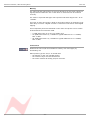
The unit can be set to one of three headroom settings; +14dB, +18dB or
+22dB relative to +4dBu.
The headroom is defined as the number of dBs above +4dBu before the ADC
clips.
The clip led within the left and right output meter will light if the selected
input level is exceeded for more than 1 sample.
The headroom can be changed by accessing the switches through two holes
on the A/D card, labelled HR and +18 UP +14 DN, indicated left.
+14 dB
Both switches in the down position.
+18 dB
HR switch down, and +18 & +14 up.
+22 dB
HR, +18 and +14 all up.
NB: Only use a non metallic plunger tool to operate the level change switches.
Monitor Source pre/post ADC Insert
NB:
The monitor source can be set to Pre- or Post- the ADC insert using jumpers
within the unit.
These jumpers are located on the main motherboard of the 8816, just
adjacent to the A/D card.
The photo below shows the view from the front of the unit.
With the jumpers on the two left most pins, the monitor source is Pre- the
ADC insert.
With the jumpers on the two right most pins, the monitor source is Postthe ADC insert.
Please consult your local Neve dealer if this information is not clear.
- 28 -
88 Series Outboard / 8816 Summing Mixer
Issue 6.5
Fader Pack Jumper Settings
Internal jumper settings must be changed to enable the optional fader pack
to take control of the fader and main mix levels.
THESE SWITCHES ONLY NEED TO BE SET IF YOU HAVE THE
OPTIONAL FADER PACK. IF THERE IS NO FADER PACK PRESENT, DO
NOT SET THESE SWITCHES.
Please consult your local Neve distributor if the following information is not
clear.
There are a total of 19 internal jumpers that need to be set for the remote
fader pack to control the 8816:
• One jumper for each fader (16)
• Mix Left / Mix Right (2)
• Aux Gain (1)
The jumper settings are the same regardless of whether the 8816 is acting as
Master or Slave.
- 29 -
88 Series Outboard / 8816 Summing Mixer
Issue 6.5
Multiple 8816 / 8804
It is possible to have up to two 8816s and two optional 8804 fader packs
connected via USB to the Recall software.
Please see also the 8804 User Manual on how to set the Master / Slave status
on the 8804.
If you only have one 8816 and one 8804 fader pack connected, both units
must be set to SLAVE so the Recall software will operate correctly, as shown
left.
Set to SLAVE
Set to SLAVE
If you have two 8816s and two 8804 fader packs, then one 8816
and 8804 must be set to MASTER, and the other 8816 and 8804
must be set to SLAVE.
In this diagram, the 8816 on the left is the master in terms of audio
(audio connections are not shown), with the unit on the right
feeding submix signals into it.
Set to MASTER
Set to SLAVE
Set to MASTER
Set to SLAVE
The Master / Slave status is set on the rear of the unit with the switch
labelled Slave Bus.
• At the Out position, this sets the unit to Slave
• At the In position, this sets the unit to Master
If you only have a single 8816, this should always be set to Slave.
- 30 -
88 Series Outboard / 8816 Summing Mixer
Issue 6.5
Unit Specifications
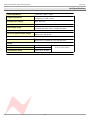
Input Impedance
(Balanced +4dBu) >20KΩ
Output Impedance
(Balanced +4dBu) 50Ω
(Unbalanced +4dBu) 100Ω
Headphone Jack Output
Impedance Loading
More than 60Ω
Max Input Level
(Balanced) Better than +26 dBu
Max Output Level
(Balanced) Better than +26 dBu into 600Ω
(Unbalanced) Better than +14 dBu into 600Ω
Frequency Response:
Ch 1 Line input to Main Output
20 Hz to 20 kHz +/- 0.5dB
Better than -3dB @ 60k
THD:
Ch 1 Line input to Main Output
50 Hz to 20 kHz, Better than 0.02%
Measured at +20 dBu into 10k with 80k filter.
Noise:
No channels routed
Better than -86 dBu
1 channel routed
Better than -85 dBu
16 channels routed
Better than -80 dBu
20 Hz to 20 kHz filter
All specifications with no processing in circuit
- 31 -
88 Series Outboard / 8816 Summing Mixer
Issue 6.5
Connectors
There are five 25-way D-type connectors.
Connectors 1 and 2 for Channel Inputs
Connector 3 for Auxiliary Outputs
Connector 4 for Master section Input
Connector 5 for Master section Outputs.
•
•
•
•
The 16 line inputs are on 2 x 25way D type connectors and follow the
standard pin-outs used by Pro Tools & Tascam DA88.
Connector 1 - Balanced Inputs 1 – 8
Circuit
Shield
Hi
Lo
1
25
24
12
2
11
10
23
3
22
21
9
4
8
7
20
5
19
18
6
6
5
4
17
7
16
15
3
8
2
1
14
Connector 2 - Balanced Inputs 9 – 16
Circuit
Shield
Hi
Lo
9
25
24
12
10
11
10
23
11
22
21
9
12
8
7
20
13
19
18
6
14
5
4
17
15
16
15
3
16
2
1
14
The same pin arrangement is used on Connectors 3, 4 and 5 to provide the
following circuits:
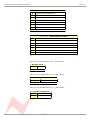
Connector 3 – Balanced Insert Outputs
8
Pre Fade Insert Left Send
7
Pre Fade Insert Right Send`
6
Insert Mix Left Send
5
Insert Mix Right Send
4
Aux Bus Send
3
-
2
-
1
-
- 32 -
88 Series Outboard / 8816 Summing Mixer
Issue 6.5
Connector 4 – Balanced Insert Inputs
8
Pre Fade Insert Left Return
7
Pre Fade Insert Right Return
6
Insert Mix Left Return
5
Insert Mix Right Return
4
2 Track Left Return
3
2 Track Right Return
2
2 Track Left Bus Input
1
2 Track Right Bus Input
Connector 5 - Balanced Main Outputs
8
Main Mix Left Output
7
Main Mix Right Output
6
Monitor Main Speaker Left Output
5
Monitor Main Speaker Right Output
4
Monitor Alternate Speaker Left Output
3
Monitor Alternate Speaker Right Output
2
Cue Left Output
1
Cue Right Output
There are two unbalanced mono ¼” jack outputs:
Main Mix L & R
Tip
Hi
Sleeve
Screen
There are four unbalanced mono ¼” jack outputs:
Main SPK L & R and ALT SPK L & R
Tip
Hi
Sleeve
Screen
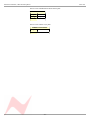
There are two unbalanced stereo ¼” jack outputs:
L & R Cue & Headphone
Tip
Left
Ring
Right
Sleeve
Common
- 33 -
88 Series Outboard / 8816 Summing Mixer
Issue 6.5
There is one unbalanced 3.5mm stereo jack:
iMon
Tip
Left
Ring
Right
Sleeve
Common
There is one control 1/4” jack:
Talkback footswitch
Tip
Control
Sleeve
Common
- 34 -
88 Series Outboard / 8816 Summing Mixer
Issue 6.5
Recall Software Installation
Installation for PC
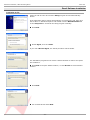
Insert the CD into the drive and the Setup program should automatically
launch.
If the application fails to launch automatically on inserting the CD, then go to
the CD Drive in Windows Explorer and double-click the NeveRecall.msi file
or the setup.exe file to launch the Setup program manually.
Click Next.
Click I Agree, then click Next.
If you click I Do Not Agree, the install procedure will terminate.
The installation programme will select a default location for files to be copied
and created to.
Click Next to keep the default location, or click Browse to select another
location.
Click Next.
Tick as desired then click Next.
- 35 -
88 Series Outboard / 8816 Summing Mixer
Issue 6.5
Click Install.
The install will start and the progress displayed.
If you wish to launch Recall, tick the Launch Neve Recall box.
Click Finish.
The software will now be ready to use, and will be accessible from Start
Menu / Programs / Neve Recall / Neve Recall, or from the Recall icon
on the Windows Desktop.
- 36 -
88 Series Outboard / 8816 Summing Mixer
Issue 6.5
Installation for Mac
Insert the CD containing the software into the Mac, and the install
programme will launch automatically.
Click Continue.
Select the location where you wish the software to be installed to.
Click Continue.
Click Upgrade, and the software will start to install.
The progress bar will show the state of the installation.
Once completed, click Close.
The software is now ready to use.
New Versions of Recall Software for Mac
Where you wish to install a new version of the Recall software on a Mac, you
will need to uninstall the previous version first and remove some files:
> From the Applications folder, move the Neve Recall folder to the
Trash;
> From the //System Library/Extensions folder, move Neve8816.kext
to the Trash (move this file, regardless of the actual outboard units you
may have connected via USB)
> From the //Library/Receipts folder, move Neve Recall.pkg to the
Trash.
You will now be able to install the new version.
- 37 -