1
Chapter 9. Editors, Text Tools, Graphics, and Printing
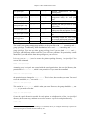
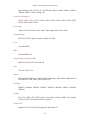
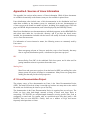
Clean design
Commercial May support cards with no other drivers
May be closed source
May not be supported
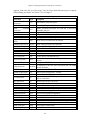
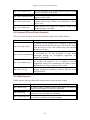
In addition to the drivers mentioned in Table 9-1, kernel patches are sometimes available that
address problems with specific sound cards.
The vast majority of sound cards are supported under Linux by one driver or another. The
devices that are least likely to be supported are very new cards, which may not yet have had
drivers developed for them, and some high-end professional sound cards, which are rarely
used by consumers. You can find a reasonably up-to-date list of supported cards in the current
Linux Sound HOWTO document, but often the best solution is to do some research on the
Internet and experiment with drivers that seem likely to match your hardware.
Many sound applications use the kernel sound drivers directly, but this causes a problem: the
kernel sound devices can be accessed by only one application at a time. In a graphical desktop
environment, a user may want to simultaneously play an MP3 file, associate window manager
actions with sounds, be alerted when there is new e-mail, etc. This requires sharing the sound
devices between different applications. To address this, modern Linux desktop environments
include a sound server that takes exclusive control of the sound devices and accepts requests
from desktop applications to play sounds, mixing them together. They may also allow sound
to be redirected to another computer, just as the X Window System allows the display to be
on a different computer from where the program is running. The KDE desktop environment
uses the artsd sound server and GNOME provides esd. As sound servers are a somewhat
recent innovation, not all sound applications are written to support them yet.
This section will not cover software development issues, but for those who want to develop
multimedia applications, a number of toolkits provide sound support more easily than the
low-level kernel API. ALSA includes a sound library, and there are many sound toolkits, such
as SDL (intended mainly for games) and OpenAL (for 3D audio). If you are a multimedia
developer you should investigate these libraries to avoid reinventing work done by others.
9.5.3 Installation and Configuration
In this section we will discuss how to install and configure a sound card under Linux.
The amount of work you have to do depends on your Linux distribution. As Linux matures,
some distributions are now providing automatic detection and configuration of sound cards.
The days of manually setting card jumpers and resolving resource conflicts are becoming a
thing of the past as sound cards become standardized on the PCI bus. If you are fortunate
enough that your sound card is detected and working on your Linux distribution, the material
in this section won't be particularly relevant because it has all been done for you
automatically.
Some Linux distributions also provide a sound configuration utility such as sndconfig which
will attempt to detect and configure your sound card, usually with some user intervention.
You should consult the documentation for your system and run the supplied sound
configuration tool, if any, and see if it works.
308