1
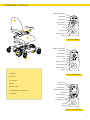
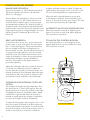
CONTROLLER DX2-REM550
MANOEUVRE OPERATION
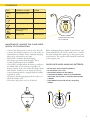
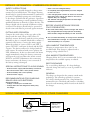
Press the main switch (1). Check the battery level (4).
The battery should not be down at the red mark.
(Please see “Charging”).
Driving: Make sure the display (3) shows one of the
driving programs 1 to 5. Press function buttons (2)
until any of these numbers appear. Set the program
speed with function buttons (6). Push the joystick (5)
straight forward to drive forwards and diagonally left/
right-forward to turn. The chair can be turned around
by moving the joystick (5) straight left/right. To reverse,
pull the joystick (5) backwards. Horn: Press the
button (8).
SEAT UNIT OPERATION
To raise/lower the seat unit or to operate electric tilt,
backrest angle or angle of footplate. Press the Option
key (7) until a chair appears. The electrical functions
that are available on the chair are displayed (one
function visible at a time). Press the function button (6)
to toggle between the symbols or move the joystick
from side to side. The electric function that is active
is blue in the display (3). Move the joystick forward/
backward alt. left/right to operate the different
functions. The symbol on the display switches to
green when adjusting.
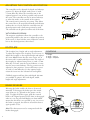
Adjust the seat height: Move the joystick (5) forward
to raise the seat, and down to lower it. Adjust
the
1
2
seat tilt: Move the joystick (5) forward to tilt the seat
forward, and back to tilt it backward. Adjust the angle
of the backrest: Move the joystick (5) forward to tilt
the backrest forward, and back to tilt it backwards.
2
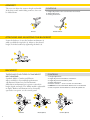
OPERATING THE ELECTRICAL FOOTPLATE
OPTION
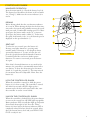
The footplate has height and angle adjustment. Press
the option button (7) until a chair appears. Press the
function button (6) or move the joystick (5) left/ right
to highlight the function “electrical footplate” which
is divided into right and left. Move the joystick (5)
forward to extend and tilt the footplate or backward
to retract the footplate and move it backward.
To adjust the left footplate only, navigate to No. 1 and
move the joystick (5) forward to tilt the footplate up
or move it backward to tilt it down. To merely extend/
shorten the footplate on the left side navigate to No. 2
and move the joystick (5) forward to extend the
8
footplate and back to make it go back. To adjust the
right footplate only navigate to No. 3 (see No. 1) and
No. 4 for vertical adjustment (as explained in # 2).
When the chair’s electrical functions are not used
in five minutes it will turn off automatically to save
battery. To boot the electronics press any key. The time
interval for automatic shut-off is adjustable.
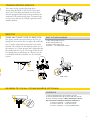
IN ORDER TO LOCK THE CONTROLLER, DX2
When the controller is turned on, hold the power
button (1) for four seconds. Lock will be displayed.
The control box is turned off.
TO UNLOCK THE CONTROL BOX DX2
Press the Power button (1). A lock appears in the
display. Push the horn (8) twice within 10 seconds.
The control box is started.
1
4
3
2
6
7
2
8
5
Controlbox DX2-REM550