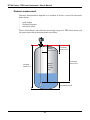
1
Operation
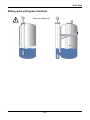
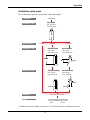
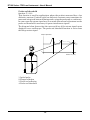
Shortening the probe
Probe Length Modif.
function C.1.6.0
Shorten the probe if the length does not correspond exactly to your needs.
Procedure: Single rod and coaxial probes
1. Cut probe to the correct length
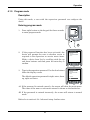
2. Reconfigure probe length in the device program mode. This can be found on
the following path Advanced Setup > Installation > Probe Length Modif
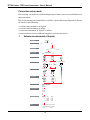
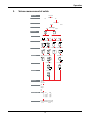
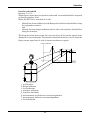
Procedure: Single and double cable probes
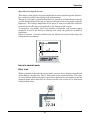
(except the crimped Ø12x100 mm rod counterweight for the Ø8 or 0.3” Single
cable probe)
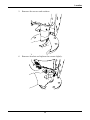
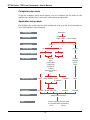
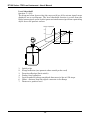
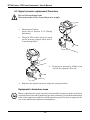
1. Remove the counterweights by removing the M6 socket set screws holding
the weights onto the cable. You will need a 3 mm hexagon key.
2. Cut the cables to the correct length - use a good quality cable cutter to avoid
the strands from splaying
3. Remount the counterweights and retighten the socket set screws.
4. Reconfigure probe length in the device program mode as in the procedure
above.
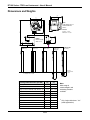
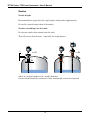
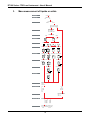
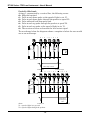
1
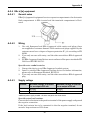
30 or 1.2"
M6
2
13 or 0.5"
100 or 4"
3
20 or 0.8"
M8
20 or
0.8"
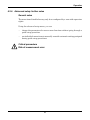
Single cable probe example
1. M6 socket set screws (2) retaining counterweight on the cable
2. Ø4 mm or 0.15” cable
3. Ø20 x 100 mm (0.8 x 4”) counterweight
103