1
LOOP delay - Manual
29
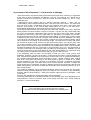
During RUNNING state
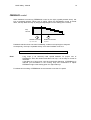
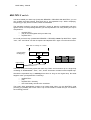
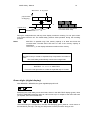
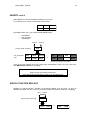
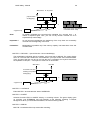
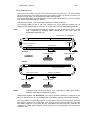
When you press UNDO, you jump one entire loop back in the memory — all you recorded
since you have been in the same part of the loop is erased. There is a rounding so that if you
tap next to a loop start, you jump back to the start of the last loop.
If you press UNDO long, it erases always the current and the whole last loop. So if you press it
long, it does not matter when you press it.
This function is helpful if you have made a mistake in a carefully built loop.
You can apply UNDO as part of your own creativity, too: try out different phrases onto an
existing loop and delete them in case you do not like them (see also Correcting page 39).
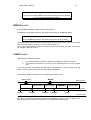
Hint !
If your LOOP delay has sufficient memory, you can go back to the history of the
loop composition by pressing UNDO several times. The same goes for
FEEDBACK (see page 19).
oldest loop is overwritten
third but last loop
UNDO
second but last loop
last loop
current loop
before
reading sample
writing sample
UNDO
output
input
after
new last
loop
new second but last loop
new current loop
reading sample
output
Note!
last complete loop
being overwritten
writing sample
input
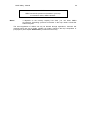
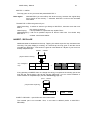
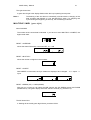
Changed timing cannot be reverted. As a consequence, UNDO goes back in
different steps after a multiplication (try out!).
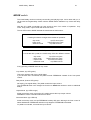
UNDO works together with AutoUndo. You may be amazed sometimes in what part of the
song you end up, if you do not understand the co-operation between Undo and AutoUndo.
If it is not possible to execute this function correctly (maybe not a whole loop passed since the
last change of beat time or maybe there is not enough memory capacity) the LED goes dark
and nothing happens if you press the key. Sometimes the LED may blink, because the
conditions for UNDO keep changing during the loop runs. Synchronisation can change the
conditions, too.