1
PRINTER PROBLEMS CHECKLIST
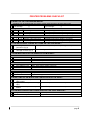
5 WHAT DO THE CARTRIDGES WEIGH?
Cartridges can be weighed with the Centor-system internal scale or another letter scale
Left cartridge:
g
5.1 Single cartridge
E
… L … R under 80 g
E
… L … R between 80 g and 85 g
E
… L … R over 85 g
5.2 Hose-cartridge
S … L … R
under 110 g
S … L … R
between 110 g und 115 g
S … L … R
over 115 g
E S
Right cartridge:
g
Cartridge empty, must be replaced
Cartridge level critical, replace if necessary
Cartridge okay: new cartridges weigh 115 g.
Cartridge empty, must be replaced
Cartridge level critical, replace if necessary
Cartridge okay: optimal weight is 125 g or more
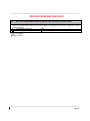
6 CAN EXCESS INK TRACES BE FOUND ON THE CARTRIDGE?
E S
E S
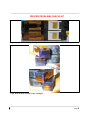
… clear signs of ink on the ink Clean print heads by hand (refer to operating manual)
jet surface (Fig 8)
… clear signs of dirt on the
Clean cartridge and PDB contacts
cartridge contacts (Fig 7)
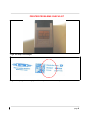
7 HOW MUCH AIR IS IN THE INKING SYSTEM HOSES?
7.1
BETWEEN TANK AND PRESSURE REGULATOR
… none
Okay
S … up to 1.5 cm
Okay, prime system to be sure
S … over 1.5 cm
System must be primed
7.2
BETWEEN PRESSURE REGULATOR AND CONNECTOR
S … none
Okay
S … up to approx. 2 cm
Okay, slowly prime system to be sure
S … over 2 cm
System must be primed
7.3
BETWEEN CONNECTOR AND CARTRIDGE
S … none
Okay
S … up to approx. 3 cm
Okay
S … over 3 cm
Replace cartridges
S
8 WHAT KIND OF INK BUILD-UPS CAN BE SEEN ON THE RDS?
E S
E S
E S
… significant ink build-up on the
Clean the spray shield
spray shield
… significant build-up on the sealing replace RDS (refer to Service Manual)
caps
… significant build up on the wiper
replace RDS (refer to Service Manual)
blades
9 HOW MUCH EXCESS INK CAN BE SEEN ON THE PRINT WINDOW?
E S
E S
… significant build-ups
… minimal build-ups
clean the print window
Okay, clean to be sure
page 2