1
Installation
Power Supply
Power Supply
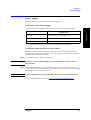
Before turning on the E5071C power, check the following.
Verification of the Power Supply
Confirm that the power supplied to the E5071C meets the following requirements:
Voltage
90 to 132 VAC or 198 to 264 VAC *1
Frequency
47 to 63 Hz
Maximum power consumption
350 VA
2. Installation
Requirements
*1. Switched automatically by the E5071C in conformity to the voltage used.
Verification and Connection of Power Cable
The three-wire power cable attached to the E5071C has one wire serving as a ground.
Using this power cable allows the E5071C to be grounded, thereby protecting you against
electrical shock from the power outlet.
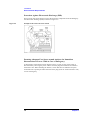
Step 1. Confirm that the power cable is not damaged.
WARNING
NEVER use a power cable showing any sign of damage. Faulty cables can cause
electrical shock.
Step 2. Use the supplied cable to connect between the power cable receptacle (Figure 2-7 on
page 24) on the rear panel of the E5071C and a three-wire power outlet with the grounding
prong firmly connected in the ground slot.
WARNING
Use the supplied power cable with grounding wire to securely ground the E5071C.
Power cord information is available at http://www.agilent.com/find/powercords.
Chapter 2
21