1
Installation
Starting the E5071C
This operation turns ON the power, and the E5071C starts the self-test.
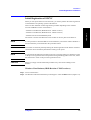
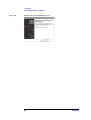
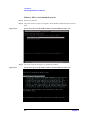
Step 4. Confirm that the self-test indicates normal operation.
Normal operation is confirmed by the self-test if no error message appears.
Turning the Power OFF
Step 1. Use either of the following methods to turn the power OFF.
•
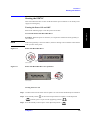
Press the standby switch (
pressed down (
•
) in the lower-left part of the front panel (now in the
) position) to put it in the popped up (
) position.
Click Turn off Computer from Windows Start menu
These operations will start the E5071C shutdown process (required software and hardware
processes for turning the power off), and the power will turn OFF after a few seconds.
NOTE
Under normal circumstances, always press the standby switch ( ), or click Turn off
Computer from Windows Start menu, to execute the E5071C shutdown process. Never cut
off the power supply directly by disconnecting the power cable plug from the rear
panel of the unit.
If the power supply is cut off directly by disconnecting the power cable plug from the
instrument or the AC outlet, the shutdown process is not carried out and there is a risk of
damage to the E5071C’s software or hardware.
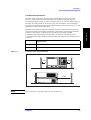
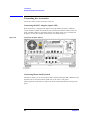
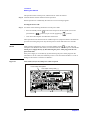
Figure 2-7
Line switch (Always ON) and power cable receptacle
Power Cable Receptacle
Line Switch: Always ON ( | )
ICES/NMB-001
LR95111C
GPIB
4
EXT TRIG
IN
ISM 1-A
N10149
NOTE
24 BIT I/O
WARNING: No operator serviceable
parts inside. Refer servicing to qualified
personnel.
Switch must remain
ON while operating.
USB
EXT TRIG
OUT
115 V
50/60 Hz
- 230 V
350 VA Max
LINE
Model# Label
Serial Label
REF IN
REF OUT
10 MHz
AUX IN 2
AUX IN 1
1 V, 10 V
I/O PANEL
PRINTER
(PARALLEL)
RESERVED
ETHERNET
VIDEO
1
3
2
4
RESERVED
Windows Label
REF OVEN
(10 MHz)
PORT 4
FUSE 0.5 A
PORT 3
PORT 2
BIAS INPUT
35 VDC Max
PORT 1
e5071cqe1003
24
Chapter 2