1
Third-party Device Configuration
Third-party Device Configuration
Firewall VPN Router Port Management
Turn on the DMZ gate, using the IP Addresses assigned specifically for the third-party
devices. The following table lists the DMZ segments and the corresponding IP addresses.
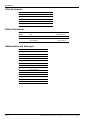
10.5.60 DMZ Segment
IP Addresses
Secondary Router/Hub
10.5.60.14
Back Office Server
10.5.60.15
Loyalty Server
10.5.60.16
Security Camera
10.5.60.17
Subnet Mask
255.255.255.192
Default Gateway
10.5.60.1
RV042 Third-party Access Rules
The following table lists the access rules for the third-party devices.
Third-party
LAN
Allow
All Traffic [1]
BOSShare
Allow
BOSShare [139]
BOSFTP
Allow
FTP [21]
WANFTP
Allow
FTP [21]
Third-party LAN is used for Loyalty Server, IP-based Security Camera, and Back Office
Systems, where data is pushed from the Passport Server to the Back Office System. The
Authorized Service Contractor (ASC) must enable this rule during installation.
BOSShare is used for Back Office Systems that access the Passport Server through File
Share. The ASC must enable this rule during installation. The Back Office System must access
the Passport Server using 10.5.60.1 as the IP Address. The IP Address 10.5.48.2 or
POSServer01 can no longer be used for accessing the Passport Server.
BOSFTP is used for Back Office Systems that access the Passport Server through FTP. The
ASC must enable this rule during installation. The Back Office System must access the
Passport Server using 10.5.60.1 as the IP Address. The IP Address 10.5.48.2 or POSServer01
can no longer be used for accessing the Passport Server.
WANFTP is used for customers of MOC and Back Office Systems that access the Passport
Server through FTP over the WAN connection. The ASC must enable this rule during
installation. The Back Office System must access the Passport Server using 10.5.60.1 as the IP
Address.
Note: 1) Only devices originating from the DMZ can access the server through 10.5.60.1. If
using the WAN port for FTP, you can access the server through the IP Address
assigned to the RV042 Internet port and not through 10.5.60.1.
2) WANFTP is used only for private network connections through the WAN port and is
NEVER used for public internet connections.
MDE-4880A Passport® V8.02+ Third-party Partner Device Access Rules · February 2010
Page 5