1
IP WatchDog Lite – Dual monitor of Ethernet devices
HW group
IP WatchDog Global
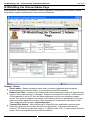
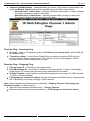
Current Network settings – Actual device’s network parameter configuration. If the DHCP
server is allowed to assign them (DHCP enabled), the gained values are then damped.
o IP address – actual device’s IP address
o Mask – actual network mask
o Gateway – actual Gateway
o DHCP enabled/disabled – information whether assigning of the network parameters
by DHCP server is enabled
Main Page Refresh time – Main Page refresh rate.
Time and Date
Time – shows actual time in HH:MM:SS format that can be set in IP WatchDog Lite.
Date – shows actual date in DD/MM/YYYY format that can be set in IP WatchDog Lite.
Time server IP address – server IP address, which IP WatchDog Lite will be synchronized
with.
Time server protocol - protocol for time synchronization. If the server is not located within
internal network, proper router or firewall communication ports must be also enabled for this
server.
o NTP – most common time synchronization protocols (UDP port 123). Requires filling
of the following IP-WatchDog fields: time zone and Time server: time zone.
o Time – older but easy protocol (UDP port 37).
o DayTime – not very common protocol that is implemented in Windows (TCP/UDP
port13).
IP-WatchDog: time zone – time zone according to GMT in the +/- HH:MM:SS format, where
IP WatchDog is located.
Refresh Time now – button for immediate time synchronization. IP WatchDog Lite tries for
the synchronization up to 5 times.
February 2006
www.HW-group.com
page 17 / 28