1
CARE AND MAINTENANCE
TROUBLESHOOTING TIPS
Care and cleaning of the dehumidifier
Before calling for service, review the chart below first yourself.
Turn the dehumidifier off and remove the plug
from the wall outlet before cleaning.
Problem
1. Clean the Grille and Case
Use water and a mild detergent. Do not use bleach
or abrasives.
Do not splash water directly onto the main unit. Doing
so may cause an electrical shock, cause the insulation
to deteriorate, or cause the unit to rust.
The air intake and outlet grilles get soiled easily, so use
a vacuum attachment or brush to clean.
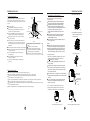
2. Clean the bucket
Every few weeks, clean the bucket to prevent
growth of mold, mildew and bacteria. Partially
fill the bucket with clean water and add a little
mild detergent. Swish it around in the bucket,
empty and rinse.
NOTE: Do not use a dishwasher to clean the
bucket. After clean, the bucket must be in place
and securely seated for the dehumidifier to operate.
3. Clean the air filter
The air filter behind the front grille should be
checked and cleaned at least every 30 days
or more often if necessary.
NOTE: DO NOT RINSE OR PUT THE FILTER
IN AN AUTOMATIC DISHWASHER.
F ig. 9
What to check
Unit does not start
,
Make sure the dehumidifier s plug is pushed completely into the
outlet.
Check the house fuse/circuit breaker box.
Dehumidifier has reached its preset level or bucket is full.
Bucket is not in the proper position.
Dehumidifier does not
dry the air as it should
Did not allow enough time to remove the moisture.
Make sure there are no curtains, blinds or furniture blocking the
front or back of the dehumidifier.
The humidity selector may not be set low enough.
Check that all doors, windows and other openings are securely
closed.
Room temperature is too low, below 5oC(41oF).
There is a kerosene heater or something giving off water vapor
in the room.
The unit makes a loud
noise when operating
The air filter is clogged.
The unit is tilted instead of upright as it should be.
The floor surface is not level.
Frost appears on the
coils
This is normal. The unit has Auto defrost feature.
Water on floor
Hose to connector or hose connection may be loose.
Intend to use the bucket to collect water, but the back
drain plug is removed.
F ig. 10
To remove:
Pull the water bucket out as shown in Fig.9.
Grasp the lower side of the filter and pull it downward,
see Fig.10.
Clean the filter with warm, soapy water. Rinse and
let the filter dry before replacing it. Do not clean the
filter in a dishwasher.
F ig. 11
To attach:
Insert the air filter into the unit from the side and push
it upward. See Fig.10.
CAUTION:
DO NOT operate the dehumidifier without a filter
because dirt and lint will clog it and reduce performance.
4. When not using the unit for long time periods
After turning off the unit, wait one day before emptying
the tank.
Clean the main unit, bucket and air filter.
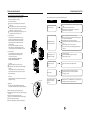
Wrap the cord and bundle it with the band(see Fig.12).
Cover the unit with a plastic bag.
Store the unit upright in a dry, well-ventilated place.
8
P ower cord
B and
Power indicator light
flashes at 5 times per
second.
Temperature sensor or Humidity sensor error. Unplug the unit
and plug it back in.If error repeats, call for service.
Fig.12
9