1
OCREB Online User Guide:
Getting Started
Version 1.0
For all OCREB Online Users
Table of Contents
1.
2.
3.
About OCREB Online .................................................................................................................................. 4
1.1.
Intended Audience ............................................................................................................................... 4
1.2.
Accessing the System ......................................................................................................................... 4
1.3.
Technical Details .................................................................................................................................. 4
1.4.
Sandbox (Practice Area) ..................................................................................................................... 4
1.5.
O2 Help.................................................................................................................................................. 4
Getting Started.............................................................................................................................................. 5
2.1.
O2 Home Page ..................................................................................................................................... 5
2.2.
Logging In.............................................................................................................................................. 5
2.3.
Registration ........................................................................................................................................... 5
2.4.
User Profile – Contact and Password Information.......................................................................... 6
2.5.
Access Levels/Roles............................................................................................................................ 7
Navigating OCREB Online.......................................................................................................................... 8
3.1.
“My Home” Page .................................................................................................................................. 8
3.1.1.
My Home page for Study Staff contains:.................................................................................. 8
3.1.2.
My Home page for REB members contains: ........................................................................... 9
3.1.3.
My Home page for Department Approvers contains: ........................................................... 10
3.1.4.
My Home page for REB Coordinators contains: ................................................................... 11
3.2.
Navigation Bar .................................................................................................................................... 12
3.2.1.
3.3.
Finding Submissons: ................................................................................................................. 12
Studies Page....................................................................................................................................... 13
3.3.1.
Amendments, Renewals and Reportable Events Pages ..................................................... 13
4.
System Notifications .................................................................................................................................. 14
5.
Issues & Support ........................................................................................................................................ 14
6.
Application “States”.................................................................................................................................... 15
7.
Tips ............................................................................................................................................................... 16
7.1.
Formatting, Copying & Pasting .................................................................................................... 16
7.2.
Working with Multiple Windows ................................................................................................... 16
7.3.
Windows Computer Tips ............................................................................................................... 16
Ontario Cancer Research Ethics Board
OCREB Online User Guide for all Users (Getting Started) Version 1.0 (2011-Feb-20)
Page 2 of 18
7.4.
Reminders: ...................................................................................................................................... 16
7.5.
Changing the Date Format: .......................................................................................................... 17
Ontario Cancer Research Ethics Board
OCREB Online User Guide for all Users (Getting Started) Version 1.0 (2011-Feb-20)
Page 3 of 18
1.
About OCREB Online
OCREB Online (O2) is a transparent, secure, web-based system designed to automate and streamline
the preparation, submission and review processes for ethics applications submitted to OCREB by
institutions in Ontario authorized to use OCREB. Ethics applications for new studies and post-approval
applications such as amendments, renewals, study closures and reportable events (e.g., local SAEs,
safety updates, DSMB reports, protocol deviations), are submitted via the online system by the principal
investigator or by the designated study team member. Applications are prepared using “smart forms”,
which dynamically show or hide questions depending on the applicability to the study. The system
automatically prompts for missing information, thereby ensuring that submissions are complete before
submission.
1.1.
Intended Audience
This guide is intended for all O2 users. The guide provides useful information on the overall system, on
how to navigate and use the system and useful tips.
1.2.
Accessing the System
To access the live O2 system, go to https://ocrebonline.ca. Review the Terms and Conditions for
restrictions on and authorized use of O2, and for privacy, security and confidentiality details
1.3.
Technical Details
•
•
•
•
•
1.4.
O2 is best viewed on Microsoft Internet Explorer (version 7 or higher recommended).
O2 will also work on Mozilla Firefox, Apple’s Safari (Mac), and Google Chrome.
Sun Java will be required for downloading files from O2, which can be obtained from
www.java.com/en/. If you have firewall or downloading restrictions, you may need local IT
assistance to download this onto your work computers.
O2 uses pop-ups and multiple windows. You will need to allow pop-ups for the O2 website so
that these windows are not blocked.
The display of system-generated date fields is dependent upon the settings on the computer
that you are accessing the system with as well as the browser you are using (see page 17).
Sandbox (Practice Area)
Users can familiarize themselves with O2 in the “Sandbox” at https://o2-staging.oicr.on.ca. The
Sandbox is a practice environment where users can test-drive the system without using real data.
Contact the O2 Help for a user name and password for the Sandbox.
1.5.
O2 Help
•
•
•
Submit issues or questions via the Issues & Support page from within the O2 system;
Email – [email protected]; or
Phone - 647-260-7945 or toll-free: 1-866-678-6427 Ext 7945.
Ontario Cancer Research Ethics Board
OCREB Online User Guide for all Users (Getting Started) Version 1.0 (2011-Feb-20)
Page 4 of 18
2.
Getting Started
2.1. O2 Home Page
On the O2 home page you will find the login link, as well as links to other OCREB information such as
policies and procedures, templates, user guides and OCREB meeting dates and deadlines.
2.2. Logging In
The O2 team will create an account for each authorized O2 user and provide a user name and
password. If you already have your user name and password, select the Login link in the top right-hand
corner of the screen to go to the login screen. The first time you login, you will be prompted to change
your password.
2.3.
Registration
If you do not have a user name and password, you will need to register. To register, select the
Registration link in the bottom left-hand corner of the OCREB home page, complete the registration
form and select Register to submit. The OCREB office must have your access authorized (e.g., by your
manager) before creating your account and providing you with a user name and temporary password.
Ontario Cancer Research Ethics Board
OCREB Online User Guide for all Users (Getting Started) Version 1.0 (2011-Feb-20)
Page 5 of 18
2.4.
User Profile – Contact and Password Information
When you login the first time, you will be directed to your User Profile to verify your contact
information. Select Apply to save any changes.
To change your password at any time, select your name from the user menu bar. This will take you to
your user profile. Select the Account tab to access the password area.
Passwords must contain at least six (6) characters in an alphanumeric combination. Passwords must
not be shared or stored in a visible and accessible location, i.e. written down. Passwords must NOT
contain:
•
•
•
•
any words that could be found in a dictionary;
any words or references to the type of work being performed in relation to the system on which
the password is being deployed;
any identifying user information such as birthdays, spouse’s birthdays, anniversaries, children’s
birthdays, pet names or other similar types of identifying information;
three or more consecutive characters from your username.
If you fail to successfully login after five (5) attempts, the system will lock you out and you
will need to call O2 Help to have your password reset.
Ontario Cancer Research Ethics Board
OCREB Online User Guide for all Users (Getting Started) Version 1.0 (2011-Feb-20)
Page 6 of 18
2.5.
Access Levels/Roles
Most O2 users will have only one O2 role (i.e., OCREB “Committee” Member, Study Staff, Department
Approver). However, if you are a PI (“Study Staff”) and/or a Committee Member and/or and a
department approver, all roles will be added to your profile. Your authorized activities will depend on the
permissions set for your specific role.
If you have more than one user
role, switch between roles by
selecting the appropriate role
on “My Home” page.
The role that you select will
determine the information
that is displayed on your
screen and the activities you
are allowed to execute.
Although all “Study Staff” share the same role name, the authorized activities (e.g., view only, make
changes, submit) depend on the permissions set for the specific study staff role (e.g., PI, main study
coordinator, co-investigator, other study staff).
Ontario Cancer Research Ethics Board
OCREB Online User Guide for all Users (Getting Started) Version 1.0 (2011-Feb-20)
Page 7 of 18
3. Navigating OCREB Online
It is important to spend some time figuring out how to navigate this new system. O2 consists of a variety
of pages and workspaces. The different pages help to organize and display information in a logical
fashion and they act as gateways to specific study areas. Workspaces are unique areas that contain
activity buttons and are where you conduct activities associated with your role.
3.1.
“My Home” Page
Except for the first time you login, every subsequent login will take you to your personal home page “My
Home”. If you have more than one role in O2, this page will differ slightly for each user role. Selecting
My Home in the upper right-hand corner of the screen will bring you back to this page if you get lost.
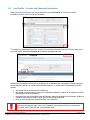
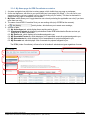
3.1.1. My Home page for Study Staff contains:
1. A system navigation bar with links to various pages. This navigation bar is visible from any page
or workspace in the system;
2. A user tool bar/menu, with links to your profile and your home page (“My Home”). (You can link
to your personal profile to review or update it at any time by clicking on your name). This user
tool bar/menu is visible from any page or workspace in the system;
3. My Roles, which allows you to toggle between user roles by selecting the applicable user role
(if you have more than one role);
4. A
activity button, which will open a new Provincial application to allow
you to prepare to submit a new study. This button is available from most pages and
workspaces;
5. My… submission tabs, which display items requiring action by you (“My Action Items”) and
other tabs where you can monitor the progress of your studies (“My Studies”) and their related
submissions (“My Amendments”, “My Renewals”, “My Reportable Events”) that you are
directly involved in;
6. Quick Links – for example, to OCREB templates.
2
1 3 4 5
6 Ontario Cancer Research Ethics Board
OCREB Online User Guide for all Users (Getting Started) Version 1.0 (2011-Feb-20)
Page 8 of 18
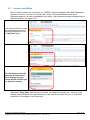
3.1.2. My Home page for REB members contains:
1. A system navigation bar with links to various pages. This navigation bar is visible from any page
or workspace in the system;
2. A user tool bar/menu, with links to your profile and your home page (“My Home”). (You can link
to your personal profile to review or update it at any time by clicking on your name). This user
too bar/menu is visible from any page or workspace in the system;
3. My Roles, which allows you to toggle between user roles by selecting the applicable user role
(if you have more than one role);
4. The name of each REB “Committee” that you serve on (only OCREB at the moment);
5. My… tabs, which display items requiring action by you (“My Action Items”), “My Reviews” tab
displaying a list withlinks to all submissions that you have been assigned to as a reviewer and
an “Upcoming Meetings” tab, displaying a listing with links to all upcoming meetings.
2
1 3 4 5
Ontario Cancer Research Ethics Board
OCREB Online User Guide for all Users (Getting Started) Version 1.0 (2011-Feb-20)
Page 9 of 18
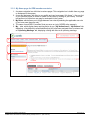
3.1.3. My Home page for Department Approvers contains:
1. A system navigation bar with links to various pages. This navigation bar is visible from any page
or workspace in the system;
2. A user tool bar/menu, with links to your profile and your home page (“My Home”). (You can link
to your personal profile to review or update it at any time by clicking on your name). This user
too bar/menu is visible from any page or workspace in the system;
3. My Roles, which allows you to toggle between user roles by selecting the applicable user role
(if you have more than one role);
4. The name of each REB “Committee” that you serve on (only OCREB at the moment);
5. My Action Items tab, which display items requiring action by you, and a “Studies” tab
displaying all studies on which you are the department approver.
2
1 3 4 5
Ontario Cancer Research Ethics Board
OCREB Online User Guide for all Users (Getting Started) Version 1.0 (2011-Feb-20)
Page 10 of 18
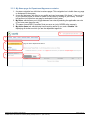
3.1.4. My Home page for REB Coordinators contains:
1. A system navigation bar with links to various pages, which visible from any page or workspace;
2. A user tool bar/menu, with links to your profile and your home page (“My Home”). (You can link to your
personal profile to review or update it at any time by clicking on your name). This user too bar/menu is
visible from any page or workspace in the system;
3. My Roles, which allows you to toggle between user roles by selecting the applicable user role (if you have
more than one role);
4. The name of each REB “Committee” that you are working with (only OCREB at the moment);
5. A
activity button, which allows you to create new meetings;
6. A series of tabs:
6.1. My Action Items tab, which display items requiring action by you;
6.2. Unassigned Projects tab displaying submissions under REB Administrative Review and not yet
assigned to an REB Coordinator.;
6.3. My Studies tab, which displays a list studies assigned to you;
6.4. My Reportable Events tab, which displays a list of reportable events for projects assigned to you;
6.5. My Amendments tab, which displays a list of amendments for projects assigned to you;
6.6. My Renewals tab, which displays a list of renewals for projects assigned to you.
The REBA (Intake Coordinator) will see a list of all studies & submissions types regardless of owner.
2 1 3 4 5 Ontario Cancer Research Ethics Board
OCREB Online User Guide for all Users (Getting Started) Version 1.0 (2011-Feb-20)
6
Page 11 of 18
3.2.
Navigation Bar
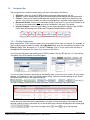
The navigation bar is visible no matter where you are in the system, with links to:
1. O2 Home – takes you to the OCREB Online home page without logging you out;
2. Studies – links to a page listing all provincial and centre studies that you are associated with;
3. Centres – links to your centre profile page that includes a list of staff at your institution in the
system, a list of all of the studies your centre is participating in, and other centre-specific items;
4. Researcher Profile - links to your researcher profile (if you are a PI), or to a list of Profiles for all
PIs that you are linked with (if you are a study coordinator). See page 7 for details;
5. Issues & Support – links to a page where you can submit questions or issues to the OCREB
Online team and access User Guides and Frequently Asked Questions (FAQs).
1 2 3
4
5 3.2.1. Finding Submissons:
Many views have a “Filter” feature to allow you to more easily find an item in a long list. For example, to
find a study by sponsor protocol number, select My Studies tab, enter the exact protocol number in the
Filter by “Name” field, and press Go. To find a PI, Filter by “First” or “Last” name, enter the name in
the adjacent field and press Go. Press Clear to return to the full list.
If you know the O2 system-generated project (“PRO”) number, filter by “ID” and use “%” in front of last
3 numbers of the PRO number to find the project.
You can sort most columns in ascending or descending order. If you move your cursor over the column
heading, it will change to a link if the column allows sorting. Select the column heading to sort. Select
the column again to sort in the opposite direction.
or
or
or
, etc. (e.g., if
you wish to display studies by the closest expiry date, sort by ascending “Expiration Date”):
If there are more items than can be displayed on one page, a bar at the bottom of the page will show
the total number of items in the entire list, as well as how many items are displayed on the current page
(
). To go to the next page, select
Ontario Cancer Research Ethics Board
OCREB Online User Guide for all Users (Getting Started) Version 1.0 (2011-Feb-20)
. Select
to go to the last page.
Page 12 of 18
3.3.
Studies Page
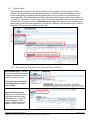
The Studies page is where you access all studies you are involved in: Provincial (top) or Centre
(bottom). This includes provincial applications where you are NOT the provincial applicant, but your
centre is participating or listed as potentially participating, even if you have not yet submitted your
centre application. The various tabs link to Provincial and to Centre studies by their current state (i.e.,
“In Progress”, “Approved”, “Closed”), or to a list of “All Studies” regardless of their current state. On the
left-hand side, you will see a menu of Other Submission Types from where you can access all postapproval provincial and centre submissions (amendments, renewals, and reportable events) related to
all studies. Think of these as subfolders of the study.
3.3.1. Amendments, Renewals and Reportable Events Pages
Amendments page – displays
a list of all provincial and centre
amendment applications for all
studies you are involved in.
Tip: look for the crumb trail
or the page title to confirm
your location.
Reportable Events page –
displays a list of all provincial
and centre reportable event
submissions (e.g., local SAE,
protocol deviation, safety
update, DSMB report) for all
studies you are involved in.
Ontario Cancer Research Ethics Board
OCREB Online User Guide for all Users (Getting Started) Version 1.0 (2011-Feb-20)
Page 13 of 18
4. System Notifications
The O2 system automatically generates email notifications to the Study Staff (SS) and REB members
at various stages/states in the review process. Emails are automatically generated with the following
activities:
•
•
•
•
•
•
•
When the REB issues requests for changes or clarifications, the SS at the submitting centre are
notified;
When the REB members are assigned as reviewers, the assigned reviewers are notified;
When the agenda is issued, all REB members are notified;
When the initial provincial study/application is approved, SS at all centres listed as participating
are notified;
When provincial amendments are submitted, SS at all participating centres are notified;
When formal decisions are issued (e.g., approved, expired), SS at all participating centres are
notified;
When there is a change in provincial applicant or change in Centre PI, the incoming PA or PI is
notified so that he/she can login and officially accept the role.
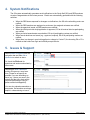
5. Issues & Support
Select Issues & Support from the
navigation bar and then Ask a
Question to submit an issue.
Or, check the FAQs tab for
questions and answers submitted by
other users.
Selecting the Ask a Question
activity will open up a new issue
form. Please be as specific as
possible if you are describing an
issue (e.g., where you were in the
system and the time, what activity
you were performing or tying to
perform and what happened).
You can also upload screenshots or
documents. Screenshots are always
helpful in characterizing an issue!
Ontario Cancer Research Ethics Board
OCREB Online User Guide for all Users (Getting Started) Version 1.0 (2011-Feb-20)
Page 14 of 18
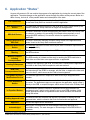
6. Application “States”
Anyone with access to O2 can monitor the progress of an application by viewing the current state of the
application. The state changes as the application moves through the ethics review process. Below is a
table of many, but not all, of the possible states and a description of the state.
Pre Submission
The application has been created by the Study Staff but not submitted to the REB.
In this state Study Staff can continue to edit the application.
REB Administrative
Review
The application has been received by the REB office, and is under review by the
Intake Coordinator. Study Staff can no longer edit the application.
REB Staff Review
The REB Coordinator reviews the application and sends it back to the Study Staff
for changes, or assigns it to a meeting (if full Board review required), or to a
designated REB member (if it meets the criteria for expedited review) as
applicable.
Changes Requested by
REB Staff
The REB Coordinator identifies concerns during review of the application and
sends it back to the Study Staff to edit and resubmit.
REB Staff Modifications
Review
The modified application is under review by the REB Coordinator responsible for
the study (“Owner”).
Assigned to REB
Meeting
The application has been assigned to an REB meeting and is ready for review by
the REB members.
Meeting Complete
Awaiting
Correspondence
The REB meeting is finished and the study is awaiting the REB coordinator to
draft either a review letter or an approval letter, as applicable.
Pending PI Response
If changes are required by the REB, a review letter is issued and the application is
sent back to the Study Staff to respond to, edit and resubmit.
REB Chair
Correspondence Review
Draft review or approval letters are under review by the Chair. The Chair can send
the letters back to the REBC for changes, edit the letter, or approve the letter and
issue it to the PI, which serves as the Chair’s formal signature.
Designated Reviewer
Modifications Review
Centre Department
Review
The modified application/PI response is under review by a designated REB
member.
The initial centre application has been submitted to the department head/approver
for review. The department approver can approve the application, which routes it
directly to the REB, or request changes, which routes it back to the PI/Study Staff.
In Expedited Review
The submission meets the criteria for expedited review (also referred to as
“delegated review”) and is under review by one or more REB members. Initial
centre applications default to expedited review unless concerns are identified
during the review.
Drafting Approval Letter
The REB reviews are complete and the REB Coordinator is drafting the final
approval letter, which is routed to the Chair for final review and approval.
Approved
Acknowledged
OCREB has approved the submission.
Many types of submissions are acknowledged rather than approved (e.g.,
reportable events). The state changes to “Acknowledged” once REB review is
complete.
Ontario Cancer Research Ethics Board
OCREB Online User Guide for all Users (Getting Started) Version 1.0 (2011-Feb-20)
Page 15 of 18
7. Tips
7.1.
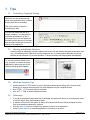
Formatting, Copying & Pasting
Whenever you see a down-facing
arrow in an application field, it means
that the field can be formatted.
Click on the arrow to open the
formatting tool bars.
You can now format the text (e.g.,
bullets, numbers). You may wish to
format the information in a Word
document first, or cut and paste into
this field from the protocol or consent
form and then format the information
directly in the application.
7.2.
Working with Multiple Windows
It can be useful to display two windows side-by-side to see O2 and another document at the same time
(e.g., O2 and this guide). Right click on links to open an item in a new window. Manually resize and
position the two windows. If you have Windows 7, the two windows will snap together automatically.
To view two windows side-by-side
(e.g., protocol or consent form and
application), reduce the size of the
windows and drag them together.
7.3.
•
•
•
7.4.
•
•
•
•
Windows Computer Tips
Holding down the “CTRL” button on your computer keyboard and scrolling with a mouse wheel
allows you to change the zoom level of a page displayed on your computer screen.
Hold “CTRL” + “F” to search within a document
Use “ALT” + “TAB” to switch between windows
Reminders:
If you fail to successfully login after five (5) attempts, the system will lock you out and you will need
to call O2 Help to have your password reset.
A session will time out if the system is idle for 60 minutes and the user will be prompted to enter
their username and password to continue.
Use the Jump To menu to navigate from section to section of an application.
Select Printer Version to view the application in its entirety or to print it.
Ontario Cancer Research Ethics Board
OCREB Online User Guide for all Users (Getting Started) Version 1.0 (2011-Feb-20)
Page 16 of 18
7.5.
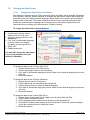
Changing the Date Format:
7.5.1.1.
Changing the Date Format in the Brower:
Date formats in browsers such as Firefox, Internet Explorer and Safari can be changed. Depending
on the browser, there are different methods for changing the date format. Safari’s date formats are
controlled by the OS X date format and language settings, which can be found in the International
Setting section of the Date Time system preference window. Firefox and Internet Explorer date
formats are controlled by the language set for each browser in the browser’s preferences. We
recommend that you change your date formats to “English (Canada)”.
To change the date format in Internet Explorer:
1. In the browser, choose Internet
Options from the Tools menu.
2. Click the Languages button on the
General tab.
3. Click "Add" to add another language
to the list. Make sure “English
(Canada)” is at the top of the list.
4. Select “OK”.
5. Restart the browser.
You must also change the date format
on your local computer (see next
section for Windows)
To change the date format in Firefox (Mac OS X):
1. Choose Preferences from the Firefox menu.
2. Click the Languages button on the General tab.
3. Click "Add" to add another language to the list. Make sure the desired language is at the top
of the list.
4. Restart the browser.
To change the date format in Firefox (Windows):
1. Choose Options from the Tools menu.
2. Click the Advanced icon and choose the General tab.
3. Click the Choose button to select the desired language.
4. Click "Add" to add another language to the list. Make sure the desired language is at the top
of the list.
5. Restart the browser.
To change the date format in Safari (Mac OS X):
1. Choose System Preferences from the Apple menu and click Date and Time.
2. Click the Open International button.
3. Set the language with the desired format at the top of the languages list.
4. Verify that the desired format appears on the Formats tab. If it does not, switch the Region
or click the customize button to modify the format.
5. Restart the browser.
Ontario Cancer Research Ethics Board
OCREB Online User Guide for all Users (Getting Started) Version 1.0 (2011-Feb-20)
Page 17 of 18
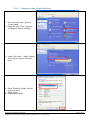
7.5.1.2.
Changing the Date Format in Windows:
1. From the “Start” menu, go to the
“Control Panel”.
2. Select the “Date, Time, Language,
and Regional Options” category.
3. Under “Pick a task…” select “Change
the format of numbers, dates and
times”
4. Select “English (Canada)” from the
drop-down menu.
5. Select “Apply”.
6. Restart the computer.
Ontario Cancer Research Ethics Board
OCREB Online User Guide for all Users (Getting Started) Version 1.0 (2011-Feb-20)
Page 18 of 18